
Java (485)
In some circumstances, you may need to change the page size of a PDF. For example, if you have a combined PDF file with pages of different sizes, you may want to resize the pages to the same size for easier reading and printing. In this article, we will introduce how to change the page size of a PDF file in Java using Spire.PDF for Java.
Install Spire.PDF for Java
First of all, you're required to add the Spire.Pdf.jar file as a dependency in your Java program. The JAR file can be downloaded from this link. If you use Maven, you can easily import the JAR file in your application by adding the following code to your project's pom.xml file.
<repositories>
    <repository>
        <id>com.e-iceblue</id>
        <name>e-iceblue</name>
        <url>https://repo.e-iceblue.com/nexus/content/groups/public/</url>
    </repository>
</repositories>
<dependencies>
    <dependency>
        <groupId>e-iceblue</groupId>
        <artifactId>spire.pdf</artifactId>
        <version>12.9.0</version>
    </dependency>
</dependencies>
Change PDF Page Size to a Standard Paper Size in Java
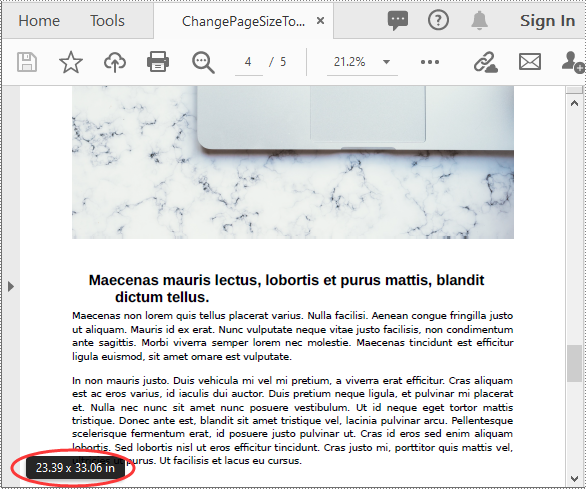
The way to change the page size of a PDF file is to create a new PDF file and add pages of the desired size to it, next, create templates from the pages in the original PDF file, then draw the templates onto the pages in the new PDF file. This process will preserve text, images, and other elements present in the original PDF.
Spire.PDF for Java supports a variety of standard paper sizes like letter, legal, A0, A1, A2, A3, A4, B0, B1, B2, B3, B4 and many more. The following steps show you how to change the page size of a PDF file to a standard paper size.
- Initialize a PdfDocument instance and load the original PDF file using PdfDocument.loadFromFile() method.
- Initialize another PdfDocument instance to create a new PDF file.
- Loop through the pages in the original PDF.
- Add pages of the desired size to the new PDF file using PdfDocument.getPages().add() method.
- Initialize a PdfTextLayout instance and set the text layout as one page using PdfTextLayout.setLayout() method.
- Create templates based on the pages in the original PDF using PdfPageBase.createTemplate() method.
- Draw the templates onto the pages in the new PDF file with the specified text layout using PdfTemplate.draw() method.
- Save the result file using PdfDocument.saveToFile() method.
- Java
import com.spire.pdf.PdfDocument;
import com.spire.pdf.PdfPageBase;
import com.spire.pdf.PdfPageSize;
import com.spire.pdf.graphics.*;

import java.awt.geom.Point2D;

public class ChangePageSizeToStandardPaperSize {
    public static void main(String []args){
        //Load the original PDF document
        PdfDocument originPdf = new PdfDocument();
        originPdf.loadFromFile("Sample.pdf");

        //Create a new PDF document
        PdfDocument newPdf = new PdfDocument();

        //Loop through the pages in the original PDF
        for(int i = 0; i< originPdf.getPages().getCount(); i++)
        {
            //Add pages of size A1 to the new PDF
            PdfPageBase newPage = newPdf.getPages().add(PdfPageSize.A1, new PdfMargins((0)));
            //Create a PdfTextLayout instance
            PdfTextLayout layout = new PdfTextLayout();
            //Set text layout as one page (if not set the content will not scale to fit page size)
            layout.setLayout(PdfLayoutType.One_Page);
            //Create templates based on the pages in the original PDF
            PdfTemplate template = originPdf.getPages().get(i).createTemplate();
            //Draw templates onto the pages in the new PDF
            template.draw(newPage, new Point2D.Float(0,0), layout);
        }

        //Save the result document
        newPdf.saveToFile("ChangePageSizeToA1.pdf");
    }
}
Change PDF Page Size to a Custom Paper Size in Java
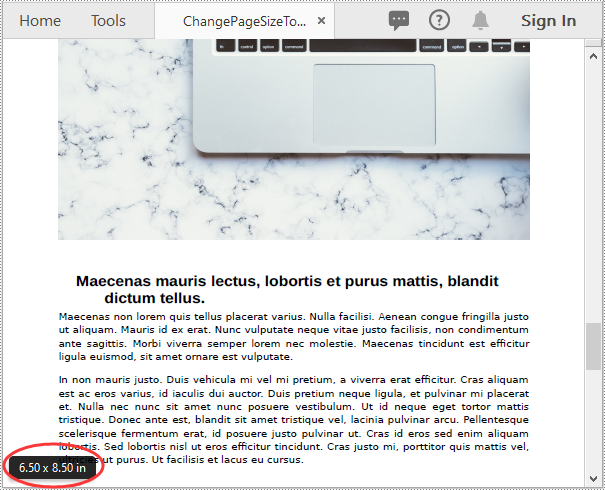
Spire.PDF for Java uses point (1/72 of an inch) as the unit of measure. If you want to change the page size of a PDF to a custom paper size in other units of measure like inches or millimeters, you can use the PdfUnitConvertor class to convert them to points.
The following steps show you how to change the page size of a PDF file to a custom paper size in inches:
- Initialize a PdfDocument instance and load the original PDF file using PdfDocument.loadFromFile() method.
- Initialize another PdfDocument instance to create a new PDF file.
- Initialize a PdfUnitConvertor instance, then convert the custom size in inches to points using PdfUnitConvertor.convertUnits() method.
- Initialize a Dimension2D instance from the custom size.
- Loop through the pages in the original PDF.
- Add pages of the custom size to the new PDF file using PdfDocument.getPages().add() method.
- Create a PdfTextLayout instance and set the text layout as one page using PdfTextLayout.setLayout() method.
- Create templates based on the pages in the original PDF using PdfPageBase.createTemplate() method.
- Draw the templates onto the pages in the new PDF file with the specified text layout using PdfTemplate.draw() method.
- Save the result file using PdfDocument.saveToFile() method.
- Java
import com.spire.pdf.PdfDocument;
import com.spire.pdf.PdfPageBase;
import com.spire.pdf.graphics.*;

import java.awt.*;
import java.awt.geom.Dimension2D;
import java.awt.geom.Point2D;

public class ChangePageSizeToCustomPaperSize {
    public static void main(String []args){
        //Load the original PDF document
        PdfDocument originPdf = new PdfDocument();
        originPdf.loadFromFile("Sample.pdf");

        //Create a new PDF document
        PdfDocument newPdf = new PdfDocument();

        //Create a PdfUnitConvertor instance
        PdfUnitConvertor unitCvtr = new PdfUnitConvertor();
        //Convert the custom size in inches to points
        float width = unitCvtr.convertUnits(6.5f, PdfGraphicsUnit.Inch, PdfGraphicsUnit.Point);
        float height = unitCvtr.convertUnits(8.5f, PdfGraphicsUnit.Inch, PdfGraphicsUnit.Point);

        //Create a Dimension2D instance from the custom size, then it will be used as the page size of the new PDF
        Dimension2D size = new Dimension();
        size.setSize(width, height);

        //Loop through the pages in the original PDF
        for(int i = 0; i< originPdf.getPages().getCount(); i++)
        {
            //Add pages of the custom size (6.5*8.5 inches) to the new PDF
            PdfPageBase newPage = newPdf.getPages().add(size, new PdfMargins((0)));
            //Create a PdfTextLayout instance
            PdfTextLayout layout = new PdfTextLayout();
            //Set text layout as one page (if not set the content will not scale to fit page size)
            layout.setLayout(PdfLayoutType.One_Page);
            //Create templates based on the pages in the original PDF
            PdfTemplate template = originPdf.getPages().get(i).createTemplate();
            //Draw templates onto the pages in the new PDF
            template.draw(newPage, new Point2D.Float(0,0), layout);
        }

        //Save the result document
        newPdf.saveToFile("ChangePageSizeToCustomSize.pdf");
    }
}
Apply for a Temporary License
If you'd like to remove the evaluation message from the generated documents, or to get rid of the function limitations, please request a 30-day trial license for yourself.
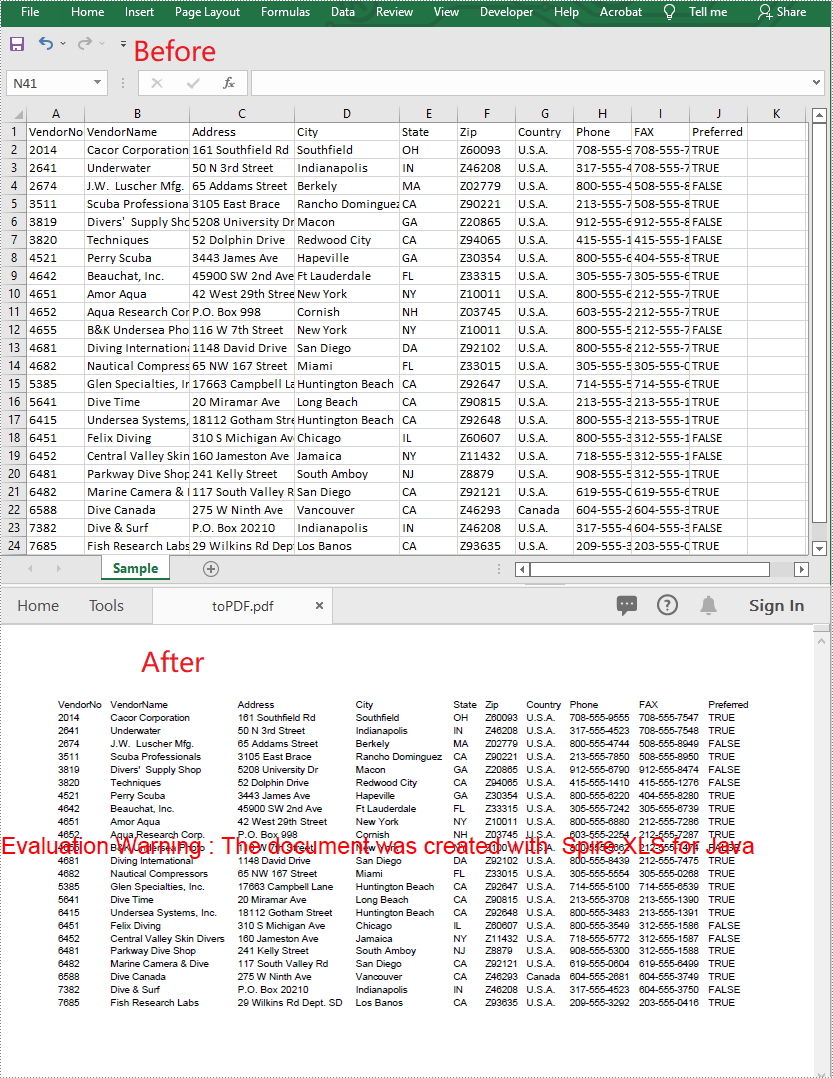
A CSV file is essentially a plain text file. It can be easily edited by almost any program that can handle text files, such as Notepad. Converting a CSV file to PDF can help in preventing it from being edited by viewers. In this article, you will learn how to convert CSV to PDF in Java using Spire.XLS for Java.
Install Spire.XLS for Java
First of all, you're required to add the Spire.Xls.jar file as a dependency in your Java program. The JAR file can be downloaded from this link. If you use Maven, you can easily import the JAR file in your application by adding the following code to your project's pom.xml file.
<repositories>
    <repository>
        <id>com.e-iceblue</id>
        <name>e-iceblue</name>
        <url>https://repo.e-iceblue.com/nexus/content/groups/public/</url>
    </repository>
</repositories>
<dependencies>
    <dependency>
        <groupId>e-iceblue</groupId>
        <artifactId>spire.xls</artifactId>
        <version>16.8.4</version>
    </dependency>
</dependencies>
Convert CSV to PDF in Java
The following are the steps to convert a CSV file to PDF:
- Create an instance of Workbook class.
- Load the CSV file using Workbook.loadFromFile(filePath, separator) method.
- Set the worksheet to be rendered to one PDF page using Workbook.getConverterSetting().setSheetFitToPage(true) method.
- Get the first worksheet in the Workbook using Workbook.getWorksheets().get(0) method.
- Loop through the columns in the worksheet and auto-fit the width of each column using Worksheet.autoFitColumn() method.
- Save the worksheet to PDF using Worksheet.saveToPdf() method.
- Java
import com.spire.xls.Workbook;
import com.spire.xls.Worksheet;

public class ConvertCsvToPdf {
    public static void main(String []args) {
        //Create a Workbook instance
        Workbook wb = new Workbook();
        //Load a CSV file
        wb.loadFromFile("Sample.csv", ",");

        //Set SheetFitToPage property as true to ensure the worksheet is converted to 1 PDF page
        wb.getConverterSetting().setSheetFitToPage(true);

        //Get the first worksheet
        Worksheet sheet = wb.getWorksheets().get(0);

        //Loop through the columns in the worksheet
        for (int i = 1; i < sheet.getColumns().length; i++)
        {
            //AutoFit columns
            sheet.autoFitColumn(i);
        }

        //Save the worksheet to PDF
        sheet.saveToPdf("toPDF.pdf");
    }
}
Apply for a Temporary License
If you'd like to remove the evaluation message from the generated documents, or to get rid of the function limitations, please request a 30-day trial license for yourself.
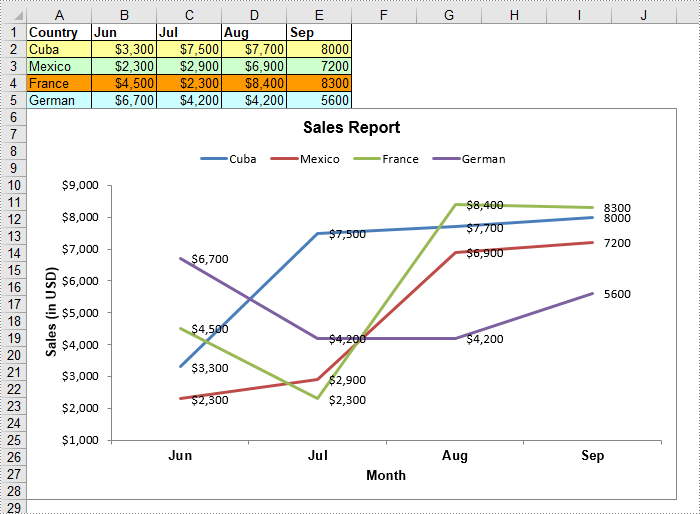
Line chart is a fundamental chart type used to display trends or changes in data over a specific time interval. A line chart uses lines to connect data points, it can include a single line for one data set or multiple lines for two or more data sets. This article will demonstrate how to create a line chart in Excel in Java using Spire.XLS for Java.
Install Spire.XLS for Java
First of all, you're required to add the Spire.Xls.jar file as a dependency in your Java program. The JAR file can be downloaded from this link. If you use Maven, you can easily import the JAR file in your application by adding the following code to your project's pom.xml file.
<repositories>
    <repository>
        <id>com.e-iceblue</id>
        <name>e-iceblue</name>
        <url>https://repo.e-iceblue.com/nexus/content/groups/public/</url>
    </repository>
</repositories>
<dependencies>
    <dependency>
        <groupId>e-iceblue</groupId>
        <artifactId>spire.xls</artifactId>
        <version>16.8.4</version>
    </dependency>
</dependencies>
Create a Line Chart in Excel using Java
The following are the main steps to create a line chart:
- Create an instance of Workbook class.
- Get the first worksheet by its index (zero-based) though Workbook.getWorksheets().get(sheetIndex) method.
- Add some data to the worksheet.
- Add a line chart to the worksheet using Worksheet.getCharts().add(ExcelChartType.Line) method.
- Set data range for the chart through Chart.setDataRange() method.
- Set position, title, category axis title and value axis title for the chart.
- Loop through the data series of the chart, show data labels for the data points of each data series using ChartSerie.getDataPoints().getDefaultDataPoint().getDataLabels().hasValue(true) method.
- Set the position of chart legend through Chart.getLegend().setPosition() method.
- Save the result file using Workbook.saveToFile() method.
- Java
import com.spire.xls.*;
import com.spire.xls.charts.ChartSerie;

import java.awt.*;

public class CreateLineChart {
    public static void main(String []args){
        //Create a Workbook instance
        Workbook workbook = new Workbook();

        //Get the first worksheet
        Worksheet sheet = workbook.getWorksheets().get(0);
        //Set sheet name
        sheet.setName("Line Chart");;
        //Hide gridlines
        sheet.setGridLinesVisible(false);

        //Add some data to the the worksheet
        sheet.getRange().get("A1").setValue("Country");
        sheet.getRange().get("A2").setValue("Cuba");
        sheet.getRange().get("A3").setValue("Mexico");
        sheet.getRange().get("A4").setValue("France");
        sheet.getRange().get("A5").setValue("German");

        sheet.getRange().get("B1").setValue("Jun");
        sheet.getRange().get("B2").setNumberValue(3300);
        sheet.getRange().get("B3").setNumberValue(2300);
        sheet.getRange().get("B4").setNumberValue(4500);
        sheet.getRange().get("B5").setNumberValue(6700);

        sheet.getRange().get("C1").setValue("Jul");
        sheet.getRange().get("C2").setNumberValue(7500);
        sheet.getRange().get("C3").setNumberValue(2900);
        sheet.getRange().get("C4").setNumberValue(2300);
        sheet.getRange().get("C5").setNumberValue(4200);

        sheet.getRange().get("D1").setValue("Aug");
        sheet.getRange().get("D2").setNumberValue(7700);
        sheet.getRange().get("D3").setNumberValue(6900);
        sheet.getRange().get("D4").setNumberValue(8400);
        sheet.getRange().get("D5").setNumberValue(4200);

        sheet.getRange().get("E1").setValue("Sep");
        sheet.getRange().get("E2").setNumberValue(8000);
        sheet.getRange().get("E3").setNumberValue(7200);
        sheet.getRange().get("E4").setNumberValue(8300);
        sheet.getRange().get("E5").setNumberValue(5600);

        //Set font and fill color for specified cells
        sheet.getRange().get("A1:E1").getStyle().getFont().isBold(true);
        sheet.getRange().get("A2:E2").getStyle().setKnownColor(ExcelColors.LightYellow);;
        sheet.getRange().get("A3:E3").getStyle().setKnownColor(ExcelColors.LightGreen1);
        sheet.getRange().get("A4:E4").getStyle().setKnownColor(ExcelColors.LightOrange);
        sheet.getRange().get("A5:E5").getStyle().setKnownColor(ExcelColors.LightTurquoise);

        //Set cell borders
        sheet.getRange().get("A1:E5").getStyle().getBorders().getByBordersLineType(BordersLineType.EdgeTop).setColor(new Color(0, 0, 128));
        sheet.getRange().get("A1:E5").getStyle().getBorders().getByBordersLineType(BordersLineType.EdgeTop).setLineStyle(LineStyleType.Thin);
        sheet.getRange().get("A1:E5").getStyle().getBorders().getByBordersLineType(BordersLineType.EdgeBottom).setColor(new Color(0, 0, 128));
        sheet.getRange().get("A1:E5").getStyle().getBorders().getByBordersLineType(BordersLineType.EdgeBottom).setLineStyle(LineStyleType.Thin);
        sheet.getRange().get("A1:E5").getStyle().getBorders().getByBordersLineType(BordersLineType.EdgeLeft).setColor(new Color(0, 0, 128));
        sheet.getRange().get("A1:E5").getStyle().getBorders().getByBordersLineType(BordersLineType.EdgeLeft).setLineStyle(LineStyleType.Thin);
        sheet.getRange().get("A1:E5").getStyle().getBorders().getByBordersLineType(BordersLineType.EdgeRight).setColor(new Color(0, 0, 128));
        sheet.getRange().get("A1:E5").getStyle().getBorders().getByBordersLineType(BordersLineType.EdgeRight).setLineStyle(LineStyleType.Thin);

        //Set number format
        sheet.getRange().get("B2:D5").getStyle().setNumberFormat("\"$\"#,##0");

        //Add a line chart to the worksheet
        Chart chart = sheet.getCharts().add(ExcelChartType.Line);

        //Set data range for the chart
        chart.setDataRange(sheet.getRange().get("A1:E5"));

        //Set position of the chart
        chart.setLeftColumn(1);
        chart.setTopRow(6);
        chart.setRightColumn(11);
        chart.setBottomRow(29);

        //Set and format chart title
        chart.setChartTitle("Sales Report");
        chart.getChartTitleArea().isBold(true);
        chart.getChartTitleArea().setSize(12);

        //Set and format category axis title
        chart.getPrimaryCategoryAxis().setTitle("Month");
        chart.getPrimaryCategoryAxis().getFont().isBold(true);
        chart.getPrimaryCategoryAxis().getTitleArea().isBold(true);

        //Set and format value axis title
        chart.getPrimaryValueAxis().setTitle("Sales (in USD)");
        chart.getPrimaryValueAxis().hasMajorGridLines(false);
        chart.getPrimaryValueAxis().getTitleArea().setTextRotationAngle(-90);
        chart.getPrimaryValueAxis().setMinValue(1000);
        chart.getPrimaryValueAxis().getTitleArea().isBold(true);

        //Loop through the data series of the chart
        for(ChartSerie cs : (Iterable) chart.getSeries())
        {
            cs.getFormat().getOptions().isVaryColor(true);
            //Show data labels for data points
            cs.getDataPoints().getDefaultDataPoint().getDataLabels().hasValue(true);
        }

        //Set position of chart legend
        chart.getLegend().setPosition(LegendPositionType.Top);

        //Save the result file
        workbook.saveToFile("LineChart.xlsx", ExcelVersion.Version2016);
    }
}
Apply for a Temporary License
If you'd like to remove the evaluation message from the generated documents, or to get rid of the function limitations, please request a 30-day trial license for yourself.
