Java (485)
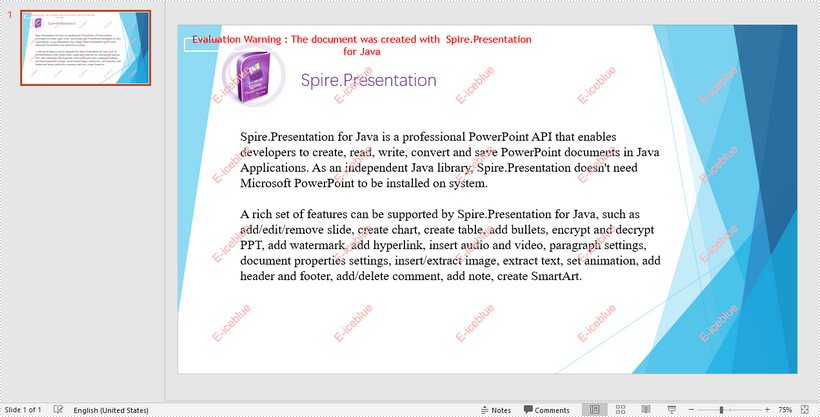
This article demonstrates how to add multiline watermarks to a PowerPoint slide using Spire.Presentation for Java. To add watermarks to all slides, use one more for loop outside the two for loops in the following code snippet.
import com.spire.presentation.*;
import com.spire.presentation.Presentation;
import com.spire.presentation.drawing.*;

import java.awt.*;
import java.awt.geom.Rectangle2D;
import java.awt.image.BufferedImage;


//Create a Presentation object
Presentation presentation = new Presentation();

//Load the sample PowerPoint file
presentation.loadFromFile("C:\\Users\\Administrator\\Desktop\\Spire.Presentation.pptx");

//Specify watermark text
String watermarkText = "E-iceblue";

//Get the size of the watermark text
Image image = new BufferedImage(1, 1, BufferedImage.TYPE_INT_ARGB);
Graphics2D g2d = (Graphics2D) image.getGraphics();
Font font = new Font("Arial", Font.BOLD, 20);
g2d.setFont(font);
FontMetrics fm = g2d.getFontMetrics();
Rectangle2D strSize = fm.getStringBounds(watermarkText, g2d);

//Initialize x and y coordinate
float x = 30;
float y = 80;

for (int rowNum = 0; rowNum < 4; rowNum++) {
    for (int colNum = 0; colNum < 5; colNum++) {

        //Add a rectangle shape
        Rectangle2D rect = new Rectangle2D.Float(x, y, (float) strSize.getWidth() + 10, (float) strSize.getHeight());
        IAutoShape shape = presentation.getSlides().get(0).getShapes().appendShape(ShapeType.RECTANGLE, rect);

        //Set the style of the shape
        shape.getFill().setFillType(FillFormatType.NONE);
        shape.getShapeStyle().getLineColor().setColor(new Color(1, 1, 1, 0));
        shape.setRotation(-45);
        shape.getLocking().setSelectionProtection(true);
        shape.getLine().setFillType(FillFormatType.NONE);

        //Add watermark text to the shape
        shape.getTextFrame().setText(watermarkText);
        PortionEx textRange = shape.getTextFrame().getTextRange();

        //Set the style of the text range
        textRange.getFill().setFillType(FillFormatType.SOLID);
        textRange.getFill().getSolidColor().setColor(Color.pink);
        textRange.setLatinFont(new TextFont(font.getName()));
        textRange.setFontMinSize(font.getSize());

        x += (100 + strSize.getWidth());

    }
    x = 30;
    y += (100 + strSize.getHeight());
}

//Save the document
presentation.saveToFile("output/Watermark.pptx", FileFormat.PPTX_2013);
In the process of manipulating Excel worksheets, sometimes you may encounter the situation where the text in a cell is so long that some of it is hidden. At this time, it’s recommended to wrap the extra-long text into multiple lines so you can see it all. This article will demonstrate how to programmatically wrap or unwrap text in Excel cells using Spire.XLS for Java.
Install Spire.XLS for Java
First of all, you're required to add the Spire.Xls.jar file as a dependency in your Java program. The JAR file can be downloaded from this link. If you use Maven, you can easily import the JAR file in your application by adding the following code to your project's pom.xml file.
<repositories>
    <repository>
        <id>com.e-iceblue</id>
        <name>e-iceblue</name>
        <url>https://repo.e-iceblue.com/nexus/content/groups/public/</url>
    </repository>
</repositories>
<dependencies>
    <dependency>
        <groupId>e-iceblue</groupId>
        <artifactId>spire.xls</artifactId>
        <version>16.6.5</version>
    </dependency>
</dependencies>
Wrap or Unwrap Text in Excel cells
Spire.XLS for Java supports wrapping or unwrapping text in Excel cells using the setWrapText() method provided by the IStyle interface. Below are detailed steps for your reference.
- Create a Workbook instance.
- Load a sample Excel document using Workbook.loadFromFile() method.
- Get a specific worksheet of the document using Workbook.getWorksheets().get() method.
- Get a specific cell of the worksheet using Worksheet.getRange().get() method.
- Get the style of the specified cell using XlsRange.getStyle() method and set whether the text is wrapped or not using setWrapText() method provided by IStyle interface.
- Save the document to another file using Workbook.saveToFile() method.
- Java
import com.spire.xls.ExcelVersion;
import com.spire.xls.Workbook;
import com.spire.xls.Worksheet;

public class WrapOrUnwrapText {
    public static void main(String[] args) {
        //Create a Workbook instance
        Workbook workbook = new Workbook();
        //Load a sample Excel document
        workbook.loadFromFile("C:\\Users\\Test1\\Desktop\\sample.xlsx");

        //Get the first worksheet
        Worksheet sheet = workbook.getWorksheets().get(0);

        //Wrap text in the cell "D8"
        sheet.getRange().get("D8").getStyle().setWrapText(true);

        //Unwrap text in the cell "D6"
        sheet.getRange().get("D6").getStyle().setWrapText(false);

        //Save the document to another file
        workbook.saveToFile("output/WrapOrUnwrapText.xlsx", ExcelVersion.Version2013);
    }
}

Apply for a Temporary License
If you'd like to remove the evaluation message from the generated documents, or to get rid of the function limitations, please request a 30-day trial license for yourself.
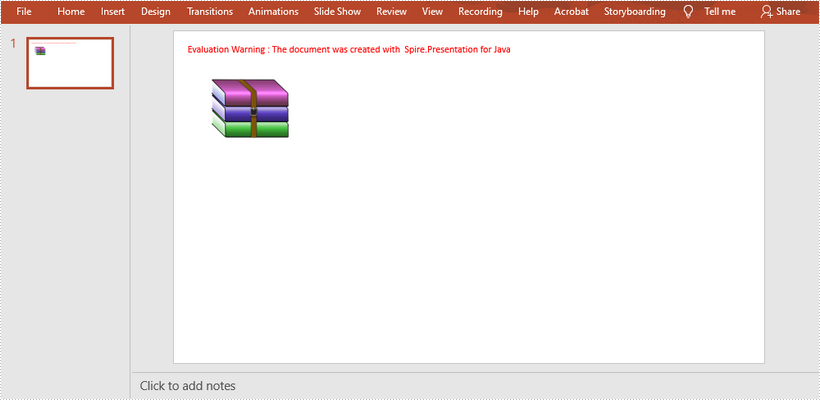
This article shows you how to embed a zip file as an OLE object in a PowerPoint document using Spire.Presentation for Java.
import com.spire.presentation.*;
import com.spire.presentation.drawing.IImageData;

import javax.imageio.ImageIO;
import java.awt.geom.Rectangle2D;
import java.awt.image.BufferedImage;
import java.io.File;
import java.io.FileInputStream;

public class InsertZip {

    public static void main(String[] args) throws Exception {

        //Create a Presentation object
        Presentation presentation = new Presentation();
        presentation.getSlideSize().setType(SlideSizeType.SCREEN_16_X_9);

        //Get the first slide
        ISlide slide = presentation.getSlides().get(0);

        //Load a zip file and convert it to a byte[] object
        String filePath = "C:\\Users\\Administrator\\Desktop\\sample.zip";
        File zipFile = new File(filePath);
        FileInputStream inputStream = new FileInputStream(zipFile);
        byte[] data = new byte[(int) zipFile.length()];
        inputStream.read(data, 0, data.length);

        //Load an image file as the display icon
        File file = new File("C:\\Users\\Administrator\\Desktop\\winrar-icon.png");
        BufferedImage image = ImageIO.read(file);
        IImageData oleImage = presentation.getImages().append(image);

        //Insert the zip file as an OLE object to the first slide
        Rectangle2D rect = new Rectangle2D.Float(60, 60, image.getWidth(), image.getHeight());
        IOleObject oleObject = slide.getShapes().appendOleObject("zip", data, rect);
        oleObject.getSubstituteImagePictureFillFormat().getPicture().setEmbedImage(oleImage);
        oleObject.setProgId("Package");

        //Save to file
        presentation.saveToFile("output/InsertZip.pptx", FileFormat.PPTX_2013);
    }
}