Hyperlinks are essential interactive elements in Word documents, widely used to link to web pages, email addresses, internal document locations, or external files. Spire.Doc for JavaScript runs entirely in the browser via WebAssembly, enabling you to insert, find, modify, and remove hyperlinks directly using a virtual file system (VFS) to manage fonts and files — no backend server required.
This article covers three core features:
For installation and project setup, refer to Integrating Spire.Doc for JavaScript in a React Project. The examples below assume Spire.Doc is installed and the WebAssembly module is initialized.
1. Insert Hyperlinks
Inserting hyperlinks involves three steps: first, load image files into the WASM virtual file system via FetchFileToVFS; then instantiate a Document, add paragraphs, and call AppendHyperlink to insert web links, email links, or image links; finally, save the document, read the generated file from VFS, wrap it as a Blob, and trigger a browser download.
function App() {
  const insertHyperlinks = async () => {
    // Get the Spire.Doc WASM module
    const docModule = window.wasmModule?.spiredoc;

    // Check if the module is ready
    if (!docModule) {
      alert('Spire.Doc is not ready yet');
      return;
    }

    const imageFileName = 'Spire.Doc.png';
    await window.spire.FetchFileToVFS(imageFileName, '', `${process.env.PUBLIC_URL}/data/`);

    // Create a document
    const doc = new docModule.Document();
    const section = doc.AddSection();

    // Insert a web link
    let paragraph = section.AddParagraph();
    paragraph.AppendText("Home page");
    paragraph.ApplyStyle({ builtinStyle: docModule.BuiltinStyle.Heading2 });
    paragraph = section.AddParagraph();
    paragraph.AppendHyperlink("www.e-iceblue.com", "www.e-iceblue.com", docModule.HyperlinkType.WebLink);

    // Insert an email link
    paragraph = section.AddParagraph();
    paragraph.AppendText("Contact US");
    paragraph.ApplyStyle({ builtinStyle: docModule.BuiltinStyle.Heading2 });
    paragraph = section.AddParagraph();
    paragraph.AppendHyperlink("mailto:support@e-iceblue.com", "support@e-iceblue.com", docModule.HyperlinkType.EMailLink);

    // Insert a link on an image
    paragraph = section.AddParagraph();
    paragraph.AppendText("Insert Link On Image");
    paragraph.ApplyStyle({ builtinStyle: docModule.BuiltinStyle.Heading2 });
    paragraph = section.AddParagraph();
    const picture = paragraph.AppendPicture({ imgFile: imageFileName });
    paragraph.AppendHyperlink("www.e-iceblue.com", picture, docModule.HyperlinkType.WebLink);

    // Define the output file name
    const outputFileName = "Hyperlink_output.docx";

    // Save the document
    doc.SaveToFile({ fileName: outputFileName, fileFormat: docModule.FileFormat.Docx2013 });

    // Read the generated file from VFS and trigger download
    const modifiedFileArray = window.dotnetRuntime.Module.FS.readFile(outputFileName);
    const blob = new Blob([modifiedFileArray], { type: 'application/vnd.openxmlformats-officedocument.wordprocessingml.document' });
    const url = URL.createObjectURL(blob);
    const a = document.createElement('a');
    a.href = url;
    a.download = outputFileName;
    a.click();
    URL.revokeObjectURL(url);
  };

  return (
    <div style={{ textAlign: 'center', height: '300px' }}>
      <h1>Insert Hyperlinks</h1>
      <button onClick={insertHyperlinks}>
        Generate
      </button>
    </div>
  );
}

export default App;
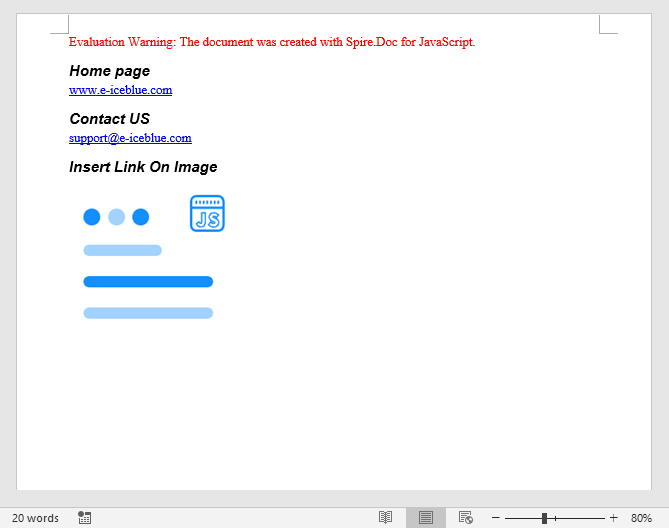
The resulting Word document contains clickable hyperlinks, including a text-based web link, an email link, and an image with an embedded hyperlink.
2. Find and Modify Hyperlinks
For existing Word documents that already contain hyperlinks, you can traverse the document object model to locate all hyperlink fields and read or modify their display text.
function App() {
  const findAndModifyHyperlinks = async () => {
    // Get the Spire.Doc WASM module
    const docModule = window.wasmModule?.spiredoc;

    // Check if the module is ready
    if (!docModule) {
      alert('Spire.Doc is not ready yet');
      return;
    }

    const inputFileName = 'Hyperlinks.docx';
    await window.spire.FetchFileToVFS(inputFileName, '', `${process.env.PUBLIC_URL}/data/`);

    // Load the document
    const doc = new docModule.Document();
    doc.LoadFromFile(inputFileName);

    // Traverse all hyperlinks in the document
    let hyperlinks = [];
    for (let i = 0; i < doc.Sections.Count; i++) {
      let section = doc.Sections.get_Item(i);
      for (let j = 0; j < section.Body.ChildObjects.Count; j++) {
        let sec = section.Body.ChildObjects.get_Item(j);
        if (sec.DocumentObjectType == docModule.DocumentObjectType.Paragraph) {
          for (let k = 0; k < sec.ChildObjects.Count; k++) {
            let para = sec.ChildObjects.get_Item(k);
            if (para.DocumentObjectType == docModule.DocumentObjectType.Field) {
              let field = para;
              if (field.Type == docModule.FieldType.FieldHyperlink) {
                hyperlinks.push(field);
              }
            }
          }
        }
      }
    }

    // Modify the display text of the first hyperlink
    hyperlinks[0].FieldText = "Spire.Doc component";

    // Define the output file name
    const outputFileName = "ModifyHyperlinkText_output.docx";

    // Save the document
    doc.SaveToFile({ fileName: outputFileName, fileFormat: docModule.FileFormat.Docx2013 });

    // Read the generated file from VFS and trigger download
    const modifiedFileArray = window.dotnetRuntime.Module.FS.readFile(outputFileName);
    const blob = new Blob([modifiedFileArray], { type: 'application/vnd.openxmlformats-officedocument.wordprocessingml.document' });
    const url = URL.createObjectURL(blob);
    const a = document.createElement('a');
    a.href = url;
    a.download = outputFileName;
    a.click();
    URL.revokeObjectURL(url);

    // Release resources
    doc.Dispose();
  };

  return (
    <div style={{ textAlign: 'center', height: '300px' }}>
      <h1>Find & Modify Hyperlinks</h1>
      <button onClick={findAndModifyHyperlinks}>
        Generate
      </button>
    </div>
  );
}

export default App;
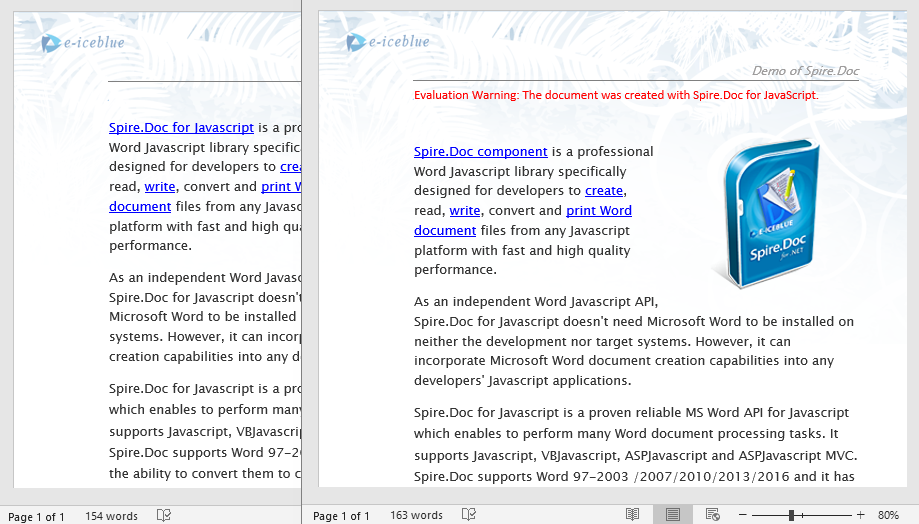
After traversing the document object model, you can read or modify the display text and target address of each hyperlink, making it easy to batch-update links.
3. Remove Hyperlinks
When hyperlinks in a document are no longer needed, you can remove them while keeping the associated text content. The key approach is to locate all hyperlink fields, then flatten the field structure so that only plain text remains without the hyperlink formatting.
// Find all hyperlinks in the document
function FindAllHyperlinks(document) {
  let docModule = window.wasmModule.spiredoc;
  let hyperlinks = [];
  for (let i = 0; i < document.Sections.Count; i++) {
    let section = document.Sections.get_Item(i);
    for (let j = 0; j < section.Body.ChildObjects.Count; j++) {
      let sec = section.Body.ChildObjects.get_Item(j);
      if (sec.DocumentObjectType == docModule.DocumentObjectType.Paragraph) {
        for (let k = 0; k < sec.ChildObjects.Count; k++) {
          let para = sec.ChildObjects.get_Item(k);
          if (para.DocumentObjectType == docModule.DocumentObjectType.Field) {
            let field = para;
            if (field.Type == docModule.FieldType.FieldHyperlink) {
              hyperlinks.push(field);
            }
          }
        }
      }
    }
  }
  return hyperlinks;
}

// Remove hyperlink formatting, keep only the text
function FormatFieldResultText(ownerBody, sepOwnerParaIndex, endOwnerParaIndex, sepIndex, endIndex) {
  let docModule = window.wasmModule.spiredoc;
  for (let i = sepOwnerParaIndex; i <= endOwnerParaIndex; i++) {
    let para = ownerBody.ChildObjects.get_Item(i);
    if (i == sepOwnerParaIndex && i == endOwnerParaIndex) {
      for (let j = sepIndex + 1; j < endIndex; j++) {
        let tr = para.ChildObjects.get_Item(j);
        tr.CharacterFormat.TextColor = docModule.Color.get_Black();
        tr.CharacterFormat.UnderlineStyle = docModule.UnderlineStyle.None;
      }
    } else if (i == sepOwnerParaIndex) {
      for (let j = sepIndex + 1; j < para.ChildObjects.Count; j++) {
        let tr = para.ChildObjects.get_Item(j);
        tr.CharacterFormat.TextColor = docModule.Color.get_Black();
        tr.CharacterFormat.UnderlineStyle = docModule.UnderlineStyle.None;
      }
    } else if (i == endOwnerParaIndex) {
      for (let j = 0; j < endIndex; j++) {
        let tr = para.ChildObjects.get_Item(j);
        tr.CharacterFormat.TextColor = docModule.Color.get_Black();
        tr.CharacterFormat.UnderlineStyle = docModule.UnderlineStyle.None;
      }
    } else {
      for (let j = 0; j < para.ChildObjects.Count; j++) {
        let tr = para.ChildObjects.get_Item(j);
        tr.CharacterFormat.TextColor = docModule.Color.get_Black();
        tr.CharacterFormat.UnderlineStyle = docModule.UnderlineStyle.None;
      }
    }
  }
}

function FlattenHyperlinks(field) {
  // Get the position indices of each hyperlink field component
  let ownerParaIndex = field.OwnerParagraph.OwnerTextBody.ChildObjects.IndexOf(field.OwnerParagraph);
  let fieldIndex = field.OwnerParagraph.ChildObjects.IndexOf(field);
  let sepOwnerPara = field.Separator.OwnerParagraph;
  let sepOwnerParaIndex = field.Separator.OwnerParagraph.OwnerTextBody.ChildObjects.IndexOf(field.Separator.OwnerParagraph);
  let sepIndex = field.Separator.OwnerParagraph.ChildObjects.IndexOf(field.Separator);
  let endIndex = field.End.OwnerParagraph.ChildObjects.IndexOf(field.End);
  let endOwnerParaIndex = field.End.OwnerParagraph.OwnerTextBody.ChildObjects.IndexOf(field.End.OwnerParagraph);

  // Remove hyperlink formatting (blue underlined text)
  FormatFieldResultText(field.Separator.OwnerParagraph.OwnerTextBody, sepOwnerParaIndex, endOwnerParaIndex, sepIndex, endIndex);

  // Remove the hyperlink field structure
  field.End.OwnerParagraph.ChildObjects.RemoveAt(endIndex);
  for (let i = sepOwnerParaIndex; i >= ownerParaIndex; i--) {
    if (i == sepOwnerParaIndex && i == ownerParaIndex) {
      for (let j = sepIndex; j >= fieldIndex; j--) {
        field.OwnerParagraph.ChildObjects.RemoveAt(j);
      }
    } else if (i == ownerParaIndex) {
      for (let j = field.OwnerParagraph.ChildObjects.Count - 1; j >= fieldIndex; j--) {
        field.OwnerParagraph.ChildObjects.RemoveAt(j);
      }
    } else if (i == sepOwnerParaIndex) {
      for (let j = sepIndex; j >= 0; j--) {
        sepOwnerPara.ChildObjects.RemoveAt(j);
      }
    } else {
      field.OwnerParagraph.OwnerTextBody.ChildObjects.RemoveAt(i);
    }
  }
}

function App() {
  const removeHyperlinks = async () => {
    // Get the Spire.Doc WASM module
    const docModule = window.wasmModule?.spiredoc;

    // Check if the module is ready
    if (!docModule) {
      alert('Spire.Doc is not ready yet');
      return;
    }

    const inputFileName = 'Hyperlinks.docx';
    await window.spire.FetchFileToVFS(inputFileName, '', `${process.env.PUBLIC_URL}/data/`);

    // Load the document
    const doc = new docModule.Document();
    doc.LoadFromFile(inputFileName);

    // Find all hyperlinks
    let hyperlinks = FindAllHyperlinks(doc);

    // Flatten all hyperlinks (remove hyperlink formatting, keep text)
    for (let i = hyperlinks.length - 1; i >= 0; i--) {
      FlattenHyperlinks(hyperlinks[i]);
    }

    // Define the output file name
    const outputFileName = "RemoveHyperlinks_output.docx";

    // Save the document
    doc.SaveToFile({ fileName: outputFileName, fileFormat: docModule.FileFormat.Docx2013 });

    // Read the generated file from VFS and trigger download
    const modifiedFileArray = window.dotnetRuntime.Module.FS.readFile(outputFileName);
    const blob = new Blob([modifiedFileArray], { type: 'application/vnd.openxmlformats-officedocument.wordprocessingml.document' });
    const url = URL.createObjectURL(blob);
    const a = document.createElement('a');
    a.href = url;
    a.download = outputFileName;
    a.click();
    URL.revokeObjectURL(url);

    // Release resources
    doc.Dispose();
  };

  return (
    <div style={{ textAlign: 'center', height: '300px' }}>
      <h1>Remove Hyperlinks</h1>
      <button onClick={removeHyperlinks}>
        Generate
      </button>
    </div>
  );
}

export default App;
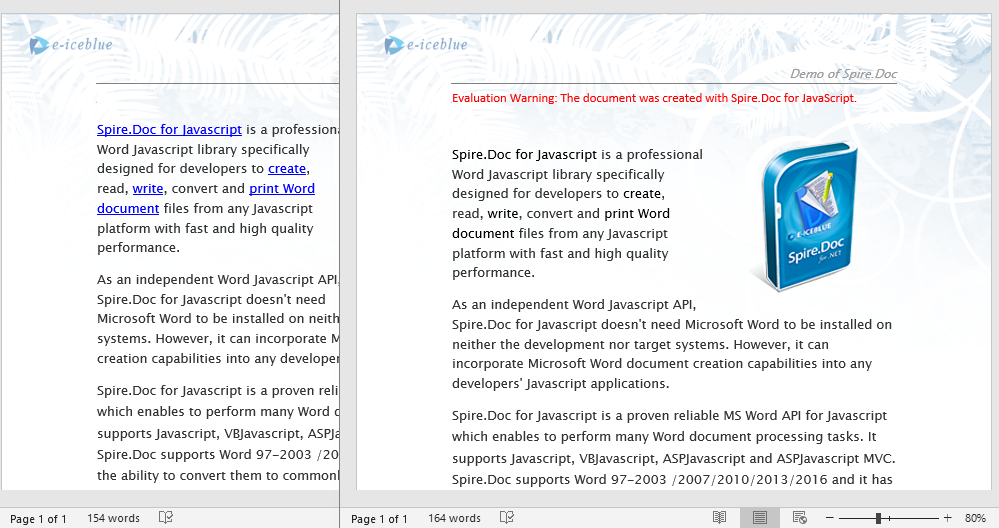
After removing the hyperlinks, the original link text remains as plain text, with the blue underline style cleared while the content stays unchanged.
FAQ
Inserted hyperlinks are not clickable in the document
Cause: The target URL format is incorrect, e.g., missing the protocol prefix (such as http:// or mailto:) so Word cannot recognize it as a valid clickable link.
Solution: Ensure web links use a complete URL and email links include the mailto: prefix:
// Correct web link
paragraph.AppendHyperlink("https://www.e-iceblue.com", "e-iceblue", wasmModule.HyperlinkType.WebLink);

// Correct email link
paragraph.AppendHyperlink("mailto:support@e-iceblue.com", "support@e-iceblue.com", wasmModule.HyperlinkType.EMailLink);
Text style is abnormal after removing hyperlinks
Cause: Only the hyperlink field structure was removed, but the text color and underline style were not reset to normal text formatting.
Solution: When flattening hyperlinks, also set the text color to black and the underline style to none:
tr.CharacterFormat.TextColor = wasmModule.Color.get_Black();
tr.CharacterFormat.UnderlineStyle = wasmModule.UnderlineStyle.None;
Get a Free License
Spire.Doc for JavaScript offers a 30-day full-featured free trial license with no functional limitations. Apply here to evaluate before purchasing.
