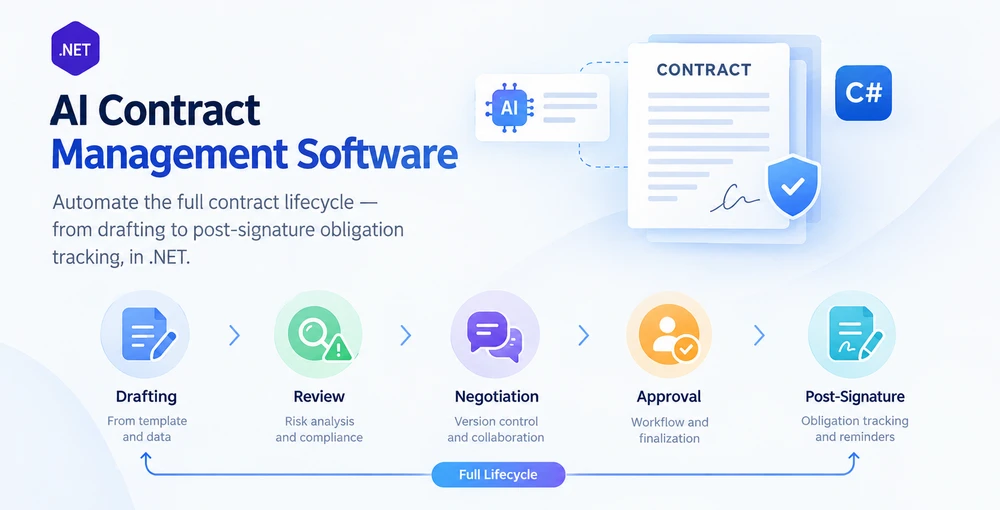
AI contract management software automates the entire contract lifecycle — from drafting through review, negotiation, approval, finalization, and post-signature obligation tracking — by combining AI language understanding with deterministic document processing inside a .NET application. The distinction from single-task contract automation is the lifecycle scope: a contract review tool flags risky clauses; a contract management system moves an agreement through every stage, maintains an audit trail across versions, and tracks obligations after signing.
Spire.Agent.Office is a document AI agent SDK that provides both the language understanding and the document-processing layer. This article shows how to build a contract lifecycle management system in C# that chains five stages into one pipeline, with per-stage error isolation, format dispatch for PDF and Word, and proper status tracking — patterns that single-task examples do not address.
This article presents a reference implementation of an AI-assisted contract lifecycle pipeline in .NET. A production CLM system would additionally need workflow persistence, identity and access control, e-signature integration, document storage and version retention, notifications, and audit infrastructure.
1. The Contract Lifecycle: Five Stages Where AI Acts
A contract lifecycle is not a single document operation. It is a sequence of stages, each with distinct inputs, outputs, and failure modes. Understanding where AI adds value at each stage — and where deterministic code must hold the line — is the foundation of a system that holds up in production.
| Stage | What happens | AI role | Deterministic code role |
|---|---|---|---|
| Drafting | Generate a contract from a template plus structured data | Interpret the request, select and fill template fields | Load template, preserve formatting, save as .docx or .pdf
|
| Review | Read the contract, flag risky clauses, extract key terms | Semantic analysis of clause language, risk scoring | Write structured review report, enforce review checklist |
| Negotiation | Compare versions, track redlines, merge changes | Summarize deltas, flag substantive vs. formatting changes | Track changes on/off, compare documents, accept/reject revisions |
| Approval | Route to stakeholders, collect sign-offs | Suggest approvers based on contract type and value | Enforce routing rules, record audit trail, produce finalized copy |
| Post-signature | Track obligations, deadlines, renewals | Extract obligations and key dates from the finalized contract | Store structured metadata, trigger reminders, generate reports |
The lifecycle is not linear in practice — negotiation loops back to review, amendments restart drafting — but the pipeline architecture handles this through stage routing rather than a fixed sequence.
What Makes This Different from Contract Review Alone
Contract review automation — the subject of AI Contract Review in C# — covers one stage: reading an agreement and flagging issues. A contract management system must:
- Chain stages together with data flowing from one to the next (the output of drafting becomes the input of review).
-
Handle multiple document formats — templates arrive as
.docx, counterparties may send.pdf, and stages with format dispatch handle both without throwing. - Maintain state across stages — a contract's review status, negotiation version count, and approval chain must persist between pipeline runs.
- Isolate failures per contract — one corrupt file in a batch of 200 must not halt the entire pipeline.
These requirements shape the architecture below.
2. System Architecture for Contract Lifecycle Automation
A contract lifecycle management system has three layers. Each layer has a specific responsibility, and the boundaries between them are where production failures either get caught or slip through.
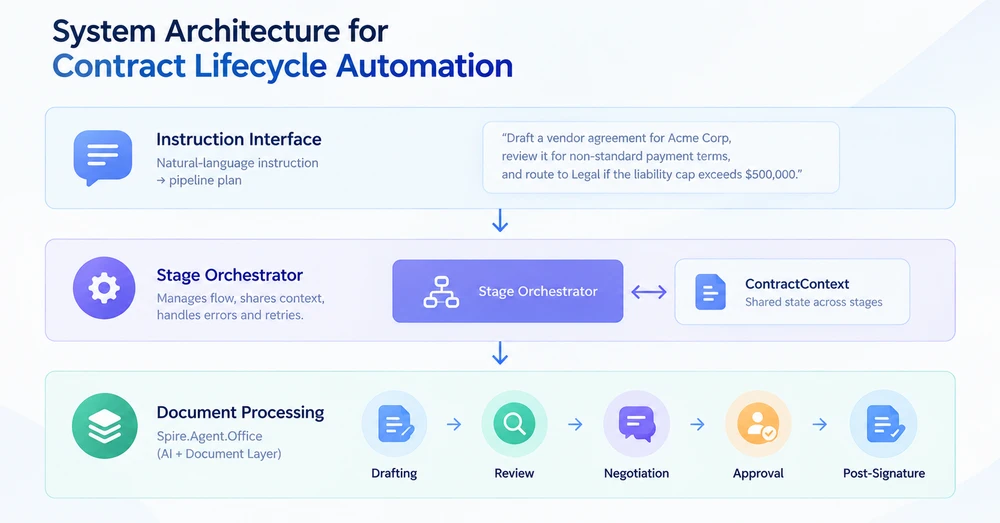
Layer 1: Instruction Interface
The entry point is a natural-language instruction that describes the desired outcome — not the mechanical steps. "Draft a vendor agreement for Acme Corp using the standard template, review it for non-standard payment terms, and route to Legal if the liability cap exceeds $500,000." The instruction layer parses this into a pipeline plan: which stages to run, in what order, and what parameters each stage needs.
Layer 2: Stage Orchestrator
The orchestrator manages the flow between stages. It holds a shared ContractContext object that carries contract metadata, the current document, and stage results from one stage to the next. Each stage receives the context, performs its operation, and returns an updated context plus a stage result. The orchestrator decides whether to proceed, retry, or route to an exception handler based on the result.
Layer 3: Document Processing
Each stage calls Spire.Agent.Office to perform the actual document operation. The agent handles the AI reasoning (understanding the instruction, extracting information) and the document layer handles the file operations (loading, modifying, saving). Format dispatch is applied at stages where multiple document formats are expected: a .pdf input uses PdfDocument, while a .docx input uses Document.
The Contract Context
The shared state object that flows through the pipeline:
/// <summary>
/// Shared state that flows through every lifecycle stage.
/// Each stage reads from and writes to this context.
/// </summary>
public class ContractContext
{
    // Identity
    public string ContractId { get; set; } = string.Empty;
    public string ContractType { get; set; } = string.Empty;  // "NDA", "MSA", "Vendor", etc.

    // Document state
    public string CurrentFilePath { get; set; } = string.Empty;
    public string WorkDir { get; set; } = string.Empty;
    public int VersionNumber { get; set; } = 1;

    // Stage results
    public DraftResult? Draft { get; set; }
    public ReviewResult? Review { get; set; }
    public NegotiationResult? Negotiation { get; set; }
    public ApprovalResult? Approval { get; set; }
    public ObligationResult? Obligations { get; set; }

    // Pipeline metadata
    public string Status { get; set; } = PipelineStages.Pending;
    public List<string> StageLog { get; set; } = new();
    public string? ErrorMessage { get; set; }
}

/// <summary>
/// Stage status constants. Using named constants instead of raw strings
/// prevents the "Status never set" bug where results fall through all
/// reporting buckets and silently disappear from batch summaries.
/// </summary>
public static class PipelineStages
{
    public const string Pending    = "Pending";
    public const string Drafted    = "Drafted";
    public const string Reviewed   = "Reviewed";
    public const string Negotiated = "Negotiated";
    public const string Approved   = "Approved";
    public const string Executed   = "Executed"; // In this sample: finalized post-approval PDF, not e-signature
    public const string Monitored  = "Monitored";
    public const string Failed     = "Failed";
    public const string NeedsReview = "NeedsReview";
}
The Status field uses named constants rather than raw strings. This prevents a common failure mode where status is never explicitly set, causing documents to fall through all reporting buckets and vanish from batch summaries.
3. Stage 1: Drafting from Template and Data
The drafting stage takes a template (.docx with {{Placeholder}} markers) and a data source (Excel spreadsheet or structured input), then produces a populated contract. The AI agent reads the template structure and fills placeholders with data from the source — one instruction replaces the field-mapping code that a traditional SDK requires.
using Spire.Agent.Office.AI;
using Spire.Agent.Office.Extensions;
using Spire.Doc;

public class DraftResult
{
    public string OutputPath { get; set; } = string.Empty;
    public int ContractsGenerated { get; set; }
    public List<string> PlaceholdersFilled { get; set; } = new();
}

public class DraftingStage
{
    private readonly AIOptions _options;

    public DraftingStage(AIOptions options) => _options = options;

    public DraftResult Execute(ContractContext context, string templatePath, string dataSourcePath)
    {
        // Format dispatch: verify the template is .docx before loading
        if (!templatePath.EndsWith(".docx", StringComparison.OrdinalIgnoreCase))
            throw new NotSupportedException(
                $"Drafting requires a .docx template. Received: {templatePath}");

        string[] attachments = { dataSourcePath };

        using (Document template = new Document())
        {
            template.LoadFromFile(templatePath);

            string draftPath = Path.Combine(context.WorkDir, $"{context.ContractId}-v1-draft.docx");

            string draftInstruction =
                "Read the data source and fill every {{Placeholder}} field in this template " +
                "with the corresponding data. Preserve the template's layout, styling, and " +
                "clause numbering. Save the completed contract to: " +
                $"{draftPath}. Contract type: {context.ContractType}.";

            AIResult result = template.AI(_options).ExecuteInstruction(
                template, draftInstruction, draftPath, attachments);

            if (result == null || !result.Success)
                throw new InvalidOperationException(
                    $"Drafting failed: {result?.ErrorMessage ?? "Unknown error"}");

            // Collect the generated file: prefer the explicit output path,
            // fall back to AIResult.OutputFiles (unreliable for some product types).
            string? generated = File.Exists(draftPath)
                ? draftPath
                : result.OutputFiles?.FirstOrDefault(p => File.Exists(p));

            if (generated == null)
                throw new InvalidOperationException(
                    "Drafting completed but no output file was found (neither at the requested " +
                    $"path '{draftPath}' nor in AIResult.OutputFiles).");

            context.CurrentFilePath = generated;
            context.VersionNumber = 1;
            context.Status = PipelineStages.Drafted;
            context.StageLog.Add($"Draft: generated contract at {generated}");

            return new DraftResult
            {
                OutputPath = generated,
                ContractsGenerated = 1,
                PlaceholdersFilled = ExtractPlaceholderNames(templatePath)
            };
        }
    }

    private static List<string> ExtractPlaceholderNames(string templatePath)
    {
        // Quick scan of the template for {{...}} markers to report what was filled
        var placeholders = new List<string>();
        using (Document doc = new Document())
        {
            doc.LoadFromFile(templatePath);
            string text = doc.GetText();
            var matches = System.Text.RegularExpressions.Regex.Matches(
                text, @"\{\{(\w+)\}\}");
            foreach (System.Text.RegularExpressions.Match m in matches)
                if (!placeholders.Contains(m.Groups[1].Value))
                    placeholders.Add(m.Groups[1].Value);
        }
        return placeholders;
    }
}
Key API Calls
-
Document.LoadFromFile()— loads the.docxtemplate with placeholders -
template.AI(_options)— attaches the AI document processor -
ExecuteInstruction(doc, instruction, outputPath, attachments)— fills placeholders from the data source; pass an explicit absolute path so the agent writes the product to a known location - Product collection: check
File.Exists(outputPath)first;AIResult.OutputFilesis unreliable for some product types and should only be a fallback
Format Dispatch
The stage validates the input format before processing. A .pdf template or an unsupported format is rejected explicitly with a clear message, rather than failing inside the agent with an opaque exception. This pattern prevents a common failure mode where missing format dispatch causes PDF inputs to throw unhandled exceptions deep in the processing pipeline.
Drafting one contract is the simple case. When the same template has to be filled for dozens of records — new hires, vendors, renewals — the instruction pattern scales to batch output unchanged; Batch Contract Generation with Spire.Agent.Office covers both the mail-merge and the placeholder-replacement route, and compares where each one fits.
SDK note: When an explicit
outputPathis passed toExecuteInstruction, the SDK may also write anoutput-<filename>copy in the same directory. This duplicate has identical content and can be safely cleaned up after processing. All stages that specify output paths are affected.
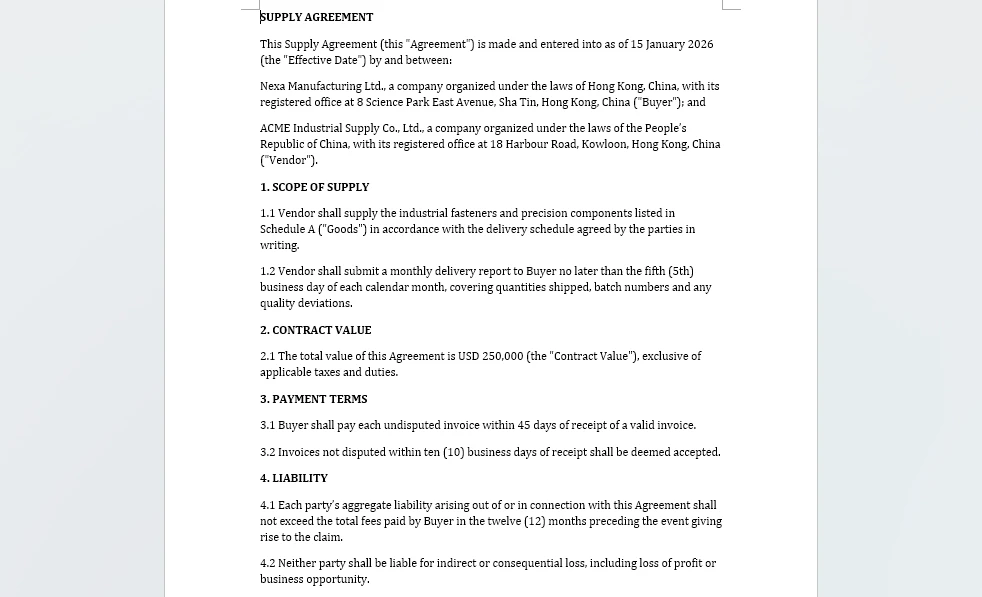
The product of this stage is the filled document itself — the vendor agreement template with every placeholder replaced from the vendor master workbook.
4. Stage 2: Review and Risk Analysis
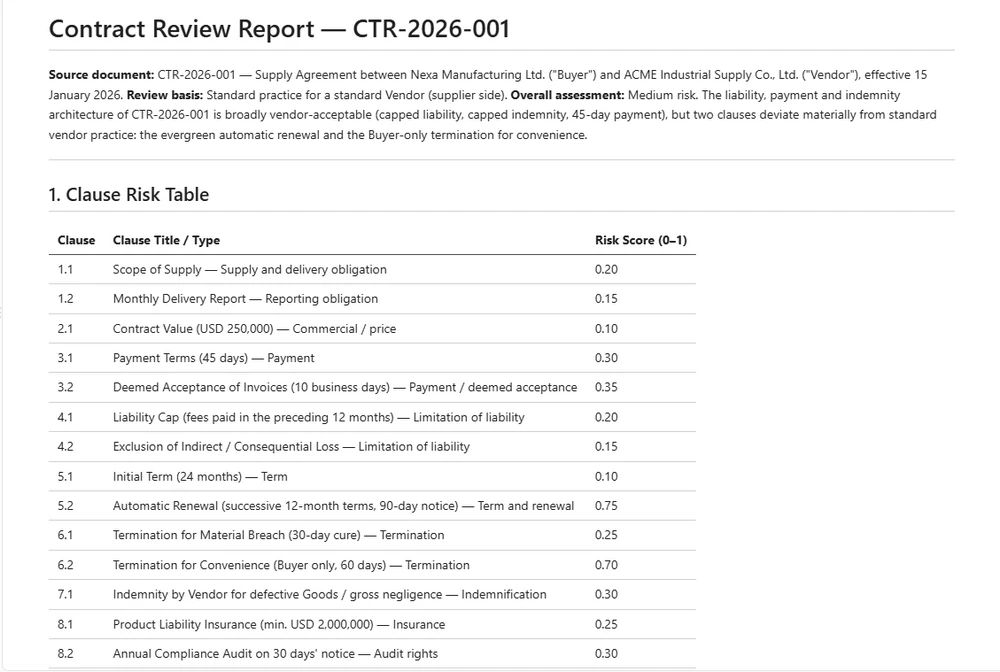
The review stage reads the drafted contract, identifies risky or non-standard clauses, and produces a structured review report. Unlike the drafting stage, the input may be .docx (internal draft) or .pdf (counterparty paper), so the stage must dispatch to the correct document type.
using Spire.Agent.Office.AI;
using Spire.Agent.Office.Extensions;
using Spire.Doc;
using Spire.Pdf;

public class ReviewResult
{
    public string ReportPath { get; set; } = string.Empty;
    public int ClausesAnalyzed { get; set; }
    public int RiskFlags { get; set; }
    public double RiskScore { get; set; }     // ratio of flagged clauses to total (0.0 = none flagged, 1.0 = all flagged)
    public List<string> FlaggedClauses { get; set; } = new();
}

public class ReviewStage
{
    private readonly AIOptions _options;

    // Risk threshold: contracts above this score require manual review.
    // Using a named constant prevents the "threshold always passes" bug
    // where a miscalculated score boundary lets everything auto-approve.
    public const double AutoApproveThreshold = 0.3;
    public const double ManualReviewThreshold = 0.6;

    public ReviewStage(AIOptions options) => _options = options;

    public ReviewResult Execute(ContractContext context)
    {
        string filePath = context.CurrentFilePath;
        string reportPath = Path.Combine(context.WorkDir, $"{context.ContractId}-review.md");

        string reviewInstruction =
            "Review this contract and write a Markdown report with two sections:\n" +
            "1. A table listing each major clause, its type, and a risk score (0-1).\n" +
            "2. A bullet list of clauses that deviate from standard practice for a " +
            $"standard {context.ContractType}. " +
            "Flag any of: uncapped liability, automatic renewal without notice, " +
            "broad indemnification, unilateral termination, or payment terms exceeding 60 days. " +
            "Prefix each flagged clause bullet with 'FLAG:' so the parser can identify it. " +
            $"Reference the source document as '{context.ContractId}', not as 'input.docx'.\n" +
            $"Save the report to: {reportPath}";

        AIResult result = DispatchByFormat(filePath, reviewInstruction, reportPath);

        if (result == null || !result.Success)
            throw new InvalidOperationException(
                $"Review failed: {result?.ErrorMessage ?? "Unknown error"}");

        // Parse the review report to extract structured data
        string reportContent = File.ReadAllText(reportPath);
        var review = ParseReviewReport(reportContent, reportPath);

        // Route based on risk score (three-tier classification)
        if (review.RiskScore >= ManualReviewThreshold)
            context.Status = PipelineStages.NeedsReview;
        else if (review.RiskScore >= AutoApproveThreshold)
        {
            // Middle zone: not clean enough to auto-approve, not risky enough to block
            context.Status = PipelineStages.Reviewed;
            context.StageLog.Add(
                $"Review: risk score {review.RiskScore:F2} in warning zone " +
                $"({AutoApproveThreshold}-{ManualReviewThreshold}); reviewed with warning");
        }
        else
            context.Status = PipelineStages.Reviewed;

        context.StageLog.Add(
            $"Review: {review.ClausesAnalyzed} clauses, {review.RiskFlags} flags, " +
            $"score {review.RiskScore:F2}, status={context.Status}");

        return review;
    }

    /// <summary>
    /// Dispatch to the correct document type based on file extension.
    /// This prevents the "PDF throws exception" bug where a stage
    /// only handles .docx and fails on counterparty PDFs.
    /// </summary>
    private AIResult DispatchByFormat(string filePath, string instruction, string outputPath)
    {
        string ext = Path.GetExtension(filePath).ToLowerInvariant();

        return ext switch
        {
            ".docx" or ".doc" => ProcessWord(filePath, instruction, outputPath),
            ".pdf"            => ProcessPdf(filePath, instruction, outputPath),
            _ => throw new NotSupportedException(
                $"Review stage does not support format: {ext}")
        };
    }

    private AIResult ProcessWord(string filePath, string instruction, string outputPath)
    {
        using (Document doc = new Document())
        {
            doc.LoadFromFile(filePath);
            return doc.AI(_options).ExecuteInstruction(
                doc, instruction, outputPath, Array.Empty<string>());
        }
    }

    private AIResult ProcessPdf(string filePath, string instruction, string outputPath)
    {
        using (PdfDocument pdf = new PdfDocument())
        {
            pdf.LoadFromFile(filePath);
            return pdf.AI(_options).ExecuteInstruction(
                pdf, instruction, outputPath, Array.Empty<string>());
        }
    }

    private static ReviewResult ParseReviewReport(string markdown, string reportPath)
    {
        var result = new ReviewResult { ReportPath = reportPath };

        // Count table rows as clauses analyzed
        var tableLines = markdown.Split('\n')
            .Where(l => l.StartsWith("|") && !l.StartsWith("|---") && !l.StartsWith("| --"))
            .Skip(1); // skip header
        result.ClausesAnalyzed = tableLines.Count();

        // Count bullet points prefixed with "FLAG:" as risk flags
        var flagLines = markdown.Split('\n')
            .Select(l => l.TrimStart())
            .Where(l => l.StartsWith("-") || l.StartsWith("*"))
            .Where(l => l.Substring(1).TrimStart()
                .StartsWith("FLAG:", StringComparison.OrdinalIgnoreCase));
        result.FlaggedClauses = flagLines.Select(l => l.Trim()).ToList();
        result.RiskFlags = result.FlaggedClauses.Count;

        // Risk score: ratio of flagged clauses to total, clamped to [0, 1]
        result.RiskScore = result.ClausesAnalyzed > 0
            ? Math.Min(1.0, (double)result.RiskFlags / result.ClausesAnalyzed)
            : 0.0;

        return result;
    }
}
The DispatchByFormat method is the critical addition. In earlier pipeline implementations, a stage that only handled .docx would throw an InvalidOperationException when a counterparty sent a .pdf. The switch expression dispatches to the correct document type before the agent runs, so both formats are first-class inputs.
The risk thresholds (AutoApproveThreshold, ManualReviewThreshold) are named constants with documented semantics. The gap between 0.3 and 0.6 creates an explicit "needs review" zone — contracts that are neither clean enough to auto-approve nor risky enough to block. This prevents the threshold dead-logic bug where every contract passes the same check.
Review findings are persisted as a report rather than returned in memory, so the clause-level audit survives independently of the run that produced it.
5. Stage 3: Negotiation and Version Control
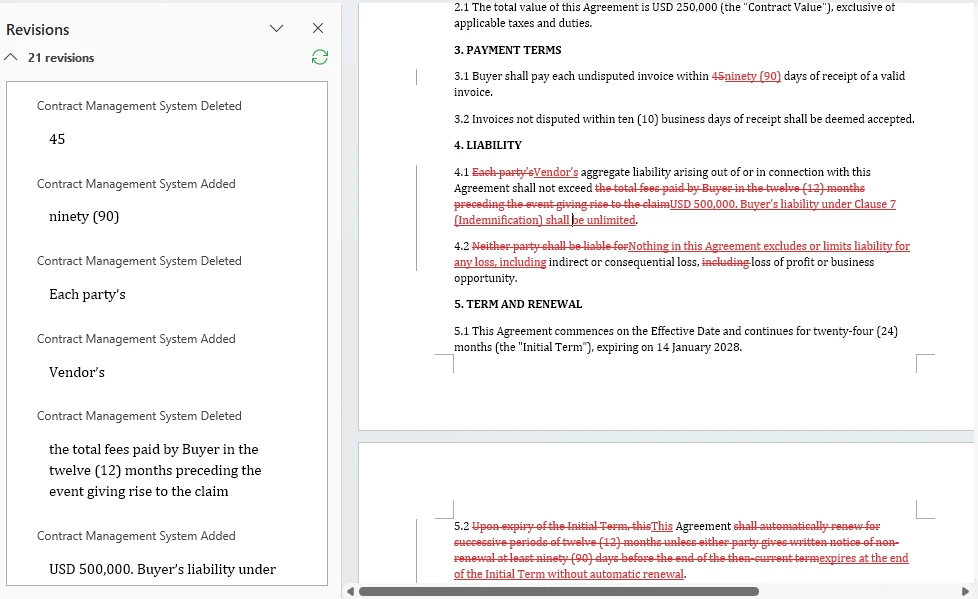
Negotiation is where contracts change hands. The counterparty marks up the document — redlining clauses, adjusting terms, adding conditions. The system must compare versions, track changes, and help the team decide what to accept.
This stage uses two capabilities from the Spire.Doc document layer that go beyond the AI agent's ExecuteInstruction:
- Track Changes — enable revision tracking so every edit is visible and attributable
- Document Comparison — compare two versions and generate a diff document
using Spire.Agent.Office.AI;
using Spire.Agent.Office.Extensions;
using Spire.Doc;
using Spire.Doc.Documents;
using System.Text.RegularExpressions;

public class NegotiationResult
{
    public string ComparisonPath { get; set; } = string.Empty;
    public int ChangesDetected { get; set; }
    public int SubstantiveChanges { get; set; }  // changes to clause text, not formatting
    public int FormattingChanges { get; set; }
    public string NegotiatedFilePath { get; set; } = string.Empty;
}

public class NegotiationStage
{
    private readonly AIOptions _options;

    public NegotiationStage(AIOptions options) => _options = options;

    /// <summary>
    /// Compare the current version with a counterparty's revised version.
    /// Produces a diff document with all changes marked.
    /// </summary>
    public NegotiationResult CompareVersions(
        ContractContext context, string counterpartyFilePath)
    {
        string comparisonPath = Path.Combine(
            context.WorkDir, $"{context.ContractId}-v{context.VersionNumber}-comparison.docx");

        // Load both versions
        using (Document ourVersion = new Document())
        using (Document theirVersion = new Document())
        {
            ourVersion.LoadFromFile(context.CurrentFilePath);
            theirVersion.LoadFromFile(counterpartyFilePath);

            // Compare: marks every difference in ourVersion as a tracked change
            ourVersion.Compare(theirVersion, "Contract Management System");

            // Save the comparison document
            ourVersion.SaveToFile(comparisonPath, FileFormat.Docx2013);
        }

        // Use the AI agent to analyze the comparison and categorize changes
        string analysisPath = Path.Combine(
            context.WorkDir, $"{context.ContractId}-negotiation-analysis.md");

        using (Document comparison = new Document())
        {
            comparison.LoadFromFile(comparisonPath);

            string analyzeInstruction =
                "Analyze this document comparison and write a Markdown report:\n" +
                "1. On the first line, write 'Total changes: <N>' where N is the total count " +
                "of categorized changes (substantive + formatting).\n" +
                "2. List each change as a bullet line prefixed with 'SUBSTANTIVE:' or 'FORMATTING:' " +
                "followed by the clause affected and the nature of the change.\n" +
                "3. SUBSTANTIVE changes: clause text, numbers, dates. " +
                "FORMATTING changes: style, spacing, font.\n" +
                $"Save to: {analysisPath}";

            AIResult result = comparison.AI(_options).ExecuteInstruction(
                comparison, analyzeInstruction, analysisPath, Array.Empty<string>());

            if (result == null || !result.Success)
                throw new InvalidOperationException(
                    $"Negotiation analysis failed: {result?.ErrorMessage}");
        }

        var negotiation = ParseNegotiationReport(analysisPath);
        negotiation.ComparisonPath = comparisonPath;
        negotiation.NegotiatedFilePath = counterpartyFilePath;

        context.VersionNumber++;
        context.CurrentFilePath = counterpartyFilePath;
        context.Status = PipelineStages.Negotiated;
        context.StageLog.Add(
            $"Negotiation: {negotiation.ChangesDetected} changes " +
            $"({negotiation.SubstantiveChanges} substantive, " +
            $"{negotiation.FormattingChanges} formatting), v{context.VersionNumber}");

        return negotiation;
    }

    /// <summary>
    /// Enable track changes on a contract before sending it for negotiation.
    /// This ensures every edit by the counterparty is visible and attributable.
    /// </summary>
    public string PrepareForRedlining(ContractContext context)
    {
        string redlineReadyPath = Path.Combine(
            context.WorkDir, $"{context.ContractId}-v{context.VersionNumber}-redline.docx");

        using (Document doc = new Document())
        {
            doc.LoadFromFile(context.CurrentFilePath);

            // Enable track changes so all edits are recorded as revisions
            doc.TrackChanges = true;

            doc.SaveToFile(redlineReadyPath, FileFormat.Docx2013);
        }

        context.StageLog.Add("Negotiation: track changes enabled for redlining");
        return redlineReadyPath;
    }

    /// <summary>
    /// Accept all tracked changes to produce a clean final version.
    /// Optional post-review operation: not automatically invoked by the pipeline
    /// because acceptance should occur only after human review of the changes.
    /// </summary>
    public string AcceptAllChanges(ContractContext context)
    {
        string cleanPath = Path.Combine(
            context.WorkDir, $"{context.ContractId}-v{context.VersionNumber}-final.docx");

        using (Document doc = new Document())
        {
            doc.LoadFromFile(context.CurrentFilePath);
            doc.AcceptChanges();
            doc.SaveToFile(cleanPath, FileFormat.Docx2013);
        }

        context.CurrentFilePath = cleanPath;
        context.StageLog.Add("Negotiation: all changes accepted, clean version produced");
        return cleanPath;
    }

    private static NegotiationResult ParseNegotiationReport(string reportPath)
    {
        string content = File.ReadAllText(reportPath);
        var result = new NegotiationResult();

        // Parse total changes from the report (try multiple patterns for robustness)
        var totalMatch = Regex.Match(content, @"Total changes:\s*(\d+)", RegexOptions.IgnoreCase);
        if (!totalMatch.Success)
            totalMatch = Regex.Match(content, @"(\d+)\s+(?:tracked\s+)?changes", RegexOptions.IgnoreCase);
        if (totalMatch.Success)
            result.ChangesDetected = int.Parse(totalMatch.Groups[1].Value);

        // Count changes by prefix: SUBSTANTIVE: or FORMATTING:
        result.SubstantiveChanges = CountByPrefix(content, "SUBSTANTIVE:");
        result.FormattingChanges = CountByPrefix(content, "FORMATTING:");

        return result;
    }

    private static int CountByPrefix(string content, string prefix)
    {
        return content.Split('\n')
            .Select(l => l.TrimStart())
            .Where(l => l.StartsWith("-") || l.StartsWith("*"))
            .Count(l => l.Substring(1).TrimStart()
                .StartsWith(prefix, StringComparison.OrdinalIgnoreCase));
    }
}
Key API Calls
-
Document.Compare(otherDoc, authorName)— generates a diff document with all changes marked as tracked revisions (from the Spire.Doc comparison demo) -
Document.TrackChanges = true— enables revision tracking so every edit is visible and attributable -
Document.AcceptChanges()— accepts all tracked changes to produce a clean final version -
doc.AI(_options).ExecuteInstruction(...)— analyzes the comparison and categorizes changes
The negotiation stage combines deterministic document operations (compare, track changes, accept) with AI analysis (categorizing changes as substantive or formatting). The deterministic operations come from the Spire.Doc layer — the same APIs available in the code reference directory — while the AI agent handles the semantic categorization that would otherwise require manual review.
The example compares versions and tracks the current file path; a production system would normally persist each version separately and explicitly record which revision was accepted. AcceptAllChanges() is provided as an optional finalization operation after negotiation, but it is not automatically invoked by the sample pipeline because acceptance should occur only after human review.
What Document.Compare returns is a document, not a summary: the tracked revisions below are the redlines a reviewer would otherwise assemble by hand.
6. Stage 4: Approval and Finalization
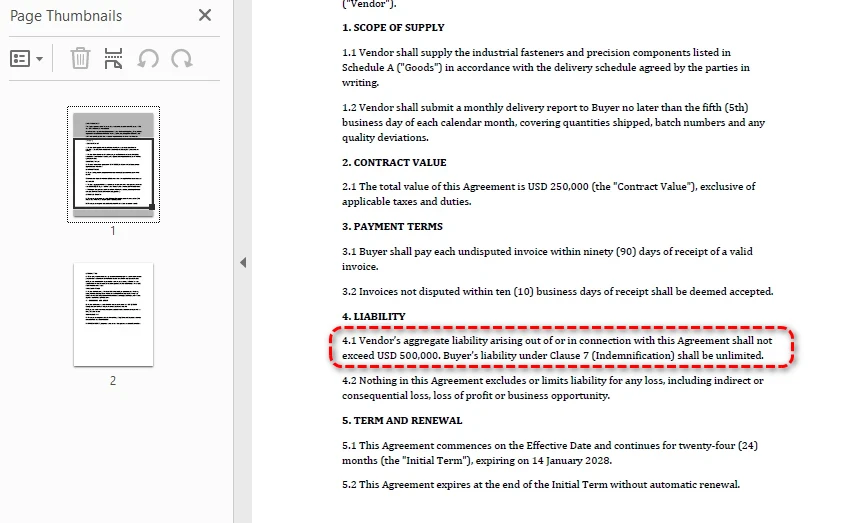
The approval stage routes the contract to the right stakeholders based on contract type and value, records their sign-offs, and produces a finalized PDF copy after all required approvals are recorded. The routing logic is deterministic — it uses business rules, not AI — but the agent assists by suggesting approvers and generating the approval summary.
using Spire.Agent.Office.AI;
using Spire.Agent.Office.Extensions;
using Spire.Doc;

public class ApprovalResult
{
    public List<ApprovalRecord> Approvals { get; set; } = new();
    public bool AllApproved { get; set; }
    public string ExecutedFilePath { get; set; } = string.Empty; // Finalized PDF path, not a signed contract
    public DateTime? ExecutionDate { get; set; }                // Finalization timestamp, not a signing date
}

public class ApprovalRecord
{
    public string Approver { get; set; } = string.Empty;
    public string Role { get; set; } = string.Empty;
    public bool Approved { get; set; }
    public DateTime Timestamp { get; set; }
    public string? Comments { get; set; }
}

public class ApprovalStage
{
    private readonly AIOptions _options;

    public ApprovalStage(AIOptions options) => _options = options;

    /// <summary>
    /// Route the contract for approval based on type and value.
    /// Routing rules are deterministic business logic, not AI.
    /// </summary>
    public ApprovalResult Execute(
        ContractContext context, double contractValue,
        Dictionary<string, bool>? approvalDecisions = null)
    {
        var routingPlan = DetermineApprovers(context.ContractType, contractValue);
        var result = new ApprovalResult();

        // Generate an approval summary for each approver
        string summaryPath = Path.Combine(
            context.WorkDir, $"{context.ContractId}-approval-summary.md");

        using (Document doc = new Document())
        {
            doc.LoadFromFile(context.CurrentFilePath);

            string summaryInstruction =
                "Write a one-page approval summary for this contract: parties, value, " +
                "key terms, risk flags from review, and changes from negotiation. " +
                $"Save to: {summaryPath}";

            AIResult aiResult = doc.AI(_options).ExecuteInstruction(
                doc, summaryInstruction, summaryPath, Array.Empty<string>());

            if (aiResult == null || !aiResult.Success)
                throw new InvalidOperationException(
                    $"Approval summary generation failed: {aiResult?.ErrorMessage}");
        }

        // In a real system, this would integrate with an approval workflow API.
        // approvalDecisions maps approver name → approved/rejected. A missing key
        // means no decision was recorded — which is not the same as a rejection.
        int approvedCount = 0, rejectedCount = 0, pendingCount = 0;

        foreach (var approver in routingPlan)
        {
            bool decision = false;
            bool hasDecision = approvalDecisions != null
                && approvalDecisions.TryGetValue(approver.Name, out decision);
            bool approved = hasDecision && decision;

            // Three states, all distinguishable in the audit record
            string comment = !hasDecision ? "Pending approval"
                : approved ? "Approved by approver"
                : "Rejected by approver";

            if (!hasDecision) pendingCount++;
            else if (approved) approvedCount++;
            else rejectedCount++;

            result.Approvals.Add(new ApprovalRecord
            {
                Approver = approver.Name,
                Role = approver.Role,
                Approved = approved,
                Timestamp = DateTime.UtcNow,
                Comments = comment
            });
        }

        result.AllApproved = result.Approvals.All(a => a.Approved);

        if (result.AllApproved)
        {
            // Produce the finalized copy as PDF
            string executedPath = Path.Combine(
                context.WorkDir, $"{context.ContractId}-executed.pdf");

            using (Document doc = new Document())
            {
                doc.LoadFromFile(context.CurrentFilePath);
                doc.SaveToFile(executedPath, FileFormat.PDF);
                result.ExecutedFilePath = executedPath;
                result.ExecutionDate = DateTime.UtcNow;
            }

            context.CurrentFilePath = result.ExecutedFilePath;
            context.Status = PipelineStages.Executed;
        }
        else
        {
            context.Status = PipelineStages.NeedsReview;
        }

        context.StageLog.Add(
            $"Approval: {result.Approvals.Count} approvers, " +
            $"approved={approvedCount}, rejected={rejectedCount}, " +
            $"pending={pendingCount}, all approved={result.AllApproved}");

        return result;
    }

    /// <summary>
    /// Deterministic routing rules. These are business logic, not AI.
    /// </summary>
    private static List<(string Name, string Role)> DetermineApprovers(
        string contractType, double value)
    {
        var approvers = new List<(string, string)>();

        // All contracts need Legal sign-off (example business rule)
        approvers.Add(("Legal Team", "Legal Counsel"));

        // Contracts over $100K need VP approval (example business rule)
        if (value > 100_000)
            approvers.Add(("VP Operations", "VP"));

        // Contracts over $500K need CFO approval (example business rule)
        if (value > 500_000)
            approvers.Add(("CFO", "CFO"));

        // Vendor contracts need Procurement sign-off
        if (contractType.Equals("Vendor", StringComparison.OrdinalIgnoreCase))
            approvers.Add(("Procurement", "Procurement Manager"));

        return approvers;
    }
}
The routing rules in DetermineApprovers are intentionally deterministic. AI suggests and summarizes; it does not decide who signs a contract. The approval chain is a business rule that must be auditable and consistent — exactly the kind of decision that belongs in code, not in a language model.
Note: The
Executedstatus in this sample means the final PDF produced after approval — not a signed contract. Actual electronic signing — signature envelopes, signer identity verification, signature field embedding — should be handled by a dedicated e-signature workflow integrated separately.
Once every approver's decision is on record, the stage writes the finalized contract as a PDF — and that PDF, not the source draft, is what Stage 5 consumes.
7. Stage 5: Post-Signature Monitoring
In a production workflow, post-signature monitoring begins after the contract has been electronically or otherwise formally signed. In this reference implementation, the finalized PDF produced by Stage 4 is used as the monitoring input. Post-signature monitoring extracts obligations, key dates, and renewal terms from the contract, then stores them as structured metadata that downstream systems use for reminders and reporting.
using Spire.Agent.Office.AI;
using Spire.Agent.Office.Extensions;
using Spire.Doc;
using Spire.Pdf;

public class ObligationResult
{
    public List<Obligation> Obligations { get; set; } = new();
    public List<KeyDate> KeyDates { get; set; } = new();
    public bool AutoRenewal { get; set; }
    public DateTime? RenewalDate { get; set; }
    public string MetadataPath { get; set; } = string.Empty;
}

public class Obligation
{
    public string Description { get; set; } = string.Empty;
    public string Party { get; set; } = string.Empty;  // who must fulfill
    public string Frequency { get; set; } = string.Empty;  // "monthly", "annual", "one-time"
    public DateTime? DueDate { get; set; }
    public string DueDateRaw { get; set; } = string.Empty;  // original deadline text from the contract
}

public class KeyDate
{
    public string Description { get; set; } = string.Empty;
    public DateTime Date { get; set; }
    public string Type { get; set; } = string.Empty;  // "renewal", "termination", "milestone"
}

public class MonitoringStage
{
    private readonly AIOptions _options;

    public MonitoringStage(AIOptions options) => _options = options;

    public ObligationResult Execute(ContractContext context)
    {
        string metadataPath = Path.Combine(
            context.WorkDir, $"{context.ContractId}-obligations.json");

        string extractInstruction =
            "Extract all post-signature obligations and key dates from this contract. " +
            "Write a JSON file with:\n" +
            "1. \"obligations\": array of {description, party, frequency, dueDate, dueDateRaw} " +
            "where dueDate is an ISO-8601 date (YYYY-MM-DD). If the obligation has a relative " +
            "deadline (e.g., 'Within 90 days of receipt'), convert it to an absolute date based " +
            "on the contract effective date. Use null only for ongoing obligations with no " +
            "fixed deadline. Always put the original deadline text in dueDateRaw.\n" +
            "2. \"keyDates\": array of {description, date, type} where date is ISO-8601 " +
            "(YYYY-MM-DD) and type is 'renewal', 'termination', or 'milestone'\n" +
            "3. \"autoRenewal\": boolean\n" +
            "4. \"renewalDate\": ISO-8601 date (YYYY-MM-DD) or null\n" +
            $"Save to: {metadataPath}";

        // Dispatch by format — executed contracts may be PDF or DOCX
        AIResult result = DispatchExtraction(
            context.CurrentFilePath, extractInstruction, metadataPath, _options);

        if (result == null || !result.Success)
            throw new InvalidOperationException(
                $"Obligation extraction failed: {result?.ErrorMessage}");

        var obligations = ParseObligationMetadata(metadataPath);
        obligations.MetadataPath = metadataPath;

        context.Obligations = obligations;
        context.Status = PipelineStages.Monitored;

        // Diagnostics: bucket every obligation by how its deadline came out, so that a
        // field the agent writes but the parser fails to read cannot pass unnoticed.
        int datesParsed = obligations.Obligations.Count(o => o.DueDate != null);
        int datesUnparsed = obligations.Obligations.Count(
            o => o.DueDate == null && !string.IsNullOrEmpty(o.DueDateRaw));
        int datesOngoing = obligations.Obligations.Count(
            o => o.DueDate == null && string.IsNullOrEmpty(o.DueDateRaw));
        int datesNoSourceText = obligations.Obligations.Count(
            o => o.DueDate != null && string.IsNullOrEmpty(o.DueDateRaw));
        context.StageLog.Add(
            $"Monitoring: {obligations.Obligations.Count} obligations, " +
            $"{obligations.KeyDates.Count} key dates, " +
            $"auto-renewal={obligations.AutoRenewal}, " +
            $"dates parsed={datesParsed}, unparsed={datesUnparsed}, ongoing={datesOngoing}, " +
            $"parsed-without-source-text={datesNoSourceText}");

        return obligations;
    }

    private static AIResult DispatchExtraction(
        string filePath, string instruction, string outputPath, AIOptions options)
    {
        string ext = Path.GetExtension(filePath).ToLowerInvariant();

        return ext switch
        {
            ".docx" or ".doc" => ProcessWordExtraction(filePath, instruction, outputPath, options),
            ".pdf"            => ProcessPdfExtraction(filePath, instruction, outputPath, options),
            _ => throw new NotSupportedException(
                $"Obligation extraction does not support format: {ext}")
        };
    }

    private static AIResult ProcessWordExtraction(
        string filePath, string instruction, string outputPath, AIOptions options)
    {
        using (Document doc = new Document())
        {
            doc.LoadFromFile(filePath);
            return doc.AI(options).ExecuteInstruction(
                doc, instruction, outputPath, Array.Empty<string>());
        }
    }

    private static AIResult ProcessPdfExtraction(
        string filePath, string instruction, string outputPath, AIOptions options)
    {
        using (PdfDocument pdf = new PdfDocument())
        {
            pdf.LoadFromFile(filePath);
            return pdf.AI(options).ExecuteInstruction(
                pdf, instruction, outputPath, Array.Empty<string>());
        }
    }

    private static ObligationResult ParseObligationMetadata(string jsonPath)
    {
        string json = File.ReadAllText(jsonPath);
        using var doc = System.Text.Json.JsonDocument.Parse(json);
        var root = doc.RootElement;

        var result = new ObligationResult();

        if (TryGetPropertyIgnoreCase(root, "obligations", out var obs))
            foreach (var ob in obs.EnumerateArray())
            {
                string dueDateRaw = TryGetPropertyIgnoreCase(ob, "dueDateRaw", out var dr)
                    && dr.ValueKind == System.Text.Json.JsonValueKind.String
                    ? dr.GetString() ?? "" : "";

                result.Obligations.Add(new Obligation
                {
                    Description = TryGetPropertyIgnoreCase(ob, "description", out var d) ? d.GetString() ?? "" : "",
                    Party = TryGetPropertyIgnoreCase(ob, "party", out var p) ? p.GetString() ?? "" : "",
                    Frequency = TryGetPropertyIgnoreCase(ob, "frequency", out var f) ? f.GetString() ?? "" : "",
                    DueDate = TryGetDate(TryGetPropertyIgnoreCase(ob, "dueDate", out var dd2), dd2),
                    DueDateRaw = dueDateRaw
                });
            }

        if (TryGetPropertyIgnoreCase(root, "keyDates", out var kds))
            foreach (var kd in kds.EnumerateArray())
                result.KeyDates.Add(new KeyDate
                {
                    Description = TryGetPropertyIgnoreCase(kd, "description", out var d) ? d.GetString() ?? "" : "",
                    Date = TryGetDate(TryGetPropertyIgnoreCase(kd, "date", out var dt), dt) ?? default,
                    Type = TryGetPropertyIgnoreCase(kd, "type", out var t) ? t.GetString() ?? "" : ""
                });

        result.AutoRenewal = TryGetBool(TryGetPropertyIgnoreCase(root, "autoRenewal", out var ar), ar);
        result.RenewalDate = TryGetDate(TryGetPropertyIgnoreCase(root, "renewalDate", out var rd), rd);

        return result;
    }

    /// <summary>
    /// Case-insensitive property lookup. Prevents silent data loss when
    /// the AI agent outputs PascalCase or snake_case instead of camelCase.
    /// </summary>
    private static bool TryGetPropertyIgnoreCase(
        System.Text.Json.JsonElement element, string name,
        out System.Text.Json.JsonElement value)
    {
        foreach (var prop in element.EnumerateObject())
        {
            if (string.Equals(prop.Name, name, StringComparison.OrdinalIgnoreCase))
            {
                value = prop.Value;
                return true;
            }
        }
        value = default;
        return false;
    }

    /// <summary>
    /// Safe date parsing: handles null, non-string values, and invalid formats
    /// without throwing. Returns null on any parse failure.
    /// </summary>
    private static DateTime? TryGetDate(bool exists, System.Text.Json.JsonElement element)
    {
        if (!exists || element.ValueKind != System.Text.Json.JsonValueKind.String)
            return null;
        string? s = element.GetString();
        return DateTime.TryParse(s, out var date) ? date : null;
    }

    /// <summary>
    /// Safe boolean parsing: handles string "true"/"false" and actual booleans
    /// without throwing on type mismatch.
    /// </summary>
    private static bool TryGetBool(bool exists, System.Text.Json.JsonElement element)
    {
        if (!exists) return false;
        if (element.ValueKind == System.Text.Json.JsonValueKind.True) return true;
        if (element.ValueKind == System.Text.Json.JsonValueKind.False) return false;
        if (element.ValueKind == System.Text.Json.JsonValueKind.String)
            return bool.TryParse(element.GetString(), out var b) && b;
        return false;
    }
}
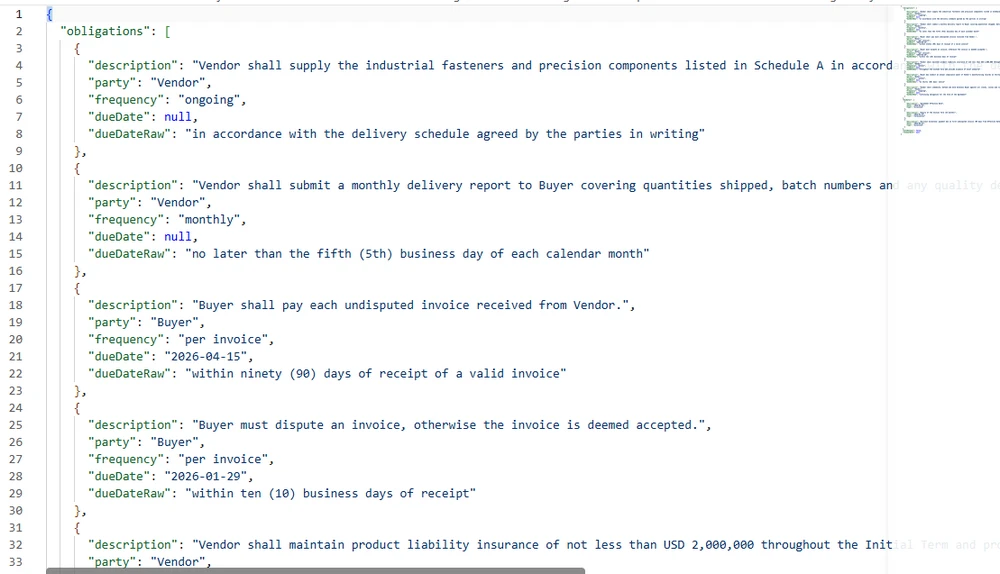
The obligation metadata is stored as JSON, not as a document. This makes it queryable by downstream systems — a renewal dashboard can scan all contracts for autoRenewal == true and renewalDate < DateTime.Now.AddDays(90) without opening a single document. Obligations with structured dueDate values can be tracked automatically; those where the deadline was not convertible to an absolute date retain the original text in dueDateRaw for manual review. The AI agent extracts the information; the deterministic layer stores it in a format that business systems can consume.
The extraction pattern is the same one used for invoices in Automate Invoice Processing with an AI Agent in .NET: pull structured fields out of an incoming document, validate them against deterministic rules, and route the uncertain values for review. Contracts differ mainly in what happens afterwards — obligations become long-lived records that outlive the transaction, while invoice fields are consumed once.
The extracted data is stored as JSON rather than prose, so each obligation and key date carries the original contract wording alongside the value the parser derived from it.
8. Orchestrating the Full Pipeline
The orchestrator chains the stages together, passing the ContractContext from one to the next. Its two critical responsibilities are per-contract error isolation (one failed contract must not halt the batch) and status conservation (every contract must end up in exactly one reporting bucket).
using Spire.Agent.Office.AI;

public class PipelineResult
{
    public string ContractId { get; set; } = string.Empty;
    public string Status { get; set; } = PipelineStages.Pending;
    public List<string> StageLog { get; set; } = new();
    public string? ErrorMessage { get; set; }
}

public class BatchResult
{
    public int Total { get; set; }
    public int Successful { get; set; }
    public int Flagged { get; set; }    // needs review
    public int Errored { get; set; }
    public List<PipelineResult> Results { get; set; } = new();
}

public class ContractLifecyclePipeline
{
    private readonly DraftingStage _drafting;
    private readonly ReviewStage _review;
    private readonly NegotiationStage _negotiation;
    private readonly ApprovalStage _approval;
    private readonly MonitoringStage _monitoring;

    public ContractLifecyclePipeline(AIOptions options)
    {
        _drafting = new DraftingStage(options);
        _review = new ReviewStage(options);
        _negotiation = new NegotiationStage(options);
        _approval = new ApprovalStage(options);
        _monitoring = new MonitoringStage(options);
    }

    /// <summary>
    /// Run a single contract through the full lifecycle.
    /// Each stage is wrapped in its own try-catch so that a failure
    /// in one stage produces a clear error without corrupting the
    /// context for subsequent contracts in the batch.
    /// </summary>
    public PipelineResult RunSingle(
        ContractContext context,
        string templatePath,
        string dataSourcePath,
        double contractValue,
        string? counterpartyFilePath = null,
        Dictionary<string, bool>? approvalDecisions = null)
    {
        try
        {
            // Stage 1: Drafting
            try
            {
                context.Draft = _drafting.Execute(context, templatePath, dataSourcePath);
            }
            catch (Exception ex)
            {
                return Fail(context, "Drafting", ex);
            }

            // Stage 2: Review
            try
            {
                context.Review = _review.Execute(context);
            }
            catch (Exception ex)
            {
                return Fail(context, "Review", ex);
            }

            // If review flagged for manual review, stop here
            if (context.Status == PipelineStages.NeedsReview)
                return Flag(context, "Review flagged for manual review");

            // Stage 3: Negotiation (only when a counterparty version exists)
            if (counterpartyFilePath != null)
            {
                try
                {
                    context.Negotiation = _negotiation.CompareVersions(context, counterpartyFilePath);
                }
                catch (Exception ex)
                {
                    return Fail(context, "Negotiation", ex);
                }
            }

            // Stage 4: Approval and Finalization
            try
            {
                context.Approval = _approval.Execute(context, contractValue, approvalDecisions);
            }
            catch (Exception ex)
            {
                return Fail(context, "Approval", ex);
            }

            if (context.Status == PipelineStages.NeedsReview)
                return Flag(context, "Approval incomplete");

            // Stage 5: Post-signature monitoring
            try
            {
                context.Obligations = _monitoring.Execute(context);
            }
            catch (Exception ex)
            {
                return Fail(context, "Monitoring", ex);
            }

            return new PipelineResult
            {
                ContractId = context.ContractId,
                Status = context.Status,
                StageLog = context.StageLog
            };
        }
        catch (Exception ex)
        {
            return Fail(context, "Pipeline", ex);
        }
    }

    /// <summary>
    /// Process a batch of contracts with per-file error isolation.
    /// One corrupt file does not halt the batch.
    /// Approval decisions are keyed by contract id; a contract with no
    /// entry keeps its approvers pending and stops at NeedsReview.
    /// </summary>
    public BatchResult RunBatch(
        List<(ContractContext context, string template, string data, double value)> contracts,
        Dictionary<string, Dictionary<string, bool>>? approvalDecisions = null)
    {
        var results = new List<PipelineResult>();

        foreach (var (context, template, data, value) in contracts)
        {
            // Per-contract try-catch: one failure does not stop the batch
            try
            {
                Dictionary<string, bool>? decisions = null;
                if (approvalDecisions != null &&
                    approvalDecisions.TryGetValue(context.ContractId, out var d))
                    decisions = d;

                results.Add(RunSingle(context, template, data, value, null, decisions));
            }
            catch (Exception ex)
            {
                results.Add(Fail(context, "Batch", ex));
            }
        }

        // Status conservation: every result must land in exactly one bucket.
        // Using the remainder method ensures that any result with an unexpected
        // status lands in "Flagged" (conservative) rather than vanishing.
        int successful = results.Count(r => r.Status == PipelineStages.Monitored
                                         || r.Status == PipelineStages.Executed);
        int errored = results.Count(r => r.Status == PipelineStages.Failed);

        return new BatchResult
        {
            Total = results.Count,
            Successful = successful,
            Flagged = results.Count - successful - errored,  // remainder → conservative
            Errored = errored,
            Results = results
        };
    }

    private static PipelineResult Fail(ContractContext context, string stage, Exception ex)
    {
        context.Status = PipelineStages.Failed;
        context.ErrorMessage = $"{stage}: {ex.Message}";
        context.StageLog.Add($"ERROR at {stage}: {ex.Message}");
        return new PipelineResult
        {
            ContractId = context.ContractId,
            Status = PipelineStages.Failed,
            StageLog = context.StageLog,
            ErrorMessage = context.ErrorMessage
        };
    }

    private static PipelineResult Flag(ContractContext context, string reason)
    {
        context.StageLog.Add($"FLAGGED: {reason}");
        return new PipelineResult
        {
            ContractId = context.ContractId,
            Status = context.Status,
            StageLog = context.StageLog
        };
    }
}
Per-Stage Error Isolation
Each stage is wrapped in its own try-catch block. If the review stage fails because the AI agent cannot parse a particularly complex clause, the pipeline records the failure and stops — but the ContractContext for the next contract in the batch is untouched. This prevents a common failure mode where a single corrupt file in a batch of 200 halts the entire pipeline with no partial results.
Status Conservation
The batch summary uses the remainder method to compute the Flagged count: Flagged = Total - Successful - Errored. This is a structural property — any result that is not explicitly successful or errored lands in "flagged" (conservative routing to manual review). This prevents the bug where results with unexpected status values silently vanish from all three reporting buckets.
Running the Pipeline
// Configure the agent
AIOptions options = new AIOptions
{
    WorkDir = @"C:\contract-mgmt\work",
    SpireToken = Environment.GetEnvironmentVariable("SPIRE_TOKEN")!
};

// Create the pipeline
var pipeline = new ContractLifecyclePipeline(options);

// Prepare a batch of contracts
var batch = new List<(ContractContext, string, string, double)>
{
    new(new ContractContext
    {
        ContractId = "CTR-2026-001",
        ContractType = "Vendor",
        WorkDir = @"C:\contract-mgmt\work\CTR-2026-001"
    },
    @"C:\templates\vendor-agreement.docx",
    @"C:\data\vendors-q1.xlsx",
    250_000)
};

// Run the batch. Approval decisions are supplied per contract id —
// a contract with no recorded decision stays in NeedsReview and
// never reaches Stage 5.
BatchResult result = pipeline.RunBatch(batch, new Dictionary<string, Dictionary<string, bool>>
{
    ["CTR-2026-001"] = new Dictionary<string, bool>
    {
        ["Legal Team"] = true,
        ["VP Operations"] = true,
        ["Procurement"] = true
    }
});

Console.WriteLine($"Total: {result.Total}");
Console.WriteLine($"Successful: {result.Successful}");
Console.WriteLine($"Flagged: {result.Flagged}");
Console.WriteLine($"Errored: {result.Errored}");

foreach (var r in result.Results)
{
    Console.WriteLine($"  {r.ContractId}: {r.Status}");
    foreach (var log in r.StageLog)
        Console.WriteLine($"    {log}");
}
Approval decisions are supplied to the batch call rather than inferred by the pipeline: a contract with no recorded decision keeps its approvers pending, lands in Flagged, and stops before Stage 5 — the intended outcome for an agreement nobody has approved yet.
One run over a handful of contracts is the simple case. Put the same stages behind a document queue and the orchestration questions change: concurrency limits, per-document error isolation, retry policy, and aggregation into a batch report. Intelligent Document Processing in .NET: Building IDP Pipelines works through those at the pipeline level, and the batch section of this article is a contract-specific instance of the same pattern.
9. Where AI Ends and Governance Begins
The architecture above assigns specific responsibilities to the AI agent and specific responsibilities to deterministic code. The boundary is not arbitrary — it follows a principle: AI interprets and suggests; deterministic code decides and records.
AI-generated risk assessments and extracted obligations should be validated by qualified reviewers before they are used for legal or commercial decisions.
| Responsibility | Handled by | Why |
|---|---|---|
| Understanding a natural-language instruction | AI agent | The whole point of language models |
| Extracting information from unstructured text | AI agent | Semantic understanding required |
| Categorizing changes as substantive or formatting | AI agent | Requires judgment about meaning |
| Suggesting approvers based on contract type | Business rules | Auditability and consistency |
| Determining who must sign | Business rules | Auditability and consistency |
| Recording the approval chain | Deterministic code | Legal audit trail must be tamper-proof |
| Setting risk thresholds | Business rules | Risk policy is a governance decision |
| Storing obligation metadata | Deterministic code | Downstream systems need reliable structure |
| Triggering renewal reminders | Deterministic code | Must fire on schedule, not on inference |
The risk thresholds in the review stage (AutoApproveThreshold = 0.3, ManualReviewThreshold = 0.6) are set by the business, not by the AI. The application derives a review ratio from the number of flagged clauses; the business defines the thresholds. This separation is what makes the system defensible in an audit — every automated decision traces back to a human-defined rule, not a model inference.
Integration with Existing Systems
A contract lifecycle system does not exist in isolation. The post-signature metadata (obligations, key dates, renewal terms) is designed to be consumed by downstream systems:
- ERP / Finance: payment milestones and invoice reconciliation
- CRM: renewal alerts for account managers
- Procurement: vendor performance tracking against contract SLAs
- Legal: compliance monitoring and audit preparation
The JSON metadata format from Stage 5 makes this integration straightforward — downstream systems query the structured data without needing to parse contract documents.
10. FAQ
How is this different from AI contract review?
Contract review is one stage of the lifecycle — reading an agreement and flagging risky clauses. A contract management system covers the full lifecycle: drafting, review, negotiation, approval, finalization, and post-signature monitoring. The existing AI Contract Review in C# article covers the review stage in depth; this article covers the full pipeline that review sits inside.
Can the pipeline handle both PDF and Word inputs?
Yes, at stages that implement format dispatch. The review and monitoring stages include a switch on the file extension that routes .docx to Document and .pdf to PdfDocument. The drafting stage requires a .docx template, and the negotiation stage operates on Word documents (document comparison uses Spire.Doc.Document). This reflects a real-world pattern: format dispatch is applied where counterparty PDFs are expected, not uniformly across every stage.
What happens if one contract fails in a batch?
The batch processor wraps each contract in its own try-catch block. A failure in one contract is recorded with the error message and stage where it occurred, and the batch continues to the next contract. The batch summary uses the remainder method for status conservation: Flagged = Total - Successful - Errored, ensuring every result lands in exactly one reporting bucket.
Does the AI agent decide who approves a contract?
No. The approval routing rules are deterministic business logic — in this example, contracts over $100K require VP approval, over $500K require CFO approval, and vendor contracts need Procurement sign-off. The AI agent generates the approval summary that approvers read, but the routing itself is code. This keeps the approval chain auditable and consistent.
How does the negotiation stage work?
The negotiation stage uses two capabilities from the Spire.Doc document layer: Document.Compare() to generate a diff between versions, and Document.TrackChanges to enable revision tracking. The AI agent then analyzes the comparison document and categorizes each change as substantive (clause text, numbers, dates) or formatting (style, spacing). This combination — deterministic comparison plus AI categorization — is what makes the negotiation stage useful for legal teams.
What is post-signature monitoring?
After a contract is finalized (signed in production), the system extracts obligations (who must do what, by when), key dates (renewal, termination, milestones), and renewal terms (auto-renewal, notice period) from the finalized document. This metadata is stored as structured JSON that downstream systems — ERP, CRM, procurement — can query without opening the contract document. This is the stage that most contract review tools do not address, and it is where the most value is lost in manual processes: obligations forgotten, renewals missed, deadlines passed without notice.
What .NET dependencies are required?
The Spire.Agent.Office NuGet package, which transitively brings in Spire.Doc, Spire.Pdf, Spire.XLS, and Spire.Presentation. The sample targets .NET 6 or later; check the package version's supported target frameworks before deployment. A SpireToken (API key) is required for the AI agent to communicate with the language model service.
Ready to Automate Your Contract Lifecycle?
If your application drafts, reviews, or tracks agreements, a document AI agent turns one natural-language instruction into a real, formatted file instead of an extraction-and-reconstruction pipeline you have to maintain. Follow the Getting Started guide to wire the SDK into a .NET project and run your first instruction, then reuse the five stage patterns above for your own contract types, approval rules, and obligation tracking.
Further Reading
- Batch Contract Generation with Spire.Agent.Office -- the drafting stage in depth: mail merge and placeholder replacement across dozens of templates at once
- Automate Invoice Processing with an AI Agent in .NET -- the same extract-validate-review pattern applied to invoices, where each document is consumed once
- Intelligent Document Processing in .NET: Building IDP Pipelines -- pipeline-level orchestration: concurrency, per-document error isolation, and batch reporting
- Spire.Agent.Office product overview -- AI agent SDKs for every Office document format