Converting old PPT files to the modern PPTX format is essential for smooth editing, full compatibility, and better performance in today's PowerPoint versions. Many users face issues like animations not rendering correctly, embedded media failing to play, or unnecessarily large file sizes when using legacy PPT files.
PPTX solves these problems: it loads faster, compresses files efficiently, supports advanced animations, and integrates seamlessly with Microsoft 365 collaboration tools. In this step-by-step guide, you'll learn 3 easy ways to convert PPT to PPTX using Microsoft PowerPoint, online converters, and Python automation, so you can choose the method that fits your workflow best.
- Why Convert PPT to PPTX
- Method 1. Convert PPT to PPTX Using Microsoft PowerPoint
- Method 2. Convert PPT to PPTX Online
- Method 3. Batch Convert PPT to PPTX with Python
- Best Practices for PPT to PPTX Conversion
Why Convert PPT to PPTX?
PPTX has replaced the old PPT format because it is based on the Office Open XML (OOXML) standard, unlike the legacy binary PPT format. This modern structure provides better file management and ensures compatibility with future PowerPoint versions.
Key reasons to convert PPT to PPTX:
- Modern compatibility: Fully supported in current and upcoming PowerPoint versions.
- Long-term reliability: Reduces the risk of file corruption and is safer for archiving.
- Workflow integration: Compatible with modern tools and processes, making presentations easier to manage over time.
Method 1. Convert PPT to PPTX Using Microsoft PowerPoint
This is the easiest and most reliable method to convert a PPT file to PPTX, because PowerPoint supports both formats natively. The conversion process is smooth, and formatting is usually preserved.
Steps to Convert in PowerPoint:
-
Open your .ppt file in Microsoft PowerPoint.
-
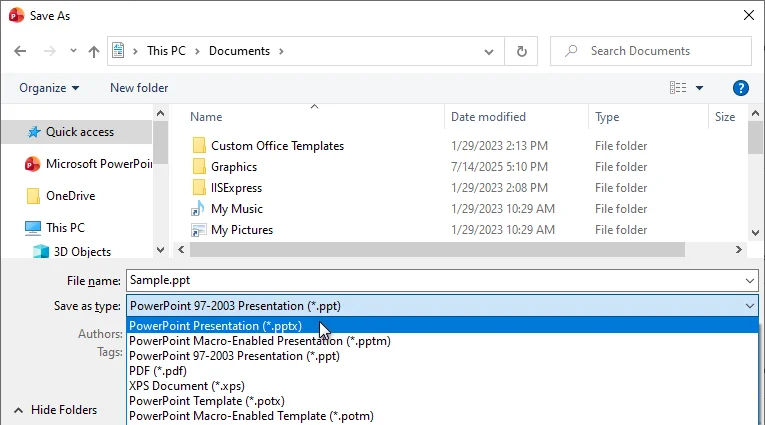
Click File → Save As.
-
In the Save as type dropdown, choose PowerPoint Presentation (*.pptx).
-
Select a location and click Save.
PowerPoint will automatically convert the file to PPTX, keeping slide layouts, fonts, charts, animations, and transitions intact.
Best for: Important presentations where accuracy matters.
Limitations: Manual conversion can be slow for multiple files.
Method 2. Convert PPT to PPTX Online
Online PPT to PPTX converters are convenient when you don't have PowerPoint installed. They work in any browser on Windows, macOS, Linux, or even mobile devices.
Popular online converters include:
- Convertio
- Zamzar
- CloudConvert
Steps to Convert PPT to PPTX Online (Using Convertio as an Example):
-
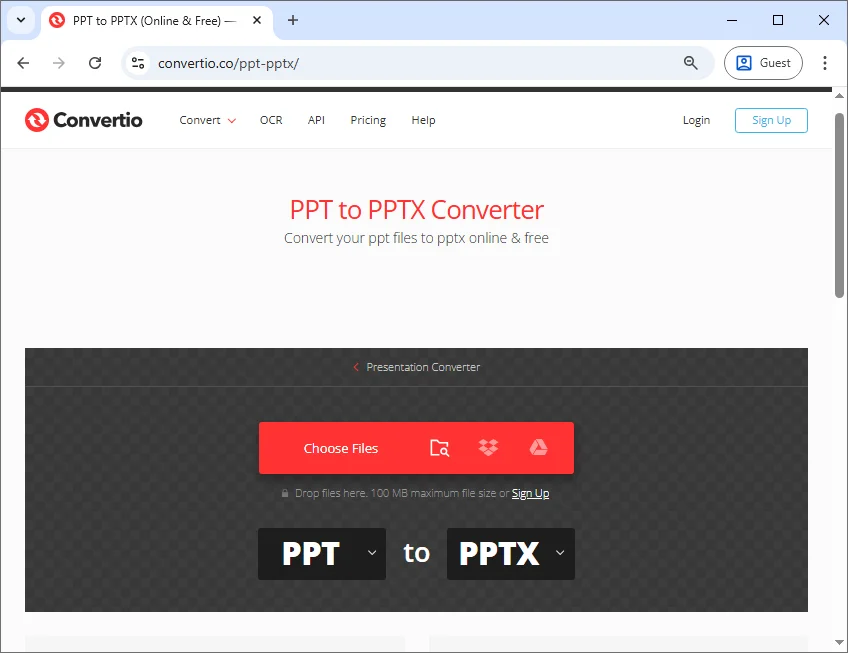
Open the Convertio online PPT to PPTX converter.
-
Click Choose Files to upload your .ppt file.
-
Click Convert and wait for the conversion process to finish.
-
Download the converted PPTX file.
Best for: Quick, occasional conversions without installing software.
Limitations: File size limits, potential formatting issues with complex presentations, not ideal for sensitive data.
Method 3. Batch Convert PPT to PPTX with Python
If you need to convert multiple PPT files regularly, Python automation is a game-changer. It allows you to batch convert dozens or hundreds of files in a single workflow without manual interaction with PowerPoint.
Example: Batch Convert PPT to PPTX in Python
The following example uses Spire.Presentation for Python, a PowerPoint processing library that supports creating and editing both PPT and PPTX formats, to batch convert multiple .ppt files to .pptx:
from spire.presentation import *
import os

# Set input and output folders
input_folder = "ppt_files"
output_folder = "pptx_files"

# Create the output folder if it doesn't exist
if not os.path.exists(output_folder):
    os.makedirs(output_folder)

# Loop through all files in the input folder
for filename in os.listdir(input_folder):
    # Process only files with .ppt or .PPT extension
    if filename.lower().endswith(".ppt"):
        # Construct the full input file path
        input_path = os.path.join(input_folder, filename)

        # Create a Presentation object and load the PPT file
        presentation = Presentation()
        presentation.LoadFromFile(input_path)

        # Safely create the output filename by replacing the extension
        name, ext = os.path.splitext(filename)
        output_path = os.path.join(output_folder, f"{name}.pptx")

        # Save the presentation as PPTX
        presentation.SaveToFile(output_path, FileFormat.Pptx2016)

        # Release the resources
        presentation.Dispose()
Steps:
-
Install the library from PyPI:
pip install spire.presentation -
Place your .ppt files in a folder named ppt_files.
-
Run the script to convert all .ppt files to .pptx automatically.

Best for: Enterprises, internal content systems, or automated reporting workflows where batch conversion saves time and reduces errors.
Limitations: Requires basic Python knowledge and environment setup. Some third-party libraries may require a commercial license for production use. Not suitable for users who only need one-time conversions.
Reference: Python: Convert PPS and PPT to PPTX
Best Practices for PPT to PPTX Conversion
To ensure a smooth and reliable PPT to PPTX conversion, it's important to follow a few best practices, especially when working with important presentations or converting large numbers of files.
- Backup original files before converting, in case adjustments are needed.
- Check fonts, animations, and embedded media after conversion to ensure they display correctly.
- Use batch automation for large numbers of files to save time.
- Avoid online converters for sensitive or confidential presentations.
- Keep software updated to reduce compatibility issues.
Conclusion: Choose the Right PPT to PPTX Conversion Method
There is no one-size-fits-all way to convert PPT to PPTX-the best method depends on how often you convert files and how many presentations you manage.
- Microsoft PowerPoint is the most accurate option for manual and important PPT to PPTX conversions.
- Online PPT to PPTX converters are fast and convenient for occasional use, but often come with file size and privacy limitations.
- Python automation is ideal for batch PPT to PPTX conversion in professional and automated workflows.
By choosing the right approach to convert PPT to PPTX, you can ensure better compatibility with modern PowerPoint versions, reduce file size, and enjoy smoother presentation playback across devices.
Looking for more high-quality PowerPoint tutorials? Check out our free PPT resources.
FAQs: PPT to PPTX
Q1. Can modern PowerPoint open PPT files?
A1: Yes. Modern versions of Microsoft PowerPoint can open legacy PPT files and convert them to PPTX automatically when you save the presentation.
Q2. Will converting PPT to PPTX change formatting?
A2: In most cases, no. When using Microsoft PowerPoint, formatting, layouts, animations, and transitions are preserved. Very old PPT files may require minor manual adjustments.
Q3. Is PPTX better than PPT for modern PowerPoint?
A3: Yes. PPTX offers better compatibility with modern PowerPoint versions, improved stability, smaller file sizes, and better support for cloud collaboration.
Q4. How can I batch convert multiple PPT files to PPTX?
A4: You can batch convert PPT to PPTX using Python automation, which is ideal for processing large numbers of files efficiently and reducing manual effort.
Q5. Are online PPT to PPTX converters safe?
A5: Not always. Online converters may have file size limits and privacy risks. For sensitive or confidential presentations, local conversion using PowerPoint or Python automation is recommended.