
Knowledgebase (2370)
Children categories
How to Digitally Sign PDFs with C# (Practical Code Tutorial)
2021-12-31 06:29:00 Written by Administrator
Digital signatures provide authenticity, integrity, and non-repudiation for PDF documents, making them essential for legal contracts, financial documents, and other sensitive materials. In this comprehensive tutorial, we'll explore how to digitally sign PDFs in C# using the powerful Spire.PDF for .NET library. We'll cover basic signing, custom appearances, timestamps, and signature fields with detailed code explanations.
Table of Contents:
- .NET Library for Adding Digital Signatures to PDF
- How to Digitally Sign PDFs in C#
- Digitally Sign a PDF with a Certificate
- Customize PDF Signature Appearance
- Add a Timestamp to PDF Digital Signature
- Create a Signable Signature Field in PDF
- Conclusion
- FAQs
.NET Library for Adding Digital Signatures to PDF
Spire.PDF for .NET is a robust library that enables developers to create, read, edit, and convert PDF documents programmatically. For digital signatures, it provides comprehensive support through key classes in the Spire.Pdf.Interactive.DigitalSignatures namespace:
- PdfOrdinarySignatureMaker : The primary class for creating standard PDF signatures
- PdfSignature : Represents a digital signature in a PDF document
- PdfSignatureAppearance : Controls the visual representation of the signature
- PdfPKCS7Formatter : Handles cryptographic formatting including timestamps
- PdfSignatureField : Represents a signature field in an interactive PDF form
Before implementing any signature functionality, ensure you have:
- Spire.PDF for .NET installed via NuGet
- A valid digital certificate (PFX file) with private key access
- Proper permissions to sign documents
How to Digitally Sign PDFs in C#
- Step 1. Install Spire.PDF for .NET.
- Step 2. Use PdfDocument to load the PDF file.
- Step 3. Load the digital certificate file using X509Certificate2.
- Step 4. Use PdfOrdinarySignatureMaker to create and apply the digital signature.
- Step 5. Save the signed PDF with the embedded signature.
Digitally Sign a PDF with a Certificate
To sign a PDF, you need a digital certificate, usually in PFX format. This certificate serves to verify the identity of the signer. Below is a code snippet demonstrating how to sign a PDF using a digital certificate.
Code Example:
using Spire.Pdf;
using Spire.Pdf.Interactive.DigitalSignatures;
using System.Security.Cryptography.X509Certificates;

namespace DigitallySignPdf
{
    class Program
    {
        static void Main(string[] args)
        {
            // Create a PdfDocument object to work with PDF files
            PdfDocument doc = new PdfDocument();

            // Load an existing PDF file from the specified path
            doc.LoadFromFile("C:/Users/Administrator/Desktop/Input.pdf");

            // Specify the path to the PFX certificate and its password
            string filePath = "C:/Users/Administrator/Desktop/certificate.pfx";
            string password = "e-iceblue";

            // Load the X.509 certificate from the PFX file
            X509Certificate2 x509 = new X509Certificate2(filePath, password,
                X509KeyStorageFlags.MachineKeySet | X509KeyStorageFlags.EphemeralKeySet);

            // Create a PdfOrdinarySignatureMaker to handle the signature process using the loaded certificate
            PdfOrdinarySignatureMaker signatureMaker = new PdfOrdinarySignatureMaker(doc, x509);

            // Create the signature on the PDF document with a specified signature name
            signatureMaker.MakeSignature("signature 1");

            // Save the signed PDF to a new file
            doc.SaveToFile("Signed.pdf");

            // Release resources
            doc.Dispose();
        }
    }
}
Key Components Explained:
- PdfDocument : The central class representing the PDF document. It provides methods for loading, manipulating, and saving PDF files.
- X509Certificate2 : The .NET class for handling digital certificates. The key storage flags are crucial:
- MachineKeySet: Stores keys in the machine-level key store
- EphemeralKeySet: Prevents key persistence in memory for better security
- PdfOrdinarySignatureMaker : The workhorse for digital signatures. It:
- Manages the signing process
- Handles cryptographic operations
- Embeds the signature in the PDF
- MakeSignature() : The method that actually applies the signature. The string parameter names the signature, which must be unique within the document.
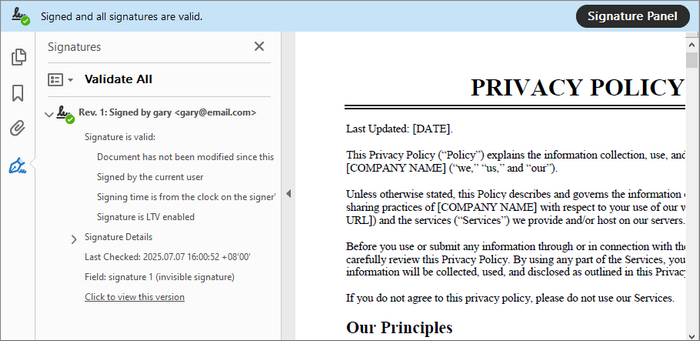
This basic implementation creates an invisible digital signature. The signature validates the document's integrity but doesn't provide a visual representation.
Output:
Customize PDF Signature Appearance
A digital signature can be customized to include additional information such as the signer's name, contact info, and even a visual signature image. This enhances the visual appeal and informational value of the signature.
Code Example:
using Spire.Pdf;
using Spire.Pdf.Graphics;
using Spire.Pdf.Interactive.DigitalSignatures;
using System.Security.Cryptography.X509Certificates;

namespace CustomSignatureAppearance
{
    class Program
    {
        static void Main(string[] args)
        {
            // Create a PdfDocument object to work with PDF files
            PdfDocument doc = new PdfDocument();

            // Load an existing PDF file from the specified path
            doc.LoadFromFile("C:/Users/Administrator/Desktop/Input.pdf");

            // Specify the path to the PFX certificate and its password
            string filePath = "C:/Users/Administrator/Desktop/certificate.pfx";
            string password = "e-iceblue";

            // Load the X.509 certificate from the PFX file
            X509Certificate2 x509 = new X509Certificate2(filePath, password,
                X509KeyStorageFlags.MachineKeySet | X509KeyStorageFlags.EphemeralKeySet);

            // Create a PdfOrdinarySignatureMaker to handle the signature process using the loaded certificate
            PdfOrdinarySignatureMaker signatureMaker = new PdfOrdinarySignatureMaker(doc, x509);

            // Get the signature
            PdfSignature signature = signatureMaker.Signature;

            // Configure the signature properties like the signer's name, contact information, location, and sign reason
            signature.Name = "Gary";
            signature.ContactInfo = "726349";
            signature.Location = "U.S.";
            signature.Reason = "This is the final version.";

            // Create a signature appearance
            PdfSignatureAppearance appearance = new PdfSignatureAppearance(signature);

            // Set labels for the signature
            appearance.NameLabel = "Signer: ";
            appearance.ContactInfoLabel = "Phone: ";
            appearance.LocationLabel = "Location: ";
            appearance.ReasonLabel = "Reason: ";

            // Load an image
            PdfImage image = PdfImage.FromFile("C:/Users/Administrator/Desktop/signature.png");

            // Set the image as the signature image
            appearance.SignatureImage = image;

            // Set the graphic mode as SignImageAndSignDetail
            appearance.GraphicMode = GraphicMode.SignImageAndSignDetail;

            // Get the last page
            PdfPageBase page = doc.Pages[doc.Pages.Count - 1];

            // Add the signature to a specified location of the page
            signatureMaker.MakeSignature("signature 1", page, 54.0f,  330.0f, 280.0f, 90.0f, appearance);

            // Save the signed PDF to a new file
            doc.SaveToFile("Signed.pdf");

            // Release resources
            doc.Dispose();
        }
    }
}
Key Features Explained:
-
PdfSignature Metadata :
- Name: Identifies the signer
- ContactInfo: Provides contact details
- Location: Geographical signing location
- Reason: Purpose of signing
-
PdfSignatureAppearance : Controls visual elements:
- Label customization for metadata fields
- Image integration via SignatureImage property
- Layout controlthrough GraphicMode (options: SignImageOnly, SignDetailOnly, SignImageAndSignDetail)
-
Precise Placement : The extended MakeSignature overload allows specifying:
- Target page
- X/Y coordinates
- Width/Height dimensions
Output:

To enhance the visibility and trustworthiness of your digitally signed PDF when opened in Adobe Reader, you can enable a validation indicator by applying the following method:
signatureMaker.SetAcro6Layers(false);

Add a Timestamp to PDF Digital Signature
Timestamping a digital signature adds an additional layer of security by proving when the document was signed. This is particularly important for long-term validity.
Code Example:
using Spire.Pdf;
using Spire.Pdf.Interactive.DigitalSignatures;
using Spire.Pdf.Security;
using System.Security.Cryptography.X509Certificates;

namespace SignPdfWithTimestamp
{
    class Program
    {
        static void Main(string[] args)
        {
            // Load PDF document
            PdfDocument doc = new PdfDocument();
            doc.LoadFromFile("C:/Users/Administrator/Desktop/Input.pdf");

            // Specify the path to the PFX certificate and its password
            string filePath = "C:/Users/Administrator/Desktop/certificate.pfx";
            string password = "e-iceblue";

            // Load the X.509 certificate from the PFX file
            X509Certificate2 x509 = new X509Certificate2(filePath, password,
                X509KeyStorageFlags.MachineKeySet | X509KeyStorageFlags.EphemeralKeySet);

            // Initialize PDFPKCS#7Formatter
            PdfPKCS7Formatter formatter = new PdfPKCS7Formatter(x509, false);

            // Set the timestamp service to a public timestamp server
            formatter.TimestampService = new TSAHttpService("http://tsa.cesnet.cz:3161/tsa");

            // Initialize OCSP service for online certificate status checking
            formatter.OCSPService = new OCSPHttpService(null);

            // Apply signature
            PdfOrdinarySignatureMaker signatureMaker = new PdfOrdinarySignatureMaker(doc, formatter);
            signatureMaker.MakeSignature("signature 1");

            // Save and cleanup
            doc.SaveToFile("SignWithTimeStamp.pdf");
            doc.Dispose();
        }
    }
}
Timestamp Implementation Details:
- PdfPKCS7Formatter : Enhances basic signing with:
- Timestamp support
- OCSP revocation checking
- Advanced cryptographic formatting
- TSAHttpService : Connects to a Time Stamp Authority (TSA) server. Public TSAs include:
- http://timestamp.digicert.com
- http://tsa.cesnet.cz:3161/tsa
- http://timestamp.sectigo.com
- OCSPHttpService : Optional Online Certificate Status Protocol service for real-time certificate validity checking.
Output:

Create a Signable Signature Field in PDF
Digital signature fields allow users to sign PDF documents interactively. This is essential for forms that require user signatures.
Code Example:
using System.Drawing;
using Spire.Pdf;
using Spire.Pdf.Fields;
using Spire.Pdf.Graphics;

namespace AddDigitalSignatureFiled
{
    class Program
    {
        static void Main(string[] args)
        {
            // Initialize a new PdfDocument object
            PdfDocument doc = new PdfDocument();

            // Load the existing PDF from the specified path
            doc.LoadFromFile("C:/Users/Administrator/Desktop/Input.pdf");

            // Retrieve the last page of the document
            PdfPageBase page = doc.Pages[doc.Pages.Count - 1];

            // Create a signature field on the specified page
            PdfSignatureField signatureField = new PdfSignatureField(page, "signature");

            // Customize the appearance of the signature field
            signatureField.BorderWidth = 1.0f;
            signatureField.BorderStyle = PdfBorderStyle.Solid;
            signatureField.BorderColor = new PdfRGBColor(System.Drawing.Color.Black);
            signatureField.HighlightMode = PdfHighlightMode.Outline;
            signatureField.Bounds = new RectangleF(54.0f, 350.0f, 200.0f, 100.0f);

            // Enable form creation if none exists in the document
            doc.AllowCreateForm = (doc.Form == null);

            // Add the signature field to the document's form
            doc.Form.Fields.Add(signatureField);

            // Save the modified document to a new file
            doc.SaveToFile("SignatureField.pdf", FileFormat.PDF);
            doc.Dispose();
        }
    }
}
Signature Field Features:
- PdfSignatureField : Represents a signable field in a PDF form with properties for:
- Visual styling (border, color)
- Positioning and sizing
- Interaction behavior
- Form Handling : The code automatically handles PDF form creation if none exists.
- Deferred Signing : Fields can be added now and signed later by end-users or additional processes.
Output:

Conclusion
Digitally signing PDFs with C# using Spire.PDF provides a robust solution for document authentication. Throughout this tutorial, we've explored:
- Basic certificate-based signing
- Custom signature appearances with images and metadata
- Timestamp integration for long-term validation
- Signature fields for form-based workflows
By implementing these techniques, you can enhance document security, compliance, and user trust in your applications. Whether for contracts, legal documents, or internal approvals, Spire.PDF simplifies end-to-end digital signing while maintaining industry standards.
FAQs
Q1: How do I verify a digitally signed PDF?
Spire.PDF provides verification capabilities through the PdfSignature class. You can check the VerifySignature method to validate signatures programmatically. For detailed guide, refer to: Verify Digital Signature in PDF with C#.
Q2: What certificate formats are supported?
Spire.PDF works with standard X.509 certificates, typically in PFX/P12 format for signing as they contain both public and private keys.
Q3: Can I add multiple signatures to a PDF?
Yes, you can add multiple signatures either by creating multiple signature fields or by incrementally signing the document.
Q4: How do I handle certificate expiration?
Using timestamps ensures signatures remain valid after certificate expiration. For long-term validation, consider using LTV (Long-Term Validation) enabled signatures.
Q5: Does Spire.PDF offer additional security options beyond digital signatures?
Yes, Spire.PDF allows you to password-protect your PDF documents and set specific document permissions. These features can be used alongside digital signatures to further enhance security.
Get a Free License
To fully experience the capabilities of Spire.PDF for .NET without any evaluation limitations, you can request a free 30-day trial license.
Securing PDFs with digital signatures is essential for ensuring the integrity and non-repudiation of the documents. With this in mind, the ability to verify the digital signatures is equally important. A valid signature means that the document hasn't been altered since it was signed and that it is indeed originated from the claimed source.
While dealing with the digital signatures, there are also times when you may want to get the certificates of the signatures to learn its issuer Information, subject information, serial number, and validity period, etc. In this article, you will learn how to verify or get the digital signatures in PDF in C# using Spire.PDF for .NET.
- Verify Digital Signatures in PDF Using C#
- Detect Whether a Signed PDF Has Been Modified Using C#
- Get the Certificates of Digital Signatures in PDF Using C#
Install Spire.PDF for .NET
To begin with, you need to add the DLL files included in the Spire.PDF for.NET package as references in your .NET project. The DLL files can be either downloaded from this link or installed via NuGet.
PM> Install-Package Spire.PDF
Verify Digital Signatures in PDF Using C#
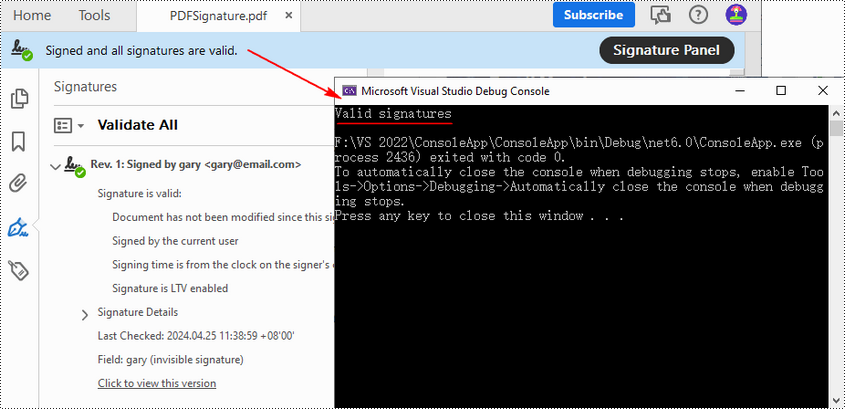
Spire.PDF for .NET provides the PdfSignature.VerifySignature() method to check the validity of the digital signatures in a PDF document directly. The following are the detailed steps.
- Create a PdfDocument object.
- Load a PDF file using PdfDocument.LoadFromFile() method.
- Get the form in the PDF file using PdfDocument.Form property, and then get a collection of form fields using PdfFormWidget.FieldsWidget property.
- Iterate through all fields and get the signature fields.
- Get PDF signatures using PdfSignatureFieldWidget.Signature property.
- Check the validity of the PDF signatures using PdfSignature.VerifySignature() method.
- C#
using Spire.Pdf;
using Spire.Pdf.Security;
using Spire.Pdf.Widget;

namespace GetSignatureCertificate
{
    class Program
    {
        static void Main(string[] args)
        {

            //Create a PdfDocument object
            PdfDocument pdf = new PdfDocument();

            //Load a PDF file
            pdf.LoadFromFile("PDFSignature.pdf");

            //Get a collection of form fields in the PDF file
            PdfFormWidget pdfFormWidget = (PdfFormWidget)pdf.Form;
            PdfFormFieldWidgetCollection pdfFormFieldWidgetCollection = pdfFormWidget.FieldsWidget;

            //Iterate through all fields
            for (int i = 0; i < pdfFormFieldWidgetCollection.Count; i++)
            {
                //Get the signature fields
                if (pdfFormFieldWidgetCollection[i] is PdfSignatureFieldWidget)
                {
                    PdfSignatureFieldWidget signatureFieldWidget = (PdfSignatureFieldWidget)pdfFormFieldWidgetCollection[i];

                    //Get the signatures
                    PdfSignature signature = signatureFieldWidget.Signature;

                    //Verify signatures
                    bool valid = signature.VerifySignature();
                    if (valid)
                    {
                        Console.WriteLine("Valid signatures");
                    }
                    else
                    {
                        Console.WriteLine("Invalid signatures");
                    }
                }
            }
        }
    }
}
Detect Whether a Signed PDF Has Been Modified Using C#
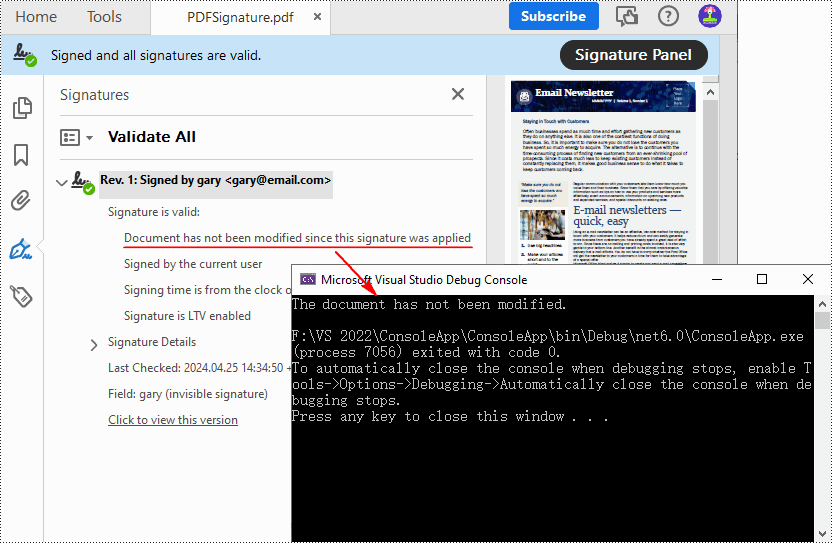
To verify if a PDF document has been modified after signing, you can use the PdfSignature.VerifyDocModified() method. If the result shows that document has been tampered with, this means that the signature will become invalid and the integrity of the document will be compromised. The following are the detailed steps.
- Create a PdfDocument object.
- Load a PDF document using PdfDocument.LoadFromFile() method.
- Get the form in the PDF document using PdfDocument.Form property, and then get a collection of form fields using PdfFormWidget.FieldsWidget property.
- Iterate through all fields and get the signature fields.
- Get PDF signatures using PdfSignatureFieldWidget.Signature property.
- Verify if the document has been modified after signing using PdfSignature.VerifyDocModified() method.
- C#
using Spire.Pdf;
using Spire.Pdf.Security;
using Spire.Pdf.Widget;

namespace GetSignatureCertificate
{
    class Program
    {
        static void Main(string[] args)
        {

            //Create a PdfDocument object
            PdfDocument pdf = new PdfDocument();

            //Load a PDF document
            pdf.LoadFromFile("PDFSignature.pdf");

            //Get a collection of form fields in the PDF file
            PdfFormWidget pdfFormWidget = (PdfFormWidget)pdf.Form;
            PdfFormFieldWidgetCollection pdfFormFieldWidgetCollection = pdfFormWidget.FieldsWidget;

            for (int i = 0; i < pdfFormFieldWidgetCollection.Count; i++)
            {
                //Get the signature fields
                if (pdfFormFieldWidgetCollection[i] is PdfSignatureFieldWidget)
                {
                    PdfSignatureFieldWidget signatureFieldWidget = (PdfSignatureFieldWidget)pdfFormFieldWidgetCollection[i];

                    //Get the signatures
                    PdfSignature signature = signatureFieldWidget.Signature;

                    //Check if the document has been modified after signing
                    bool modified = signature.VerifyDocModified();
                    if (modified)
                    {
                        Console.WriteLine("The document has been modified.");
                    }
                    else
                    {
                        Console.WriteLine("The document has not been modified.");
                    }
                }
            }
        }
    }
}
Get the Certificates of Digital Signatures in PDF Using C#
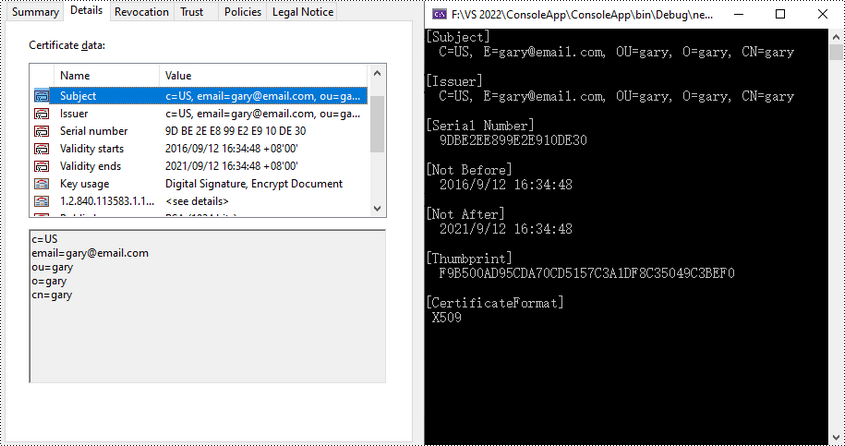
The digital certificates used to sign PDF files typically contain various pieces of information that verifies the identity of the issuer. With Spire.PDF for .NET, you can get the certificates in a PDF file through the PdfSignatureFieldWidget.Signature.Certificate property. The following are the detailed steps.
- Create a PdfDocument object.
- Load a PDF document using PdfDocument.LoadFromFile() method.
- Get the form in the PDF document using PdfDocument.Form property, and then get a collection of form fields using PdfFormWidget.FieldsWidget property.
- Iterate through all fields and get the signature fields.
- Get the certificate of the signature using PdfSignatureFieldWidget.Signature.Certificate property.
- Set to display the certificate in text format using PdfCertificate.ToString() method.
- Get the format of the certificate using PdfCertificate.GetFormat() method.
- Output the obtained certificate information.
- C#
using Spire.Pdf;
using Spire.Pdf.Widget;

namespace GetSignatureCertificate
{
    class Program
    {
        static void Main(string[] args)
        {
            //Create a PdfDocument object
            PdfDocument pdf = new PdfDocument();

            //Load a PDF file
            pdf.LoadFromFile("PDFSignature.pdf");

            //Get a collection of form fields in the PDF file
            PdfFormWidget pdfFormWidget = (PdfFormWidget)pdf.Form;
            PdfFormFieldWidgetCollection pdfFormFieldWidgetCollection = pdfFormWidget.FieldsWidget;

            //Iterate through all fields
            for (int i = 0; i < pdfFormFieldWidgetCollection.Count; i++)
            {
                //Get the signature fields
                if (pdfFormFieldWidgetCollection[i] is PdfSignatureFieldWidget)
                {
                    PdfSignatureFieldWidget signatureFieldWidget = (PdfSignatureFieldWidget)pdfFormFieldWidgetCollection[i];

                    //Get the certificate of the signature
                    string certificateInfo = signatureFieldWidget.Signature.Certificate.ToString();

                    //Get the format of the certificate
                    string format = signatureFieldWidget.Signature.Certificate.GetFormat();

                    //Output the certificate information
                    Console.WriteLine(certificateInfo + "\n" + "[CertificateFormat]\n " + format);
                }
            }
            Console.ReadKey();
        }
    }
}
Apply for a Temporary License
If you'd like to remove the evaluation message from the generated documents, or to get rid of the function limitations, please request a 30-day trial license for yourself.
HTML is the standard format for web pages and online content. However, there are many scenarios where you may need to convert HTML documents into other file formats, such as PDF, XPS, and XML. Whether you're looking to generate a printable version of a web page, share HTML content in a more universally accepted format, or extract data from HTML for further processing, being able to reliably convert HTML documents to these alternate formats is an important skill to have. In this article, we will demonstrate how to convert HTML to PDF, XPS, and XML in C# using Spire.Doc for .NET.
- Convert HTML to PDF in C#
- Convert HTML String to PDF in C#
- Convert HTML to XPS in C#
- Convert HTML to XML in C#
Install Spire.Doc for .NET
To begin with, you need to add the DLL files included in the Spire.Doc for .NET package as references in your .NET project. The DLL files can be either downloaded from this link or installed via NuGet.
PM> Install-Package Spire.Doc
Convert HTML to PDF in C#
Converting HTML to PDF offers several advantages, including enhanced portability, consistent formatting, and easy sharing. PDF files retain the original layout, styling, and visual elements of the HTML content, ensuring that the document appears the same across different devices and platforms.
You can use the Document.SaveToFile(string filename, FileFormat.PDF) method to convert an HTML file to PDF format. The detailed steps are as follows.
- Create an instance of the Document object.
- Load an HTML file using the Document.LoadFromFile() method.
- Save the HTML file to PDF format using the Document.SaveToFile(string filename, FileFormat.PDF) method.
- C#
using Spire.Doc;
using Spire.Doc.Documents;

namespace ConvertHtmlToPdf
{
    internal class Program
    {
        static void Main(string[] args)
        {
            // Create an instance of the Document class
            Document doc = new Document();
            // Load an HTML file
            doc.LoadFromFile("Sample.html", FileFormat.Html, XHTMLValidationType.None);

            //Convert the HTML file to PDF format
            doc.SaveToFile("HtmlToPDF.pdf", FileFormat.PDF);
            doc.Close();
        }
    }
}

Convert HTML String to PDF in C#
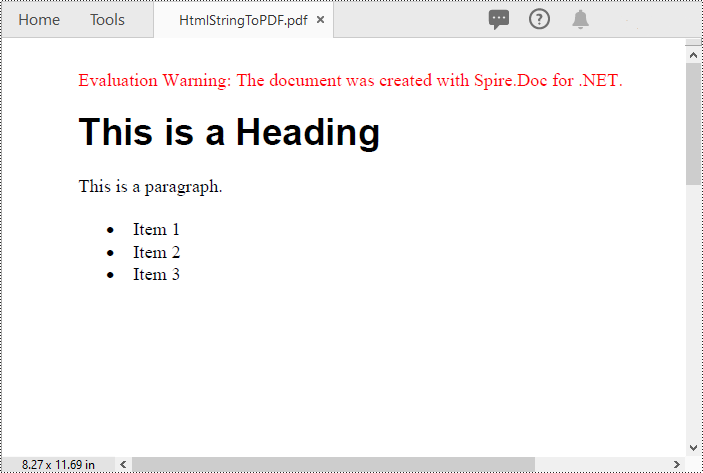
In addition to converting HTML files to PDF, you are also able to convert HTML strings to PDF. Spire.Doc for .NET provides the Paragraph.AppendHTML() method to add an HTML string to a Word document. Once the HTML string has been added, you can convert the result document to PDF using the Document.SaveToFile(string filename, FileFormat.PDF) method. The detailed steps are as follows.
- Create an instance of the Document object.
- Add a paragraph to the document using the Document.AddSection().AddParagraph() method.
- Append an HTML string to the paragraph using the Paragraph.AppendHTML() method.
- Save the document to PDF format using the Document.SaveToFile(string filename, FileFormat.PDF) method.
- C#
using Spire.Doc;
using Spire.Doc.Documents;

namespace ConvertHtmlStringToPdf
{
    internal class Program
    {
        static void Main(string[] args)
        {
            // Create an instance of the Document class
            Document doc = new Document();
            // Add a paragraph to the document
            Paragraph para = doc.AddSection().AddParagraph();
            // Specify the HTML string
            string htmlString = @"<h1>This is a Heading</h1>
                                  <p>This is a paragraph.</p>
                                  <ul>
                                    <li>Item 1</li>
                                    <li>Item 2</li>
                                    <li>Item 3</li>
                                  </ul>";

            // Append the HTML string to the paragraph
            para.AppendHTML(htmlString);

            // Convert the document to PDF format
            doc.SaveToFile("HtmlStringToPDF.pdf", FileFormat.PDF);
            doc.Close();
        }
    }
}
Convert HTML to XPS in C#
XPS, or XML Paper Specification, is an alternative format to PDF that provides similar functionality and advantages. Converting HTML to XPS ensures the preservation of document layout, fonts, and images while maintaining high fidelity. XPS files are optimized for printing and can be viewed using XPS viewers or Windows' built-in XPS Viewer.
By using the Document.SaveToFile(string filename, FileFormat.XPS) method, you can convert HTML files to XPS format with ease. The detailed steps are as follows.
- Create an instance of the Document object.
- Load an HTML file using the Document.LoadFromFile() method.
- Save the HTML file to XPS format using the Document.SaveToFile(string filename, FileFormat.XPS) method.
- C#
using Spire.Doc;
using Spire.Doc.Documents;

namespace ConvertHtmlToXps
{
    internal class Program
    {
        static void Main(string[] args)
        {
            // Create an instance of the Document class
            Document doc = new Document();
            // Load an HTML file
            doc.LoadFromFile("Sample.html", FileFormat.Html, XHTMLValidationType.None);

            //Convert the HTML file to XPS format
            doc.SaveToFile("HtmlToXPS.xps", FileFormat.XPS);
            doc.Close();
        }
    }
}

Convert HTML to XML in C#
Converting HTML to XML unlocks the potential for data extraction, manipulation, and integration with other systems. XML is a flexible and extensible markup language that allows for structured representation of data. By converting HTML to XML, you can extract specific elements, organize data hierarchically, and perform data analysis or integration tasks using XML processing tools and techniques.
To convert HTML files to XML format, you can use the Document.SaveToFile(string filename, FileFormat.Xml) method. The detailed steps are as follows.
- Create an instance of the Document object.
- Load an HTML file using the Document.LoadFromFile() method.
- Save the HTML file to XML format using the Document.SaveToFile(string filename, FileFormat.Xml) method.
- C#
using Spire.Doc;
using Spire.Doc.Documents;

namespace ConvertHtmlToXml
{
    internal class Program
    {
        static void Main(string[] args)
        {
            // Create an instance of the Document class
            Document doc = new Document();
            // Load an HTML file
            doc.LoadFromFile("Sample.html", FileFormat.Html, XHTMLValidationType.None);

            //Convert the HTML file to XML format
            doc.SaveToFile("HtmlToXML.xml", FileFormat.Xml);
            doc.Close();
        }
    }
}

Apply for a Temporary License
If you'd like to remove the evaluation message from the generated documents, or to get rid of the function limitations, please request a 30-day trial license for yourself.
