
Knowledgebase (2370)
Children categories
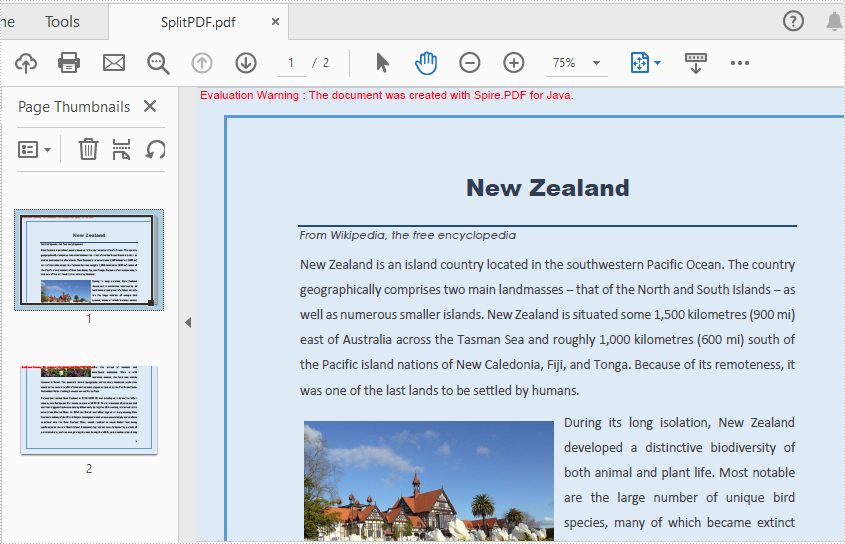
Spire.PDF for java offers PdfDocument.split() method to split one PDF document to multiple files by pages. In this article, we will demonstrate how to horizontally or vertically split a single PDF page into multiple pages in Java by using Spire.PDF for Java.
Install Spire.PDF for Java
First of all, you need to add the Spire.PDF.jar file as a dependency in your Java program. The JAR file can be downloaded from this link. If you use Maven, you can easily import the JAR file by adding the following code to your project's pom.xml file.
<repositories>
    <repository>
        <id>com.e-iceblue</id>
        <name>e-iceblue</name>
        <url>https://repo.e-iceblue.com/nexus/content/groups/public/</url>
    </repository>
</repositories>
<dependencies>
    <dependency>
        <groupId>e-iceblue</groupId>
        <artifactId>spire.pdf</artifactId>
        <version>12.7.0</version>
    </dependency>
</dependencies>
Split a PDF Page into multiple Pages
Spire.PDF for Java offers PdfPageBase.createTemplate().draw() method to draw the content of a source page on a new PDF page. Splitting a page into multiple pages actually means that the content of the source page will be drew on multiple smaller pages. The following are the main steps to split the first page into two pages:
- Create an object of PdfDocument class and load a sample PDF document using PdfDocument.loadFromFile() method.
- Get the desired page of PDF using PdfDocument.getPages().get() method.
- Create a new PDF document and set the page margins to 0.
- Set the page size of the new PDF to half or a fraction of that of the original.
- Add a new page to the new PDF document using PdfDocument.getPages().add() method.
- Draw content of source page on the new page using PdfPageBase.createTemplate().draw() method.
- Save the document to another file using PdfDocument.saveToFile() method.
- Java
import com.spire.pdf.*;
import com.spire.pdf.graphics.*;
import java.awt.geom.Point2D;

public class SplitPDF {
    public static void main(String[] args) throws Exception {

        //Create an object of PdfDocument class.
        PdfDocument pdf = new PdfDocument();

        //Load the sample PDF document
        pdf.loadFromFile("Sample.pdf");

        //Get the first page of PDF
        PdfPageBase page = pdf.getPages().get(0);

        //Create a new PDF document and remove page margins
        PdfDocument newPdf = new PdfDocument();
        newPdf.getPageSettings().getMargins().setAll(0);

        //Horizontally Split
        newPdf.getPageSettings().setWidth((float) page.getSize().getWidth());
        newPdf.getPageSettings().setHeight((float) page.getSize().getHeight()/2);

        ////Vertically Split
        //newPdf.getPageSettings().setWidth((float) page.getSize().getWidth()/2);
        //newPdf.getPageSettings().setHeight((float) page.getSize().getHeight());

        // Add a new page to the new PDF document
        PdfPageBase newPage = newPdf.getPages().add();

        //Set the PdfLayoutType to Paginate to make the content paginated automatically
        PdfTextLayout layout = new PdfTextLayout();
        layout.setBreak(PdfLayoutBreakType.Fit_Page);
        layout.setLayout(PdfLayoutType.Paginate);

        //Draw the content of source page in the new page
        page.createTemplate().draw(newPage, new Point2D.Float(0, 0), layout);

        //Save the Pdf document
        newPdf.saveToFile("SplitPDF.pdf");
        newPdf.close();

    }
}
Apply for a Temporary License
If you'd like to remove the evaluation message from the generated documents, or to get rid of the function limitations, please request a 30-day trial license for yourself.
Hyperlinks in PowerPoint are clickable objects that enable you to jump to another slide in the same/different PowerPoint document or to a specific website. They are a great way to add additional resources to your slides, and they can also make the document more interactive. In addition to adding hyperlinks to PowerPoint documents, Spire.Presentation for Java also supports modifying and removing the existing hyperlinks. This article is going to introduce how to achieve the above two functions.
Install Spire.Presentation for Java
First of all, you're required to add the Spire.Presentation.jar file as a dependency in your Java program. The JAR file can be downloaded from this link. If you use Maven, you can easily import the JAR file in your application by adding the following code to your project's pom.xml file.
<repositories>
    <repository>
        <id>com.e-iceblue</id>
        <name>e-iceblue</name>
        <url>https://repo.e-iceblue.com/nexus/content/groups/public/</url>
    </repository>
</repositories>
<dependencies>
    <dependency>
        <groupId>e-iceblue</groupId>
        <artifactId>spire.presentation</artifactId>
        <version>11.7.2</version>
    </dependency>
</dependencies>
Modify Hyperlinks in PowerPoint
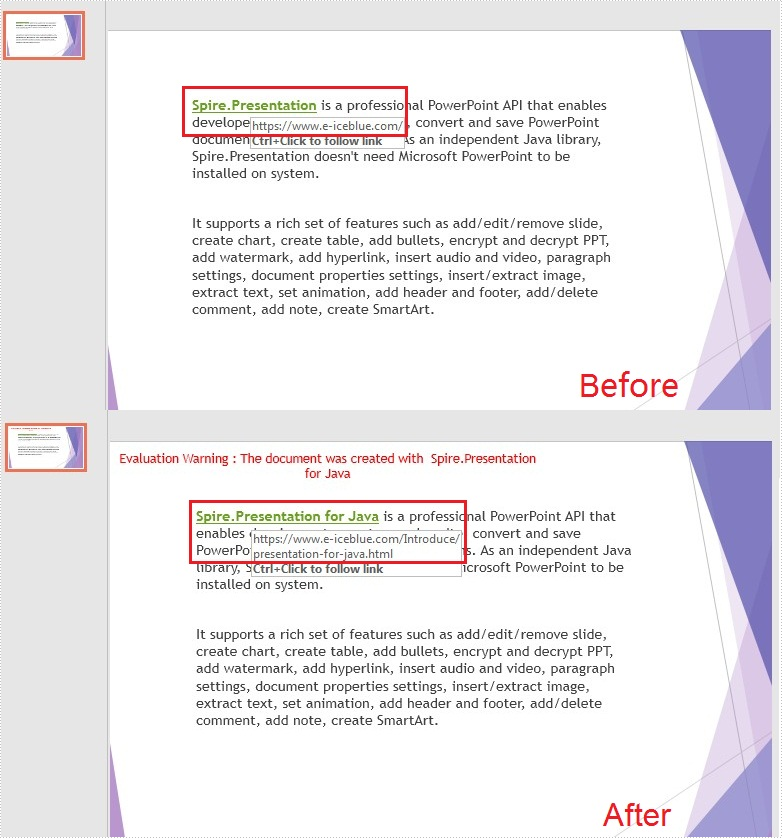
With Spire.Presentation for Java, you are allowed to set a new hyperlink address and display text for the existing hyperlink. The following are the detailed steps to modify a hyperlink in PowerPoint.
- Create a Presentation object and load a PowerPoint document using Presentation.loadFromFile() method.
- Get a specified slide using Presentation.getSlides().get() method.
- Get the shapes of the specified slide using getShapes() method under ISlide interface, and then get the specified shape that contains the hyperlink using ShapeList.get() method.
- Get the text range of the existing hyperlink using IAutoShape.getTextFrame().getTextRange() method, and then set a new hyperlink display text for the text range using PortionEx.setText() method.
- Get the existing clickable hyperlink of the text range using TextCharacterProperties.getClickAction() method, and then set a new hyperlink address using ClickHyperlink.setAddress() method.
- Save the document to file using Presentation.saveToFile() method.
- Java
import com.spire.presentation.*;

public class modifyHyperlink {
    public static void main(String[] args) throws Exception {

        //Create a Presentation object and load a PowerPoint document
        Presentation presentation = new Presentation();
        presentation.loadFromFile("test.pptx");

        //Get the shape that contains the hyperlink
        IAutoShape shape = (IAutoShape)presentation.getSlides().get(0).getShapes().get(0);

        //Edit the hyperlink text and address
        shape.getTextFrame().getTextRange().setText("Spire.Presentation for Java");
        shape.getTextFrame().getTextRange().getClickAction().setAddress("https://www.e-iceblue.com/Introduce/presentation-for-java.html");

        //Save to file.
        presentation.saveToFile("ModifyHyperlink.pptx", FileFormat.PPTX_2013);
    }
}
Remove Hyperlinks in PowerPoint
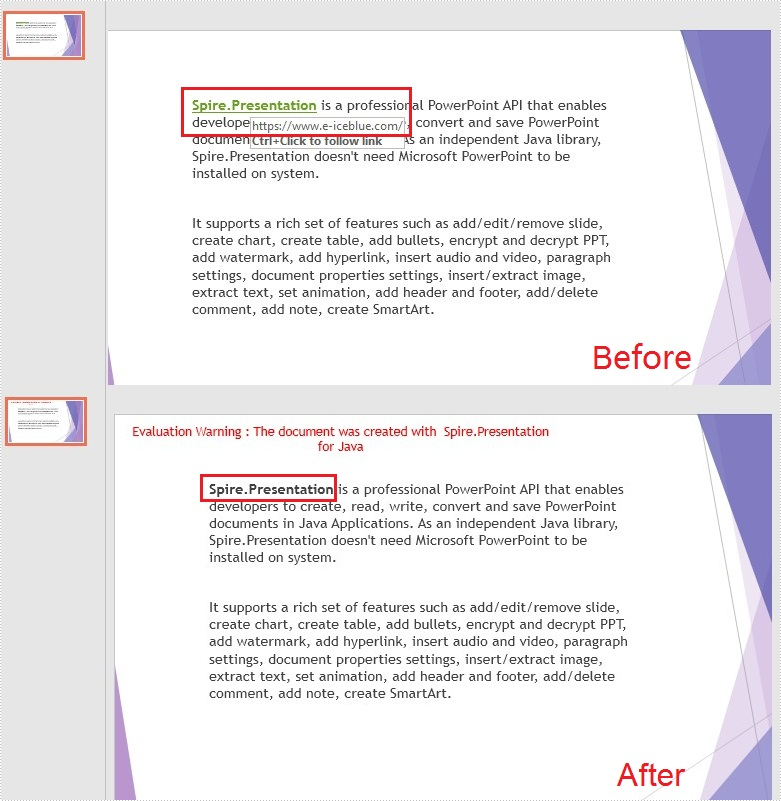
When a hyperlink needs to be removed for some reason, Spire.Persentation for Java provides the TextCharacterProperties.setClickAction() method. And by setting its value to null, you could remove the hyperlink easily in PowerPoint. The detailed steps are as follows:
- Create a Presentation object and load a PowerPoint document using Presentation.loadFromFile() method.
- Get a specified slides using Presentation.getSlides().get() method.
- Get the shapes of the specified slide using getShapes() method under ISlide interface, and then get the specified shape that contains the hyperlink using ShapeList.get() method.
- Get the text range of the existing hyperlink using IAutoShape.getTextFrame().getTextRange() method, and then remove the hyperlink by setting the value of the TextCharacterProperties.setClickAction() method to null.
- Save the document to file using Presentation.saveToFile() method.
- Java
import com.spire.presentation.*;

public class removeHyperlink {
    public static void main(String[] args) throws Exception {

        //Create a Presentation object and load a PowerPoint document
        Presentation presentation = new Presentation();
        presentation.loadFromFile("test.pptx");

        //Get the shape that contains the hyperlink.
        IAutoShape shape = (IAutoShape)presentation.getSlides().get(0).getShapes().get(0);

        //Set the click action to null to remove the hyperlink.
        shape.getTextFrame().getTextRange().setClickAction(null);

        //Save to file.
        presentation.saveToFile("RemoveHyperlink.pptx", FileFormat.PPTX_2013);
    }
}
Apply for a Temporary License
If you'd like to remove the evaluation message from the generated documents, or to get rid of the function limitations, please request a 30-day trial license for yourself.
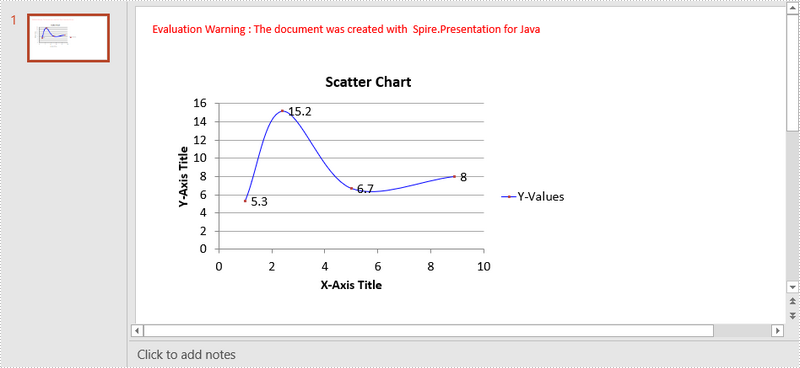
A scatter (XY) chart is a two-dimensional chart that shows the relationship between two sets of variables. Each scatter chart has two axes: a horizontal axis (x-axis) and a vertical axis (y-axis), and it accepts only one data series. In this article, you will learn how to add a scatter chart to a PowerPoint slide using Spire.Presentation for Java.
Install Spire.Presentation for Java
First of all, you're required to add the Spire.Presentation.jar file as a dependency in your Java program. The JAR file can be downloaded from this link. If you use Maven, you can easily import the JAR file in your application by adding the following code to your project's pom.xml file.
<repositories>
    <repository>
        <id>com.e-iceblue</id>
        <name>e-iceblue</name>
        <url>https://repo.e-iceblue.com/nexus/content/groups/public/</url>
    </repository>
</repositories>
<dependencies>
    <dependency>
        <groupId>e-iceblue</groupId>
        <artifactId>spire.presentation</artifactId>
        <version>11.7.2</version>
    </dependency>
</dependencies>
Create a Scatter Chart in PowerPoint
Spire.Presentation for Java provides the ShapeCollection.appendChart(ChartType type, Rectangle2D rectangle, boolean init) method to add charts of a certain type to a presentation slide. The ChartType enumeration pre-defines 73 chart types, including scatter chart, column chart, pie chart, etc. The following are the main steps to add a scatter chart in PowerPoint.
- Create a Presentation object.
- Append a scatter chart to the specific slide using ShapeCollection.appendChart() method.
- Set the chart data through ChartData.get().setValue() method.
- Set the chart title, axes titles, series labels, etc. using the methods under IChart interface.
- Set the grid line style and data point line style.
- Save the document to file using Presentation.saveToFile() method.
- Java
import com.spire.presentation.FileFormat;
import com.spire.presentation.Presentation;
import com.spire.presentation.SlideSizeType;
import com.spire.presentation.TextLineStyle;
import com.spire.presentation.charts.ChartType;
import com.spire.presentation.charts.IChart;
import com.spire.presentation.charts.entity.ChartDataLabel;
import com.spire.presentation.drawing.FillFormatType;

import java.awt.*;
import java.awt.geom.Rectangle2D;

public class CreateScatterChart {

    public static void main(String[] args) throws Exception {

        //Create a Presentation object
        Presentation presentation = new Presentation();
        presentation.getSlideSize().setType(SlideSizeType.SCREEN_16_X_9);

        //Add a scatter chart to the first slide
        IChart chart = presentation.getSlides().get(0).getShapes().appendChart(ChartType.SCATTER_SMOOTH_LINES_AND_MARKERS,new Rectangle2D.Float(40, 80, 550, 320),false);

        //Set the chart title
        chart.getChartTitle().getTextProperties().setText("Scatter Chart");
        chart.getChartTitle().getTextProperties().isCentered(true);
        chart.getChartTitle().setHeight(20f);
        chart.hasTitle(true);

        //Set the chart data
        Double[] xData = new Double[] { 1.0, 2.4, 5.0, 8.9 };
        Double[] yData = new Double[] { 5.3, 15.2, 6.7, 8.0 };
        chart.getChartData().get(0,0).setText("X-Values");
        chart.getChartData().get(0,1).setText("Y-Values");
        for (int i = 0; i < xData.length; i++) {
            chart.getChartData().get(i+1,0).setValue(xData[i]);
            chart.getChartData().get(i+1,1).setValue(yData[i]);
        }

        //Set the series label
        chart.getSeries().setSeriesLabel(chart.getChartData().get("B1","B1"));

        //Set the X and Y values
        chart.getSeries().get(0).setXValues(chart.getChartData().get("A2","A5"));
        chart.getSeries().get(0).setYValues(chart.getChartData().get("B2","B5"));

        //Add data labels
        for (int i = 0; i < 4; i++)
        {
            ChartDataLabel dataLabel = chart.getSeries().get(0).getDataLabels().add();
            dataLabel.setLabelValueVisible(true);
        }

        //Set the primary axis title and the secondary axis title
        chart.getPrimaryValueAxis().hasTitle(true);
        chart.getPrimaryValueAxis().getTitle().getTextProperties().setText("X-Axis Title");
        chart.getSecondaryValueAxis().hasTitle(true);
        chart.getSecondaryValueAxis().getTitle().getTextProperties().setText("Y-Axis Title");

        //Set the grid line
        chart.getSecondaryValueAxis().getMajorGridTextLines().setFillType(FillFormatType.SOLID);
        chart.getSecondaryValueAxis().getMajorGridTextLines().setStyle(TextLineStyle.THIN_THIN);
        chart.getSecondaryValueAxis().getMajorGridTextLines().getSolidFillColor().setColor(Color.GRAY);
        chart.getPrimaryValueAxis().getMajorGridTextLines().setFillType(FillFormatType.NONE);

        //Set the data point line
        chart.getSeries().get(0).getLine().setFillType(FillFormatType.SOLID);
        chart.getSeries().get(0).getLine().setWidth(0.1f);
        chart.getSeries().get(0).getLine().getSolidFillColor().setColor(Color.BLUE);

        //Save the document to file
        presentation.saveToFile("output/ScatterChart.pptx", FileFormat.PPTX_2016);
    }
}
Apply for a Temporary License
If you'd like to remove the evaluation message from the generated documents, or to get rid of the function limitations, please request a 30-day trial license for yourself.
