
Knowledgebase (2370)
Children categories
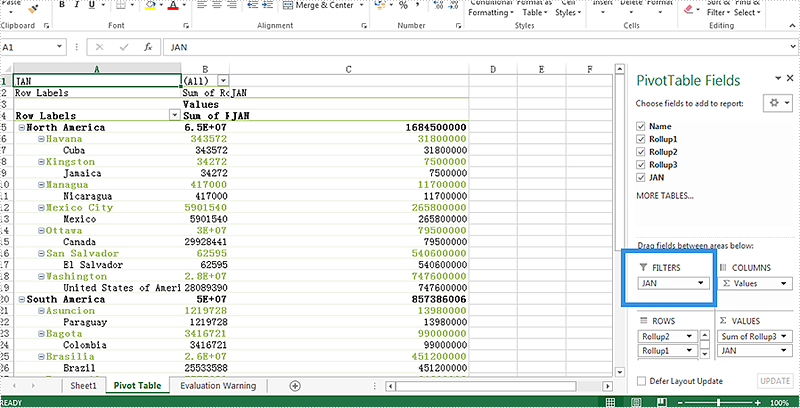
To view the large amount of Excel data's easily, Spire.XLS for .NET supports create Pivot table and add excel table with filters. Spire.XLS also offers a method of pivotTable.ReportFilters.Add(); to enable developers to add the report filter to the pivot table.
This article will show you how to add a report filter to the Excel Pivot table in C#.
Note: Before Start, please download the latest version of Spire.XLS and add Spire.xls.dll in the bin folder as the reference of Visual Studio.
Firstly, please check the original screenshot of excel pivot table.
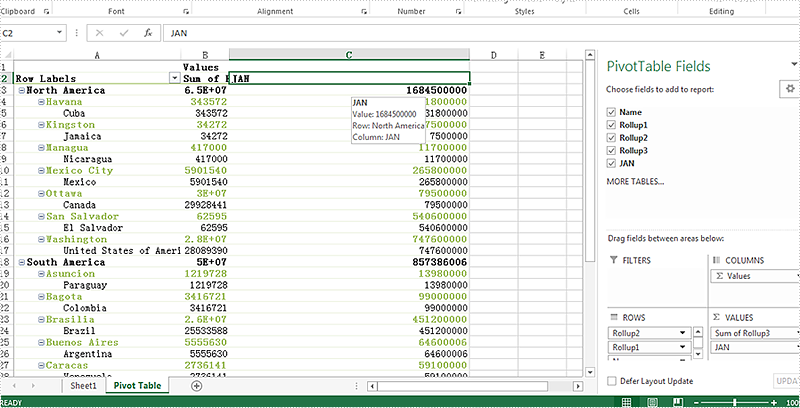
Step 1: Create a new workbook and load from file.
Workbook workbook = new Workbook();
workbook.LoadFromFile("Sample.xlsx");
Step 2: Get the PivotTable from the Excel worksheet.
Spire.Xls.Core.Spreadsheet.PivotTables.XlsPivotTable pivotTable = workbook.Worksheets["Pivot Table"].PivotTables[0] as Spire.Xls.Core.Spreadsheet.PivotTables.XlsPivotTable;
Step 3: Add a filter to the pivot table.
PivotReportFilter filter = new PivotReportFilter("JAN", true);
pivotTable.ReportFilters.Add(filter);
Step 4: Save the document to file and launch to preview it.
workbook.SaveToFile("Result.xlsx", ExcelVersion.Version2010);
System.Diagnostics.Process.Start("result.xlsx");
Effective screenshot after add a filter to the pivot table:
Full codes:
using Spire.Xls;
using Spire.Xls.Core.Spreadsheet.PivotTables;

namespace AddReportFilter
{
    class Program
    {
        static void Main(string[] args)
        {
            Workbook workbook = new Workbook();
            workbook.LoadFromFile("Sample.xlsx");

            Spire.Xls.Core.Spreadsheet.PivotTables.XlsPivotTable pivotTable = workbook.Worksheets["Pivot Table"].PivotTables[0] as Spire.Xls.Core.Spreadsheet.PivotTables.XlsPivotTable;

            PivotReportFilter filter = new PivotReportFilter("JAN", true);
            pivotTable.ReportFilters.Add(filter);

            workbook.SaveToFile("Result.xlsx", ExcelVersion.Version2010);
            System.Diagnostics.Process.Start("result.xlsx");
        }
    }
}
Generally we add predefined information or insert elements such as data, time and file name to Excel header or footer for printing purpose. Header or footer can be manually inserted or modified in Page Layout View or from Page Setup dialog box.
This article will present how to insert header and footer at runtime using Spire.XLS for WPF. Spire.XLS provides a class of PageSetup that contains all the page setup settings including header and footer, and a set of script commands that are used to set header and footer formatting.
Script Commands:
| Commands | Description |
| &G | A picture |
| &D | The current data |
| &T | The current time |
| &A | Worksheet name |
| &F | File name |
| &B | Make text bold |
| &I | Italicize text |
| &<Font name> | Font name. For example: &"Arial" |
| &K<Html color code> | Font color. For example: &KFFFFF0 |
Code Snippets:
Step 1: Initialize a new instance of Workbook class and get the first sheet from workbook.
Workbook wb = new Workbook();
Worksheet sheet = wb.Worksheets[0];
Step 2: Insert header text with formatting (specified font name, size and color) to the left part of Excel header.
sheet.PageSetup.LeftHeader ="&\"Showcard Gothic\"&14&K8B2252 Header and Footer Sample";
Step 3: Insert footer with formatting to the center part of Excel footer.
sheet.PageSetup.CenterFooter = "&B Copyright © 2016 e-iceblue. All Rights Reserved.";
Step 4: Save and launch the file.
wb.SaveToFile(@"..\Sample.xls");
System.Diagnostics.Process.Start(@"..\Sample.xls");
Output:
Header

Footer

Full Code:
using System.Drawing;
using System.Windows;

namespace WpfApplication1
{
    public partial class MainWindow : Window
    {
        public MainWindow()
        {
            InitializeComponent();
        }
        private void button1_Click(object sender, RoutedEventArgs e)
        {
            Workbook wb = new Workbook();
            Worksheet sheet = wb.Worksheets[0];

            sheet.PageSetup.LeftHeader = "&\"Showcard Gothic\"&14&K8B2252 Header and Footer Sample";
            sheet.PageSetup.CenterFooter = "&B Copyright © 2016 e-iceblue. All Rights Reserved.";

            wb.SaveToFile(@"..\Sample.xls");
            System.Diagnostics.Process.Start(@"..\Sample.xls");

        }
    }
}
Imports System.Drawing
Imports System.Windows

Namespace WpfApplication1
	Public Partial Class MainWindow
		Inherits Window
		Public Sub New()
			InitializeComponent()
		End Sub
		Private Sub button1_Click(sender As Object, e As RoutedEventArgs)
			Dim wb As New Workbook()
			Dim sheet As Worksheet = wb.Worksheets(0)

			sheet.PageSetup.LeftHeader = "&""Showcard Gothic""&14&K8B2252 Header and Footer Sample"
			sheet.PageSetup.CenterFooter = "&B Copyright © 2016 e-iceblue. All Rights Reserved."

			wb.SaveToFile("..\Sample.xls")
			System.Diagnostics.Process.Start("..\Sample.xls")

		End Sub
	End Class
End Namespace
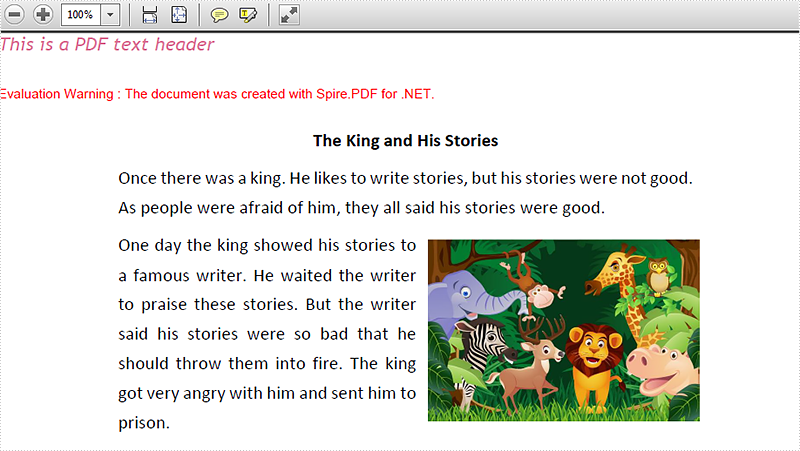
We often use header to the PDF file to give additional information to the PDF file. With Spire.PDF for WPF, developers can easily use the method SetDocumentTemplate() to create a PDF template that only contains header text and header image. By invoking this method, the template will be applied to all pages in your PDF document. This article will demonstrate how to add a header to PDF in C# on WPF applications.
Note: Before Start, please download the latest version of Spire.PDF and add Spire.Pdf.Wpf.dll in the bin folder as the reference of Visual Studio.
Step 1: Create a new PDF document, set its margin and load from file.
PdfDocument doc = new PdfDocument();
doc.PageSettings.Margins.All = 0;
PdfPageBase page = null;
PdfDocument original = new PdfDocument();
original.LoadFromFile("Test.pdf");
Step 2: Create a SetDocumentTemplate() method to add header text.
SetDocumentTemplate(doc, PdfPageSize.A4, original.PageSettings.Margins);
Step 3: Traverse every page of the original PDF document and create a new page with the original contents.
foreach (PdfPageBase origianlPage in original.Pages)
{
    page = doc.Pages.Add(new SizeF(origianlPage.Size.Width, origianlPage.Size.Height));
    origianlPage.CreateTemplate().Draw(page, 0, -(original.PageSettings.Margins.Top));
}
Step 4: Save the document to file and launch to preview it.
doc.SaveToFile("output.pdf");
System.Diagnostics.Process.Start("output.pdf");
Step 5: Details of how to add the header text to the PDF.
private static void SetDocumentTemplate(PdfDocument doc, SizeF pageSize, PdfMargins margin)
{
    PdfPageTemplateElement topSpace = new PdfPageTemplateElement(pageSize.Width, margin.Top);
    topSpace.Foreground = true;
    doc.Template.Top = topSpace;
    PdfTrueTypeFont font1 = new PdfTrueTypeFont(new Font("Trebuchet MS", 14f, System.Drawing.FontStyle.Italic));
    String label = "This is a PDF text header";
    SizeF size = font1.MeasureString(label);
    float y = 0;
    float x = 0;
    topSpace.Graphics.DrawString(label, font1, PdfBrushes.PaleVioletRed, x, y);
}
Effective screenshot:
Full codes:
private void button1_Click(object sender, RoutedEventArgs e)
 {
     // Create a pdf document.
     PdfDocument doc = new PdfDocument();
     doc.PageSettings.Margins.All = 0;
     PdfPageBase page = null;
     PdfDocument original = new PdfDocument();

     original.LoadFromFile("Test.pdf");

     SetDocumentTemplate(doc, PdfPageSize.A4, original.PageSettings.Margins);
     foreach (PdfPageBase origianlPage in original.Pages)
     {
         page = doc.Pages.Add(new SizeF(origianlPage.Size.Width, origianlPage.Size.Height));
         origianlPage.CreateTemplate().Draw(page, 0, -(original.PageSettings.Margins.Top));

     }

     doc.SaveToFile("output.pdf");
     System.Diagnostics.Process.Start("output.pdf");

 }
 private static void SetDocumentTemplate(PdfDocument doc, SizeF pageSize, PdfMargins margin)
 {
     PdfPageTemplateElement topSpace = new PdfPageTemplateElement(pageSize.Width, margin.Top);
     topSpace.Foreground = true;
     doc.Template.Top = topSpace;
     PdfTrueTypeFont font1 = new PdfTrueTypeFont(new Font("Trebuchet MS", 14f, System.Drawing.FontStyle.Italic));
     String label = "This is a PDF text header";
     SizeF size = font1.MeasureString(label);
     float y = 0;
     float x = 0;
     topSpace.Graphics.DrawString(label, font1, PdfBrushes.PaleVioletRed, x, y);
 }
