
Knowledgebase (2370)
Children categories
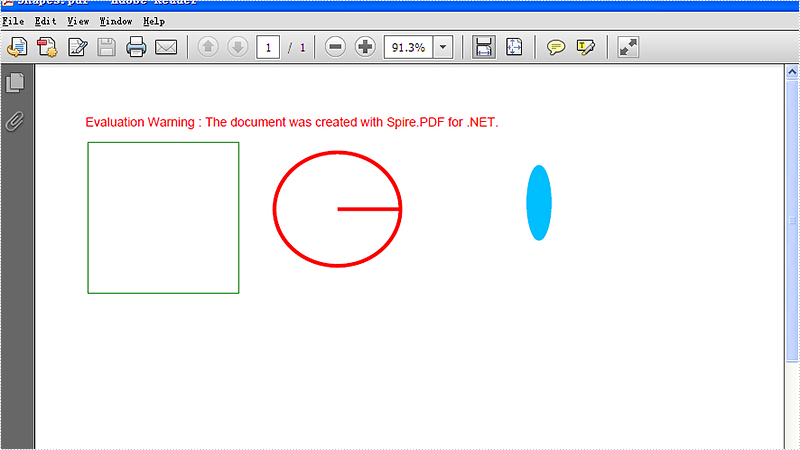
We often use shape to the PDF file to make it obvious and show the data clearly. With Spire.PDF for WPF, developers can easily use the object Spire.Pdf.PdfPageBase.Canvas to add different kind of shapes, such as rectangle, circle and Ellipse, etc. This article will demonstrate how to add shapes to PDF in C# on WPF applications.
Note: Before Start, please download the latest version of Spire.PDF and add Spire.Pdf.Wpf.dll in the bin folder as the reference of Visual Studio.
Here comes to the steps of how to add shapes to PDF file in C#:
Step 1: Create a new PDF document and add a page to it.
PdfDocument pdfDoc = new PdfDocument();
PdfPageBase page = pdfDoc.Pages.Add();
Step 2: Save graphics state.
PdfGraphicsState state = page.Canvas.Save();
Step 3: Set the color for the shapes.
PdfPen pen = new PdfPen(System.Drawing.Color.ForestGreen, 0.1f);
PdfPen pen1 = new PdfPen(System.Drawing.Color.Red, 3f);
PdfBrush brush = new PdfSolidBrush(System.Drawing.Color.DeepSkyBlue);
Step 4: Draw shapes and set the position for them.
page.Canvas.DrawRectangle(pen, new System.Drawing.Rectangle(new System.Drawing.Point(2, 22), new System.Drawing.Size(120, 120)));
page.Canvas.DrawPie(pen1, 150, 30, 100, 90, 360, 360);
page.Canvas.DrawEllipse(brush, 350, 40, 20, 60);
Step 5: Restore graphics.
page.Canvas.Restore(state);
Step 6: Save the PDF document to file.
pdfDoc.SaveToFile("Shapes.pdf");
Effective screenshots of the adding shapes to PDF file:
Full codes:
private void button1_Click(object sender, RoutedEventArgs e)
{
    PdfDocument pdfDoc = new PdfDocument();
    PdfPageBase page = pdfDoc.Pages.Add();
    PdfGraphicsState state = page.Canvas.Save();
    PdfPen pen = new PdfPen(System.Drawing.Color.ForestGreen, 0.1f);
    PdfPen pen1 = new PdfPen(System.Drawing.Color.Red, 3f);
    PdfBrush brush = new PdfSolidBrush(System.Drawing.Color.DeepSkyBlue);

    //draw rectangle
    page.Canvas.DrawRectangle(pen, new System.Drawing.Rectangle(new System.Drawing.Point(2, 22), new System.Drawing.Size(120, 120)));
    //draw circle
    page.Canvas.DrawPie(pen1, 150, 30, 100, 90, 360, 360);
    //draw ellipse
    page.Canvas.DrawEllipse(brush, 350, 40, 20, 60);

    page.Canvas.Restore(state);
    pdfDoc.SaveToFile("Shapes.pdf");
}
The simplest and most efficient way to keep your Excel file confidential is to encrypt the whole workbook or the specified worksheet with password. Apart from setting a password for your document, you could also choose whether to protect workbook structure or protect worksheet with a certain protection type.
In this article, I am going to introduce how to password protect a workbook or a worksheet as well as set specified permissions to control what types of changes people can make to this workbook using Spire.XLS for WPF.
Code Snippets:
Step 1: Initialize a new instance of workbook class and load an existing Excel file.
Workbook wb = new Workbook();
wb.LoadFromFile("sample.xlsx", ExcelVersion.Version2013);
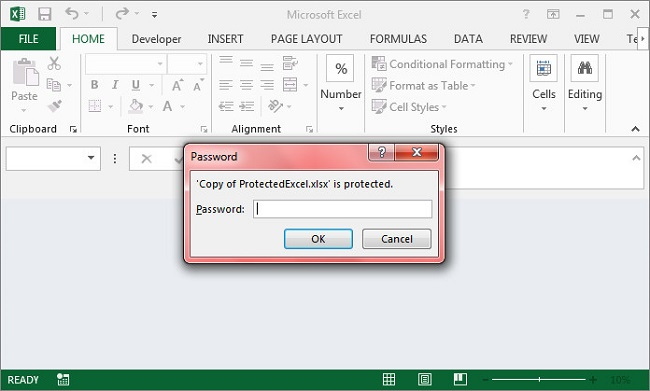
Step 2: Call Workbook.Protect(string passwordToOpen, bool bIsProtectWindow, bool bIsProtectContent) to protect the workbook with password and also protect the workbook window and structure.
wb.Protect("password-1",true,true);
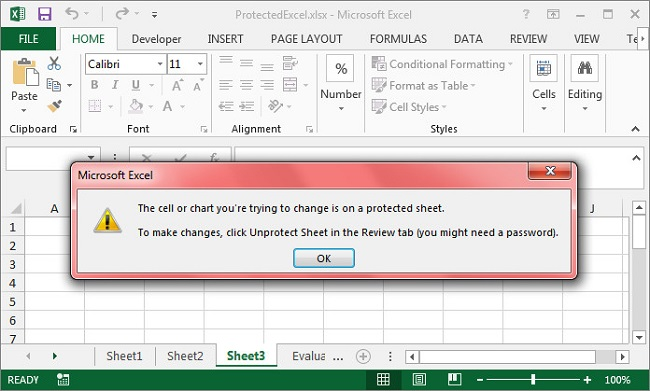
Step 3: Get the third worksheet from workbook, call protect method of XlsWorksheetBase class to encrypt the sheet with password and set the protection type as None which represents no changes are allowed in the protected sheet. Besides None, there are 17 others in SheetProtectionType enum that can help you to set different permissions to command what users can do to this worksheet.
Worksheet sheet = wb.Worksheets[2];
sheet.Protect("password-2", SheetProtectionType.None);
Step 4: Save and launch the file.
wb.SaveToFile("ProtectedExcel.xlsx");
System.Diagnostics.Process.Start("ProtectedExcel.xlsx");
Output:
Protect Workbook
Protect Worksheet
Full Code:
using Spire.Xls;
using System.Windows;

namespace WpfApplication1
{
    public partial class MainWindow : Window
    {
        public MainWindow()
        {
            InitializeComponent();
        }
        private void button1_Click(object sender, RoutedEventArgs e)
        {
            Workbook wb = new Workbook();
            wb.LoadFromFile("sample.xlsx", ExcelVersion.Version2013);

            wb.Protect("password-1", true, true);
            Worksheet sheet = wb.Worksheets[2];
            sheet.Protect("password-2", SheetProtectionType.None);

            wb.SaveToFile("ProtectedExcel.xlsx");
            System.Diagnostics.Process.Start("ProtectedExcel.xlsx");

        }
    }
}
Imports Spire.Xls
Imports System.Windows

Namespace WpfApplication1
	Public Partial Class MainWindow
		Inherits Window
		Public Sub New()
			InitializeComponent()
		End Sub
		Private Sub button1_Click(sender As Object, e As RoutedEventArgs)
			Dim wb As New Workbook()
			wb.LoadFromFile("sample.xlsx", ExcelVersion.Version2013)

			wb.Protect("password-1", True, True)
			Dim sheet As Worksheet = wb.Worksheets(2)
			sheet.Protect("password-2", SheetProtectionType.None)

			wb.SaveToFile("ProtectedExcel.xlsx")
			System.Diagnostics.Process.Start("ProtectedExcel.xlsx")

		End Sub
	End Class
End Namespace
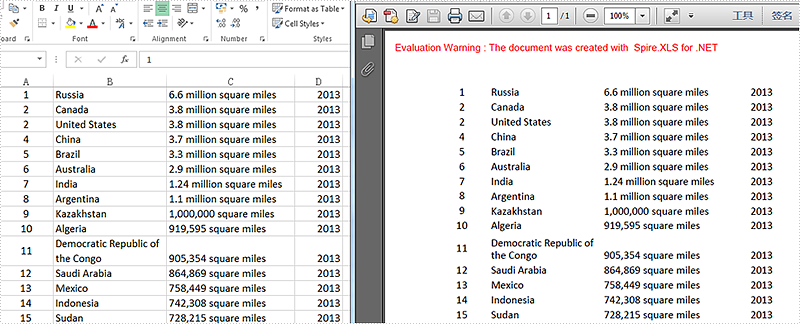
We have discussed before about converting workbook to PDF. However, in this section, we will show you a neat solution to convert the specific worksheet to PDF with C# and VB.NET in workbook. Apply Spire.Xls for .NET in your application and you can turn worksheet into PDF easily without changing the layout of worksheet.
In the following sections, we will demonstrate how to convert worksheet to PDF.
Step 1: Initialize a new instance of Workbook class and load the sample Excel file.
Workbook workbook = new Workbook();
workbook.LoadFromFile("Sample.xlsx");
Step 2: Get its first worksheet.
Worksheet sheet = workbook.Worksheets[0];
Step 3: Convert the selected worksheet to PDF and save to file.
sheet.SaveToPdf("toPDF.pdf");
Step 4: Launch the file.
System.Diagnostics.Process.Start("toPDF.pdf");
Effective screenshot:
Full codes:
using Spire.Xls;

namespace Excel_Worksheet_to_PDF
{
    class Program
    {
        static void Main(string[] args)
        {
            Workbook workbook = new Workbook();
            workbook.LoadFromFile("Sample.xlsx");

            Worksheet sheet = workbook.Worksheets[0];

            sheet.SaveToPdf("toPDF.pdf");
            System.Diagnostics.Process.Start("toPDF.pdf");
        }
    }
}
Imports Spire.Xls

Namespace Excel_Worksheet_to_PDF
	Class Program
		Private Shared Sub Main(args As String())
			Dim workbook As New Workbook()
			workbook.LoadFromFile("Sample.xlsx")

			Dim sheet As Worksheet = workbook.Worksheets(0)

			sheet.SaveToPdf("toPDF.pdf")
			System.Diagnostics.Process.Start("toPDF.pdf")
		End Sub
	End Class
End Namespace
