
Knowledgebase (2370)
Children categories
Word allows you to create forms that other people can use to input information. Fillable forms are particularly useful when you need to gather data or feedback from many individuals and want to make sure that the formatting is consistent. The tools that you may need for creating a form include:
- Content Controls: The areas where users input information in a form.
- Tables: Tables are used in forms to align text and form fields, and to create borders and boxes.
- Protection: Allows users to populate fields but not to make changes to the rest of the document.
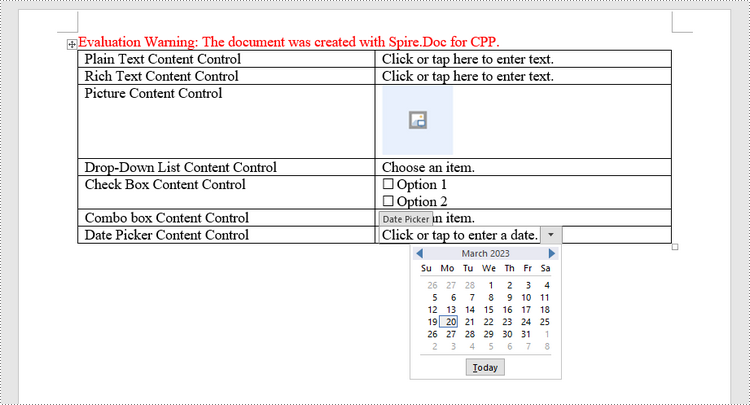
Content controls in Word are containers for content that let users build structured documents. A structured document controls where content appears within the document. There are basically ten types of content controls available in Word 2013. This article focuses on how to create a fillable form in Word consisting of the following seven common content controls using Spire.Doc for C++.
| Content Control | Description |
| Plain Text | A text field limited to plain text, so no formatting can be included. |
| Rich Text | A text field that can contain formatted text or other items, such as tables, pictures, or other content controls. |
| Picture | Accepts a single picture. |
| Drop-Down List | A drop-down list displays a predefined list of items for the user to choose from. |
| Combo Box | A combo box enables users to select a predefined value in a list or type their own value in the text box of the control. |
| Check Box | A check box provides a graphical widget that allows the user to make a binary choice: yes (checked) or no (not checked). |
| Date Picker | Contains a calendar control from which the user can select a date. |
Install Spire.Doc for C++
There are two ways to integrate Spire.Doc for C++ into your application. One way is to install it through NuGet, and the other way is to download the package from our website and copy the libraries into your program. Installation via NuGet is simpler and more recommended. You can find more details by visiting the following link.
Integrate Spire.Doc for C++ in a C++ Application
Create a Fillable Form in Word in C++
The StructureDocumentTagInline class provided by Spire.Doc for C++ is used to create structured document tags for inline-level structures (DrawingML object, fields, etc.) in a paragraph. The SDTProperties property and the SDTContent property under this class shall be used to specify the properties and content of the current structured document tag. The following are the detailed steps to create a fillable form with content controls in Word.
- Create a Document object.
- Add a section using Document->AddSection() method.
- Add a table using Section->AddTable() method.
- Add a paragraph to a specific table cell using TableCell->AddParagraph() method.
- Create an instance of StructureDocumentTagInline class, and add it to the paragraph as a child object using Paragraph->GetChildObjects()->Add() method.
- Specify the properties and content of the structured document tag using the methods under the SDTProperties property and the SDTContent property of the StructureDocumentTagInline object. The type of the structured document tag is set through SDTProperties->SetSDTType() method.
- Prevent users from editing content outside form fields using Document->Protect() method.
- Save the document using Document->SaveToFile() method.
- C++
#include "Spire.Doc.o.h";

using namespace Spire::Doc;
using namespace std;

int main() {

    //Create a Document object
    intrusive_ptr<Document> doc = new Document();

    //Add a section
    intrusive_ptr<Section> section = doc->AddSection();

    //add a table
    intrusive_ptr<Table> table = section->AddTable(true);
    table->ResetCells(7, 2);

    //Add text to the cells of the first column
    intrusive_ptr<Paragraph> paragraph = table->GetRows()->GetItemInRowCollection(0)->GetCells()->GetItemInCellCollection(0)->AddParagraph();
    paragraph->AppendText(L"Plain Text Content Control");
    paragraph = table->GetRows()->GetItemInRowCollection(1)->GetCells()->GetItemInCellCollection(0)->AddParagraph();
    paragraph->AppendText(L"Rich Text Content Control");
    paragraph = table->GetRows()->GetItemInRowCollection(2)->GetCells()->GetItemInCellCollection(0)->AddParagraph();
    paragraph->AppendText(L"Picture Content Control");
    paragraph = table->GetRows()->GetItemInRowCollection(3)->GetCells()->GetItemInCellCollection(0)->AddParagraph();
    paragraph->AppendText(L"Drop-Down List Content Control");
    paragraph = table->GetRows()->GetItemInRowCollection(4)->GetCells()->GetItemInCellCollection(0)->AddParagraph();
    paragraph->AppendText(L"Check Box Content Control");
    paragraph = table->GetRows()->GetItemInRowCollection(5)->GetCells()->GetItemInCellCollection(0)->AddParagraph();
    paragraph->AppendText(L"Combo box Content Control");
    paragraph = table->GetRows()->GetItemInRowCollection(6)->GetCells()->GetItemInCellCollection(0)->AddParagraph();
    paragraph->AppendText(L"Date Picker Content Control");

    //Add a plain text content control to the cell (0,1)
    paragraph = table->GetRows()->GetItemInRowCollection(0)->GetCells()->GetItemInCellCollection(1)->AddParagraph();
    intrusive_ptr<StructureDocumentTagInline> sdt = new StructureDocumentTagInline(doc);
    paragraph->GetChildObjects()->Add(sdt);
    sdt->GetSDTProperties()->SetSDTType(SdtType::Text);
    sdt->GetSDTProperties()->SetAlias(L"Plain Text");
    sdt->GetSDTProperties()->SetTag(L"Plain Text");
    sdt->GetSDTProperties()->SetIsShowingPlaceHolder(true);
    intrusive_ptr<SdtText> text = new SdtText(true);
    text->SetIsMultiline(false);
    sdt->GetSDTProperties()->SetControlProperties(text);
    intrusive_ptr<TextRange> tr = new TextRange(doc);
    tr->SetText(L"Click or tap here to enter text.");
    sdt->GetSDTContent()->GetChildObjects()->Add(tr);

    //Add a rich text content control to the cell (1,1)
    paragraph = table->GetRows()->GetItemInRowCollection(1)->GetCells()->GetItemInCellCollection(1)->AddParagraph();
    sdt = new StructureDocumentTagInline(doc);
    paragraph->GetChildObjects()->Add(sdt);
    sdt->GetSDTProperties()->SetSDTType(SdtType::RichText);
    sdt->GetSDTProperties()->SetAlias(L"Rich Text");
    sdt->GetSDTProperties()->SetTag(L"Rich Text");
    sdt->GetSDTProperties()->SetIsShowingPlaceHolder(true);
    text = new SdtText(true);
    text->SetIsMultiline(false);
    sdt->GetSDTProperties()->SetControlProperties(text);
    tr = new TextRange(doc);
    tr->SetText(L"Click or tap here to enter text.");
    sdt->GetSDTContent()->GetChildObjects()->Add(tr);

    //Add a picture content control to the cell (2,1)
    paragraph = table->GetRows()->GetItemInRowCollection(2)->GetCells()->GetItemInCellCollection(1)->AddParagraph();
    sdt = new StructureDocumentTagInline(doc);
    paragraph->GetChildObjects()->Add(sdt);
    sdt->GetSDTProperties()->SetSDTType(SdtType::Picture);
    sdt->GetSDTProperties()->SetAlias(L"Picture");
    sdt->GetSDTProperties()->SetTag(L"Picture");
    intrusive_ptr<SdtPicture> sdtPicture = new SdtPicture();
    sdt->GetSDTProperties()->SetControlProperties(sdtPicture);
    intrusive_ptr<DocPicture> pic = new DocPicture(doc);
    pic->LoadImageSpire(L"C:\\Users\\Administrator\\Desktop\\1.png");
    sdt->GetSDTContent()->GetChildObjects()->Add(pic);

    //Add a dropdown list content control to the cell(3,1)
    paragraph = table->GetRows()->GetItemInRowCollection(3)->GetCells()->GetItemInCellCollection(1)->AddParagraph();
    sdt = new StructureDocumentTagInline(doc);
    sdt->GetSDTProperties()->SetSDTType(SdtType::DropDownList);
    sdt->GetSDTProperties()->SetAlias(L"Dropdown List");
    sdt->GetSDTProperties()->SetTag(L"Dropdown List");
    paragraph->GetChildObjects()->Add(sdt);
    intrusive_ptr<SdtDropDownList> sddl = new SdtDropDownList();
    sddl->GetListItems()->Add(new SdtListItem(L"Choose an item.", L"1"));
    sddl->GetListItems()->Add(new SdtListItem(L"Item 2", L"2"));
    sddl->GetListItems()->Add(new SdtListItem(L"Item 3", L"3"));
    sddl->GetListItems()->Add(new SdtListItem(L"Item 4", L"4"));
    sdt->GetSDTProperties()->SetControlProperties(sddl);
    tr = new TextRange(doc);
    tr->SetText(sddl->GetListItems()->GetItem(0)->GetDisplayText());
    sdt->GetSDTContent()->GetChildObjects()->Add(tr);

    //Add two check box content controls to the cell (4,1)
    paragraph = table->GetRows()->GetItemInRowCollection(4)->GetCells()->GetItemInCellCollection(1)->AddParagraph();
    sdt = new StructureDocumentTagInline(doc);
    paragraph->GetChildObjects()->Add(sdt);
    sdt->GetSDTProperties()->SetSDTType(SdtType::CheckBox);
    intrusive_ptr<SdtCheckBox> scb = new SdtCheckBox();
    sdt->GetSDTProperties()->SetControlProperties(scb);
    tr = new TextRange(doc);
    sdt->GetChildObjects()->Add(tr);
    scb->SetChecked(false);
    paragraph->AppendText(L" Option 1");

    paragraph = table->GetRows()->GetItemInRowCollection(4)->GetCells()->GetItemInCellCollection(1)->AddParagraph();
    sdt = new StructureDocumentTagInline(doc);
    paragraph->GetChildObjects()->Add(sdt);
    sdt->GetSDTProperties()->SetSDTType(SdtType::CheckBox);
    scb = new SdtCheckBox();
    sdt->GetSDTProperties()->SetControlProperties(scb);
    tr = new TextRange(doc);
    sdt->GetChildObjects()->Add(tr);
    scb->SetChecked(false);
    paragraph->AppendText(L" Option 2");

    //Add a combo box content control to the cell (5,1)
    paragraph = table->GetRows()->GetItemInRowCollection(5)->GetCells()->GetItemInCellCollection(1)->AddParagraph();
    sdt = new StructureDocumentTagInline(doc);
    paragraph->GetChildObjects()->Add(sdt);
    sdt->GetSDTProperties()->SetSDTType(SdtType::ComboBox);
    sdt->GetSDTProperties()->SetAlias(L"Combo Box");
    sdt->GetSDTProperties()->SetTag(L"Combo Box");
    intrusive_ptr<SdtComboBox> cb = new SdtComboBox();
    cb->GetListItems()->Add(new SdtListItem(L"Choose an item."));
    cb->GetListItems()->Add(new SdtListItem(L"Item 2"));
    cb->GetListItems()->Add(new SdtListItem(L"Item 3"));
    sdt->GetSDTProperties()->SetControlProperties(cb);
    tr = new TextRange(doc);
    tr->SetText(cb->GetListItems()->GetItem(0)->GetDisplayText());
    sdt->GetSDTContent()->GetChildObjects()->Add(tr);

    //Add a date picker content control to the cell (6,1)
    paragraph = table->GetRows()->GetItemInRowCollection(6)->GetCells()->GetItemInCellCollection(1)->AddParagraph();
    sdt = new StructureDocumentTagInline(doc);
    paragraph->GetChildObjects()->Add(sdt);
    sdt->GetSDTProperties()->SetSDTType(SdtType::DatePicker);
    sdt->GetSDTProperties()->SetAlias(L"Date Picker");
    sdt->GetSDTProperties()->SetTag(L"Date Picker");
    intrusive_ptr<SdtDate> date = new SdtDate();
    date->SetCalendarType(CalendarType::Default);
    date->SetDateFormatSpire(L"yyyy.MM.dd");
    date->SetFullDate(DateTime::GetNow());
    sdt->GetSDTProperties()->SetControlProperties(date);
    tr = new TextRange(doc);
    tr->SetText(L"Click or tap to enter a date.");
    sdt->GetSDTContent()->GetChildObjects()->Add(tr);

    //Allow users to edit the form fields only
    doc->Protect(ProtectionType::AllowOnlyFormFields, L"permission-psd");

    //Save to file
    doc->SaveToFile(L"Output/WordForm.docx", FileFormat::Docx2013);
    doc->Close();
}
Apply for a Temporary License
If you'd like to remove the evaluation message from the generated documents, or to get rid of the function limitations, please request a 30-day trial license for yourself.
Images can add visual variety to documents and convey information that is hard to express through text alone, such as complex concepts or emotions. They are a powerful tool to make your document easier to understand, more engaging, and more memorable. Whether you are designing a report or creating a marketing document, inserting images can enhance your communication with your readers and leave a lasting impression on them. In this article, you will learn how to insert images into Word documents in C++ using Spire.Doc for C++.
- Insert an Image in a Word Document in C++
- Insert an Image at a Specified Location in a Word Document in C++
Install Spire.Doc for C++
There are two ways to integrate Spire.Doc for C++ into your application. One way is to install it through NuGet, and the other way is to download the package from our website and copy the libraries into your program. Installation via NuGet is simpler and more recommended. You can find more details by visiting the following link.
Integrate Spire.Doc for C++ in a C++ Application
Insert an Image in a Word Document in C++
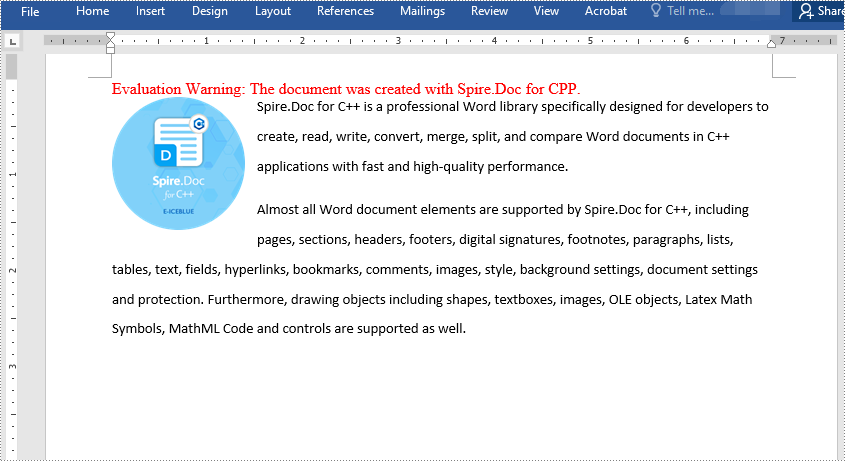
Spire.Doc for C++ offers the Paragraph->AppendPicture() method to insert an image into a Word document. The detailed steps are as follows:
- Initialize an instance of the Document class.
- Add a section using Document->AddSection() method.
- Add two paragraphs to the section using Section->AddParagraph() method.
- Add text to the paragraphs using Paragraph->AppendText() method and set formatting.
- Load an image using Image::FromFile() method.
- Add the image to the first paragraph using Paragraph->AppendPicture() method.
- Set width and height for the image using DocPicture->SetWidth() and DocPicture->SetHeight() methods.
- Set a text wrapping style for the image using DocPicture->SetTextWrappingStyle() method.
- Save the result document using Document->SaveToFile() method.
- C++
#include "Spire.Doc.o.h"

using namespace Spire::Doc;

int main()
{
 //Initialize an instance of the Document class
 intrusive_ptr<Document> document = new Document();

 //Add a section
 intrusive_ptr<Section> section = document->AddSection();

 //Add the first paragraph
 intrusive_ptr<Paragraph> paragraph1 = section->AddParagraph();
 //Add text to the paragraph and set formatting
 intrusive_ptr <TextRange> tr = paragraph1->AppendText(L"Spire.Doc for C++ is a professional Word library specifically designed for developers to create, read, write, convert, merge, split, and compare Word documents in C++ applications with fast and high-quality performance.");
 tr->GetCharacterFormat()->SetFontName(L"Calibri");
 tr->GetCharacterFormat()->SetFontSize(11.0f);
 paragraph1->GetFormat()->SetLineSpacing(20.0f);
 paragraph1->GetFormat()->SetAfterSpacing(10.0f);

 //Add the second paragraph
 intrusive_ptr<Paragraph> paragraph2 = section->AddParagraph();
 //Add text to the paragraph and set formatting
 tr = paragraph2->AppendText(L"Almost all Word document elements are supported by Spire.Doc for C++, including pages, sections, headers, footers, digital signatures, footnotes, paragraphs, lists, tables, text, fields, hyperlinks, bookmarks, comments, images, style, background settings, document settings and protection. Furthermore, drawing objects including shapes, textboxes, images, OLE objects, Latex Math Symbols, MathML Code and controls are supported as well.");
 tr->GetCharacterFormat()->SetFontName(L"Calibri");
 tr->GetCharacterFormat()->SetFontSize(11.0f);
 paragraph2->GetFormat()->SetLineSpacing(20.0f);

 //Add the image to the first paragraph
 intrusive_ptr<DocPicture> picture = paragraph1->AppendPicture(L"Spire.Doc.png");
 //Set image width and height
 picture->SetWidth(100);
 picture->SetHeight(100);
 //Set text wrapping style for the image
 picture->SetTextWrappingStyle(TextWrappingStyle::Tight);

 //Save the result document
 document->SaveToFile(L"InsertImage.docx", FileFormat::Docx2013);
 document->Close();
}
Insert an Image at a Specified Location in a Word document in C++
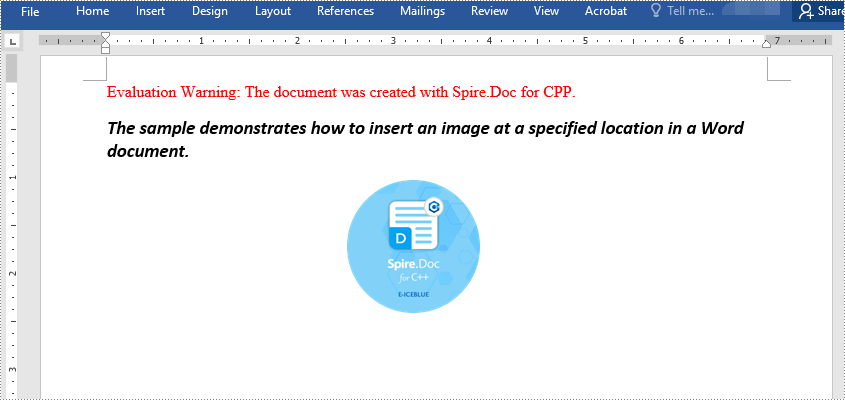
Spire.Doc for C++ enables you to insert an image into a Word document and set its position by using the DocPicture->SetHorizontalPosition() and DocPicture->SetVerticalPosition() methods. The detailed steps are as follows:
- Initialize an instance of the Document class.
- Add a section using Document->AddSection() method.
- Add a paragraph to the section using Section->AddParagraph() method.
- Add text to the paragraph using Paragraph->AppendText() method and set formatting.
- Load an image using Image::FromFile() method.
- Add the image to the paragraph using Paragraph->AppendPicture() method.
- Set width and height for the image using DocPicture->SetWidth() and DocPicture->SetHeight() methods.
- Set the horizontal position and vertical position for the image using DocPicture->SetHorizontalPosition() and DocPicture->SetVerticalPosition() methods.
- Set a text wrapping style for the image using DocPicture->SetTextWrappingStyle() method (note that the position settings are not applicable when the text wrapping style is Inline).
- Save the result document using Document->SaveToFile() method.
- C++
#include "Spire.Doc.o.h"

using namespace Spire::Doc;

int main()
{
 //Initialize an instance of the Document class
 intrusive_ptr<Document> document = new Document();

 //Add a section
 intrusive_ptr<Section> section = document->AddSection();

 //Add a paragraph to the section
 intrusive_ptr<Paragraph> paragraph = section->AddParagraph();

 //Add text to the paragraph and set formatting
 intrusive_ptr<TextRange> tr = paragraph->AppendText(L"The sample demonstrates how to insert an image at a specified location in a Word document.");
 tr->GetCharacterFormat()->SetFontName(L"Calibri");
 paragraph->ApplyStyle(BuiltinStyle::Heading2);

 //Add the image to the paragraph
 intrusive_ptr<DocPicture> picture = paragraph->AppendPicture(L"Spire.Doc.png");

 //Set image size
 picture->SetWidth(100);
 picture->SetHeight(100);

 //Set image position
 picture->SetHorizontalPosition(180.0F);
 picture->SetVerticalPosition(60.0F);

 //Set a text wrapping style for the image (note that the position settings are not applicable when the text wrapping style is Inline)
 picture->SetTextWrappingStyle(TextWrappingStyle::Through);

 //Save the result document
 document->SaveToFile(L"InsertImageAtSpecifiedLocation.docx", FileFormat::Docx);
 document->Close();
}
Apply for a Temporary License
If you'd like to remove the evaluation message from the generated documents, or to get rid of the function limitations, please request a 30-day trial license for yourself.
C++: Convert PowerPoint Presentations to Images (JPG, PNG, SVG)
2023-03-23 00:57:10 Written by AdministratorConverting PowerPoint presentations to images brings you multiple benefits. For example, it makes it easy for you to share the content with others who may not have access to PowerPoint software; it preserves the formatting of the original presentation, ensuring that the content appears exactly as intended; and it protects the content in the presentation from being edited or modified by others. In this article, you will learn how to convert a PowerPoint Presentation to different image formats in C++ using Spire.Presentation for C++.
- Convert PowerPoint Presentation to JPG or PNG Images
- Convert PowerPoint Presentation to JPG or PNG Images with Specific Size
- Convert PowerPoint Presentation to SVG Images
Install Spire.Presentation for C++
There are two ways to integrate Spire.Presentation for C++ into your application. One way is to install it through NuGet, and the other way is to download the package from our website and copy the libraries into your program. Installation via NuGet is simpler and more recommended. You can find more details by visiting the following link.
Integrate Spire.Presentation for C++ in a C++ Application
Convert PowerPoint Presentation to JPG or PNG Images in C++
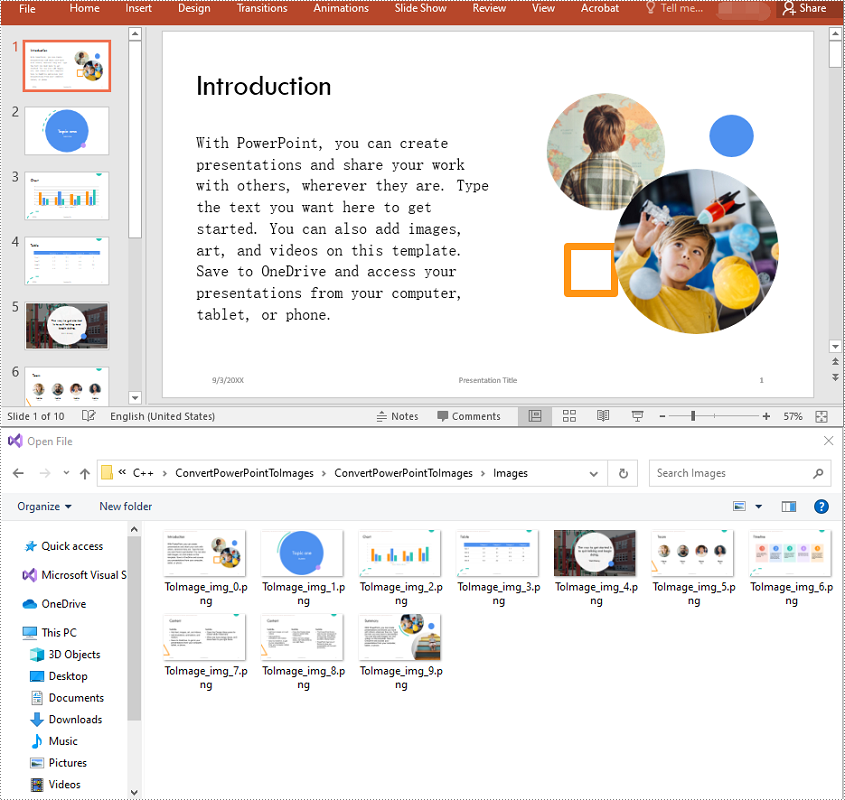
Spire.Presentation for C++ offers the ISlide->SaveAsImage() method which enables you to convert the slides in a PowerPoint presentation to JPG or PNG images. The detailed steps are as follows:
- Initialize an instance of the Presentation class.
- Load a PowerPoint presentation using Presentation->LoadFromFile() method.
- Access the slide collection of the presentation using Presentation->GetSlides() method.
- Iterate through the slides in the collection.
- Save each slide to an image stream using ISlide->SaveAsImage() method.
- Save the image stream to a JPG or PNG file using Stream->Save() method.
- C++
#include "Spire.Presentation.o.h";
using namespace Spire::Presentation;
using namespace std;
int main()
{
//Initialize an instance of the Presentation class
intrusive_ptrPresentation> ppt = new Presentation();
//Load a PowerPoint presentation
ppt->LoadFromFile(L"Sample.pptx");
//Get the slide collection of the presentation
intrusive_ptrSlideCollection> slides = ppt->GetSlides();
//Iterate through the slides in the collection
for (int i = 0; i < slides->GetCount(); i++)
{
intrusive_ptrISlide> slide = slides->GetItem(i);
//Save each slide to a PNG image
intrusive_ptrStream> image = slide->SaveAsImage();
image->Save((L"Images\\ToImage_img_" + to_wstring(i) + L".png").c_str());
}
ppt->Dispose();
}
Convert PowerPoint Presentation to JPG or PNG Images with Specific Size in C++
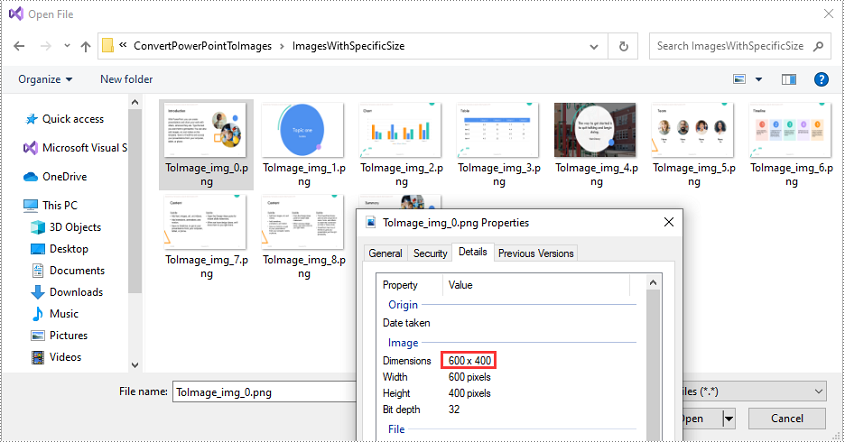
You can convert the slides in a PowerPoint presentation to JPG or PNG images with a specific size using ISlide->SaveAsImage(int width, int height) method. The detailed steps are as follows:
- Initialize an instance of the Presentation class.
- Load a PowerPoint presentation using Presentation->LoadFromFile() method.
- Access the slide collection of the presentation using Presentation->GetSlides() method.
- Iterate through the slides in the collection.
- Save each slide to an image stream using ISlide->SaveAsImage(int width, int height) method.
- Save the image stream to a JPG or PNG file using Stream->Save() method.
- C++
#include "Spire.Presentation.o.h";
using namespace Spire::Presentation;
using namespace std;
int main()
{
//Initialize an instance of the Presentation class
intrusive_ptrPresentation> ppt = new Presentation();
//Load a PowerPoint presentation
ppt->LoadFromFile(L"Sample.pptx");
//Get the slide collection of the presentation
intrusive_ptrSlideCollection> slides = ppt->GetSlides();
//Iterate through the slides in the collection
for (int i = 0; i < slides->GetCount(); i++)
{
intrusive_ptrISlide> slide = slides->GetItem(i);
//Save each slide to a PNG image with a size of 600 x 400 pixels
intrusive_ptrStream> image = slide->SaveAsImage(600, 400);
image->Save((L"ImagesWithSpecificSize\\ToImage_img_" + to_wstring(i) + L".png").c_str());
}
ppt->Dispose();
}
Convert PowerPoint Presentation to SVG Images in C++
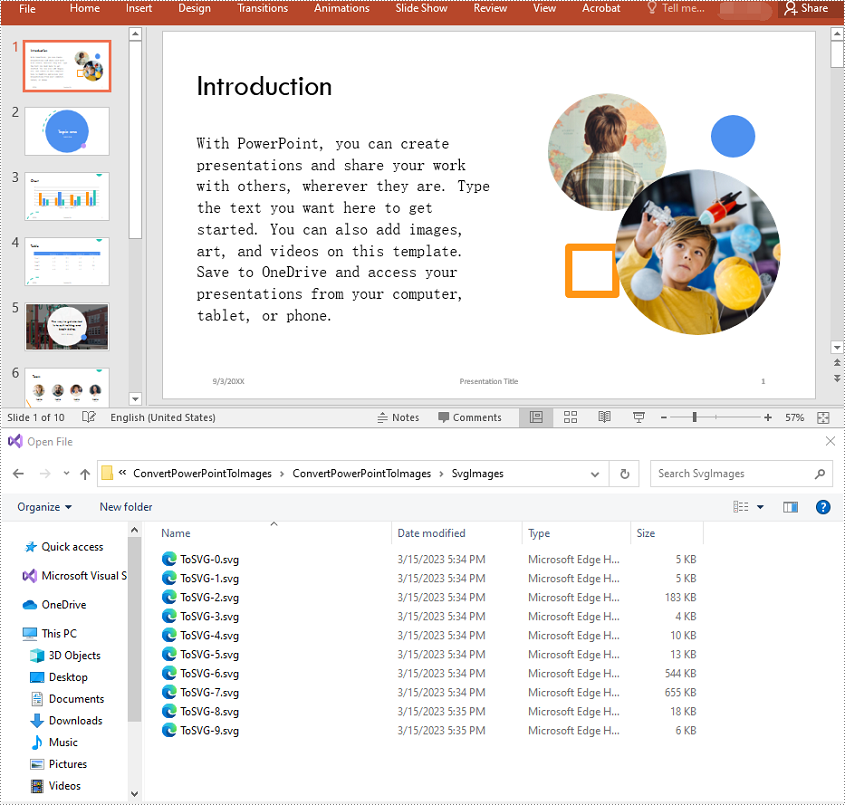
To convert the slides in a PowerPoint presentation to SVG images, you can use the ISlide->SaveToSVG() method. The detailed steps are as follows:
- Initialize an instance of the Presentation class.
- Load a PowerPoint presentation using Presentation->LoadFromFile() method.
- Access the slide collection of the presentation using Presentation->GetSlides() method.
- Iterate through the slides in the collection.
- Save each slide to an SVG stream using ISlide->SaveToSVG() method.
- Save the SVG stream to an SVG file using Stream->Save() method.
- C++
#include "Spire.Presentation.o.h";
using namespace Spire::Presentation;
using namespace std;
int main()
{
//Initialize an instance of the Presentation class
intrusive_ptrPresentation> ppt = new Presentation();
//Load a PowerPoint presentation
ppt->LoadFromFile(L"Sample.pptx");
//Get the slide collection of the presentation
intrusive_ptrSlideCollection> slides = ppt->GetSlides();
//Set whether to retain notes while converting PowerPoint to SVG
ppt->SetIsNoteRetained(true);
//Iterate through the slides in the collection
for (int i = 0; i < slides->GetCount(); i++)
{
intrusive_ptrISlide> slide = slides->GetItem(i);
//Save each slide to an SVG image
intrusive_ptrStream> svg = slide->SaveToSVG();
svg->Save((L"SvgImages\\ToSVG-" + to_wstring(i) + L".svg").c_str());
}
ppt->Dispose();
}
Apply for a Temporary License
If you'd like to remove the evaluation message from the generated documents, or to get rid of the function limitations, please request a 30-day trial license for yourself.
