EPUB is ideal for reading eBooks, but it's not designed for editing. If you want to revise content, quote a chapter, or reuse text in Microsoft Word, you'll first need to convert EPUB to Word, as Word doesn't support EPUB files natively. Fortunately, there are several ways to do this. Depending on whether you need a quick online converter, a desktop application, or an automated batch solution, this guide walks you through three practical methods using online tools, Calibre, and Python.
- Convert EPUB to Word Online Quickly
- Convert EPUB to DOCX Offline with Calibre Safely
- Batch Convert EPUB to Word Using Python
- Which Method Should You Choose
- FAQs
Convert EPUB to Word Online Quickly
If you only have one or two short eBooks to convert, online EPUB-to-Word converters are ideal for users who only need occasional conversions right in their web browser.
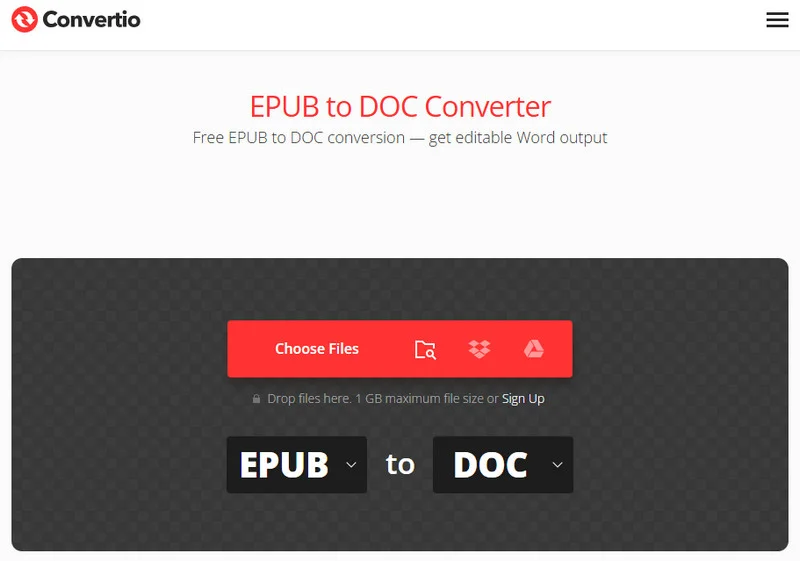
Two of the most reliable web-based platforms for this task are Convertio and FreeConvert. Convertio offers an easy-to-use interface and outputs clean .docx files, though it caps free uploads at 100MB. FreeConvert, on the other hand, allows larger files and gives you advanced control over individual conversion settings.
Tip: If you just want to view or share an eBook rather than edit its contents, converting it to PDF may be a better choice. See our guide on how to convert EPUB to PDF for several quick and reliable methods.
Steps to convert EPUB to Word documents with online tools
- Step 1: Upload EPUB files onto the website's dashboard.
- Step 2: Choose DOCX or DOC as your target format.
- Step 3: Click the convert button and wait for the cloud server to process documents.
- Step 4: Save the converted Word document directly to your device.
Pros and Cons
- Pros: No installation required; completely free and fast for single files.
- Cons: Potential privacy risks since you upload files to a third-party server; strict file size limits; unstable formatting if the book has a complex layout.
When it comes to sensitive data or confidential company materials, you might want to skip the web apps to avoid privacy risks. Instead, let's look at how to convert from EPUB to Word using a private, desktop-based workflow.
Convert EPUB to DOCX Offline with Calibre Safely
When web tools fail to handle heavy books or complex styling, you can turn to Calibre. Calibre is an open-source ebook management tool that also supports format conversion.
Because it runs completely on your local machine, your data remains 100% private. It features a robust layout engine that analyzes the underlying code of an eBook, making it an incredibly accurate tool to convert EPUB content into DOCX while preserving most of the original formatting.
Step-by-Step Desktop Guide
- Step 1: Open Calibre and click the Add books button in the top-left corner to load your EPUB file.
- Step 2: Highlight your book from the main library list and click the Convert books icon on the top toolbar.
- Step 3: In the pop-up window, look at the top-right corner and change the Output format to DOCX.
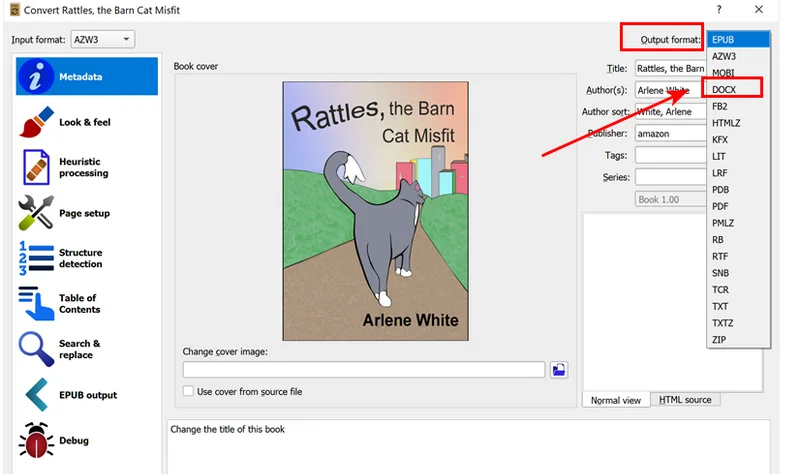
- Step 4: On the left-hand menu, navigate to Heuristic Processing and check the box to enable heuristic processing. This built-in feature automatically scans and fixes broken paragraph lines, unwanted hyphenations, and bad spacing.
- Step 5: Click OK at the bottom right. Once the tasks spinner hits zero, click Save to disk to export your polished Word document.
Tip:
If you prefer using your terminal over a user interface, Calibre installs a native command-line utility straight into your system path. Open your terminal or PowerShell and run this command to instantly convert an EPUB file:
ebook-convert input.epub output.docx
While Calibre is excellent for manual management, it still requires many clicks or custom shell scripts. If you are integrating EPUB conversion into your own application or need to automate massive EPUB files, writing a custom Python script is more efficient.
Batch Convert EPUB to Word Using Python
Manually clicking buttons on web pages or desktop apps becomes inefficient when you have hundreds of eBooks that need to be converted. For developers and IT professionals, building a script to convert EPUB files to Word docs in large batches saves hours of repetitive labor.
To automate the conversion process, we'll use Free Spire.Doc for Python. The library provides native support for EPUB documents and can be integrated into Python applications for automated document conversion. It also supports converting Word documents back to EPUB, making it a practical choice for two-way document conversion.
Python Code Implementation
Converting a single file with Free Spire.Doc takes just two steps: loading the EPUB and saving it as a DOCX. However, to handle an entire library, we need a quick Python loop to scan the directory.
Before running the script, make sure you install the library in your environment:
pip install Spire.Doc.Free
The following example converts every EPUB file in a folder into DOCX:
import os
from spire.doc import Document, FileFormat

# Define source and destination directories
input_dir = "/input/epub/"
output_dir = "/output/epubtoword/"

# Ensure the output directory exists
if not os.path.exists(output_dir):
    os.makedirs(output_dir)

# Scan the folder and batch convert all EPUB files
for file_name in os.listdir(input_dir):
    if file_name.lower().endswith('.epub'):
        # Create a Document object
        document = Document()

        # Load the EPUB file natively
        document.LoadFromFile(os.path.join(input_dir, file_name))

        # Save the EPUB document as a Word DOCX file
        base_name = os.path.splitext(file_name)[0]
        document.SaveToFile(os.path.join(output_dir, f"{base_name}.docx"), FileFormat.Docx)

        # Close the document to release resources
        document.Close()
Here's the preview of the batch-converted Word documents: 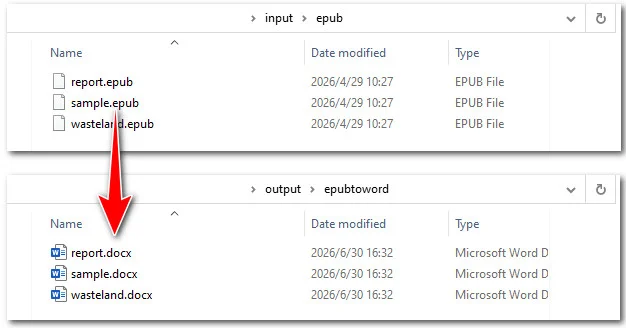
You may like: 5 Best EPUB to TXT Converters (Online & Programming Ways)
Which Method Should You Choose?
Picking the perfect tool depends on how many files you have, your technical background, and your privacy standards. Here is a clear breakdown to help you decide which approach to take:
| Feature / Metric | Online Tools | Calibre | Python Automation |
|---|---|---|---|
| Target Audience | Casual users with quick tasks | Heavy readers and book collectors | Developers and system administrators |
| Data Privacy | Low | High | High |
| File Size Limit | Yes | None | None |
| Batch Processing | Average | Good | Best |
| Layout Retention | Average | Very Good | Excellent |
Conclusion
Choosing the right solution comes down to your workload. If you just have one or two public files and want a quick fix without installing anything, online converters like Convertio are great. For a larger personal file where you need privacy and complex layout control, Calibre is a better choice. Finally, if you need to handle bulk conversions or integrate it into a background workflow, using a Python script with Free Spire.Doc is the best option.
FAQs about Converting EPUB to Word Documents
Q1: Why did my converted Word document lose its formatting or images?
Because EPUBs use flexible web layouts while Word relies on fixed page dimensions, their formatting rules don't always match. When complex elements like sidebars are converted, Word often cannot map their exact positions, so it deletes them or pushes them to a new page. To improve the conversion results, enable Calibre's heuristic processing before exporting or adjust Free Spire.Doc script to handle specific element margins.
Q2: Can I convert DRM-protected EPUB files to Word?
DRM-protected EPUB files cannot be converted directly. If permitted by the publisher and applicable local laws, remove the DRM protection before converting the file.
Q3: Is it possible to convert from EPUB to Word without losing the clickable Table of Contents (TOC)?
Yes! Advanced utilities like Calibre and Free Spire.Doc automatically translate the native eBook compilation index into Word's default interactive hyperlink system.