
Knowledgebase (2370)
Children categories
Spire.PDF for Python is a professional PDF development component that enables developers to create, read, edit, convert, and save PDF files in Python programs without depending on any external applications or libraries. This Python PDF class library provides developers with various functions to create PDF files from scratch or process existing PDF documents completely through Python programs.
Spire.PDF for Python supports various PDF processing features including security settings, extracting text/image from PDF, merging/splitting PDF, adding page numbers to PDF, drawing text/image/shape/barcode to PDF, creating/filling in form fields, adding and deleting PDF layers, cropping pages, copying pages, overlaying PDF, creating actions in PDF, inserting text/image watermarks to PDF, adding/deleting/extracting annotations, adding/updating/deleting PDF bookmarks, adding tables to PDF, compressing PDF documents etc.


Converting a PDF document to an image format like JPEG or PNG can be useful for a variety of reasons, such as making it easier to share the content on social media, embedding it into a website, or including it in a presentation. Converting PDF to images can also avoid printing issues caused by the printers that do not support PDF format well enough. In this article, you will learn how to convert PDF to JPEG or PNG in Java using Spire.PDF for Java.
Install Spire.PDF for Java
First, you're required to add the Spire.Pdf.jar file as a dependency in your Java program. The JAR file can be downloaded from this link. If you use Maven, you can easily import the JAR file in your application by adding the following code to your project's pom.xml file.
<repositories>
    <repository>
        <id>com.e-iceblue</id>
        <name>e-iceblue</name>
        <url>https://repo.e-iceblue.com/nexus/content/groups/public/</url>
    </repository>
</repositories>
<dependencies>
    <dependency>
        <groupId>e-iceblue</groupId>
        <artifactId>spire.pdf</artifactId>
        <version>12.7.0</version>
    </dependency>
</dependencies>
Convert PDF to JPEG in Java
The PdfDocument.saveAsImage() method provided by Spire.PDF for Java enables the conversion of a particular page from a PDF document into a BufferedImage object, which can be saved as a file in .jpg or .png format. The following are the steps to convert each page of a PDF document to a JPEG image file.
- Create a PdfDocument object.
- Load a PDF file using PdfDocument.loadFromFile() method.
- Iterate through each page of the PDF document.
- Convert a specific page into a BufferedImage object using PdfDocument.saveAsImage() method.
- Re-create a BufferedImage in RGB type with the same width and height as the converted image.
- Write the image data as a .jpg file using ImageIO.write() method.
- Java
import com.spire.pdf.PdfDocument;
import com.spire.pdf.graphics.PdfImageType;

import javax.imageio.ImageIO;
import java.awt.image.BufferedImage;
import java.io.File;
import java.io.IOException;

public class ConvertPdfToJpeg {

    public static void main(String[] args) throws IOException {

        //Create a PdfDocument instance
        PdfDocument pdf = new PdfDocument();

        //Load a sample PDF document
        pdf.loadFromFile("C:\\Users\\Administrator\\Desktop\\Input.pdf");

        //Loop through the pages
        for (int i = 0; i < pdf.getPages().getCount(); i++) {

            //Save the current page as a buffered image
            BufferedImage image = pdf.saveAsImage(i, PdfImageType.Bitmap, 300, 300);

            //Re-create a buffered image in RGB type
            BufferedImage newImg = new BufferedImage(image.getWidth(), image.getHeight(), BufferedImage.TYPE_INT_RGB);
            newImg.getGraphics().drawImage(image, 0, 0, null);

            //Write the image data as a .jpg file
            File file = new File("C:\\Users\\Administrator\\Desktop\\Output\\" + String.format(("ToImage-%d.jpg"), i));
            ImageIO.write(newImg, "JPEG", file);
        }
        pdf.close();
    }
}
Convert PDF to PNG in Java
The steps to convert PDF to PNG using Spire.PDF for Java are as follows.
- Create a PdfDocument object.
- Load a PDF file using PdfDocument.loadFromFile() method.
- Iterate through each page of the PDF document.
- Convert a specific page into a BufferedImage object using PdfDocument.saveAsImage() method.
- Write the image data as a .png file using ImageIO.write() method.
- Java
import com.spire.pdf.*;
import javax.imageio.ImageIO;
import java.awt.image.BufferedImage;
import java.io.File;
import java.io.IOException;

public class ConvertPdfToPng {

    public static void main(String[] args) throws IOException {

        //Create a PdfDocument object
        PdfDocument doc = new PdfDocument();

        //Load a sample PDF document
        doc.loadFromFile("C:\\Users\\Administrator\\Desktop\\Input.pdf");

        //Make the background of the generated PNG files transparent
        //doc.getConvertOptions().setPdfToImageOptions(0);

        //Loop through the pages
        for (int i = 0; i < doc.getPages().getCount(); i++) {

            //Save the current page as a buffered image
            BufferedImage image = doc.saveAsImage(i);

            //Write the image data as a .png file
            File file = new File("C:\\Users\\Administrator\\Desktop\\Output\\" + String.format("ToImage-%d.png", i));
            ImageIO.write(image, "png", file);
        }
        doc.close();
    }
}
If the background of the PDF document is white and you want to make it transparent when converted to PNG, you can add following line of code before you save each page to a BufferedImage object.
- Java
doc.getConvertOptions().setPdfToImageOptions(0);
Apply for a Temporary License
If you'd like to remove the evaluation message from the generated documents, or to get rid of the function limitations, please request a 30-day trial license for yourself.
Merging and unmerging cells are two essential features in Microsoft Excel that allow users to create a more organized and visually appealing spreadsheet. Merging cells enables users to combine adjacent cells to create a single cell that spans multiple columns or rows. This feature is particularly useful for creating headers, titles, or labels for tables, as well as for combining data into a more concise format.
Unmerging cells, on the other hand, is the process of separating a merged cell back into individual cells. This feature is useful when users need to apply different formatting or styles to individual cells within a merged cell or when they want to separate data that were previously combined.
In this article, we will demonstrate how to merge or unmerge cells in an Excel file in C++ using Spire.XLS for C++ library.
- Merge Specific Cells in Excel in C++
- Unmerge Specific Merged Cells in Excel in C++
- Unmerge All Merged Cells in Excel in C++
Install Spire.XLS for C++
There are two ways to integrate Spire.XLS for C++ into your application. One way is to install it through NuGet, and the other way is to download the package from our website and copy the libraries into your program. Installation via NuGet is simpler and more recommended. You can find more details by visiting the following link.
Integrate Spire.XLS for C++ in a C++ Application
Merge Specific Cells in Excel in C++
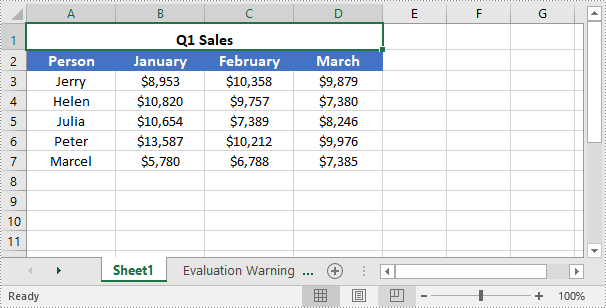
You can easily use the IXLSRange->Merge() method provided by Spire.XLS for C++ to merge a specific range of cells into a single cell. The detailed steps are as follows:
- Initialize an instance of the Workbook instance.
- Load an Excel file using the Workbook->LoadFromFile(LPCWSTR_S fileName) method.
- Get a specific worksheet of the file using the Workbbok->GetWorksheets()->Get(int index) method.
- Get the cell range that you want to merge using the Worksheet->GetRange(LPCWSTR_S name) method.
- Merge the cell range using the IXLSRange->Merge() method.
- Center the text in the merged cell using the IXLSRange->GetStyle()->SetHorizontalAlignment(HorizontalAlignType::Center) method.
- Save the result file to a specific location using the Workbook->SaveToFile(LPCWSTR_S fileName, ExcelVersion version) method.
- C++
#include "Spire.Xls.o.h";

using namespace Spire::Xls;
using namespace std;


int main()
{
	//Specify the input and output file paths
	wstring inputFile = L"Template.xlsx";
	wstring outputFile = L"MergeCells.xlsx";

	//Initialize an instance of the Workbook instance
	intrusive_ptr<Workbook> workbook = new Workbook();

	//Load an Excel file
	workbook->LoadFromFile(inputFile.c_str());

	//Get the first worksheet of the file
	intrusive_ptr<Worksheet> sheet = dynamic_pointer_cast<Worksheet>(workbook->GetWorksheets()->Get(0));

	//Merge a particular range of cells in the worksheet
	intrusive_ptr<IXLSRange> range = sheet->GetRange(L"A1:D1");
	range->Merge();

	//Center the text in the merged cell
	range->GetStyle()->SetHorizontalAlignment(HorizontalAlignType::Center);

	//Save the result file to the specific path
	workbook->SaveToFile(outputFile.c_str(), ExcelVersion::Version2013);
	workbook->Dispose();
}
Unmerge Specific Merged Cells in Excel in C++
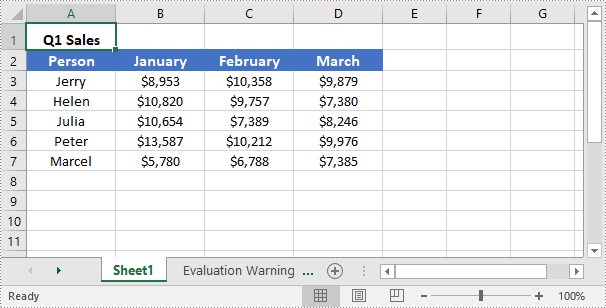
To unmerge merged cells, you can use the IXLSRange->UnMerge() method. The detailed steps are as follows:
- Initialize an instance of the Workbook instance.
- Load an Excel file using the Workbook->LoadFromFile(LPCWSTR_S fileName) method.
- Get a specific worksheet of the file using the Workbbok->GetWorksheets()->Get(int index) method.
- Get the cell that you want to unmerge using the Worksheet->GetRange(LPCWSTR_S name) method.
- Unmerge the cell using the IXLSRange->UnMerge() method.
- Save the result file to a specific location using the Workbook->SaveToFile(LPCWSTR_S fileName, ExcelVersion version) method.
- C++
#include "Spire.Xls.o.h";

using namespace Spire::Xls;
using namespace std;

int main()
{
	//Specify the input and output file paths
	wstring inputFile = L"MergeCells.xlsx";
	wstring outputFile = L"UnmergeCells.xlsx";

	//Initialize an instance of the Workbook instance
	intrusive_ptr<Workbook> workbook = new Workbook();

	//Load an Excel file
	workbook->LoadFromFile(inputFile.c_str());

	//Get the first worksheet of the file
	intrusive_ptr<Worksheet> sheet = dynamic_pointer_cast<Worksheet>(workbook->GetWorksheets()->Get(0));

	//Unmerge a specific merged cell in the worksheet
	intrusive_ptr<IXLSRange> range = sheet->GetRange(L"A1");
	range->UnMerge();

	//Save the result file to the specific path
	workbook->SaveToFile(outputFile.c_str(), ExcelVersion::Version2013);
	workbook->Dispose();
}
Unmerge All Merged Cells in Excel in C++
Spire.XLS for C++ provides the Worksheet->GetMergedCells() method which enables you to obtain all merged cells in a specific worksheet. Once the merged cells are obtained, you can use the IXLSRange->UnMerge() method to unmerge them. The detailed steps are as follows:
- Initialize an instance of the Workbook instance.
- Load an Excel file using the Workbook->LoadFromFile(LPCWSTR_S fileName) method.
- Get a specific worksheet of the file using the Workbbok->GetWorksheets()->Get(int index) method.
- Get the merged cells in the worksheet using the Worksheet->GetMergedCells() method.
- Iterate through all the merged cells, then unmerge each merged cell using the IXLSRange->UnMerge() method.
- Save the result file to a specific location using the Workbook->SaveToFile(LPCWSTR_S fileName, ExcelVersion version) method.
- C++
#include ""Spire.Xls.o.h"";

using namespace Spire::Xls;
using namespace std;

int main()
{
	//Specify the input and output file paths
	wstring inputFile = L""MergeCells.xlsx"";
	wstring outputFile = L""UnmergeAllCells.xlsx"";

	//Initialize an instance of the Workbook class
	intrusive_ptr<Workbook> workbook = new Workbook();

	//Load an Excel file
	workbook->LoadFromFile(inputFile.c_str());

	//Get the first worksheet
	intrusive_ptr<Worksheet> sheet = dynamic_pointer_cast<Worksheet>(workbook->GetWorksheets()->Get(0));

	//Get the merged cell ranges in the first worksheet
	intrusive_ptr<Spire::Xls::IList<XlsRange>> range = dynamic_pointer_cast<Spire::Xls::IList<XlsRange>>(sheet->GetMergedCells());

	//Iterate through the merged cells
	for (int i = 0; i < range->GetCount(); i++)
	{
		intrusive_ptr<XlsRange> cell = range->GetItem(i);
		//Unmerge each merged cell
		cell->UnMerge();
	}

	//Save the result file to the specific path
	workbook->SaveToFile(outputFile.c_str(), ExcelVersion::Version2013);
	workbook->Dispose();
}
Apply for a Temporary License
If you'd like to remove the evaluation message from the generated documents, or to get rid of the function limitations, please request a 30-day trial license for yourself.
