How to Highlight Text in a PDF: 5 Easy Methods
Table of Contents
Install with Pypi
pip install Spire.Pdf
Related Links

Highlighting text in a PDF is a quick way to emphasize key information without altering the document. While Adobe Acrobat Reader DC is a popular choice, it’s not the only option. From free browsers and online editors to Mac’s Preview and even Python automation, there are multiple ways to get the job done.
In this article, you’ll learn five practical methods to highlight text in PDFs , ranging from beginner-friendly tools to advanced solutions for developers.
- Method 1. Using Adobe Acrobat Reader DC
- Method 2. Using Web Browsers
- Method 3. Using Online Editors
- Method 4. Using Preview on Mac
- Method 5. Using Python (Automation)
Method 1. Using Adobe Acrobat Reader DC
Adobe Acrobat Reader DC is the go-to tool for many users. It’s free, available on both Windows and Mac, and comes with a built-in highlighter that makes PDF annotation straightforward.
How to Highlight Text in PDF with Acrobat Reader
- Step 1. Download and Install Adobe Acrobat Reader DC if you don't already have it.
- Step 2. Open your PDF file in Acrobat Reader.
- Step 3. Select the Highlight Text tool from the toolbar.
- Step 4. Drag your mouse over the text you want to highlight.
- Step 5. Save the PDF to keep your changes.
For customization: Click the " Comment " tool in the sidebar. This opens a panel where you can select a new highlight color and adjust its transparency (opacity).

Pros
- Free and widely available.
- Very intuitive interface.
- Works consistently across Windows and Mac.
- Supports additional annotation tools like comments and sticky notes.
Cons
- Can feel bulky for simple tasks.
- Requires installation, which may not be ideal for quick edits.
Method 2. Using Web Browsers
Most modern browsers, such as Chrome, Edge, and Firefox, can open PDFs directly and provide basic annotation features like highlighting. The advantage is you don’t need to install anything—just open the PDF in the browser and start marking it up.
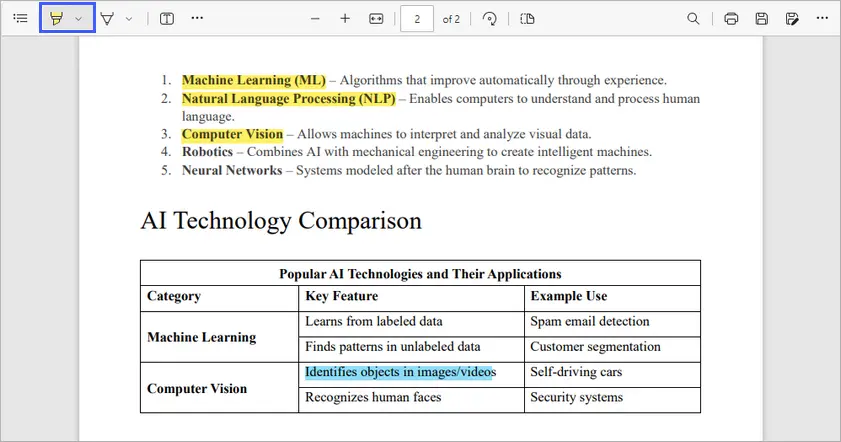
How to Highlight Text in PDF with Edge
- Step 1. Right-click your PDF file > " Open with " > " Microsoft Edge " or drag it into an Edge window.
- Step 2. Select the Highlight pen from the PDF viewer's toolbar. You can click the dropdown arrow beside the tool to select a different color.
- Step 3. Click and drag over the text to highlight it.
- Step 4. Save the PDF by clicking the Save icon or pressing Ctrl +S .
Pros
- Completely free, no software installation needed.
- Fast and convenient for quick highlighting.
- Available on both Windows and Mac.
Cons
- Highlighting options are limited compared to dedicated PDF editors.
- No advanced annotation features like comments or shapes.
- Works best for simple highlighting, not professional editing.
Method 3. Using Online Editors
If you don’t want to install software, online PDF editors like Smallpdf or Sejda provide easy-to-use highlighting tools accessible from any device with a browser.
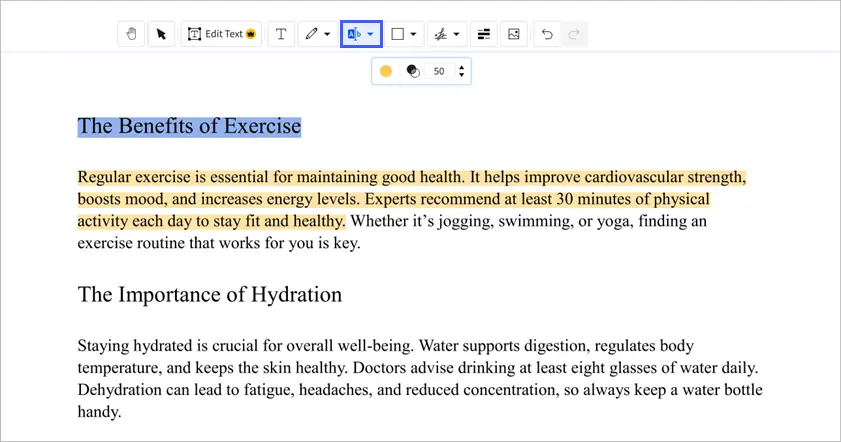
How to Highlight Text in PDF with Smallpdf
- Step 1. Go to Smallpdf’s Annotate PDF tool.
- Step 2. Upload your PDF file from your computer.
- Step 3. Select the highlight tool and mark your text.
- Step 4. Download the edited PDF once you’re done.
Pros
- Accessible from any device (Windows, Mac, mobile).
- No installation required.
- Works well for occasional PDF editing.
Cons
- Free version has limitations (daily usage caps, file size limits).
- Privacy concerns when uploading sensitive documents.
- Requires an internet connection.
Method 4. Using Preview on Mac
If you’re a Mac user, you already have a built-in PDF highlighter at your fingertips: Preview . It’s lightweight, fast, and surprisingly powerful for basic PDF annotation.
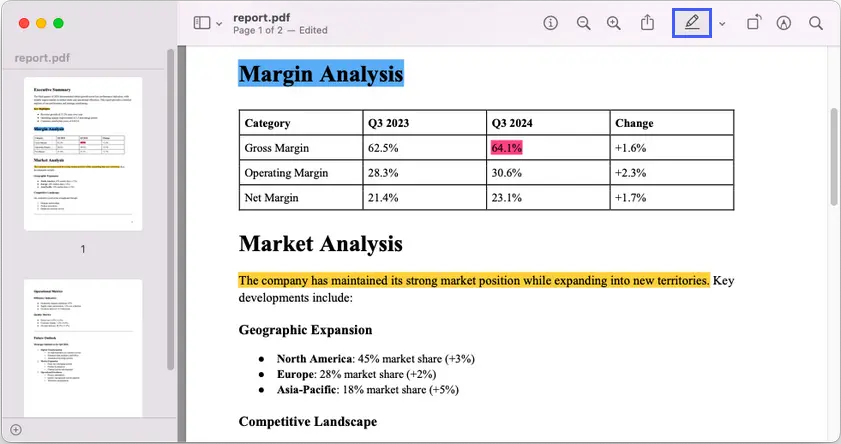
How to Highlight Text in PDF Using Preview
- Step 1. Launch Preview and open your PDF file.
- Step 2. Navigate to the top right corner, and click on the highlighter icon.
- Step 3. (Optional) Click the color box next to the highlight tool to choose a different color.
- Step 4. Click and drag your cursor over the text you want to highlight.
- Step 5. Save the file to preserve your edits.
Pros
- Free and pre-installed on every Mac.
- Simple, clean interface with highlighting and note-taking.
- No need to download third-party apps.
Cons
- Not available on Windows.
- Limited to basic annotation features.
- May not support advanced editing tasks.
Method 5. Using Python (Automation)
For developers or anyone dealing with large-scale PDF processing, manual highlighting isn’t efficient. That’s where automation with libraries like Spire.PDF for Python comes in. This method allows you to programmatically add highlights to PDFs—perfect for batch processing or precise annotation tasks.
How to Highlight Text with Python and Spire.PDF
- Step 1. Install Spire.PDF with: pip install Spire.PDF
- Step 2. Create a PdfDocument object and load your PDF file using LoadFromFile() .
- Step 3. Get the page you want to work on from the document’s Pages collection.
- Step 4. Use PdfTextFinder to search for the text you want to highlight, adjusting parameters such as IgnoreCase if needed.
- Step 5. Apply highlights to the found text fragments with the HighLight() method and choose a color.
- Step 6. Save the updated PDF to a different file.
Below is the entire code snippet to highlight text in a PDF file using Spire.PDF for Python:
from spire.pdf import *
from spire.pdf.common import*

# Create a PdfDocument object
document = PdfDocument()

# Load a PDF file
document.LoadFromFile("C:\\Users\\Administrator\\Desktop\\report.pdf")

# Get a specific page
page = document.Pages.get_Item(0)

# Create a PdfTextFinder object for the current page
finder = PdfTextFinder(page)

# Set the search parameter to find exact matches
finder.Options.Parameter = TextFindParameter.IgnoreCase

# Find instances of two strings on the page
textFragments_one = finder.Find("Executive Summary")
textFragments_two = finder.Find("This report provides a detailed analysis of our performance and strategic positioning.")

# Highlight the first instance
textFragments_one[0].HighLight(Color.get_LightGray())
textFragments_two[0].HighLight(Color.get_Yellow())

# Save the document
document.SaveToFile("output/Highlighted.pdf")

# Dispose resources
document.Close()
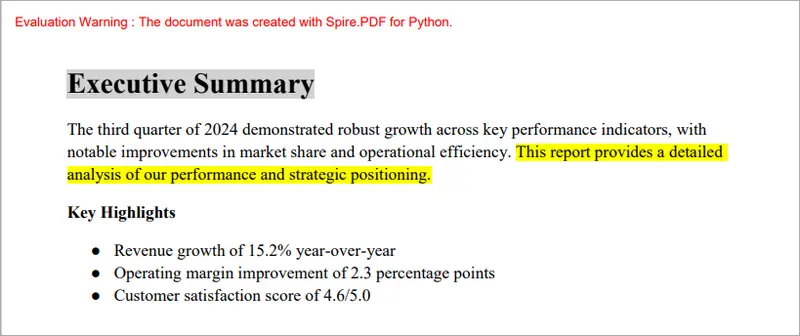
This script searches for two strings and highlights their first instances with different colors, as illustrated in the screenshot below.
Check out the full guide on how to find and highlight text in PDF with Python
Pros
- Perfect for automation and batch tasks.
- Highly customizable (colors, specific words, page ranges).
- Cross-platform (works on Windows, Linux, Mac).
Cons
- Requires programming knowledge.
- Spire.PDF free version has a 10-page limit when creating/loading PDFs.
- Setup takes longer than GUI-based tools.
Summary Table
| Method | Platform | Difficulty | Free/Paid | Best For |
|---|---|---|---|---|
| Adobe Acrobat Reader DC | Windows, Mac | Easy | Free | Everyday users who need reliability |
| Web Browser (Edge) | Windows, Mac | Easy | Free | Quick highlights, no install |
| Online Editor (Smallpdf) | Any (Web) | Easy | Free*/Paid | Easy access anywhere |
| Preview (Mac) | Mac | Easy | Free | Mac users who need a built-in solution |
| Python with Spire.PDF | Cross-platform | Advanced | Free*/Paid | Developers, automation, bulk work |
Free with limitations: Smallpdf has dailyusage/file size caps; Spire.PDF free version has a 10-page limit.
Final Tips
Highlighting text in PDFs doesn’t have to be complicated. For quick tasks, Edge or Preview are excellent free solutions. If you want reliability and more features, Adobe Acrobat Reader DC is still a top choice. For occasional edits on any device, online editors like Smallpdf work well. And if you’re handling large batches of PDFs or need precision, Python with Spire.PDF offers the power of automation.
Ultimately, the best method depends on your situation: casual users should stick with free tools, while developers and professionals may benefit from advanced automation. No matter your workflow, one of these five methods will help you highlight text in PDFs efficiently.
FAQs
Q1: Can I highlight text in a PDF without Adobe Acrobat?
Yes! You can use web browsers like Edge, online tools like Smallpdf, or Preview on Mac—all free alternatives.
Q2: How do I remove highlights from a PDF?
In most tools, select the highlighted text, right-click, and choose Remove Highlight. In code-based methods, you’ll need to adjust or remove annotations.
Q3: Are online editors safe to use?
For casual documents, yes. But avoid uploading sensitive files like contracts or financial reports since they are processed on third-party servers.
Q4: Can I highlight PDFs on mobile devices?
Yes, many mobile PDF readers (Google Drive on Android, Books on iOS) support text highlighting.
Q5: Does highlighting change the original PDF?
Highlighting adds an annotation layer—it doesn’t alter the text itself. You can always remove or edit highlights later.
See Also
Rimuovere la convalida dei dati in Excel: Mantenere i dati, Cancellare le restrizioni
Indice dei contenuti
Installa con Pypi
pip install spire.xls
Link Correlati
La funzione Convalida dati di Excel è ampiamente utilizzata per controllare ciò che gli utenti possono digitare in una cella. Viene spesso applicata per limitare i valori a un elenco specifico (menu a discesa), limitare gli input a numeri o date, o impedire voci duplicate. Sebbene potenti, queste regole a volte possono essere d'intralcio — forse le restrizioni non sono più necessarie, o si desidera consentire l'inserimento libero dei dati.
In tali casi, potrebbe essere necessario rimuovere la convalida dei dati in Excel. La cancellazione delle regole di convalida non eliminerà il contenuto delle celle, ma solo le restrizioni. Ciò significa che i dati esistenti rimangono intatti, ma sarai libero di digitare qualsiasi cosa in quelle celle.
Se desideri rimuovere le restrizioni di convalida dei dati in Excel, puoi utilizzare sia metodi manuali che automatizzati. Questo tutorial copre i comandi della barra multifunzione, le scorciatoie e l'automazione con Python o VBA.
Confronto Rapido: Metodi per Rimuovere la Convalida dei Dati in Excel
Quando si lavora con Excel, ci sono diversi modi per rimuovere la convalida dei dati a seconda delle proprie esigenze, che si tratti di una rimozione manuale rapida, di un'elaborazione batch o di una gestione automatizzata su più file. La tabella seguente fornisce un rapido confronto di ciascun metodo, mostrando il loro ambito, la difficoltà e per quale scenario sono più adatti.
| Metodo | Ambito | Difficoltà | Conserva i Valori? | Ideale per |
|---|---|---|---|---|
| Barra Multifunzione (Cancella tutto) | Celle / intervalli selezionati | Facile | ✅ Sì | Principianti |
| Selezione Colonna/Foglio | Intera colonna o intero foglio di lavoro | Facile | ✅ Sì | Grandi aree |
| Scorciatoia da Tastiera (Alt + D + L) | Celle / intervalli selezionati | Facile | ✅ Sì | Utenti esperti |
| Python (Spire.XLS) | Cella / intervallo / foglio / file multipli | Medio | ✅ Sì | Automazione, file batch |
| Macro VBA | Cella / intervallo / foglio | Medio | ✅ Sì | Utenti esperti di Excel |
1. Rimuovere la Convalida dei Dati in Excel Tramite la Barra Multifunzione
Il modo più comune per eliminare la convalida dei dati è attraverso l'interfaccia della barra multifunzione di Excel. Questo metodo è adatto ai principianti e funziona in tutte le versioni moderne di Excel.
Passaggi:
- Seleziona la cella o l'intervallo che contiene la regola di convalida.
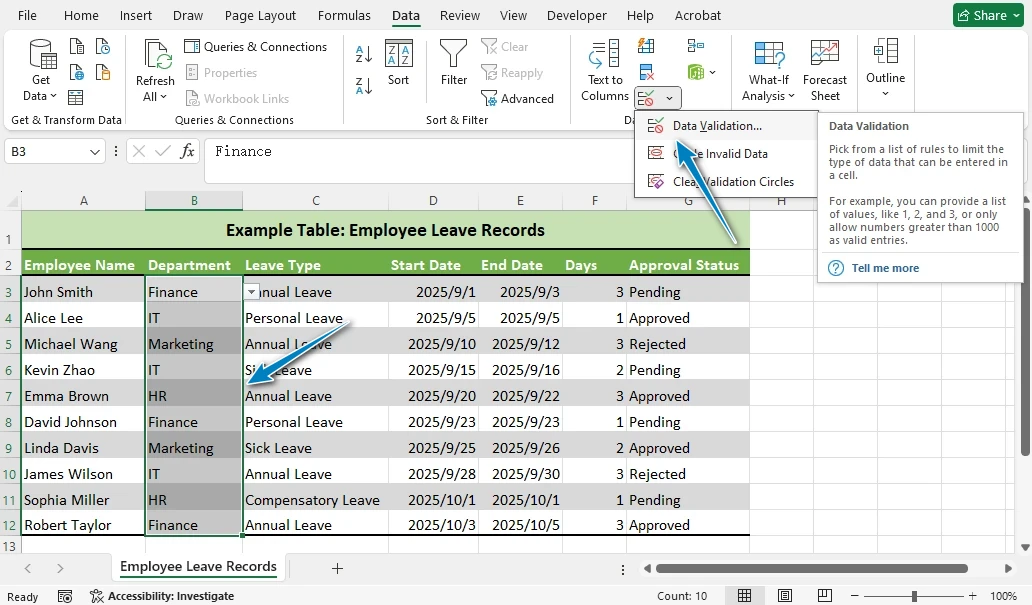
- Vai alla scheda Dati sulla barra multifunzione.
- Fai clic su Convalida dati (nel gruppo Strumenti dati).
- Nella finestra pop-up, fai clic su Cancella tutto.
- Premi OK per confermare.
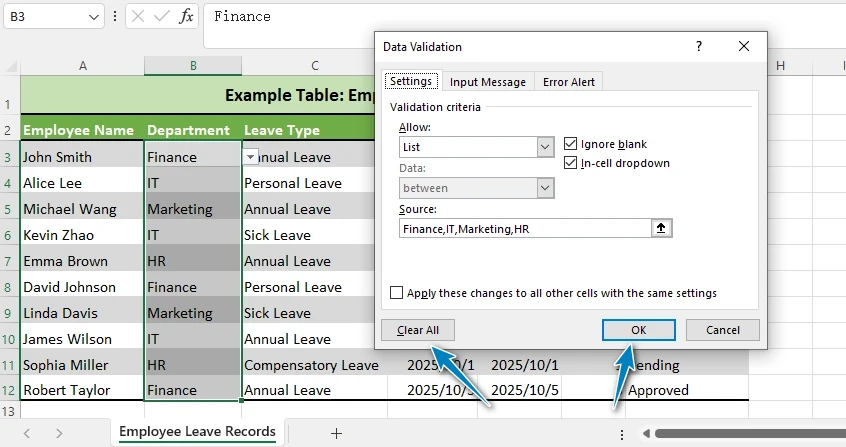
Questa azione rimuoverà la convalida dei dati dalle celle selezionate. I valori delle celle stesse non cambieranno.
Suggerimento: Se vedi solo "Cerchia dati non validi", fai clic sulla freccia a discesa sotto Convalida dati per accedere al menu completo.
2. Cancellare la Convalida dei Dati in Excel da un'Intera Colonna o Foglio
Se devi rimuovere le regole di convalida su un'area vasta, non devi cancellarle cella per cella.
- Per rimuovere la convalida da un'intera colonna, fai clic sull'intestazione della colonna (ad es. B per selezionare B:B).

- Per rimuovere la convalida dall'intero foglio, premi Ctrl + A per selezionare tutte le celle.

- Quindi ripeti i passaggi: Dati → Convalida dati → Cancella tutto → OK.
Questo è particolarmente utile quando hai ereditato un foglio di calcolo pieno di elenchi a discesa o restrizioni e vuoi cancellare tutto in una volta.
Suggerimento per l'efficienza: Rimuovere la convalida a livello di colonna o foglio è molto più veloce che mirare a singole celle.
3. Scorciatoia da Tastiera per Rimuovere la Convalida dei Dati
Se preferisci lavorare principalmente con la tastiera piuttosto che con il mouse, c'è una comoda scorciatoia in Excel che ti permette di rimuovere rapidamente la convalida dei dati da celle o intervalli selezionati.
- Seleziona la cella o l'intervallo da cui vuoi rimuovere la convalida dei dati.
- Premi Alt + D + L (pressioni brevi, non tenere premuto) per aprire la finestra di dialogo Convalida dati.
- Quindi fai clic su Cancella tutto → OK.
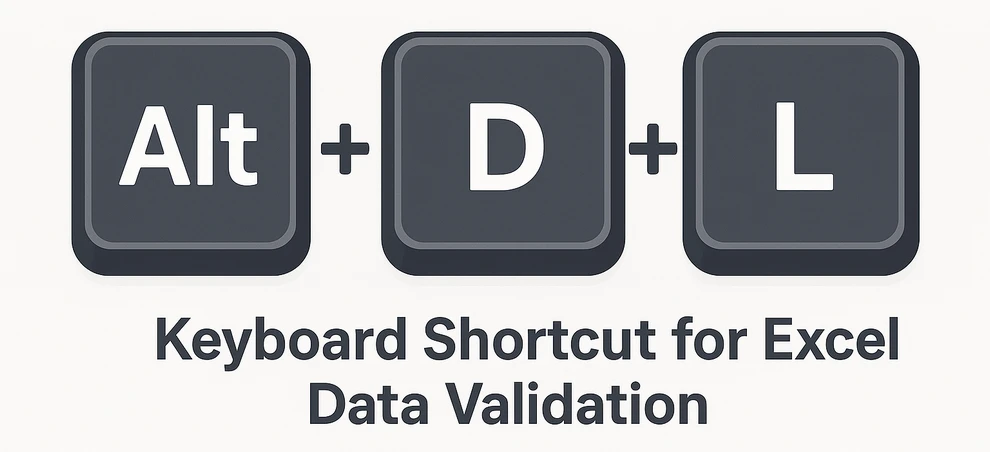
Questa scorciatoia funziona in molte versioni di Excel, anche se la disponibilità può variare.
4. Rimuovere la Convalida dei Dati di Excel con Python (Automazione)
Mentre i metodi manuali sopra descritti funzionano bene per singole celle o fogli, possono diventare dispendiosi in termini di tempo quando si ha a che fare con più cartelle di lavoro o grandi intervalli. In tali casi, l'automazione è una soluzione più efficiente.
Per automatizzare questo compito, possiamo usare Spire.XLS for Python, una potente libreria che consente la manipolazione programmatica dei file di Excel, inclusa la rimozione delle regole di convalida dei dati mantenendo intatti i dati esistenti.
Prima di iniziare, installa il pacchetto tramite pip:
pip install spire.xls
Esempio: Rimuovere le Regole di Convalida dei Dati di Excel con Python
Con Spire.XLS for Python, puoi rimuovere le regole di convalida dei dati usando il codice Python da un intervallo specifico o dall'intero foglio di lavoro, mantenendo i tuoi dati esistenti al sicuro. Questo approccio è ideale per elaborare più file o grandi set di dati in modo rapido e affidabile.
from spire.xls import *
from spire.xls.common import *

# Create a Workbook object
workbook = Workbook()

# Load an Excel file that contains data validation rules
workbook.LoadFromFile("Sample.xlsx")

# Get the first worksheet
worksheet = workbook.Worksheets[0]

# --- Method 1: Remove data validation from a specific range ---
# Rectangle.FromLTRB(startColumn, startRow, endColumn, endRow)
# Note: coordinates are zero-based (0 = first column/row)
# Example below: columns A–C (0-2), rows 1–12 (0–11)
range_rect = Rectangle.FromLTRB(0, 0, 2, 11)

# --- Method 2: Remove all data validation rules from the worksheet ---
# Use the sheet's LastRow and LastColumn to cover the full used range
#all_rect = Rectangle.FromLTRB(0, 0, worksheet.LastColumn, worksheet.LastRow)

rects = [range_rect]
worksheet.DVTable.Remove(rects)

# Save the workbook to a new file
workbook.SaveToFile("output/RemoveDataValidation.xlsx", ExcelVersion.Version2016)
Spiegazione
- Rectangle(startColumn, startRow, endColumn, endRow) crea un oggetto rettangolo che definisce l'intervallo da cui rimuovere le regole di convalida.
- DVTable.Remove(Rectangle) rimuove le regole di convalida dei dati dall'intervallo specificato.
- I valori delle celle rimangono invariati — vengono eliminate solo le restrizioni.
- Puoi mirare a intervalli specifici o rimuovere le regole di convalida dall'intero foglio di lavoro in un unico passaggio.
Ecco come appare il foglio dopo aver eseguito lo script Python: la convalida dei dati è stata cancellata, ma i valori rimangono.
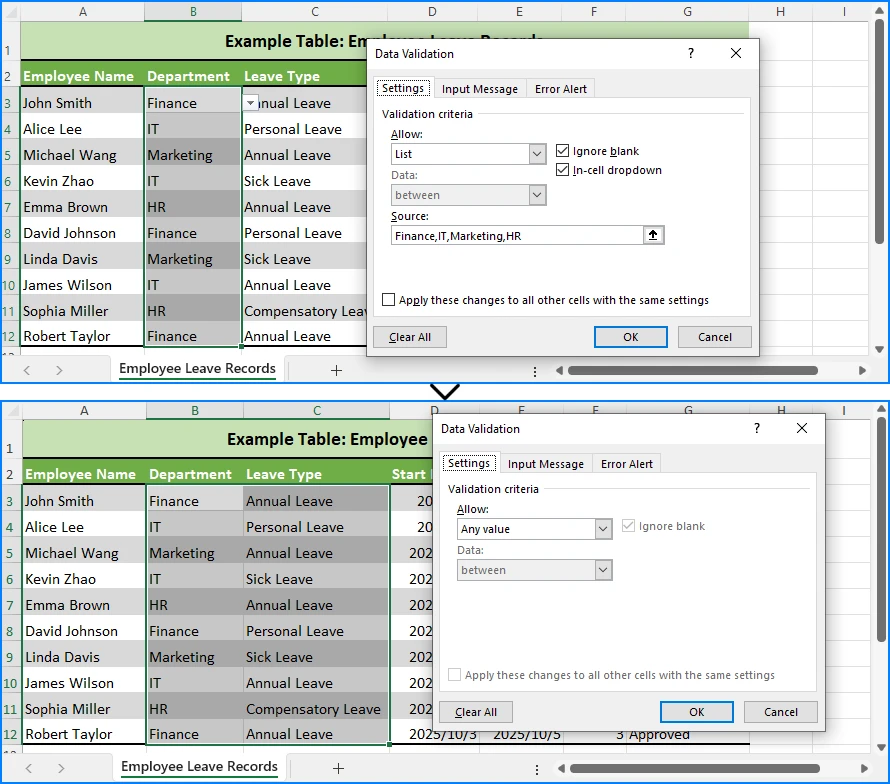
Questo approccio è ideale se elabori frequentemente fogli di calcolo con regole di convalida restrittive.
Se vuoi imparare come aggiungere la convalida dei dati in Excel usando Python, consulta la nostra guida passo-passo per impostare regole ed elenchi a discesa.
5. Alternativa: Rimuovere la Convalida dei Dati con VBA
Se preferisci il linguaggio di scripting integrato di Excel, una semplice macro VBA può rimuovere la convalida dei dati:
Sub RemoveAllValidation()
    Cells.Validation.Delete
End Sub
Questo elimina tutte le regole di convalida dal foglio di lavoro attivo.
Puoi anche mirare a un intervallo specifico invece dell'intero foglio:
Sub RemoveValidationFromRange()
    Range("B2:D10").Validation.Delete
End Sub
VBA è comodo per gli utenti esperti di Excel, ma se devi gestire più file o integrarti con altri flussi di lavoro, Python è generalmente più flessibile.
Differenza tra Cancellare la Convalida dei Dati e Cancellare i Contenuti
Una confusione comune in Excel è la differenza tra cancellare le regole di convalida e cancellare i contenuti delle celle:
- Cancellare la Convalida dei Dati → Rimuove solo le restrizioni (regole). I valori esistenti rimangono intatti e modificabili.
- Cancellare i Contenuti → Rimuove sia i valori che qualsiasi convalida applicata.
Quando il tuo obiettivo è rimuovere la convalida dei dati senza perdere i dati, usa sempre l'opzione Cancella tutto nella finestra di dialogo Convalida dati — non il comando Cancella contenuti dalla barra multifunzione o dal menu contestuale.
Questa distinzione assicura che i tuoi dati rimangano disponibili mentre vengono eliminate le restrizioni di input. Puoi anche semplificare la pulizia dei fogli di calcolo imparando a eliminare intere righe o colonne in Excel quando devi rimuovere rapidamente dati non necessari.
Conclusione
Ora conosci diversi modi per rimuovere la convalida dei dati in Excel:
- Metodi manuali: Usa la barra multifunzione, applicala a colonne o all'intero foglio, o affidati alla scorciatoia Alt + D + L.
- Metodi automatizzati: Usa Python (tramite Spire.XLS for Python) per soluzioni scalabili, o macro VBA per soluzioni rapide all'interno di Excel.
Che tu stia cancellando un singolo elenco a discesa o rimuovendo restrizioni da un'intera cartella di lavoro, questi metodi ti assicurano di poter lavorare liberamente con i tuoi dati. E ricorda: la rimozione della convalida non elimina mai i valori esistenti, quindi puoi procedere con fiducia.
Se devi rimuovere ripetutamente le restrizioni di convalida dei dati in Excel, l'automazione con Python o VBA ti farà risparmiare tempo e sforzi significativi.
FAQ sulla Rimozione della Convalida dei Dati in Excel
D1: La rimozione della convalida dei dati eliminerà i valori delle mie celle?
No. Rimuove solo le regole, non il contenuto esistente.
D2: Posso rimuovere la convalida dei dati da più fogli contemporaneamente?
Manualmente, no — dovrai ripetere il processo per ogni foglio. Con Python o VBA, puoi automatizzare l'operazione su più fogli.
D3: Esiste una scorciatoia per cancellare la convalida dei dati in Excel?
Sì, premi Alt + D + L per aprire la finestra di dialogo Convalida dati, quindi scegli Cancella tutto.
D4: Qual è la differenza tra Cancella Contenuti e Cancella Convalida?
Cancella Contenuti cancella sia i valori che la convalida. Cancella Convalida rimuove solo le restrizioni, mantenendo intatti i valori.
D5: Come elimino le restrizioni di convalida dei dati in un'intera cartella di lavoro?
Avrai bisogno dell'automazione. Uno script Python o una macro VBA possono scorrere tutti i fogli di lavoro e rimuovere le regole di convalida mantenendo i dati intatti.
Vedi Anche
Remover Validação de Dados no Excel: Manter Dados, Limpar Restrições
Índice
Instalar com Pypi
pip install spire.xls
Links Relacionados
O recurso de Validação de Dados do Excel é amplamente utilizado para controlar o que os usuários podem digitar em uma célula. É frequentemente aplicado para restringir valores a uma lista específica (menus suspensos), limitar entradas a números ou datas, ou impedir entradas duplicadas. Embora poderosas, essas regras às vezes podem atrapalhar — talvez as restrições não sejam mais necessárias, ou você queira permitir a entrada livre de dados.
Nesses casos, pode ser necessário remover a validação de dados no Excel. Limpar as regras de validação не apagará o conteúdo da célula — apenas removerá as restrições. Isso significa que seus dados existentes permanecem intactos, mas você estará livre para digitar qualquer coisa nessas células.
Se você deseja remover as restrições de validação de dados no Excel, existem métodos manuais e automatizados que você pode usar. Este tutorial aborda comandos da Faixa de Opções, atalhos e automação com Python ou VBA.
Comparação Rápida: Métodos para Remover a Validação de Dados no Excel
Ao trabalhar com o Excel, existem várias maneiras de remover a validação de dados, dependendo de suas necessidades — seja para uma remoção manual rápida, processamento em lote ou manuseio automatizado em vários arquivos. A tabela abaixo fornece uma comparação rápida de cada método, mostrando seu escopo, dificuldade e para qual cenário eles são mais adequados.
| Método | Escopo | Dificuldade | Mantém Valores? | Melhor para |
|---|---|---|---|---|
| Faixa de Opções (Limpar Tudo) | Células / intervalos selecionados | Fácil | ✅ Sim | Iniciantes |
| Seleção de Coluna/Planilha | Coluna inteira ou planilha inteira | Fácil | ✅ Sim | Áreas grandes |
| Atalho de Teclado (Alt + D + L) | Células / intervalos selecionados | Fácil | ✅ Sim | Usuários avançados |
| Python (Spire.XLS) | Célula / intervalo / planilha / múltiplos arquivos | Médio | ✅ Sim | Automação, arquivos em lote |
| Macro VBA | Célula / intervalo / planilha | Médio | ✅ Sim | Usuários avançados do Excel |
1. Remover Validação de Dados no Excel Usando a Faixa de Opções
A maneira mais comum de excluir a validação de dados é através da interface da Faixa de Opções do Excel. Este método é amigável para iniciantes e funciona em todas as versões modernas do Excel.
Passos:
- Selecione a célula ou o intervalo que contém a regra de validação.
- Vá para a guia Dados na Faixa de Opções.
- Clique em Validação de Dados (no grupo Ferramentas de Dados).
- Na janela pop-up, clique em Limpar Tudo.
- Pressione OK para confirmar.
Esta ação removerá a validação de dados das células selecionadas. Os valores das células em si não mudarão.
Dica: Se você vir apenas “Circular Dados Inválidos”, clique na seta suspensa sob Validação de Dados para acessar o menu completo.
2. Limpar a Validação de Dados no Excel de uma Coluna ou Planilha Inteira
Se você precisar remover regras de validação em uma área grande, não precisa limpá-las célula por célula.
- Para remover a validação de uma coluna inteira, clique no cabeçalho da coluna (por exemplo, B para selecionar B:B).
- Para remover a validação da planilha inteira, pressione Ctrl + A para selecionar todas as células.
- Em seguida, repita os passos: Dados → Validação de Dados → Limpar Tudo → OK.
Isso é particularmente útil quando você herda uma planilha cheia de listas suspensas ou restrições e deseja limpar tudo de uma vez.
Dica de eficiência: Remover a validação no nível da coluna ou da planilha é muito mais rápido do que visar células individuais.
3. Atalho de Teclado para Remover a Validação de Dados
Se você prefere trabalhar principalmente com o teclado em vez do mouse, há um atalho útil no Excel que permite remover rapidamente a validação de dados de células ou intervalos selecionados.
- Selecione a célula ou o intervalo onde você deseja remover a validação de dados.
- Pressione Alt + D + L (pressionamentos curtos, sem segurar) para abrir a caixa de diálogo Validação de Dados.
- Em seguida, clique em Limpar Tudo → OK.
Este atalho funciona em muitas versões do Excel, embora a disponibilidade possa variar.
4. Remover Validação de Dados do Excel com Python (Automação)
Embora os métodos manuais acima funcionem bem para células ou planilhas individuais, eles podem se tornar demorados ao lidar com várias pastas de trabalho ou grandes intervalos. Nesses casos, a automação é uma solução mais eficiente.
Para automatizar essa tarefa, podemos usar o Spire.XLS for Python, uma biblioteca poderosa que permite a manipulação programática de arquivos do Excel, incluindo a remoção de regras de validação de dados, mantendo os dados existentes intactos.
Antes de começar, instale o pacote via pip:
pip install spire.xls
Exemplo: Remover Regras de Validação de Dados do Excel com Python
Com o Spire.XLS for Python, você pode remover regras de validação de dados usando código Python de um intervalo específico ou da planilha inteira, mantendo seus dados existentes seguros. Esta abordagem é ideal para processar vários arquivos ou grandes conjuntos de dados de forma rápida e confiável.
from spire.xls import *
from spire.xls.common import *

# Create a Workbook object
workbook = Workbook()

# Load an Excel file that contains data validation rules
workbook.LoadFromFile("Sample.xlsx")

# Get the first worksheet
worksheet = workbook.Worksheets[0]

# --- Method 1: Remove data validation from a specific range ---
# Rectangle.FromLTRB(startColumn, startRow, endColumn, endRow)
# Note: coordinates are zero-based (0 = first column/row)
# Example below: columns A–C (0-2), rows 1–12 (0–11)
range_rect = Rectangle.FromLTRB(0, 0, 2, 11)

# --- Method 2: Remove all data validation rules from the worksheet ---
# Use the sheet's LastRow and LastColumn to cover the full used range
#all_rect = Rectangle.FromLTRB(0, 0, worksheet.LastColumn, worksheet.LastRow)

rects = [range_rect]
worksheet.DVTable.Remove(rects)

# Save the workbook to a new file
workbook.SaveToFile("output/RemoveDataValidation.xlsx", ExcelVersion.Version2016)
Explicação
- Rectangle(startColumn, startRow, endColumn, endRow) cria um objeto retângulo que define o intervalo do qual remover as regras de validação.
- DVTable.Remove(Rectangle) remove as regras de validação de dados do intervalo especificado.
- Os valores das células permanecem inalterados — apenas as restrições são excluídas.
- Você pode visar intervalos específicos ou remover regras de validação de toda a planilha em uma única etapa.
Veja como a planilha fica depois de executar o script Python — a validação de dados é limpa, mas os valores permanecem.
Esta abordagem é ideal se você processa frequentemente planilhas com regras de validação restritivas.
Se você quiser aprender a adicionar validação de dados no Excel usando Python, confira nosso guia passo a passo para configurar regras e listas suspensas.
5. Alternativa: Remover Validação de Dados com VBA
Se você prefere a linguagem de script integrada do Excel, uma simples macro VBA pode remover a validação de dados:
Sub RemoveAllValidation()
    Cells.Validation.Delete
End Sub
Isso exclui todas as regras de validação da planilha ativa.
Você também pode visar um intervalo específico em vez da planilha inteira:
Sub RemoveValidationFromRange()
    Range("B2:D10").Validation.Delete
End Sub
O VBA é conveniente para usuários avançados do Excel, mas se você precisar lidar com vários arquivos ou integrar com outros fluxos de trabalho, o Python é geralmente mais flexível.
Diferença Entre Limpar Validação de Dados e Limpar Conteúdo
Uma confusão comum no Excel é a diferença entre limpar regras de validação e limpar o conteúdo das células:
- Limpar Validação de Dados → Remove apenas as restrições (regras). Os valores existentes permanecem intactos e editáveis.
- Limpar Conteúdo → Remove tanto os valores quanto qualquer validação aplicada.
Quando seu objetivo é remover a validação de dados sem perder os dados, sempre use a opção Limpar Tudo na caixa de diálogo de Validação de Dados — não o comando Limpar Conteúdo da Faixa de Opções ou do menu de contexto.
Essa distinção garante que seus dados permaneçam disponíveis enquanto as restrições de entrada são levantadas. Você também pode simplificar a limpeza de planilhas aprendendo a excluir linhas ou colunas inteiras no Excel quando precisar remover dados desnecessários rapidamente.
Conclusão
Agora você conhece várias maneiras de remover a validação de dados no Excel:
- Métodos manuais: Use a Faixa de Opções, aplique a colunas ou a toda a planilha, ou confie no atalho Alt + D + L.
- Métodos automatizados: Use o Python (via Spire.XLS for Python) para soluções escaláveis, ou macros VBA para correções rápidas dentro do Excel.
Seja limpando uma única lista suspensa ou removendo restrições de uma pasta de trabalho inteira, esses métodos garantem que você possa trabalhar livremente com seus dados. E lembre-se — remover a validação nunca exclui os valores existentes, então você pode prosseguir com confiança.
Se você precisar remover as restrições de validação de dados no Excel repetidamente, a automação com Python ou VBA economizará tempo e esforço significativos.
FAQ para Remover a Validação de Dados no Excel
Q1: Remover a validação de dados excluirá os valores das minhas células?
Não. Remove apenas as regras, não o conteúdo existente.
Q2: Posso remover a validação de dados de várias planilhas de uma vez?
Manualmente, não — você precisará repetir o processo para cada planilha. Com Python ou VBA, você pode automatizar em todas as planilhas.
Q3: Existe um atalho para limpar a validação de dados no Excel?
Sim, pressione Alt + D + L para abrir a caixa de diálogo de Validação de Dados e, em seguida, escolha Limpar Tudo.
Q4: Qual é a diferença entre Limpar Conteúdo e Limpar Validação?
Limpar Conteúdo apaga tanto os valores quanto a validação. Limpar Validação remove apenas as restrições, mantendo os valores intactos.
Q5: Como excluo as restrições de validação de dados em uma pasta de trabalho inteira?
Você precisará de automação. Um script Python ou uma macro VBA pode percorrer todas as planilhas e remover as regras de validação, mantendo os dados intactos.
Veja Também
Excel 데이터 유효성 검사 제거: 데이터는 유지, 제한은 해제
Pypi로 설치
pip install spire.xls
관련 링크
Excel의 데이터 유효성 검사 기능은 사용자가 셀에 입력할 수 있는 내용을 제어하는 데 널리 사용됩니다. 특정 목록(드롭다운 메뉴)으로 값을 제한하거나, 입력을 숫자나 날짜로 제한하거나, 중복 입력을 방지하는 데 자주 적용됩니다. 강력하지만 이러한 규칙이 때로는 방해가 될 수 있습니다. 제한이 더 이상 필요 없거나 자유로운 데이터 입력을 허용하고 싶을 수 있습니다.
이러한 경우 Excel에서 데이터 유효성 검사를 제거해야 할 수 있습니다. 유효성 검사 규칙을 지워도 셀 내용이 삭제되지는 않으며 제한만 제거됩니다. 즉, 기존 데이터는 그대로 유지되지만 해당 셀에 무엇이든 자유롭게 입력할 수 있습니다.
Excel에서 데이터 유효성 검사 제한을 제거하려면 수동 및 자동화된 방법을 모두 사용할 수 있습니다. 이 튜토리얼에서는 리본 명령, 바로 가기 및 Python 또는 VBA를 사용한 자동화를 다룹니다.
빠른 비교: Excel에서 데이터 유효성 검사를 제거하는 방법
Excel로 작업할 때 필요에 따라 데이터 유효성 검사를 제거하는 여러 가지 방법이 있습니다. 빠른 수동 제거, 일괄 처리 또는 여러 파일에 걸친 자동화된 처리 등입니다. 아래 표는 각 방법의 빠른 비교를 제공하여 범위, 난이도 및 가장 적합한 시나리오를 보여줍니다.
| 방법 | 범위 | 난이도 | 값을 유지하나요? | 최적 대상 |
|---|---|---|---|---|
| 리본 (모두 지우기) | 선택한 셀 / 범위 | 쉬움 | ✅ 예 | 초보자 |
| 열/시트 선택 | 전체 열 또는 전체 워크시트 | 쉬움 | ✅ 예 | 넓은 영역 |
| 키보드 단축키 (Alt + D + L) | 선택한 셀 / 범위 | 쉬움 | ✅ 예 | 파워 유저 |
| Python (Spire.XLS) | 셀 / 범위 / 시트 / 여러 파일 | 중간 | ✅ 예 | 자동화, 배치 파일 |
| VBA 매크로 | 셀 / 범위 / 시트 | 중간 | ✅ 예 | Excel 파워 유저 |
1. 리본 메뉴를 사용하여 Excel에서 데이터 유효성 검사 제거
데이터 유효성 검사를 삭제하는 가장 일반적인 방법은 Excel의 리본 인터페이스를 통하는 것입니다. 이 방법은 초보자에게 친숙하며 모든 최신 버전의 Excel에서 작동합니다.
단계:
- 유효성 검사 규칙이 포함된 셀 또는 범위를 선택합니다.
- 리본 메뉴의 데이터 탭으로 이동합니다.
- 데이터 유효성 검사(데이터 도구 그룹)를 클릭합니다.
- 팝업 창에서 모두 지우기를 클릭합니다.
- 확인을 눌러 확인합니다.
이 작업은 선택한 셀에서 데이터 유효성 검사를 제거합니다. 셀 값 자체는 변경되지 않습니다.
팁: "잘못된 데이터에 동그라미"만 표시되는 경우 데이터 유효성 검사 아래의 드롭다운 화살표를 클릭하여 전체 메뉴에 액세스하십시오.
2. 전체 열 또는 시트에서 Excel의 데이터 유효성 검사 지우기
넓은 영역에 걸쳐 유효성 검사 규칙을 제거해야 하는 경우 셀 단위로 지울 필요가 없습니다.
- 전체 열에서 유효성 검사를 제거하려면 열 머리글(예: B를 클릭하여 B:B 선택)을 클릭합니다.
- 전체 시트에서 유효성 검사를 제거하려면 Ctrl + A를 눌러 모든 셀을 선택합니다.
- 그런 다음 단계를 반복합니다: 데이터 → 데이터 유효성 검사 → 모두 지우기 → 확인.
이는 드롭다운 목록이나 제한 사항으로 가득 찬 스프레드시트를 물려받았을 때 한 번에 모든 것을 지우고 싶을 때 특히 유용합니다.
효율성 팁: 열 또는 시트 수준에서 유효성 검사를 제거하는 것이 개별 셀을 대상으로 하는 것보다 훨씬 빠릅니다.
3. 데이터 유효성 검사를 제거하는 키보드 단축키
마우스보다 키보드로 주로 작업하는 것을 선호하는 경우, 선택한 셀이나 범위에서 데이터 유효성 검사를 빠르게 제거할 수 있는 유용한 Excel 단축키가 있습니다.
- 데이터 유효성 검사를 제거할 셀 또는 범위를 선택합니다.
- Alt + D + L(길게 누르지 말고 짧게 누름)을 눌러 데이터 유효성 검사 대화 상자를 엽니다.
- 그런 다음 모두 지우기 → 확인을 클릭합니다.
이 단축키는 많은 Excel 버전에서 작동하지만 가용성은 다를 수 있습니다.
4. Python으로 Excel 데이터 유효성 검사 제거 (자동화)
위의 수동 방법은 개별 셀이나 시트에 대해 잘 작동하지만, 여러 통합 문서나 큰 범위를 다룰 때는 시간이 많이 걸릴 수 있습니다. 이러한 경우 자동화가 더 효율적인 솔루션입니다.
이 작업을 자동화하기 위해 Spire.XLS for Python을 사용할 수 있습니다. 이 강력한 라이브러리는 기존 데이터를 그대로 유지하면서 데이터 유효성 검사 규칙을 제거하는 등 Excel 파일을 프로그래밍 방식으로 조작할 수 있게 해줍니다.
시작하기 전에 pip를 통해 패키지를 설치하십시오:
pip install spire.xls
예제: Python으로 Excel 데이터 유효성 검사 규칙 제거
Spire.XLS for Python을 사용하면 Python 코드를 사용하여 특정 범위 또는 전체 워크시트에서 데이터 유효성 검사 규칙을 제거하고 기존 데이터를 안전하게 유지할 수 있습니다. 이 접근 방식은 여러 파일이나 대규모 데이터 세트를 빠르고 안정적으로 처리하는 데 이상적입니다.
from spire.xls import *
from spire.xls.common import *

# Create a Workbook object
workbook = Workbook()

# Load an Excel file that contains data validation rules
workbook.LoadFromFile("Sample.xlsx")

# Get the first worksheet
worksheet = workbook.Worksheets[0]

# --- Method 1: Remove data validation from a specific range ---
# Rectangle.FromLTRB(startColumn, startRow, endColumn, endRow)
# Note: coordinates are zero-based (0 = first column/row)
# Example below: columns A–C (0-2), rows 1–12 (0–11)
range_rect = Rectangle.FromLTRB(0, 0, 2, 11)

# --- Method 2: Remove all data validation rules from the worksheet ---
# Use the sheet's LastRow and LastColumn to cover the full used range
#all_rect = Rectangle.FromLTRB(0, 0, worksheet.LastColumn, worksheet.LastRow)

rects = [range_rect]
worksheet.DVTable.Remove(rects)

# Save the workbook to a new file
workbook.SaveToFile("output/RemoveDataValidation.xlsx", ExcelVersion.Version2016)
설명
- Rectangle(startColumn, startRow, endColumn, endRow)은 유효성 검사 규칙을 제거할 범위를 정의하는 사각형 객체를 생성합니다.
- DVTable.Remove(Rectangle)은 지정된 범위에서 데이터 유효성 검사 규칙을 제거합니다.
- 셀 값은 변경되지 않으며 제한만 삭제됩니다.
- 특정 범위를 대상으로 하거나 한 번에 전체 워크시트에서 유효성 검사 규칙을 제거할 수 있습니다.
Python 스크립트를 실행한 후 시트가 어떻게 보이는지 확인하세요. 데이터 유효성 검사는 지워졌지만 값은 그대로 남아 있습니다.
이 접근 방식은 제한적인 유효성 검사 규칙이 있는 스프레드시트를 자주 처리하는 경우에 이상적입니다.
Python을 사용하여 Excel에 데이터 유효성 검사를 추가하는 방법을 배우고 싶다면 규칙 및 드롭다운 목록 설정에 대한 단계별 가이드를 확인하세요.
5. 대안: VBA로 데이터 유효성 검사 제거
Excel의 내장 스크립팅 언어를 선호하는 경우 간단한 VBA 매크로로 데이터 유효성 검사를 제거할 수 있습니다:
Sub RemoveAllValidation()
    Cells.Validation.Delete
End Sub
이것은 활성 워크시트에서 모든 유효성 검사 규칙을 삭제합니다.
전체 시트 대신 특정 범위를 대상으로 할 수도 있습니다:
Sub RemoveValidationFromRange()
    Range("B2:D10").Validation.Delete
End Sub
VBA는 Excel 파워 유저에게 편리하지만, 여러 파일을 처리하거나 다른 워크플로우와 통합해야 하는 경우 Python이 일반적으로 더 유연합니다.
데이터 유효성 검사 지우기와 내용 지우기의 차이점
Excel에서 흔한 혼동은 유효성 검사 규칙 지우기와 셀 내용 지우기의 차이입니다:
- 데이터 유효성 검사 지우기 → 제한(규칙)만 제거합니다. 기존 값은 그대로 유지되고 편집할 수 있습니다.
- 내용 지우기 → 값과 적용된 유효성 검사를 모두 제거합니다.
목표가 데이터를 잃지 않고 데이터 유효성 검사를 제거하는 것이라면, 항상 데이터 유효성 검사 대화 상자에서 모두 지우기 옵션을 사용하고, 리본 메뉴나 오른쪽 클릭 메뉴에서 내용 지우기 명령을 사용하지 마십시오.
이러한 구분을 통해 입력 제한을 해제하면서도 데이터를 계속 사용할 수 있습니다. 불필요한 데이터를 신속하게 제거해야 할 때 Excel에서 전체 행이나 열을 삭제하는 방법을 배우면 스프레드시트 정리를 단순화할 수 있습니다.
결론
이제 Excel에서 데이터 유효성 검사를 제거하는 여러 방법을 알게 되었습니다:
- 수동 방법: 리본 메뉴를 사용하거나, 열이나 전체 시트에 적용하거나, Alt + D + L 단축키를 사용합니다.
- 자동화된 방법: 확장 가능한 솔루션을 위해 Python(Spire.XLS for Python 사용)을 사용하거나, Excel 내에서 빠른 수정을 위해 VBA 매크로를 사용합니다.
단일 드롭다운 목록을 지우든 전체 통합 문서에서 제한을 제거하든, 이러한 방법을 사용하면 데이터로 자유롭게 작업할 수 있습니다. 그리고 기억하세요—유효성 검사를 제거해도 기존 값은 삭제되지 않으므로 자신 있게 진행할 수 있습니다.
Excel에서 데이터 유효성 검사 제한을 반복적으로 제거해야 하는 경우, Python 또는 VBA를 사용한 자동화는 상당한 시간과 노력을 절약해 줄 것입니다.
Excel에서 데이터 유효성 검사 제거에 대한 FAQ
Q1: 데이터 유효성 검사를 제거하면 셀 값이 삭제되나요?
아니요. 규칙만 제거되고 기존 내용은 삭제되지 않습니다.
Q2: 여러 시트에서 한 번에 데이터 유효성 검사를 제거할 수 있나요?
수동으로는 불가능합니다—각 시트마다 과정을 반복해야 합니다. Python이나 VBA를 사용하면 여러 시트에 걸쳐 자동화할 수 있습니다.
Q3: Excel에서 데이터 유효성 검사를 지우는 단축키가 있나요?
예, Alt + D + L을 눌러 데이터 유효성 검사 대화 상자를 연 다음 모두 지우기를 선택하세요.
Q4: 내용 지우기와 유효성 검사 지우기의 차이점은 무엇인가요?
내용 지우기는 값과 유효성 검사를 모두 지웁니다. 유효성 검사 지우기는 제한만 제거하고 값은 그대로 둡니다.
Q5: 전체 통합 문서에서 데이터 유효성 검사 제한을 어떻게 삭제하나요?
자동화가 필요합니다. Python 스크립트나 VBA 매크로가 모든 워크시트를 순회하며 데이터를 그대로 둔 채 유효성 검사 규칙을 제거할 수 있습니다.
참조 항목
Supprimer la validation des données dans Excel : Conserver les données, Effacer les restrictions
Table des matières
Installer avec Pypi
pip install spire.xls
Liens connexes
La fonctionnalité de Validation des données d'Excel est largement utilisée pour contrôler ce que les utilisateurs peuvent taper dans une cellule. Elle est souvent appliquée pour restreindre les valeurs à une liste spécifique (menus déroulants), limiter les entrées aux nombres ou aux dates, ou empêcher les entrées en double. Bien que puissantes, ces règles peuvent parfois gêner — peut-être que les restrictions ne sont plus nécessaires, ou que vous souhaitez autoriser la saisie libre des données.
Dans de tels cas, vous pourriez avoir besoin de supprimer la validation des données dans Excel. Effacer les règles de validation n'effacera pas le contenu des cellules — cela ne supprime que les restrictions. Cela signifie que vos données existantes restent intactes, mais vous serez libre de taper n'importe quoi dans ces cellules.
Si vous souhaitez supprimer les restrictions de validation des données dans Excel, il existe des méthodes manuelles et automatisées que vous pouvez utiliser. Ce tutoriel couvre les commandes du ruban, les raccourcis et l'automatisation avec Python ou VBA.
Comparaison rapide : Méthodes pour supprimer la validation des données dans Excel
Lorsque vous travaillez avec Excel, il existe plusieurs façons de supprimer la validation des données en fonction de vos besoins, que vous souhaitiez une suppression manuelle rapide, un traitement par lots ou une gestion automatisée sur plusieurs fichiers. Le tableau ci-dessous fournit une comparaison rapide de chaque méthode, montrant leur portée, leur difficulté et le scénario pour lequel elles sont les mieux adaptées.
| Méthode | Portée | Difficulté | Conserve les valeurs ? | Idéal pour |
|---|---|---|---|---|
| Ruban (Effacer tout) | Cellules / plages sélectionnées | Facile | ✅ Oui | Débutants |
| Sélection de colonne/feuille | Colonne entière ou feuille de calcul entière | Facile | ✅ Oui | Grandes zones |
| Raccourci clavier (Alt + D + L) | Cellules / plages sélectionnées | Facile | ✅ Oui | Utilisateurs avancés |
| Python (Spire.XLS) | Cellule / plage / feuille / plusieurs fichiers | Moyen | ✅ Oui | Automatisation, fichiers batch |
| Macro VBA | Cellule / plage / feuille | Moyen | ✅ Oui | Utilisateurs avancés d'Excel |
1. Supprimer la validation des données dans Excel à l'aide du ruban
La manière la plus courante de supprimer la validation des données est via l'interface du ruban d'Excel. Cette méthode est adaptée aux débutants et fonctionne dans toutes les versions modernes d'Excel.
Étapes :
- Sélectionnez la cellule ou la plage contenant la règle de validation.
- Allez à l'onglet Données sur le ruban.
- Cliquez sur Validation des données (dans le groupe Outils de données).
- Dans la fenêtre contextuelle, cliquez sur Effacer tout.
- Appuyez sur OK pour confirmer.
Cette action supprimera la validation des données des cellules sélectionnées. Les valeurs des cellules elles-mêmes не changeront pas.
Astuce : Si vous ne voyez que « Entourer les données non valides », cliquez sur la flèche déroulante sous Validation des données pour accéder au menu complet.
2. Effacer la validation des données dans Excel d'une colonne ou d'une feuille entière
Si vous devez supprimer des règles de validation sur une grande zone, vous n'avez pas à les effacer cellule par cellule.
- Pour supprimer la validation d'une colonne entière, cliquez sur l'en-tête de la colonne (par exemple, B pour sélectionner B:B).
- Pour supprimer la validation de la feuille entière, appuyez sur Ctrl + A pour sélectionner toutes les cellules.
- Répétez ensuite les étapes : Données → Validation des données → Effacer tout → OK.
Ceci est particulièrement utile lorsque vous avez hérité d'une feuille de calcul pleine de listes déroulantes ou de restrictions et que vous voulez tout effacer en une seule fois.
Conseil d'efficacité : Supprimer la validation au niveau de la colonne ou de la feuille est beaucoup plus rapide que de cibler des cellules individuelles.
3. Raccourci clavier pour supprimer la validation des données
Si vous préférez travailler principalement avec le clavier plutôt qu'avec la souris, il existe un raccourci pratique dans Excel qui vous permet de supprimer rapidement la validation des données des cellules ou des plages sélectionnées.
- Sélectionnez la cellule ou la plage où vous souhaitez supprimer la validation des données.
- Appuyez sur Alt + D + L (pressions courtes, ne pas maintenir) pour ouvrir la boîte de dialogue Validation des données.
- Cliquez ensuite sur Effacer tout → OK.
Ce raccourci fonctionne dans de nombreuses versions d'Excel, bien que la disponibilité puisse varier.
4. Supprimer la validation des données Excel avec Python (Automatisation)
Alors que les méthodes manuelles ci-dessus fonctionnent bien pour des cellules ou des feuilles individuelles, elles могут devenir chronophages lorsqu'il s'agit de plusieurs classeurs ou de grandes plages. Dans de tels cas, l'automatisation est une solution plus efficace.
Pour automatiser cette tâche, nous pouvons utiliser Spire.XLS for Python, une bibliothèque puissante qui permet la manipulation programmatique des fichiers Excel, y compris la suppression des règles de validation des données tout en conservant les données existantes intactes.
Avant de commencer, installez le package via pip :
pip install spire.xls
Exemple : Supprimer les règles de validation des données Excel avec Python
Avec Spire.XLS for Python, vous pouvez supprimer les règles de validation des données à l'aide de code Python d'une plage spécifique ou de la feuille de calcul entière, en gardant vos données existantes en sécurité. Cette approche est idéale pour traiter rapidement et de manière fiable plusieurs fichiers ou de grands ensembles de données.
from spire.xls import *
from spire.xls.common import *

# Create a Workbook object
workbook = Workbook()

# Load an Excel file that contains data validation rules
workbook.LoadFromFile("Sample.xlsx")

# Get the first worksheet
worksheet = workbook.Worksheets[0]

# --- Method 1: Remove data validation from a specific range ---
# Rectangle.FromLTRB(startColumn, startRow, endColumn, endRow)
# Note: coordinates are zero-based (0 = first column/row)
# Example below: columns A–C (0-2), rows 1–12 (0–11)
range_rect = Rectangle.FromLTRB(0, 0, 2, 11)

# --- Method 2: Remove all data validation rules from the worksheet ---
# Use the sheet's LastRow and LastColumn to cover the full used range
#all_rect = Rectangle.FromLTRB(0, 0, worksheet.LastColumn, worksheet.LastRow)

rects = [range_rect]
worksheet.DVTable.Remove(rects)

# Save the workbook to a new file
workbook.SaveToFile("output/RemoveDataValidation.xlsx", ExcelVersion.Version2016)
Explication
- Rectangle(startColumn, startRow, endColumn, endRow) crée un objet rectangle qui définit la plage à partir de laquelle supprimer les règles de validation.
- DVTable.Remove(Rectangle) supprime les règles de validation des données de la plage spécifiée.
- Les valeurs des cellules restent inchangées — seules les restrictions sont supprimées.
- Vous pouvez soit cibler des plages spécifiques, soit supprimer les règles de validation de la feuille de calcul entière en une seule étape.
Voici à quoi ressemble la feuille après l'exécution du script Python — la validation des données est effacée, mais les valeurs restent.
Cette approche est idéale si vous traitez fréquemment des feuilles de calcul avec des règles de validation restrictives.
Si vous voulez apprendre comment ajouter la validation des données dans Excel en utilisant Python, consultez notre guide étape par étape pour configurer des règles et des listes déroulantes.
5. Alternative : Supprimer la validation des données avec VBA
Si vous préférez le langage de script intégré d'Excel, une simple macro VBA peut supprimer la validation des données :
Sub RemoveAllValidation()
    Cells.Validation.Delete
End Sub
Cela supprime toutes les règles de validation de la feuille de calcul active.
Vous pouvez également cibler une plage spécifique au lieu de la feuille entière :
Sub RemoveValidationFromRange()
    Range("B2:D10").Validation.Delete
End Sub
VBA est pratique pour les utilisateurs avancés d'Excel, mais si vous devez gérer plusieurs fichiers ou intégrer d'autres flux de travail, Python est généralement plus flexible.
Différence entre effacer la validation des données et effacer le contenu
Une confusion courante dans Excel est la différence entre effacer les règles de validation et effacer le contenu des cellules :
- Effacer la validation des données → Supprime uniquement les restrictions (règles). Les valeurs existantes restent intactes et modifiables.
- Effacer le contenu → Supprime à la fois les valeurs et toute validation appliquée.
Lorsque votre objectif est de supprimer la validation des données sans perdre les données, utilisez toujours l'option Effacer tout dans la boîte de dialogue Validation des données, et non la commande Effacer le contenu du ruban ou du menu contextuel.
Cette distinction garantit que vos données restent disponibles tout en levant les restrictions de saisie. Vous pouvez également simplifier le nettoyage des feuilles de calcul en apprenant à supprimer des lignes ou des colonnes entières dans Excel lorsque vous devez supprimer rapidement des données inutiles.
Conclusion
Vous connaissez maintenant plusieurs façons de supprimer la validation des données dans Excel :
- Méthodes manuelles : Utilisez le ruban, appliquez-le à des colonnes ou à la feuille entière, ou utilisez le raccourci Alt + D + L.
- Méthodes automatisées : Utilisez Python (via Spire.XLS for Python) pour des solutions évolutives, ou des macros VBA pour des corrections rapides dans Excel.
Que vous effaciez une seule liste déroulante ou que vous supprimiez des restrictions d'un classeur entier, ces méthodes vous garantissent de pouvoir travailler librement avec vos données. Et rappelez-vous — la suppression de la validation ne supprime jamais les valeurs existantes, vous pouvez donc procéder en toute confiance.
Si vous devez supprimer les restrictions de validation des données dans Excel à plusieurs reprises, l'automatisation avec Python ou VBA vous fera gagner un temps et des efforts considérables.
FAQ sur la suppression de la validation des données dans Excel
Q1 : La suppression de la validation des données supprimera-t-elle les valeurs de mes cellules ?
Non. Elle ne supprime que les règles, pas le contenu existant.
Q2 : Puis-je supprimer la validation des données de plusieurs feuilles à la fois ?
Manuellement, non — vous devrez répéter le processus pour chaque feuille. Avec Python ou VBA, vous pouvez automatiser sur plusieurs feuilles.
Q3 : Existe-t-il un raccourci pour effacer la validation des données dans Excel ?
Oui, appuyez sur Alt + D + L pour ouvrir la boîte de dialogue Validation des données, puis choisissez Effacer tout.
Q4 : Quelle est la différence entre Effacer le contenu et Effacer la validation ?
Effacer le contenu efface à la fois les valeurs et la validation. Effacer la validation ne supprime que les restrictions, en conservant les valeurs intactes.
Q5 : Comment puis-je supprimer les restrictions de validation des données sur un classeur entier ?
Vous aurez besoin d'automatisation. Un script Python ou une macro VBA peut parcourir toutes les feuilles de calcul et supprimer les règles de validation tout en conservant les données intactes.
Voir aussi
Quitar validación de datos en Excel: Mantener datos, Eliminar restricciones
Tabla de Contenidos
Instalar con Pypi
pip install spire.xls
Enlaces Relacionados
La función de Validación de Datos de Excel es ampliamente utilizada para controlar lo que los usuarios pueden escribir en una celda. A menudo se aplica para restringir valores a una lista específica (menús desplegables), limitar las entradas a números o fechas, o evitar entradas duplicadas. Aunque son potentes, estas reglas a veces pueden estorbar, tal vez las restricciones ya no son necesarias o desea permitir la entrada libre de datos.
En tales casos, es posible que necesite quitar la validación de datos en Excel. Borrar las reglas de validación no borrará el contenido de las celdas, solo elimina las restricciones. Esto significa que sus datos existentes permanecen intactos, pero podrá escribir cualquier cosa en esas celdas.
Si desea quitar las restricciones de validación de datos en Excel, puede usar tanto métodos manuales como automatizados. Este tutorial cubre los comandos de la cinta de opciones, los atajos y la automatización con Python o VBA.
Comparación Rápida: Métodos para Quitar la Validación de Datos en Excel
Al trabajar con Excel, existen varias formas de quitar la validación de datos según sus necesidades, ya sea que desee una eliminación manual rápida, un procesamiento por lotes o un manejo automatizado en múltiples archivos. La siguiente tabla proporciona una comparación rápida de cada método, mostrando su alcance, dificultad y para qué escenario son más adecuados.
| Método | Alcance | Dificultad | ¿Conserva los valores? | Ideal para |
|---|---|---|---|---|
| Cinta de opciones (Borrar todo) | Celdas / rangos seleccionados | Fácil | ✅ Sí | Principiantes |
| Selección de columna/hoja | Columna completa u hoja de cálculo completa | Fácil | ✅ Sí | Áreas grandes |
| Atajo de teclado (Alt + D + L) | Celdas / rangos seleccionados | Fácil | ✅ Sí | Usuarios avanzados |
| Python (Spire.XLS) | Celda / rango / hoja / múltiples archivos | Medio | ✅ Sí | Automatización, archivos por lotes |
| Macro de VBA | Celda / rango / hoja | Medio | ✅ Sí | Usuarios avanzados de Excel |
1. Quitar la Validación de Datos en Excel Usando la Cinta de Opciones
La forma más común de eliminar la validación de datos es a través de la interfaz de la cinta de opciones de Excel. Este método es amigable para principiantes y funciona en todas las versiones modernas de Excel.
Pasos:
- Seleccione la celda o el rango que contiene la regla de validación.
- Vaya a la pestaña Datos en la cinta de opciones.
- Haga clic en Validación de datos (en el grupo Herramientas de datos).
- En la ventana emergente, haga clic en Borrar todo.
- Presione Aceptar para confirmar.
Esta acción eliminará la validación de datos de las celdas seleccionadas. Los valores de las celdas en sí no cambiarán.
Consejo: Si solo ve "Rodear con un círculo datos no válidos", haga clic en la flecha desplegable debajo de Validación de datos para acceder al menú completo.
2. Borrar la Validación de Datos en Excel de una Columna u Hoja Completa
Si necesita eliminar reglas de validación en un área grande, no tiene que borrarlas celda por celda.
- Para quitar la validación de una columna completa, haga clic en el encabezado de la columna (por ejemplo, B para seleccionar B:B).
- Para quitar la validación de toda la hoja, presione Ctrl + A para seleccionar todas las celdas.
- Luego repita los pasos: Datos → Validación de datos → Borrar todo → Aceptar.
Esto es particularmente útil cuando ha heredado una hoja de cálculo llena de listas desplegables o restricciones y desea borrar todo de una vez.
Consejo de eficiencia: Quitar la validación a nivel de columna u hoja es mucho más rápido que apuntar a celdas individuales.
3. Atajo de Teclado para Quitar la Validación de Datos
Si prefiere trabajar principalmente con el teclado en lugar del mouse, hay un atajo útil en Excel que le permite quitar rápidamente la validación de datos de celdas o rangos seleccionados.
- Seleccione la celda o el rango donde desea quitar la validación de datos.
- Presione Alt + D + L (pulsaciones cortas, sin mantener) para abrir el cuadro de diálogo Validación de datos.
- Luego haga clic en Borrar todo → Aceptar.
Este atajo funciona en muchas versiones de Excel, aunque la disponibilidad puede variar.
4. Quitar la Validación de Datos de Excel con Python (Automatización)
Si bien los métodos manuales anteriores funcionan bien para celdas u hojas individuales, pueden consumir mucho tiempo cuando se trata de múltiples libros de trabajo o rangos grandes. En tales casos, la automatización es una solución más eficiente.
Para automatizar esta tarea, podemos usar Spire.XLS for Python, una potente biblioteca que permite la manipulación programática de archivos de Excel, incluida la eliminación de reglas de validación de datos mientras se mantienen intactos los datos existentes.
Antes de comenzar, instale el paquete a través de pip:
pip install spire.xls
Ejemplo: Quitar Reglas de Validación de Datos de Excel con Python
Con Spire.XLS for Python, puede quitar reglas de validación de datos usando código Python de un rango específico o de toda la hoja de cálculo, manteniendo sus datos existentes seguros. Este enfoque es ideal para procesar múltiples archivos o grandes conjuntos de datos de manera rápida y confiable.
from spire.xls import *
from spire.xls.common import *

# Create a Workbook object
workbook = Workbook()

# Load an Excel file that contains data validation rules
workbook.LoadFromFile("Sample.xlsx")

# Get the first worksheet
worksheet = workbook.Worksheets[0]

# --- Method 1: Remove data validation from a specific range ---
# Rectangle.FromLTRB(startColumn, startRow, endColumn, endRow)
# Note: coordinates are zero-based (0 = first column/row)
# Example below: columns A–C (0-2), rows 1–12 (0–11)
range_rect = Rectangle.FromLTRB(0, 0, 2, 11)

# --- Method 2: Remove all data validation rules from the worksheet ---
# Use the sheet's LastRow and LastColumn to cover the full used range
#all_rect = Rectangle.FromLTRB(0, 0, worksheet.LastColumn, worksheet.LastRow)

rects = [range_rect]
worksheet.DVTable.Remove(rects)

# Save the workbook to a new file
workbook.SaveToFile("output/RemoveDataValidation.xlsx", ExcelVersion.Version2016)
Explicación
- Rectangle(startColumn, startRow, endColumn, endRow) crea un objeto rectángulo que define el rango del cual se eliminarán las reglas de validación.
- DVTable.Remove(Rectangle) elimina las reglas de validación de datos del rango especificado.
- Los valores de las celdas permanecen sin cambios, solo se eliminan las restricciones.
- Puede apuntar a rangos específicos o eliminar las reglas de validación de toda la hoja de cálculo en un solo paso.
Así es como se ve la hoja después de ejecutar el script de Python: la validación de datos se borra, pero los valores permanecen.
Este enfoque es ideal si procesa con frecuencia hojas de cálculo con reglas de validación restrictivas.
Si desea aprender a agregar validación de datos en Excel usando Python, consulte nuestra guía paso a paso para configurar reglas y listas desplegables.
5. Alternativa: Quitar la Validación de Datos con VBA
Si prefiere el lenguaje de scripting integrado de Excel, una simple macro de VBA puede quitar la validación de datos:
Sub RemoveAllValidation()
    Cells.Validation.Delete
End Sub
Esto elimina todas las reglas de validación de la hoja de cálculo activa.
También puede apuntar a un rango específico en lugar de a toda la hoja:
Sub RemoveValidationFromRange()
    Range("B2:D10").Validation.Delete
End Sub
VBA es conveniente para los usuarios avanzados de Excel, pero si necesita manejar múltiples archivos o integrarse con otros flujos de trabajo, Python es generalmente más flexible.
Diferencia Entre Borrar Validación de Datos y Borrar Contenidos
Una confusión común en Excel es la diferencia entre borrar reglas de validación y borrar contenidos de celda:
- Borrar Validación de Datos → Elimina solo las restricciones (reglas). Los valores existentes permanecen intactos y editables.
- Borrar Contenidos → Elimina tanto los valores como cualquier validación aplicada.
Cuando su objetivo es quitar la validación de datos sin perder los datos, siempre use la opción Borrar todo en el diálogo de Validación de Datos, no el comando Borrar Contenidos de la cinta de opciones o del menú contextual.
Esta distinción garantiza que sus datos permanezcan disponibles mientras se levantan las restricciones de entrada. También puede simplificar la limpieza de hojas de cálculo aprendiendo a eliminar filas o columnas enteras en Excel cuando necesite eliminar datos innecesarios rápidamente.
Conclusión
Ahora conoce varias formas de quitar la validación de datos en Excel:
- Métodos manuales: Use la cinta de opciones, aplíquela a columnas o a toda la hoja, o confíe en el atajo Alt + D + L.
- Métodos automatizados: Use Python (a través de Spire.XLS for Python) para soluciones escalables, o macros de VBA para soluciones rápidas dentro de Excel.
Ya sea que esté borrando una sola lista desplegable o quitando restricciones de un libro de trabajo completo, estos métodos aseguran que pueda trabajar libremente con sus datos. Y recuerde: quitar la validación nunca elimina los valores existentes, por lo que puede proceder con confianza.
Si necesita quitar las restricciones de validación de datos en Excel repetidamente, la automatización con Python o VBA le ahorrará una cantidad significativa de tiempo y esfuerzo.
Preguntas Frecuentes sobre la Eliminación de la Validación de Datos en Excel
P1: ¿Quitar la validación de datos eliminará los valores de mis celdas?
No. Solo elimina las reglas, no el contenido existente.
P2: ¿Puedo quitar la validación de datos de múltiples hojas a la vez?
Manualmente, no; necesitará repetir el proceso para cada hoja. Con Python o VBA, puede automatizarlo en todas las hojas.
P3: ¿Existe un atajo para borrar la validación de datos en Excel?
Sí, presione Alt + D + L para abrir el diálogo de Validación de Datos, luego elija Borrar todo.
P4: ¿Cuál es la diferencia entre Borrar Contenidos y Borrar Validación?
Borrar Contenidos borra tanto los valores como la validación. Borrar Validación elimina solo las restricciones, manteniendo los valores intactos.
P5: ¿Cómo elimino las restricciones de validación de datos en todo un libro de trabajo?
Necesitará automatización. Un script de Python o una macro de VBA puede recorrer todas las hojas de cálculo y eliminar las reglas de validación mientras mantiene los datos intactos.
Ver También
Datenüberprüfung in Excel entfernen: Daten beibehalten, Einschränkungen aufheben
Inhaltsverzeichnis
Mit Pypi installieren
pip install spire.xls
Verwandte Links
Die Funktion Datenüberprüfung von Excel wird häufig verwendet, um zu kontrollieren, was Benutzer in eine Zelle eingeben können. Sie wird oft angewendet, um Werte auf eine bestimmte Liste (Dropdown-Menüs) zu beschränken, Eingaben auf Zahlen oder Daten zu begrenzen oder doppelte Einträge zu verhindern. Obwohl diese Regeln leistungsstark sind, können sie manchmal im Weg stehen – vielleicht werden die Einschränkungen nicht mehr benötigt, oder Sie möchten eine freie Dateneingabe ermöglichen.
In solchen Fällen müssen Sie möglicherweise die Datenüberprüfung in Excel entfernen. Das Löschen von Überprüfungsregeln löscht nicht den Zellinhalt – es entfernt nur die Einschränkungen. Das bedeutet, Ihre vorhandenen Daten bleiben erhalten, aber Sie können in diesen Zellen alles eingeben.
Wenn Sie die Einschränkungen der Datenüberprüfung in Excel entfernen möchten, können Sie sowohl manuelle als auch automatisierte Methoden verwenden. Dieses Tutorial behandelt Befehle im Menüband, Tastenkombinationen und die Automatisierung mit Python oder VBA.
Schnellvergleich: Methoden zum Entfernen der Datenüberprüfung in Excel
Bei der Arbeit mit Excel gibt es mehrere Möglichkeiten, die Datenüberprüfung zu entfernen, je nach Ihren Bedürfnissen – ob Sie eine schnelle manuelle Entfernung, eine Stapelverarbeitung oder eine automatisierte Handhabung über mehrere Dateien hinweg wünschen. Die folgende Tabelle bietet einen schnellen Vergleich jeder Methode und zeigt deren Umfang, Schwierigkeitsgrad und für welches Szenario sie am besten geeignet ist.
| Methode | Umfang | Schwierigkeit | Behält Werte? | Am besten für |
|---|---|---|---|---|
| Menüband (Alle löschen) | Ausgewählte Zellen / Bereiche | Einfach | ✅ Ja | Anfänger |
| Spalten-/Blattauswahl | Ganze Spalte oder ganzes Arbeitsblatt | Einfach | ✅ Ja | Große Bereiche |
| Tastenkombination (Alt + D + L) | Ausgewählte Zellen / Bereiche | Einfach | ✅ Ja | Power-User |
| Python (Spire.XLS) | Zelle / Bereich / Blatt / mehrere Dateien | Mittel | ✅ Ja | Automatisierung, Stapeldateien |
| VBA-Makro | Zelle / Bereich / Blatt | Mittel | ✅ Ja | Excel-Power-User |
1. Datenüberprüfung in Excel über das Menüband entfernen
Die gebräuchlichste Methode zum Löschen der Datenüberprüfung ist über die Benutzeroberfläche des Excel-Menübands. Diese Methode ist anfängerfreundlich und funktioniert in allen modernen Excel-Versionen.
Schritte:
- Wählen Sie die Zelle oder den Bereich aus, der die Überprüfungsregel enthält.
- Gehen Sie zum Tab Daten im Menüband.
- Klicken Sie auf Datenüberprüfung (in der Gruppe Datentools).
- Klicken Sie im Popup-Fenster auf Alle löschen.
- Drücken Sie OK zur Bestätigung.
Diese Aktion entfernt die Datenüberprüfung aus den ausgewählten Zellen. Die Zellwerte selbst ändern sich nicht.
Tipp: Wenn Sie nur „Ungültige Daten einkreisen“ sehen, klicken Sie auf den Dropdown-Pfeil unter Datenüberprüfung, um auf das vollständige Menü zuzugreifen.
2. Datenüberprüfung in Excel aus einer ganzen Spalte oder einem Blatt löschen
Wenn Sie Überprüfungsregeln über einen großen Bereich entfernen müssen, müssen Sie sie nicht Zelle für Zelle löschen.
- Um die Überprüfung aus einer ganzen Spalte zu entfernen, klicken Sie auf den Spaltenkopf (z. B. B, um B:B auszuwählen).
- Um die Überprüfung aus dem gesamten Blatt zu entfernen, drücken Sie Strg + A, um alle Zellen auszuwählen.
- Wiederholen Sie dann die Schritte: Daten → Datenüberprüfung → Alle löschen → OK.
Dies ist besonders nützlich, wenn Sie eine Tabelle voller Dropdown-Listen oder Einschränkungen geerbt haben und alles auf einmal löschen möchten.
Effizienztipp: Das Entfernen der Überprüfung auf Spalten- oder Blattebene ist viel schneller als das Anvisieren einzelner Zellen.
3. Tastenkombination zum Entfernen der Datenüberprüfung
Wenn Sie lieber hauptsächlich mit der Tastatur als mit der Maus arbeiten, gibt es eine praktische Tastenkombination in Excel, mit der Sie die Datenüberprüfung schnell aus ausgewählten Zellen oder Bereichen entfernen können.
- Wählen Sie die Zelle oder den Bereich aus, aus dem Sie die Datenüberprüfung entfernen möchten.
- Drücken Sie Alt + D + L (kurze Tastenanschläge, nicht gedrückt halten), um das Dialogfeld Datenüberprüfung zu öffnen.
- Klicken Sie dann auf Alle löschen → OK.
Diese Tastenkombination funktioniert in vielen Excel-Versionen, obwohl die Verfügbarkeit variieren kann.
4. Excel-Datenüberprüfung mit Python entfernen (Automatisierung)
Während die oben genannten manuellen Methoden für einzelne Zellen oder Blätter gut funktionieren, können sie bei der Arbeit mit mehreren Arbeitsmappen oder großen Bereichen zeitaufwändig werden. In solchen Fällen ist die Automatisierung eine effizientere Lösung.
Um diese Aufgabe zu automatisieren, können wir Spire.XLS for Python verwenden, eine leistungsstarke Bibliothek, die die programmgesteuerte Bearbeitung von Excel-Dateien ermöglicht, einschließlich des Entfernens von Datenüberprüfungsregeln bei gleichzeitigem Erhalt der vorhandenen Daten.
Bevor Sie beginnen, installieren Sie das Paket über pip:
pip install spire.xls
Beispiel: Excel-Datenüberprüfungsregeln mit Python entfernen
Mit Spire.XLS for Python können Sie Datenüberprüfungsregeln mit Python-Code aus einem bestimmten Bereich oder dem gesamten Arbeitsblatt entfernen und dabei Ihre vorhandenen Daten sicher aufbewahren. Dieser Ansatz ist ideal für die schnelle und zuverlässige Verarbeitung mehrerer Dateien oder großer Datensätze.
from spire.xls import *
from spire.xls.common import *

# Create a Workbook object
workbook = Workbook()

# Load an Excel file that contains data validation rules
workbook.LoadFromFile("Sample.xlsx")

# Get the first worksheet
worksheet = workbook.Worksheets[0]

# --- Method 1: Remove data validation from a specific range ---
# Rectangle.FromLTRB(startColumn, startRow, endColumn, endRow)
# Note: coordinates are zero-based (0 = first column/row)
# Example below: columns A–C (0-2), rows 1–12 (0–11)
range_rect = Rectangle.FromLTRB(0, 0, 2, 11)

# --- Method 2: Remove all data validation rules from the worksheet ---
# Use the sheet's LastRow and LastColumn to cover the full used range
#all_rect = Rectangle.FromLTRB(0, 0, worksheet.LastColumn, worksheet.LastRow)

rects = [range_rect]
worksheet.DVTable.Remove(rects)

# Save the workbook to a new file
workbook.SaveToFile("output/RemoveDataValidation.xlsx", ExcelVersion.Version2016)
Erklärung
- Rectangle(startColumn, startRow, endColumn, endRow) erstellt ein Rechteckobjekt, das den Bereich definiert, aus dem die Überprüfungsregeln entfernt werden sollen.
- DVTable.Remove(Rectangle) entfernt Datenüberprüfungsregeln aus dem angegebenen Bereich.
- Die Zellwerte bleiben unverändert – nur die Einschränkungen werden gelöscht.
- Sie können entweder bestimmte Bereiche anvisieren oder Überprüfungsregeln aus dem gesamten Arbeitsblatt in einem Schritt entfernen.
So sieht das Blatt nach Ausführung des Python-Skripts aus – die Datenüberprüfung ist gelöscht, aber die Werte bleiben erhalten.
Dieser Ansatz ist ideal, wenn Sie häufig Tabellenkalkulationen mit restriktiven Überprüfungsregeln verarbeiten.
Wenn Sie lernen möchten, wie man Datenüberprüfung in Excel mit Python hinzufügt, sehen Sie sich unsere Schritt-für-Schritt-Anleitung zum Einrichten von Regeln und Dropdown-Listen an.
5. Alternative: Datenüberprüfung mit VBA entfernen
Wenn Sie die integrierte Skriptsprache von Excel bevorzugen, kann ein einfaches VBA-Makro die Datenüberprüfung entfernen:
Sub RemoveAllValidation()
    Cells.Validation.Delete
End Sub
Dies löscht alle Überprüfungsregeln aus dem aktiven Arbeitsblatt.
Sie können auch einen bestimmten Bereich anstelle des gesamten Blattes anvisieren:
Sub RemoveValidationFromRange()
    Range("B2:D10").Validation.Delete
End Sub
VBA ist praktisch für Excel-Power-User, aber wenn Sie mehrere Dateien verarbeiten oder in andere Arbeitsabläufe integrieren müssen, ist Python im Allgemeinen flexibler.
Unterschied zwischen dem Löschen der Datenüberprüfung und dem Löschen von Inhalten
Ein häufiges Missverständnis in Excel ist der Unterschied zwischen dem Löschen von Überprüfungsregeln und dem Löschen von Zellinhalten:
- Datenüberprüfung löschen → Entfernt nur die Einschränkungen (Regeln). Die vorhandenen Werte bleiben erhalten und bearbeitbar.
- Inhalte löschen → Entfernt sowohl die Werte als auch jede angewendete Überprüfung.
Wenn Ihr Ziel darin besteht, die Datenüberprüfung zu entfernen, ohne die Daten zu verlieren, verwenden Sie immer die Option Alle löschen im Dialogfeld „Datenüberprüfung“ – nicht den Befehl „Inhalte löschen“ aus dem Menüband oder dem Kontextmenü.
Diese Unterscheidung stellt sicher, dass Ihre Daten verfügbar bleiben, während die Eingabebeschränkungen aufgehoben werden. Sie können die Bereinigung von Tabellenkalkulationen auch vereinfachen, indem Sie lernen, wie man ganze Zeilen oder Spalten in Excel löscht, wenn Sie unnötige Daten schnell entfernen müssen.
Fazit
Sie kennen jetzt mehrere Möglichkeiten, die Datenüberprüfung in Excel zu entfernen:
- Manuelle Methoden: Verwenden Sie das Menüband, wenden Sie es auf Spalten oder das gesamte Blatt an oder verlassen Sie sich auf die Tastenkombination Alt + D + L.
- Automatisierte Methoden: Verwenden Sie Python (über Spire.XLS for Python) für skalierbare Lösungen oder VBA-Makros für schnelle Korrekturen in Excel.
Ob Sie eine einzelne Dropdown-Liste löschen oder Einschränkungen aus einer ganzen Arbeitsmappe entfernen, diese Methoden stellen sicher, dass Sie frei mit Ihren Daten arbeiten können. Und denken Sie daran – das Entfernen der Überprüfung löscht niemals vorhandene Werte, sodass Sie sicher fortfahren können.
Wenn Sie Einschränkungen der Datenüberprüfung in Excel wiederholt entfernen müssen, spart die Automatisierung mit Python oder VBA erheblich Zeit und Mühe.
FAQ zum Entfernen der Datenüberprüfung in Excel
F1: Werden durch das Entfernen der Datenüberprüfung meine Zellwerte gelöscht?
Nein. Es werden nur die Regeln entfernt, nicht der vorhandene Inhalt.
F2: Kann ich die Datenüberprüfung aus mehreren Blättern gleichzeitig entfernen?
Manuell nicht – Sie müssen den Vorgang für jedes Blatt wiederholen. Mit Python oder VBA können Sie dies über mehrere Blätter hinweg automatisieren.
F3: Gibt es eine Tastenkombination zum Löschen der Datenüberprüfung in Excel?
Ja, drücken Sie Alt + D + L, um das Dialogfeld „Datenüberprüfung“ zu öffnen, und wählen Sie dann Alle löschen.
F4: Was ist der Unterschied zwischen „Inhalte löschen“ und „Überprüfung löschen“?
„Inhalte löschen“ löscht sowohl Werte als auch die Überprüfung. „Überprüfung löschen“ entfernt nur die Einschränkungen und behält die Werte bei.
F5: Wie lösche ich Datenüberprüfungsbeschränkungen in einer ganzen Arbeitsmappe?
Sie benötigen Automatisierung. Ein Python-Skript oder ein VBA-Makro kann alle Arbeitsblätter durchlaufen und die Überprüfungsregeln entfernen, während die Daten erhalten bleiben.
Siehe auch
Удалить проверку данных в Excel: Сохранить данные, Снять ограничения
Содержание
Установить с помощью Pypi
pip install spire.xls
Похожие ссылки
Функция Проверка данных в Excel широко используется для контроля того, что пользователи могут вводить в ячейку. Она часто применяется для ограничения значений определенным списком (выпадающие меню), ограничения ввода числами или датами, или для предотвращения дублирования записей. Несмотря на свою мощь, эти правила иногда могут мешать — возможно, ограничения больше не нужны, или вы хотите разрешить свободный ввод данных.
В таких случаях вам может потребоваться удалить проверку данных в Excel. Очистка правил проверки не сотрет содержимое ячеек — она только удалит ограничения. Это означает, что ваши существующие данные останутся нетронутыми, но вы сможете свободно вводить что угодно в эти ячейки.
Если вы хотите удалить ограничения проверки данных в Excel, вы можете использовать как ручные, так и автоматизированные методы. Это руководство охватывает команды ленты, сочетания клавиш и автоматизацию с помощью Python или VBA.
Краткое сравнение: Методы удаления проверки данных в Excel
При работе с Excel существует несколько способов удаления проверки данных в зависимости от ваших потребностей — будь то быстрое ручное удаление, пакетная обработка или автоматизированная обработка нескольких файлов. В таблице ниже представлено краткое сравнение каждого метода, показывающее их область применения, сложность и наиболее подходящий сценарий использования.
| Метод | Область применения | Сложность | Сохраняет значения? | Лучше всего подходит для |
|---|---|---|---|---|
| Лента (Очистить все) | Выделенные ячейки / диапазоны | Легко | ✅ Да | Начинающих |
| Выбор столбца/листа | Весь столбец или весь лист | Легко | ✅ Да | Больших областей |
| Сочетание клавиш (Alt + D + L) | Выделенные ячейки / диапазоны | Легко | ✅ Да | Опытных пользователей |
| Python (Spire.XLS) | Ячейка / диапазон / лист / несколько файлов | Средняя | ✅ Да | Автоматизации, пакетных файлов |
| Макрос VBA | Ячейка / диапазон / лист | Средняя | ✅ Да | Опытных пользователей Excel |
1. Удаление проверки данных в Excel с помощью ленты
Самый распространенный способ удаления проверки данных — через интерфейс ленты Excel. Этот метод удобен для начинающих и работает во всех современных версиях Excel.
Шаги:
- Выберите ячейку или диапазон, содержащий правило проверки.
- Перейдите на вкладку Данные на ленте.
- Нажмите Проверка данных (в группе Работа с данными).
- В появившемся окне нажмите Очистить все.
- Нажмите OK для подтверждения.
Это действие удалит проверку данных из выделенных ячеек. Сами значения в ячейках не изменятся.
Совет: Если вы видите только «Обвести неверные данные», щелкните стрелку раскрывающегося списка под Проверка данных, чтобы получить доступ к полному меню.
2. Очистка проверки данных в Excel для всего столбца или листа
Если вам нужно удалить правила проверки на большой площади, вам не нужно очищать их ячейку за ячейкой.
- Чтобы удалить проверку из всего столбца, щелкните заголовок столбца (например, B, чтобы выбрать B:B).
- Чтобы удалить проверку со всего листа, нажмите Ctrl + A, чтобы выбрать все ячейки.
- Затем повторите шаги: Данные → Проверка данных → Очистить все → OK.
Это особенно полезно, когда вы унаследовали электронную таблицу, полную выпадающих списков или ограничений, и хотите очистить все за один раз.
Совет по эффективности: Удаление проверки на уровне столбца или листа намного быстрее, чем нацеливание на отдельные ячейки.
3. Сочетание клавиш для удаления проверки данных
Если вы предпочитаете работать в основном с клавиатуры, а не с мышью, в Excel есть удобное сочетание клавиш, которое позволяет быстро удалить проверку данных из выделенных ячеек или диапазонов.
- Выберите ячейку или диапазон, где вы хотите удалить проверку данных.
- Нажмите Alt + D + L (короткие нажатия, не удерживая), чтобы открыть диалоговое окно Проверка данных.
- Затем нажмите Очистить все → OK.
Это сочетание клавиш работает во многих версиях Excel, хотя доступность может варьироваться.
4. Удаление проверки данных Excel с помощью Python (Автоматизация)
Хотя вышеуказанные ручные методы хорошо работают для отдельных ячеек или листов, они могут отнимать много времени при работе с несколькими рабочими книгами или большими диапазонами. В таких случаях автоматизация является более эффективным решением.
Для автоматизации этой задачи мы можем использовать Spire.XLS for Python, мощную библиотеку, которая позволяет программно манипулировать файлами Excel, включая удаление правил проверки данных при сохранении существующих данных.
Прежде чем начать, установите пакет через pip:
pip install spire.xls
Пример: Удаление правил проверки данных Excel с помощью Python
С помощью Spire.XLS for Python вы можете удалить правила проверки данных с помощью кода Python из определенного диапазона или всего рабочего листа, сохраняя ваши существующие данные в безопасности. Этот подход идеально подходит для быстрой и надежной обработки нескольких файлов или больших наборов данных.
from spire.xls import *
from spire.xls.common import *

# Create a Workbook object
workbook = Workbook()

# Load an Excel file that contains data validation rules
workbook.LoadFromFile("Sample.xlsx")

# Get the first worksheet
worksheet = workbook.Worksheets[0]

# --- Method 1: Remove data validation from a specific range ---
# Rectangle.FromLTRB(startColumn, startRow, endColumn, endRow)
# Note: coordinates are zero-based (0 = first column/row)
# Example below: columns A–C (0-2), rows 1–12 (0–11)
range_rect = Rectangle.FromLTRB(0, 0, 2, 11)

# --- Method 2: Remove all data validation rules from the worksheet ---
# Use the sheet's LastRow and LastColumn to cover the full used range
#all_rect = Rectangle.FromLTRB(0, 0, worksheet.LastColumn, worksheet.LastRow)

rects = [range_rect]
worksheet.DVTable.Remove(rects)

# Save the workbook to a new file
workbook.SaveToFile("output/RemoveDataValidation.xlsx", ExcelVersion.Version2016)
Объяснение
- Rectangle(startColumn, startRow, endColumn, endRow) создает объект прямоугольника, который определяет диапазон для удаления правил проверки.
- DVTable.Remove(Rectangle) удаляет правила проверки данных из указанного диапазона.
- Значения в ячейках остаются неизменными — удаляются только ограничения.
- Вы можете нацеливаться на определенные диапазоны или удалить правила проверки со всего рабочего листа за один шаг.
Вот как выглядит лист после запуска скрипта Python — проверка данных очищена, но значения остались.
Этот подход идеален, если вы часто обрабатываете электронные таблицы с ограничительными правилами проверки.
Если вы хотите узнать, как добавить проверку данных в Excel с помощью Python, ознакомьтесь с нашим пошаговым руководством по настройке правил и выпадающих списков.
5. Альтернатива: Удаление проверки данных с помощью VBA
Если вы предпочитаете встроенный язык сценариев Excel, простой макрос VBA может удалить проверку данных:
Sub RemoveAllValidation()
    Cells.Validation.Delete
End Sub
Это удаляет все правила проверки с активного рабочего листа.
Вы также можете нацелиться на определенный диапазон вместо всего листа:
Sub RemoveValidationFromRange()
    Range("B2:D10").Validation.Delete
End Sub
VBA удобен для опытных пользователей Excel, но если вам нужно обрабатывать несколько файлов или интегрироваться с другими рабочими процессами, Python, как правило, более гибок.
Разница между очисткой проверки данных и очисткой содержимого
Распространенной путаницей в Excel является разница между очисткой правил проверки и очисткой содержимого ячеек:
- Очистка проверки данных → Удаляет только ограничения (правила). Существующие значения остаются нетронутыми и редактируемыми.
- Очистка содержимого → Удаляет как значения, так и любую примененную проверку.
Когда ваша цель — удалить проверку данных, не теряя данные, всегда используйте опцию Очистить все в диалоговом окне «Проверка данных», а не команду «Очистить содержимое» с ленты или из контекстного меню.
Это различие гарантирует, что ваши данные останутся доступными при снятии ограничений на ввод. Вы также можете упростить очистку электронных таблиц, научившись удалять целые строки или столбцы в Excel, когда вам нужно быстро удалить ненужные данные.
Заключение
Теперь вы знаете несколько способов удаления проверки данных в Excel:
- Ручные методы: Используйте ленту, применяйте ее к столбцам или всему листу, или полагайтесь на сочетание клавиш Alt + D + L.
- Автоматизированные методы: Используйте Python (через Spire.XLS for Python) для масштабируемых решений или макросы VBA для быстрых исправлений внутри Excel.
Независимо от того, очищаете ли вы один выпадающий список или удаляете ограничения со всей рабочей книги, эти методы гарантируют, что вы сможете свободно работать с вашими данными. И помните — удаление проверки никогда не удаляет существующие значения, так что вы можете действовать уверенно.
Если вам нужно удалять ограничения проверки данных в Excel многократно, автоматизация с помощью Python или VBA значительно сэкономит время и усилия.
Часто задаваемые вопросы по удалению проверки данных в Excel
В1: Удалит ли удаление проверки данных значения в моих ячейках?
Нет. Оно удаляет только правила, а не существующее содержимое.
В2: Могу ли я удалить проверку данных с нескольких листов одновременно?
Вручную нет — вам придется повторять процесс для каждого листа. С помощью Python или VBA вы можете автоматизировать этот процесс для всех листов.
В3: Есть ли сочетание клавиш для очистки проверки данных в Excel?
Да, нажмите Alt + D + L, чтобы открыть диалоговое окно «Проверка данных», затем выберите Очистить все.
В4: В чем разница между «Очистить содержимое» и «Очистить проверку»?
«Очистить содержимое» стирает как значения, так и проверку. «Очистить проверку» удаляет только ограничения, сохраняя значения нетронутыми.
В5: Как удалить ограничения проверки данных во всей рабочей книге?
Вам понадобится автоматизация. Скрипт на Python или макрос VBA может пройти по всем рабочим листам и удалить правила проверки, сохраняя при этом данные.
Смотрите также
Remove Data Validation in Excel: Keep Data, Clear Restrictions
Table of Contents
Install with Pypi
pip install spire.xls
Related Links
Excel’s Data Validation feature is widely used to control what users can type into a cell. It’s often applied to restrict values to a specific list (drop-down menus), limit inputs to numbers or dates, or prevent duplicate entries. While powerful, these rules can sometimes get in the way—maybe the restrictions are no longer needed, or you want to allow free data entry.
In such cases, you may need to remove data validation in Excel. Clearing validation rules won’t erase the cell contents—it only removes the restrictions. That means your existing data stays intact, but you’ll be free to type anything in those cells.
If you want to remove data validation restrictions in Excel, there are both manual and automated methods you can use. This tutorial covers Ribbon commands, shortcuts, and automation with Python or VBA.
Quick Comparison: Methods to Remove Data Validation in Excel
When working with Excel, there are several ways to remove data validation depending on your needs—whether you want a quick manual removal, batch processing, or automated handling across multiple files. The table below provides a quick comparison of each method, showing their scope, difficulty, and which scenario they are best suited for.
| Method | Scope | Difficulty | Keeps Values? | Best For |
|---|---|---|---|---|
| Ribbon (Clear All) | Selected cells / ranges | Easy | ✅ Yes | Beginners |
| Column/Sheet Selection | Entire column or entire worksheet | Easy | ✅ Yes | Large areas |
| Keyboard Shortcut (Alt + D + L) | Selected cells / ranges | Easy | ✅ Yes | Power users |
| Python (Spire.XLS) | Cell / range / sheet / multiple files | Medium | ✅ Yes | Automation, batch files |
| VBA Macro | Cell / range / sheet | Medium | ✅ Yes | Excel power users |
1. Remove Data Validation in Excel Using the Ribbon
The most common way to delete data validation is through Excel’s Ribbon interface. This method is beginner-friendly and works in all modern versions of Excel.
Steps:
- Select the cell or range that contains the validation rule.
- Go to the Data tab on the Ribbon.
- Click Data Validation (in the Data Tools group).
- In the pop-up window, click Clear All.
- Press OK to confirm.
This action will remove data validation from the selected cells. The cell values themselves won’t change.
Tip: If you only see “Circle Invalid Data,” click the drop-down arrow under Data Validation to access the full menu.
2. Clear Data Validation in Excel from an Entire Column or Sheet
If you need to remove validation rules across a large area, you don’t have to clear them cell by cell.
- To remove validation from a whole column, click the column header (e.g., B to select B:B).
- To remove validation from the entire sheet, press Ctrl + A to select all cells.
- Then repeat the steps: Data → Data Validation → Clear All → OK.
This is particularly useful when you’ve inherited a spreadsheet full of drop-down lists or restrictions and want to clear everything in one go.
Efficiency tip: Removing validation at the column or sheet level is much faster than targeting individual cells.
3. Keyboard Shortcut to Remove Data Validation
If you prefer working primarily with the keyboard rather than the mouse, there's a handy shortcut in Excel that lets you quickly remove data validation from selected cells or ranges.
- Select the cell or range where you want to remove data validation.
- Press Alt + D + L (short presses, not holding) to open the Data Validation dialog box.
- Then click Clear All → OK.
This shortcut works in many Excel versions, though availability can vary.
4. Remove Excel Data Validation with Python (Automation)
While the manual methods above work well for individual cells or sheets, they can become time-consuming when dealing with multiple workbooks or large ranges. In such cases, automation is a more efficient solution.
To automate this task, we can use Spire.XLS for Python, a powerful library that allows programmatic manipulation of Excel files, including removing data validation rules while keeping existing data intact.
Before you start, install the package via pip:
pip install spire.xls
Example: Remove Excel Data Validation Rules with Python
With Spire.XLS for Python, you can remove data validation rules using Python code from a specific range or the entire worksheet, keeping your existing data safe. This approach is ideal for processing multiple files or large datasets quickly and reliably.
from spire.xls import *
from spire.xls.common import *

# Create a Workbook object
workbook = Workbook()

# Load an Excel file that contains data validation rules
workbook.LoadFromFile("Sample.xlsx")

# Get the first worksheet
worksheet = workbook.Worksheets[0]

# --- Method 1: Remove data validation from a specific range ---
# Rectangle.FromLTRB(startColumn, startRow, endColumn, endRow)
# Note: coordinates are zero-based (0 = first column/row)
# Example below: columns A–C (0-2), rows 1–12 (0–11)
range_rect = Rectangle.FromLTRB(0, 0, 2, 11)

# --- Method 2: Remove all data validation rules from the worksheet ---
# Use the sheet's LastRow and LastColumn to cover the full used range
#all_rect = Rectangle.FromLTRB(0, 0, worksheet.LastColumn, worksheet.LastRow)

rects = [range_rect]
worksheet.DVTable.Remove(rects)

# Save the workbook to a new file
workbook.SaveToFile("output/RemoveDataValidation.xlsx", ExcelVersion.Version2016)
Explanation
- Rectangle(startColumn, startRow, endColumn, endRow) creates a rectangle object that defines the range to remove validation rules from.
- DVTable.Remove(Rectangle) removes data validation rules from the specified range.
- The cell values remain unchanged—only the restrictions are deleted.
- You can either target specific ranges or remove validation rules from the entire worksheet in one step.
Here’s how the sheet looks after running the Python script—data validation is cleared, but values remain.
This approach is ideal if you frequently process spreadsheets with restrictive validation rules.
If you want to learn how to add data validation in Excel using Python, check out our step-by-step guide to set up rules and drop-down lists.
5. Alternative: Remove Data Validation with VBA
If you prefer Excel’s built-in scripting language, a simple VBA macro can remove data validation:
Sub RemoveAllValidation()
    Cells.Validation.Delete
End Sub
This deletes all validation rules from the active worksheet.
You can also target a specific range instead of the entire sheet:
Sub RemoveValidationFromRange()
    Range("B2:D10").Validation.Delete
End Sub
VBA is convenient for Excel power users, but if you need to handle multiple files or integrate with other workflows, Python is generally more flexible.
Difference Between Clearing Data Validation and Clearing Contents
A common confusion in Excel is the difference between clearing validation rules and clearing cell contents:
- Clear Data Validation → Removes only the restrictions (rules). The existing values stay intact and editable.
- Clear Contents → Removes both the values and any applied validation.
When your goal is to remove data validation without losing the data, always use the Clear All option in the Data Validation dialog—not the Clear Contents command from the Ribbon or right-click menu.
This distinction ensures your data remains available while lifting input restrictions. You can also simplify spreadsheet cleanup by learning how to delete entire rows or columns in Excel when you need to remove unnecessary data quickly.
Conclusion
You now know several ways to remove data validation in Excel:
- Manual methods: Use the Ribbon, apply it to columns or the whole sheet, or rely on the Alt + D + L shortcut.
- Automated methods: Use Python (via Spire.XLS for Python) for scalable solutions, or VBA macros for quick fixes inside Excel.
Whether you’re clearing a single drop-down list or removing restrictions from an entire workbook, these methods ensure you can work freely with your data. And remember—removing validation never deletes existing values, so you can proceed confidently.
If you need to remove data validation restrictions in Excel repeatedly, automation with Python or VBA will save significant time and effort.
FAQ for Removing Data Validation in Excel
Q1: Will removing data validation delete my cell values?
No. It only removes the rules, not the existing content.
Q2: Can I remove data validation from multiple sheets at once?
Manually, no—you’ll need to repeat the process for each sheet. With Python or VBA, you can automate across sheets.
Q3: Is there a shortcut to clear data validation in Excel?
Yes, press Alt + D + L to open the Data Validation dialog, then choose Clear All.
Q4: What’s the difference between Clear Contents and Clear Validation?
Clear Contents erases both values and validation. Clear Validation removes only the restrictions, keeping values intact.
Q5: How do I delete data validation restrictions across an entire workbook?
You’ll need automation. A Python script or VBA macro can loop through all worksheets and remove validation rules while keeping the data untouched.
See Also
La guida definitiva per scaricare PDF da un URL per tutti gli utenti
Indice dei contenuti
Installa con Nuget
PM> Install-Package Spire.PDF
Link Correlati

Contenuto della pagina:
- Metodo 1. Salvare una pagina web in formato PDF direttamente dal browser
- Metodo 2. Scaricare un PDF da un URL con una libreria PDF dedicata
- Bonus: Come scaricare un URL in formato PDF da mobile
Nel mondo digitale di oggi, i documenti vengono spesso condivisi online in formato PDF, che si tratti di un eBook, di un rapporto aziendale o di una fattura. Ma cosa fare se è necessario scaricare un PDF direttamente da un URL? Invece di fare clic su più link o di lottare con download interrotti, esistono modi più veloci e affidabili per salvare un file PDF sul proprio dispositivo.
In questo post, spiegheremo perché scaricare PDF da un URL è utile, vi mostreremo diversi metodi per farlo e condivideremo alcuni strumenti pratici che potete utilizzare. Continuate a leggere questo post per informazioni più dettagliate.
Perché scaricare PDF da un URL?
I PDF sono ovunque al giorno d'oggi, ma a volte aprirli semplicemente nel browser non è sufficiente e si ha bisogno di una copia salvata sul proprio dispositivo. Ecco perché così tante persone cercano come scaricare un PDF da un URL. Che sia per l'accesso offline, per la tenuta dei registri o per una facile condivisione, avere una versione locale garantisce di poter utilizzare il documento quando e come si desidera.
Di seguito sono elencate alcune ragioni:
- Accesso offline: Salva i documenti per leggerli senza accesso a Internet.
- Archiviazione: Conserva copie di ricevute, rapporti o registri per uso personale o aziendale.
- Automazione: Gli sviluppatori spesso necessitano di scaricare in massa i PDF dagli URL per l'elaborazione.
- Condivisione: Archivia e inoltra documenti importanti senza dipendere dal link originale.
Indipendentemente dal motivo per cui si gestisce la conversione da URL a PDF, scaricare PDF da un URL è semplice una volta che si conosce il metodo giusto.
Metodo 1. Salvare una pagina web in formato PDF direttamente dal browser
Ideale per: Download rapidi e occasionali.
Limitazioni: Non ideale per il download di massa o per flussi di lavoro automatizzati.
Quando è necessario accedere rapidamente a un PDF dal web, utilizzare un browser per scaricare direttamente il file può essere l'approccio più semplice. Questo metodo è perfetto per gli utenti che preferiscono la semplicità e la velocità, senza la necessità di software aggiuntivo o di configurazioni tecniche.
Di seguito, vi guideremo attraverso l'intero processo di download di un file PDF utilizzando solo il vostro browser web:
Passaggio 1. Aprite la pagina web che desiderate scaricare in formato PDF con il browser.
Passaggio 2. Premete "Ctrl + P" per Windows o "Command + P" per gli utenti Mac sulla vostra tastiera. Si aprirà una nuova finestra che vi permetterà di scegliere le impostazioni.

Passaggio 3. Regolate le impostazioni in base alle vostre esigenze specifiche, quindi fate clic su "Salva".
Passaggio 4. Successivamente, potrete sfogliare le cartelle e decidere dove salvare questo file. Dopo aver selezionato la posizione del file, fate clic su "OK" e il browser scaricherà automaticamente la pagina web in formato PDF.
Metodo 2. Scaricare un PDF da un URL con una libreria PDF dedicata
Ideale per: Sviluppatori e aziende che necessitano di soluzioni robuste e automatizzate.
Limitazioni: Richiede l'installazione di una libreria PDF o di un SDK.
Per le applicazioni professionali, specialmente quando si gestiscono grandi volumi di PDF, una libreria dedicata come Spire.PDF for .NET può fare un'enorme differenza. È ottimizzata per la creazione, la manipolazione, la conversione e il rendering efficienti di PDF, fornendo potenti funzionalità per compiti come la gestione della crittografia, l'elaborazione batch e la modifica complessa di documenti. Spire.PDF offre una soluzione affidabile e ad alte prestazioni per semplificare i flussi di lavoro PDF e aumentare la produttività.
Con Spire.PDF, potete:
- Scaricare PDF direttamente dagli URL.
- Unire, dividere e proteggere i file PDF.
- Estrarre testo e immagini dai documenti scaricati.
- Automatizzare interi flussi di lavoro senza intervento manuale.
- Altre funzionalità in attesa di essere esplorate...
Installare Spire.PDF for .NET:
Per iniziare, dovreste installare Spire.PDF for .NET sul vostro computer. Potete scaricarlo dalla pagina di download ufficiale o usare NuGet:
PM> Install-Package Spire.PDF
Codice di esempio in C# con Spire.PDF:
using System.IO;
using System.Net;
using Spire.Pdf;

namespace DownloadPdfFromUrl
{
    class Program
    {
        static void Main(string[] args)
        {
            //Create a PdfDocument object
            PdfDocument doc = new PdfDocument();

            //Create a WebClient object
            WebClient webClient = new WebClient();

            //Download data from URL and save as memory stream
            using (MemoryStream ms = new MemoryStream(webClient.DownloadData("https://www.e-iceblue.com/article/toDownload.pdf")))
            {
                //Load the stream
                doc.LoadFromStream(ms);
            }

            //Save to PDF file
            doc.SaveToFile("result.pdf", FileFormat.PDF);
        }
    }
}
Bonus: Come scaricare un URL in formato PDF da mobile
Mentre scaricare PDF da un browser su un desktop è semplice, molti utenti hanno bisogno della flessibilità di accedere e salvare file mentre sono in movimento. Fortunatamente, scaricare PDF da URL su dispositivi mobili è altrettanto facile. Che si utilizzi un dispositivo Android o iOS, è possibile scaricare PDF da un URL.
I passaggi sono abbastanza semplici:
-
iPhone/iPad:
Passaggio 1. Aprite il link con un browser come Safari, quindi toccate l'icona Condividi in basso.
Passaggio 2. Fate clic su "Opzioni" e scegliete il formato del file come "PDF".
Passaggio 3. Quindi, potete salvare la pagina web in formato PDF con "Salva in File".
-
Android: Aprite il link con il browser predefinito del vostro telefono, quindi toccate "Scarica" per salvare la pagina web come PDF o utilizzate un'app di gestione file.
Conclusione
Imparare a scaricare un PDF da un URL fa risparmiare tempo e garantisce di avere sempre a portata di mano i file importanti. Dai semplici download tramite browser a potenti soluzioni programmatiche, esiste un metodo per ogni tipo di utente.
Indipendentemente dalle vostre esigenze, scaricare PDF da URL non deve essere complicato, basta avere lo strumento giusto per il lavoro.
Leggi anche: