Comment créer un logiciel de gestion de contrats IA en C#
Table des matières
- Le cycle de vie du contrat
- Architecture système
- Étape 1 : Rédaction
- Étape 2 : Révision et analyse des risques
- Étape 3 : Négociation et contrôle des versions
- Étape 4 : Approbation et finalisation
- Étape 5 : Suivi post-signature
- Orchestration du pipeline complet
- Où l'IA s'arrête et où la gouvernance commence
- FAQ
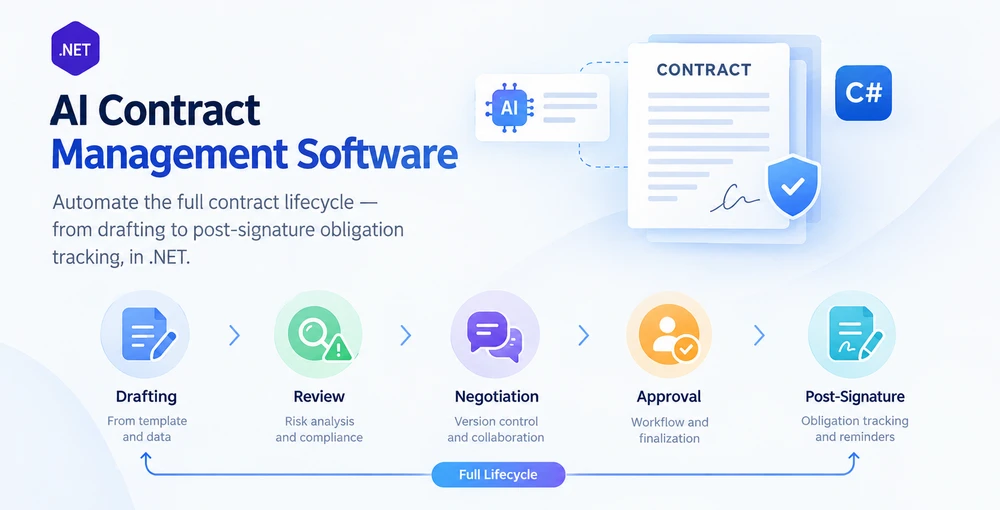
Logiciel de gestion des contrats par IA automatise l'ensemble du cycle de vie du contrat — de la rédaction à la révision, la négociation, l'approbation, la finalisation et le suivi des obligations post-signature — en combinant la compréhension du langage par l'IA avec un traitement déterministe des documents au sein d'une application .NET. La différence avec l'automatisation de tâches contractuelles isolées réside dans la portée du cycle de vie : un outil de révision de contrat signale les clauses à risque ; un système de gestion des contrats fait progresser un accord à travers chaque étape, maintient une piste d'audit à travers les versions et suit les obligations après la signature.
Spire.Agent.Office est un SDK d'agent IA documentaire qui fournit à la fois la compréhension du langage et la couche de traitement de documents. Cet article montre comment construire un système de gestion du cycle de vie des contrats en C# qui enchaîne cinq étapes en un seul pipeline, avec isolation des erreurs par étape, répartition des formats pour PDF et Word, et suivi approprié des statuts — des modèles que les exemples de tâches isolées n'abordent pas.
Cet article présente une implémentation de référence d'un pipeline de cycle de vie des contrats assisté par IA en .NET. Un système CLM de production nécessiterait en plus la persistance des flux de travail, le contrôle des identités et des accès, l'intégration de signature électronique, le stockage des documents et la rétention des versions, les notifications et l'infrastructure d'audit.
1. Le cycle de vie du contrat : cinq étapes où l'IA intervient
Le cycle de vie d'un contrat n'est pas une simple opération sur un document. C'est une séquence d'étapes, chacune avec des entrées, des sorties et des modes de défaillance distincts. Comprendre où l'IA apporte de la valeur à chaque étape — et où le code déterministe doit tenir bon — est la fondation d'un système qui tient en production.
| Étape | Ce qui se passe | Rôle de l'IA | Rôle du code déterministe |
|---|---|---|---|
| Rédaction | Générer un contrat à partir d'un modèle et de données structurées | Interpréter la demande, sélectionner et remplir les champs du modèle | Charger le modèle, préserver la mise en forme, enregistrer au format .docx ou .pdf |
| Révision | Lire le contrat, signaler les clauses à risque, extraire les termes clés | Analyse sémantique du langage des clauses, notation des risques | Rédiger un rapport de révision structuré, appliquer la liste de contrôle de révision |
| Négociation | Comparer les versions, suivre les modifications, fusionner les changements | Résumer les écarts, signaler les changements de fond par rapport aux changements de forme | Activer/désactiver le suivi des modifications, comparer les documents, accepter/rejeter les révisions |
| Approbation | Acheminer vers les parties prenantes, recueillir les approbations | Suggérer des approbateurs en fonction du type et de la valeur du contrat | Appliquer les règles d'acheminement, enregistrer la piste d'audit, produire une copie finalisée |
| Post-signature | Suivre les obligations, les échéances, les renouvellements | Extraire les obligations et les dates clés du contrat finalisé | Stocker les métadonnées structurées, déclencher des rappels, générer des rapports |
Le cycle de vie n'est pas linéaire en pratique — la négociation revient à la révision, les avenants redémarrent la rédaction — mais l'architecture du pipeline gère cela par un routage d'étapes plutôt que par une séquence fixe.
Ce qui le distingue de la simple révision de contrat
L'automatisation de la révision de contrat — sujet de Révision de contrat par IA en C# — couvre une étape : lire un accord et signaler les problèmes. Un système de gestion des contrats doit :
- Enchaîner les étapes avec les données circulant de l'une à l'autre (la sortie de la rédaction devient l'entrée de la révision).
- Gérer plusieurs formats de documents — les modèles arrivent en
.docx, les contreparties peuvent envoyer des.pdf, et les étapes avec répartition des formats gèrent les deux sans lever d'exception. - Maintenir l'état à travers les étapes — le statut de révision d'un contrat, le nombre de versions de négociation et la chaîne d'approbation doivent persister entre les exécutions du pipeline.
- Isoler les défaillances par contrat — un fichier corrompu dans un lot de 200 ne doit pas arrêter tout le pipeline.
Ces exigences façonnent l'architecture ci-dessous.
2. Architecture système pour l'automatisation du cycle de vie des contrats
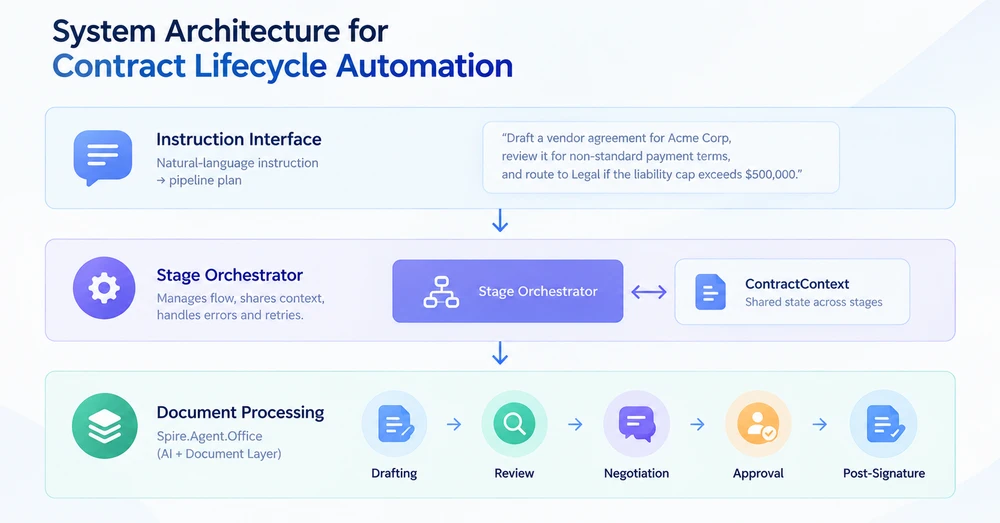
Un système de gestion du cycle de vie des contrats comporte trois couches. Chaque couche a une responsabilité spécifique, et les frontières entre elles sont là où les défaillances de production sont soit interceptées, soit passent inaperçues.
Couche 1 : Interface d'instruction
Le point d'entrée est une instruction en langage naturel qui décrit le résultat souhaité — pas les étapes mécaniques. "Rédige un contrat fournisseur pour Acme Corp en utilisant le modèle standard, révise-le pour les conditions de paiement non standard, et achemine-le vers le service juridique si le plafond de responsabilité dépasse 500 000 $." La couche d'instruction analyse cela en un plan de pipeline : quelles étapes exécuter, dans quel ordre, et quels paramètres chaque étape nécessite.
Couche 2 : Orchestrateur d'étapes
L'orchestrateur gère le flux entre les étapes. Il détient un objet partagé ContractContext qui transporte les métadonnées du contrat, le document courant et les résultats d'étape d'une étape à l'autre. Chaque étape reçoit le contexte, effectue son opération et renvoie un contexte mis à jour ainsi qu'un résultat d'étape. L'orchestrateur décide s'il faut continuer, réessayer ou acheminer vers un gestionnaire d'exceptions en fonction du résultat.
Couche 3 : Traitement des documents
Chaque étape appelle Spire.Agent.Office pour effectuer l'opération documentaire réelle. L'agent gère le raisonnement IA (compréhension de l'instruction, extraction d'informations) et la couche documentaire gère les opérations sur les fichiers (chargement, modification, enregistrement). La répartition des formats est appliquée aux étapes où plusieurs formats de documents sont attendus : une entrée .pdf utilise PdfDocument, tandis qu'une entrée .docx utilise Document.
Le contexte du contrat
L'objet d'état partagé qui traverse le pipeline :
/// <summary>
/// Shared state that flows through every lifecycle stage.
/// Each stage reads from and writes to this context.
/// </summary>
public class ContractContext
{
    // Identity
    public string ContractId { get; set; } = string.Empty;
    public string ContractType { get; set; } = string.Empty;  // "NDA", "MSA", "Vendor", etc.

    // Document state
    public string CurrentFilePath { get; set; } = string.Empty;
    public string WorkDir { get; set; } = string.Empty;
    public int VersionNumber { get; set; } = 1;

    // Stage results
    public DraftResult? Draft { get; set; }
    public ReviewResult? Review { get; set; }
    public NegotiationResult? Negotiation { get; set; }
    public ApprovalResult? Approval { get; set; }
    public ObligationResult? Obligations { get; set; }

    // Pipeline metadata
    public string Status { get; set; } = PipelineStages.Pending;
    public List<string> StageLog { get; set; } = new();
    public string? ErrorMessage { get; set; }
}

/// <summary>
/// Stage status constants. Using named constants instead of raw strings
/// prevents the "Status never set" bug where results fall through all
/// reporting buckets and silently disappear from batch summaries.
/// </summary>
public static class PipelineStages
{
    public const string Pending    = "Pending";
    public const string Drafted    = "Drafted";
    public const string Reviewed   = "Reviewed";
    public const string Negotiated = "Negotiated";
    public const string Approved   = "Approved";
    public const string Executed   = "Executed"; // In this sample: finalized post-approval PDF, not e-signature
    public const string Monitored  = "Monitored";
    public const string Failed     = "Failed";
    public const string NeedsReview = "NeedsReview";
}
Le champ Status utilise des constantes nommées plutôt que des chaînes brutes. Cela évite un mode de défaillance courant où le statut n'est jamais explicitement défini, ce qui fait que les documents tombent à travers tous les compartiments de rapport et disparaissent des résumés de lots.
3. Étape 1 : Rédaction à partir d'un modèle et de données
L'étape de rédaction prend un modèle (.docx avec des marqueurs {{Placeholder}}) et une source de données (feuille de calcul Excel ou entrée structurée), puis produit un contrat rempli. L'agent IA lit la structure du modèle et remplit les espaces réservés avec les données de la source — une seule instruction remplace le code de mappage de champs qu'un SDK traditionnel nécessite.
using Spire.Agent.Office.AI;
using Spire.Agent.Office.Extensions;
using Spire.Doc;

public class DraftResult
{
    public string OutputPath { get; set; } = string.Empty;
    public int ContractsGenerated { get; set; }
    public List<string> PlaceholdersFilled { get; set; } = new();
}

public class DraftingStage
{
    private readonly AIOptions _options;

    public DraftingStage(AIOptions options) => _options = options;

    public DraftResult Execute(ContractContext context, string templatePath, string dataSourcePath)
    {
        // Format dispatch: verify the template is .docx before loading
        if (!templatePath.EndsWith(".docx", StringComparison.OrdinalIgnoreCase))
            throw new NotSupportedException(
                $"Drafting requires a .docx template. Received: {templatePath}");

        string[] attachments = { dataSourcePath };

        using (Document template = new Document())
        {
            template.LoadFromFile(templatePath);

            string draftPath = Path.Combine(context.WorkDir, $"{context.ContractId}-v1-draft.docx");

            string draftInstruction =
                "Read the data source and fill every {{Placeholder}} field in this template " +
                "with the corresponding data. Preserve the template's layout, styling, and " +
                "clause numbering. Save the completed contract to: " +
                $"{draftPath}. Contract type: {context.ContractType}.";

            AIResult result = template.AI(_options).ExecuteInstruction(
                template, draftInstruction, draftPath, attachments);

            if (result == null || !result.Success)
                throw new InvalidOperationException(
                    $"Drafting failed: {result?.ErrorMessage ?? "Unknown error"}");

            // Collect the generated file: prefer the explicit output path,
            // fall back to AIResult.OutputFiles (unreliable for some product types).
            string? generated = File.Exists(draftPath)
                ? draftPath
                : result.OutputFiles?.FirstOrDefault(p => File.Exists(p));

            if (generated == null)
                throw new InvalidOperationException(
                    "Drafting completed but no output file was found (neither at the requested " +
                    $"path '{draftPath}' nor in AIResult.OutputFiles).");

            context.CurrentFilePath = generated;
            context.VersionNumber = 1;
            context.Status = PipelineStages.Drafted;
            context.StageLog.Add($"Draft: generated contract at {generated}");

            return new DraftResult
            {
                OutputPath = generated,
                ContractsGenerated = 1,
                PlaceholdersFilled = ExtractPlaceholderNames(templatePath)
            };
        }
    }

    private static List<string> ExtractPlaceholderNames(string templatePath)
    {
        // Quick scan of the template for {{...}} markers to report what was filled
        var placeholders = new List<string>();
        using (Document doc = new Document())
        {
            doc.LoadFromFile(templatePath);
            string text = doc.GetText();
            var matches = System.Text.RegularExpressions.Regex.Matches(
                text, @"\{\{(\w+)\}\}");
            foreach (System.Text.RegularExpressions.Match m in matches)
                if (!placeholders.Contains(m.Groups[1].Value))
                    placeholders.Add(m.Groups[1].Value);
        }
        return placeholders;
    }
}
Appels API clés
Document.LoadFromFile()— charge le modèle.docxavec les espaces réservéstemplate.AI(_options)— attache le processeur de documents IAExecuteInstruction(doc, instruction, outputPath, attachments)— remplit les espaces réservés à partir de la source de données ; passez un chemin absolu explicite pour que l'agent écrive le produit à un emplacement connu- Collecte du produit : vérifiez d'abord
File.Exists(outputPath);AIResult.OutputFilesn'est pas fiable pour certains types de produits et ne doit être utilisé qu'en dernier recours
Répartition des formats
L'étape valide le format d'entrée avant le traitement. Un modèle .pdf ou un format non pris en charge est rejeté explicitement avec un message clair, plutôt que d'échouer à l'intérieur de l'agent avec une exception opaque. Ce modèle évite un mode de défaillance courant où l'absence de répartition des formats provoque des exceptions non gérées pour les entrées PDF au plus profond du pipeline de traitement.
Rédiger un seul contrat est le cas simple. Lorsque le même modèle doit être rempli pour des dizaines d'enregistrements — nouvelles embauches, fournisseurs, renouvellements — le modèle d'instruction s'adapte à la sortie par lots sans changement ; Génération de contrats par lots avec Spire.Agent.Office couvre à la fois la fusion et la publication et la voie de remplacement des espaces réservés, et compare où chacune convient.
Note SDK : Lorsqu'un
outputPathexplicite est passé àExecuteInstruction, le SDK peut également écrire une copieoutput-<filename>dans le même répertoire. Ce doublon a un contenu identique et peut être supprimé en toute sécurité après le traitement. Toutes les étapes qui spécifient des chemins de sortie sont concernées.
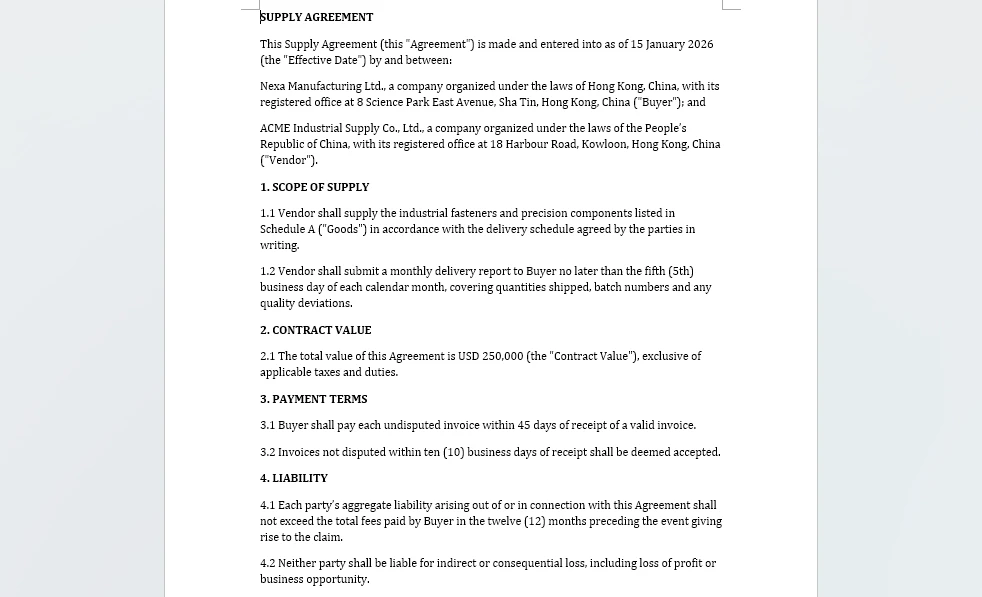
Le produit de cette étape est le document rempli lui-même — le modèle de contrat fournisseur avec chaque espace réservé remplacé à partir du classeur principal des fournisseurs.
4. Étape 2 : Révision et analyse des risques
L'étape de révision lit le contrat rédigé, identifie les clauses risquées ou non standard, et produit un rapport de révision structuré. Contrairement à l'étape de rédaction, l'entrée peut être .docx (brouillon interne) ou .pdf (document de la contrepartie), de sorte que l'étape doit dispatcher vers le type de document correct.
using Spire.Agent.Office.AI;
using Spire.Agent.Office.Extensions;
using Spire.Doc;
using Spire.Pdf;

public class ReviewResult
{
    public string ReportPath { get; set; } = string.Empty;
    public int ClausesAnalyzed { get; set; }
    public int RiskFlags { get; set; }
    public double RiskScore { get; set; }     // ratio of flagged clauses to total (0.0 = none flagged, 1.0 = all flagged)
    public List<string> FlaggedClauses { get; set; } = new();
}

public class ReviewStage
{
    private readonly AIOptions _options;

    // Risk threshold: contracts above this score require manual review.
    // Using a named constant prevents the "threshold always passes" bug
    // where a miscalculated score boundary lets everything auto-approve.
    public const double AutoApproveThreshold = 0.3;
    public const double ManualReviewThreshold = 0.6;

    public ReviewStage(AIOptions options) => _options = options;

    public ReviewResult Execute(ContractContext context)
    {
        string filePath = context.CurrentFilePath;
        string reportPath = Path.Combine(context.WorkDir, $"{context.ContractId}-review.md");

        string reviewInstruction =
            "Review this contract and write a Markdown report with two sections:\n" +
            "1. A table listing each major clause, its type, and a risk score (0-1).\n" +
            "2. A bullet list of clauses that deviate from standard practice for a " +
            $"standard {context.ContractType}. " +
            "Flag any of: uncapped liability, automatic renewal without notice, " +
            "broad indemnification, unilateral termination, or payment terms exceeding 60 days. " +
            "Prefix each flagged clause bullet with 'FLAG:' so the parser can identify it. " +
            $"Reference the source document as '{context.ContractId}', not as 'input.docx'.\n" +
            $"Save the report to: {reportPath}";

        AIResult result = DispatchByFormat(filePath, reviewInstruction, reportPath);

        if (result == null || !result.Success)
            throw new InvalidOperationException(
                $"Review failed: {result?.ErrorMessage ?? "Unknown error"}");

        // Parse the review report to extract structured data
        string reportContent = File.ReadAllText(reportPath);
        var review = ParseReviewReport(reportContent, reportPath);

        // Route based on risk score (three-tier classification)
        if (review.RiskScore >= ManualReviewThreshold)
            context.Status = PipelineStages.NeedsReview;
        else if (review.RiskScore >= AutoApproveThreshold)
        {
            // Middle zone: not clean enough to auto-approve, not risky enough to block
            context.Status = PipelineStages.Reviewed;
            context.StageLog.Add(
                $"Review: risk score {review.RiskScore:F2} in warning zone " +
                $"({AutoApproveThreshold}-{ManualReviewThreshold}); reviewed with warning");
        }
        else
            context.Status = PipelineStages.Reviewed;

        context.StageLog.Add(
            $"Review: {review.ClausesAnalyzed} clauses, {review.RiskFlags} flags, " +
            $"score {review.RiskScore:F2}, status={context.Status}");

        return review;
    }

    /// <summary>
    /// Dispatch to the correct document type based on file extension.
    /// This prevents the "PDF throws exception" bug where a stage
    /// only handles .docx and fails on counterparty PDFs.
    /// </summary>
    private AIResult DispatchByFormat(string filePath, string instruction, string outputPath)
    {
        string ext = Path.GetExtension(filePath).ToLowerInvariant();

        return ext switch
        {
            ".docx" or ".doc" => ProcessWord(filePath, instruction, outputPath),
            ".pdf"            => ProcessPdf(filePath, instruction, outputPath),
            _ => throw new NotSupportedException(
                $"Review stage does not support format: {ext}")
        };
    }

    private AIResult ProcessWord(string filePath, string instruction, string outputPath)
    {
        using (Document doc = new Document())
        {
            doc.LoadFromFile(filePath);
            return doc.AI(_options).ExecuteInstruction(
                doc, instruction, outputPath, Array.Empty<string>());
        }
    }

    private AIResult ProcessPdf(string filePath, string instruction, string outputPath)
    {
        using (PdfDocument pdf = new PdfDocument())
        {
            pdf.LoadFromFile(filePath);
            return pdf.AI(_options).ExecuteInstruction(
                pdf, instruction, outputPath, Array.Empty<string>());
        }
    }

    private static ReviewResult ParseReviewReport(string markdown, string reportPath)
    {
        var result = new ReviewResult { ReportPath = reportPath };

        // Count table rows as clauses analyzed
        var tableLines = markdown.Split('\n')
            .Where(l => l.StartsWith("|") && !l.StartsWith("|---") && !l.StartsWith("| --"))
            .Skip(1); // skip header
        result.ClausesAnalyzed = tableLines.Count();

        // Count bullet points prefixed with "FLAG:" as risk flags
        var flagLines = markdown.Split('\n')
            .Select(l => l.TrimStart())
            .Where(l => l.StartsWith("-") || l.StartsWith("*"))
            .Where(l => l.Substring(1).TrimStart()
                .StartsWith("FLAG:", StringComparison.OrdinalIgnoreCase));
        result.FlaggedClauses = flagLines.Select(l => l.Trim()).ToList();
        result.RiskFlags = result.FlaggedClauses.Count;

        // Risk score: ratio of flagged clauses to total, clamped to [0, 1]
        result.RiskScore = result.ClausesAnalyzed > 0
            ? Math.Min(1.0, (double)result.RiskFlags / result.ClausesAnalyzed)
            : 0.0;

        return result;
    }
}
La méthode DispatchByFormat est l'ajout critique. Dans les implémentations précédentes du pipeline, une étape qui ne gérait que .docx levait une InvalidOperationException lorsqu'une contrepartie envoyait un .pdf. L'expression switch dispatche vers le type de document correct avant l'exécution de l'agent, de sorte que les deux formats sont des entrées de première classe.
Les seuils de risque (AutoApproveThreshold, ManualReviewThreshold) sont des constantes nommées avec une sémantique documentée. L'écart entre 0,3 et 0,6 crée une zone explicite "à réviser" — des contrats qui ne sont ni assez propres pour être approuvés automatiquement, ni assez risqués pour être bloqués. Cela évite le bogue de logique morte des seuils où chaque contrat passe la même vérification.
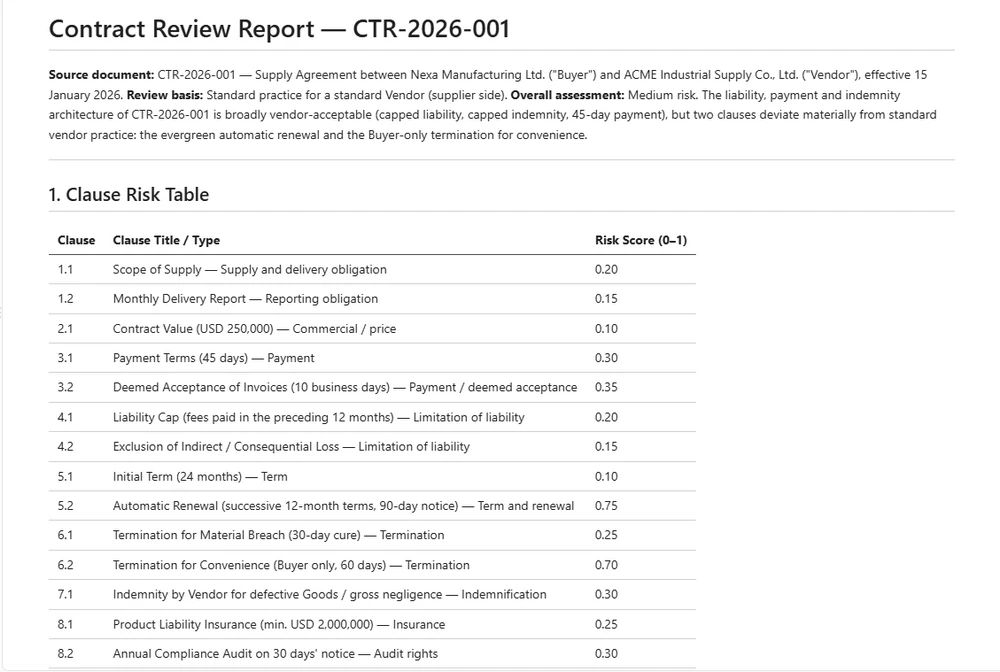
Les conclusions de révision sont conservées sous forme de rapport plutôt que renvoyées en mémoire, de sorte que l'audit au niveau des clauses survive indépendamment de l'exécution qui l'a produit.
5. Étape 3 : Négociation et contrôle des versions
La négociation est le moment où les contrats changent de mains. La contrepartie annote le document — en modifiant les clauses, en ajustant les termes, en ajoutant des conditions. Le système doit comparer les versions, suivre les modifications et aider l'équipe à décider ce qu'il faut accepter.
Cette étape utilise deux capacités de la couche documentaire Spire.Doc qui vont au-delà de ExecuteInstruction de l'agent IA :
- Suivi des modifications — activer le suivi des révisions pour que chaque modification soit visible et attribuable
- Comparaison de documents — comparer deux versions et générer un document de différences
using Spire.Agent.Office.AI;
using Spire.Agent.Office.Extensions;
using Spire.Doc;
using Spire.Doc.Documents;
using System.Text.RegularExpressions;

public class NegotiationResult
{
    public string ComparisonPath { get; set; } = string.Empty;
    public int ChangesDetected { get; set; }
    public int SubstantiveChanges { get; set; }  // changes to clause text, not formatting
    public int FormattingChanges { get; set; }
    public string NegotiatedFilePath { get; set; } = string.Empty;
}

public class NegotiationStage
{
    private readonly AIOptions _options;

    public NegotiationStage(AIOptions options) => _options = options;

    /// <summary>
    /// Compare the current version with a counterparty's revised version.
    /// Produces a diff document with all changes marked.
    /// </summary>
    public NegotiationResult CompareVersions(
        ContractContext context, string counterpartyFilePath)
    {
        string comparisonPath = Path.Combine(
            context.WorkDir, $"{context.ContractId}-v{context.VersionNumber}-comparison.docx");

        // Load both versions
        using (Document ourVersion = new Document())
        using (Document theirVersion = new Document())
        {
            ourVersion.LoadFromFile(context.CurrentFilePath);
            theirVersion.LoadFromFile(counterpartyFilePath);

            // Compare: marks every difference in ourVersion as a tracked change
            ourVersion.Compare(theirVersion, "Contract Management System");

            // Save the comparison document
            ourVersion.SaveToFile(comparisonPath, FileFormat.Docx2013);
        }

        // Use the AI agent to analyze the comparison and categorize changes
        string analysisPath = Path.Combine(
            context.WorkDir, $"{context.ContractId}-negotiation-analysis.md");

        using (Document comparison = new Document())
        {
            comparison.LoadFromFile(comparisonPath);

            string analyzeInstruction =
                "Analyze this document comparison and write a Markdown report:\n" +
                "1. On the first line, write 'Total changes: <N>' where N is the total count " +
                "of categorized changes (substantive + formatting).\n" +
                "2. List each change as a bullet line prefixed with 'SUBSTANTIVE:' or 'FORMATTING:' " +
                "followed by the clause affected and the nature of the change.\n" +
                "3. SUBSTANTIVE changes: clause text, numbers, dates. " +
                "FORMATTING changes: style, spacing, font.\n" +
                $"Save to: {analysisPath}";

            AIResult result = comparison.AI(_options).ExecuteInstruction(
                comparison, analyzeInstruction, analysisPath, Array.Empty<string>());

            if (result == null || !result.Success)
                throw new InvalidOperationException(
                    $"Negotiation analysis failed: {result?.ErrorMessage}");
        }

        var negotiation = ParseNegotiationReport(analysisPath);
        negotiation.ComparisonPath = comparisonPath;
        negotiation.NegotiatedFilePath = counterpartyFilePath;

        context.VersionNumber++;
        context.CurrentFilePath = counterpartyFilePath;
        context.Status = PipelineStages.Negotiated;
        context.StageLog.Add(
            $"Negotiation: {negotiation.ChangesDetected} changes " +
            $"({negotiation.SubstantiveChanges} substantive, " +
            $"{negotiation.FormattingChanges} formatting), v{context.VersionNumber}");

        return negotiation;
    }

    /// <summary>
    /// Enable track changes on a contract before sending it for negotiation.
    /// This ensures every edit by the counterparty is visible and attributable.
    /// </summary>
    public string PrepareForRedlining(ContractContext context)
    {
        string redlineReadyPath = Path.Combine(
            context.WorkDir, $"{context.ContractId}-v{context.VersionNumber}-redline.docx");

        using (Document doc = new Document())
        {
            doc.LoadFromFile(context.CurrentFilePath);

            // Enable track changes so all edits are recorded as revisions
            doc.TrackChanges = true;

            doc.SaveToFile(redlineReadyPath, FileFormat.Docx2013);
        }

        context.StageLog.Add("Negotiation: track changes enabled for redlining");
        return redlineReadyPath;
    }

    /// <summary>
    /// Accept all tracked changes to produce a clean final version.
    /// Optional post-review operation: not automatically invoked by the pipeline
    /// because acceptance should occur only after human review of the changes.
    /// </summary>
    public string AcceptAllChanges(ContractContext context)
    {
        string cleanPath = Path.Combine(
            context.WorkDir, $"{context.ContractId}-v{context.VersionNumber}-final.docx");

        using (Document doc = new Document())
        {
            doc.LoadFromFile(context.CurrentFilePath);
            doc.AcceptChanges();
            doc.SaveToFile(cleanPath, FileFormat.Docx2013);
        }

        context.CurrentFilePath = cleanPath;
        context.StageLog.Add("Negotiation: all changes accepted, clean version produced");
        return cleanPath;
    }

    private static NegotiationResult ParseNegotiationReport(string reportPath)
    {
        string content = File.ReadAllText(reportPath);
        var result = new NegotiationResult();

        // Parse total changes from the report (try multiple patterns for robustness)
        var totalMatch = Regex.Match(content, @"Total changes:\s*(\d+)", RegexOptions.IgnoreCase);
        if (!totalMatch.Success)
            totalMatch = Regex.Match(content, @"(\d+)\s+(?:tracked\s+)?changes", RegexOptions.IgnoreCase);
        if (totalMatch.Success)
            result.ChangesDetected = int.Parse(totalMatch.Groups[1].Value);

        // Count changes by prefix: SUBSTANTIVE: or FORMATTING:
        result.SubstantiveChanges = CountByPrefix(content, "SUBSTANTIVE:");
        result.FormattingChanges = CountByPrefix(content, "FORMATTING:");

        return result;
    }

    private static int CountByPrefix(string content, string prefix)
    {
        return content.Split('\n')
            .Select(l => l.TrimStart())
            .Where(l => l.StartsWith("-") || l.StartsWith("*"))
            .Count(l => l.Substring(1).TrimStart()
                .StartsWith(prefix, StringComparison.OrdinalIgnoreCase));
    }
}
Appels API clés
Document.Compare(otherDoc, authorName)— génère un document de différences avec toutes les modifications marquées comme révisions suivies (d'après la démo de comparaison Spire.Doc)Document.TrackChanges = true— active le suivi des révisions pour que chaque modification soit visible et attribuableDocument.AcceptChanges()— accepte toutes les modifications suivies pour produire une version finale propredoc.AI(_options).ExecuteInstruction(...)— analyse la comparaison et catégorise les changements
L'étape de négociation combine des opérations documentaires déterministes (comparer, suivre les modifications, accepter) avec une analyse IA (catégoriser les changements comme substantiels ou de mise en forme). Les opérations déterministes proviennent de la couche Spire.Doc — les mêmes API disponibles dans le répertoire de référence du code — tandis que l'agent IA gère la catégorisation sémantique qui nécessiterait autrement une révision manuelle.
L'exemple compare les versions et suit le chemin du fichier courant ; un système de production conserverait normalement chaque version séparément et enregistrerait explicitement quelle révision a été acceptée. AcceptAllChanges() est fourni comme opération de finalisation facultative après la négociation, mais il n'est pas automatiquement invoqué par le pipeline d'exemple car l'acceptation ne doit avoir lieu qu'après une révision humaine.
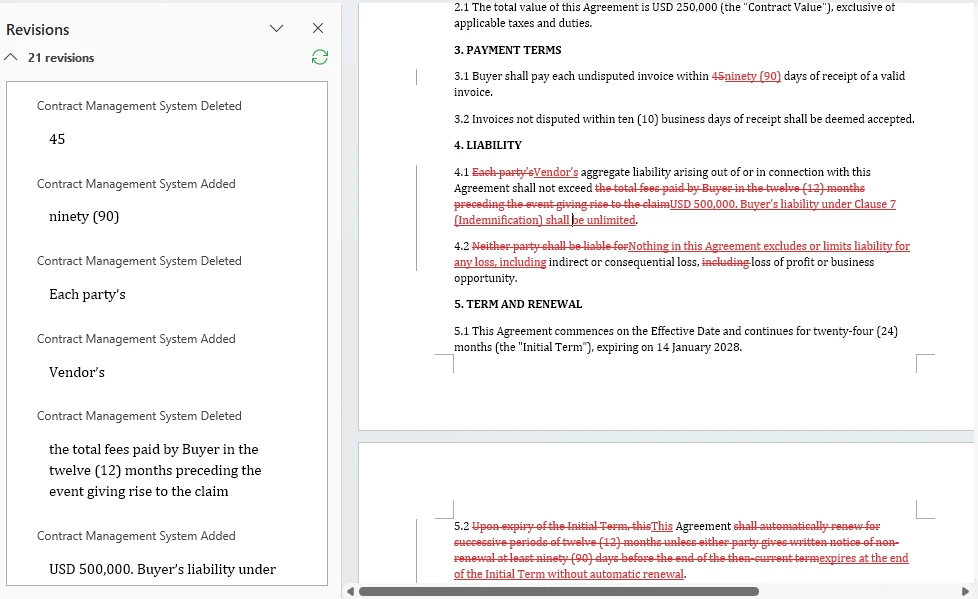
Ce que Document.Compare renvoie est un document, pas un résumé : les révisions suivies ci-dessous sont les modifications qu'un réviseur assemblerait autrement à la main.
6. Étape 4 : Approbation et finalisation
L'étape d'approbation achemine le contrat vers les bonnes parties prenantes en fonction du type et de la valeur du contrat, enregistre leurs approbations et produit une copie PDF finalisée après que toutes les approbations requises ont été enregistrées. La logique d'acheminement est déterministe — elle utilise des règles métier, pas l'IA — mais l'agent aide en suggérant des approbateurs et en générant le résumé d'approbation.
using Spire.Agent.Office.AI;
using Spire.Agent.Office.Extensions;
using Spire.Doc;

public class ApprovalResult
{
    public List<ApprovalRecord> Approvals { get; set; } = new();
    public bool AllApproved { get; set; }
    public string ExecutedFilePath { get; set; } = string.Empty; // Finalized PDF path, not a signed contract
    public DateTime? ExecutionDate { get; set; }                // Finalization timestamp, not a signing date
}

public class ApprovalRecord
{
    public string Approver { get; set; } = string.Empty;
    public string Role { get; set; } = string.Empty;
    public bool Approved { get; set; }
    public DateTime Timestamp { get; set; }
    public string? Comments { get; set; }
}

public class ApprovalStage
{
    private readonly AIOptions _options;

    public ApprovalStage(AIOptions options) => _options = options;

    /// <summary>
    /// Route the contract for approval based on type and value.
    /// Routing rules are deterministic business logic, not AI.
    /// </summary>
    public ApprovalResult Execute(
        ContractContext context, double contractValue,
        Dictionary<string, bool>? approvalDecisions = null)
    {
        var routingPlan = DetermineApprovers(context.ContractType, contractValue);
        var result = new ApprovalResult();

        // Generate an approval summary for each approver
        string summaryPath = Path.Combine(
            context.WorkDir, $"{context.ContractId}-approval-summary.md");

        using (Document doc = new Document())
        {
            doc.LoadFromFile(context.CurrentFilePath);

            string summaryInstruction =
                "Write a one-page approval summary for this contract: parties, value, " +
                "key terms, risk flags from review, and changes from negotiation. " +
                $"Save to: {summaryPath}";

            AIResult aiResult = doc.AI(_options).ExecuteInstruction(
                doc, summaryInstruction, summaryPath, Array.Empty<string>());

            if (aiResult == null || !aiResult.Success)
                throw new InvalidOperationException(
                    $"Approval summary generation failed: {aiResult?.ErrorMessage}");
        }

        // In a real system, this would integrate with an approval workflow API.
        // approvalDecisions maps approver name → approved/rejected. A missing key
        // means no decision was recorded — which is not the same as a rejection.
        int approvedCount = 0, rejectedCount = 0, pendingCount = 0;

        foreach (var approver in routingPlan)
        {
            bool decision = false;
            bool hasDecision = approvalDecisions != null
                && approvalDecisions.TryGetValue(approver.Name, out decision);
            bool approved = hasDecision && decision;

            // Three states, all distinguishable in the audit record
            string comment = !hasDecision ? "Pending approval"
                : approved ? "Approved by approver"
                : "Rejected by approver";

            if (!hasDecision) pendingCount++;
            else if (approved) approvedCount++;
            else rejectedCount++;

            result.Approvals.Add(new ApprovalRecord
            {
                Approver = approver.Name,
                Role = approver.Role,
                Approved = approved,
                Timestamp = DateTime.UtcNow,
                Comments = comment
            });
        }

        result.AllApproved = result.Approvals.All(a => a.Approved);

        if (result.AllApproved)
        {
            // Produce the finalized copy as PDF
            string executedPath = Path.Combine(
                context.WorkDir, $"{context.ContractId}-executed.pdf");

            using (Document doc = new Document())
            {
                doc.LoadFromFile(context.CurrentFilePath);
                doc.SaveToFile(executedPath, FileFormat.PDF);
                result.ExecutedFilePath = executedPath;
                result.ExecutionDate = DateTime.UtcNow;
            }

            context.CurrentFilePath = result.ExecutedFilePath;
            context.Status = PipelineStages.Executed;
        }
        else
        {
            context.Status = PipelineStages.NeedsReview;
        }

        context.StageLog.Add(
            $"Approval: {result.Approvals.Count} approvers, " +
            $"approved={approvedCount}, rejected={rejectedCount}, " +
            $"pending={pendingCount}, all approved={result.AllApproved}");

        return result;
    }

    /// <summary>
    /// Deterministic routing rules. These are business logic, not AI.
    /// </summary>
    private static List<(string Name, string Role)> DetermineApprovers(
        string contractType, double value)
    {
        var approvers = new List<(string, string)>();

        // All contracts need Legal sign-off (example business rule)
        approvers.Add(("Legal Team", "Legal Counsel"));

        // Contracts over $100K need VP approval (example business rule)
        if (value > 100_000)
            approvers.Add(("VP Operations", "VP"));

        // Contracts over $500K need CFO approval (example business rule)
        if (value > 500_000)
            approvers.Add(("CFO", "CFO"));

        // Vendor contracts need Procurement sign-off
        if (contractType.Equals("Vendor", StringComparison.OrdinalIgnoreCase))
            approvers.Add(("Procurement", "Procurement Manager"));

        return approvers;
    }
}
Les règles d'acheminement dans DetermineApprovers sont intentionnellement déterministes. L'IA suggère et résume ; elle ne décide pas qui signe un contrat. La chaîne d'approbation est une règle métier qui doit être auditable et cohérente — exactement le type de décision qui appartient au code, pas à un modèle de langage.
Note : Le statut
Executeddans cet exemple signifie le PDF final produit après approbation — pas un contrat signé. La signature électronique réelle — enveloppes de signature, vérification de l'identité du signataire, intégration des champs de signature — devrait être gérée par un flux de travail de signature électronique dédié, intégré séparément.
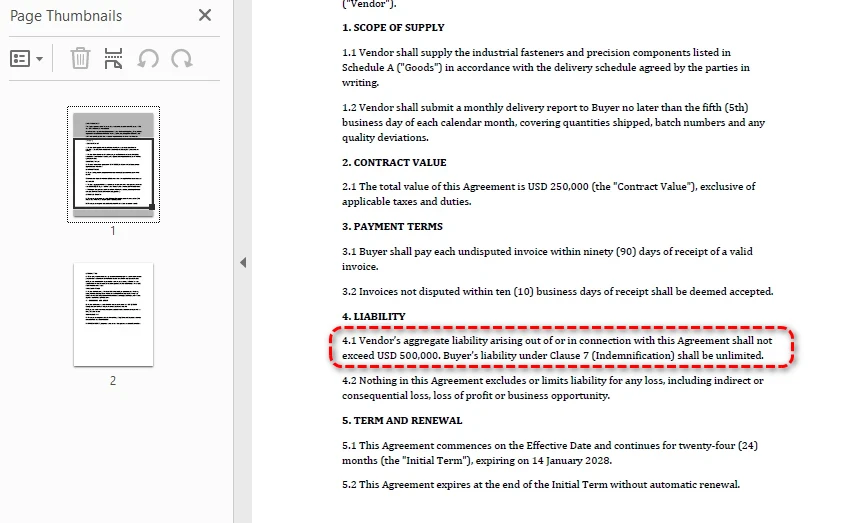
Une fois la décision de chaque approbateur enregistrée, l'étape écrit le contrat finalisé au format PDF — et c'est ce PDF, et non le brouillon source, que l'étape 5 consomme.
7. Étape 5 : Suivi post-signature
Dans un flux de travail de production, le suivi post-signature commence après que le contrat a été signé électroniquement ou formellement d'une autre manière. Dans cette implémentation de référence, le PDF finalisé produit par l'étape 4 est utilisé comme entrée de suivi. Le suivi post-signature extrait les obligations, les dates clés et les conditions de renouvellement du contrat, puis les stocke sous forme de métadonnées structurées que les systèmes en aval utilisent pour les rappels et les rapports.
using Spire.Agent.Office.AI;
using Spire.Agent.Office.Extensions;
using Spire.Doc;
using Spire.Pdf;

public class ObligationResult
{
    public List<Obligation> Obligations { get; set; } = new();
    public List<KeyDate> KeyDates { get; set; } = new();
    public bool AutoRenewal { get; set; }
    public DateTime? RenewalDate { get; set; }
    public string MetadataPath { get; set; } = string.Empty;
}

public class Obligation
{
    public string Description { get; set; } = string.Empty;
    public string Party { get; set; } = string.Empty;  // who must fulfill
    public string Frequency { get; set; } = string.Empty;  // "monthly", "annual", "one-time"
    public DateTime? DueDate { get; set; }
    public string DueDateRaw { get; set; } = string.Empty;  // original deadline text from the contract
}

public class KeyDate
{
    public string Description { get; set; } = string.Empty;
    public DateTime Date { get; set; }
    public string Type { get; set; } = string.Empty;  // "renewal", "termination", "milestone"
}

public class MonitoringStage
{
    private readonly AIOptions _options;

    public MonitoringStage(AIOptions options) => _options = options;

    public ObligationResult Execute(ContractContext context)
    {
        string metadataPath = Path.Combine(
            context.WorkDir, $"{context.ContractId}-obligations.json");

        string extractInstruction =
            "Extract all post-signature obligations and key dates from this contract. " +
            "Write a JSON file with:\n" +
            "1. \"obligations\": array of {description, party, frequency, dueDate, dueDateRaw} " +
            "where dueDate is an ISO-8601 date (YYYY-MM-DD). If the obligation has a relative " +
            "deadline (e.g., 'Within 90 days of receipt'), convert it to an absolute date based " +
            "on the contract effective date. Use null only for ongoing obligations with no " +
            "fixed deadline. Always put the original deadline text in dueDateRaw.\n" +
            "2. \"keyDates\": array of {description, date, type} where date is ISO-8601 " +
            "(YYYY-MM-DD) and type is 'renewal', 'termination', or 'milestone'\n" +
            "3. \"autoRenewal\": boolean\n" +
            "4. \"renewalDate\": ISO-8601 date (YYYY-MM-DD) or null\n" +
            $"Save to: {metadataPath}";

        // Dispatch by format — executed contracts may be PDF or DOCX
        AIResult result = DispatchExtraction(
            context.CurrentFilePath, extractInstruction, metadataPath, _options);

        if (result == null || !result.Success)
            throw new InvalidOperationException(
                $"Obligation extraction failed: {result?.ErrorMessage}");

        var obligations = ParseObligationMetadata(metadataPath);
        obligations.MetadataPath = metadataPath;

        context.Obligations = obligations;
        context.Status = PipelineStages.Monitored;

        // Diagnostics: bucket every obligation by how its deadline came out, so that a
        // field the agent writes but the parser fails to read cannot pass unnoticed.
        int datesParsed = obligations.Obligations.Count(o => o.DueDate != null);
        int datesUnparsed = obligations.Obligations.Count(
            o => o.DueDate == null && !string.IsNullOrEmpty(o.DueDateRaw));
        int datesOngoing = obligations.Obligations.Count(
            o => o.DueDate == null && string.IsNullOrEmpty(o.DueDateRaw));
        int datesNoSourceText = obligations.Obligations.Count(
            o => o.DueDate != null && string.IsNullOrEmpty(o.DueDateRaw));
        context.StageLog.Add(
            $"Monitoring: {obligations.Obligations.Count} obligations, " +
            $"{obligations.KeyDates.Count} key dates, " +
            $"auto-renewal={obligations.AutoRenewal}, " +
            $"dates parsed={datesParsed}, unparsed={datesUnparsed}, ongoing={datesOngoing}, " +
            $"parsed-without-source-text={datesNoSourceText}");

        return obligations;
    }

    private static AIResult DispatchExtraction(
        string filePath, string instruction, string outputPath, AIOptions options)
    {
        string ext = Path.GetExtension(filePath).ToLowerInvariant();

        return ext switch
        {
            ".docx" or ".doc" => ProcessWordExtraction(filePath, instruction, outputPath, options),
            ".pdf"            => ProcessPdfExtraction(filePath, instruction, outputPath, options),
            _ => throw new NotSupportedException(
                $"Obligation extraction does not support format: {ext}")
        };
    }

    private static AIResult ProcessWordExtraction(
        string filePath, string instruction, string outputPath, AIOptions options)
    {
        using (Document doc = new Document())
        {
            doc.LoadFromFile(filePath);
            return doc.AI(options).ExecuteInstruction(
                doc, instruction, outputPath, Array.Empty<string>());
        }
    }

    private static AIResult ProcessPdfExtraction(
        string filePath, string instruction, string outputPath, AIOptions options)
    {
        using (PdfDocument pdf = new PdfDocument())
        {
            pdf.LoadFromFile(filePath);
            return pdf.AI(options).ExecuteInstruction(
                pdf, instruction, outputPath, Array.Empty<string>());
        }
    }

    private static ObligationResult ParseObligationMetadata(string jsonPath)
    {
        string json = File.ReadAllText(jsonPath);
        using var doc = System.Text.Json.JsonDocument.Parse(json);
        var root = doc.RootElement;

        var result = new ObligationResult();

        if (TryGetPropertyIgnoreCase(root, "obligations", out var obs))
            foreach (var ob in obs.EnumerateArray())
            {
                string dueDateRaw = TryGetPropertyIgnoreCase(ob, "dueDateRaw", out var dr)
                    && dr.ValueKind == System.Text.Json.JsonValueKind.String
                    ? dr.GetString() ?? "" : "";

                result.Obligations.Add(new Obligation
                {
                    Description = TryGetPropertyIgnoreCase(ob, "description", out var d) ? d.GetString() ?? "" : "",
                    Party = TryGetPropertyIgnoreCase(ob, "party", out var p) ? p.GetString() ?? "" : "",
                    Frequency = TryGetPropertyIgnoreCase(ob, "frequency", out var f) ? f.GetString() ?? "" : "",
                    DueDate = TryGetDate(TryGetPropertyIgnoreCase(ob, "dueDate", out var dd2), dd2),
                    DueDateRaw = dueDateRaw
                });
            }

        if (TryGetPropertyIgnoreCase(root, "keyDates", out var kds))
            foreach (var kd in kds.EnumerateArray())
                result.KeyDates.Add(new KeyDate
                {
                    Description = TryGetPropertyIgnoreCase(kd, "description", out var d) ? d.GetString() ?? "" : "",
                    Date = TryGetDate(TryGetPropertyIgnoreCase(kd, "date", out var dt), dt) ?? default,
                    Type = TryGetPropertyIgnoreCase(kd, "type", out var t) ? t.GetString() ?? "" : ""
                });

        result.AutoRenewal = TryGetBool(TryGetPropertyIgnoreCase(root, "autoRenewal", out var ar), ar);
        result.RenewalDate = TryGetDate(TryGetPropertyIgnoreCase(root, "renewalDate", out var rd), rd);

        return result;
    }

    /// <summary>
    /// Case-insensitive property lookup. Prevents silent data loss when
    /// the AI agent outputs PascalCase or snake_case instead of camelCase.
    /// </summary>
    private static bool TryGetPropertyIgnoreCase(
        System.Text.Json.JsonElement element, string name,
        out System.Text.Json.JsonElement value)
    {
        foreach (var prop in element.EnumerateObject())
        {
            if (string.Equals(prop.Name, name, StringComparison.OrdinalIgnoreCase))
            {
                value = prop.Value;
                return true;
            }
        }
        value = default;
        return false;
    }

    /// <summary>
    /// Safe date parsing: handles null, non-string values, and invalid formats
    /// without throwing. Returns null on any parse failure.
    /// </summary>
    private static DateTime? TryGetDate(bool exists, System.Text.Json.JsonElement element)
    {
        if (!exists || element.ValueKind != System.Text.Json.JsonValueKind.String)
            return null;
        string? s = element.GetString();
        return DateTime.TryParse(s, out var date) ? date : null;
    }

    /// <summary>
    /// Safe boolean parsing: handles string "true"/"false" and actual booleans
    /// without throwing on type mismatch.
    /// </summary>
    private static bool TryGetBool(bool exists, System.Text.Json.JsonElement element)
    {
        if (!exists) return false;
        if (element.ValueKind == System.Text.Json.JsonValueKind.True) return true;
        if (element.ValueKind == System.Text.Json.JsonValueKind.False) return false;
        if (element.ValueKind == System.Text.Json.JsonValueKind.String)
            return bool.TryParse(element.GetString(), out var b) && b;
        return false;
    }
}
Les métadonnées d'obligation sont stockées en JSON, pas sous forme de document. Cela les rend interrogeables par les systèmes en aval — un tableau de bord de renouvellement peut scanner tous les contrats pour autoRenewal == true et renewalDate < DateTime.Now.AddDays(90) sans ouvrir un seul document. Les obligations avec des valeurs dueDate structurées peuvent être suivies automatiquement ; celles où l'échéance n'était pas convertible en date absolue conservent le texte original dans dueDateRaw pour une révision manuelle. L'agent IA extrait les informations ; la couche déterministe les stocke dans un format que les systèmes métier peuvent consommer.
Le modèle d'extraction est le même que celui utilisé pour les factures dans Automatiser le traitement des factures avec un agent IA en .NET : extraire des champs structurés d'un document entrant, les valider par rapport à des règles déterministes, et acheminer les valeurs incertaines pour révision. Les contrats diffèrent principalement par ce qui se passe ensuite — les obligations deviennent des enregistrements à longue durée de vie qui survivent à la transaction, tandis que les champs de facture sont consommés une fois.
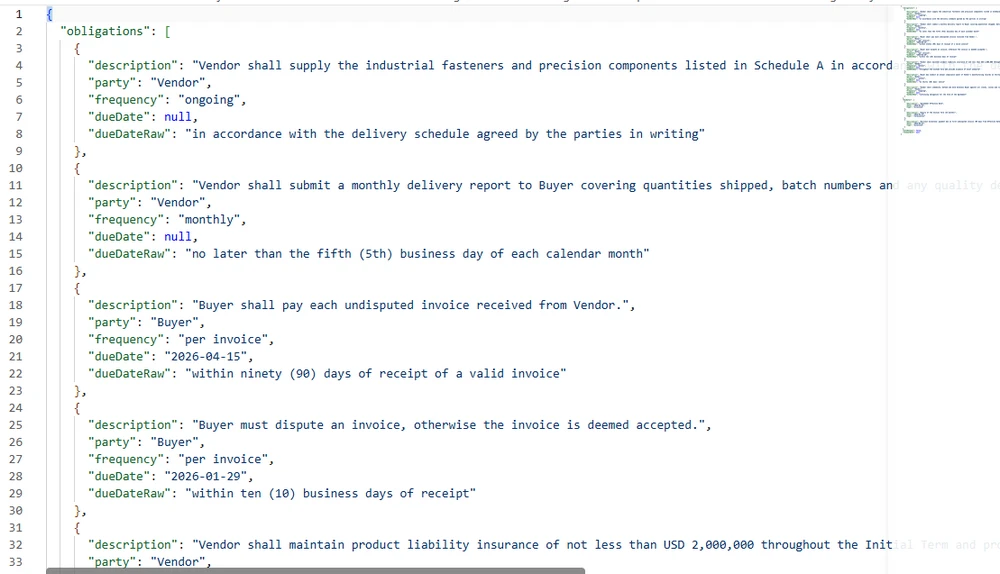
Les données extraites sont stockées en JSON plutôt qu'en prose, de sorte que chaque obligation et date clé porte le libellé original du contrat à côté de la valeur que l'analyseur en a dérivée.
8. Orchestration du pipeline complet
L'orchestrateur enchaîne les étapes, en passant le ContractContext de l'une à l'autre. Ses deux responsabilités critiques sont l'isolation des erreurs par contrat (un contrat échoué ne doit pas arrêter le lot) et la conservation des statuts (chaque contrat doit se retrouver dans exactement un compartiment de rapport).
using Spire.Agent.Office.AI;

public class PipelineResult
{
    public string ContractId { get; set; } = string.Empty;
    public string Status { get; set; } = PipelineStages.Pending;
    public List<string> StageLog { get; set; } = new();
    public string? ErrorMessage { get; set; }
}

public class BatchResult
{
    public int Total { get; set; }
    public int Successful { get; set; }
    public int Flagged { get; set; }    // needs review
    public int Errored { get; set; }
    public List<PipelineResult> Results { get; set; } = new();
}

public class ContractLifecyclePipeline
{
    private readonly DraftingStage _drafting;
    private readonly ReviewStage _review;
    private readonly NegotiationStage _negotiation;
    private readonly ApprovalStage _approval;
    private readonly MonitoringStage _monitoring;

    public ContractLifecyclePipeline(AIOptions options)
    {
        _drafting = new DraftingStage(options);
        _review = new ReviewStage(options);
        _negotiation = new NegotiationStage(options);
        _approval = new ApprovalStage(options);
        _monitoring = new MonitoringStage(options);
    }

    /// <summary>
    /// Run a single contract through the full lifecycle.
    /// Each stage is wrapped in its own try-catch so that a failure
    /// in one stage produces a clear error without corrupting the
    /// context for subsequent contracts in the batch.
    /// </summary>
    public PipelineResult RunSingle(
        ContractContext context,
        string templatePath,
        string dataSourcePath,
        double contractValue,
        string? counterpartyFilePath = null,
        Dictionary<string, bool>? approvalDecisions = null)
    {
        try
        {
            // Stage 1: Drafting
            try
            {
                context.Draft = _drafting.Execute(context, templatePath, dataSourcePath);
            }
            catch (Exception ex)
            {
                return Fail(context, "Drafting", ex);
            }

            // Stage 2: Review
            try
            {
                context.Review = _review.Execute(context);
            }
            catch (Exception ex)
            {
                return Fail(context, "Review", ex);
            }

            // If review flagged for manual review, stop here
            if (context.Status == PipelineStages.NeedsReview)
                return Flag(context, "Review flagged for manual review");

            // Stage 3: Negotiation (only when a counterparty version exists)
            if (counterpartyFilePath != null)
            {
                try
                {
                    context.Negotiation = _negotiation.CompareVersions(context, counterpartyFilePath);
                }
                catch (Exception ex)
                {
                    return Fail(context, "Negotiation", ex);
                }
            }

            // Stage 4: Approval and Finalization
            try
            {
                context.Approval = _approval.Execute(context, contractValue, approvalDecisions);
            }
            catch (Exception ex)
            {
                return Fail(context, "Approval", ex);
            }

            if (context.Status == PipelineStages.NeedsReview)
                return Flag(context, "Approval incomplete");

            // Stage 5: Post-signature monitoring
            try
            {
                context.Obligations = _monitoring.Execute(context);
            }
            catch (Exception ex)
            {
                return Fail(context, "Monitoring", ex);
            }

            return new PipelineResult
            {
                ContractId = context.ContractId,
                Status = context.Status,
                StageLog = context.StageLog
            };
        }
        catch (Exception ex)
        {
            return Fail(context, "Pipeline", ex);
        }
    }

    /// <summary>
    /// Process a batch of contracts with per-file error isolation.
    /// One corrupt file does not halt the batch.
    /// Approval decisions are keyed by contract id; a contract with no
    /// entry keeps its approvers pending and stops at NeedsReview.
    /// </summary>
    public BatchResult RunBatch(
        List<(ContractContext context, string template, string data, double value)> contracts,
        Dictionary<string, Dictionary<string, bool>>? approvalDecisions = null)
    {
        var results = new List<PipelineResult>();

        foreach (var (context, template, data, value) in contracts)
        {
            // Per-contract try-catch: one failure does not stop the batch
            try
            {
                Dictionary<string, bool>? decisions = null;
                if (approvalDecisions != null &&
                    approvalDecisions.TryGetValue(context.ContractId, out var d))
                    decisions = d;

                results.Add(RunSingle(context, template, data, value, null, decisions));
            }
            catch (Exception ex)
            {
                results.Add(Fail(context, "Batch", ex));
            }
        }

        // Status conservation: every result must land in exactly one bucket.
        // Using the remainder method ensures that any result with an unexpected
        // status lands in "Flagged" (conservative) rather than vanishing.
        int successful = results.Count(r => r.Status == PipelineStages.Monitored
                                         || r.Status == PipelineStages.Executed);
        int errored = results.Count(r => r.Status == PipelineStages.Failed);

        return new BatchResult
        {
            Total = results.Count,
            Successful = successful,
            Flagged = results.Count - successful - errored,  // remainder → conservative
            Errored = errored,
            Results = results
        };
    }

    private static PipelineResult Fail(ContractContext context, string stage, Exception ex)
    {
        context.Status = PipelineStages.Failed;
        context.ErrorMessage = $"{stage}: {ex.Message}";
        context.StageLog.Add($"ERROR at {stage}: {ex.Message}");
        return new PipelineResult
        {
            ContractId = context.ContractId,
            Status = PipelineStages.Failed,
            StageLog = context.StageLog,
            ErrorMessage = context.ErrorMessage
        };
    }

    private static PipelineResult Flag(ContractContext context, string reason)
    {
        context.StageLog.Add($"FLAGGED: {reason}");
        return new PipelineResult
        {
            ContractId = context.ContractId,
            Status = context.Status,
            StageLog = context.StageLog
        };
    }
}
Isolation des erreurs par étape
Chaque étape est enveloppée dans son propre bloc try-catch. Si l'étape de révision échoue parce que l'agent IA ne peut pas analyser une clause particulièrement complexe, le pipeline enregistre l'échec et s'arrête — mais le ContractContext du contrat suivant dans le lot est intact. Cela évite un mode de défaillance courant où un seul fichier corrompu dans un lot de 200 arrête tout le pipeline sans résultats partiels.
Conservation des statuts
Le résumé du lot utilise la méthode du reste pour calculer le nombre de Flagged : Flagged = Total - Successful - Errored. C'est une propriété structurelle — tout résultat qui n'est pas explicitement réussi ou en erreur atterrit dans "flagged" (acheminement conservateur vers une révision manuelle). Cela évite le bogue où les résultats avec des valeurs de statut inattendues disparaissent silencieusement des trois compartiments de rapport.
Exécution du pipeline
// Configure the agent
AIOptions options = new AIOptions
{
    WorkDir = @"C:\contract-mgmt\work",
    SpireToken = Environment.GetEnvironmentVariable("SPIRE_TOKEN")!
};

// Create the pipeline
var pipeline = new ContractLifecyclePipeline(options);

// Prepare a batch of contracts
var batch = new List<(ContractContext, string, string, double)>
{
    new(new ContractContext
    {
        ContractId = "CTR-2026-001",
        ContractType = "Vendor",
        WorkDir = @"C:\contract-mgmt\work\CTR-2026-001"
    },
    @"C:\templates\vendor-agreement.docx",
    @"C:\data\vendors-q1.xlsx",
    250_000)
};

// Run the batch. Approval decisions are supplied per contract id —
// a contract with no recorded decision stays in NeedsReview and
// never reaches Stage 5.
BatchResult result = pipeline.RunBatch(batch, new Dictionary<string, Dictionary<string, bool>>
{
    ["CTR-2026-001"] = new Dictionary<string, bool>
    {
        ["Legal Team"] = true,
        ["VP Operations"] = true,
        ["Procurement"] = true
    }
});

Console.WriteLine($"Total: {result.Total}");
Console.WriteLine($"Successful: {result.Successful}");
Console.WriteLine($"Flagged: {result.Flagged}");
Console.WriteLine($"Errored: {result.Errored}");

foreach (var r in result.Results)
{
    Console.WriteLine($"  {r.ContractId}: {r.Status}");
    foreach (var log in r.StageLog)
        Console.WriteLine($"    {log}");
}
Les décisions d'approbation sont fournies à l'appel du lot plutôt que déduites par le pipeline : un contrat sans décision enregistrée garde ses approbateurs en attente, atterrit dans Flagged et s'arrête avant l'étape 5 — le résultat attendu pour un accord que personne n'a encore approuvé.
Une exécution sur une poignée de contrats est le cas simple. Placez les mêmes étapes derrière une file d'attente de documents et les questions d'orchestration changent : limites de concurrence, isolation des erreurs par document, politique de nouvelle tentative et agrégation dans un rapport de lot. Traitement intelligent des documents en .NET : construire des pipelines IDP traite de ces aspects au niveau du pipeline, et la section sur les lots de cet article est une instance spécifique aux contrats du même modèle.
9. Où l'IA s'arrête et où la gouvernance commence
L'architecture ci-dessus attribue des responsabilités spécifiques à l'agent IA et des responsabilités spécifiques au code déterministe. La frontière n'est pas arbitraire — elle suit un principe : L'IA interprète et suggère ; le code déterministe décide et enregistre.
Les évaluations de risques générées par l'IA et les obligations extraites doivent être validées par des réviseurs qualifiés avant d'être utilisées pour des décisions juridiques ou commerciales.
| Responsabilité | Géré par | Pourquoi |
|---|---|---|
| Comprendre une instruction en langage naturel | Agent IA | Tout l'intérêt des modèles de langage |
| Extraire des informations à partir de texte non structuré | Agent IA | Compréhension sémantique requise |
| Catégoriser les changements comme substantiels ou de mise en forme | Agent IA | Nécessite un jugement sur le sens |
| Suggérer des approbateurs en fonction du type de contrat | Règles métier | Auditabilité et cohérence |
| Déterminer qui doit signer | Règles métier | Auditabilité et cohérence |
| Enregistrer la chaîne d'approbation | Code déterministe | La piste d'audit juridique doit être infalsifiable |
| Définir les seuils de risque | Règles métier | La politique de risque est une décision de gouvernance |
| Stocker les métadonnées d'obligation | Code déterministe | Les systèmes en aval ont besoin d'une structure fiable |
| Déclencher des rappels de renouvellement | Code déterministe | Doit se déclencher selon un calendrier, pas sur une inférence |
Les seuils de risque dans l'étape de révision (AutoApproveThreshold = 0.3, ManualReviewThreshold = 0.6) sont définis par l'entreprise, pas par l'IA. L'application dérive un ratio de révision à partir du nombre de clauses signalées ; l'entreprise définit les seuils. Cette séparation est ce qui rend le système défendable lors d'un audit — chaque décision automatisée remonte à une règle définie par l'homme, pas à une inférence de modèle.
Intégration avec les systèmes existants
Un système de cycle de vie des contrats n'existe pas isolément. Les métadonnées post-signature (obligations, dates clés, conditions de renouvellement) sont conçues pour être consommées par les systèmes en aval :
- ERP / Finance : jalons de paiement et rapprochement des factures
- CRM : alertes de renouvellement pour les gestionnaires de comptes
- Achats : suivi des performances des fournisseurs par rapport aux SLA contractuels
- Juridique : surveillance de la conformité et préparation d'audit
Le format de métadonnées JSON de l'étape 5 rend cette intégration simple — les systèmes en aval interrogent les données structurées sans avoir besoin d'analyser les documents contractuels.
10. FAQ
En quoi est-ce différent de la révision de contrat par IA ?
La révision de contrat est une étape du cycle de vie — lire un accord et signaler les clauses à risque. Un système de gestion des contrats couvre l'ensemble du cycle de vie : rédaction, révision, négociation, approbation, finalisation et suivi post-signature. L'article existant Révision de contrat par IA en C# couvre en profondeur l'étape de révision ; cet article couvre le pipeline complet dans lequel s'inscrit la révision.
Le pipeline peut-il gérer à la fois les entrées PDF et Word ?
Oui, aux étapes qui implémentent la répartition des formats. Les étapes de révision et de suivi incluent un switch sur l'extension de fichier qui achemine .docx vers Document et .pdf vers PdfDocument. L'étape de rédaction nécessite un modèle .docx, et l'étape de négociation opère sur des documents Word (la comparaison de documents utilise Spire.Doc.Document). Cela reflète un modèle du monde réel : la répartition des formats est appliquée là où des PDF de contrepartie sont attendus, pas uniformément à chaque étape.
Que se passe-t-il si un contrat échoue dans un lot ?
Le processeur de lot enveloppe chaque contrat dans son propre bloc try-catch. Une défaillance dans un contrat est enregistrée avec le message d'erreur et l'étape où elle s'est produite, et le lot continue avec le contrat suivant. Le résumé du lot utilise la méthode du reste pour la conservation des statuts : Flagged = Total - Successful - Errored, garantissant que chaque résultat atterrit dans exactement un compartiment de rapport.
L'agent IA décide-t-il qui approuve un contrat ?
Non. Les règles d'acheminement des approbations sont une logique métier déterministe — dans cet exemple, les contrats de plus de 100 000 $ nécessitent l'approbation du vice-président, ceux de plus de 500 000 $ nécessitent l'approbation du directeur financier, et les contrats fournisseurs nécessitent l'approbation des achats. L'agent IA génère le résumé d'approbation que lisent les approbateurs, mais l'acheminement lui-même est du code. Cela maintient la chaîne d'approbation auditable et cohérente.
Comment fonctionne l'étape de négociation ?
L'étape de négociation utilise deux capacités de la couche documentaire Spire.Doc : Document.Compare() pour générer un diff entre les versions, et Document.TrackChanges pour activer le suivi des révisions. L'agent IA analyse ensuite le document de comparaison et catégorise chaque changement comme substantiel (texte de clause, nombres, dates) ou de mise en forme (style, espacement). Cette combinaison — comparaison déterministe plus catégorisation IA — est ce qui rend l'étape de négociation utile pour les équipes juridiques.
Qu'est-ce que le suivi post-signature ?
Après qu'un contrat est finalisé (signé en production), le système extrait les obligations (qui doit faire quoi, quand), les dates clés (renouvellement, résiliation, jalons) et les conditions de renouvellement (renouvellement automatique, préavis) du document finalisé. Ces métadonnées sont stockées en JSON structuré que les systèmes en aval — ERP, CRM, achats — peuvent interroger sans ouvrir le document contractuel. C'est l'étape que la plupart des outils de révision de contrat n'abordent pas, et c'est là que la plus grande valeur est perdue dans les processus manuels : obligations oubliées, renouvellements manqués, échéances dépassées sans préavis.
Quelles dépendances .NET sont requises ?
Le package NuGet Spire.Agent.Office, qui apporte transitivement Spire.Doc, Spire.Pdf, Spire.XLS et Spire.Presentation. L'exemple cible .NET 6 ou version ultérieure ; vérifiez les frameworks cibles pris en charge par la version du package avant le déploiement. Un SpireToken (clé API) est requis pour que l'agent IA communique avec le service de modèle de langage.
Prêt à automatiser votre cycle de vie contractuel ?
Si votre application rédige, révise ou suit des accords, un agent IA documentaire transforme une instruction en langage naturel en un fichier réel et formaté au lieu d'un pipeline d'extraction et de reconstruction que vous devez maintenir. Suivez le guide de démarrage pour intégrer le SDK dans un projet .NET et exécuter votre première instruction, puis réutilisez les cinq modèles d'étapes ci-dessus pour vos propres types de contrats, règles d'approbation et suivi des obligations.
Lectures complémentaires
- Génération de contrats par lots avec Spire.Agent.Office -- l'étape de rédaction en profondeur : fusion et publication et remplacement des espaces réservés sur des dizaines de modèles à la fois
- Automatiser le traitement des factures avec un agent IA en .NET -- le même modèle extraire-valider-réviser appliqué aux factures, où chaque document est consommé une fois
- Traitement intelligent des documents en .NET : construire des pipelines IDP -- orchestration au niveau du pipeline : concurrence, isolation des erreurs par document et rapports par lots
- Présentation du produit Spire.Agent.Office -- SDK d'agents IA pour chaque format de document Office
Cómo crear software de gestión de contratos con IA en C#
Tabla de contenidos
- El ciclo de vida del contrato
- Arquitectura del sistema
- Etapa 1: Redacción
- Etapa 2: Revisión y análisis de riesgos
- Etapa 3: Negociación y control de versiones
- Etapa 4: Aprobación y finalización
- Etapa 5: Monitoreo posterior a la firma
- Orquestación del pipeline completo
- Dónde termina la IA y comienza la gobernanza
- Preguntas frecuentes
El software de gestión de contratos con IA automatiza todo el ciclo de vida del contrato —desde la redacción hasta la revisión, negociación, aprobación, finalización y seguimiento de obligaciones posteriores a la firma— combinando la comprensión del lenguaje de la IA con el procesamiento determinista de documentos dentro de una aplicación .NET. La distinción con la automatización de contratos de una sola tarea es el alcance del ciclo de vida: una herramienta de revisión de contratos señala cláusulas riesgosas; un sistema de gestión de contratos mueve un acuerdo por cada etapa, mantiene una pista de auditoría entre versiones y rastrea obligaciones después de la firma.
Spire.Agent.Office es un SDK de agente de IA para documentos que proporciona tanto la capa de comprensión del lenguaje como la de procesamiento de documentos. Este artículo muestra cómo construir un sistema de gestión del ciclo de vida de contratos en C# que encadena cinco etapas en un solo pipeline, con aislamiento de errores por etapa, despacho de formato para PDF y Word, y seguimiento de estado adecuado: patrones que los ejemplos de una sola tarea no abordan.
Este artículo presenta una implementación de referencia de un pipeline de ciclo de vida de contratos asistido por IA en .NET. Un sistema CLM de producción necesitaría además persistencia de flujos de trabajo, control de identidad y acceso, integración de firma electrónica, almacenamiento de documentos y retención de versiones, notificaciones e infraestructura de auditoría.
1. El ciclo de vida del contrato: cinco etapas donde actúa la IA
El ciclo de vida de un contrato no es una única operación documental. Es una secuencia de etapas, cada una con entradas, salidas y modos de fallo distintos. Comprender dónde la IA aporta valor en cada etapa —y dónde el código determinista debe mantenerse firme— es la base de un sistema que resiste en producción.
| Etapa | Qué ocurre | Rol de la IA | Rol del código determinista |
|---|---|---|---|
| Redacción | Generar un contrato a partir de una plantilla más datos estructurados | Interpretar la solicitud, seleccionar y completar campos de la plantilla | Cargar la plantilla, preservar el formato, guardar como .docx o .pdf |
| Revisión | Leer el contrato, señalar cláusulas riesgosas, extraer términos clave | Análisis semántico del lenguaje de las cláusulas, puntuación de riesgo | Escribir un informe de revisión estructurado, aplicar la lista de verificación de revisión |
| Negociación | Comparar versiones, rastrear cambios, fusionar modificaciones | Resumir diferencias, señalar cambios sustantivos vs. de formato | Activar/desactivar control de cambios, comparar documentos, aceptar/rechazar revisiones |
| Aprobación | Dirigir a las partes interesadas, recopilar aprobaciones | Sugerir aprobadores según el tipo y valor del contrato | Aplicar reglas de enrutamiento, registrar pista de auditoría, producir copia finalizada |
| Posterior a la firma | Rastrear obligaciones, plazos, renovaciones | Extraer obligaciones y fechas clave del contrato finalizado | Almacenar metadatos estructurados, activar recordatorios, generar informes |
El ciclo de vida no es lineal en la práctica —la negociación vuelve a la revisión, las enmiendas reinician la redacción— pero la arquitectura del pipeline maneja esto mediante el enrutamiento por etapas en lugar de una secuencia fija.
Qué lo diferencia de la revisión de contratos por sí sola
La automatización de la revisión de contratos —tema de Revisión de contratos con IA en C#— cubre una etapa: leer un acuerdo y señalar problemas. Un sistema de gestión de contratos debe:
- Encadenar etapas con datos que fluyen de una a la siguiente (la salida de la redacción se convierte en la entrada de la revisión).
- Manejar múltiples formatos de documento —las plantillas llegan como
.docx, las contrapartes pueden enviar.pdf, y las etapas con despacho de formato manejan ambos sin lanzar errores. - Mantener el estado entre etapas —el estado de revisión de un contrato, el recuento de versiones de negociación y la cadena de aprobación deben persistir entre ejecuciones del pipeline.
- Aislar fallos por contrato —un archivo corrupto en un lote de 200 no debe detener todo el pipeline.
Estos requisitos dan forma a la arquitectura que se describe a continuación.
2. Arquitectura del sistema para la automatización del ciclo de vida del contrato
Un sistema de gestión del ciclo de vida de contratos tiene tres capas. Cada capa tiene una responsabilidad específica, y los límites entre ellas son donde los fallos de producción se detectan o se escapan.
Capa 1: Interfaz de instrucciones
El punto de entrada es una instrucción en lenguaje natural que describe el resultado deseado, no los pasos mecánicos. «Redacta un acuerdo de proveedor para Acme Corp usando la plantilla estándar, revísalo en busca de términos de pago no estándar y envíalo a Legal si el límite de responsabilidad supera los $500,000.» La capa de instrucciones analiza esto en un plan de pipeline: qué etapas ejecutar, en qué orden y qué parámetros necesita cada etapa.
Capa 2: Orquestador de etapas
El orquestador gestiona el flujo entre etapas. Mantiene un objeto compartido ContractContext que transporta metadatos del contrato, el documento actual y los resultados de cada etapa de una a la siguiente. Cada etapa recibe el contexto, realiza su operación y devuelve un contexto actualizado más un resultado de etapa. El orquestador decide si continuar, reintentar o derivar a un manejador de excepciones según el resultado.
Capa 3: Procesamiento de documentos
Cada etapa llama a Spire.Agent.Office para realizar la operación de documento real. El agente maneja el razonamiento de IA (entender la instrucción, extraer información) y la capa de documentos maneja las operaciones de archivo (cargar, modificar, guardar). El despacho de formato se aplica en etapas donde se esperan múltiples formatos de documento: una entrada .pdf usa PdfDocument, mientras que una entrada .docx usa Document.
El contexto del contrato
El objeto de estado compartido que fluye a través del pipeline:
/// <summary>
/// Shared state that flows through every lifecycle stage.
/// Each stage reads from and writes to this context.
/// </summary>
public class ContractContext
{
    // Identity
    public string ContractId { get; set; } = string.Empty;
    public string ContractType { get; set; } = string.Empty;  // "NDA", "MSA", "Vendor", etc.

    // Document state
    public string CurrentFilePath { get; set; } = string.Empty;
    public string WorkDir { get; set; } = string.Empty;
    public int VersionNumber { get; set; } = 1;

    // Stage results
    public DraftResult? Draft { get; set; }
    public ReviewResult? Review { get; set; }
    public NegotiationResult? Negotiation { get; set; }
    public ApprovalResult? Approval { get; set; }
    public ObligationResult? Obligations { get; set; }

    // Pipeline metadata
    public string Status { get; set; } = PipelineStages.Pending;
    public List<string> StageLog { get; set; } = new();
    public string? ErrorMessage { get; set; }
}

/// <summary>
/// Stage status constants. Using named constants instead of raw strings
/// prevents the "Status never set" bug where results fall through all
/// reporting buckets and silently disappear from batch summaries.
/// </summary>
public static class PipelineStages
{
    public const string Pending    = "Pending";
    public const string Drafted    = "Drafted";
    public const string Reviewed   = "Reviewed";
    public const string Negotiated = "Negotiated";
    public const string Approved   = "Approved";
    public const string Executed   = "Executed"; // In this sample: finalized post-approval PDF, not e-signature
    public const string Monitored  = "Monitored";
    public const string Failed     = "Failed";
    public const string NeedsReview = "NeedsReview";
}
El campo Status usa constantes con nombre en lugar de cadenas sin formato. Esto evita un modo de fallo común en el que el estado nunca se establece explícitamente, lo que hace que los documentos caigan en todos los grupos de informes y desaparezcan de los resúmenes de lotes.
3. Etapa 1: Redacción a partir de plantilla y datos
La etapa de redacción toma una plantilla (.docx con marcadores {{Placeholder}}) y una fuente de datos (hoja de cálculo de Excel o entrada estructurada), y luego produce un contrato completado. El agente de IA lee la estructura de la plantilla y completa los marcadores con datos de la fuente: una instrucción reemplaza el código de mapeo de campos que requiere un SDK tradicional.
using Spire.Agent.Office.AI;
using Spire.Agent.Office.Extensions;
using Spire.Doc;

public class DraftResult
{
    public string OutputPath { get; set; } = string.Empty;
    public int ContractsGenerated { get; set; }
    public List<string> PlaceholdersFilled { get; set; } = new();
}

public class DraftingStage
{
    private readonly AIOptions _options;

    public DraftingStage(AIOptions options) => _options = options;

    public DraftResult Execute(ContractContext context, string templatePath, string dataSourcePath)
    {
        // Format dispatch: verify the template is .docx before loading
        if (!templatePath.EndsWith(".docx", StringComparison.OrdinalIgnoreCase))
            throw new NotSupportedException(
                $"Drafting requires a .docx template. Received: {templatePath}");

        string[] attachments = { dataSourcePath };

        using (Document template = new Document())
        {
            template.LoadFromFile(templatePath);

            string draftPath = Path.Combine(context.WorkDir, $"{context.ContractId}-v1-draft.docx");

            string draftInstruction =
                "Read the data source and fill every {{Placeholder}} field in this template " +
                "with the corresponding data. Preserve the template's layout, styling, and " +
                "clause numbering. Save the completed contract to: " +
                $"{draftPath}. Contract type: {context.ContractType}.";

            AIResult result = template.AI(_options).ExecuteInstruction(
                template, draftInstruction, draftPath, attachments);

            if (result == null || !result.Success)
                throw new InvalidOperationException(
                    $"Drafting failed: {result?.ErrorMessage ?? "Unknown error"}");

            // Collect the generated file: prefer the explicit output path,
            // fall back to AIResult.OutputFiles (unreliable for some product types).
            string? generated = File.Exists(draftPath)
                ? draftPath
                : result.OutputFiles?.FirstOrDefault(p => File.Exists(p));

            if (generated == null)
                throw new InvalidOperationException(
                    "Drafting completed but no output file was found (neither at the requested " +
                    $"path '{draftPath}' nor in AIResult.OutputFiles).");

            context.CurrentFilePath = generated;
            context.VersionNumber = 1;
            context.Status = PipelineStages.Drafted;
            context.StageLog.Add($"Draft: generated contract at {generated}");

            return new DraftResult
            {
                OutputPath = generated,
                ContractsGenerated = 1,
                PlaceholdersFilled = ExtractPlaceholderNames(templatePath)
            };
        }
    }

    private static List<string> ExtractPlaceholderNames(string templatePath)
    {
        // Quick scan of the template for {{...}} markers to report what was filled
        var placeholders = new List<string>();
        using (Document doc = new Document())
        {
            doc.LoadFromFile(templatePath);
            string text = doc.GetText();
            var matches = System.Text.RegularExpressions.Regex.Matches(
                text, @"\{\{(\w+)\}\}");
            foreach (System.Text.RegularExpressions.Match m in matches)
                if (!placeholders.Contains(m.Groups[1].Value))
                    placeholders.Add(m.Groups[1].Value);
        }
        return placeholders;
    }
}
Llamadas clave a la API
Document.LoadFromFile()— carga la plantilla.docxcon marcadorestemplate.AI(_options)— adjunta el procesador de documentos de IAExecuteInstruction(doc, instruction, outputPath, attachments)— completa los marcadores desde la fuente de datos; pase una ruta absoluta explícita para que el agente escriba el producto en una ubicación conocida- Recolección de productos: verifique primero
File.Exists(outputPath);AIResult.OutputFilesno es confiable para algunos tipos de producto y solo debe usarse como respaldo
Despacho de formato
La etapa valida el formato de entrada antes de procesar. Una plantilla .pdf o un formato no compatible se rechaza explícitamente con un mensaje claro, en lugar de fallar dentro del agente con una excepción opaca. Este patrón evita un modo de fallo común en el que la falta de despacho de formato hace que las entradas PDF lancen excepciones no controladas en lo profundo del pipeline de procesamiento.
Redactar un contrato es el caso simple. Cuando la misma plantilla debe completarse para docenas de registros —nuevas contrataciones, proveedores, renovaciones— el patrón de instrucciones escala a salida por lotes sin cambios; Generación de contratos por lotes con Spire.Agent.Office cubre tanto la ruta de combinación de correspondencia como la de reemplazo de marcadores, y compara dónde encaja cada una.
Nota del SDK: Cuando se pasa un
outputPathexplícito aExecuteInstruction, el SDK también puede escribir una copiaoutput-<filename>en el mismo directorio. Este duplicado tiene contenido idéntico y puede eliminarse de forma segura después del procesamiento. Todas las etapas que especifican rutas de salida se ven afectadas.
El producto de esta etapa es el documento completado en sí: la plantilla del acuerdo de proveedor con cada marcador reemplazado desde el libro maestro de proveedores.
4. Etapa 2: Revisión y análisis de riesgos
La etapa de revisión lee el contrato redactado, identifica cláusulas riesgosas o no estándar y produce un informe de revisión estructurado. A diferencia de la etapa de redacción, la entrada puede ser .docx (borrador interno) o .pdf (documento de la contraparte), por lo que la etapa debe despachar al tipo de documento correcto.
using Spire.Agent.Office.AI;
using Spire.Agent.Office.Extensions;
using Spire.Doc;
using Spire.Pdf;

public class ReviewResult
{
    public string ReportPath { get; set; } = string.Empty;
    public int ClausesAnalyzed { get; set; }
    public int RiskFlags { get; set; }
    public double RiskScore { get; set; }     // ratio of flagged clauses to total (0.0 = none flagged, 1.0 = all flagged)
    public List<string> FlaggedClauses { get; set; } = new();
}

public class ReviewStage
{
    private readonly AIOptions _options;

    // Risk threshold: contracts above this score require manual review.
    // Using a named constant prevents the "threshold always passes" bug
    // where a miscalculated score boundary lets everything auto-approve.
    public const double AutoApproveThreshold = 0.3;
    public const double ManualReviewThreshold = 0.6;

    public ReviewStage(AIOptions options) => _options = options;

    public ReviewResult Execute(ContractContext context)
    {
        string filePath = context.CurrentFilePath;
        string reportPath = Path.Combine(context.WorkDir, $"{context.ContractId}-review.md");

        string reviewInstruction =
            "Review this contract and write a Markdown report with two sections:\n" +
            "1. A table listing each major clause, its type, and a risk score (0-1).\n" +
            "2. A bullet list of clauses that deviate from standard practice for a " +
            $"standard {context.ContractType}. " +
            "Flag any of: uncapped liability, automatic renewal without notice, " +
            "broad indemnification, unilateral termination, or payment terms exceeding 60 days. " +
            "Prefix each flagged clause bullet with 'FLAG:' so the parser can identify it. " +
            $"Reference the source document as '{context.ContractId}', not as 'input.docx'.\n" +
            $"Save the report to: {reportPath}";

        AIResult result = DispatchByFormat(filePath, reviewInstruction, reportPath);

        if (result == null || !result.Success)
            throw new InvalidOperationException(
                $"Review failed: {result?.ErrorMessage ?? "Unknown error"}");

        // Parse the review report to extract structured data
        string reportContent = File.ReadAllText(reportPath);
        var review = ParseReviewReport(reportContent, reportPath);

        // Route based on risk score (three-tier classification)
        if (review.RiskScore >= ManualReviewThreshold)
            context.Status = PipelineStages.NeedsReview;
        else if (review.RiskScore >= AutoApproveThreshold)
        {
            // Middle zone: not clean enough to auto-approve, not risky enough to block
            context.Status = PipelineStages.Reviewed;
            context.StageLog.Add(
                $"Review: risk score {review.RiskScore:F2} in warning zone " +
                $"({AutoApproveThreshold}-{ManualReviewThreshold}); reviewed with warning");
        }
        else
            context.Status = PipelineStages.Reviewed;

        context.StageLog.Add(
            $"Review: {review.ClausesAnalyzed} clauses, {review.RiskFlags} flags, " +
            $"score {review.RiskScore:F2}, status={context.Status}");

        return review;
    }

    /// <summary>
    /// Dispatch to the correct document type based on file extension.
    /// This prevents the "PDF throws exception" bug where a stage
    /// only handles .docx and fails on counterparty PDFs.
    /// </summary>
    private AIResult DispatchByFormat(string filePath, string instruction, string outputPath)
    {
        string ext = Path.GetExtension(filePath).ToLowerInvariant();

        return ext switch
        {
            ".docx" or ".doc" => ProcessWord(filePath, instruction, outputPath),
            ".pdf"            => ProcessPdf(filePath, instruction, outputPath),
            _ => throw new NotSupportedException(
                $"Review stage does not support format: {ext}")
        };
    }

    private AIResult ProcessWord(string filePath, string instruction, string outputPath)
    {
        using (Document doc = new Document())
        {
            doc.LoadFromFile(filePath);
            return doc.AI(_options).ExecuteInstruction(
                doc, instruction, outputPath, Array.Empty<string>());
        }
    }

    private AIResult ProcessPdf(string filePath, string instruction, string outputPath)
    {
        using (PdfDocument pdf = new PdfDocument())
        {
            pdf.LoadFromFile(filePath);
            return pdf.AI(_options).ExecuteInstruction(
                pdf, instruction, outputPath, Array.Empty<string>());
        }
    }

    private static ReviewResult ParseReviewReport(string markdown, string reportPath)
    {
        var result = new ReviewResult { ReportPath = reportPath };

        // Count table rows as clauses analyzed
        var tableLines = markdown.Split('\n')
            .Where(l => l.StartsWith("|") && !l.StartsWith("|---") && !l.StartsWith("| --"))
            .Skip(1); // skip header
        result.ClausesAnalyzed = tableLines.Count();

        // Count bullet points prefixed with "FLAG:" as risk flags
        var flagLines = markdown.Split('\n')
            .Select(l => l.TrimStart())
            .Where(l => l.StartsWith("-") || l.StartsWith("*"))
            .Where(l => l.Substring(1).TrimStart()
                .StartsWith("FLAG:", StringComparison.OrdinalIgnoreCase));
        result.FlaggedClauses = flagLines.Select(l => l.Trim()).ToList();
        result.RiskFlags = result.FlaggedClauses.Count;

        // Risk score: ratio of flagged clauses to total, clamped to [0, 1]
        result.RiskScore = result.ClausesAnalyzed > 0
            ? Math.Min(1.0, (double)result.RiskFlags / result.ClausesAnalyzed)
            : 0.0;

        return result;
    }
}
El método DispatchByFormat es la adición crítica. En implementaciones anteriores del pipeline, una etapa que solo manejaba .docx lanzaba una InvalidOperationException cuando una contraparte enviaba un .pdf. La expresión switch despacha al tipo de documento correcto antes de que se ejecute el agente, por lo que ambos formatos son entradas de primera clase.
Los umbrales de riesgo (AutoApproveThreshold, ManualReviewThreshold) son constantes con nombre con semántica documentada. La brecha entre 0.3 y 0.6 crea una zona explícita de «necesita revisión»: contratos que no son lo suficientemente limpios para aprobar automáticamente ni lo suficientemente riesgosos para bloquear. Esto evita el error de lógica muerta del umbral donde cada contrato pasa la misma verificación.
Los hallazgos de la revisión se conservan como un informe en lugar de devolverse en memoria, por lo que la auditoría a nivel de cláusula sobrevive independientemente de la ejecución que la produjo.
5. Etapa 3: Negociación y control de versiones
La negociación es donde los contratos cambian de manos. La contraparte marca el documento —editando cláusulas, ajustando términos, añadiendo condiciones—. El sistema debe comparar versiones, rastrear cambios y ayudar al equipo a decidir qué aceptar.
Esta etapa utiliza dos capacidades de la capa de documentos Spire.Doc que van más allá del ExecuteInstruction del agente de IA:
- Control de cambios —habilita el seguimiento de revisiones para que cada edición sea visible y atribuible
- Comparación de documentos —compara dos versiones y genera un documento de diferencias
using Spire.Agent.Office.AI;
using Spire.Agent.Office.Extensions;
using Spire.Doc;
using Spire.Doc.Documents;
using System.Text.RegularExpressions;

public class NegotiationResult
{
    public string ComparisonPath { get; set; } = string.Empty;
    public int ChangesDetected { get; set; }
    public int SubstantiveChanges { get; set; }  // changes to clause text, not formatting
    public int FormattingChanges { get; set; }
    public string NegotiatedFilePath { get; set; } = string.Empty;
}

public class NegotiationStage
{
    private readonly AIOptions _options;

    public NegotiationStage(AIOptions options) => _options = options;

    /// <summary>
    /// Compare the current version with a counterparty's revised version.
    /// Produces a diff document with all changes marked.
    /// </summary>
    public NegotiationResult CompareVersions(
        ContractContext context, string counterpartyFilePath)
    {
        string comparisonPath = Path.Combine(
            context.WorkDir, $"{context.ContractId}-v{context.VersionNumber}-comparison.docx");

        // Load both versions
        using (Document ourVersion = new Document())
        using (Document theirVersion = new Document())
        {
            ourVersion.LoadFromFile(context.CurrentFilePath);
            theirVersion.LoadFromFile(counterpartyFilePath);

            // Compare: marks every difference in ourVersion as a tracked change
            ourVersion.Compare(theirVersion, "Contract Management System");

            // Save the comparison document
            ourVersion.SaveToFile(comparisonPath, FileFormat.Docx2013);
        }

        // Use the AI agent to analyze the comparison and categorize changes
        string analysisPath = Path.Combine(
            context.WorkDir, $"{context.ContractId}-negotiation-analysis.md");

        using (Document comparison = new Document())
        {
            comparison.LoadFromFile(comparisonPath);

            string analyzeInstruction =
                "Analyze this document comparison and write a Markdown report:\n" +
                "1. On the first line, write 'Total changes: <N>' where N is the total count " +
                "of categorized changes (substantive + formatting).\n" +
                "2. List each change as a bullet line prefixed with 'SUBSTANTIVE:' or 'FORMATTING:' " +
                "followed by the clause affected and the nature of the change.\n" +
                "3. SUBSTANTIVE changes: clause text, numbers, dates. " +
                "FORMATTING changes: style, spacing, font.\n" +
                $"Save to: {analysisPath}";

            AIResult result = comparison.AI(_options).ExecuteInstruction(
                comparison, analyzeInstruction, analysisPath, Array.Empty<string>());

            if (result == null || !result.Success)
                throw new InvalidOperationException(
                    $"Negotiation analysis failed: {result?.ErrorMessage}");
        }

        var negotiation = ParseNegotiationReport(analysisPath);
        negotiation.ComparisonPath = comparisonPath;
        negotiation.NegotiatedFilePath = counterpartyFilePath;

        context.VersionNumber++;
        context.CurrentFilePath = counterpartyFilePath;
        context.Status = PipelineStages.Negotiated;
        context.StageLog.Add(
            $"Negotiation: {negotiation.ChangesDetected} changes " +
            $"({negotiation.SubstantiveChanges} substantive, " +
            $"{negotiation.FormattingChanges} formatting), v{context.VersionNumber}");

        return negotiation;
    }

    /// <summary>
    /// Enable track changes on a contract before sending it for negotiation.
    /// This ensures every edit by the counterparty is visible and attributable.
    /// </summary>
    public string PrepareForRedlining(ContractContext context)
    {
        string redlineReadyPath = Path.Combine(
            context.WorkDir, $"{context.ContractId}-v{context.VersionNumber}-redline.docx");

        using (Document doc = new Document())
        {
            doc.LoadFromFile(context.CurrentFilePath);

            // Enable track changes so all edits are recorded as revisions
            doc.TrackChanges = true;

            doc.SaveToFile(redlineReadyPath, FileFormat.Docx2013);
        }

        context.StageLog.Add("Negotiation: track changes enabled for redlining");
        return redlineReadyPath;
    }

    /// <summary>
    /// Accept all tracked changes to produce a clean final version.
    /// Optional post-review operation: not automatically invoked by the pipeline
    /// because acceptance should occur only after human review of the changes.
    /// </summary>
    public string AcceptAllChanges(ContractContext context)
    {
        string cleanPath = Path.Combine(
            context.WorkDir, $"{context.ContractId}-v{context.VersionNumber}-final.docx");

        using (Document doc = new Document())
        {
            doc.LoadFromFile(context.CurrentFilePath);
            doc.AcceptChanges();
            doc.SaveToFile(cleanPath, FileFormat.Docx2013);
        }

        context.CurrentFilePath = cleanPath;
        context.StageLog.Add("Negotiation: all changes accepted, clean version produced");
        return cleanPath;
    }

    private static NegotiationResult ParseNegotiationReport(string reportPath)
    {
        string content = File.ReadAllText(reportPath);
        var result = new NegotiationResult();

        // Parse total changes from the report (try multiple patterns for robustness)
        var totalMatch = Regex.Match(content, @"Total changes:\s*(\d+)", RegexOptions.IgnoreCase);
        if (!totalMatch.Success)
            totalMatch = Regex.Match(content, @"(\d+)\s+(?:tracked\s+)?changes", RegexOptions.IgnoreCase);
        if (totalMatch.Success)
            result.ChangesDetected = int.Parse(totalMatch.Groups[1].Value);

        // Count changes by prefix: SUBSTANTIVE: or FORMATTING:
        result.SubstantiveChanges = CountByPrefix(content, "SUBSTANTIVE:");
        result.FormattingChanges = CountByPrefix(content, "FORMATTING:");

        return result;
    }

    private static int CountByPrefix(string content, string prefix)
    {
        return content.Split('\n')
            .Select(l => l.TrimStart())
            .Where(l => l.StartsWith("-") || l.StartsWith("*"))
            .Count(l => l.Substring(1).TrimStart()
                .StartsWith(prefix, StringComparison.OrdinalIgnoreCase));
    }
}
Llamadas clave a la API
Document.Compare(otherDoc, authorName)— genera un documento de diferencias con todos los cambios marcados como revisiones controladas (del ejemplo de comparación de Spire.Doc)Document.TrackChanges = true— habilita el seguimiento de revisiones para que cada edición sea visible y atribuibleDocument.AcceptChanges()— acepta todos los cambios controlados para producir una versión final limpiadoc.AI(_options).ExecuteInstruction(...)— analiza la comparación y categoriza los cambios
La etapa de negociación combina operaciones deterministas de documentos (comparar, controlar cambios, aceptar) con análisis de IA (categorizar cambios como sustantivos o de formato). Las operaciones deterministas provienen de la capa Spire.Doc —las mismas API disponibles en el directorio de referencia de código— mientras que el agente de IA se encarga de la categorización semántica que de otro modo requeriría revisión manual.
El ejemplo compara versiones y rastrea la ruta del archivo actual; un sistema de producción normalmente persistiría cada versión por separado y registraría explícitamente qué revisión se aceptó. AcceptAllChanges() se proporciona como una operación de finalización opcional después de la negociación, pero el pipeline de ejemplo no la invoca automáticamente porque la aceptación debe ocurrir solo después de la revisión humana.
Lo que Document.Compare devuelve es un documento, no un resumen: las revisiones controladas a continuación son las marcas rojas que un revisor tendría que ensamblar a mano.
6. Etapa 4: Aprobación y finalización
La etapa de aprobación dirige el contrato a las partes interesadas correctas según el tipo y el valor del contrato, registra sus aprobaciones y produce una copia PDF finalizada después de que se registran todas las aprobaciones requeridas. La lógica de enrutamiento es determinista —usa reglas de negocio, no IA— pero el agente ayuda sugiriendo aprobadores y generando el resumen de aprobación.
using Spire.Agent.Office.AI;
using Spire.Agent.Office.Extensions;
using Spire.Doc;

public class ApprovalResult
{
    public List<ApprovalRecord> Approvals { get; set; } = new();
    public bool AllApproved { get; set; }
    public string ExecutedFilePath { get; set; } = string.Empty; // Finalized PDF path, not a signed contract
    public DateTime? ExecutionDate { get; set; }                // Finalization timestamp, not a signing date
}

public class ApprovalRecord
{
    public string Approver { get; set; } = string.Empty;
    public string Role { get; set; } = string.Empty;
    public bool Approved { get; set; }
    public DateTime Timestamp { get; set; }
    public string? Comments { get; set; }
}

public class ApprovalStage
{
    private readonly AIOptions _options;

    public ApprovalStage(AIOptions options) => _options = options;

    /// <summary>
    /// Route the contract for approval based on type and value.
    /// Routing rules are deterministic business logic, not AI.
    /// </summary>
    public ApprovalResult Execute(
        ContractContext context, double contractValue,
        Dictionary<string, bool>? approvalDecisions = null)
    {
        var routingPlan = DetermineApprovers(context.ContractType, contractValue);
        var result = new ApprovalResult();

        // Generate an approval summary for each approver
        string summaryPath = Path.Combine(
            context.WorkDir, $"{context.ContractId}-approval-summary.md");

        using (Document doc = new Document())
        {
            doc.LoadFromFile(context.CurrentFilePath);

            string summaryInstruction =
                "Write a one-page approval summary for this contract: parties, value, " +
                "key terms, risk flags from review, and changes from negotiation. " +
                $"Save to: {summaryPath}";

            AIResult aiResult = doc.AI(_options).ExecuteInstruction(
                doc, summaryInstruction, summaryPath, Array.Empty<string>());

            if (aiResult == null || !aiResult.Success)
                throw new InvalidOperationException(
                    $"Approval summary generation failed: {aiResult?.ErrorMessage}");
        }

        // In a real system, this would integrate with an approval workflow API.
        // approvalDecisions maps approver name → approved/rejected. A missing key
        // means no decision was recorded — which is not the same as a rejection.
        int approvedCount = 0, rejectedCount = 0, pendingCount = 0;

        foreach (var approver in routingPlan)
        {
            bool decision = false;
            bool hasDecision = approvalDecisions != null
                && approvalDecisions.TryGetValue(approver.Name, out decision);
            bool approved = hasDecision && decision;

            // Three states, all distinguishable in the audit record
            string comment = !hasDecision ? "Pending approval"
                : approved ? "Approved by approver"
                : "Rejected by approver";

            if (!hasDecision) pendingCount++;
            else if (approved) approvedCount++;
            else rejectedCount++;

            result.Approvals.Add(new ApprovalRecord
            {
                Approver = approver.Name,
                Role = approver.Role,
                Approved = approved,
                Timestamp = DateTime.UtcNow,
                Comments = comment
            });
        }

        result.AllApproved = result.Approvals.All(a => a.Approved);

        if (result.AllApproved)
        {
            // Produce the finalized copy as PDF
            string executedPath = Path.Combine(
                context.WorkDir, $"{context.ContractId}-executed.pdf");

            using (Document doc = new Document())
            {
                doc.LoadFromFile(context.CurrentFilePath);
                doc.SaveToFile(executedPath, FileFormat.PDF);
                result.ExecutedFilePath = executedPath;
                result.ExecutionDate = DateTime.UtcNow;
            }

            context.CurrentFilePath = result.ExecutedFilePath;
            context.Status = PipelineStages.Executed;
        }
        else
        {
            context.Status = PipelineStages.NeedsReview;
        }

        context.StageLog.Add(
            $"Approval: {result.Approvals.Count} approvers, " +
            $"approved={approvedCount}, rejected={rejectedCount}, " +
            $"pending={pendingCount}, all approved={result.AllApproved}");

        return result;
    }

    /// <summary>
    /// Deterministic routing rules. These are business logic, not AI.
    /// </summary>
    private static List<(string Name, string Role)> DetermineApprovers(
        string contractType, double value)
    {
        var approvers = new List<(string, string)>();

        // All contracts need Legal sign-off (example business rule)
        approvers.Add(("Legal Team", "Legal Counsel"));

        // Contracts over $100K need VP approval (example business rule)
        if (value > 100_000)
            approvers.Add(("VP Operations", "VP"));

        // Contracts over $500K need CFO approval (example business rule)
        if (value > 500_000)
            approvers.Add(("CFO", "CFO"));

        // Vendor contracts need Procurement sign-off
        if (contractType.Equals("Vendor", StringComparison.OrdinalIgnoreCase))
            approvers.Add(("Procurement", "Procurement Manager"));

        return approvers;
    }
}
Las reglas de enrutamiento en DetermineApprovers son intencionalmente deterministas. La IA sugiere y resume; no decide quién firma un contrato. La cadena de aprobación es una regla de negocio que debe ser auditable y consistente —exactamente el tipo de decisión que pertenece al código, no a un modelo de lenguaje.
Nota: El estado
Executeden este ejemplo significa el PDF final producido después de la aprobación, no un contrato firmado. La firma electrónica real —sobres de firma, verificación de identidad del firmante, incrustación de campos de firma— debe manejarse mediante un flujo de trabajo de firma electrónica dedicado integrado por separado.
Una vez que la decisión de cada aprobador está registrada, la etapa escribe el contrato finalizado como PDF, y ese PDF, no el borrador fuente, es lo que consume la Etapa 5.
7. Etapa 5: Monitoreo posterior a la firma
En un flujo de trabajo de producción, el monitoreo posterior a la firma comienza después de que el contrato ha sido firmado electrónicamente o de otra forma formalmente. En esta implementación de referencia, el PDF finalizado producido por la Etapa 4 se utiliza como entrada para el monitoreo. El monitoreo posterior a la firma extrae obligaciones, fechas clave y términos de renovación del contrato, y luego los almacena como metadatos estructurados que los sistemas posteriores usan para recordatorios e informes.
using Spire.Agent.Office.AI;
using Spire.Agent.Office.Extensions;
using Spire.Doc;
using Spire.Pdf;

public class ObligationResult
{
    public List<Obligation> Obligations { get; set; } = new();
    public List<KeyDate> KeyDates { get; set; } = new();
    public bool AutoRenewal { get; set; }
    public DateTime? RenewalDate { get; set; }
    public string MetadataPath { get; set; } = string.Empty;
}

public class Obligation
{
    public string Description { get; set; } = string.Empty;
    public string Party { get; set; } = string.Empty;  // who must fulfill
    public string Frequency { get; set; } = string.Empty;  // "monthly", "annual", "one-time"
    public DateTime? DueDate { get; set; }
    public string DueDateRaw { get; set; } = string.Empty;  // original deadline text from the contract
}

public class KeyDate
{
    public string Description { get; set; } = string.Empty;
    public DateTime Date { get; set; }
    public string Type { get; set; } = string.Empty;  // "renewal", "termination", "milestone"
}

public class MonitoringStage
{
    private readonly AIOptions _options;

    public MonitoringStage(AIOptions options) => _options = options;

    public ObligationResult Execute(ContractContext context)
    {
        string metadataPath = Path.Combine(
            context.WorkDir, $"{context.ContractId}-obligations.json");

        string extractInstruction =
            "Extract all post-signature obligations and key dates from this contract. " +
            "Write a JSON file with:\n" +
            "1. \"obligations\": array of {description, party, frequency, dueDate, dueDateRaw} " +
            "where dueDate is an ISO-8601 date (YYYY-MM-DD). If the obligation has a relative " +
            "deadline (e.g., 'Within 90 days of receipt'), convert it to an absolute date based " +
            "on the contract effective date. Use null only for ongoing obligations with no " +
            "fixed deadline. Always put the original deadline text in dueDateRaw.\n" +
            "2. \"keyDates\": array of {description, date, type} where date is ISO-8601 " +
            "(YYYY-MM-DD) and type is 'renewal', 'termination', or 'milestone'\n" +
            "3. \"autoRenewal\": boolean\n" +
            "4. \"renewalDate\": ISO-8601 date (YYYY-MM-DD) or null\n" +
            $"Save to: {metadataPath}";

        // Dispatch by format — executed contracts may be PDF or DOCX
        AIResult result = DispatchExtraction(
            context.CurrentFilePath, extractInstruction, metadataPath, _options);

        if (result == null || !result.Success)
            throw new InvalidOperationException(
                $"Obligation extraction failed: {result?.ErrorMessage}");

        var obligations = ParseObligationMetadata(metadataPath);
        obligations.MetadataPath = metadataPath;

        context.Obligations = obligations;
        context.Status = PipelineStages.Monitored;

        // Diagnostics: bucket every obligation by how its deadline came out, so that a
        // field the agent writes but the parser fails to read cannot pass unnoticed.
        int datesParsed = obligations.Obligations.Count(o => o.DueDate != null);
        int datesUnparsed = obligations.Obligations.Count(
            o => o.DueDate == null && !string.IsNullOrEmpty(o.DueDateRaw));
        int datesOngoing = obligations.Obligations.Count(
            o => o.DueDate == null && string.IsNullOrEmpty(o.DueDateRaw));
        int datesNoSourceText = obligations.Obligations.Count(
            o => o.DueDate != null && string.IsNullOrEmpty(o.DueDateRaw));
        context.StageLog.Add(
            $"Monitoring: {obligations.Obligations.Count} obligations, " +
            $"{obligations.KeyDates.Count} key dates, " +
            $"auto-renewal={obligations.AutoRenewal}, " +
            $"dates parsed={datesParsed}, unparsed={datesUnparsed}, ongoing={datesOngoing}, " +
            $"parsed-without-source-text={datesNoSourceText}");

        return obligations;
    }

    private static AIResult DispatchExtraction(
        string filePath, string instruction, string outputPath, AIOptions options)
    {
        string ext = Path.GetExtension(filePath).ToLowerInvariant();

        return ext switch
        {
            ".docx" or ".doc" => ProcessWordExtraction(filePath, instruction, outputPath, options),
            ".pdf"            => ProcessPdfExtraction(filePath, instruction, outputPath, options),
            _ => throw new NotSupportedException(
                $"Obligation extraction does not support format: {ext}")
        };
    }

    private static AIResult ProcessWordExtraction(
        string filePath, string instruction, string outputPath, AIOptions options)
    {
        using (Document doc = new Document())
        {
            doc.LoadFromFile(filePath);
            return doc.AI(options).ExecuteInstruction(
                doc, instruction, outputPath, Array.Empty<string>());
        }
    }

    private static AIResult ProcessPdfExtraction(
        string filePath, string instruction, string outputPath, AIOptions options)
    {
        using (PdfDocument pdf = new PdfDocument())
        {
            pdf.LoadFromFile(filePath);
            return pdf.AI(options).ExecuteInstruction(
                pdf, instruction, outputPath, Array.Empty<string>());
        }
    }

    private static ObligationResult ParseObligationMetadata(string jsonPath)
    {
        string json = File.ReadAllText(jsonPath);
        using var doc = System.Text.Json.JsonDocument.Parse(json);
        var root = doc.RootElement;

        var result = new ObligationResult();

        if (TryGetPropertyIgnoreCase(root, "obligations", out var obs))
            foreach (var ob in obs.EnumerateArray())
            {
                string dueDateRaw = TryGetPropertyIgnoreCase(ob, "dueDateRaw", out var dr)
                    && dr.ValueKind == System.Text.Json.JsonValueKind.String
                    ? dr.GetString() ?? "" : "";

                result.Obligations.Add(new Obligation
                {
                    Description = TryGetPropertyIgnoreCase(ob, "description", out var d) ? d.GetString() ?? "" : "",
                    Party = TryGetPropertyIgnoreCase(ob, "party", out var p) ? p.GetString() ?? "" : "",
                    Frequency = TryGetPropertyIgnoreCase(ob, "frequency", out var f) ? f.GetString() ?? "" : "",
                    DueDate = TryGetDate(TryGetPropertyIgnoreCase(ob, "dueDate", out var dd2), dd2),
                    DueDateRaw = dueDateRaw
                });
            }

        if (TryGetPropertyIgnoreCase(root, "keyDates", out var kds))
            foreach (var kd in kds.EnumerateArray())
                result.KeyDates.Add(new KeyDate
                {
                    Description = TryGetPropertyIgnoreCase(kd, "description", out var d) ? d.GetString() ?? "" : "",
                    Date = TryGetDate(TryGetPropertyIgnoreCase(kd, "date", out var dt), dt) ?? default,
                    Type = TryGetPropertyIgnoreCase(kd, "type", out var t) ? t.GetString() ?? "" : ""
                });

        result.AutoRenewal = TryGetBool(TryGetPropertyIgnoreCase(root, "autoRenewal", out var ar), ar);
        result.RenewalDate = TryGetDate(TryGetPropertyIgnoreCase(root, "renewalDate", out var rd), rd);

        return result;
    }

    /// <summary>
    /// Case-insensitive property lookup. Prevents silent data loss when
    /// the AI agent outputs PascalCase or snake_case instead of camelCase.
    /// </summary>
    private static bool TryGetPropertyIgnoreCase(
        System.Text.Json.JsonElement element, string name,
        out System.Text.Json.JsonElement value)
    {
        foreach (var prop in element.EnumerateObject())
        {
            if (string.Equals(prop.Name, name, StringComparison.OrdinalIgnoreCase))
            {
                value = prop.Value;
                return true;
            }
        }
        value = default;
        return false;
    }

    /// <summary>
    /// Safe date parsing: handles null, non-string values, and invalid formats
    /// without throwing. Returns null on any parse failure.
    /// </summary>
    private static DateTime? TryGetDate(bool exists, System.Text.Json.JsonElement element)
    {
        if (!exists || element.ValueKind != System.Text.Json.JsonValueKind.String)
            return null;
        string? s = element.GetString();
        return DateTime.TryParse(s, out var date) ? date : null;
    }

    /// <summary>
    /// Safe boolean parsing: handles string "true"/"false" and actual booleans
    /// without throwing on type mismatch.
    /// </summary>
    private static bool TryGetBool(bool exists, System.Text.Json.JsonElement element)
    {
        if (!exists) return false;
        if (element.ValueKind == System.Text.Json.JsonValueKind.True) return true;
        if (element.ValueKind == System.Text.Json.JsonValueKind.False) return false;
        if (element.ValueKind == System.Text.Json.JsonValueKind.String)
            return bool.TryParse(element.GetString(), out var b) && b;
        return false;
    }
}
Los metadatos de obligaciones se almacenan como JSON, no como un documento. Esto los hace consultables por sistemas posteriores: un panel de renovaciones puede escanear todos los contratos en busca de autoRenewal == true y renewalDate < DateTime.Now.AddDays(90) sin abrir un solo documento. Las obligaciones con valores dueDate estructurados se pueden rastrear automáticamente; aquellas donde la fecha límite no se pudo convertir a una fecha absoluta conservan el texto original en dueDateRaw para revisión manual. El agente de IA extrae la información; la capa determinista la almacena en un formato que los sistemas de negocio pueden consumir.
El patrón de extracción es el mismo que se usa para facturas en Automatizar el procesamiento de facturas con un agente de IA en .NET: extraer campos estructurados de un documento entrante, validarlos contra reglas deterministas y enrutar los valores inciertos para su revisión. Los contratos difieren principalmente en lo que ocurre después: las obligaciones se convierten en registros de larga vida que sobreviven a la transacción, mientras que los campos de factura se consumen una vez.
Los datos extraídos se almacenan como JSON en lugar de prosa, por lo que cada obligación y fecha clave lleva la redacción original del contrato junto con el valor que el analizador derivó de ella.
8. Orquestación del pipeline completo
El orquestador encadena las etapas, pasando el ContractContext de una a la siguiente. Sus dos responsabilidades críticas son el aislamiento de errores por contrato (un contrato fallido no debe detener el lote) y la conservación de estado (cada contrato debe terminar en exactamente un grupo de informes).
using Spire.Agent.Office.AI;

public class PipelineResult
{
    public string ContractId { get; set; } = string.Empty;
    public string Status { get; set; } = PipelineStages.Pending;
    public List<string> StageLog { get; set; } = new();
    public string? ErrorMessage { get; set; }
}

public class BatchResult
{
    public int Total { get; set; }
    public int Successful { get; set; }
    public int Flagged { get; set; }    // needs review
    public int Errored { get; set; }
    public List<PipelineResult> Results { get; set; } = new();
}

public class ContractLifecyclePipeline
{
    private readonly DraftingStage _drafting;
    private readonly ReviewStage _review;
    private readonly NegotiationStage _negotiation;
    private readonly ApprovalStage _approval;
    private readonly MonitoringStage _monitoring;

    public ContractLifecyclePipeline(AIOptions options)
    {
        _drafting = new DraftingStage(options);
        _review = new ReviewStage(options);
        _negotiation = new NegotiationStage(options);
        _approval = new ApprovalStage(options);
        _monitoring = new MonitoringStage(options);
    }

    /// <summary>
    /// Run a single contract through the full lifecycle.
    /// Each stage is wrapped in its own try-catch so that a failure
    /// in one stage produces a clear error without corrupting the
    /// context for subsequent contracts in the batch.
    /// </summary>
    public PipelineResult RunSingle(
        ContractContext context,
        string templatePath,
        string dataSourcePath,
        double contractValue,
        string? counterpartyFilePath = null,
        Dictionary<string, bool>? approvalDecisions = null)
    {
        try
        {
            // Stage 1: Drafting
            try
            {
                context.Draft = _drafting.Execute(context, templatePath, dataSourcePath);
            }
            catch (Exception ex)
            {
                return Fail(context, "Drafting", ex);
            }

            // Stage 2: Review
            try
            {
                context.Review = _review.Execute(context);
            }
            catch (Exception ex)
            {
                return Fail(context, "Review", ex);
            }

            // If review flagged for manual review, stop here
            if (context.Status == PipelineStages.NeedsReview)
                return Flag(context, "Review flagged for manual review");

            // Stage 3: Negotiation (only when a counterparty version exists)
            if (counterpartyFilePath != null)
            {
                try
                {
                    context.Negotiation = _negotiation.CompareVersions(context, counterpartyFilePath);
                }
                catch (Exception ex)
                {
                    return Fail(context, "Negotiation", ex);
                }
            }

            // Stage 4: Approval and Finalization
            try
            {
                context.Approval = _approval.Execute(context, contractValue, approvalDecisions);
            }
            catch (Exception ex)
            {
                return Fail(context, "Approval", ex);
            }

            if (context.Status == PipelineStages.NeedsReview)
                return Flag(context, "Approval incomplete");

            // Stage 5: Post-signature monitoring
            try
            {
                context.Obligations = _monitoring.Execute(context);
            }
            catch (Exception ex)
            {
                return Fail(context, "Monitoring", ex);
            }

            return new PipelineResult
            {
                ContractId = context.ContractId,
                Status = context.Status,
                StageLog = context.StageLog
            };
        }
        catch (Exception ex)
        {
            return Fail(context, "Pipeline", ex);
        }
    }

    /// <summary>
    /// Process a batch of contracts with per-file error isolation.
    /// One corrupt file does not halt the batch.
    /// Approval decisions are keyed by contract id; a contract with no
    /// entry keeps its approvers pending and stops at NeedsReview.
    /// </summary>
    public BatchResult RunBatch(
        List<(ContractContext context, string template, string data, double value)> contracts,
        Dictionary<string, Dictionary<string, bool>>? approvalDecisions = null)
    {
        var results = new List<PipelineResult>();

        foreach (var (context, template, data, value) in contracts)
        {
            // Per-contract try-catch: one failure does not stop the batch
            try
            {
                Dictionary<string, bool>? decisions = null;
                if (approvalDecisions != null &&
                    approvalDecisions.TryGetValue(context.ContractId, out var d))
                    decisions = d;

                results.Add(RunSingle(context, template, data, value, null, decisions));
            }
            catch (Exception ex)
            {
                results.Add(Fail(context, "Batch", ex));
            }
        }

        // Status conservation: every result must land in exactly one bucket.
        // Using the remainder method ensures that any result with an unexpected
        // status lands in "Flagged" (conservative) rather than vanishing.
        int successful = results.Count(r => r.Status == PipelineStages.Monitored
                                         || r.Status == PipelineStages.Executed);
        int errored = results.Count(r => r.Status == PipelineStages.Failed);

        return new BatchResult
        {
            Total = results.Count,
            Successful = successful,
            Flagged = results.Count - successful - errored,  // remainder → conservative
            Errored = errored,
            Results = results
        };
    }

    private static PipelineResult Fail(ContractContext context, string stage, Exception ex)
    {
        context.Status = PipelineStages.Failed;
        context.ErrorMessage = $"{stage}: {ex.Message}";
        context.StageLog.Add($"ERROR at {stage}: {ex.Message}");
        return new PipelineResult
        {
            ContractId = context.ContractId,
            Status = PipelineStages.Failed,
            StageLog = context.StageLog,
            ErrorMessage = context.ErrorMessage
        };
    }

    private static PipelineResult Flag(ContractContext context, string reason)
    {
        context.StageLog.Add($"FLAGGED: {reason}");
        return new PipelineResult
        {
            ContractId = context.ContractId,
            Status = context.Status,
            StageLog = context.StageLog
        };
    }
}
Aislamiento de errores por etapa
Cada etapa está envuelta en su propio bloque try-catch. Si la etapa de revisión falla porque el agente de IA no puede analizar una cláusula particularmente compleja, el pipeline registra el fallo y se detiene, pero el ContractContext del siguiente contrato del lote no se ve afectado. Esto evita un modo de fallo común en el que un solo archivo corrupto en un lote de 200 detiene todo el pipeline sin resultados parciales.
Conservación de estado
El resumen del lote usa el método del residuo para calcular el recuento de Flagged: Flagged = Total - Successful - Errored. Esta es una propiedad estructural: cualquier resultado que no sea explícitamente exitoso o erróneo cae en «marcado» (enrutamiento conservador a revisión manual). Esto evita el error en el que resultados con valores de estado inesperados desaparecen silenciosamente de los tres grupos de informes.
Ejecución del pipeline
// Configure the agent
AIOptions options = new AIOptions
{
    WorkDir = @"C:\contract-mgmt\work",
    SpireToken = Environment.GetEnvironmentVariable("SPIRE_TOKEN")!
};

// Create the pipeline
var pipeline = new ContractLifecyclePipeline(options);

// Prepare a batch of contracts
var batch = new List<(ContractContext, string, string, double)>
{
    new(new ContractContext
    {
        ContractId = "CTR-2026-001",
        ContractType = "Vendor",
        WorkDir = @"C:\contract-mgmt\work\CTR-2026-001"
    },
    @"C:\templates\vendor-agreement.docx",
    @"C:\data\vendors-q1.xlsx",
    250_000)
};

// Run the batch. Approval decisions are supplied per contract id —
// a contract with no recorded decision stays in NeedsReview and
// never reaches Stage 5.
BatchResult result = pipeline.RunBatch(batch, new Dictionary<string, Dictionary<string, bool>>
{
    ["CTR-2026-001"] = new Dictionary<string, bool>
    {
        ["Legal Team"] = true,
        ["VP Operations"] = true,
        ["Procurement"] = true
    }
});

Console.WriteLine($"Total: {result.Total}");
Console.WriteLine($"Successful: {result.Successful}");
Console.WriteLine($"Flagged: {result.Flagged}");
Console.WriteLine($"Errored: {result.Errored}");

foreach (var r in result.Results)
{
    Console.WriteLine($"  {r.ContractId}: {r.Status}");
    foreach (var log in r.StageLog)
        Console.WriteLine($"    {log}");
}
Las decisiones de aprobación se suministran a la llamada por lotes en lugar de ser inferidas por el pipeline: un contrato sin decisión registrada mantiene a sus aprobadores pendientes, cae en Flagged y se detiene antes de la Etapa 5: el resultado previsto para un acuerdo que nadie ha aprobado todavía.
Una ejecución sobre un puñado de contratos es el caso simple. Coloque las mismas etapas detrás de una cola de documentos y las preguntas de orquestación cambian: límites de concurrencia, aislamiento de errores por documento, política de reintentos y agregación en un informe por lotes. Procesamiento inteligente de documentos en .NET: construcción de pipelines IDP aborda esos a nivel de pipeline, y la sección de lotes de este artículo es una instancia específica de contratos del mismo patrón.
9. Dónde termina la IA y comienza la gobernanza
La arquitectura anterior asigna responsabilidades específicas al agente de IA y responsabilidades específicas al código determinista. El límite no es arbitrario: sigue un principio: la IA interpreta y sugiere; el código determinista decide y registra.
Las evaluaciones de riesgo generadas por IA y las obligaciones extraídas deben ser validadas por revisores calificados antes de usarse para decisiones legales o comerciales.
| Responsabilidad | Gestionada por | Por qué |
|---|---|---|
| Comprender una instrucción en lenguaje natural | Agente de IA | Es el objetivo mismo de los modelos de lenguaje |
| Extraer información de texto no estructurado | Agente de IA | Se requiere comprensión semántica |
| Categorizar cambios como sustantivos o de formato | Agente de IA | Requiere juicio sobre el significado |
| Sugerir aprobadores según el tipo de contrato | Reglas de negocio | Auditabilidad y consistencia |
| Determinar quién debe firmar | Reglas de negocio | Auditabilidad y consistencia |
| Registrar la cadena de aprobación | Código determinista | La pista de auditoría legal debe ser a prueba de manipulaciones |
| Establecer umbrales de riesgo | Reglas de negocio | La política de riesgo es una decisión de gobernanza |
| Almacenar metadatos de obligaciones | Código determinista | Los sistemas posteriores necesitan una estructura confiable |
| Activar recordatorios de renovación | Código determinista | Debe dispararse según lo programado, no por inferencia |
Los umbrales de riesgo en la etapa de revisión (AutoApproveThreshold = 0.3, ManualReviewThreshold = 0.6) los establece el negocio, no la IA. La aplicación deriva una relación de revisión a partir del número de cláusulas marcadas; el negocio define los umbrales. Esta separación es lo que hace que el sistema sea defendible en una auditoría: cada decisión automatizada se remonta a una regla definida por humanos, no a una inferencia del modelo.
Integración con sistemas existentes
Un sistema de ciclo de vida de contratos no existe de forma aislada. Los metadatos posteriores a la firma (obligaciones, fechas clave, términos de renovación) están diseñados para ser consumidos por sistemas posteriores:
- ERP / Finanzas: hitos de pago y conciliación de facturas
- CRM: alertas de renovación para gerentes de cuentas
- Compras: seguimiento del rendimiento de proveedores frente a los SLA del contrato
- Legal: monitoreo de cumplimiento y preparación de auditorías
El formato de metadatos JSON de la Etapa 5 facilita esta integración: los sistemas posteriores consultan los datos estructurados sin necesidad de analizar documentos de contrato.
10. Preguntas frecuentes
¿En qué se diferencia esto de la revisión de contratos con IA?
La revisión de contratos es una etapa del ciclo de vida: leer un acuerdo y señalar cláusulas riesgosas. Un sistema de gestión de contratos cubre todo el ciclo de vida: redacción, revisión, negociación, aprobación, finalización y monitoreo posterior a la firma. El artículo existente Revisión de contratos con IA en C# cubre la etapa de revisión en profundidad; este artículo cubre el pipeline completo dentro del cual se sitúa la revisión.
¿Puede el pipeline manejar entradas tanto PDF como Word?
Sí, en las etapas que implementan despacho de formato. Las etapas de revisión y monitoreo incluyen un switch sobre la extensión de archivo que enruta .docx a Document y .pdf a PdfDocument. La etapa de redacción requiere una plantilla .docx, y la etapa de negociación opera sobre documentos de Word (la comparación de documentos usa Spire.Doc.Document). Esto refleja un patrón del mundo real: el despacho de formato se aplica donde se esperan PDF de la contraparte, no de manera uniforme en todas las etapas.
¿Qué sucede si un contrato falla en un lote?
El procesador por lotes envuelve cada contrato en su propio bloque try-catch. Un fallo en un contrato se registra con el mensaje de error y la etapa donde ocurrió, y el lote continúa con el siguiente contrato. El resumen del lote usa el método del residuo para la conservación de estado: Flagged = Total - Successful - Errored, lo que garantiza que cada resultado caiga en exactamente un grupo de informes.
¿El agente de IA decide quién aprueba un contrato?
No. Las reglas de enrutamiento de aprobación son lógica de negocio determinista: en este ejemplo, los contratos superiores a $100K requieren aprobación del VP, los superiores a $500K requieren aprobación del CFO, y los contratos de proveedores necesitan la aprobación de Compras. El agente de IA genera el resumen de aprobación que leen los aprobadores, pero el enrutamiento en sí es código. Esto mantiene la cadena de aprobación auditable y consistente.
¿Cómo funciona la etapa de negociación?
La etapa de negociación utiliza dos capacidades de la capa de documentos Spire.Doc: Document.Compare() para generar un diff entre versiones, y Document.TrackChanges para habilitar el seguimiento de revisiones. Luego, el agente de IA analiza el documento de comparación y categoriza cada cambio como sustantivo (texto de cláusula, números, fechas) o de formato (estilo, espaciado). Esta combinación —comparación determinista más categorización por IA— es lo que hace que la etapa de negociación sea útil para los equipos legales.
¿Qué es el monitoreo posterior a la firma?
Después de que un contrato se finaliza (firmado en producción), el sistema extrae obligaciones (quién debe hacer qué, para cuándo), fechas clave (renovación, terminación, hitos) y términos de renovación (renovación automática, período de aviso) del documento finalizado. Estos metadatos se almacenan como JSON estructurado que los sistemas posteriores —ERP, CRM, compras— pueden consultar sin abrir el documento del contrato. Esta es la etapa que la mayoría de las herramientas de revisión de contratos no abordan, y es donde se pierde más valor en los procesos manuales: obligaciones olvidadas, renovaciones perdidas, plazos vencidos sin aviso.
¿Qué dependencias de .NET se requieren?
El paquete NuGet Spire.Agent.Office, que incluye transitivamente Spire.Doc, Spire.Pdf, Spire.XLS y Spire.Presentation. El ejemplo apunta a .NET 6 o posterior; verifique los marcos de destino compatibles con la versión del paquete antes del despliegue. Se requiere un SpireToken (clave de API) para que el agente de IA se comunique con el servicio de modelo de lenguaje.
¿Listo para automatizar el ciclo de vida de sus contratos?
Si su aplicación redacta, revisa o rastrea acuerdos, un agente de IA para documentos convierte una instrucción en lenguaje natural en un archivo real y formateado en lugar de un pipeline de extracción y reconstrucción que usted tiene que mantener. Siga la guía de introducción para integrar el SDK en un proyecto .NET y ejecutar su primera instrucción, luego reutilice los cinco patrones de etapas anteriores para sus propios tipos de contrato, reglas de aprobación y seguimiento de obligaciones.
Lecturas adicionales
- Generación de contratos por lotes con Spire.Agent.Office: la etapa de redacción en profundidad: combinación de correspondencia y reemplazo de marcadores en docenas de plantillas a la vez
- Automatizar el procesamiento de facturas con un agente de IA en .NET: el mismo patrón de extraer-validar-revisar aplicado a facturas, donde cada documento se consume una vez
- Procesamiento inteligente de documentos en .NET: construcción de pipelines IDP: orquestación a nivel de pipeline: concurrencia, aislamiento de errores por documento e informes por lotes
- Descripción general del producto Spire.Agent.Office: SDK de agentes de IA para cada formato de documento de Office
Wie man KI-Vertragsmanagement-Software in C# erstellt
Inhaltsverzeichnis
KI-Vertragsmanagement-Software automatisiert den gesamten Vertragslebenszyklus – vom Entwurf über Überprüfung, Verhandlung, Genehmigung, Finalisierung bis zur Nachverfolgung von Verpflichtungen nach der Unterzeichnung – indem sie KI-Sprachverständnis mit deterministischer Dokumentenverarbeitung in einer .NET-Anwendung kombiniert. Der Unterschied zur Einzelaufgaben-Vertragsautomatisierung ist der Lebenszyklusumfang: Ein Vertragsprüfungstool markiert riskante Klauseln; ein Vertragsmanagementsystem bewegt eine Vereinbarung durch jede Phase, führt einen Prüfpfad über Versionen hinweg und verfolgt Verpflichtungen nach der Unterzeichnung.
Spire.Agent.Office ist ein Dokument-KI-Agent-SDK, das sowohl die Sprachverständnis- als auch die Dokumentenverarbeitungsschicht bereitstellt. Dieser Artikel zeigt, wie man ein Vertragslebenszyklus-Managementsystem in C# erstellt, das fünf Phasen zu einer Pipeline verkettet, mit Fehlerisolierung pro Phase, Format-Dispatch für PDF und Word und ordnungsgemäßer Statusverfolgung – Muster, die Einzelaufgabenbeispiele nicht abdecken.
Dieser Artikel präsentiert eine Referenzimplementierung einer KI-gestützten Vertragslebenszyklus-Pipeline in .NET. Ein Produktions-CLM-System würde zusätzlich Workflow-Persistenz, Identitäts- und Zugriffskontrolle, E-Signatur-Integration, Dokumentenspeicherung und Versionsaufbewahrung, Benachrichtigungen und Audit-Infrastruktur benötigen.
1. Der Vertragslebenszyklus: Fünf Phasen, in denen KI handelt
Ein Vertragslebenszyklus ist keine einzelne Dokumentoperation. Er ist eine Abfolge von Phasen, jede mit eigenen Eingaben, Ausgaben und Fehlermodi. Zu verstehen, wo KI in jeder Phase Mehrwert bietet – und wo deterministischer Code die Linie halten muss – ist die Grundlage eines Systems, das in der Produktion Bestand hat.
| Phase | Was geschieht | KI-Rolle | Rolle des deterministischen Codes |
|---|---|---|---|
| Entwurf | Einen Vertrag aus einer Vorlage plus strukturierten Daten generieren | Die Anfrage interpretieren, Vorlagenfelder auswählen und ausfüllen | Vorlage laden, Formatierung beibehalten, als .docx oder .pdf speichern |
| Überprüfung | Den Vertrag lesen, riskante Klauseln markieren, Schlüsselbegriffe extrahieren | Semantische Analyse der Klauselsprache, Risikobewertung | Strukturierten Prüfbericht schreiben, Prüfcheckliste durchsetzen |
| Verhandlung | Versionen vergleichen, Änderungen verfolgen, Änderungen zusammenführen | Deltas zusammenfassen, substanzielle vs. Formatierungsänderungen markieren | Änderungen verfolgen ein/aus, Dokumente vergleichen, Revisionen akzeptieren/ablehnen |
| Genehmigung | An Stakeholder weiterleiten, Zustimmungen sammeln | Genehmiger basierend auf Vertragstyp und -wert vorschlagen | Routing-Regeln durchsetzen, Prüfpfad aufzeichnen, finalisierte Kopie erstellen |
| Nach Unterzeichnung | Verpflichtungen, Fristen, Verlängerungen verfolgen | Verpflichtungen und Schlüsseldaten aus dem finalisierten Vertrag extrahieren | Strukturierte Metadaten speichern, Erinnerungen auslösen, Berichte generieren |
Der Lebenszyklus ist in der Praxis nicht linear – Verhandlungen führen zurück zur Überprüfung, Änderungen starten den Entwurf neu – aber die Pipeline-Architektur bewältigt dies durch Phasen-Routing statt einer festen Reihenfolge.
Was dies von einer reinen Vertragsprüfung unterscheidet
Die Automatisierung der Vertragsprüfung – das Thema von KI-Vertragsprüfung in C# – deckt eine Phase ab: das Lesen einer Vereinbarung und das Markieren von Problemen. Ein Vertragsmanagementsystem muss:
- Phasen miteinander verketten, wobei Daten von einer zur nächsten fließen (die Ausgabe des Entwurfs wird zur Eingabe der Überprüfung).
- Mehrere Dokumentformate verarbeiten – Vorlagen kommen als
.docx, Gegenparteien senden möglicherweise.pdf, und Phasen mit Format-Dispatch verarbeiten beide ohne Ausnahme. - Zustand über Phasen hinweg beibehalten – der Prüfstatus eines Vertrags, die Anzahl der Verhandlungsversionen und die Genehmigungskette müssen zwischen Pipeline-Läufen erhalten bleiben.
- Fehler pro Vertrag isolieren – eine beschädigte Datei in einem Stapel von 200 darf nicht die gesamte Pipeline anhalten.
Diese Anforderungen prägen die folgende Architektur.
2. Systemarchitektur für die Automatisierung des Vertragslebenszyklus
Ein Vertragslebenszyklus-Managementsystem hat drei Schichten. Jede Schicht hat eine bestimmte Verantwortung, und die Grenzen zwischen ihnen sind der Ort, an dem Produktionsfehler entweder abgefangen werden oder durchrutschen.
Schicht 1: Instruktionsschnittstelle
Der Einstiegspunkt ist eine natürlichsprachliche Anweisung, die das gewünschte Ergebnis beschreibt – nicht die mechanischen Schritte. "Erstelle einen Lieferantenvertrag für Acme Corp unter Verwendung der Standardvorlage, überprüfe ihn auf nicht standardmäßige Zahlungsbedingungen und leite ihn an die Rechtsabteilung weiter, wenn die Haftungsobergrenze 500.000 $ überschreitet." Die Instruktionsschicht parst dies in einen Pipeline-Plan: welche Phasen ausgeführt werden, in welcher Reihenfolge und welche Parameter jede Phase benötigt.
Schicht 2: Phasen-Orchestrator
Der Orchestrator verwaltet den Fluss zwischen den Phasen. Er hält ein gemeinsames ContractContext-Objekt, das Vertragsmetadaten, das aktuelle Dokument und Phasenergebnisse von einer Phase zur nächsten trägt. Jede Phase erhält den Kontext, führt ihre Operation aus und gibt einen aktualisierten Kontext plus ein Phasenergebnis zurück. Der Orchestrator entscheidet anhand des Ergebnisses, ob fortgefahren, wiederholt oder an einen Ausnahmehandler weitergeleitet wird.
Schicht 3: Dokumentenverarbeitung
Jede Phase ruft Spire.Agent.Office auf, um die eigentliche Dokumentoperation durchzuführen. Der Agent übernimmt die KI-Schlussfolgerung (Verstehen der Anweisung, Extrahieren von Informationen) und die Dokumentschicht übernimmt die Dateioperationen (Laden, Ändern, Speichern). Format-Dispatch wird in Phasen angewendet, in denen mehrere Dokumentformate erwartet werden: Eine .pdf-Eingabe verwendet PdfDocument, während eine .docx-Eingabe Document verwendet.
Der Vertragskontext
Das gemeinsame Zustandsobjekt, das durch die Pipeline fließt:
/// <summary>
/// Shared state that flows through every lifecycle stage.
/// Each stage reads from and writes to this context.
/// </summary>
public class ContractContext
{
    // Identity
    public string ContractId { get; set; } = string.Empty;
    public string ContractType { get; set; } = string.Empty;  // "NDA", "MSA", "Vendor", etc.

    // Document state
    public string CurrentFilePath { get; set; } = string.Empty;
    public string WorkDir { get; set; } = string.Empty;
    public int VersionNumber { get; set; } = 1;

    // Stage results
    public DraftResult? Draft { get; set; }
    public ReviewResult? Review { get; set; }
    public NegotiationResult? Negotiation { get; set; }
    public ApprovalResult? Approval { get; set; }
    public ObligationResult? Obligations { get; set; }

    // Pipeline metadata
    public string Status { get; set; } = PipelineStages.Pending;
    public List<string> StageLog { get; set; } = new();
    public string? ErrorMessage { get; set; }
}

/// <summary>
/// Stage status constants. Using named constants instead of raw strings
/// prevents the "Status never set" bug where results fall through all
/// reporting buckets and silently disappear from batch summaries.
/// </summary>
public static class PipelineStages
{
    public const string Pending    = "Pending";
    public const string Drafted    = "Drafted";
    public const string Reviewed   = "Reviewed";
    public const string Negotiated = "Negotiated";
    public const string Approved   = "Approved";
    public const string Executed   = "Executed"; // In this sample: finalized post-approval PDF, not e-signature
    public const string Monitored  = "Monitored";
    public const string Failed     = "Failed";
    public const string NeedsReview = "NeedsReview";
}
Das Status-Feld verwendet benannte Konstanten anstelle von Rohstrings. Dies verhindert einen häufigen Fehlermodus, bei dem der Status nie explizit gesetzt wird, wodurch Dokumente durch alle Berichts-Buckets fallen und aus Stapelzusammenfassungen verschwinden.
3. Phase 1: Entwurf aus Vorlage und Daten
Die Entwurfsphase nimmt eine Vorlage (.docx mit {{Placeholder}}-Markierungen) und eine Datenquelle (Excel-Tabelle oder strukturierte Eingabe) und erzeugt dann einen befüllten Vertrag. Der KI-Agent liest die Vorlagenstruktur und füllt Platzhalter mit Daten aus der Quelle – eine Anweisung ersetzt den Feldzuordnungscode, den ein traditionelles SDK erfordert.
using Spire.Agent.Office.AI;
using Spire.Agent.Office.Extensions;
using Spire.Doc;

public class DraftResult
{
    public string OutputPath { get; set; } = string.Empty;
    public int ContractsGenerated { get; set; }
    public List<string> PlaceholdersFilled { get; set; } = new();
}

public class DraftingStage
{
    private readonly AIOptions _options;

    public DraftingStage(AIOptions options) => _options = options;

    public DraftResult Execute(ContractContext context, string templatePath, string dataSourcePath)
    {
        // Format dispatch: verify the template is .docx before loading
        if (!templatePath.EndsWith(".docx", StringComparison.OrdinalIgnoreCase))
            throw new NotSupportedException(
                $"Drafting requires a .docx template. Received: {templatePath}");

        string[] attachments = { dataSourcePath };

        using (Document template = new Document())
        {
            template.LoadFromFile(templatePath);

            string draftPath = Path.Combine(context.WorkDir, $"{context.ContractId}-v1-draft.docx");

            string draftInstruction =
                "Read the data source and fill every {{Placeholder}} field in this template " +
                "with the corresponding data. Preserve the template's layout, styling, and " +
                "clause numbering. Save the completed contract to: " +
                $"{draftPath}. Contract type: {context.ContractType}.";

            AIResult result = template.AI(_options).ExecuteInstruction(
                template, draftInstruction, draftPath, attachments);

            if (result == null || !result.Success)
                throw new InvalidOperationException(
                    $"Drafting failed: {result?.ErrorMessage ?? "Unknown error"}");

            // Collect the generated file: prefer the explicit output path,
            // fall back to AIResult.OutputFiles (unreliable for some product types).
            string? generated = File.Exists(draftPath)
                ? draftPath
                : result.OutputFiles?.FirstOrDefault(p => File.Exists(p));

            if (generated == null)
                throw new InvalidOperationException(
                    "Drafting completed but no output file was found (neither at the requested " +
                    $"path '{draftPath}' nor in AIResult.OutputFiles).");

            context.CurrentFilePath = generated;
            context.VersionNumber = 1;
            context.Status = PipelineStages.Drafted;
            context.StageLog.Add($"Draft: generated contract at {generated}");

            return new DraftResult
            {
                OutputPath = generated,
                ContractsGenerated = 1,
                PlaceholdersFilled = ExtractPlaceholderNames(templatePath)
            };
        }
    }

    private static List<string> ExtractPlaceholderNames(string templatePath)
    {
        // Quick scan of the template for {{...}} markers to report what was filled
        var placeholders = new List<string>();
        using (Document doc = new Document())
        {
            doc.LoadFromFile(templatePath);
            string text = doc.GetText();
            var matches = System.Text.RegularExpressions.Regex.Matches(
                text, @"\{\{(\w+)\}\}");
            foreach (System.Text.RegularExpressions.Match m in matches)
                if (!placeholders.Contains(m.Groups[1].Value))
                    placeholders.Add(m.Groups[1].Value);
        }
        return placeholders;
    }
}
Wichtige API-Aufrufe
Document.LoadFromFile()– lädt die.docx-Vorlage mit Platzhalterntemplate.AI(_options)– hängt den KI-Dokumentenprozessor anExecuteInstruction(doc, instruction, outputPath, attachments)– füllt Platzhalter aus der Datenquelle; übergeben Sie einen expliziten absoluten Pfad, damit der Agent das Produkt an einen bekannten Ort schreibt- Produktsammlung: Prüfen Sie zuerst
File.Exists(outputPath);AIResult.OutputFilesist für einige Produkttypen unzuverlässig und sollte nur als Fallback dienen
Format-Dispatch
Die Phase validiert das Eingabeformat vor der Verarbeitung. Eine .pdf-Vorlage oder ein nicht unterstütztes Format wird explizit mit einer klaren Meldung abgelehnt, anstatt im Agenten mit einer undurchsichtigen Ausnahme fehlzuschlagen. Dieses Muster verhindert einen häufigen Fehlermodus, bei dem fehlender Format-Dispatch dazu führt, dass PDF-Eingaben tief in der Verarbeitungspipeline nicht behandelte Ausnahmen auslösen.
Einen Vertrag zu entwerfen ist der einfache Fall. Wenn dieselbe Vorlage für Dutzende von Datensätzen ausgefüllt werden muss – neue Mitarbeiter, Lieferanten, Verlängerungen – skaliert das Instruktionsmuster unverändert auf Stapelausgabe; Batch-Vertragsgenerierung mit Spire.Agent.Office behandelt sowohl die Serienbrief- als auch die Platzhalterersetzungs-Route und vergleicht, wo jede passt.
SDK-Hinweis: Wenn ein expliziter
outputPathanExecuteInstructionübergeben wird, schreibt das SDK möglicherweise auch eineoutput-<filename>-Kopie im selben Verzeichnis. Dieses Duplikat hat identischen Inhalt und kann nach der Verarbeitung sicher bereinigt werden. Alle Phasen, die Ausgabepfade angeben, sind betroffen.
Das Produkt dieser Phase ist das ausgefüllte Dokument selbst – die Lieferantenvertragsvorlage, bei der jeder Platzhalter aus der Lieferantenstammarbeitsmappe ersetzt wurde.
4. Phase 2: Überprüfung und Risikoanalyse
Die Überprüfungsphase liest den entworfenen Vertrag, identifiziert riskante oder nicht standardmäßige Klauseln und erstellt einen strukturierten Prüfbericht. Im Gegensatz zur Entwurfsphase kann die Eingabe .docx (interner Entwurf) oder .pdf (Papier der Gegenpartei) sein, daher muss die Phase an den richtigen Dokumenttyp weiterleiten.
using Spire.Agent.Office.AI;
using Spire.Agent.Office.Extensions;
using Spire.Doc;
using Spire.Pdf;

public class ReviewResult
{
    public string ReportPath { get; set; } = string.Empty;
    public int ClausesAnalyzed { get; set; }
    public int RiskFlags { get; set; }
    public double RiskScore { get; set; }     // ratio of flagged clauses to total (0.0 = none flagged, 1.0 = all flagged)
    public List<string> FlaggedClauses { get; set; } = new();
}

public class ReviewStage
{
    private readonly AIOptions _options;

    // Risk threshold: contracts above this score require manual review.
    // Using a named constant prevents the "threshold always passes" bug
    // where a miscalculated score boundary lets everything auto-approve.
    public const double AutoApproveThreshold = 0.3;
    public const double ManualReviewThreshold = 0.6;

    public ReviewStage(AIOptions options) => _options = options;

    public ReviewResult Execute(ContractContext context)
    {
        string filePath = context.CurrentFilePath;
        string reportPath = Path.Combine(context.WorkDir, $"{context.ContractId}-review.md");

        string reviewInstruction =
            "Review this contract and write a Markdown report with two sections:\n" +
            "1. A table listing each major clause, its type, and a risk score (0-1).\n" +
            "2. A bullet list of clauses that deviate from standard practice for a " +
            $"standard {context.ContractType}. " +
            "Flag any of: uncapped liability, automatic renewal without notice, " +
            "broad indemnification, unilateral termination, or payment terms exceeding 60 days. " +
            "Prefix each flagged clause bullet with 'FLAG:' so the parser can identify it. " +
            $"Reference the source document as '{context.ContractId}', not as 'input.docx'.\n" +
            $"Save the report to: {reportPath}";

        AIResult result = DispatchByFormat(filePath, reviewInstruction, reportPath);

        if (result == null || !result.Success)
            throw new InvalidOperationException(
                $"Review failed: {result?.ErrorMessage ?? "Unknown error"}");

        // Parse the review report to extract structured data
        string reportContent = File.ReadAllText(reportPath);
        var review = ParseReviewReport(reportContent, reportPath);

        // Route based on risk score (three-tier classification)
        if (review.RiskScore >= ManualReviewThreshold)
            context.Status = PipelineStages.NeedsReview;
        else if (review.RiskScore >= AutoApproveThreshold)
        {
            // Middle zone: not clean enough to auto-approve, not risky enough to block
            context.Status = PipelineStages.Reviewed;
            context.StageLog.Add(
                $"Review: risk score {review.RiskScore:F2} in warning zone " +
                $"({AutoApproveThreshold}-{ManualReviewThreshold}); reviewed with warning");
        }
        else
            context.Status = PipelineStages.Reviewed;

        context.StageLog.Add(
            $"Review: {review.ClausesAnalyzed} clauses, {review.RiskFlags} flags, " +
            $"score {review.RiskScore:F2}, status={context.Status}");

        return review;
    }

    /// <summary>
    /// Dispatch to the correct document type based on file extension.
    /// This prevents the "PDF throws exception" bug where a stage
    /// only handles .docx and fails on counterparty PDFs.
    /// </summary>
    private AIResult DispatchByFormat(string filePath, string instruction, string outputPath)
    {
        string ext = Path.GetExtension(filePath).ToLowerInvariant();

        return ext switch
        {
            ".docx" or ".doc" => ProcessWord(filePath, instruction, outputPath),
            ".pdf"            => ProcessPdf(filePath, instruction, outputPath),
            _ => throw new NotSupportedException(
                $"Review stage does not support format: {ext}")
        };
    }

    private AIResult ProcessWord(string filePath, string instruction, string outputPath)
    {
        using (Document doc = new Document())
        {
            doc.LoadFromFile(filePath);
            return doc.AI(_options).ExecuteInstruction(
                doc, instruction, outputPath, Array.Empty<string>());
        }
    }

    private AIResult ProcessPdf(string filePath, string instruction, string outputPath)
    {
        using (PdfDocument pdf = new PdfDocument())
        {
            pdf.LoadFromFile(filePath);
            return pdf.AI(_options).ExecuteInstruction(
                pdf, instruction, outputPath, Array.Empty<string>());
        }
    }

    private static ReviewResult ParseReviewReport(string markdown, string reportPath)
    {
        var result = new ReviewResult { ReportPath = reportPath };

        // Count table rows as clauses analyzed
        var tableLines = markdown.Split('\n')
            .Where(l => l.StartsWith("|") && !l.StartsWith("|---") && !l.StartsWith("| --"))
            .Skip(1); // skip header
        result.ClausesAnalyzed = tableLines.Count();

        // Count bullet points prefixed with "FLAG:" as risk flags
        var flagLines = markdown.Split('\n')
            .Select(l => l.TrimStart())
            .Where(l => l.StartsWith("-") || l.StartsWith("*"))
            .Where(l => l.Substring(1).TrimStart()
                .StartsWith("FLAG:", StringComparison.OrdinalIgnoreCase));
        result.FlaggedClauses = flagLines.Select(l => l.Trim()).ToList();
        result.RiskFlags = result.FlaggedClauses.Count;

        // Risk score: ratio of flagged clauses to total, clamped to [0, 1]
        result.RiskScore = result.ClausesAnalyzed > 0
            ? Math.Min(1.0, (double)result.RiskFlags / result.ClausesAnalyzed)
            : 0.0;

        return result;
    }
}
Die DispatchByFormat-Methode ist die entscheidende Ergänzung. In früheren Pipeline-Implementierungen warf eine Phase, die nur .docx verarbeitete, eine InvalidOperationException aus, wenn eine Gegenpartei eine .pdf sendete. Der Switch-Ausdruck leitet an den richtigen Dokumenttyp weiter, bevor der Agent ausgeführt wird, sodass beide Formate erstklassige Eingaben sind.
Die Risikoschwellenwerte (AutoApproveThreshold, ManualReviewThreshold) sind benannte Konstanten mit dokumentierter Semantik. Die Lücke zwischen 0,3 und 0,6 schafft eine explizite "Überprüfung erforderlich"-Zone – Verträge, die weder sauber genug für eine automatische Genehmigung noch riskant genug für eine Blockierung sind. Dies verhindert den Threshold-Dead-Logic-Bug, bei dem jeder Vertrag dieselbe Prüfung besteht.
Prüfungsergebnisse werden als Bericht persistiert und nicht im Speicher zurückgegeben, sodass das Audit auf Klausel-Ebene unabhängig von dem Lauf, der es erzeugt hat, erhalten bleibt.
5. Phase 3: Verhandlung und Versionskontrolle
Verhandlung ist der Punkt, an dem Verträge den Besitzer wechseln. Die Gegenpartei markiert das Dokument – markiert Klauseln, passt Bedingungen an, fügt Bedingungen hinzu. Das System muss Versionen vergleichen, Änderungen verfolgen und dem Team helfen zu entscheiden, was akzeptiert wird.
Diese Phase nutzt zwei Funktionen aus der Spire.Doc-Dokumentschicht, die über die ExecuteInstruction des KI-Agenten hinausgehen:
- Änderungen verfolgen – Revisionverfolgung aktivieren, damit jede Bearbeitung sichtbar und zuordenbar ist
- Dokumentenvergleich – zwei Versionen vergleichen und ein Diff-Dokument generieren
using Spire.Agent.Office.AI;
using Spire.Agent.Office.Extensions;
using Spire.Doc;
using Spire.Doc.Documents;
using System.Text.RegularExpressions;

public class NegotiationResult
{
    public string ComparisonPath { get; set; } = string.Empty;
    public int ChangesDetected { get; set; }
    public int SubstantiveChanges { get; set; }  // changes to clause text, not formatting
    public int FormattingChanges { get; set; }
    public string NegotiatedFilePath { get; set; } = string.Empty;
}

public class NegotiationStage
{
    private readonly AIOptions _options;

    public NegotiationStage(AIOptions options) => _options = options;

    /// <summary>
    /// Compare the current version with a counterparty's revised version.
    /// Produces a diff document with all changes marked.
    /// </summary>
    public NegotiationResult CompareVersions(
        ContractContext context, string counterpartyFilePath)
    {
        string comparisonPath = Path.Combine(
            context.WorkDir, $"{context.ContractId}-v{context.VersionNumber}-comparison.docx");

        // Load both versions
        using (Document ourVersion = new Document())
        using (Document theirVersion = new Document())
        {
            ourVersion.LoadFromFile(context.CurrentFilePath);
            theirVersion.LoadFromFile(counterpartyFilePath);

            // Compare: marks every difference in ourVersion as a tracked change
            ourVersion.Compare(theirVersion, "Contract Management System");

            // Save the comparison document
            ourVersion.SaveToFile(comparisonPath, FileFormat.Docx2013);
        }

        // Use the AI agent to analyze the comparison and categorize changes
        string analysisPath = Path.Combine(
            context.WorkDir, $"{context.ContractId}-negotiation-analysis.md");

        using (Document comparison = new Document())
        {
            comparison.LoadFromFile(comparisonPath);

            string analyzeInstruction =
                "Analyze this document comparison and write a Markdown report:\n" +
                "1. On the first line, write 'Total changes: <N>' where N is the total count " +
                "of categorized changes (substantive + formatting).\n" +
                "2. List each change as a bullet line prefixed with 'SUBSTANTIVE:' or 'FORMATTING:' " +
                "followed by the clause affected and the nature of the change.\n" +
                "3. SUBSTANTIVE changes: clause text, numbers, dates. " +
                "FORMATTING changes: style, spacing, font.\n" +
                $"Save to: {analysisPath}";

            AIResult result = comparison.AI(_options).ExecuteInstruction(
                comparison, analyzeInstruction, analysisPath, Array.Empty<string>());

            if (result == null || !result.Success)
                throw new InvalidOperationException(
                    $"Negotiation analysis failed: {result?.ErrorMessage}");
        }

        var negotiation = ParseNegotiationReport(analysisPath);
        negotiation.ComparisonPath = comparisonPath;
        negotiation.NegotiatedFilePath = counterpartyFilePath;

        context.VersionNumber++;
        context.CurrentFilePath = counterpartyFilePath;
        context.Status = PipelineStages.Negotiated;
        context.StageLog.Add(
            $"Negotiation: {negotiation.ChangesDetected} changes " +
            $"({negotiation.SubstantiveChanges} substantive, " +
            $"{negotiation.FormattingChanges} formatting), v{context.VersionNumber}");

        return negotiation;
    }

    /// <summary>
    /// Enable track changes on a contract before sending it for negotiation.
    /// This ensures every edit by the counterparty is visible and attributable.
    /// </summary>
    public string PrepareForRedlining(ContractContext context)
    {
        string redlineReadyPath = Path.Combine(
            context.WorkDir, $"{context.ContractId}-v{context.VersionNumber}-redline.docx");

        using (Document doc = new Document())
        {
            doc.LoadFromFile(context.CurrentFilePath);

            // Enable track changes so all edits are recorded as revisions
            doc.TrackChanges = true;

            doc.SaveToFile(redlineReadyPath, FileFormat.Docx2013);
        }

        context.StageLog.Add("Negotiation: track changes enabled for redlining");
        return redlineReadyPath;
    }

    /// <summary>
    /// Accept all tracked changes to produce a clean final version.
    /// Optional post-review operation: not automatically invoked by the pipeline
    /// because acceptance should occur only after human review of the changes.
    /// </summary>
    public string AcceptAllChanges(ContractContext context)
    {
        string cleanPath = Path.Combine(
            context.WorkDir, $"{context.ContractId}-v{context.VersionNumber}-final.docx");

        using (Document doc = new Document())
        {
            doc.LoadFromFile(context.CurrentFilePath);
            doc.AcceptChanges();
            doc.SaveToFile(cleanPath, FileFormat.Docx2013);
        }

        context.CurrentFilePath = cleanPath;
        context.StageLog.Add("Negotiation: all changes accepted, clean version produced");
        return cleanPath;
    }

    private static NegotiationResult ParseNegotiationReport(string reportPath)
    {
        string content = File.ReadAllText(reportPath);
        var result = new NegotiationResult();

        // Parse total changes from the report (try multiple patterns for robustness)
        var totalMatch = Regex.Match(content, @"Total changes:\s*(\d+)", RegexOptions.IgnoreCase);
        if (!totalMatch.Success)
            totalMatch = Regex.Match(content, @"(\d+)\s+(?:tracked\s+)?changes", RegexOptions.IgnoreCase);
        if (totalMatch.Success)
            result.ChangesDetected = int.Parse(totalMatch.Groups[1].Value);

        // Count changes by prefix: SUBSTANTIVE: or FORMATTING:
        result.SubstantiveChanges = CountByPrefix(content, "SUBSTANTIVE:");
        result.FormattingChanges = CountByPrefix(content, "FORMATTING:");

        return result;
    }

    private static int CountByPrefix(string content, string prefix)
    {
        return content.Split('\n')
            .Select(l => l.TrimStart())
            .Where(l => l.StartsWith("-") || l.StartsWith("*"))
            .Count(l => l.Substring(1).TrimStart()
                .StartsWith(prefix, StringComparison.OrdinalIgnoreCase));
    }
}
Wichtige API-Aufrufe
Document.Compare(otherDoc, authorName)– generiert ein Diff-Dokument, bei dem alle Änderungen als verfolgte Revisionen markiert sind (aus der Spire.Doc-Vergleichsdemo)Document.TrackChanges = true– aktiviert die Revisionverfolgung, damit jede Bearbeitung sichtbar und zuordenbar istDocument.AcceptChanges()– akzeptiert alle verfolgten Änderungen, um eine saubere endgültige Version zu erstellendoc.AI(_options).ExecuteInstruction(...)– analysiert den Vergleich und kategorisiert Änderungen
Die Verhandlungsphase kombiniert deterministische Dokumentoperationen (Vergleichen, Änderungen verfolgen, Akzeptieren) mit KI-Analyse (Kategorisierung von Änderungen als substanziell oder formatierend). Die deterministischen Operationen stammen aus der Spire.Doc-Schicht – dieselben APIs, die im Code-Referenzverzeichnis verfügbar sind – während der KI-Agent die semantische Kategorisierung übernimmt, die sonst eine manuelle Überprüfung erfordern würde.
Das Beispiel vergleicht Versionen und verfolgt den aktuellen Dateipfad; ein Produktionssystem würde normalerweise jede Version separat persistieren und explizit aufzeichnen, welche Revision akzeptiert wurde. AcceptAllChanges() wird als optionale Finalisierungsoperation nach der Verhandlung bereitgestellt, aber sie wird von der Beispiel-Pipeline nicht automatisch aufgerufen, da die Annahme erst nach menschlicher Überprüfung erfolgen sollte.
Was Document.Compare zurückgibt, ist ein Dokument, keine Zusammenfassung: Die unten verfolgten Revisionen sind die Markierungen, die ein Prüfer sonst von Hand zusammenstellen müsste.
6. Phase 4: Genehmigung und Finalisierung
Die Genehmigungsphase leitet den Vertrag basierend auf Vertragstyp und -wert an die richtigen Stakeholder weiter, zeichnet deren Zustimmungen auf und erstellt eine finalisierte PDF-Kopie, nachdem alle erforderlichen Genehmigungen aufgezeichnet wurden. Die Routing-Logik ist deterministisch – sie verwendet Geschäftsregeln, nicht KI – aber der Agent unterstützt, indem er Genehmiger vorschlägt und die Genehmigungszusammenfassung generiert.
using Spire.Agent.Office.AI;
using Spire.Agent.Office.Extensions;
using Spire.Doc;

public class ApprovalResult
{
    public List<ApprovalRecord> Approvals { get; set; } = new();
    public bool AllApproved { get; set; }
    public string ExecutedFilePath { get; set; } = string.Empty; // Finalized PDF path, not a signed contract
    public DateTime? ExecutionDate { get; set; }                // Finalization timestamp, not a signing date
}

public class ApprovalRecord
{
    public string Approver { get; set; } = string.Empty;
    public string Role { get; set; } = string.Empty;
    public bool Approved { get; set; }
    public DateTime Timestamp { get; set; }
    public string? Comments { get; set; }
}

public class ApprovalStage
{
    private readonly AIOptions _options;

    public ApprovalStage(AIOptions options) => _options = options;

    /// <summary>
    /// Route the contract for approval based on type and value.
    /// Routing rules are deterministic business logic, not AI.
    /// </summary>
    public ApprovalResult Execute(
        ContractContext context, double contractValue,
        Dictionary<string, bool>? approvalDecisions = null)
    {
        var routingPlan = DetermineApprovers(context.ContractType, contractValue);
        var result = new ApprovalResult();

        // Generate an approval summary for each approver
        string summaryPath = Path.Combine(
            context.WorkDir, $"{context.ContractId}-approval-summary.md");

        using (Document doc = new Document())
        {
            doc.LoadFromFile(context.CurrentFilePath);

            string summaryInstruction =
                "Write a one-page approval summary for this contract: parties, value, " +
                "key terms, risk flags from review, and changes from negotiation. " +
                $"Save to: {summaryPath}";

            AIResult aiResult = doc.AI(_options).ExecuteInstruction(
                doc, summaryInstruction, summaryPath, Array.Empty<string>());

            if (aiResult == null || !aiResult.Success)
                throw new InvalidOperationException(
                    $"Approval summary generation failed: {aiResult?.ErrorMessage}");
        }

        // In a real system, this would integrate with an approval workflow API.
        // approvalDecisions maps approver name → approved/rejected. A missing key
        // means no decision was recorded — which is not the same as a rejection.
        int approvedCount = 0, rejectedCount = 0, pendingCount = 0;

        foreach (var approver in routingPlan)
        {
            bool decision = false;
            bool hasDecision = approvalDecisions != null
                && approvalDecisions.TryGetValue(approver.Name, out decision);
            bool approved = hasDecision && decision;

            // Three states, all distinguishable in the audit record
            string comment = !hasDecision ? "Pending approval"
                : approved ? "Approved by approver"
                : "Rejected by approver";

            if (!hasDecision) pendingCount++;
            else if (approved) approvedCount++;
            else rejectedCount++;

            result.Approvals.Add(new ApprovalRecord
            {
                Approver = approver.Name,
                Role = approver.Role,
                Approved = approved,
                Timestamp = DateTime.UtcNow,
                Comments = comment
            });
        }

        result.AllApproved = result.Approvals.All(a => a.Approved);

        if (result.AllApproved)
        {
            // Produce the finalized copy as PDF
            string executedPath = Path.Combine(
                context.WorkDir, $"{context.ContractId}-executed.pdf");

            using (Document doc = new Document())
            {
                doc.LoadFromFile(context.CurrentFilePath);
                doc.SaveToFile(executedPath, FileFormat.PDF);
                result.ExecutedFilePath = executedPath;
                result.ExecutionDate = DateTime.UtcNow;
            }

            context.CurrentFilePath = result.ExecutedFilePath;
            context.Status = PipelineStages.Executed;
        }
        else
        {
            context.Status = PipelineStages.NeedsReview;
        }

        context.StageLog.Add(
            $"Approval: {result.Approvals.Count} approvers, " +
            $"approved={approvedCount}, rejected={rejectedCount}, " +
            $"pending={pendingCount}, all approved={result.AllApproved}");

        return result;
    }

    /// <summary>
    /// Deterministic routing rules. These are business logic, not AI.
    /// </summary>
    private static List<(string Name, string Role)> DetermineApprovers(
        string contractType, double value)
    {
        var approvers = new List<(string, string)>();

        // All contracts need Legal sign-off (example business rule)
        approvers.Add(("Legal Team", "Legal Counsel"));

        // Contracts over $100K need VP approval (example business rule)
        if (value > 100_000)
            approvers.Add(("VP Operations", "VP"));

        // Contracts over $500K need CFO approval (example business rule)
        if (value > 500_000)
            approvers.Add(("CFO", "CFO"));

        // Vendor contracts need Procurement sign-off
        if (contractType.Equals("Vendor", StringComparison.OrdinalIgnoreCase))
            approvers.Add(("Procurement", "Procurement Manager"));

        return approvers;
    }
}
Die Routing-Regeln in DetermineApprovers sind absichtlich deterministisch. KI schlägt vor und fasst zusammen; sie entscheidet nicht, wer einen Vertrag unterzeichnet. Die Genehmigungskette ist eine Geschäftsregel, die auditierbar und konsistent sein muss – genau die Art von Entscheidung, die in Code gehört, nicht in ein Sprachmodell.
Hinweis: Der
Executed-Status in diesem Beispiel bedeutet die nach der Genehmigung erstellte endgültige PDF – keinen unterzeichneten Vertrag. Das tatsächliche elektronische Unterzeichnen – Signaturumschläge, Identitätsüberprüfung des Unterzeichners, Einbetten von Signaturfeldern – sollte von einem separaten, integrierten E-Signatur-Workflow gehandhabt werden.
Sobald die Entscheidung jedes Genehmigers aufgezeichnet ist, schreibt die Phase den finalisierten Vertrag als PDF – und diese PDF, nicht der Quellentwurf, ist das, was Phase 5 verwendet.
7. Phase 5: Überwachung nach Unterzeichnung
In einem Produktions-Workflow beginnt die Überwachung nach der Unterzeichnung, nachdem der Vertrag elektronisch oder anderweitig formell unterzeichnet wurde. In dieser Referenzimplementierung wird die von Phase 4 erstellte finalisierte PDF als Überwachungseingabe verwendet. Die Überwachung nach der Unterzeichnung extrahiert Verpflichtungen, Schlüsseldaten und Verlängerungsbedingungen aus dem Vertrag und speichert sie als strukturierte Metadaten, die nachgelagerte Systeme für Erinnerungen und Berichte nutzen.
using Spire.Agent.Office.AI;
using Spire.Agent.Office.Extensions;
using Spire.Doc;
using Spire.Pdf;

public class ObligationResult
{
    public List<Obligation> Obligations { get; set; } = new();
    public List<KeyDate> KeyDates { get; set; } = new();
    public bool AutoRenewal { get; set; }
    public DateTime? RenewalDate { get; set; }
    public string MetadataPath { get; set; } = string.Empty;
}

public class Obligation
{
    public string Description { get; set; } = string.Empty;
    public string Party { get; set; } = string.Empty;  // who must fulfill
    public string Frequency { get; set; } = string.Empty;  // "monthly", "annual", "one-time"
    public DateTime? DueDate { get; set; }
    public string DueDateRaw { get; set; } = string.Empty;  // original deadline text from the contract
}

public class KeyDate
{
    public string Description { get; set; } = string.Empty;
    public DateTime Date { get; set; }
    public string Type { get; set; } = string.Empty;  // "renewal", "termination", "milestone"
}

public class MonitoringStage
{
    private readonly AIOptions _options;

    public MonitoringStage(AIOptions options) => _options = options;

    public ObligationResult Execute(ContractContext context)
    {
        string metadataPath = Path.Combine(
            context.WorkDir, $"{context.ContractId}-obligations.json");

        string extractInstruction =
            "Extract all post-signature obligations and key dates from this contract. " +
            "Write a JSON file with:\n" +
            "1. \"obligations\": array of {description, party, frequency, dueDate, dueDateRaw} " +
            "where dueDate is an ISO-8601 date (YYYY-MM-DD). If the obligation has a relative " +
            "deadline (e.g., 'Within 90 days of receipt'), convert it to an absolute date based " +
            "on the contract effective date. Use null only for ongoing obligations with no " +
            "fixed deadline. Always put the original deadline text in dueDateRaw.\n" +
            "2. \"keyDates\": array of {description, date, type} where date is ISO-8601 " +
            "(YYYY-MM-DD) and type is 'renewal', 'termination', or 'milestone'\n" +
            "3. \"autoRenewal\": boolean\n" +
            "4. \"renewalDate\": ISO-8601 date (YYYY-MM-DD) or null\n" +
            $"Save to: {metadataPath}";

        // Dispatch by format — executed contracts may be PDF or DOCX
        AIResult result = DispatchExtraction(
            context.CurrentFilePath, extractInstruction, metadataPath, _options);

        if (result == null || !result.Success)
            throw new InvalidOperationException(
                $"Obligation extraction failed: {result?.ErrorMessage}");

        var obligations = ParseObligationMetadata(metadataPath);
        obligations.MetadataPath = metadataPath;

        context.Obligations = obligations;
        context.Status = PipelineStages.Monitored;

        // Diagnostics: bucket every obligation by how its deadline came out, so that a
        // field the agent writes but the parser fails to read cannot pass unnoticed.
        int datesParsed = obligations.Obligations.Count(o => o.DueDate != null);
        int datesUnparsed = obligations.Obligations.Count(
            o => o.DueDate == null && !string.IsNullOrEmpty(o.DueDateRaw));
        int datesOngoing = obligations.Obligations.Count(
            o => o.DueDate == null && string.IsNullOrEmpty(o.DueDateRaw));
        int datesNoSourceText = obligations.Obligations.Count(
            o => o.DueDate != null && string.IsNullOrEmpty(o.DueDateRaw));
        context.StageLog.Add(
            $"Monitoring: {obligations.Obligations.Count} obligations, " +
            $"{obligations.KeyDates.Count} key dates, " +
            $"auto-renewal={obligations.AutoRenewal}, " +
            $"dates parsed={datesParsed}, unparsed={datesUnparsed}, ongoing={datesOngoing}, " +
            $"parsed-without-source-text={datesNoSourceText}");

        return obligations;
    }

    private static AIResult DispatchExtraction(
        string filePath, string instruction, string outputPath, AIOptions options)
    {
        string ext = Path.GetExtension(filePath).ToLowerInvariant();

        return ext switch
        {
            ".docx" or ".doc" => ProcessWordExtraction(filePath, instruction, outputPath, options),
            ".pdf"            => ProcessPdfExtraction(filePath, instruction, outputPath, options),
            _ => throw new NotSupportedException(
                $"Obligation extraction does not support format: {ext}")
        };
    }

    private static AIResult ProcessWordExtraction(
        string filePath, string instruction, string outputPath, AIOptions options)
    {
        using (Document doc = new Document())
        {
            doc.LoadFromFile(filePath);
            return doc.AI(options).ExecuteInstruction(
                doc, instruction, outputPath, Array.Empty<string>());
        }
    }

    private static AIResult ProcessPdfExtraction(
        string filePath, string instruction, string outputPath, AIOptions options)
    {
        using (PdfDocument pdf = new PdfDocument())
        {
            pdf.LoadFromFile(filePath);
            return pdf.AI(options).ExecuteInstruction(
                pdf, instruction, outputPath, Array.Empty<string>());
        }
    }

    private static ObligationResult ParseObligationMetadata(string jsonPath)
    {
        string json = File.ReadAllText(jsonPath);
        using var doc = System.Text.Json.JsonDocument.Parse(json);
        var root = doc.RootElement;

        var result = new ObligationResult();

        if (TryGetPropertyIgnoreCase(root, "obligations", out var obs))
            foreach (var ob in obs.EnumerateArray())
            {
                string dueDateRaw = TryGetPropertyIgnoreCase(ob, "dueDateRaw", out var dr)
                    && dr.ValueKind == System.Text.Json.JsonValueKind.String
                    ? dr.GetString() ?? "" : "";

                result.Obligations.Add(new Obligation
                {
                    Description = TryGetPropertyIgnoreCase(ob, "description", out var d) ? d.GetString() ?? "" : "",
                    Party = TryGetPropertyIgnoreCase(ob, "party", out var p) ? p.GetString() ?? "" : "",
                    Frequency = TryGetPropertyIgnoreCase(ob, "frequency", out var f) ? f.GetString() ?? "" : "",
                    DueDate = TryGetDate(TryGetPropertyIgnoreCase(ob, "dueDate", out var dd2), dd2),
                    DueDateRaw = dueDateRaw
                });
            }

        if (TryGetPropertyIgnoreCase(root, "keyDates", out var kds))
            foreach (var kd in kds.EnumerateArray())
                result.KeyDates.Add(new KeyDate
                {
                    Description = TryGetPropertyIgnoreCase(kd, "description", out var d) ? d.GetString() ?? "" : "",
                    Date = TryGetDate(TryGetPropertyIgnoreCase(kd, "date", out var dt), dt) ?? default,
                    Type = TryGetPropertyIgnoreCase(kd, "type", out var t) ? t.GetString() ?? "" : ""
                });

        result.AutoRenewal = TryGetBool(TryGetPropertyIgnoreCase(root, "autoRenewal", out var ar), ar);
        result.RenewalDate = TryGetDate(TryGetPropertyIgnoreCase(root, "renewalDate", out var rd), rd);

        return result;
    }

    /// <summary>
    /// Case-insensitive property lookup. Prevents silent data loss when
    /// the AI agent outputs PascalCase or snake_case instead of camelCase.
    /// </summary>
    private static bool TryGetPropertyIgnoreCase(
        System.Text.Json.JsonElement element, string name,
        out System.Text.Json.JsonElement value)
    {
        foreach (var prop in element.EnumerateObject())
        {
            if (string.Equals(prop.Name, name, StringComparison.OrdinalIgnoreCase))
            {
                value = prop.Value;
                return true;
            }
        }
        value = default;
        return false;
    }

    /// <summary>
    /// Safe date parsing: handles null, non-string values, and invalid formats
    /// without throwing. Returns null on any parse failure.
    /// </summary>
    private static DateTime? TryGetDate(bool exists, System.Text.Json.JsonElement element)
    {
        if (!exists || element.ValueKind != System.Text.Json.JsonValueKind.String)
            return null;
        string? s = element.GetString();
        return DateTime.TryParse(s, out var date) ? date : null;
    }

    /// <summary>
    /// Safe boolean parsing: handles string "true"/"false" and actual booleans
    /// without throwing on type mismatch.
    /// </summary>
    private static bool TryGetBool(bool exists, System.Text.Json.JsonElement element)
    {
        if (!exists) return false;
        if (element.ValueKind == System.Text.Json.JsonValueKind.True) return true;
        if (element.ValueKind == System.Text.Json.JsonValueKind.False) return false;
        if (element.ValueKind == System.Text.Json.JsonValueKind.String)
            return bool.TryParse(element.GetString(), out var b) && b;
        return false;
    }
}
Die Verpflichtungsmetadaten werden als JSON gespeichert, nicht als Dokument. Dadurch sind sie für nachgelagerte Systeme abfragbar – ein Verlängerungs-Dashboard kann alle Verträge nach autoRenewal == true und renewalDate < DateTime.Now.AddDays(90) durchsuchen, ohne ein einziges Dokument zu öffnen. Verpflichtungen mit strukturierten dueDate-Werten können automatisch verfolgt werden; bei denen, deren Frist nicht in ein absolutes Datum umgewandelt werden konnte, bleibt der Originaltext in dueDateRaw für die manuelle Überprüfung erhalten. Der KI-Agent extrahiert die Informationen; die deterministische Schicht speichert sie in einem Format, das Geschäftssysteme nutzen können.
Das Extraktionsmuster ist dasselbe, das für Rechnungen in Rechnungsverarbeitung mit einem KI-Agenten in .NET automatisieren verwendet wird: strukturierte Felder aus einem eingehenden Dokument ziehen, sie gegen deterministische Regeln validieren und die unsicheren Werte zur Überprüfung weiterleiten. Verträge unterscheiden sich hauptsächlich darin, was danach passiert – Verpflichtungen werden zu langlebigen Datensätzen, die die Transaktion überleben, während Rechnungsfelder einmalig konsumiert werden.
Die extrahierten Daten werden als JSON und nicht als Prosa gespeichert, sodass jede Verpflichtung und jedes Schlüsseldatum den ursprünglichen Vertragswortlaut neben dem vom Parser abgeleiteten Wert trägt.
8. Orchestrierung der gesamten Pipeline
Der Orchestrator verkettet die Phasen miteinander und übergibt den ContractContext von einer zur nächsten. Seine zwei kritischen Verantwortlichkeiten sind Fehlerisolierung pro Vertrag (ein fehlgeschlagener Vertrag darf den Stapel nicht anhalten) und Statuserhaltung (jeder Vertrag muss in genau einem Berichts-Bucket landen).
using Spire.Agent.Office.AI;

public class PipelineResult
{
    public string ContractId { get; set; } = string.Empty;
    public string Status { get; set; } = PipelineStages.Pending;
    public List<string> StageLog { get; set; } = new();
    public string? ErrorMessage { get; set; }
}

public class BatchResult
{
    public int Total { get; set; }
    public int Successful { get; set; }
    public int Flagged { get; set; }    // needs review
    public int Errored { get; set; }
    public List<PipelineResult> Results { get; set; } = new();
}

public class ContractLifecyclePipeline
{
    private readonly DraftingStage _drafting;
    private readonly ReviewStage _review;
    private readonly NegotiationStage _negotiation;
    private readonly ApprovalStage _approval;
    private readonly MonitoringStage _monitoring;

    public ContractLifecyclePipeline(AIOptions options)
    {
        _drafting = new DraftingStage(options);
        _review = new ReviewStage(options);
        _negotiation = new NegotiationStage(options);
        _approval = new ApprovalStage(options);
        _monitoring = new MonitoringStage(options);
    }

    /// <summary>
    /// Run a single contract through the full lifecycle.
    /// Each stage is wrapped in its own try-catch so that a failure
    /// in one stage produces a clear error without corrupting the
    /// context for subsequent contracts in the batch.
    /// </summary>
    public PipelineResult RunSingle(
        ContractContext context,
        string templatePath,
        string dataSourcePath,
        double contractValue,
        string? counterpartyFilePath = null,
        Dictionary<string, bool>? approvalDecisions = null)
    {
        try
        {
            // Stage 1: Drafting
            try
            {
                context.Draft = _drafting.Execute(context, templatePath, dataSourcePath);
            }
            catch (Exception ex)
            {
                return Fail(context, "Drafting", ex);
            }

            // Stage 2: Review
            try
            {
                context.Review = _review.Execute(context);
            }
            catch (Exception ex)
            {
                return Fail(context, "Review", ex);
            }

            // If review flagged for manual review, stop here
            if (context.Status == PipelineStages.NeedsReview)
                return Flag(context, "Review flagged for manual review");

            // Stage 3: Negotiation (only when a counterparty version exists)
            if (counterpartyFilePath != null)
            {
                try
                {
                    context.Negotiation = _negotiation.CompareVersions(context, counterpartyFilePath);
                }
                catch (Exception ex)
                {
                    return Fail(context, "Negotiation", ex);
                }
            }

            // Stage 4: Approval and Finalization
            try
            {
                context.Approval = _approval.Execute(context, contractValue, approvalDecisions);
            }
            catch (Exception ex)
            {
                return Fail(context, "Approval", ex);
            }

            if (context.Status == PipelineStages.NeedsReview)
                return Flag(context, "Approval incomplete");

            // Stage 5: Post-signature monitoring
            try
            {
                context.Obligations = _monitoring.Execute(context);
            }
            catch (Exception ex)
            {
                return Fail(context, "Monitoring", ex);
            }

            return new PipelineResult
            {
                ContractId = context.ContractId,
                Status = context.Status,
                StageLog = context.StageLog
            };
        }
        catch (Exception ex)
        {
            return Fail(context, "Pipeline", ex);
        }
    }

    /// <summary>
    /// Process a batch of contracts with per-file error isolation.
    /// One corrupt file does not halt the batch.
    /// Approval decisions are keyed by contract id; a contract with no
    /// entry keeps its approvers pending and stops at NeedsReview.
    /// </summary>
    public BatchResult RunBatch(
        List<(ContractContext context, string template, string data, double value)> contracts,
        Dictionary<string, Dictionary<string, bool>>? approvalDecisions = null)
    {
        var results = new List<PipelineResult>();

        foreach (var (context, template, data, value) in contracts)
        {
            // Per-contract try-catch: one failure does not stop the batch
            try
            {
                Dictionary<string, bool>? decisions = null;
                if (approvalDecisions != null &&
                    approvalDecisions.TryGetValue(context.ContractId, out var d))
                    decisions = d;

                results.Add(RunSingle(context, template, data, value, null, decisions));
            }
            catch (Exception ex)
            {
                results.Add(Fail(context, "Batch", ex));
            }
        }

        // Status conservation: every result must land in exactly one bucket.
        // Using the remainder method ensures that any result with an unexpected
        // status lands in "Flagged" (conservative) rather than vanishing.
        int successful = results.Count(r => r.Status == PipelineStages.Monitored
                                         || r.Status == PipelineStages.Executed);
        int errored = results.Count(r => r.Status == PipelineStages.Failed);

        return new BatchResult
        {
            Total = results.Count,
            Successful = successful,
            Flagged = results.Count - successful - errored,  // remainder → conservative
            Errored = errored,
            Results = results
        };
    }

    private static PipelineResult Fail(ContractContext context, string stage, Exception ex)
    {
        context.Status = PipelineStages.Failed;
        context.ErrorMessage = $"{stage}: {ex.Message}";
        context.StageLog.Add($"ERROR at {stage}: {ex.Message}");
        return new PipelineResult
        {
            ContractId = context.ContractId,
            Status = PipelineStages.Failed,
            StageLog = context.StageLog,
            ErrorMessage = context.ErrorMessage
        };
    }

    private static PipelineResult Flag(ContractContext context, string reason)
    {
        context.StageLog.Add($"FLAGGED: {reason}");
        return new PipelineResult
        {
            ContractId = context.ContractId,
            Status = context.Status,
            StageLog = context.StageLog
        };
    }
}
Fehlerisolierung pro Phase
Jede Phase ist in einen eigenen try-catch-Block eingewickelt. Wenn die Überprüfungsphase fehlschlägt, weil der KI-Agent eine besonders komplexe Klausel nicht parsen kann, zeichnet die Pipeline den Fehler auf und stoppt – aber der ContractContext für den nächsten Vertrag im Stapel bleibt unberührt. Dies verhindert einen häufigen Fehlermodus, bei dem eine einzelne beschädigte Datei in einem Stapel von 200 die gesamte Pipeline ohne Teilergebnisse anhält.
Statuserhaltung
Die Stapelzusammenfassung verwendet die Restmethode, um die Flagged-Anzahl zu berechnen: Flagged = Total - Successful - Errored. Dies ist eine strukturelle Eigenschaft – jedes Ergebnis, das nicht explizit erfolgreich oder fehlerhaft ist, landet in "flagged" (konservatives Routing zur manuellen Überprüfung). Dies verhindert den Bug, bei dem Ergebnisse mit unerwarteten Statuswerten stillschweigend aus allen drei Berichts-Buckets verschwinden.
Ausführen der Pipeline
// Configure the agent
AIOptions options = new AIOptions
{
    WorkDir = @"C:\contract-mgmt\work",
    SpireToken = Environment.GetEnvironmentVariable("SPIRE_TOKEN")!
};

// Create the pipeline
var pipeline = new ContractLifecyclePipeline(options);

// Prepare a batch of contracts
var batch = new List<(ContractContext, string, string, double)>
{
    new(new ContractContext
    {
        ContractId = "CTR-2026-001",
        ContractType = "Vendor",
        WorkDir = @"C:\contract-mgmt\work\CTR-2026-001"
    },
    @"C:\templates\vendor-agreement.docx",
    @"C:\data\vendors-q1.xlsx",
    250_000)
};

// Run the batch. Approval decisions are supplied per contract id —
// a contract with no recorded decision stays in NeedsReview and
// never reaches Stage 5.
BatchResult result = pipeline.RunBatch(batch, new Dictionary<string, Dictionary<string, bool>>
{
    ["CTR-2026-001"] = new Dictionary<string, bool>
    {
        ["Legal Team"] = true,
        ["VP Operations"] = true,
        ["Procurement"] = true
    }
});

Console.WriteLine($"Total: {result.Total}");
Console.WriteLine($"Successful: {result.Successful}");
Console.WriteLine($"Flagged: {result.Flagged}");
Console.WriteLine($"Errored: {result.Errored}");

foreach (var r in result.Results)
{
    Console.WriteLine($"  {r.ContractId}: {r.Status}");
    foreach (var log in r.StageLog)
        Console.WriteLine($"    {log}");
}
Genehmigungsentscheidungen werden dem Stapelaufruf übergeben und nicht von der Pipeline abgeleitet: Ein Vertrag ohne aufgezeichnete Entscheidung behält seine Genehmiger im Status "ausstehend", landet in Flagged und stoppt vor Phase 5 – das beabsichtigte Ergebnis für eine Vereinbarung, die noch niemand genehmigt hat.
Ein Lauf über eine Handvoll Verträge ist der einfache Fall. Stellen Sie dieselben Phasen hinter eine Dokumentenwarteschlange, und die Orchestrierungsfragen ändern sich: Nebenläufigkeitsgrenzen, Fehlerisolierung pro Dokument, Wiederholungsrichtlinie und Aggregation in einen Stapelbericht. Intelligente Dokumentenverarbeitung in .NET: Aufbau von IDP-Pipelines arbeitet diese auf Pipeline-Ebene durch, und der Stapelabschnitt dieses Artikels ist eine vertragsspezifische Instanz desselben Musters.
9. Wo KI endet und Governance beginnt
Die obige Architektur weist dem KI-Agenten bestimmte Verantwortlichkeiten und dem deterministischen Code bestimmte Verantwortlichkeiten zu. Die Grenze ist nicht willkürlich – sie folgt einem Prinzip: KI interpretiert und schlägt vor; deterministischer Code entscheidet und zeichnet auf.
KI-generierte Risikobewertungen und extrahierte Verpflichtungen sollten von qualifizierten Prüfern validiert werden, bevor sie für rechtliche oder kommerzielle Entscheidungen verwendet werden.
| Verantwortlichkeit | Gehandhabt von | Warum |
|---|---|---|
| Verstehen einer natürlichsprachlichen Anweisung | KI-Agent | Der ganze Sinn von Sprachmodellen |
| Extrahieren von Informationen aus unstrukturiertem Text | KI-Agent | Semantisches Verständnis erforderlich |
| Kategorisieren von Änderungen als substanziell oder formatierend | KI-Agent | Erfordert Urteilsvermögen über die Bedeutung |
| Vorschlagen von Genehmigern basierend auf Vertragstyp | Geschäftsregeln | Auditierbarkeit und Konsistenz |
| Bestimmen, wer unterzeichnen muss | Geschäftsregeln | Auditierbarkeit und Konsistenz |
| Aufzeichnen der Genehmigungskette | Deterministischer Code | Rechtlicher Prüfpfad muss manipulationssicher sein |
| Festlegen von Risikoschwellenwerten | Geschäftsregeln | Risikopolitik ist eine Governance-Entscheidung |
| Speichern von Verpflichtungsmetadaten | Deterministischer Code | Nachgelagerte Systeme benötigen zuverlässige Struktur |
| Auslösen von Verlängerungserinnerungen | Deterministischer Code | Muss planmäßig ausgelöst werden, nicht auf Inferenz basierend |
Die Risikoschwellenwerte in der Überprüfungsphase (AutoApproveThreshold = 0.3, ManualReviewThreshold = 0.6) werden vom Unternehmen festgelegt, nicht von der KI. Die Anwendung leitet ein Überprüfungsverhältnis aus der Anzahl der markierten Klauseln ab; das Unternehmen definiert die Schwellenwerte. Diese Trennung macht das System in einem Audit verteidigungsfähig – jede automatisierte Entscheidung lässt sich auf eine menschlich definierte Regel zurückführen, nicht auf eine Modellinferenz.
Integration in bestehende Systeme
Ein Vertragslebenszyklus-System existiert nicht isoliert. Die Metadaten nach der Unterzeichnung (Verpflichtungen, Schlüsseldaten, Verlängerungsbedingungen) sind dafür ausgelegt, von nachgelagerten Systemen konsumiert zu werden:
- ERP / Finanzen: Zahlungsmeilensteine und Rechnungsabstimmung
- CRM: Verlängerungswarnungen für Account-Manager
- Beschaffung: Lieferantenleistungsverfolgung gegen Vertrags-SLAs
- Rechtsabteilung: Compliance-Überwachung und Audit-Vorbereitung
Das JSON-Metadatenformat aus Phase 5 macht diese Integration unkompliziert – nachgelagerte Systeme fragen die strukturierten Daten ab, ohne Vertragsdokumente parsen zu müssen.
10. FAQ
Wie unterscheidet sich dies von der KI-Vertragsprüfung?
Die Vertragsprüfung ist eine Phase des Lebenszyklus – das Lesen einer Vereinbarung und das Markieren riskanter Klauseln. Ein Vertragsmanagementsystem deckt den gesamten Lebenszyklus ab: Entwurf, Überprüfung, Verhandlung, Genehmigung, Finalisierung und Überwachung nach der Unterzeichnung. Der bestehende Artikel KI-Vertragsprüfung in C# behandelt die Überprüfungsphase ausführlich; dieser Artikel behandelt die vollständige Pipeline, in die die Überprüfung eingebettet ist.
Kann die Pipeline sowohl PDF- als auch Word-Eingaben verarbeiten?
Ja, in Phasen, die Format-Dispatch implementieren. Die Überprüfungs- und Überwachungsphasen enthalten einen Switch auf die Dateierweiterung, der .docx an Document und .pdf an PdfDocument weiterleitet. Die Entwurfsphase erfordert eine .docx-Vorlage, und die Verhandlungsphase arbeitet mit Word-Dokumenten (Dokumentenvergleich verwendet Spire.Doc.Document). Dies spiegelt ein reales Muster wider: Format-Dispatch wird dort angewendet, wo PDFs von Gegenparteien erwartet werden, nicht einheitlich über jede Phase hinweg.
Was passiert, wenn ein Vertrag in einem Stapel fehlschlägt?
Der Stapelprozessor umschließt jeden Vertrag mit einem eigenen try-catch-Block. Ein Fehler in einem Vertrag wird mit der Fehlermeldung und der Phase, in der er auftrat, aufgezeichnet, und der Stapel fährt mit dem nächsten Vertrag fort. Die Stapelzusammenfassung verwendet die Restmethode zur Statuserhaltung: Flagged = Total - Successful - Errored, wodurch sichergestellt wird, dass jedes Ergebnis in genau einem Berichts-Bucket landet.
Entscheidet der KI-Agent, wer einen Vertrag genehmigt?
Nein. Die Genehmigungs-Routing-Regeln sind deterministische Geschäftslogik – in diesem Beispiel erfordern Verträge über 100.000 $ die Genehmigung des VP, über 500.000 $ die Genehmigung des CFO, und Lieferantenverträge benötigen die Zustimmung der Beschaffung. Der KI-Agent generiert die Genehmigungszusammenfassung, die die Genehmiger lesen, aber das Routing selbst ist Code. Dies hält die Genehmigungskette auditierbar und konsistent.
Wie funktioniert die Verhandlungsphase?
Die Verhandlungsphase nutzt zwei Funktionen aus der Spire.Doc-Dokumentschicht: Document.Compare(), um ein Diff zwischen Versionen zu generieren, und Document.TrackChanges, um die Revisionverfolgung zu aktivieren. Der KI-Agent analysiert dann das Vergleichsdokument und kategorisiert jede Änderung als substanziell (Klauseltext, Zahlen, Daten) oder formatierend (Stil, Abstand). Diese Kombination – deterministischer Vergleich plus KI-Kategorisierung – macht die Verhandlungsphase für Rechtsteams nützlich.
Was ist die Überwachung nach der Unterzeichnung?
Nachdem ein Vertrag finalisiert wurde (in der Produktion unterzeichnet), extrahiert das System Verpflichtungen (wer muss was bis wann tun), Schlüsseldaten (Verlängerung, Kündigung, Meilensteine) und Verlängerungsbedingungen (automatische Verlängerung, Kündigungsfrist) aus dem finalisierten Dokument. Diese Metadaten werden als strukturiertes JSON gespeichert, das nachgelagerte Systeme – ERP, CRM, Beschaffung – abfragen können, ohne das Vertragsdokument zu öffnen. Dies ist die Phase, die die meisten Vertragsprüfungstools nicht abdecken, und hier geht in manuellen Prozessen der meiste Wert verloren: Verpflichtungen vergessen, Verlängerungen verpasst, Fristen ohne Benachrichtigung überschritten.
Welche .NET-Abhängigkeiten sind erforderlich?
Das Spire.Agent.Office-NuGet-Paket, das transitiv Spire.Doc, Spire.Pdf, Spire.XLS und Spire.Presentation einbindet. Das Beispiel zielt auf .NET 6 oder höher ab; prüfen Sie vor der Bereitstellung die unterstützten Zielframeworks der Paketversion. Ein SpireToken (API-Schlüssel) ist erforderlich, damit der KI-Agent mit dem Sprachmodell-Service kommunizieren kann.
Bereit, Ihren Vertragslebenszyklus zu automatisieren?
Wenn Ihre Anwendung Vereinbarungen entwirft, überprüft oder verfolgt, verwandelt ein Dokument-KI-Agent eine natürlichsprachliche Anweisung in eine echte, formatierte Datei, anstatt in eine Extraktions- und Rekonstruktionspipeline, die Sie warten müssen. Befolgen Sie den Erste-Schritte-Leitfaden, um das SDK in ein .NET-Projekt einzubinden und Ihre erste Anweisung auszuführen, und verwenden Sie dann die fünf Phasenmuster oben für Ihre eigenen Vertragstypen, Genehmigungsregeln und Verpflichtungsverfolgung.
Weiterführende Literatur
- Batch-Vertragsgenerierung mit Spire.Agent.Office – die Entwurfsphase im Detail: Serienbrief und Platzhalterersetzung über Dutzende von Vorlagen gleichzeitig
- Rechnungsverarbeitung mit einem KI-Agenten in .NET automatisieren – dasselbe Extract-Validate-Review-Muster angewendet auf Rechnungen, bei denen jedes Dokument einmalig konsumiert wird
- Intelligente Dokumentenverarbeitung in .NET: Aufbau von IDP-Pipelines – Orchestrierung auf Pipeline-Ebene: Nebenläufigkeit, Fehlerisolierung pro Dokument und Stapelberichterstattung
- Spire.Agent.Office Produktübersicht – KI-Agent-SDKs für jedes Office-Dokumentformat
Как создать программное обеспечение для управления контрактами с ИИ на C#
Содержание
- Жизненный цикл договора
- Архитектура системы
- Этап 1: Составление проекта
- Этап 2: Проверка и анализ рисков
- Этап 3: Согласование и контроль версий
- Этап 4: Утверждение и финализация
- Этап 5: Мониторинг после подписания
- Оркестрация полного конвейера
- Где заканчивается ИИ и начинается управление
- Часто задаваемые вопросы
Программное обеспечение для управления договорами на базе ИИ автоматизирует весь жизненный цикл договора — от составления проекта до проверки, согласования, утверждения, финализации и отслеживания обязательств после подписания — объединяя языковое понимание ИИ с детерминированной обработкой документов внутри приложения .NET. Его отличие от автоматизации отдельных задач по работе с договорами заключается в охвате жизненного цикла: инструмент проверки договоров отмечает рискованные условия, а система управления договорами проводит соглашение через каждый этап, ведёт журнал аудита по всем версиям и отслеживает обязательства после подписания.
Spire.Agent.Office — это SDK ИИ-агента для работы с документами, который предоставляет одновременно слой языкового понимания и слой обработки документов. В этой статье показано, как построить систему управления жизненным циклом договоров на C#, объединив пять этапов в один конвейер, с изоляцией ошибок на уровне этапов, диспетчеризацией форматов для PDF и Word и корректным отслеживанием статусов — подходы, которые не рассматриваются в примерах для отдельных задач.
В этой статье представлена референсная реализация конвейера жизненного цикла договоров с поддержкой ИИ на платформе .NET. Промышленная система CLM дополнительно потребовала бы сохранения состояния рабочего процесса, управления идентификацией и доступом, интеграции с электронной подписью, хранения документов и их версий, уведомлений и инфраструктуры аудита.
1. Жизненный цикл договора: пять этапов, на которых действует ИИ
Жизненный цикл договора — это не одна операция с документом. Это последовательность этапов, каждый из которых имеет свои входные и выходные данные и свои сценарии сбоя. Понимание того, где на каждом этапе ИИ приносит пользу, а где детерминированный код должен держать оборону, — основа системы, способной выдержать эксплуатацию.
| Этап | Что происходит | Роль ИИ | Роль детерминированного кода |
|---|---|---|---|
| Составление проекта | Создание договора на основе шаблона и структурированных данных | Интерпретация запроса, выбор и заполнение полей шаблона | Загрузка шаблона, сохранение форматирования, сохранение в формате .docx или .pdf |
| Проверка | Чтение договора, выявление рискованных условий, извлечение ключевых условий | Семантический анализ формулировок условий, оценка риска | Формирование структурированного отчёта о проверке, соблюдение чек-листа проверки |
| Согласование | Сравнение версий, отслеживание правок, объединение изменений | Резюмирование различий, различение содержательных изменений и изменений оформления | Включение и отключение отслеживания изменений, сравнение документов, принятие и отклонение правок |
| Утверждение | Маршрутизация заинтересованным сторонам, сбор согласований | Предложение утверждающих лиц на основе типа и стоимости договора | Применение правил маршрутизации, ведение журнала аудита, создание финальной копии |
| После подписания | Отслеживание обязательств, сроков, продлений | Извлечение обязательств и ключевых дат из финального договора | Хранение структурированных метаданных, запуск напоминаний, формирование отчётов |
На практике жизненный цикл не является линейным — согласование возвращает к проверке, а поправки перезапускают составление проекта, — но архитектура конвейера справляется с этим за счёт маршрутизации этапов, а не жёсткой последовательности.
Чем это отличается от одной лишь проверки договоров
Автоматизация проверки договоров — тема статьи Проверка договоров с помощью ИИ на C# — охватывает один этап: чтение соглашения и выявление проблем. Система управления договорами должна:
- Связывать этапы в цепочку, передавая данные от одного к другому (результат составления проекта становится входными данными для проверки).
- Поддерживать несколько форматов документов — шаблоны поступают в формате
.docx, контрагенты могут присылать.pdf, и этапы с диспетчеризацией форматов обрабатывают оба варианта без исключений. - Сохранять состояние между этапами — статус проверки договора, число версий при согласовании и цепочка утверждения должны сохраняться между запусками конвейера.
- Изолировать сбои по каждому договору — один повреждённый файл в пакете из 200 не должен останавливать весь конвейер.
Эти требования определяют архитектуру, описанную ниже.
2. Архитектура системы для автоматизации жизненного цикла договоров
Система управления жизненным циклом договоров состоит из трёх уровней. Каждый уровень отвечает за свою область, и именно на границах между ними либо выявляются, либо пропускаются сбои, возникающие в эксплуатации.
Уровень 1: Интерфейс инструкций
Точкой входа служит инструкция на естественном языке, описывающая желаемый результат, а не механические шаги. "Составь договор с поставщиком для Acme Corp по стандартному шаблону, проверь его на наличие нестандартных условий оплаты и направь в юридический отдел, если предел ответственности превышает $500 000." Уровень инструкций преобразует её в план конвейера: какие этапы выполнять, в каком порядке и какие параметры нужны каждому этапу.
Уровень 2: Оркестратор этапов
Оркестратор управляет потоком между этапами. Он хранит общий объект ContractContext, который переносит метаданные договора, текущий документ и результаты этапов от одного этапа к следующему. Каждый этап получает контекст, выполняет свою операцию и возвращает обновлённый контекст вместе с результатом этапа. На основе результата оркестратор решает, продолжить работу, повторить попытку или передать управление обработчику исключений.
Уровень 3: Обработка документов
Каждый этап вызывает Spire.Agent.Office для выполнения собственно операции с документом. Агент отвечает за рассуждения ИИ (понимание инструкции, извлечение информации), а уровень документов — за файловые операции (загрузку, изменение, сохранение). Диспетчеризация форматов применяется на этапах, где ожидается несколько форматов документов: для входного файла .pdf используется PdfDocument, а для входного файла .docx — Document.
Контекст договора
Общий объект состояния, проходящий через конвейер:
/// <summary>
/// Shared state that flows through every lifecycle stage.
/// Each stage reads from and writes to this context.
/// </summary>
public class ContractContext
{
    // Identity
    public string ContractId { get; set; } = string.Empty;
    public string ContractType { get; set; } = string.Empty;  // "NDA", "MSA", "Vendor", etc.

    // Document state
    public string CurrentFilePath { get; set; } = string.Empty;
    public string WorkDir { get; set; } = string.Empty;
    public int VersionNumber { get; set; } = 1;

    // Stage results
    public DraftResult? Draft { get; set; }
    public ReviewResult? Review { get; set; }
    public NegotiationResult? Negotiation { get; set; }
    public ApprovalResult? Approval { get; set; }
    public ObligationResult? Obligations { get; set; }

    // Pipeline metadata
    public string Status { get; set; } = PipelineStages.Pending;
    public List<string> StageLog { get; set; } = new();
    public string? ErrorMessage { get; set; }
}

/// <summary>
/// Stage status constants. Using named constants instead of raw strings
/// prevents the "Status never set" bug where results fall through all
/// reporting buckets and silently disappear from batch summaries.
/// </summary>
public static class PipelineStages
{
    public const string Pending    = "Pending";
    public const string Drafted    = "Drafted";
    public const string Reviewed   = "Reviewed";
    public const string Negotiated = "Negotiated";
    public const string Approved   = "Approved";
    public const string Executed   = "Executed"; // In this sample: finalized post-approval PDF, not e-signature
    public const string Monitored  = "Monitored";
    public const string Failed     = "Failed";
    public const string NeedsReview = "NeedsReview";
}
Поле Status использует именованные константы, а не строковые литералы. Это предотвращает распространённый сценарий сбоя, когда статус никогда не задаётся явно, из-за чего документы выпадают из всех отчётных категорий и исчезают из сводок по пакету.
3. Этап 1: Составление проекта на основе шаблона и данных
Этап составления проекта берёт шаблон (.docx с маркерами {{Placeholder}}) и источник данных (таблицу Excel или структурированные входные данные), а затем создаёт заполненный договор. ИИ-агент читает структуру шаблона и заполняет маркеры данными из источника — одна инструкция заменяет код сопоставления полей, который требуется традиционному SDK.
using Spire.Agent.Office.AI;
using Spire.Agent.Office.Extensions;
using Spire.Doc;

public class DraftResult
{
    public string OutputPath { get; set; } = string.Empty;
    public int ContractsGenerated { get; set; }
    public List<string> PlaceholdersFilled { get; set; } = new();
}

public class DraftingStage
{
    private readonly AIOptions _options;

    public DraftingStage(AIOptions options) => _options = options;

    public DraftResult Execute(ContractContext context, string templatePath, string dataSourcePath)
    {
        // Format dispatch: verify the template is .docx before loading
        if (!templatePath.EndsWith(".docx", StringComparison.OrdinalIgnoreCase))
            throw new NotSupportedException(
                $"Drafting requires a .docx template. Received: {templatePath}");

        string[] attachments = { dataSourcePath };

        using (Document template = new Document())
        {
            template.LoadFromFile(templatePath);

            string draftPath = Path.Combine(context.WorkDir, $"{context.ContractId}-v1-draft.docx");

            string draftInstruction =
                "Read the data source and fill every {{Placeholder}} field in this template " +
                "with the corresponding data. Preserve the template's layout, styling, and " +
                "clause numbering. Save the completed contract to: " +
                $"{draftPath}. Contract type: {context.ContractType}.";

            AIResult result = template.AI(_options).ExecuteInstruction(
                template, draftInstruction, draftPath, attachments);

            if (result == null || !result.Success)
                throw new InvalidOperationException(
                    $"Drafting failed: {result?.ErrorMessage ?? "Unknown error"}");

            // Collect the generated file: prefer the explicit output path,
            // fall back to AIResult.OutputFiles (unreliable for some product types).
            string? generated = File.Exists(draftPath)
                ? draftPath
                : result.OutputFiles?.FirstOrDefault(p => File.Exists(p));

            if (generated == null)
                throw new InvalidOperationException(
                    "Drafting completed but no output file was found (neither at the requested " +
                    $"path '{draftPath}' nor in AIResult.OutputFiles).");

            context.CurrentFilePath = generated;
            context.VersionNumber = 1;
            context.Status = PipelineStages.Drafted;
            context.StageLog.Add($"Draft: generated contract at {generated}");

            return new DraftResult
            {
                OutputPath = generated,
                ContractsGenerated = 1,
                PlaceholdersFilled = ExtractPlaceholderNames(templatePath)
            };
        }
    }

    private static List<string> ExtractPlaceholderNames(string templatePath)
    {
        // Quick scan of the template for {{...}} markers to report what was filled
        var placeholders = new List<string>();
        using (Document doc = new Document())
        {
            doc.LoadFromFile(templatePath);
            string text = doc.GetText();
            var matches = System.Text.RegularExpressions.Regex.Matches(
                text, @"\{\{(\w+)\}\}");
            foreach (System.Text.RegularExpressions.Match m in matches)
                if (!placeholders.Contains(m.Groups[1].Value))
                    placeholders.Add(m.Groups[1].Value);
        }
        return placeholders;
    }
}
Ключевые вызовы API
Document.LoadFromFile()— загружает шаблон.docxс маркерамиtemplate.AI(_options)— подключает ИИ-обработчик документовExecuteInstruction(doc, instruction, outputPath, attachments)— заполняет маркеры данными из источника; передавайте явный абсолютный путь, чтобы агент записал результат в известное место- Сбор результатов: сначала проверяйте
File.Exists(outputPath);AIResult.OutputFilesненадёжен для некоторых типов продуктов и должен использоваться только как запасной вариант
Диспетчеризация форматов
Этап проверяет формат входных данных перед обработкой. Шаблон .pdf или неподдерживаемый формат отклоняется явно с понятным сообщением, вместо того чтобы привести к сбою внутри агента с непрозрачным исключением. Этот подход предотвращает распространённый сценарий сбоя, когда отсутствие диспетчеризации форматов приводит к необработанным исключениям при обработке PDF-файлов глубоко в конвейере.
Составление одного договора — простой случай. Когда один и тот же шаблон нужно заполнить для десятков записей — новых сотрудников, поставщиков, продлений, — шаблон инструкции масштабируется на пакетный вывод без изменений; в статье Пакетное создание договоров с помощью Spire.Agent.Office рассматриваются как маршрут слияния, так и маршрут замены маркеров, а также сравниваются области их применения.
Примечание к SDK: когда в
ExecuteInstructionпередаётся явныйoutputPath, SDK может также записать копиюoutput-<filename>в тот же каталог. Эта копия имеет идентичное содержимое и может быть безопасно удалена после обработки. Это затрагивает все этапы, в которых указаны пути вывода.
Результатом этого этапа является сам заполненный документ — шаблон договора с поставщиком, в котором все маркеры заменены данными из реестра поставщиков.
4. Этап 2: Проверка и анализ рисков
Этап проверки читает составленный договор, выявляет рискованные или нестандартные условия и формирует структурированный отчёт о проверке. В отличие от этапа составления проекта, входные данные могут быть в формате .docx (внутренний черновик) или .pdf (документ контрагента), поэтому этап должен направлять обработку к правильному типу документа.
using Spire.Agent.Office.AI;
using Spire.Agent.Office.Extensions;
using Spire.Doc;
using Spire.Pdf;

public class ReviewResult
{
    public string ReportPath { get; set; } = string.Empty;
    public int ClausesAnalyzed { get; set; }
    public int RiskFlags { get; set; }
    public double RiskScore { get; set; }     // ratio of flagged clauses to total (0.0 = none flagged, 1.0 = all flagged)
    public List<string> FlaggedClauses { get; set; } = new();
}

public class ReviewStage
{
    private readonly AIOptions _options;

    // Risk threshold: contracts above this score require manual review.
    // Using a named constant prevents the "threshold always passes" bug
    // where a miscalculated score boundary lets everything auto-approve.
    public const double AutoApproveThreshold = 0.3;
    public const double ManualReviewThreshold = 0.6;

    public ReviewStage(AIOptions options) => _options = options;

    public ReviewResult Execute(ContractContext context)
    {
        string filePath = context.CurrentFilePath;
        string reportPath = Path.Combine(context.WorkDir, $"{context.ContractId}-review.md");

        string reviewInstruction =
            "Review this contract and write a Markdown report with two sections:\n" +
            "1. A table listing each major clause, its type, and a risk score (0-1).\n" +
            "2. A bullet list of clauses that deviate from standard practice for a " +
            $"standard {context.ContractType}. " +
            "Flag any of: uncapped liability, automatic renewal without notice, " +
            "broad indemnification, unilateral termination, or payment terms exceeding 60 days. " +
            "Prefix each flagged clause bullet with 'FLAG:' so the parser can identify it. " +
            $"Reference the source document as '{context.ContractId}', not as 'input.docx'.\n" +
            $"Save the report to: {reportPath}";

        AIResult result = DispatchByFormat(filePath, reviewInstruction, reportPath);

        if (result == null || !result.Success)
            throw new InvalidOperationException(
                $"Review failed: {result?.ErrorMessage ?? "Unknown error"}");

        // Parse the review report to extract structured data
        string reportContent = File.ReadAllText(reportPath);
        var review = ParseReviewReport(reportContent, reportPath);

        // Route based on risk score (three-tier classification)
        if (review.RiskScore >= ManualReviewThreshold)
            context.Status = PipelineStages.NeedsReview;
        else if (review.RiskScore >= AutoApproveThreshold)
        {
            // Middle zone: not clean enough to auto-approve, not risky enough to block
            context.Status = PipelineStages.Reviewed;
            context.StageLog.Add(
                $"Review: risk score {review.RiskScore:F2} in warning zone " +
                $"({AutoApproveThreshold}-{ManualReviewThreshold}); reviewed with warning");
        }
        else
            context.Status = PipelineStages.Reviewed;

        context.StageLog.Add(
            $"Review: {review.ClausesAnalyzed} clauses, {review.RiskFlags} flags, " +
            $"score {review.RiskScore:F2}, status={context.Status}");

        return review;
    }

    /// <summary>
    /// Dispatch to the correct document type based on file extension.
    /// This prevents the "PDF throws exception" bug where a stage
    /// only handles .docx and fails on counterparty PDFs.
    /// </summary>
    private AIResult DispatchByFormat(string filePath, string instruction, string outputPath)
    {
        string ext = Path.GetExtension(filePath).ToLowerInvariant();

        return ext switch
        {
            ".docx" or ".doc" => ProcessWord(filePath, instruction, outputPath),
            ".pdf"            => ProcessPdf(filePath, instruction, outputPath),
            _ => throw new NotSupportedException(
                $"Review stage does not support format: {ext}")
        };
    }

    private AIResult ProcessWord(string filePath, string instruction, string outputPath)
    {
        using (Document doc = new Document())
        {
            doc.LoadFromFile(filePath);
            return doc.AI(_options).ExecuteInstruction(
                doc, instruction, outputPath, Array.Empty<string>());
        }
    }

    private AIResult ProcessPdf(string filePath, string instruction, string outputPath)
    {
        using (PdfDocument pdf = new PdfDocument())
        {
            pdf.LoadFromFile(filePath);
            return pdf.AI(_options).ExecuteInstruction(
                pdf, instruction, outputPath, Array.Empty<string>());
        }
    }

    private static ReviewResult ParseReviewReport(string markdown, string reportPath)
    {
        var result = new ReviewResult { ReportPath = reportPath };

        // Count table rows as clauses analyzed
        var tableLines = markdown.Split('\n')
            .Where(l => l.StartsWith("|") && !l.StartsWith("|---") && !l.StartsWith("| --"))
            .Skip(1); // skip header
        result.ClausesAnalyzed = tableLines.Count();

        // Count bullet points prefixed with "FLAG:" as risk flags
        var flagLines = markdown.Split('\n')
            .Select(l => l.TrimStart())
            .Where(l => l.StartsWith("-") || l.StartsWith("*"))
            .Where(l => l.Substring(1).TrimStart()
                .StartsWith("FLAG:", StringComparison.OrdinalIgnoreCase));
        result.FlaggedClauses = flagLines.Select(l => l.Trim()).ToList();
        result.RiskFlags = result.FlaggedClauses.Count;

        // Risk score: ratio of flagged clauses to total, clamped to [0, 1]
        result.RiskScore = result.ClausesAnalyzed > 0
            ? Math.Min(1.0, (double)result.RiskFlags / result.ClausesAnalyzed)
            : 0.0;

        return result;
    }
}
Метод DispatchByFormat — это ключевое дополнение. В более ранних реализациях конвейера этап, обрабатывавший только .docx, выбрасывал InvalidOperationException, когда контрагент присылал .pdf. Выражение switch направляет обработку к правильному типу документа до запуска агента, поэтому оба формата являются полноценными входными данными.
Пороговые значения риска (AutoApproveThreshold, ManualReviewThreshold) — это именованные константы с документированной семантикой. Промежуток между 0,3 и 0,6 образует явную зону "требуется проверка" — договоры, которые недостаточно чисты для автоматического утверждения и недостаточно рискованны для блокировки. Это предотвращает ошибку "мёртвой логики порога", когда все договоры проходят одну и ту же проверку.
Результаты проверки сохраняются в виде отчёта, а не возвращаются в память, поэтому аудит на уровне отдельных условий сохраняется независимо от запуска, который его создал.
5. Этап 3: Согласование и контроль версий
Согласование — это этап, на котором договоры переходят из рук в руки. Контрагент вносит правки в документ — отмечает условия, корректирует формулировки, добавляет условия. Система должна сравнивать версии, отслеживать изменения и помогать команде решить, что принять.
На этом этапе используются две возможности уровня документов Spire.Doc, выходящие за рамки метода ExecuteInstruction ИИ-агента:
- Отслеживание изменений — включение режима правок, чтобы каждое изменение было видимым и атрибутируемым
- Сравнение документов — сравнение двух версий и создание документа с различиями
using Spire.Agent.Office.AI;
using Spire.Agent.Office.Extensions;
using Spire.Doc;
using Spire.Doc.Documents;
using System.Text.RegularExpressions;

public class NegotiationResult
{
    public string ComparisonPath { get; set; } = string.Empty;
    public int ChangesDetected { get; set; }
    public int SubstantiveChanges { get; set; }  // changes to clause text, not formatting
    public int FormattingChanges { get; set; }
    public string NegotiatedFilePath { get; set; } = string.Empty;
}

public class NegotiationStage
{
    private readonly AIOptions _options;

    public NegotiationStage(AIOptions options) => _options = options;

    /// <summary>
    /// Compare the current version with a counterparty's revised version.
    /// Produces a diff document with all changes marked.
    /// </summary>
    public NegotiationResult CompareVersions(
        ContractContext context, string counterpartyFilePath)
    {
        string comparisonPath = Path.Combine(
            context.WorkDir, $"{context.ContractId}-v{context.VersionNumber}-comparison.docx");

        // Load both versions
        using (Document ourVersion = new Document())
        using (Document theirVersion = new Document())
        {
            ourVersion.LoadFromFile(context.CurrentFilePath);
            theirVersion.LoadFromFile(counterpartyFilePath);

            // Compare: marks every difference in ourVersion as a tracked change
            ourVersion.Compare(theirVersion, "Contract Management System");

            // Save the comparison document
            ourVersion.SaveToFile(comparisonPath, FileFormat.Docx2013);
        }

        // Use the AI agent to analyze the comparison and categorize changes
        string analysisPath = Path.Combine(
            context.WorkDir, $"{context.ContractId}-negotiation-analysis.md");

        using (Document comparison = new Document())
        {
            comparison.LoadFromFile(comparisonPath);

            string analyzeInstruction =
                "Analyze this document comparison and write a Markdown report:\n" +
                "1. On the first line, write 'Total changes: <N>' where N is the total count " +
                "of categorized changes (substantive + formatting).\n" +
                "2. List each change as a bullet line prefixed with 'SUBSTANTIVE:' or 'FORMATTING:' " +
                "followed by the clause affected and the nature of the change.\n" +
                "3. SUBSTANTIVE changes: clause text, numbers, dates. " +
                "FORMATTING changes: style, spacing, font.\n" +
                $"Save to: {analysisPath}";

            AIResult result = comparison.AI(_options).ExecuteInstruction(
                comparison, analyzeInstruction, analysisPath, Array.Empty<string>());

            if (result == null || !result.Success)
                throw new InvalidOperationException(
                    $"Negotiation analysis failed: {result?.ErrorMessage}");
        }

        var negotiation = ParseNegotiationReport(analysisPath);
        negotiation.ComparisonPath = comparisonPath;
        negotiation.NegotiatedFilePath = counterpartyFilePath;

        context.VersionNumber++;
        context.CurrentFilePath = counterpartyFilePath;
        context.Status = PipelineStages.Negotiated;
        context.StageLog.Add(
            $"Negotiation: {negotiation.ChangesDetected} changes " +
            $"({negotiation.SubstantiveChanges} substantive, " +
            $"{negotiation.FormattingChanges} formatting), v{context.VersionNumber}");

        return negotiation;
    }

    /// <summary>
    /// Enable track changes on a contract before sending it for negotiation.
    /// This ensures every edit by the counterparty is visible and attributable.
    /// </summary>
    public string PrepareForRedlining(ContractContext context)
    {
        string redlineReadyPath = Path.Combine(
            context.WorkDir, $"{context.ContractId}-v{context.VersionNumber}-redline.docx");

        using (Document doc = new Document())
        {
            doc.LoadFromFile(context.CurrentFilePath);

            // Enable track changes so all edits are recorded as revisions
            doc.TrackChanges = true;

            doc.SaveToFile(redlineReadyPath, FileFormat.Docx2013);
        }

        context.StageLog.Add("Negotiation: track changes enabled for redlining");
        return redlineReadyPath;
    }

    /// <summary>
    /// Accept all tracked changes to produce a clean final version.
    /// Optional post-review operation: not automatically invoked by the pipeline
    /// because acceptance should occur only after human review of the changes.
    /// </summary>
    public string AcceptAllChanges(ContractContext context)
    {
        string cleanPath = Path.Combine(
            context.WorkDir, $"{context.ContractId}-v{context.VersionNumber}-final.docx");

        using (Document doc = new Document())
        {
            doc.LoadFromFile(context.CurrentFilePath);
            doc.AcceptChanges();
            doc.SaveToFile(cleanPath, FileFormat.Docx2013);
        }

        context.CurrentFilePath = cleanPath;
        context.StageLog.Add("Negotiation: all changes accepted, clean version produced");
        return cleanPath;
    }

    private static NegotiationResult ParseNegotiationReport(string reportPath)
    {
        string content = File.ReadAllText(reportPath);
        var result = new NegotiationResult();

        // Parse total changes from the report (try multiple patterns for robustness)
        var totalMatch = Regex.Match(content, @"Total changes:\s*(\d+)", RegexOptions.IgnoreCase);
        if (!totalMatch.Success)
            totalMatch = Regex.Match(content, @"(\d+)\s+(?:tracked\s+)?changes", RegexOptions.IgnoreCase);
        if (totalMatch.Success)
            result.ChangesDetected = int.Parse(totalMatch.Groups[1].Value);

        // Count changes by prefix: SUBSTANTIVE: or FORMATTING:
        result.SubstantiveChanges = CountByPrefix(content, "SUBSTANTIVE:");
        result.FormattingChanges = CountByPrefix(content, "FORMATTING:");

        return result;
    }

    private static int CountByPrefix(string content, string prefix)
    {
        return content.Split('\n')
            .Select(l => l.TrimStart())
            .Where(l => l.StartsWith("-") || l.StartsWith("*"))
            .Count(l => l.Substring(1).TrimStart()
                .StartsWith(prefix, StringComparison.OrdinalIgnoreCase));
    }
}
Ключевые вызовы API
Document.Compare(otherDoc, authorName)— создаёт документ с различиями, в котором все изменения помечены как отслеживаемые правки (из примера сравнения документов Spire.Doc)Document.TrackChanges = true— включает отслеживание правок, чтобы каждое изменение было видимым и атрибутируемымDocument.AcceptChanges()— принимает все отслеживаемые изменения для получения чистой финальной версииdoc.AI(_options).ExecuteInstruction(...)— анализирует сравнение и классифицирует изменения
Этап согласования объединяет детерминированные операции с документами (сравнение, отслеживание изменений, принятие) с анализом ИИ (классификация изменений как содержательных или оформительских). Детерминированные операции предоставляются уровнем Spire.Doc — теми же API, которые доступны в справочном каталоге кода, — а ИИ-агент выполняет семантическую классификацию, которая иначе потребовала бы ручной проверки.
В примере выполняется сравнение версий и отслеживается путь к текущему файлу; промышленная система обычно сохраняла бы каждую версию отдельно и явно фиксировала, какая правка была принята. Метод AcceptAllChanges() предоставлен как необязательная операция финализации после согласования, но он не вызывается автоматически в примере конвейера, поскольку принятие должно происходить только после проверки изменений человеком.
Метод Document.Compare возвращает документ, а не сводку: отслеживаемые правки, показанные ниже, — это те самые правки, которые проверяющий иначе собирал бы вручную.
6. Этап 4: Утверждение и финализация
Этап утверждения направляет договор нужным заинтересованным сторонам в зависимости от типа и стоимости договора, фиксирует их согласования и создаёт финальную PDF-копию после того, как все необходимые утверждения зафиксированы. Логика маршрутизации детерминирована — она использует бизнес-правила, а не ИИ, — но агент помогает, предлагая утверждающих лиц и формируя сводку для утверждения.
using Spire.Agent.Office.AI;
using Spire.Agent.Office.Extensions;
using Spire.Doc;

public class ApprovalResult
{
    public List<ApprovalRecord> Approvals { get; set; } = new();
    public bool AllApproved { get; set; }
    public string ExecutedFilePath { get; set; } = string.Empty; // Finalized PDF path, not a signed contract
    public DateTime? ExecutionDate { get; set; }                // Finalization timestamp, not a signing date
}

public class ApprovalRecord
{
    public string Approver { get; set; } = string.Empty;
    public string Role { get; set; } = string.Empty;
    public bool Approved { get; set; }
    public DateTime Timestamp { get; set; }
    public string? Comments { get; set; }
}

public class ApprovalStage
{
    private readonly AIOptions _options;

    public ApprovalStage(AIOptions options) => _options = options;

    /// <summary>
    /// Route the contract for approval based on type and value.
    /// Routing rules are deterministic business logic, not AI.
    /// </summary>
    public ApprovalResult Execute(
        ContractContext context, double contractValue,
        Dictionary<string, bool>? approvalDecisions = null)
    {
        var routingPlan = DetermineApprovers(context.ContractType, contractValue);
        var result = new ApprovalResult();

        // Generate an approval summary for each approver
        string summaryPath = Path.Combine(
            context.WorkDir, $"{context.ContractId}-approval-summary.md");

        using (Document doc = new Document())
        {
            doc.LoadFromFile(context.CurrentFilePath);

            string summaryInstruction =
                "Write a one-page approval summary for this contract: parties, value, " +
                "key terms, risk flags from review, and changes from negotiation. " +
                $"Save to: {summaryPath}";

            AIResult aiResult = doc.AI(_options).ExecuteInstruction(
                doc, summaryInstruction, summaryPath, Array.Empty<string>());

            if (aiResult == null || !aiResult.Success)
                throw new InvalidOperationException(
                    $"Approval summary generation failed: {aiResult?.ErrorMessage}");
        }

        // In a real system, this would integrate with an approval workflow API.
        // approvalDecisions maps approver name → approved/rejected. A missing key
        // means no decision was recorded — which is not the same as a rejection.
        int approvedCount = 0, rejectedCount = 0, pendingCount = 0;

        foreach (var approver in routingPlan)
        {
            bool decision = false;
            bool hasDecision = approvalDecisions != null
                && approvalDecisions.TryGetValue(approver.Name, out decision);
            bool approved = hasDecision && decision;

            // Three states, all distinguishable in the audit record
            string comment = !hasDecision ? "Pending approval"
                : approved ? "Approved by approver"
                : "Rejected by approver";

            if (!hasDecision) pendingCount++;
            else if (approved) approvedCount++;
            else rejectedCount++;

            result.Approvals.Add(new ApprovalRecord
            {
                Approver = approver.Name,
                Role = approver.Role,
                Approved = approved,
                Timestamp = DateTime.UtcNow,
                Comments = comment
            });
        }

        result.AllApproved = result.Approvals.All(a => a.Approved);

        if (result.AllApproved)
        {
            // Produce the finalized copy as PDF
            string executedPath = Path.Combine(
                context.WorkDir, $"{context.ContractId}-executed.pdf");

            using (Document doc = new Document())
            {
                doc.LoadFromFile(context.CurrentFilePath);
                doc.SaveToFile(executedPath, FileFormat.PDF);
                result.ExecutedFilePath = executedPath;
                result.ExecutionDate = DateTime.UtcNow;
            }

            context.CurrentFilePath = result.ExecutedFilePath;
            context.Status = PipelineStages.Executed;
        }
        else
        {
            context.Status = PipelineStages.NeedsReview;
        }

        context.StageLog.Add(
            $"Approval: {result.Approvals.Count} approvers, " +
            $"approved={approvedCount}, rejected={rejectedCount}, " +
            $"pending={pendingCount}, all approved={result.AllApproved}");

        return result;
    }

    /// <summary>
    /// Deterministic routing rules. These are business logic, not AI.
    /// </summary>
    private static List<(string Name, string Role)> DetermineApprovers(
        string contractType, double value)
    {
        var approvers = new List<(string, string)>();

        // All contracts need Legal sign-off (example business rule)
        approvers.Add(("Legal Team", "Legal Counsel"));

        // Contracts over $100K need VP approval (example business rule)
        if (value > 100_000)
            approvers.Add(("VP Operations", "VP"));

        // Contracts over $500K need CFO approval (example business rule)
        if (value > 500_000)
            approvers.Add(("CFO", "CFO"));

        // Vendor contracts need Procurement sign-off
        if (contractType.Equals("Vendor", StringComparison.OrdinalIgnoreCase))
            approvers.Add(("Procurement", "Procurement Manager"));

        return approvers;
    }
}
Правила маршрутизации в DetermineApprovers намеренно детерминированы. ИИ предлагает и резюмирует; он не решает, кто подписывает договор. Цепочка утверждения — это бизнес-правило, которое должно быть проверяемым и согласованным, — именно такое решение должно находиться в коде, а не в языковой модели.
Примечание. Статус
Executedв этом примере означает финальный PDF, созданный после утверждения, — а не подписанный договор. Собственно электронное подписание — конверты подписей, проверка личности подписанта, встраивание полей подписи — должно выполняться отдельным специализированным процессом электронной подписи, интегрированным независимо.
Как только решение каждого утверждающего лица зафиксировано, этап сохраняет финальный договор в формате PDF — и именно этот PDF, а не исходный черновик, используется на этапе 5.
7. Этап 5: Мониторинг после подписания
В рабочем процессе мониторинг после подписания начинается после того, как договор был официально подписан в электронной или иной форме. В данной референсной реализации в качестве входных данных для мониторинга используется финальный PDF, созданный на этапе 4. Мониторинг после подписания извлекает из договора обязательства, ключевые даты и условия продления, а затем сохраняет их в виде структурированных метаданных, которые нижестоящие системы используют для напоминаний и отчётности.
using Spire.Agent.Office.AI;
using Spire.Agent.Office.Extensions;
using Spire.Doc;
using Spire.Pdf;

public class ObligationResult
{
    public List<Obligation> Obligations { get; set; } = new();
    public List<KeyDate> KeyDates { get; set; } = new();
    public bool AutoRenewal { get; set; }
    public DateTime? RenewalDate { get; set; }
    public string MetadataPath { get; set; } = string.Empty;
}

public class Obligation
{
    public string Description { get; set; } = string.Empty;
    public string Party { get; set; } = string.Empty;  // who must fulfill
    public string Frequency { get; set; } = string.Empty;  // "monthly", "annual", "one-time"
    public DateTime? DueDate { get; set; }
    public string DueDateRaw { get; set; } = string.Empty;  // original deadline text from the contract
}

public class KeyDate
{
    public string Description { get; set; } = string.Empty;
    public DateTime Date { get; set; }
    public string Type { get; set; } = string.Empty;  // "renewal", "termination", "milestone"
}

public class MonitoringStage
{
    private readonly AIOptions _options;

    public MonitoringStage(AIOptions options) => _options = options;

    public ObligationResult Execute(ContractContext context)
    {
        string metadataPath = Path.Combine(
            context.WorkDir, $"{context.ContractId}-obligations.json");

        string extractInstruction =
            "Extract all post-signature obligations and key dates from this contract. " +
            "Write a JSON file with:\n" +
            "1. \"obligations\": array of {description, party, frequency, dueDate, dueDateRaw} " +
            "where dueDate is an ISO-8601 date (YYYY-MM-DD). If the obligation has a relative " +
            "deadline (e.g., 'Within 90 days of receipt'), convert it to an absolute date based " +
            "on the contract effective date. Use null only for ongoing obligations with no " +
            "fixed deadline. Always put the original deadline text in dueDateRaw.\n" +
            "2. \"keyDates\": array of {description, date, type} where date is ISO-8601 " +
            "(YYYY-MM-DD) and type is 'renewal', 'termination', or 'milestone'\n" +
            "3. \"autoRenewal\": boolean\n" +
            "4. \"renewalDate\": ISO-8601 date (YYYY-MM-DD) or null\n" +
            $"Save to: {metadataPath}";

        // Dispatch by format — executed contracts may be PDF or DOCX
        AIResult result = DispatchExtraction(
            context.CurrentFilePath, extractInstruction, metadataPath, _options);

        if (result == null || !result.Success)
            throw new InvalidOperationException(
                $"Obligation extraction failed: {result?.ErrorMessage}");

        var obligations = ParseObligationMetadata(metadataPath);
        obligations.MetadataPath = metadataPath;

        context.Obligations = obligations;
        context.Status = PipelineStages.Monitored;

        // Diagnostics: bucket every obligation by how its deadline came out, so that a
        // field the agent writes but the parser fails to read cannot pass unnoticed.
        int datesParsed = obligations.Obligations.Count(o => o.DueDate != null);
        int datesUnparsed = obligations.Obligations.Count(
            o => o.DueDate == null && !string.IsNullOrEmpty(o.DueDateRaw));
        int datesOngoing = obligations.Obligations.Count(
            o => o.DueDate == null && string.IsNullOrEmpty(o.DueDateRaw));
        int datesNoSourceText = obligations.Obligations.Count(
            o => o.DueDate != null && string.IsNullOrEmpty(o.DueDateRaw));
        context.StageLog.Add(
            $"Monitoring: {obligations.Obligations.Count} obligations, " +
            $"{obligations.KeyDates.Count} key dates, " +
            $"auto-renewal={obligations.AutoRenewal}, " +
            $"dates parsed={datesParsed}, unparsed={datesUnparsed}, ongoing={datesOngoing}, " +
            $"parsed-without-source-text={datesNoSourceText}");

        return obligations;
    }

    private static AIResult DispatchExtraction(
        string filePath, string instruction, string outputPath, AIOptions options)
    {
        string ext = Path.GetExtension(filePath).ToLowerInvariant();

        return ext switch
        {
            ".docx" or ".doc" => ProcessWordExtraction(filePath, instruction, outputPath, options),
            ".pdf"            => ProcessPdfExtraction(filePath, instruction, outputPath, options),
            _ => throw new NotSupportedException(
                $"Obligation extraction does not support format: {ext}")
        };
    }

    private static AIResult ProcessWordExtraction(
        string filePath, string instruction, string outputPath, AIOptions options)
    {
        using (Document doc = new Document())
        {
            doc.LoadFromFile(filePath);
            return doc.AI(options).ExecuteInstruction(
                doc, instruction, outputPath, Array.Empty<string>());
        }
    }

    private static AIResult ProcessPdfExtraction(
        string filePath, string instruction, string outputPath, AIOptions options)
    {
        using (PdfDocument pdf = new PdfDocument())
        {
            pdf.LoadFromFile(filePath);
            return pdf.AI(options).ExecuteInstruction(
                pdf, instruction, outputPath, Array.Empty<string>());
        }
    }

    private static ObligationResult ParseObligationMetadata(string jsonPath)
    {
        string json = File.ReadAllText(jsonPath);
        using var doc = System.Text.Json.JsonDocument.Parse(json);
        var root = doc.RootElement;

        var result = new ObligationResult();

        if (TryGetPropertyIgnoreCase(root, "obligations", out var obs))
            foreach (var ob in obs.EnumerateArray())
            {
                string dueDateRaw = TryGetPropertyIgnoreCase(ob, "dueDateRaw", out var dr)
                    && dr.ValueKind == System.Text.Json.JsonValueKind.String
                    ? dr.GetString() ?? "" : "";

                result.Obligations.Add(new Obligation
                {
                    Description = TryGetPropertyIgnoreCase(ob, "description", out var d) ? d.GetString() ?? "" : "",
                    Party = TryGetPropertyIgnoreCase(ob, "party", out var p) ? p.GetString() ?? "" : "",
                    Frequency = TryGetPropertyIgnoreCase(ob, "frequency", out var f) ? f.GetString() ?? "" : "",
                    DueDate = TryGetDate(TryGetPropertyIgnoreCase(ob, "dueDate", out var dd2), dd2),
                    DueDateRaw = dueDateRaw
                });
            }

        if (TryGetPropertyIgnoreCase(root, "keyDates", out var kds))
            foreach (var kd in kds.EnumerateArray())
                result.KeyDates.Add(new KeyDate
                {
                    Description = TryGetPropertyIgnoreCase(kd, "description", out var d) ? d.GetString() ?? "" : "",
                    Date = TryGetDate(TryGetPropertyIgnoreCase(kd, "date", out var dt), dt) ?? default,
                    Type = TryGetPropertyIgnoreCase(kd, "type", out var t) ? t.GetString() ?? "" : ""
                });

        result.AutoRenewal = TryGetBool(TryGetPropertyIgnoreCase(root, "autoRenewal", out var ar), ar);
        result.RenewalDate = TryGetDate(TryGetPropertyIgnoreCase(root, "renewalDate", out var rd), rd);

        return result;
    }

    /// <summary>
    /// Case-insensitive property lookup. Prevents silent data loss when
    /// the AI agent outputs PascalCase or snake_case instead of camelCase.
    /// </summary>
    private static bool TryGetPropertyIgnoreCase(
        System.Text.Json.JsonElement element, string name,
        out System.Text.Json.JsonElement value)
    {
        foreach (var prop in element.EnumerateObject())
        {
            if (string.Equals(prop.Name, name, StringComparison.OrdinalIgnoreCase))
            {
                value = prop.Value;
                return true;
            }
        }
        value = default;
        return false;
    }

    /// <summary>
    /// Safe date parsing: handles null, non-string values, and invalid formats
    /// without throwing. Returns null on any parse failure.
    /// </summary>
    private static DateTime? TryGetDate(bool exists, System.Text.Json.JsonElement element)
    {
        if (!exists || element.ValueKind != System.Text.Json.JsonValueKind.String)
            return null;
        string? s = element.GetString();
        return DateTime.TryParse(s, out var date) ? date : null;
    }

    /// <summary>
    /// Safe boolean parsing: handles string "true"/"false" and actual booleans
    /// without throwing on type mismatch.
    /// </summary>
    private static bool TryGetBool(bool exists, System.Text.Json.JsonElement element)
    {
        if (!exists) return false;
        if (element.ValueKind == System.Text.Json.JsonValueKind.True) return true;
        if (element.ValueKind == System.Text.Json.JsonValueKind.False) return false;
        if (element.ValueKind == System.Text.Json.JsonValueKind.String)
            return bool.TryParse(element.GetString(), out var b) && b;
        return false;
    }
}
Метаданные обязательств хранятся в формате JSON, а не в виде документа. Это делает их доступными для запросов из нижестоящих систем — панель контроля продлений может просканировать все договоры на условие autoRenewal == true и renewalDate < DateTime.Now.AddDays(90), не открывая ни одного документа. Обязательства со структурированными значениями dueDate можно отслеживать автоматически; для тех, где срок не удалось преобразовать в абсолютную дату, в поле dueDateRaw сохраняется исходный текст для ручной проверки. ИИ-агент извлекает информацию; детерминированный уровень сохраняет её в формате, который могут использовать бизнес-системы.
Шаблон извлечения тот же, что используется для счетов в статье Автоматизация обработки счетов с помощью ИИ-агента в .NET: извлечение структурированных полей из входящего документа, их проверка по детерминированным правилам и направление неоднозначных значений на проверку. Договоры отличаются главным образом тем, что происходит дальше: обязательства становятся долгоживущими записями, которые переживают саму сделку, тогда как поля счёта используются один раз.
Извлечённые данные хранятся в формате JSON, а не в виде текста, поэтому каждое обязательство и каждая ключевая дата содержат исходную формулировку договора наряду со значением, которое вывел из неё парсер.
8. Оркестрация полного конвейера
Оркестратор связывает этапы в цепочку, передавая ContractContext от одного к другому. Две его ключевые обязанности — изоляция ошибок по каждому договору (один неудачный договор не должен останавливать пакет) и сохранение статусов (каждый договор должен попасть ровно в одну отчётную категорию).
using Spire.Agent.Office.AI;

public class PipelineResult
{
    public string ContractId { get; set; } = string.Empty;
    public string Status { get; set; } = PipelineStages.Pending;
    public List<string> StageLog { get; set; } = new();
    public string? ErrorMessage { get; set; }
}

public class BatchResult
{
    public int Total { get; set; }
    public int Successful { get; set; }
    public int Flagged { get; set; }    // needs review
    public int Errored { get; set; }
    public List<PipelineResult> Results { get; set; } = new();
}

public class ContractLifecyclePipeline
{
    private readonly DraftingStage _drafting;
    private readonly ReviewStage _review;
    private readonly NegotiationStage _negotiation;
    private readonly ApprovalStage _approval;
    private readonly MonitoringStage _monitoring;

    public ContractLifecyclePipeline(AIOptions options)
    {
        _drafting = new DraftingStage(options);
        _review = new ReviewStage(options);
        _negotiation = new NegotiationStage(options);
        _approval = new ApprovalStage(options);
        _monitoring = new MonitoringStage(options);
    }

    /// <summary>
    /// Run a single contract through the full lifecycle.
    /// Each stage is wrapped in its own try-catch so that a failure
    /// in one stage produces a clear error without corrupting the
    /// context for subsequent contracts in the batch.
    /// </summary>
    public PipelineResult RunSingle(
        ContractContext context,
        string templatePath,
        string dataSourcePath,
        double contractValue,
        string? counterpartyFilePath = null,
        Dictionary<string, bool>? approvalDecisions = null)
    {
        try
        {
            // Stage 1: Drafting
            try
            {
                context.Draft = _drafting.Execute(context, templatePath, dataSourcePath);
            }
            catch (Exception ex)
            {
                return Fail(context, "Drafting", ex);
            }

            // Stage 2: Review
            try
            {
                context.Review = _review.Execute(context);
            }
            catch (Exception ex)
            {
                return Fail(context, "Review", ex);
            }

            // If review flagged for manual review, stop here
            if (context.Status == PipelineStages.NeedsReview)
                return Flag(context, "Review flagged for manual review");

            // Stage 3: Negotiation (only when a counterparty version exists)
            if (counterpartyFilePath != null)
            {
                try
                {
                    context.Negotiation = _negotiation.CompareVersions(context, counterpartyFilePath);
                }
                catch (Exception ex)
                {
                    return Fail(context, "Negotiation", ex);
                }
            }

            // Stage 4: Approval and Finalization
            try
            {
                context.Approval = _approval.Execute(context, contractValue, approvalDecisions);
            }
            catch (Exception ex)
            {
                return Fail(context, "Approval", ex);
            }

            if (context.Status == PipelineStages.NeedsReview)
                return Flag(context, "Approval incomplete");

            // Stage 5: Post-signature monitoring
            try
            {
                context.Obligations = _monitoring.Execute(context);
            }
            catch (Exception ex)
            {
                return Fail(context, "Monitoring", ex);
            }

            return new PipelineResult
            {
                ContractId = context.ContractId,
                Status = context.Status,
                StageLog = context.StageLog
            };
        }
        catch (Exception ex)
        {
            return Fail(context, "Pipeline", ex);
        }
    }

    /// <summary>
    /// Process a batch of contracts with per-file error isolation.
    /// One corrupt file does not halt the batch.
    /// Approval decisions are keyed by contract id; a contract with no
    /// entry keeps its approvers pending and stops at NeedsReview.
    /// </summary>
    public BatchResult RunBatch(
        List<(ContractContext context, string template, string data, double value)> contracts,
        Dictionary<string, Dictionary<string, bool>>? approvalDecisions = null)
    {
        var results = new List<PipelineResult>();

        foreach (var (context, template, data, value) in contracts)
        {
            // Per-contract try-catch: one failure does not stop the batch
            try
            {
                Dictionary<string, bool>? decisions = null;
                if (approvalDecisions != null &&
                    approvalDecisions.TryGetValue(context.ContractId, out var d))
                    decisions = d;

                results.Add(RunSingle(context, template, data, value, null, decisions));
            }
            catch (Exception ex)
            {
                results.Add(Fail(context, "Batch", ex));
            }
        }

        // Status conservation: every result must land in exactly one bucket.
        // Using the remainder method ensures that any result with an unexpected
        // status lands in "Flagged" (conservative) rather than vanishing.
        int successful = results.Count(r => r.Status == PipelineStages.Monitored
                                         || r.Status == PipelineStages.Executed);
        int errored = results.Count(r => r.Status == PipelineStages.Failed);

        return new BatchResult
        {
            Total = results.Count,
            Successful = successful,
            Flagged = results.Count - successful - errored,  // remainder → conservative
            Errored = errored,
            Results = results
        };
    }

    private static PipelineResult Fail(ContractContext context, string stage, Exception ex)
    {
        context.Status = PipelineStages.Failed;
        context.ErrorMessage = $"{stage}: {ex.Message}";
        context.StageLog.Add($"ERROR at {stage}: {ex.Message}");
        return new PipelineResult
        {
            ContractId = context.ContractId,
            Status = PipelineStages.Failed,
            StageLog = context.StageLog,
            ErrorMessage = context.ErrorMessage
        };
    }

    private static PipelineResult Flag(ContractContext context, string reason)
    {
        context.StageLog.Add($"FLAGGED: {reason}");
        return new PipelineResult
        {
            ContractId = context.ContractId,
            Status = context.Status,
            StageLog = context.StageLog
        };
    }
}
Изоляция ошибок на уровне этапов
Каждый этап обёрнут в собственный блок try-catch. Если этап проверки завершается сбоем из-за того, что ИИ-агент не может разобрать особо сложное условие, конвейер фиксирует сбой и останавливается, — но ContractContext следующего договора в пакете остаётся нетронутым. Это предотвращает распространённый сценарий сбоя, когда один повреждённый файл в пакете из 200 останавливает весь конвейер без частичных результатов.
Сохранение статусов
В сводке по пакету для вычисления значения Flagged используется метод остатка: Flagged = Total - Successful - Errored. Это структурное свойство — любой результат, который не является явно успешным или ошибочным, попадает в категорию "отмечено" (консервативная маршрутизация на ручную проверку). Это предотвращает ошибку, при которой результаты с неожиданными значениями статуса незаметно исчезают из всех трёх отчётных категорий.
Запуск конвейера
// Configure the agent
AIOptions options = new AIOptions
{
    WorkDir = @"C:\contract-mgmt\work",
    SpireToken = Environment.GetEnvironmentVariable("SPIRE_TOKEN")!
};

// Create the pipeline
var pipeline = new ContractLifecyclePipeline(options);

// Prepare a batch of contracts
var batch = new List<(ContractContext, string, string, double)>
{
    new(new ContractContext
    {
        ContractId = "CTR-2026-001",
        ContractType = "Vendor",
        WorkDir = @"C:\contract-mgmt\work\CTR-2026-001"
    },
    @"C:\templates\vendor-agreement.docx",
    @"C:\data\vendors-q1.xlsx",
    250_000)
};

// Run the batch. Approval decisions are supplied per contract id —
// a contract with no recorded decision stays in NeedsReview and
// never reaches Stage 5.
BatchResult result = pipeline.RunBatch(batch, new Dictionary<string, Dictionary<string, bool>>
{
    ["CTR-2026-001"] = new Dictionary<string, bool>
    {
        ["Legal Team"] = true,
        ["VP Operations"] = true,
        ["Procurement"] = true
    }
});

Console.WriteLine($"Total: {result.Total}");
Console.WriteLine($"Successful: {result.Successful}");
Console.WriteLine($"Flagged: {result.Flagged}");
Console.WriteLine($"Errored: {result.Errored}");

foreach (var r in result.Results)
{
    Console.WriteLine($"  {r.ContractId}: {r.Status}");
    foreach (var log in r.StageLog)
        Console.WriteLine($"    {log}");
}
Решения об утверждении передаются в вызов пакетной обработки, а не выводятся конвейером: договор без зафиксированного решения оставляет своих утверждающих лиц в состоянии ожидания, попадает в категорию Flagged и останавливается до этапа 5 — это ожидаемый результат для соглашения, которое ещё никто не утвердил.
Один запуск для нескольких договоров — простой случай. Если поставить те же этапы за очередь документов, вопросы оркестрации меняются: ограничения параллелизма, изоляция ошибок по каждому документу, политика повторных попыток и агрегация в отчёт по пакету. В статье Интеллектуальная обработка документов в .NET: построение конвейеров IDP эти вопросы рассматриваются на уровне конвейера, а раздел о пакетной обработке в этой статье представляет собой специфичный для договоров пример того же подхода.
9. Где заканчивается ИИ и начинается управление
Приведённая выше архитектура закрепляет конкретные обязанности за ИИ-агентом и конкретные обязанности за детерминированным кодом. Эта граница не произвольна — она следует принципу: ИИ интерпретирует и предлагает; детерминированный код решает и фиксирует.
Оценки рисков, сформированные ИИ, и извлечённые обязательства должны проверяться квалифицированными специалистами, прежде чем использоваться для юридических или коммерческих решений.
| Обязанность | Кем выполняется | Почему |
|---|---|---|
| Понимание инструкции на естественном языке | ИИ-агент | В этом и заключается суть языковых моделей |
| Извлечение информации из неструктурированного текста | ИИ-агент | Требуется семантическое понимание |
| Классификация изменений как содержательных или оформительских | ИИ-агент | Требуется оценка смысла |
| Предложение утверждающих лиц на основе типа договора | Бизнес-правила | Проверяемость и согласованность |
| Определение того, кто должен подписать | Бизнес-правила | Проверяемость и согласованность |
| Фиксация цепочки утверждения | Детерминированный код | Юридический журнал аудита должен быть защищён от подделки |
| Установка пороговых значений риска | Бизнес-правила | Политика управления рисками — это управленческое решение |
| Хранение метаданных обязательств | Детерминированный код | Нижестоящим системам нужна надёжная структура |
| Запуск напоминаний о продлении | Детерминированный код | Должно срабатывать по расписанию, а не по догадке |
Пороговые значения риска на этапе проверки (AutoApproveThreshold = 0.3, ManualReviewThreshold = 0.6) устанавливаются бизнесом, а не ИИ. Приложение вычисляет коэффициент проверки исходя из числа отмеченных условий; бизнес определяет пороги. Именно это разделение делает систему защищаемой при аудите — каждое автоматизированное решение восходит к определённому человеком правилу, а не к выводу модели.
Интеграция с существующими системами
Система управления жизненным циклом договоров не существует изолированно. Метаданные, формируемые после подписания (обязательства, ключевые даты, условия продления), рассчитаны на использование нижестоящими системами:
- ERP / финансы: этапы платежей и сверка счетов
- CRM: оповещения о продлении для менеджеров по работе с клиентами
- Закупки: отслеживание эффективности поставщиков в соответствии с SLA договора
- Юридический отдел: мониторинг соответствия и подготовка к аудиту
Формат метаданных JSON с этапа 5 делает такую интеграцию простой — нижестоящие системы запрашивают структурированные данные без необходимости разбирать документы договоров.
10. Часто задаваемые вопросы
Чем это отличается от проверки договоров с помощью ИИ?
Проверка договоров — это один этап жизненного цикла: чтение соглашения и выявление рискованных условий. Система управления договорами охватывает весь жизненный цикл: составление проекта, проверку, согласование, утверждение, финализацию и мониторинг после подписания. Существующая статья Проверка договоров с помощью ИИ на C# подробно рассматривает этап проверки; в этой статье описан полный конвейер, частью которого является проверка.
Может ли конвейер обрабатывать как PDF, так и Word?
Да, на этапах, где реализована диспетчеризация форматов. Этапы проверки и мониторинга включают проверку расширения файла, которая направляет .docx в Document, а .pdf — в PdfDocument. Этап составления проекта требует шаблона .docx, а этап согласования работает с документами Word (сравнение документов использует Spire.Doc.Document). Это отражает реальную практику: диспетчеризация форматов применяется там, где ожидаются PDF от контрагентов, а не единообразно на каждом этапе.
Что произойдёт, если один договор в пакете завершится сбоем?
Пакетный обработчик оборачивает каждый договор в собственный блок try-catch. Сбой одного договора фиксируется вместе с сообщением об ошибке и указанием этапа, на котором он произошёл, а обработка пакета продолжается со следующим договором. В сводке по пакету для сохранения статусов используется метод остатка: Flagged = Total - Successful - Errored, что гарантирует попадание каждого результата ровно в одну отчётную категорию.
Решает ли ИИ-агент, кто утверждает договор?
Нет. Правила маршрутизации утверждения — это детерминированная бизнес-логика: в данном примере договоры на сумму свыше $100 000 требуют утверждения вице-президента, свыше $500 000 — утверждения финансового директора, а договоры с поставщиками требуют согласования отдела закупок. ИИ-агент формирует сводку для утверждения, которую читают утверждающие лица, но сама маршрутизация реализована в коде. Это сохраняет цепочку утверждения проверяемой и согласованной.
Как работает этап согласования?
Этап согласования использует две возможности уровня документов Spire.Doc: Document.Compare() для создания документа с различиями между версиями и Document.TrackChanges для включения отслеживания правок. Затем ИИ-агент анализирует документ сравнения и классифицирует каждое изменение как содержательное (текст условий, числа, даты) или оформительское (стиль, интервалы). Именно это сочетание — детерминированное сравнение плюс классификация ИИ — делает этап согласования полезным для юридических команд.
Что такое мониторинг после подписания?
После финализации договора (в реальной эксплуатации — после подписания) система извлекает из финального документа обязательства (кто что должен сделать и к какому сроку), ключевые даты (продление, расторжение, этапы) и условия продления (автоматическое продление, срок уведомления). Эти метаданные сохраняются в виде структурированного JSON, который нижестоящие системы — ERP, CRM, закупки — могут запрашивать, не открывая документ договора. Это тот этап, который большинство инструментов проверки договоров не охватывают, и именно здесь в ручных процессах теряется больше всего ценности: обязательства забыты, продления пропущены, сроки прошли незамеченными.
Какие зависимости .NET требуются?
Пакет NuGet Spire.Agent.Office, который транзитивно подключает Spire.Doc, Spire.Pdf, Spire.XLS и Spire.Presentation. Пример ориентирован на .NET 6 или более позднюю версию; перед развёртыванием проверьте поддерживаемые целевые платформы для версии пакета. Для взаимодействия ИИ-агента со службой языковой модели требуется SpireToken (ключ API).
Готовы автоматизировать жизненный цикл своих договоров?
Если ваше приложение составляет, проверяет или отслеживает соглашения, ИИ-агент для работы с документами превращает одну инструкцию на естественном языке в реальный отформатированный файл вместо конвейера извлечения и восстановления, который вам приходится поддерживать. Следуйте руководству по началу работы, чтобы подключить SDK к проекту .NET и выполнить первую инструкцию, а затем используйте описанные выше шаблоны пяти этапов для своих типов договоров, правил утверждения и отслеживания обязательств.
Дополнительная литература
- Пакетное создание договоров с помощью Spire.Agent.Office — этап составления проекта подробно: слияние и замена маркеров сразу в десятках шаблонов
- Автоматизация обработки счетов с помощью ИИ-агента в .NET — тот же шаблон "извлечь — проверить — просмотреть", применённый к счетам, где каждый документ обрабатывается один раз
- Интеллектуальная обработка документов в .NET: построение конвейеров IDP — оркестрация на уровне конвейера: параллелизм, изоляция ошибок по каждому документу и отчётность по пакетам
- Обзор продукта Spire.Agent.Office — SDK ИИ-агентов для всех форматов документов Office
How to Build AI Contract Management Software in C#
Table of Contents
AI contract management software automates the entire contract lifecycle — from drafting through review, negotiation, approval, finalization, and post-signature obligation tracking — by combining AI language understanding with deterministic document processing inside a .NET application. The distinction from single-task contract automation is the lifecycle scope: a contract review tool flags risky clauses; a contract management system moves an agreement through every stage, maintains an audit trail across versions, and tracks obligations after signing.
Spire.Agent.Office is a document AI agent SDK that provides both the language understanding and the document-processing layer. This article shows how to build a contract lifecycle management system in C# that chains five stages into one pipeline, with per-stage error isolation, format dispatch for PDF and Word, and proper status tracking — patterns that single-task examples do not address.
This article presents a reference implementation of an AI-assisted contract lifecycle pipeline in .NET. A production CLM system would additionally need workflow persistence, identity and access control, e-signature integration, document storage and version retention, notifications, and audit infrastructure.
1. The Contract Lifecycle: Five Stages Where AI Acts
A contract lifecycle is not a single document operation. It is a sequence of stages, each with distinct inputs, outputs, and failure modes. Understanding where AI adds value at each stage — and where deterministic code must hold the line — is the foundation of a system that holds up in production.
| Stage | What happens | AI role | Deterministic code role |
|---|---|---|---|
| Drafting | Generate a contract from a template plus structured data | Interpret the request, select and fill template fields | Load template, preserve formatting, save as .docx or .pdf |
| Review | Read the contract, flag risky clauses, extract key terms | Semantic analysis of clause language, risk scoring | Write structured review report, enforce review checklist |
| Negotiation | Compare versions, track redlines, merge changes | Summarize deltas, flag substantive vs. formatting changes | Track changes on/off, compare documents, accept/reject revisions |
| Approval | Route to stakeholders, collect sign-offs | Suggest approvers based on contract type and value | Enforce routing rules, record audit trail, produce finalized copy |
| Post-signature | Track obligations, deadlines, renewals | Extract obligations and key dates from the finalized contract | Store structured metadata, trigger reminders, generate reports |
The lifecycle is not linear in practice — negotiation loops back to review, amendments restart drafting — but the pipeline architecture handles this through stage routing rather than a fixed sequence.
What Makes This Different from Contract Review Alone
Contract review automation — the subject of AI Contract Review in C# — covers one stage: reading an agreement and flagging issues. A contract management system must:
- Chain stages together with data flowing from one to the next (the output of drafting becomes the input of review).
- Handle multiple document formats — templates arrive as
.docx, counterparties may send.pdf, and stages with format dispatch handle both without throwing. - Maintain state across stages — a contract's review status, negotiation version count, and approval chain must persist between pipeline runs.
- Isolate failures per contract — one corrupt file in a batch of 200 must not halt the entire pipeline.
These requirements shape the architecture below.
2. System Architecture for Contract Lifecycle Automation
A contract lifecycle management system has three layers. Each layer has a specific responsibility, and the boundaries between them are where production failures either get caught or slip through.
Layer 1: Instruction Interface
The entry point is a natural-language instruction that describes the desired outcome — not the mechanical steps. "Draft a vendor agreement for Acme Corp using the standard template, review it for non-standard payment terms, and route to Legal if the liability cap exceeds $500,000." The instruction layer parses this into a pipeline plan: which stages to run, in what order, and what parameters each stage needs.
Layer 2: Stage Orchestrator
The orchestrator manages the flow between stages. It holds a shared ContractContext object that carries contract metadata, the current document, and stage results from one stage to the next. Each stage receives the context, performs its operation, and returns an updated context plus a stage result. The orchestrator decides whether to proceed, retry, or route to an exception handler based on the result.
Layer 3: Document Processing
Each stage calls Spire.Agent.Office to perform the actual document operation. The agent handles the AI reasoning (understanding the instruction, extracting information) and the document layer handles the file operations (loading, modifying, saving). Format dispatch is applied at stages where multiple document formats are expected: a .pdf input uses PdfDocument, while a .docx input uses Document.
The Contract Context
The shared state object that flows through the pipeline:
/// <summary>
/// Shared state that flows through every lifecycle stage.
/// Each stage reads from and writes to this context.
/// </summary>
public class ContractContext
{
    // Identity
    public string ContractId { get; set; } = string.Empty;
    public string ContractType { get; set; } = string.Empty;  // "NDA", "MSA", "Vendor", etc.

    // Document state
    public string CurrentFilePath { get; set; } = string.Empty;
    public string WorkDir { get; set; } = string.Empty;
    public int VersionNumber { get; set; } = 1;

    // Stage results
    public DraftResult? Draft { get; set; }
    public ReviewResult? Review { get; set; }
    public NegotiationResult? Negotiation { get; set; }
    public ApprovalResult? Approval { get; set; }
    public ObligationResult? Obligations { get; set; }

    // Pipeline metadata
    public string Status { get; set; } = PipelineStages.Pending;
    public List<string> StageLog { get; set; } = new();
    public string? ErrorMessage { get; set; }
}

/// <summary>
/// Stage status constants. Using named constants instead of raw strings
/// prevents the "Status never set" bug where results fall through all
/// reporting buckets and silently disappear from batch summaries.
/// </summary>
public static class PipelineStages
{
    public const string Pending    = "Pending";
    public const string Drafted    = "Drafted";
    public const string Reviewed   = "Reviewed";
    public const string Negotiated = "Negotiated";
    public const string Approved   = "Approved";
    public const string Executed   = "Executed"; // In this sample: finalized post-approval PDF, not e-signature
    public const string Monitored  = "Monitored";
    public const string Failed     = "Failed";
    public const string NeedsReview = "NeedsReview";
}
The Status field uses named constants rather than raw strings. This prevents a common failure mode where status is never explicitly set, causing documents to fall through all reporting buckets and vanish from batch summaries.
3. Stage 1: Drafting from Template and Data
The drafting stage takes a template (.docx with {{Placeholder}} markers) and a data source (Excel spreadsheet or structured input), then produces a populated contract. The AI agent reads the template structure and fills placeholders with data from the source — one instruction replaces the field-mapping code that a traditional SDK requires.
using Spire.Agent.Office.AI;
using Spire.Agent.Office.Extensions;
using Spire.Doc;

public class DraftResult
{
    public string OutputPath { get; set; } = string.Empty;
    public int ContractsGenerated { get; set; }
    public List<string> PlaceholdersFilled { get; set; } = new();
}

public class DraftingStage
{
    private readonly AIOptions _options;

    public DraftingStage(AIOptions options) => _options = options;

    public DraftResult Execute(ContractContext context, string templatePath, string dataSourcePath)
    {
        // Format dispatch: verify the template is .docx before loading
        if (!templatePath.EndsWith(".docx", StringComparison.OrdinalIgnoreCase))
            throw new NotSupportedException(
                $"Drafting requires a .docx template. Received: {templatePath}");

        string[] attachments = { dataSourcePath };

        using (Document template = new Document())
        {
            template.LoadFromFile(templatePath);

            string draftPath = Path.Combine(context.WorkDir, $"{context.ContractId}-v1-draft.docx");

            string draftInstruction =
                "Read the data source and fill every {{Placeholder}} field in this template " +
                "with the corresponding data. Preserve the template's layout, styling, and " +
                "clause numbering. Save the completed contract to: " +
                $"{draftPath}. Contract type: {context.ContractType}.";

            AIResult result = template.AI(_options).ExecuteInstruction(
                template, draftInstruction, draftPath, attachments);

            if (result == null || !result.Success)
                throw new InvalidOperationException(
                    $"Drafting failed: {result?.ErrorMessage ?? "Unknown error"}");

            // Collect the generated file: prefer the explicit output path,
            // fall back to AIResult.OutputFiles (unreliable for some product types).
            string? generated = File.Exists(draftPath)
                ? draftPath
                : result.OutputFiles?.FirstOrDefault(p => File.Exists(p));

            if (generated == null)
                throw new InvalidOperationException(
                    "Drafting completed but no output file was found (neither at the requested " +
                    $"path '{draftPath}' nor in AIResult.OutputFiles).");

            context.CurrentFilePath = generated;
            context.VersionNumber = 1;
            context.Status = PipelineStages.Drafted;
            context.StageLog.Add($"Draft: generated contract at {generated}");

            return new DraftResult
            {
                OutputPath = generated,
                ContractsGenerated = 1,
                PlaceholdersFilled = ExtractPlaceholderNames(templatePath)
            };
        }
    }

    private static List<string> ExtractPlaceholderNames(string templatePath)
    {
        // Quick scan of the template for {{...}} markers to report what was filled
        var placeholders = new List<string>();
        using (Document doc = new Document())
        {
            doc.LoadFromFile(templatePath);
            string text = doc.GetText();
            var matches = System.Text.RegularExpressions.Regex.Matches(
                text, @"\{\{(\w+)\}\}");
            foreach (System.Text.RegularExpressions.Match m in matches)
                if (!placeholders.Contains(m.Groups[1].Value))
                    placeholders.Add(m.Groups[1].Value);
        }
        return placeholders;
    }
}
Key API Calls
Document.LoadFromFile()— loads the.docxtemplate with placeholderstemplate.AI(_options)— attaches the AI document processorExecuteInstruction(doc, instruction, outputPath, attachments)— fills placeholders from the data source; pass an explicit absolute path so the agent writes the product to a known location- Product collection: check
File.Exists(outputPath)first;AIResult.OutputFilesis unreliable for some product types and should only be a fallback
Format Dispatch
The stage validates the input format before processing. A .pdf template or an unsupported format is rejected explicitly with a clear message, rather than failing inside the agent with an opaque exception. This pattern prevents a common failure mode where missing format dispatch causes PDF inputs to throw unhandled exceptions deep in the processing pipeline.
Drafting one contract is the simple case. When the same template has to be filled for dozens of records — new hires, vendors, renewals — the instruction pattern scales to batch output unchanged; Batch Contract Generation with Spire.Agent.Office covers both the mail-merge and the placeholder-replacement route, and compares where each one fits.
SDK note: When an explicit
outputPathis passed toExecuteInstruction, the SDK may also write anoutput-<filename>copy in the same directory. This duplicate has identical content and can be safely cleaned up after processing. All stages that specify output paths are affected.
The product of this stage is the filled document itself — the vendor agreement template with every placeholder replaced from the vendor master workbook.
4. Stage 2: Review and Risk Analysis
The review stage reads the drafted contract, identifies risky or non-standard clauses, and produces a structured review report. Unlike the drafting stage, the input may be .docx (internal draft) or .pdf (counterparty paper), so the stage must dispatch to the correct document type.
using Spire.Agent.Office.AI;
using Spire.Agent.Office.Extensions;
using Spire.Doc;
using Spire.Pdf;

public class ReviewResult
{
    public string ReportPath { get; set; } = string.Empty;
    public int ClausesAnalyzed { get; set; }
    public int RiskFlags { get; set; }
    public double RiskScore { get; set; }     // ratio of flagged clauses to total (0.0 = none flagged, 1.0 = all flagged)
    public List<string> FlaggedClauses { get; set; } = new();
}

public class ReviewStage
{
    private readonly AIOptions _options;

    // Risk threshold: contracts above this score require manual review.
    // Using a named constant prevents the "threshold always passes" bug
    // where a miscalculated score boundary lets everything auto-approve.
    public const double AutoApproveThreshold = 0.3;
    public const double ManualReviewThreshold = 0.6;

    public ReviewStage(AIOptions options) => _options = options;

    public ReviewResult Execute(ContractContext context)
    {
        string filePath = context.CurrentFilePath;
        string reportPath = Path.Combine(context.WorkDir, $"{context.ContractId}-review.md");

        string reviewInstruction =
            "Review this contract and write a Markdown report with two sections:\n" +
            "1. A table listing each major clause, its type, and a risk score (0-1).\n" +
            "2. A bullet list of clauses that deviate from standard practice for a " +
            $"standard {context.ContractType}. " +
            "Flag any of: uncapped liability, automatic renewal without notice, " +
            "broad indemnification, unilateral termination, or payment terms exceeding 60 days. " +
            "Prefix each flagged clause bullet with 'FLAG:' so the parser can identify it. " +
            $"Reference the source document as '{context.ContractId}', not as 'input.docx'.\n" +
            $"Save the report to: {reportPath}";

        AIResult result = DispatchByFormat(filePath, reviewInstruction, reportPath);

        if (result == null || !result.Success)
            throw new InvalidOperationException(
                $"Review failed: {result?.ErrorMessage ?? "Unknown error"}");

        // Parse the review report to extract structured data
        string reportContent = File.ReadAllText(reportPath);
        var review = ParseReviewReport(reportContent, reportPath);

        // Route based on risk score (three-tier classification)
        if (review.RiskScore >= ManualReviewThreshold)
            context.Status = PipelineStages.NeedsReview;
        else if (review.RiskScore >= AutoApproveThreshold)
        {
            // Middle zone: not clean enough to auto-approve, not risky enough to block
            context.Status = PipelineStages.Reviewed;
            context.StageLog.Add(
                $"Review: risk score {review.RiskScore:F2} in warning zone " +
                $"({AutoApproveThreshold}-{ManualReviewThreshold}); reviewed with warning");
        }
        else
            context.Status = PipelineStages.Reviewed;

        context.StageLog.Add(
            $"Review: {review.ClausesAnalyzed} clauses, {review.RiskFlags} flags, " +
            $"score {review.RiskScore:F2}, status={context.Status}");

        return review;
    }

    /// <summary>
    /// Dispatch to the correct document type based on file extension.
    /// This prevents the "PDF throws exception" bug where a stage
    /// only handles .docx and fails on counterparty PDFs.
    /// </summary>
    private AIResult DispatchByFormat(string filePath, string instruction, string outputPath)
    {
        string ext = Path.GetExtension(filePath).ToLowerInvariant();

        return ext switch
        {
            ".docx" or ".doc" => ProcessWord(filePath, instruction, outputPath),
            ".pdf"            => ProcessPdf(filePath, instruction, outputPath),
            _ => throw new NotSupportedException(
                $"Review stage does not support format: {ext}")
        };
    }

    private AIResult ProcessWord(string filePath, string instruction, string outputPath)
    {
        using (Document doc = new Document())
        {
            doc.LoadFromFile(filePath);
            return doc.AI(_options).ExecuteInstruction(
                doc, instruction, outputPath, Array.Empty<string>());
        }
    }

    private AIResult ProcessPdf(string filePath, string instruction, string outputPath)
    {
        using (PdfDocument pdf = new PdfDocument())
        {
            pdf.LoadFromFile(filePath);
            return pdf.AI(_options).ExecuteInstruction(
                pdf, instruction, outputPath, Array.Empty<string>());
        }
    }

    private static ReviewResult ParseReviewReport(string markdown, string reportPath)
    {
        var result = new ReviewResult { ReportPath = reportPath };

        // Count table rows as clauses analyzed
        var tableLines = markdown.Split('\n')
            .Where(l => l.StartsWith("|") && !l.StartsWith("|---") && !l.StartsWith("| --"))
            .Skip(1); // skip header
        result.ClausesAnalyzed = tableLines.Count();

        // Count bullet points prefixed with "FLAG:" as risk flags
        var flagLines = markdown.Split('\n')
            .Select(l => l.TrimStart())
            .Where(l => l.StartsWith("-") || l.StartsWith("*"))
            .Where(l => l.Substring(1).TrimStart()
                .StartsWith("FLAG:", StringComparison.OrdinalIgnoreCase));
        result.FlaggedClauses = flagLines.Select(l => l.Trim()).ToList();
        result.RiskFlags = result.FlaggedClauses.Count;

        // Risk score: ratio of flagged clauses to total, clamped to [0, 1]
        result.RiskScore = result.ClausesAnalyzed > 0
            ? Math.Min(1.0, (double)result.RiskFlags / result.ClausesAnalyzed)
            : 0.0;

        return result;
    }
}
The DispatchByFormat method is the critical addition. In earlier pipeline implementations, a stage that only handled .docx would throw an InvalidOperationException when a counterparty sent a .pdf. The switch expression dispatches to the correct document type before the agent runs, so both formats are first-class inputs.
The risk thresholds (AutoApproveThreshold, ManualReviewThreshold) are named constants with documented semantics. The gap between 0.3 and 0.6 creates an explicit "needs review" zone — contracts that are neither clean enough to auto-approve nor risky enough to block. This prevents the threshold dead-logic bug where every contract passes the same check.
Review findings are persisted as a report rather than returned in memory, so the clause-level audit survives independently of the run that produced it.
5. Stage 3: Negotiation and Version Control
Negotiation is where contracts change hands. The counterparty marks up the document — redlining clauses, adjusting terms, adding conditions. The system must compare versions, track changes, and help the team decide what to accept.
This stage uses two capabilities from the Spire.Doc document layer that go beyond the AI agent's ExecuteInstruction:
- Track Changes — enable revision tracking so every edit is visible and attributable
- Document Comparison — compare two versions and generate a diff document
using Spire.Agent.Office.AI;
using Spire.Agent.Office.Extensions;
using Spire.Doc;
using Spire.Doc.Documents;
using System.Text.RegularExpressions;

public class NegotiationResult
{
    public string ComparisonPath { get; set; } = string.Empty;
    public int ChangesDetected { get; set; }
    public int SubstantiveChanges { get; set; }  // changes to clause text, not formatting
    public int FormattingChanges { get; set; }
    public string NegotiatedFilePath { get; set; } = string.Empty;
}

public class NegotiationStage
{
    private readonly AIOptions _options;

    public NegotiationStage(AIOptions options) => _options = options;

    /// <summary>
    /// Compare the current version with a counterparty's revised version.
    /// Produces a diff document with all changes marked.
    /// </summary>
    public NegotiationResult CompareVersions(
        ContractContext context, string counterpartyFilePath)
    {
        string comparisonPath = Path.Combine(
            context.WorkDir, $"{context.ContractId}-v{context.VersionNumber}-comparison.docx");

        // Load both versions
        using (Document ourVersion = new Document())
        using (Document theirVersion = new Document())
        {
            ourVersion.LoadFromFile(context.CurrentFilePath);
            theirVersion.LoadFromFile(counterpartyFilePath);

            // Compare: marks every difference in ourVersion as a tracked change
            ourVersion.Compare(theirVersion, "Contract Management System");

            // Save the comparison document
            ourVersion.SaveToFile(comparisonPath, FileFormat.Docx2013);
        }

        // Use the AI agent to analyze the comparison and categorize changes
        string analysisPath = Path.Combine(
            context.WorkDir, $"{context.ContractId}-negotiation-analysis.md");

        using (Document comparison = new Document())
        {
            comparison.LoadFromFile(comparisonPath);

            string analyzeInstruction =
                "Analyze this document comparison and write a Markdown report:\n" +
                "1. On the first line, write 'Total changes: <N>' where N is the total count " +
                "of categorized changes (substantive + formatting).\n" +
                "2. List each change as a bullet line prefixed with 'SUBSTANTIVE:' or 'FORMATTING:' " +
                "followed by the clause affected and the nature of the change.\n" +
                "3. SUBSTANTIVE changes: clause text, numbers, dates. " +
                "FORMATTING changes: style, spacing, font.\n" +
                $"Save to: {analysisPath}";

            AIResult result = comparison.AI(_options).ExecuteInstruction(
                comparison, analyzeInstruction, analysisPath, Array.Empty<string>());

            if (result == null || !result.Success)
                throw new InvalidOperationException(
                    $"Negotiation analysis failed: {result?.ErrorMessage}");
        }

        var negotiation = ParseNegotiationReport(analysisPath);
        negotiation.ComparisonPath = comparisonPath;
        negotiation.NegotiatedFilePath = counterpartyFilePath;

        context.VersionNumber++;
        context.CurrentFilePath = counterpartyFilePath;
        context.Status = PipelineStages.Negotiated;
        context.StageLog.Add(
            $"Negotiation: {negotiation.ChangesDetected} changes " +
            $"({negotiation.SubstantiveChanges} substantive, " +
            $"{negotiation.FormattingChanges} formatting), v{context.VersionNumber}");

        return negotiation;
    }

    /// <summary>
    /// Enable track changes on a contract before sending it for negotiation.
    /// This ensures every edit by the counterparty is visible and attributable.
    /// </summary>
    public string PrepareForRedlining(ContractContext context)
    {
        string redlineReadyPath = Path.Combine(
            context.WorkDir, $"{context.ContractId}-v{context.VersionNumber}-redline.docx");

        using (Document doc = new Document())
        {
            doc.LoadFromFile(context.CurrentFilePath);

            // Enable track changes so all edits are recorded as revisions
            doc.TrackChanges = true;

            doc.SaveToFile(redlineReadyPath, FileFormat.Docx2013);
        }

        context.StageLog.Add("Negotiation: track changes enabled for redlining");
        return redlineReadyPath;
    }

    /// <summary>
    /// Accept all tracked changes to produce a clean final version.
    /// Optional post-review operation: not automatically invoked by the pipeline
    /// because acceptance should occur only after human review of the changes.
    /// </summary>
    public string AcceptAllChanges(ContractContext context)
    {
        string cleanPath = Path.Combine(
            context.WorkDir, $"{context.ContractId}-v{context.VersionNumber}-final.docx");

        using (Document doc = new Document())
        {
            doc.LoadFromFile(context.CurrentFilePath);
            doc.AcceptChanges();
            doc.SaveToFile(cleanPath, FileFormat.Docx2013);
        }

        context.CurrentFilePath = cleanPath;
        context.StageLog.Add("Negotiation: all changes accepted, clean version produced");
        return cleanPath;
    }

    private static NegotiationResult ParseNegotiationReport(string reportPath)
    {
        string content = File.ReadAllText(reportPath);
        var result = new NegotiationResult();

        // Parse total changes from the report (try multiple patterns for robustness)
        var totalMatch = Regex.Match(content, @"Total changes:\s*(\d+)", RegexOptions.IgnoreCase);
        if (!totalMatch.Success)
            totalMatch = Regex.Match(content, @"(\d+)\s+(?:tracked\s+)?changes", RegexOptions.IgnoreCase);
        if (totalMatch.Success)
            result.ChangesDetected = int.Parse(totalMatch.Groups[1].Value);

        // Count changes by prefix: SUBSTANTIVE: or FORMATTING:
        result.SubstantiveChanges = CountByPrefix(content, "SUBSTANTIVE:");
        result.FormattingChanges = CountByPrefix(content, "FORMATTING:");

        return result;
    }

    private static int CountByPrefix(string content, string prefix)
    {
        return content.Split('\n')
            .Select(l => l.TrimStart())
            .Where(l => l.StartsWith("-") || l.StartsWith("*"))
            .Count(l => l.Substring(1).TrimStart()
                .StartsWith(prefix, StringComparison.OrdinalIgnoreCase));
    }
}
Key API Calls
Document.Compare(otherDoc, authorName)— generates a diff document with all changes marked as tracked revisions (from the Spire.Doc comparison demo)Document.TrackChanges = true— enables revision tracking so every edit is visible and attributableDocument.AcceptChanges()— accepts all tracked changes to produce a clean final versiondoc.AI(_options).ExecuteInstruction(...)— analyzes the comparison and categorizes changes
The negotiation stage combines deterministic document operations (compare, track changes, accept) with AI analysis (categorizing changes as substantive or formatting). The deterministic operations come from the Spire.Doc layer — the same APIs available in the code reference directory — while the AI agent handles the semantic categorization that would otherwise require manual review.
The example compares versions and tracks the current file path; a production system would normally persist each version separately and explicitly record which revision was accepted. AcceptAllChanges() is provided as an optional finalization operation after negotiation, but it is not automatically invoked by the sample pipeline because acceptance should occur only after human review.
What Document.Compare returns is a document, not a summary: the tracked revisions below are the redlines a reviewer would otherwise assemble by hand.
6. Stage 4: Approval and Finalization
The approval stage routes the contract to the right stakeholders based on contract type and value, records their sign-offs, and produces a finalized PDF copy after all required approvals are recorded. The routing logic is deterministic — it uses business rules, not AI — but the agent assists by suggesting approvers and generating the approval summary.
using Spire.Agent.Office.AI;
using Spire.Agent.Office.Extensions;
using Spire.Doc;

public class ApprovalResult
{
    public List<ApprovalRecord> Approvals { get; set; } = new();
    public bool AllApproved { get; set; }
    public string ExecutedFilePath { get; set; } = string.Empty; // Finalized PDF path, not a signed contract
    public DateTime? ExecutionDate { get; set; }                // Finalization timestamp, not a signing date
}

public class ApprovalRecord
{
    public string Approver { get; set; } = string.Empty;
    public string Role { get; set; } = string.Empty;
    public bool Approved { get; set; }
    public DateTime Timestamp { get; set; }
    public string? Comments { get; set; }
}

public class ApprovalStage
{
    private readonly AIOptions _options;

    public ApprovalStage(AIOptions options) => _options = options;

    /// <summary>
    /// Route the contract for approval based on type and value.
    /// Routing rules are deterministic business logic, not AI.
    /// </summary>
    public ApprovalResult Execute(
        ContractContext context, double contractValue,
        Dictionary<string, bool>? approvalDecisions = null)
    {
        var routingPlan = DetermineApprovers(context.ContractType, contractValue);
        var result = new ApprovalResult();

        // Generate an approval summary for each approver
        string summaryPath = Path.Combine(
            context.WorkDir, $"{context.ContractId}-approval-summary.md");

        using (Document doc = new Document())
        {
            doc.LoadFromFile(context.CurrentFilePath);

            string summaryInstruction =
                "Write a one-page approval summary for this contract: parties, value, " +
                "key terms, risk flags from review, and changes from negotiation. " +
                $"Save to: {summaryPath}";

            AIResult aiResult = doc.AI(_options).ExecuteInstruction(
                doc, summaryInstruction, summaryPath, Array.Empty<string>());

            if (aiResult == null || !aiResult.Success)
                throw new InvalidOperationException(
                    $"Approval summary generation failed: {aiResult?.ErrorMessage}");
        }

        // In a real system, this would integrate with an approval workflow API.
        // approvalDecisions maps approver name → approved/rejected. A missing key
        // means no decision was recorded — which is not the same as a rejection.
        int approvedCount = 0, rejectedCount = 0, pendingCount = 0;

        foreach (var approver in routingPlan)
        {
            bool decision = false;
            bool hasDecision = approvalDecisions != null
                && approvalDecisions.TryGetValue(approver.Name, out decision);
            bool approved = hasDecision && decision;

            // Three states, all distinguishable in the audit record
            string comment = !hasDecision ? "Pending approval"
                : approved ? "Approved by approver"
                : "Rejected by approver";

            if (!hasDecision) pendingCount++;
            else if (approved) approvedCount++;
            else rejectedCount++;

            result.Approvals.Add(new ApprovalRecord
            {
                Approver = approver.Name,
                Role = approver.Role,
                Approved = approved,
                Timestamp = DateTime.UtcNow,
                Comments = comment
            });
        }

        result.AllApproved = result.Approvals.All(a => a.Approved);

        if (result.AllApproved)
        {
            // Produce the finalized copy as PDF
            string executedPath = Path.Combine(
                context.WorkDir, $"{context.ContractId}-executed.pdf");

            using (Document doc = new Document())
            {
                doc.LoadFromFile(context.CurrentFilePath);
                doc.SaveToFile(executedPath, FileFormat.PDF);
                result.ExecutedFilePath = executedPath;
                result.ExecutionDate = DateTime.UtcNow;
            }

            context.CurrentFilePath = result.ExecutedFilePath;
            context.Status = PipelineStages.Executed;
        }
        else
        {
            context.Status = PipelineStages.NeedsReview;
        }

        context.StageLog.Add(
            $"Approval: {result.Approvals.Count} approvers, " +
            $"approved={approvedCount}, rejected={rejectedCount}, " +
            $"pending={pendingCount}, all approved={result.AllApproved}");

        return result;
    }

    /// <summary>
    /// Deterministic routing rules. These are business logic, not AI.
    /// </summary>
    private static List<(string Name, string Role)> DetermineApprovers(
        string contractType, double value)
    {
        var approvers = new List<(string, string)>();

        // All contracts need Legal sign-off (example business rule)
        approvers.Add(("Legal Team", "Legal Counsel"));

        // Contracts over $100K need VP approval (example business rule)
        if (value > 100_000)
            approvers.Add(("VP Operations", "VP"));

        // Contracts over $500K need CFO approval (example business rule)
        if (value > 500_000)
            approvers.Add(("CFO", "CFO"));

        // Vendor contracts need Procurement sign-off
        if (contractType.Equals("Vendor", StringComparison.OrdinalIgnoreCase))
            approvers.Add(("Procurement", "Procurement Manager"));

        return approvers;
    }
}
The routing rules in DetermineApprovers are intentionally deterministic. AI suggests and summarizes; it does not decide who signs a contract. The approval chain is a business rule that must be auditable and consistent — exactly the kind of decision that belongs in code, not in a language model.
Note: The
Executedstatus in this sample means the final PDF produced after approval — not a signed contract. Actual electronic signing — signature envelopes, signer identity verification, signature field embedding — should be handled by a dedicated e-signature workflow integrated separately.
Once every approver's decision is on record, the stage writes the finalized contract as a PDF — and that PDF, not the source draft, is what Stage 5 consumes.
7. Stage 5: Post-Signature Monitoring
In a production workflow, post-signature monitoring begins after the contract has been electronically or otherwise formally signed. In this reference implementation, the finalized PDF produced by Stage 4 is used as the monitoring input. Post-signature monitoring extracts obligations, key dates, and renewal terms from the contract, then stores them as structured metadata that downstream systems use for reminders and reporting.
using Spire.Agent.Office.AI;
using Spire.Agent.Office.Extensions;
using Spire.Doc;
using Spire.Pdf;

public class ObligationResult
{
    public List<Obligation> Obligations { get; set; } = new();
    public List<KeyDate> KeyDates { get; set; } = new();
    public bool AutoRenewal { get; set; }
    public DateTime? RenewalDate { get; set; }
    public string MetadataPath { get; set; } = string.Empty;
}

public class Obligation
{
    public string Description { get; set; } = string.Empty;
    public string Party { get; set; } = string.Empty;  // who must fulfill
    public string Frequency { get; set; } = string.Empty;  // "monthly", "annual", "one-time"
    public DateTime? DueDate { get; set; }
    public string DueDateRaw { get; set; } = string.Empty;  // original deadline text from the contract
}

public class KeyDate
{
    public string Description { get; set; } = string.Empty;
    public DateTime Date { get; set; }
    public string Type { get; set; } = string.Empty;  // "renewal", "termination", "milestone"
}

public class MonitoringStage
{
    private readonly AIOptions _options;

    public MonitoringStage(AIOptions options) => _options = options;

    public ObligationResult Execute(ContractContext context)
    {
        string metadataPath = Path.Combine(
            context.WorkDir, $"{context.ContractId}-obligations.json");

        string extractInstruction =
            "Extract all post-signature obligations and key dates from this contract. " +
            "Write a JSON file with:\n" +
            "1. \"obligations\": array of {description, party, frequency, dueDate, dueDateRaw} " +
            "where dueDate is an ISO-8601 date (YYYY-MM-DD). If the obligation has a relative " +
            "deadline (e.g., 'Within 90 days of receipt'), convert it to an absolute date based " +
            "on the contract effective date. Use null only for ongoing obligations with no " +
            "fixed deadline. Always put the original deadline text in dueDateRaw.\n" +
            "2. \"keyDates\": array of {description, date, type} where date is ISO-8601 " +
            "(YYYY-MM-DD) and type is 'renewal', 'termination', or 'milestone'\n" +
            "3. \"autoRenewal\": boolean\n" +
            "4. \"renewalDate\": ISO-8601 date (YYYY-MM-DD) or null\n" +
            $"Save to: {metadataPath}";

        // Dispatch by format — executed contracts may be PDF or DOCX
        AIResult result = DispatchExtraction(
            context.CurrentFilePath, extractInstruction, metadataPath, _options);

        if (result == null || !result.Success)
            throw new InvalidOperationException(
                $"Obligation extraction failed: {result?.ErrorMessage}");

        var obligations = ParseObligationMetadata(metadataPath);
        obligations.MetadataPath = metadataPath;

        context.Obligations = obligations;
        context.Status = PipelineStages.Monitored;

        // Diagnostics: bucket every obligation by how its deadline came out, so that a
        // field the agent writes but the parser fails to read cannot pass unnoticed.
        int datesParsed = obligations.Obligations.Count(o => o.DueDate != null);
        int datesUnparsed = obligations.Obligations.Count(
            o => o.DueDate == null && !string.IsNullOrEmpty(o.DueDateRaw));
        int datesOngoing = obligations.Obligations.Count(
            o => o.DueDate == null && string.IsNullOrEmpty(o.DueDateRaw));
        int datesNoSourceText = obligations.Obligations.Count(
            o => o.DueDate != null && string.IsNullOrEmpty(o.DueDateRaw));
        context.StageLog.Add(
            $"Monitoring: {obligations.Obligations.Count} obligations, " +
            $"{obligations.KeyDates.Count} key dates, " +
            $"auto-renewal={obligations.AutoRenewal}, " +
            $"dates parsed={datesParsed}, unparsed={datesUnparsed}, ongoing={datesOngoing}, " +
            $"parsed-without-source-text={datesNoSourceText}");

        return obligations;
    }

    private static AIResult DispatchExtraction(
        string filePath, string instruction, string outputPath, AIOptions options)
    {
        string ext = Path.GetExtension(filePath).ToLowerInvariant();

        return ext switch
        {
            ".docx" or ".doc" => ProcessWordExtraction(filePath, instruction, outputPath, options),
            ".pdf"            => ProcessPdfExtraction(filePath, instruction, outputPath, options),
            _ => throw new NotSupportedException(
                $"Obligation extraction does not support format: {ext}")
        };
    }

    private static AIResult ProcessWordExtraction(
        string filePath, string instruction, string outputPath, AIOptions options)
    {
        using (Document doc = new Document())
        {
            doc.LoadFromFile(filePath);
            return doc.AI(options).ExecuteInstruction(
                doc, instruction, outputPath, Array.Empty<string>());
        }
    }

    private static AIResult ProcessPdfExtraction(
        string filePath, string instruction, string outputPath, AIOptions options)
    {
        using (PdfDocument pdf = new PdfDocument())
        {
            pdf.LoadFromFile(filePath);
            return pdf.AI(options).ExecuteInstruction(
                pdf, instruction, outputPath, Array.Empty<string>());
        }
    }

    private static ObligationResult ParseObligationMetadata(string jsonPath)
    {
        string json = File.ReadAllText(jsonPath);
        using var doc = System.Text.Json.JsonDocument.Parse(json);
        var root = doc.RootElement;

        var result = new ObligationResult();

        if (TryGetPropertyIgnoreCase(root, "obligations", out var obs))
            foreach (var ob in obs.EnumerateArray())
            {
                string dueDateRaw = TryGetPropertyIgnoreCase(ob, "dueDateRaw", out var dr)
                    && dr.ValueKind == System.Text.Json.JsonValueKind.String
                    ? dr.GetString() ?? "" : "";

                result.Obligations.Add(new Obligation
                {
                    Description = TryGetPropertyIgnoreCase(ob, "description", out var d) ? d.GetString() ?? "" : "",
                    Party = TryGetPropertyIgnoreCase(ob, "party", out var p) ? p.GetString() ?? "" : "",
                    Frequency = TryGetPropertyIgnoreCase(ob, "frequency", out var f) ? f.GetString() ?? "" : "",
                    DueDate = TryGetDate(TryGetPropertyIgnoreCase(ob, "dueDate", out var dd2), dd2),
                    DueDateRaw = dueDateRaw
                });
            }

        if (TryGetPropertyIgnoreCase(root, "keyDates", out var kds))
            foreach (var kd in kds.EnumerateArray())
                result.KeyDates.Add(new KeyDate
                {
                    Description = TryGetPropertyIgnoreCase(kd, "description", out var d) ? d.GetString() ?? "" : "",
                    Date = TryGetDate(TryGetPropertyIgnoreCase(kd, "date", out var dt), dt) ?? default,
                    Type = TryGetPropertyIgnoreCase(kd, "type", out var t) ? t.GetString() ?? "" : ""
                });

        result.AutoRenewal = TryGetBool(TryGetPropertyIgnoreCase(root, "autoRenewal", out var ar), ar);
        result.RenewalDate = TryGetDate(TryGetPropertyIgnoreCase(root, "renewalDate", out var rd), rd);

        return result;
    }

    /// <summary>
    /// Case-insensitive property lookup. Prevents silent data loss when
    /// the AI agent outputs PascalCase or snake_case instead of camelCase.
    /// </summary>
    private static bool TryGetPropertyIgnoreCase(
        System.Text.Json.JsonElement element, string name,
        out System.Text.Json.JsonElement value)
    {
        foreach (var prop in element.EnumerateObject())
        {
            if (string.Equals(prop.Name, name, StringComparison.OrdinalIgnoreCase))
            {
                value = prop.Value;
                return true;
            }
        }
        value = default;
        return false;
    }

    /// <summary>
    /// Safe date parsing: handles null, non-string values, and invalid formats
    /// without throwing. Returns null on any parse failure.
    /// </summary>
    private static DateTime? TryGetDate(bool exists, System.Text.Json.JsonElement element)
    {
        if (!exists || element.ValueKind != System.Text.Json.JsonValueKind.String)
            return null;
        string? s = element.GetString();
        return DateTime.TryParse(s, out var date) ? date : null;
    }

    /// <summary>
    /// Safe boolean parsing: handles string "true"/"false" and actual booleans
    /// without throwing on type mismatch.
    /// </summary>
    private static bool TryGetBool(bool exists, System.Text.Json.JsonElement element)
    {
        if (!exists) return false;
        if (element.ValueKind == System.Text.Json.JsonValueKind.True) return true;
        if (element.ValueKind == System.Text.Json.JsonValueKind.False) return false;
        if (element.ValueKind == System.Text.Json.JsonValueKind.String)
            return bool.TryParse(element.GetString(), out var b) && b;
        return false;
    }
}
The obligation metadata is stored as JSON, not as a document. This makes it queryable by downstream systems — a renewal dashboard can scan all contracts for autoRenewal == true and renewalDate < DateTime.Now.AddDays(90) without opening a single document. Obligations with structured dueDate values can be tracked automatically; those where the deadline was not convertible to an absolute date retain the original text in dueDateRaw for manual review. The AI agent extracts the information; the deterministic layer stores it in a format that business systems can consume.
The extraction pattern is the same one used for invoices in Automate Invoice Processing with an AI Agent in .NET: pull structured fields out of an incoming document, validate them against deterministic rules, and route the uncertain values for review. Contracts differ mainly in what happens afterwards — obligations become long-lived records that outlive the transaction, while invoice fields are consumed once.
The extracted data is stored as JSON rather than prose, so each obligation and key date carries the original contract wording alongside the value the parser derived from it.
8. Orchestrating the Full Pipeline
The orchestrator chains the stages together, passing the ContractContext from one to the next. Its two critical responsibilities are per-contract error isolation (one failed contract must not halt the batch) and status conservation (every contract must end up in exactly one reporting bucket).
using Spire.Agent.Office.AI;

public class PipelineResult
{
    public string ContractId { get; set; } = string.Empty;
    public string Status { get; set; } = PipelineStages.Pending;
    public List<string> StageLog { get; set; } = new();
    public string? ErrorMessage { get; set; }
}

public class BatchResult
{
    public int Total { get; set; }
    public int Successful { get; set; }
    public int Flagged { get; set; }    // needs review
    public int Errored { get; set; }
    public List<PipelineResult> Results { get; set; } = new();
}

public class ContractLifecyclePipeline
{
    private readonly DraftingStage _drafting;
    private readonly ReviewStage _review;
    private readonly NegotiationStage _negotiation;
    private readonly ApprovalStage _approval;
    private readonly MonitoringStage _monitoring;

    public ContractLifecyclePipeline(AIOptions options)
    {
        _drafting = new DraftingStage(options);
        _review = new ReviewStage(options);
        _negotiation = new NegotiationStage(options);
        _approval = new ApprovalStage(options);
        _monitoring = new MonitoringStage(options);
    }

    /// <summary>
    /// Run a single contract through the full lifecycle.
    /// Each stage is wrapped in its own try-catch so that a failure
    /// in one stage produces a clear error without corrupting the
    /// context for subsequent contracts in the batch.
    /// </summary>
    public PipelineResult RunSingle(
        ContractContext context,
        string templatePath,
        string dataSourcePath,
        double contractValue,
        string? counterpartyFilePath = null,
        Dictionary<string, bool>? approvalDecisions = null)
    {
        try
        {
            // Stage 1: Drafting
            try
            {
                context.Draft = _drafting.Execute(context, templatePath, dataSourcePath);
            }
            catch (Exception ex)
            {
                return Fail(context, "Drafting", ex);
            }

            // Stage 2: Review
            try
            {
                context.Review = _review.Execute(context);
            }
            catch (Exception ex)
            {
                return Fail(context, "Review", ex);
            }

            // If review flagged for manual review, stop here
            if (context.Status == PipelineStages.NeedsReview)
                return Flag(context, "Review flagged for manual review");

            // Stage 3: Negotiation (only when a counterparty version exists)
            if (counterpartyFilePath != null)
            {
                try
                {
                    context.Negotiation = _negotiation.CompareVersions(context, counterpartyFilePath);
                }
                catch (Exception ex)
                {
                    return Fail(context, "Negotiation", ex);
                }
            }

            // Stage 4: Approval and Finalization
            try
            {
                context.Approval = _approval.Execute(context, contractValue, approvalDecisions);
            }
            catch (Exception ex)
            {
                return Fail(context, "Approval", ex);
            }

            if (context.Status == PipelineStages.NeedsReview)
                return Flag(context, "Approval incomplete");

            // Stage 5: Post-signature monitoring
            try
            {
                context.Obligations = _monitoring.Execute(context);
            }
            catch (Exception ex)
            {
                return Fail(context, "Monitoring", ex);
            }

            return new PipelineResult
            {
                ContractId = context.ContractId,
                Status = context.Status,
                StageLog = context.StageLog
            };
        }
        catch (Exception ex)
        {
            return Fail(context, "Pipeline", ex);
        }
    }

    /// <summary>
    /// Process a batch of contracts with per-file error isolation.
    /// One corrupt file does not halt the batch.
    /// Approval decisions are keyed by contract id; a contract with no
    /// entry keeps its approvers pending and stops at NeedsReview.
    /// </summary>
    public BatchResult RunBatch(
        List<(ContractContext context, string template, string data, double value)> contracts,
        Dictionary<string, Dictionary<string, bool>>? approvalDecisions = null)
    {
        var results = new List<PipelineResult>();

        foreach (var (context, template, data, value) in contracts)
        {
            // Per-contract try-catch: one failure does not stop the batch
            try
            {
                Dictionary<string, bool>? decisions = null;
                if (approvalDecisions != null &&
                    approvalDecisions.TryGetValue(context.ContractId, out var d))
                    decisions = d;

                results.Add(RunSingle(context, template, data, value, null, decisions));
            }
            catch (Exception ex)
            {
                results.Add(Fail(context, "Batch", ex));
            }
        }

        // Status conservation: every result must land in exactly one bucket.
        // Using the remainder method ensures that any result with an unexpected
        // status lands in "Flagged" (conservative) rather than vanishing.
        int successful = results.Count(r => r.Status == PipelineStages.Monitored
                                         || r.Status == PipelineStages.Executed);
        int errored = results.Count(r => r.Status == PipelineStages.Failed);

        return new BatchResult
        {
            Total = results.Count,
            Successful = successful,
            Flagged = results.Count - successful - errored,  // remainder → conservative
            Errored = errored,
            Results = results
        };
    }

    private static PipelineResult Fail(ContractContext context, string stage, Exception ex)
    {
        context.Status = PipelineStages.Failed;
        context.ErrorMessage = $"{stage}: {ex.Message}";
        context.StageLog.Add($"ERROR at {stage}: {ex.Message}");
        return new PipelineResult
        {
            ContractId = context.ContractId,
            Status = PipelineStages.Failed,
            StageLog = context.StageLog,
            ErrorMessage = context.ErrorMessage
        };
    }

    private static PipelineResult Flag(ContractContext context, string reason)
    {
        context.StageLog.Add($"FLAGGED: {reason}");
        return new PipelineResult
        {
            ContractId = context.ContractId,
            Status = context.Status,
            StageLog = context.StageLog
        };
    }
}
Per-Stage Error Isolation
Each stage is wrapped in its own try-catch block. If the review stage fails because the AI agent cannot parse a particularly complex clause, the pipeline records the failure and stops — but the ContractContext for the next contract in the batch is untouched. This prevents a common failure mode where a single corrupt file in a batch of 200 halts the entire pipeline with no partial results.
Status Conservation
The batch summary uses the remainder method to compute the Flagged count: Flagged = Total - Successful - Errored. This is a structural property — any result that is not explicitly successful or errored lands in "flagged" (conservative routing to manual review). This prevents the bug where results with unexpected status values silently vanish from all three reporting buckets.
Running the Pipeline
// Configure the agent
AIOptions options = new AIOptions
{
    WorkDir = @"C:\contract-mgmt\work",
    SpireToken = Environment.GetEnvironmentVariable("SPIRE_TOKEN")!
};

// Create the pipeline
var pipeline = new ContractLifecyclePipeline(options);

// Prepare a batch of contracts
var batch = new List<(ContractContext, string, string, double)>
{
    new(new ContractContext
    {
        ContractId = "CTR-2026-001",
        ContractType = "Vendor",
        WorkDir = @"C:\contract-mgmt\work\CTR-2026-001"
    },
    @"C:\templates\vendor-agreement.docx",
    @"C:\data\vendors-q1.xlsx",
    250_000)
};

// Run the batch. Approval decisions are supplied per contract id —
// a contract with no recorded decision stays in NeedsReview and
// never reaches Stage 5.
BatchResult result = pipeline.RunBatch(batch, new Dictionary<string, Dictionary<string, bool>>
{
    ["CTR-2026-001"] = new Dictionary<string, bool>
    {
        ["Legal Team"] = true,
        ["VP Operations"] = true,
        ["Procurement"] = true
    }
});

Console.WriteLine($"Total: {result.Total}");
Console.WriteLine($"Successful: {result.Successful}");
Console.WriteLine($"Flagged: {result.Flagged}");
Console.WriteLine($"Errored: {result.Errored}");

foreach (var r in result.Results)
{
    Console.WriteLine($"  {r.ContractId}: {r.Status}");
    foreach (var log in r.StageLog)
        Console.WriteLine($"    {log}");
}
Approval decisions are supplied to the batch call rather than inferred by the pipeline: a contract with no recorded decision keeps its approvers pending, lands in Flagged, and stops before Stage 5 — the intended outcome for an agreement nobody has approved yet.
One run over a handful of contracts is the simple case. Put the same stages behind a document queue and the orchestration questions change: concurrency limits, per-document error isolation, retry policy, and aggregation into a batch report. Intelligent Document Processing in .NET: Building IDP Pipelines works through those at the pipeline level, and the batch section of this article is a contract-specific instance of the same pattern.
9. Where AI Ends and Governance Begins
The architecture above assigns specific responsibilities to the AI agent and specific responsibilities to deterministic code. The boundary is not arbitrary — it follows a principle: AI interprets and suggests; deterministic code decides and records.
AI-generated risk assessments and extracted obligations should be validated by qualified reviewers before they are used for legal or commercial decisions.
| Responsibility | Handled by | Why |
|---|---|---|
| Understanding a natural-language instruction | AI agent | The whole point of language models |
| Extracting information from unstructured text | AI agent | Semantic understanding required |
| Categorizing changes as substantive or formatting | AI agent | Requires judgment about meaning |
| Suggesting approvers based on contract type | Business rules | Auditability and consistency |
| Determining who must sign | Business rules | Auditability and consistency |
| Recording the approval chain | Deterministic code | Legal audit trail must be tamper-proof |
| Setting risk thresholds | Business rules | Risk policy is a governance decision |
| Storing obligation metadata | Deterministic code | Downstream systems need reliable structure |
| Triggering renewal reminders | Deterministic code | Must fire on schedule, not on inference |
The risk thresholds in the review stage (AutoApproveThreshold = 0.3, ManualReviewThreshold = 0.6) are set by the business, not by the AI. The application derives a review ratio from the number of flagged clauses; the business defines the thresholds. This separation is what makes the system defensible in an audit — every automated decision traces back to a human-defined rule, not a model inference.
Integration with Existing Systems
A contract lifecycle system does not exist in isolation. The post-signature metadata (obligations, key dates, renewal terms) is designed to be consumed by downstream systems:
- ERP / Finance: payment milestones and invoice reconciliation
- CRM: renewal alerts for account managers
- Procurement: vendor performance tracking against contract SLAs
- Legal: compliance monitoring and audit preparation
The JSON metadata format from Stage 5 makes this integration straightforward — downstream systems query the structured data without needing to parse contract documents.
10. FAQ
How is this different from AI contract review?
Contract review is one stage of the lifecycle — reading an agreement and flagging risky clauses. A contract management system covers the full lifecycle: drafting, review, negotiation, approval, finalization, and post-signature monitoring. The existing AI Contract Review in C# article covers the review stage in depth; this article covers the full pipeline that review sits inside.
Can the pipeline handle both PDF and Word inputs?
Yes, at stages that implement format dispatch. The review and monitoring stages include a switch on the file extension that routes .docx to Document and .pdf to PdfDocument. The drafting stage requires a .docx template, and the negotiation stage operates on Word documents (document comparison uses Spire.Doc.Document). This reflects a real-world pattern: format dispatch is applied where counterparty PDFs are expected, not uniformly across every stage.
What happens if one contract fails in a batch?
The batch processor wraps each contract in its own try-catch block. A failure in one contract is recorded with the error message and stage where it occurred, and the batch continues to the next contract. The batch summary uses the remainder method for status conservation: Flagged = Total - Successful - Errored, ensuring every result lands in exactly one reporting bucket.
Does the AI agent decide who approves a contract?
No. The approval routing rules are deterministic business logic — in this example, contracts over $100K require VP approval, over $500K require CFO approval, and vendor contracts need Procurement sign-off. The AI agent generates the approval summary that approvers read, but the routing itself is code. This keeps the approval chain auditable and consistent.
How does the negotiation stage work?
The negotiation stage uses two capabilities from the Spire.Doc document layer: Document.Compare() to generate a diff between versions, and Document.TrackChanges to enable revision tracking. The AI agent then analyzes the comparison document and categorizes each change as substantive (clause text, numbers, dates) or formatting (style, spacing). This combination — deterministic comparison plus AI categorization — is what makes the negotiation stage useful for legal teams.
What is post-signature monitoring?
After a contract is finalized (signed in production), the system extracts obligations (who must do what, by when), key dates (renewal, termination, milestones), and renewal terms (auto-renewal, notice period) from the finalized document. This metadata is stored as structured JSON that downstream systems — ERP, CRM, procurement — can query without opening the contract document. This is the stage that most contract review tools do not address, and it is where the most value is lost in manual processes: obligations forgotten, renewals missed, deadlines passed without notice.
What .NET dependencies are required?
The Spire.Agent.Office NuGet package, which transitively brings in Spire.Doc, Spire.Pdf, Spire.XLS, and Spire.Presentation. The sample targets .NET 6 or later; check the package version's supported target frameworks before deployment. A SpireToken (API key) is required for the AI agent to communicate with the language model service.
Ready to Automate Your Contract Lifecycle?
If your application drafts, reviews, or tracks agreements, a document AI agent turns one natural-language instruction into a real, formatted file instead of an extraction-and-reconstruction pipeline you have to maintain. Follow the Getting Started guide to wire the SDK into a .NET project and run your first instruction, then reuse the five stage patterns above for your own contract types, approval rules, and obligation tracking.
Further Reading
- Batch Contract Generation with Spire.Agent.Office -- the drafting stage in depth: mail merge and placeholder replacement across dozens of templates at once
- Automate Invoice Processing with an AI Agent in .NET -- the same extract-validate-review pattern applied to invoices, where each document is consumed once
- Intelligent Document Processing in .NET: Building IDP Pipelines -- pipeline-level orchestration: concurrency, per-document error isolation, and batch reporting
- Spire.Agent.Office product overview -- AI agent SDKs for every Office document format
Processamento Inteligente de Documentos em .NET: Construindo Pipelines IDP
Índice
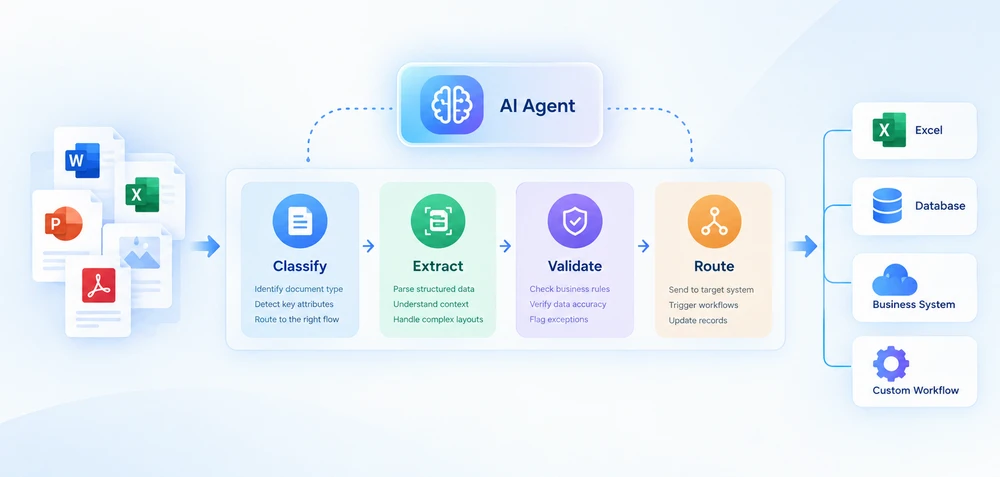
O processamento inteligente de documentos (IDP) combina compreensão de documentos baseada em IA com extração automatizada, validação e processamento downstream. Para desenvolvedores .NET, implementar IDP geralmente significa conectar a compreensão de documentos baseada em IA com código determinístico que lida com arquivos, regras de negócios e integração de sistemas.
Este guia concentra-se em fluxos de trabalho IDP para documentos do Office e PDF em .NET. Ele aborda a arquitetura de pipeline de quatro estágios, mostra padrões de implementação em C# e fornece uma estrutura de decisão para escolher entre construir internamente e adotar uma plataforma de fornecedor.
Navegação Rápida
- O Pipeline IDP de Quatro Estágios
- Criando um Pipeline IDP em .NET
- Processamento em Lote e de Vários Documentos
- IDP na Prática
- Construir vs Comprar: Escolhendo uma Abordagem de IDP
1. O que é Processamento Inteligente de Documentos?
O processamento inteligente de documentos é uma abordagem de automação que usa IA para classificar documentos, extrair dados estruturados deles, validar os resultados em relação a regras de negócios e encaminhar a saída para sistemas downstream. Diferentemente do OCR tradicional, que converte principalmente conteúdo visual em texto legível por máquina, o IDP adiciona classificação de documentos, extração semântica, validação e automação de fluxo de trabalho. Ele consegue lidar com layouts de documentos variados sem depender inteiramente de modelos fixos.
Um pipeline IDP prático pode ser organizado em quatro estágios: classificar, extrair, validar e encaminhar. Cada estágio tem entradas, saídas e modos de falha distintos. O agente de IA lida com classificação e extração por meio de compreensão de linguagem natural, enquanto validação e encaminhamento permanecem como código determinístico que aplica regras de negócios e integra-se com sistemas downstream.
IDP vs. OCR, Processamento de Documentos e Inteligência de Documentos
Esses termos muitas vezes são usados de forma intercambiável, mas descrevem capacidades diferentes:
| Tecnologia | Função principal |
|---|---|
| OCR | Converter conteúdo visual em texto |
| Processamento de documentos | Ler, manipular, converter ou gerar arquivos |
| Inteligência de documentos | Compreender o conteúdo do documento e extrair significado |
| IDP | Combinar compreensão de documentos com fluxos de trabalho automatizados |
Na prática, essas capacidades muitas vezes se sobrepõem. Um pipeline IDP pode usar OCR para documentos digitalizados, IA para compreensão semântica e APIs de processamento de documentos para operações determinísticas de arquivos. A distinção é importante para a arquitetura: saber qual camada é responsável por qual tarefa determina como você constrói e mantém o sistema.
IDP não significa substituir todo o fluxo de trabalho por IA. A IA lida com compreensão e extração; código determinístico lida com validação, encaminhamento, manipulação de arquivos e integração de sistemas. Essa separação é o que torna o IDP sustentável em produção — regras de negócios mudam com mais frequência do que formatos de documentos, e você quer essas regras em código que você controla, não em um prompt de modelo.
2. O Pipeline IDP de Quatro Estágios
Um pipeline IDP não é uma única chamada de API. É uma sequência de estágios, cada um com entradas, saídas e modos de falha distintos. Entender essa arquitetura é a diferença entre construir um pipeline que lida com variedade real de documentos e escrever um script que quebra na primeira entrada inesperada.
Um pipeline IDP prático pode ser organizado em quatro estágios:
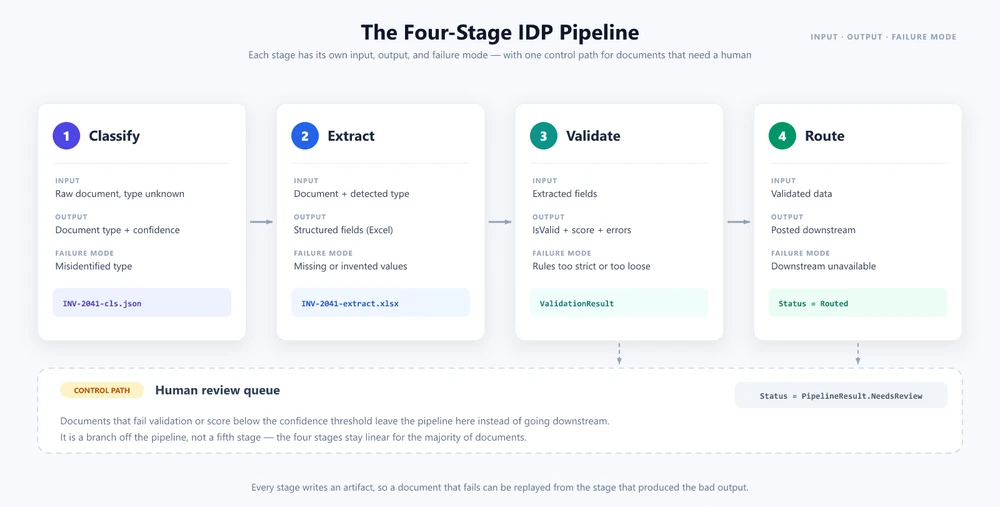
Estágio 1 — Classificação
O pipeline recebe um documento de tipo desconhecido. A classificação determina o que o documento é — uma fatura, um contrato, um pedido de compra, um recibo, um extrato bancário — e anexa metadados que orientam o comportamento downstream. Em um sistema tradicional, a classificação depende de convenções de nomenclatura de arquivos, caminhos de pastas ou correspondência de modelos. Em um pipeline orientado por IA, a classificação usa análise de linguagem natural: o agente lê o conteúdo do documento e determina seu tipo com base na compreensão semântica.
Estágio 2 — Extração
Assim que o tipo de documento é conhecido, a extração obtém dados estruturados do documento. Para uma fatura, isso significa nome do fornecedor, número da fatura, itens de linha, totais, valores de impostos, condições de pagamento. Para um contrato, significa partes, datas de vigência, cláusulas de rescisão, obrigações financeiras. O estágio de extração transforma conteúdo de documento não estruturado ou semiestruturado em um formato estruturado (JSON, XML, registros de banco de dados) que sistemas downstream podem consumir.
Estágio 3 — Validação
Os dados extraídos são verificados em relação a regras de negócios. O total da fatura corresponde à soma dos itens de linha? O fornecedor está na lista de fornecedores aprovados? O contrato foi assinado por um signatário autorizado? A validação detecta erros de extração, sinaliza anomalias e produz uma pontuação de confiança que determina se o documento pode ser encaminhado automaticamente ou exige revisão humana.
Estágio 4 — Encaminhamento
Dados validados são enviados ao sistema downstream apropriado: um ERP para dados de fatura, uma plataforma de gestão de contratos para dados de contrato, um arquivo de documentos para todo o resto. O encaminhamento também pode disparar fluxos de trabalho downstream — cadeias de aprovação, processamento de pagamentos, verificações de conformidade.
A revisão humana é um caminho de controle, e não um estágio obrigatório: documentos que falham na validação ou ficam abaixo de um limite de confiança podem ser encaminhados para revisão manual. Isso mantém o pipeline de quatro estágios linear para a maioria dos documentos, ao mesmo tempo que fornece um fallback controlado para casos limite.
Por que o IDP precisa de mais do que uma chamada de API de IA
Cada estágio tem modos de falha independentes. A classificação pode identificar incorretamente um tipo de documento. A extração pode deixar passar campos ou alucinar valores. A validação pode rejeitar dados válidos devido a regras excessivamente rígidas. O encaminhamento pode falhar devido à indisponibilidade de sistemas downstream. Um pipeline IDP robusto lida com cada modo de falha de forma independente, com lógica de repetição, comportamento de fallback e registro de auditoria em cada estágio.
3. Criando um Pipeline IDP em .NET
Uma forma de implementar essa arquitetura em .NET é usar Spire.Agent.Office, um SDK de agente de IA que processa documentos Word, Excel, PowerPoint e PDF por meio de instruções em linguagem natural. O SDK fornece o método de extensão AI() em objetos de documento (Document, PdfDocument, Workbook, Presentation), que aceita uma configuração AIOptions e retorna um AIDocumentProcessor. Chamar ExecuteInstruction no processador executa a instrução e grava a saída em um arquivo, retornando um AIResult com as propriedades Success e ErrorMessage.
Pré-requisitos
<!-- NuGet package -->
<PackageReference Include="Spire.Agent.Office" Version="11.8.3" />
Os exemplos abaixo concentram-se na arquitetura do pipeline e na integração com Spire.Agent.Office. Métodos auxiliares, como análise de resultados e encaminhamento downstream, são omitidos por brevidade.
3.1 Definir o Modelo do Pipeline
O pipeline precisa de estruturas de dados para transportar resultados entre estágios e uma configuração compartilhada para o agente de IA.
using Spire.Agent.Office.AI;
using Spire.Agent.Office.Extensions;
using Spire.Doc;
using Spire.Pdf;
using Spire.Xls;
using Spire.Presentation;
using System.Collections.Concurrent;

public class ClassificationResult
{
    public string DocumentType { get; set; } = "Unknown";
    public double Confidence { get; set; }
    public string SourceFile { get; set; } = string.Empty;
}

public class ExtractionResult
{
    public Dictionary<string, string> Fields { get; set; } = new();
    public List<Dictionary<string, string>> LineItems { get; set; } = new();
    public string OutputPath { get; set; } = string.Empty;
}

public class ValidationResult
{
    public bool IsValid { get; set; }
    public List<string> Errors { get; set; } = new();
    public List<string> Warnings { get; set; } = new();
    public double ValidationScore { get; set; }
}

public class PipelineResult
{
    // Stage 4 outcomes. RunPipelineAsync records one of them on every
    // path, and ProcessBatchAsync counts by them, so the batch report
    // always adds up: Successful + Flagged + Errored == Total.
    public const string Routed = "Routed";
    public const string NeedsReview = "Flagged for review";
    public const string Failed = "Failed";

    // Non-null defaults keep a failed result object complete, so the
    // batch aggregator never has to null-check stage outputs.
    public ClassificationResult Classification { get; set; } = new();
    public ExtractionResult Extraction { get; set; } = new();
    public ValidationResult Validation { get; set; } = new();
    public List<string> AuditLog { get; set; } = new();
    public string Status { get; set; } = string.Empty;
}

public class BatchResult
{
    public int Total { get; set; }
    public int Successful { get; set; }
    public int Flagged { get; set; }
    public int Errored { get; set; }
    public List<PipelineResult> Results { get; set; } = new();
}

// Routing policy shared by validation (§3.3) and orchestration (§3.4)
static class RoutingPolicy
{
    // Minimum validation score required for automatic routing.
    public const double AutoRouteThreshold = 0.7;

    // Confidence budget shared across all optional-field warnings.
    // Spending the whole budget must be able to push a valid document
    // below AutoRouteThreshold — otherwise the routing check in §3.4
    // is dead code. Allocating a fixed budget instead of a flat
    // per-field penalty keeps that true when optional fields change.
    public const double OptionalFieldBudget = 0.4;
}

// Shared agent configuration
static AIOptions CreateAgentOptions(string workDir)
{
    string spireToken = Environment.GetEnvironmentVariable("SPIRE_TOKEN")
        ?? throw new InvalidOperationException("SPIRE_TOKEN not set.");

    AIOptions options = new AIOptions();
    options.SpireToken = spireToken;
    options.WorkDir = workDir;
    options.TimeoutMs = 300000;
    return options;
}
SpireToken é usado para autenticar o Spire.Agent.Office. O SDK gerencia a conexão com o serviço de IA por meio de AIOptions, então a aplicação não precisa implementar diretamente a integração com a API do modelo subjacente. WorkDir designa onde o agente armazena arquivos intermediários durante o processamento.
3.2 Classificar e Extrair Documentos com um Agente de IA
A classificação carrega o documento, pede ao agente para identificar seu tipo e grava o resultado em um arquivo JSON. O mesmo padrão LoadFromFile → AI(options) → ExecuteInstruction funciona para todos os formatos de documento — apenas a classe do documento muda, e esse despacho é seu para escrever. AI() vincula-se a um tipo concreto de documento: um PDF deve ser carregado como PdfDocument, uma pasta de trabalho como Workbook, uma apresentação como Presentation e um arquivo Word como Document. Entregar um arquivo à classe errada não recorre a um leitor genérico; ele lança uma exceção, então escolha a classe pela extensão do arquivo antes de chamar AI().
public ClassificationResult Classify(
    string filePath, string outputDir)
{
    AIOptions agentOptions = CreateAgentOptions(outputDir);
    string classifyPath = Path.Combine(outputDir,
        Path.GetFileNameWithoutExtension(filePath) + "-cls.json");

    string instruction =
        "Analyze this document and determine its type. " +
        "Return one of: Invoice, Contract, PurchaseOrder, " +
        "Receipt, BankStatement, Unknown. Include a confidence " +
        "score between 0 and 1. Save the result as JSON.";

    string ext = Path.GetExtension(filePath).ToLowerInvariant();
    AIResult? result = null;

    if (ext == ".pdf")
    {
        using (PdfDocument doc = new PdfDocument())
        {
            doc.LoadFromFile(filePath);
            result = doc.AI(agentOptions).ExecuteInstruction(
                doc, instruction, classifyPath, new string[] { });
        }
    }
    else if (ext == ".xlsx" || ext == ".xls")
    {
        using (Workbook doc = new Workbook())
        {
            doc.LoadFromFile(filePath);
            result = doc.AI(agentOptions).ExecuteInstruction(
                doc, instruction, classifyPath, new string[] { });
        }
    }
    else if (ext == ".pptx" || ext == ".ppt")
    {
        using (Presentation doc = new Presentation())
        {
            doc.LoadFromFile(filePath);
            result = doc.AI(agentOptions).ExecuteInstruction(
                doc, instruction, classifyPath, new string[] { });
        }
    }
    else
    {
        using (Document doc = new Document())
        {
            doc.LoadFromFile(filePath);
            result = doc.AI(agentOptions).ExecuteInstruction(
                doc, instruction, classifyPath, new string[] { });
        }
    }

    if (result != null && result.Success && File.Exists(classifyPath))
    {
        return ParseClassification(
            File.ReadAllText(classifyPath), filePath);
    }

    return new ClassificationResult
    {
        DocumentType = "Unknown",
        Confidence = 0,
        SourceFile = filePath
    };
}
A extração usa instruções específicas por tipo para obter campos estruturados do documento:
public ExtractionResult Extract(
    string filePath, string documentType, string outputDir)
{
    AIOptions agentOptions = CreateAgentOptions(outputDir);
    string extractPath = Path.Combine(outputDir,
        Path.GetFileNameWithoutExtension(filePath) + "-extract.xlsx");

    string instruction = documentType switch
    {
        "Invoice" =>
            "Extract all invoice fields and write them as key-value " +
            "pairs in a sheet named 'Fields' with columns 'Field' and " +
            "'Value'. Use these exact field names: VendorName, " +
            "InvoiceNumber, IssueDate, DueDate, Subtotal, Tax, Total, " +
            "PONumber. Extract line items into a sheet named 'LineItems' " +
            "with columns: Description, Quantity, UnitPrice, Amount. " +
            "Write the extracted data to a structured Excel workbook.",

        "Contract" =>
            "Extract all contract fields and write them as key-value " +
            "pairs in a sheet named 'Fields' with columns 'Field' and " +
            "'Value'. Use these exact field names: Party1, Party2, " +
            "EffectiveDate, TerminationDate, ContractValue, " +
            "PaymentTerms, Signatory1, Signatory2. Extract key " +
            "obligations into a sheet named 'Obligations' with " +
            "columns: Description, Party, Deadline. Write the " +
            "extracted data to a structured Excel workbook.",

        "PurchaseOrder" =>
            "Extract all purchase order fields and write them as " +
            "key-value pairs in a sheet named 'Fields' with columns " +
            "'Field' and 'Value'. Use these exact field names: " +
            "PONumber, VendorName, IssueDate, ExpectedDeliveryDate, " +
            "ShippingAddress, Total. Extract requested items into a " +
            "sheet named 'LineItems' with columns: Description, " +
            "Quantity, UnitPrice, Amount. Write the extracted data " +
            "to a structured Excel workbook.",

        _ => "Extract all key fields and values from this document. " +
             "Write the extracted data to a structured Excel workbook."
    };

    string ext = Path.GetExtension(filePath).ToLowerInvariant();
    AIResult? result = null;

    if (ext == ".pdf")
    {
        using (PdfDocument doc = new PdfDocument())
        {
            doc.LoadFromFile(filePath);
            result = doc.AI(agentOptions).ExecuteInstruction(
                doc, instruction, extractPath, new string[] { });
        }
    }
    else if (ext == ".xlsx" || ext == ".xls")
    {
        using (Workbook doc = new Workbook())
        {
            doc.LoadFromFile(filePath);
            result = doc.AI(agentOptions).ExecuteInstruction(
                doc, instruction, extractPath, new string[] { });
        }
    }
    else if (ext == ".pptx" || ext == ".ppt")
    {
        using (Presentation doc = new Presentation())
        {
            doc.LoadFromFile(filePath);
            result = doc.AI(agentOptions).ExecuteInstruction(
                doc, instruction, extractPath, new string[] { });
        }
    }
    else
    {
        using (Document doc = new Document())
        {
            doc.LoadFromFile(filePath);
            result = doc.AI(agentOptions).ExecuteInstruction(
                doc, instruction, extractPath, new string[] { });
        }
    }

    if (result == null || !result.Success)
        throw new InvalidOperationException(
            $"Extraction failed: {result?.ErrorMessage}");

    return ReadExtractionResult(extractPath);
}
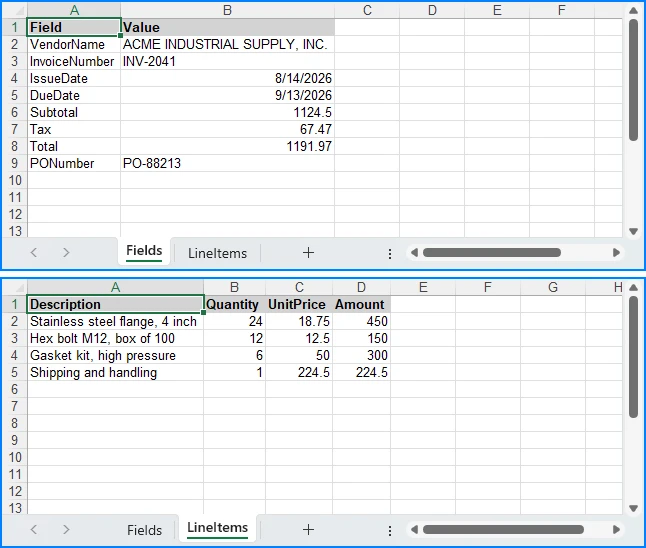
Cada tipo de documento recebe uma instrução dedicada que informa ao agente quais campos procurar e qual formato de saída produzir. O agente lê o documento de origem e grava uma pasta de trabalho Excel estruturada em extractPath. A instrução é o que fixa o formato dessa pasta de trabalho — nomear as planilhas, os cabeçalhos e os nomes exatos dos campos é o que torna a saída analisável downstream. Uma instrução que apenas diz "extraia os campos da fatura" pode retornar com um nome de planilha diferente, uma linha de cabeçalho diferente ou uma grafia diferente para o mesmo campo a cada execução, porque o agente decide o layout sozinho. O GetField na próxima seção cobre as variações que ainda assim escapam.
Essa divisão entre julgamento do agente e código determinístico é abordada mais adiante em Agente de IA para Processamento de Documentos.
3.3 Validar Dados Extraídos com C#
A validação é lógica pura em C# — nenhuma chamada de IA é necessária. O agente já produziu dados estruturados; a validação verifica esses dados em relação a regras de negócios.
// Normalized field lookup: handles key variations like
// "VendorName" vs "Vendor Name" vs "vendor_name", and strips
// trailing qualifier words (e.g., "Total Amount Due" → "Total")
static string? GetField(
    Dictionary<string, string> fields, string key)
{
    string normalized = key.Replace(" ", "").ToLowerInvariant();
    foreach (var kvp in fields)
    {
        if (kvp.Key.Replace(" ", "").ToLowerInvariant() == normalized)
            return kvp.Value;
    }

    // Fallback: strip trailing qualifier words, one at a time, so
    // multi-word labels collapse all the way down to the field name
    // we asked for ("Total Amount Due" → "Total", "Invoice No"
    // → "Invoice"). Stripping is restarted after every match so the
    // result does not depend on the order of the suffix list.
    string[] suffixes = { "due", "amount", "no" };
    foreach (var kvp in fields)
    {
        string candidate = kvp.Key.Replace(" ", "")
            .ToLowerInvariant();

        bool stripped = true;
        while (stripped)
        {
            stripped = false;
            foreach (var suffix in suffixes)
            {
                if (candidate.Length > suffix.Length &&
                    candidate.EndsWith(suffix))
                {
                    candidate = candidate[..^suffix.Length];
                    stripped = true;
                    break;
                }
            }
        }

        if (candidate == normalized)
            return kvp.Value;
    }

    return null;
}

public ValidationResult Validate(
    ExtractionResult extracted, string documentType)
{
    var errors = new List<string>();
    var warnings = new List<string>();
    double confidence = 1.0;

    switch (documentType)
    {
        case "Invoice":
            // Rule 1a: Total must equal Subtotal + Tax. Runs only when
            // all three amounts were extracted — a missing Tax is
            // reported once, as a warning, instead of being turned
            // into a fabricated arithmetic error.
            var totalStr = GetField(extracted.Fields, "Total");
            var subtotalStr = GetField(extracted.Fields, "Subtotal");
            var taxStr = GetField(extracted.Fields, "Tax");

            if (decimal.TryParse(totalStr, out var total) &&
                decimal.TryParse(subtotalStr, out var subtotal) &&
                decimal.TryParse(taxStr, out var tax))
            {
                if (Math.Abs(total - (subtotal + tax)) > 0.01m)
                {
                    errors.Add(
                        $"Total mismatch: stated {total}, " +
                        $"calculated {subtotal + tax}");
                    confidence -= 0.3;
                }
            }

            // Rule 1b: Subtotal must equal the sum of the line items.
            // Line items are pre-tax, so they are checked against
            // Subtotal. Comparing them against the tax-inclusive Total
            // would reject every correctly extracted taxed invoice.
            if (decimal.TryParse(subtotalStr, out var subtotalBase) &&
                extracted.LineItems.Count > 0)
            {
                decimal lineItemSum = 0;
                foreach (var item in extracted.LineItems)
                {
                    var amtStr = GetField(item, "Amount");
                    if (decimal.TryParse(amtStr, out var amt))
                        lineItemSum += amt;
                }

                if (lineItemSum > 0 &&
                    Math.Abs(subtotalBase - lineItemSum) > 0.01m)
                {
                    errors.Add(
                        $"Line item mismatch: subtotal " +
                        $"{subtotalBase}, line items {lineItemSum}");
                    confidence -= 0.3;
                }
            }

            // Rule 2: Required fields must be present
            string[] required = { "VendorName", "InvoiceNumber",
                "IssueDate", "Total" };
            foreach (var field in required)
            {
                var value = GetField(extracted.Fields, field);
                if (string.IsNullOrEmpty(value))
                {
                    errors.Add($"Missing required field: {field}");
                    confidence -= 0.15;
                }
            }

            // Warnings: optional fields reduce confidence
            // but do not invalidate the document
            string[] optional = { "PONumber", "DueDate", "Tax" };
            double optionalPenalty =
                RoutingPolicy.OptionalFieldBudget / optional.Length;
            foreach (var field in optional)
            {
                var value = GetField(extracted.Fields, field);
                if (string.IsNullOrEmpty(value))
                {
                    warnings.Add(
                        $"Optional field missing: {field}");
                    confidence -= optionalPenalty;
                }
            }
            break;

        case "Contract":
            var party1 = GetField(extracted.Fields, "Party1");
            var party2 = GetField(extracted.Fields, "Party2");
            if (string.IsNullOrEmpty(party1) ||
                string.IsNullOrEmpty(party2))
            {
                errors.Add(
                    "Contract must identify at least two parties");
                confidence -= 0.25;
            }

            // Warnings: missing optional contract metadata
            string[] optionalContract =
                { "EffectiveDate", "ContractValue", "PaymentTerms" };
            double contractPenalty =
                RoutingPolicy.OptionalFieldBudget / optionalContract.Length;
            foreach (var field in optionalContract)
            {
                var value = GetField(extracted.Fields, field);
                if (string.IsNullOrEmpty(value))
                {
                    warnings.Add(
                        $"Optional field missing: {field}");
                    confidence -= contractPenalty;
                }
            }
            break;

        default:
            // Uncovered document types require human review
            errors.Add(
                $"No validation rules for type '{documentType}'");
            confidence -= 0.5;
            break;
    }

    // Hard guard: zero extracted fields is always invalid
    if (extracted.Fields.Count == 0)
    {
        errors.Add("No fields were extracted from the document");
        confidence -= 0.5;
    }

    return new ValidationResult
    {
        IsValid = errors.Count == 0,
        Errors = errors,
        Warnings = warnings,
        ValidationScore = Math.Max(0, confidence)
    };
}
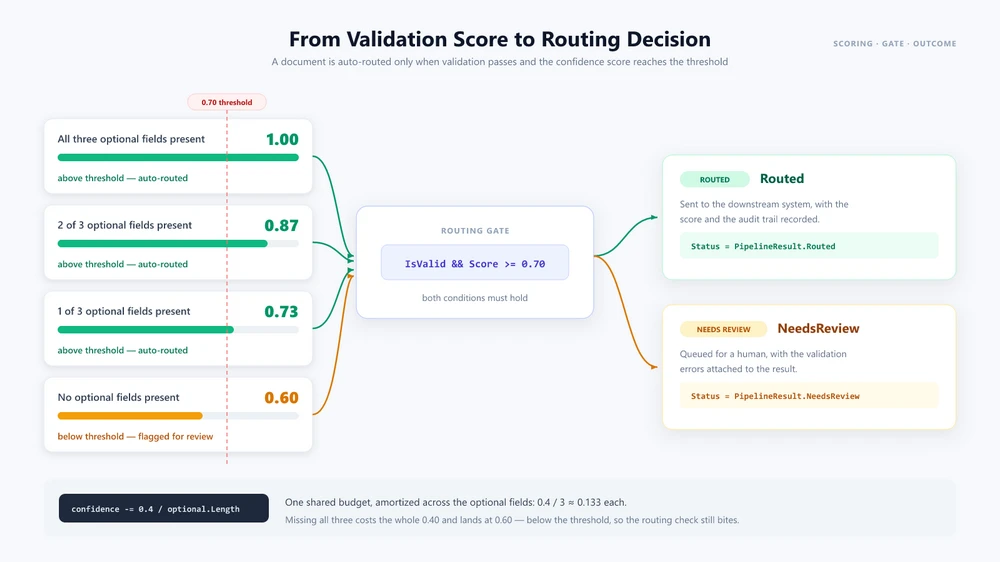
A validação separa falhas rígidas de avisos de qualidade. Um campo obrigatório ausente, um total que não concilia com os itens de linha ou um tipo de documento sem regras produz uma entrada em Errors, e o documento é tratado como inválido. Um campo opcional que não pôde ser extraído apenas reduz ValidationScore, então um documento que de outra forma está íntegro ainda é encaminhado. A dedução é um orçamento fixo compartilhado entre os campos opcionais, em vez de uma penalidade fixa por campo: com três campos opcionais e o orçamento de 0,4 no código acima, um campo ausente deixa a pontuação em 0,87 e dois a deixam em 0,73 — ainda acima do limite de encaminhamento automático de 0,7 —, então somente perder todos os três a reduz para 0,60 e envia o documento para revisão. Manter esses dois sinais separados é o que reserva a revisão humana para documentos que realmente precisam dela.
3.4 Orquestrar o Pipeline
O método de orquestração conecta os estágios e toma decisões de encaminhamento com base na confiança da validação:
public async Task<PipelineResult> RunPipelineAsync(
    string filePath, string outputDir)
{
    var auditLog = new List<string>();
    string status;

    // Stage 1: Classify
    auditLog.Add($"[{DateTime.Now}] Classifying: {filePath}");
    var classification = Classify(filePath, outputDir);
    auditLog.Add($"  Type: {classification.DocumentType} " +
        $"(confidence: {classification.Confidence:P0})");

    // Stage 2: Extract
    auditLog.Add($"[{DateTime.Now}] Extracting fields...");
    var extraction = Extract(
        filePath, classification.DocumentType, outputDir);
    auditLog.Add($"  Extracted {extraction.Fields.Count} fields, " +
        $"{extraction.LineItems.Count} line items");

    // Stage 3: Validate
    auditLog.Add($"[{DateTime.Now}] Validating...");
    var validation = Validate(
        extraction, classification.DocumentType);
    auditLog.Add($"  Valid: {validation.IsValid}, " +
        $"Confidence: {validation.ValidationScore:P0}");

    if (!validation.IsValid)
    {
        foreach (var error in validation.Errors)
            auditLog.Add($"  ERROR: {error}");
    }

    // Stage 4: Route
    if (validation.IsValid &&
        validation.ValidationScore >= RoutingPolicy.AutoRouteThreshold)
    {
        auditLog.Add(
            $"[{DateTime.Now}] Routing to downstream system...");
        await RouteToDownstreamAsync(
            classification.DocumentType, extraction);
        auditLog.Add($"  Routed successfully");
        status = PipelineResult.Routed;
    }
    else
    {
        auditLog.Add(
            $"[{DateTime.Now}] Flagged for human review " +
            $"(confidence: {validation.ValidationScore:P0})");
        await FlagForReviewAsync(filePath, validation.Errors);
        status = PipelineResult.NeedsReview;
    }

    // Status is the stage-4 outcome the batch report counts by, so it
    // has to be set on every path out of this method.
    return new PipelineResult
    {
        Classification = classification,
        Extraction = extraction,
        Validation = validation,
        AuditLog = auditLog,
        Status = status
    };
}
Cada estágio é testável de forma independente, tem seu próprio tratamento de erros e produz saída de auditoria. O PipelineResult retornado também registra o resultado do estágio 4 em Status, o que permite que o relatório em lote na próxima seção conte documentos por resultado em vez de derivá-lo novamente do payload de validação. Neste exemplo, o agente de IA lida com classificação e extração por meio de instruções em linguagem natural, enquanto validação e encaminhamento permanecem como lógica determinística em C#.
4. Processamento em Lote e de Vários Documentos
Um pipeline de documento único é um ponto de partida. Sistemas IDP de produção processam centenas ou milhares de documentos diariamente, com tipos, prioridades e destinos downstream variados.
Processamento em Lote Paralelo
public async Task<BatchResult> ProcessBatchAsync(
    string inputDirectory, string outputDir,
    int maxConcurrency = 5)
{
    var files = Directory.GetFiles(inputDirectory);
    var semaphore = new SemaphoreSlim(maxConcurrency);
    var results = new ConcurrentBag<PipelineResult>();

    var tasks = files.Select(async file =>
    {
        await semaphore.WaitAsync();
        try
        {
            var result = await RunPipelineAsync(file, outputDir);
            results.Add(result);
        }
        catch (Exception ex)
        {
            results.Add(new PipelineResult
            {
                Status = $"{PipelineResult.Failed}: {ex.Message}",
                Validation = new ValidationResult
                {
                    IsValid = false,
                    Errors = new List<string> { ex.Message }
                },
                AuditLog = new List<string>
                    { $"Error processing {file}: {ex}" }
            });
        }
        finally
        {
            semaphore.Release();
        }
    });

    await Task.WhenAll(tasks);

    int successful = results.Count(
        r => r.Status == PipelineResult.Routed);
    int errored = results.Count(r => r.Status.StartsWith(
        PipelineResult.Failed));

    // Flagged is the remainder, so the report stays conserved by
    // construction: Successful + Flagged + Errored == Total. A result
    // that never reached stage 4 is counted as needing review instead
    // of being silently dropped from all three counters.
    return new BatchResult
    {
        Total = files.Length,
        Successful = successful,
        Flagged = results.Count - successful - errored,
        Errored = errored,
        Results = results.ToList()
    };
}
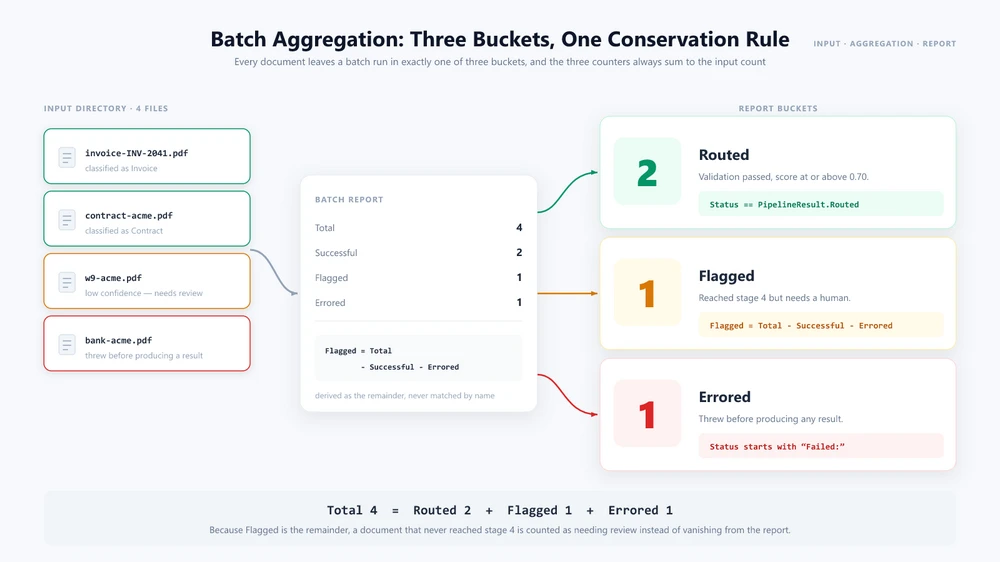
O SemaphoreSlim limita a concorrência para evitar sobrecarregar o serviço de IA ou sistemas downstream. Cada documento é processado independentemente por todos os quatro estágios. O relatório em lote classifica os resultados nas três formas pelas quais um documento pode sair do pipeline: Routed (validado e enviado downstream), Flagged (chegou ao estágio 4, mas precisa de revisão) e Errored (lançou exceção antes de produzir um resultado). Flagged é calculado como o restante, em vez de corresponder a uma string de status, então os três contadores sempre somam Total — um documento que falha inesperadamente é relatado como precisando de revisão em vez de desaparecer do relatório. O limite de concorrência apropriado depende dos limites de taxa do serviço de IA, do tamanho do documento e dos recursos da aplicação.
Fluxos de Trabalho entre Documentos
Alguns processos de negócios exigem que vários documentos sejam processados juntos. Um fluxo de trabalho de integração de fornecedor nos EUA, por exemplo, pode processar um formulário fiscal, um contrato e um extrato bancário como uma única unidade — extraindo dados de cada um, fazendo validação cruzada e produzindo uma saída combinada.
public async Task<OnboardingResult> ProcessVendorOnboardingAsync(
    string w9Path, string contractPath,
    string bankStatementPath, string outputDir)
{
    AIOptions agentOptions = CreateAgentOptions(outputDir);

    // Process all three documents in parallel
    var w9Task = RunPipelineAsync(w9Path, outputDir);
    var contractTask = RunPipelineAsync(contractPath, outputDir);
    var bankTask = RunPipelineAsync(bankStatementPath, outputDir);

    try
    {
        await Task.WhenAll(w9Task, contractTask, bankTask);
    }
    catch (Exception ex)
    {
        return new OnboardingResult
        {
            Status = "Failed",
            Issue = $"Document processing failed: {ex.Message}"
        };
    }

    var w9 = w9Task.Result;
    var contract = contractTask.Result;
    var bank = bankTask.Result;

    // Cross-validate: names must match across all documents
    var w9Name = GetField(w9.Extraction.Fields, "VendorName");
    var contractName = GetField(contract.Extraction.Fields, "Party2");
    var bankName = GetField(bank.Extraction.Fields, "AccountHolder");

    if (w9Name == null || contractName == null || bankName == null)
    {
        return new OnboardingResult
        {
            Status = "Flagged",
            Issue = "Could not extract vendor name from one or more documents"
        };
    }

    if (w9Name != contractName || contractName != bankName)
    {
        return new OnboardingResult
        {
            Status = "Flagged",
            Issue = $"Name mismatch: W-9='{w9Name}', " +
                $"Contract='{contractName}', Bank='{bankName}'"
        };
    }

    // Generate combined onboarding summary using the agent
    string summaryPath = Path.Combine(outputDir,
        $"onboarding-{w9Name}.docx");
    string[] attachments = { w9Path, contractPath, bankStatementPath };

    string summaryInstruction =
        $"Create a vendor onboarding summary for {w9Name}. " +
        "Read the attached W-9, contract, and bank statement. " +
        "Compile the vendor's legal name, tax ID, contract terms, " +
        "and banking details into a formatted Word document. " +
        "Save the summary to the output path.";

    using (Document summary = new Document())
    {
        summary.LoadFromFile(
            Path.Combine(AppContext.BaseDirectory,
                "templates", "onboarding-summary.docx"));

        AIResult result = summary.AI(agentOptions).ExecuteInstruction(
            summary, summaryInstruction, summaryPath, attachments);

        return new OnboardingResult
        {
            Status = result != null && result.Success
                ? "Complete" : "Failed",
            SummaryPath = result != null && result.Success
                ? summaryPath : null,
            Error = result?.ErrorMessage
        };
    }
}
O parâmetro attachments passa vários caminhos de documentos para o agente em uma única chamada. O agente lê todos os arquivos anexados, raciocina sobre eles e produz uma saída combinada. Isso vai além do papel de reconhecimento de texto do OCR tradicional, permitindo que um modelo de IA raciocine sobre múltiplas entradas de documentos.
Retentativa e Revisão Humana
public async Task<PipelineResult> RunPipelineWithRetryAsync(
    string filePath, string outputDir, int maxRetries = 3)
{
    string lastError = "unknown";

    for (int attempt = 1; attempt <= maxRetries; attempt++)
    {
        try
        {
            var result = await RunPipelineAsync(filePath, outputDir);

            if (result.Validation.IsValid)
                return result;

            // Borderline confidence: retry in case the next pass
            // classifies or extracts the document differently
            if (result.Validation.ValidationScore >= 0.5 &&
                attempt < maxRetries)
            {
                continue;
            }

            return result;
        }
        catch (Exception ex)
        {
            lastError = ex.Message;

            if (attempt < maxRetries)
            {
                await Task.Delay(
                    TimeSpan.FromSeconds(Math.Pow(2, attempt)));
            }
        }
    }

    // Every attempt threw, so the loop ran out instead of returning.
    return new PipelineResult
    {
        Status = $"{PipelineResult.Failed} after {maxRetries} retries: " +
            lastError
    };
}
Documentos que falham na validação ou ficam abaixo do limite de confiança são sinalizados para revisão humana em vez de falharem silenciosamente. A estratégia de retentativa usa backoff exponencial para erros transitórios e tenta novamente casos limítrofes na chance de que uma segunda passagem os classifique ou extraia de forma diferente.
5. IDP na Prática
Esta seção mostra como o pipeline lida com cenários de negócios reais que envolvem vários tipos de documentos em um único fluxo de trabalho.
Automação de Contas a Pagar
Um departamento de Contas a Pagar recebe faturas em formatos variados — PDF, Excel, Word, imagens digitalizadas. Cada fatura precisa ser classificada, extraída, validada em relação a um pedido de compra e encaminhada ao sistema ERP.
public async Task<APResult> ProcessInvoiceAsync(
    string invoicePath, string outputDir)
{
    // Stages 1-3: Standard pipeline
    var pipeline = await RunPipelineAsync(invoicePath, outputDir);

    if (!pipeline.Validation.IsValid)
        return new APResult
        {
            Status = "Requires review",
            Errors = pipeline.Validation.Errors
        };

    // Cross-reference with purchase order
    var poNumber = GetField(pipeline.Extraction.Fields, "PONumber");
    if (string.IsNullOrEmpty(poNumber))
        return new APResult { Status = "No PO reference" };

    var poData = await _erpService.GetPurchaseOrderAsync(poNumber);
    if (poData == null)
        return new APResult { Status = "PO not found in ERP" };

    // Three-way match: invoice vs PO vs goods receipt
    var grData = await _erpService.GetGoodsReceiptAsync(poNumber);
    var matchResult = ThreeWayMatch(
        pipeline.Extraction, poData, grData);

    if (matchResult.IsMatch)
    {
        await _erpService.PostInvoiceForPaymentAsync(
            pipeline.Extraction);
        return new APResult { Status = "Posted for payment" };
    }

    return new APResult
    {
        Status = "Three-way match failed",
        Discrepancies = matchResult.Discrepancies
    };
}
O tutorial de processamento de faturas cobre esse cenário de ponta a ponta: a instrução de extração, a comparação com o pedido de compra e o relatório que o sistema financeiro consome.
Análise de Contratos
Uma equipe jurídica recebe contratos de partes externas. Cada contrato precisa ser analisado, ter termos-chave extraídos, ser comparado ao modelo padrão da empresa e ser encaminhado para revisão se cláusulas não padrão forem encontradas. O agente processa o contrato recebido com o modelo padrão anexado como documento de referência.
public async Task<ContractAnalysisResult> AnalyzeContractAsync(
    string contractPath, string outputDir)
{
    AIOptions agentOptions = CreateAgentOptions(outputDir);

    string analysisPath = Path.Combine(outputDir,
        $"contract-analysis-{DateTime.Now:yyyyMMdd}.docx");

    string[] attachments =
        { Path.Combine(AppContext.BaseDirectory,
            "templates", "standard-contract.docx") };

    string instruction =
        "Analyze this contract and compare it to the attached " +
        "standard template. Identify non-standard clauses, unusual " +
        "risk terms, or missing provisions. Generate a redline " +
        "summary document highlighting the differences and save " +
        "it to the output path.";

    string ext = Path.GetExtension(contractPath).ToLowerInvariant();
    AIResult? result = null;

    if (ext == ".pdf")
    {
        using (PdfDocument contract = new PdfDocument())
        {
            contract.LoadFromFile(contractPath);
            result = contract.AI(agentOptions).ExecuteInstruction(
                contract, instruction, analysisPath, attachments);
        }
    }
    else if (ext == ".pptx" || ext == ".ppt")
    {
        using (Presentation contract = new Presentation())
        {
            contract.LoadFromFile(contractPath);
            result = contract.AI(agentOptions).ExecuteInstruction(
                contract, instruction, analysisPath, attachments);
        }
    }
    else
    {
        using (Document contract = new Document())
        {
            contract.LoadFromFile(contractPath);
            result = contract.AI(agentOptions).ExecuteInstruction(
                contract, instruction, analysisPath, attachments);
        }
    }

    return new ContractAnalysisResult
    {
        Success = result != null && result.Success,
        AnalysisPath = result != null && result.Success
            ? analysisPath : null,
        Error = result?.ErrorMessage
    };
}
Este fluxo de trabalho combina extração, comparação entre documentos e geração de documentos em um único processo, ilustrando como um agente de IA pode estender um pipeline IDP tradicional além da extração de campos estruturados. Padrões específicos de contratos — revisão, extração e geração a partir de um modelo — são abordados no guia de revisão de contratos com IA.
6. Construir vs Comprar: Escolhendo uma Abordagem de IDP
O mercado de IDP é dominado por plataformas SaaS. Esta seção ajuda desenvolvedores a decidir quando construir um pipeline em .NET é a escolha certa e quando adotar uma plataforma de fornecedor é mais prático.
Construa quando você precisar de integração estreita com uma aplicação .NET existente, regras de validação personalizadas ou geração e transformação de documentos junto com a extração. Construir a camada de orquestração em .NET oferece maior controle sobre onde os documentos são armazenados e como são processados. A residência real dos dados depende do modelo de IA e da configuração do serviço.
Compre quando cargas de trabalho com muito OCR, modelos de extração pré-construídos, infraestrutura gerenciada ou implantação rápida forem a prioridade. Se sua equipe não tem expertise em .NET ou está focada em outras prioridades, uma plataforma gerenciada remove o ônus da implementação.
Estrutura de decisão:
| Fator | Construir (.NET + agente de IA) | Comprar (IDP SaaS) |
|---|---|---|
| Integração | Em processo, nativo .NET | Chamada de API externa |
| Residência de dados | Depende da configuração do modelo | Nuvem do fornecedor |
| Operações de documentos | Extrair + gerar + transformar + converter | Depende da plataforma |
| Validação personalizada | Controle total do código | Configuração da plataforma |
| Fluxo de trabalho personalizado | Controle total do código | Dependente da plataforma |
| Tempo até produção | Semanas a meses | Dias a semanas |
| Modelo de custo | Custo fixo de API + licença do SDK | Preço por documento |
A escolha certa depende dos requisitos da sua aplicação, das capacidades da equipe e dos tipos de documentos que você processa. Muitas equipes usam uma abordagem híbrida: uma plataforma de fornecedor para extração em alto volume de formulários padronizados e um pipeline .NET personalizado para fluxos de trabalho complexos que exigem geração de documentos, raciocínio entre documentos ou integração estreita de sistemas.
7. Perguntas Frequentes
O que é processamento inteligente de documentos (IDP)?
O processamento inteligente de documentos é uma abordagem de automação que usa IA e aprendizado de máquina para classificar documentos, extrair dados estruturados, validar os resultados em relação a regras de negócios e encaminhar a saída para sistemas downstream. Diferentemente do OCR tradicional, que converte principalmente conteúdo visual em texto legível por máquina, o IDP adiciona classificação de documentos, extração semântica, validação e automação de fluxo de trabalho. Ele consegue lidar com layouts de documentos variados sem depender inteiramente de modelos fixos.
Como um pipeline IDP difere de uma única chamada de API de LLM?
Uma única chamada de LLM processa texto, mas não lida com formatos de arquivo, executa operações de documentos ou gerencia o estado do pipeline. Um pipeline IDP orquestra vários estágios — classificação, extração, validação, encaminhamento —, cada um com tratamento de erros independente, lógica de retentativa e registro de auditoria. O pipeline também faz a ponte entre raciocínio de IA e manipulação determinística de arquivos, garantindo que a saída preserve a formatação correta.
Posso construir um pipeline IDP sem uma plataforma de fornecedor?
Sim. Usando um SDK de agente de IA .NET como o Spire.Agent.Office, você pode implementar todos os quatro estágios do pipeline em C#. O SDK fornece processamento de documentos em linguagem natural para arquivos Word, Excel, PowerPoint e PDF, com saída de arquivo determinística. Essa abordagem dá controle total sobre a lógica de validação e as regras de encaminhamento.
Quais formatos de documento um pipeline IDP suporta?
Com o Spire.Agent.Office, o pipeline lida com arquivos Word (.docx, .doc), Excel (.xlsx, .xls), PowerPoint (.pptx, .ppt) e PDF. Documentos digitalizados podem exigir uma etapa de OCR antes da extração baseada em IA, dependendo do documento e do fluxo de processamento. O pipeline também pode converter entre formatos como parte do estágio de encaminhamento.
Como o agente de IA se conecta ao modelo de linguagem?
O Spire.Agent.Office usa uma propriedade SpireToken em AIOptions para autenticar com o serviço de IA. O SDK gerencia a conexão com o serviço de IA por meio de AIOptions, então a aplicação não precisa implementar diretamente a integração com a API do modelo subjacente. Esse design separa o processamento de documentos da configuração do modelo, então o código do seu pipeline permanece o mesmo independentemente de qual modelo alimenta o agente.
Quão precisa é a extração de documentos baseada em IA?
A precisão da extração depende fortemente da qualidade do documento, da variabilidade de layout, da qualidade do OCR, do comportamento do modelo e das instruções de extração. Sistemas de produção devem validar os valores extraídos em relação a regras de negócios determinísticas e encaminhar casos incertos para revisão humana. O estágio de validação ajuda a tornar a extração baseada em IA mais confiável em produção, verificando os valores extraídos em relação a regras determinísticas e encaminhando resultados incertos para revisão.
Qual é a diferença entre IDP e OCR?
OCR (Reconhecimento Óptico de Caracteres) converte conteúdo visual de documentos em texto legível por máquina. O IDP baseia-se nessa capacidade, mas adiciona compreensão, validação e automação de fluxo de trabalho impulsionadas por IA. Um pipeline IDP pode usar OCR internamente para documentos digitalizados, mas o OCR sozinho não classifica documentos, valida dados extraídos nem encaminha resultados para sistemas downstream.
Como o processamento em lote funciona em um pipeline IDP?
O processamento em lote executa o pipeline simultaneamente em vários documentos, com limites de concorrência configuráveis para gerenciar o uso de recursos. Cada documento é processado independentemente por todos os quatro estágios, com resultados agregados em um relatório em lote. Documentos com falha são sinalizados para revisão sem bloquear o restante do lote.
Pronto para Construir um Pipeline IDP?
Se você está construindo processamento inteligente de documentos em uma aplicação .NET, comece com o guia de Introdução do Spire.Agent.Office, que aborda a instalação do SDK e a execução da sua primeira instrução em .NET.
Leitura Adicional
- Agente de IA vs. API LLM Bruta: Camada de Documentos em .NET — o que uma camada de documentos adiciona sobre uma chamada de API LLM bruta e quando cada abordagem se encaixa
- Transforme Documentos em Apresentações PowerPoint com IA em C# — o mesmo padrão orientado por instruções aplicado à saída de slides
.NET 기반 지능형 문서 처리: IDP 파이프라인 구축
지능형 문서 처리(IDP)는 AI 기반 문서 이해와 자동 추출, 검증, 다운스트림 처리를 결합합니다. .NET 개발자에게 IDP를 구현한다는 것은 일반적으로 AI 기반 문서 이해를 파일, 비즈니스 규칙, 시스템 통합을 처리하는 결정적 코드와 연결하는 것을 의미합니다.
이 가이드는 .NET에서 Office 및 PDF 문서를 위한 IDP 워크플로에 초점을 맞춥니다. 4단계 파이프라인 아키텍처를 다루고, C# 구현 패턴을 보여주며, 사내 구축과 공급업체 플랫폼 도입 중에서 선택하기 위한 의사 결정 프레임워크를 제공합니다.
빠른 탐색
1. 지능형 문서 처리란 무엇인가?
지능형 문서 처리는 AI를 사용하여 문서를 분류하고, 구조화된 데이터를 추출하며, 결과를 비즈니스 규칙에 따라 검증하고, 출력을 다운스트림 시스템으로 라우팅하는 자동화 접근 방식입니다. 주로 시각적 콘텐츠를 기계 판독 가능한 텍스트로 변환하는 기존 OCR과 달리, IDP는 문서 분류, 의미 기반 추출, 검증, 워크플로 자동화를 추가합니다. 고정된 템플릿에 전적으로 의존하지 않고 다양한 문서 레이아웃을 처리할 수 있습니다.
실용적인 IDP 파이프라인은 분류, 추출, 검증, 라우팅의 네 단계로 구성할 수 있습니다. 각 단계는 서로 다른 입력, 출력, 실패 모드를 가집니다. AI 에이전트는 자연어 이해를 통해 분류와 추출을 처리하고, 검증과 라우팅은 비즈니스 규칙을 적용하고 다운스트림 시스템과 통합하는 결정적 코드로 남습니다.
IDP vs. OCR, 문서 처리, 문서 인텔리전스
이 용어들은 종종 혼용되지만 서로 다른 기능을 설명합니다:
| 기술 | 주요 역할 |
|---|---|
| OCR | 시각적 콘텐츠를 텍스트로 변환 |
| 문서 처리 | 파일 읽기, 조작, 변환 또는 생성 |
| 문서 인텔리전스 | 문서 콘텐츠를 이해하고 의미 추출 |
| IDP | 문서 이해와 자동화된 워크플로 결합 |
실제로 이러한 기능은 종종 겹칩니다. IDP 파이프라인은 스캔 문서에 OCR을, 의미 이해에 AI를, 결정적 파일 작업에 문서 처리 API를 사용할 수 있습니다. 아키텍처에서는 이 구분이 중요합니다. 어떤 계층이 어떤 책임을 처리하는지 아는 것이 시스템을 구축하고 유지 관리하는 방법을 결정합니다.
IDP가 전체 워크플로를 AI로 대체한다는 의미는 아닙니다. AI는 이해와 추출을 처리하고, 결정적 코드는 검증, 라우팅, 파일 조작, 시스템 통합을 처리합니다. 이러한 분리가 바로 프로덕션에서 IDP를 유지 관리 가능하게 만듭니다. 비즈니스 규칙은 문서 형식보다 더 자주 바뀌며, 그러한 규칙은 모델 프롬프트가 아니라 여러분이 제어하는 코드에 있어야 합니다.
2. 4단계 IDP 파이프라인
IDP 파이프라인은 단일 API 호출이 아닙니다. 각 단계가 서로 다른 입력, 출력, 실패 모드를 가지는 일련의 단계입니다. 이 아키텍처를 이해하는 것은 실제 문서 다양성을 처리하는 파이프라인을 구축하는 것과 예상치 못한 첫 입력에서 깨지는 스크립트를 작성하는 것의 차이입니다.
실용적인 IDP 파이프라인은 네 단계로 구성할 수 있습니다:
1단계 — 분류
파이프라인은 알 수 없는 유형의 문서를 받습니다. 분류는 문서가 무엇인지—청구서, 계약서, 구매 주문서, 영수증, 은행 명세서—결정하고 다운스트림 동작을 주도하는 메타데이터를 첨부합니다. 전통적인 시스템에서 분류는 파일 이름 규칙, 폴더 경로 또는 템플릿 일치에 의존합니다. AI 기반 파이프라인에서 분류는 자연어 분석을 사용합니다. 에이전트가 문서 콘텐츠를 읽고 의미 이해를 기반으로 유형을 결정합니다.
2단계 — 추출
문서 유형을 알게 되면 추출은 문서에서 구조화된 데이터를 가져옵니다. 청구서의 경우 공급업체 이름, 청구서 번호, 품목, 합계, 세액, 지불 조건을 의미합니다. 계약서의 경우 당사자, 발효일, 해지 조항, 재정적 의무를 의미합니다. 추출 단계는 비구조적 또는 반구조적 문서 콘텐츠를 다운스트림 시스템에서 사용할 수 있는 구조화된 형식(JSON, XML, 데이터베이스 레코드)으로 변환합니다.
3단계 — 검증
추출된 데이터를 비즈니스 규칙과 대조하여 확인합니다. 청구서 합계가 품목 합계와 일치합니까? 공급업체가 승인된 공급업체 목록에 있습니까? 계약서가 권한 있는 서명자에 의해 서명되었습니까? 검증은 추출 오류를 잡아내고, 이상 징후를 표시하며, 문서를 자동 라우팅할 수 있는지 또는 사람의 검토가 필요한지 결정하는 신뢰도 점수를 생성합니다.
4단계 — 라우팅
검증된 데이터는 적절한 다운스트림 시스템—청구서 데이터용 ERP, 계약 데이터용 계약 관리 플랫폼, 그 외 모든 것을 위한 문서 아카이브—으로 전송됩니다. 라우팅은 승인 체인, 결제 처리, 규정 준수 확인과 같은 다운스트림 워크플로를 트리거할 수도 있습니다.
사람의 검토는 필수 단계가 아니라 제어 경로입니다: 검증에 실패하거나 신뢰도 임계값 아래로 떨어지는 문서는 수동 검토로 라우팅될 수 있습니다. 이렇게 하면 대부분의 문서에 대해 4단계 파이프라인을 선형으로 유지하면서 엣지 케이스에 대한 제어된 대체 경로를 제공합니다.
IDP에 AI API 호출 이상의 것이 필요한 이유
각 단계에는 독립적인 실패 모드가 있습니다. 분류가 문서 유형을 잘못 식별할 수 있습니다. 추출이 필드를 놓치거나 값을 환각할 수 있습니다. 검증이 지나치게 엄격한 규칙으로 인해 유효한 데이터를 거부할 수 있습니다. 라우팅이 다운스트림 시스템 사용 불가로 인해 실패할 수 있습니다. 견고한 IDP 파이프라인은 각 실패 모드를 독립적으로 처리하며, 모든 단계에서 재시도 로직, 대체 동작, 감사 로깅을 갖춥니다.
3. .NET에서 IDP 파이프라인 구축하기
.NET에서 이 아키텍처를 구현하는 한 가지 방법은 자연어 지침을 통해 Word, Excel, PowerPoint, PDF 문서를 처리하는 AI 에이전트 SDK인 Spire.Agent.Office를 사용하는 것입니다. 이 SDK는 문서 객체(Document, PdfDocument, Workbook, Presentation)에 AI() 확장 메서드를 제공하며, 이 메서드는 AIOptions 구성을 받아 AIDocumentProcessor를 반환합니다. 프로세서에서 ExecuteInstruction을 호출하면 지침이 실행되고 출력이 파일에 기록되며, Success 및 ErrorMessage 속성을 가진 AIResult가 반환됩니다.
필수 구성 요소
<!-- NuGet package -->
<PackageReference Include="Spire.Agent.Office" Version="11.8.3" />
아래 예제는 파이프라인 아키텍처와 Spire.Agent.Office 통합에 초점을 맞춥니다. 결과 구문 분석 및 다운스트림 라우팅과 같은 도우미 메서드는 간결함을 위해 생략합니다.
3.1 파이프라인 모델 정의
파이프라인은 단계 간에 결과를 전달할 데이터 구조와 AI 에이전트를 위한 공유 구성을 필요로 합니다.
using Spire.Agent.Office.AI;
using Spire.Agent.Office.Extensions;
using Spire.Doc;
using Spire.Pdf;
using Spire.Xls;
using Spire.Presentation;
using System.Collections.Concurrent;

public class ClassificationResult
{
    public string DocumentType { get; set; } = "Unknown";
    public double Confidence { get; set; }
    public string SourceFile { get; set; } = string.Empty;
}

public class ExtractionResult
{
    public Dictionary<string, string> Fields { get; set; } = new();
    public List<Dictionary<string, string>> LineItems { get; set; } = new();
    public string OutputPath { get; set; } = string.Empty;
}

public class ValidationResult
{
    public bool IsValid { get; set; }
    public List<string> Errors { get; set; } = new();
    public List<string> Warnings { get; set; } = new();
    public double ValidationScore { get; set; }
}

public class PipelineResult
{
    // Stage 4 outcomes. RunPipelineAsync records one of them on every
    // path, and ProcessBatchAsync counts by them, so the batch report
    // always adds up: Successful + Flagged + Errored == Total.
    public const string Routed = "Routed";
    public const string NeedsReview = "Flagged for review";
    public const string Failed = "Failed";

    // Non-null defaults keep a failed result object complete, so the
    // batch aggregator never has to null-check stage outputs.
    public ClassificationResult Classification { get; set; } = new();
    public ExtractionResult Extraction { get; set; } = new();
    public ValidationResult Validation { get; set; } = new();
    public List<string> AuditLog { get; set; } = new();
    public string Status { get; set; } = string.Empty;
}

public class BatchResult
{
    public int Total { get; set; }
    public int Successful { get; set; }
    public int Flagged { get; set; }
    public int Errored { get; set; }
    public List<PipelineResult> Results { get; set; } = new();
}

// Routing policy shared by validation (§3.3) and orchestration (§3.4)
static class RoutingPolicy
{
    // Minimum validation score required for automatic routing.
    public const double AutoRouteThreshold = 0.7;

    // Confidence budget shared across all optional-field warnings.
    // Spending the whole budget must be able to push a valid document
    // below AutoRouteThreshold — otherwise the routing check in §3.4
    // is dead code. Allocating a fixed budget instead of a flat
    // per-field penalty keeps that true when optional fields change.
    public const double OptionalFieldBudget = 0.4;
}

// Shared agent configuration
static AIOptions CreateAgentOptions(string workDir)
{
    string spireToken = Environment.GetEnvironmentVariable("SPIRE_TOKEN")
        ?? throw new InvalidOperationException("SPIRE_TOKEN not set.");

    AIOptions options = new AIOptions();
    options.SpireToken = spireToken;
    options.WorkDir = workDir;
    options.TimeoutMs = 300000;
    return options;
}
SpireToken은 Spire.Agent.Office를 인증하는 데 사용됩니다. SDK는 AIOptions를 통해 AI 서비스 연결을 관리하므로 애플리케이션에서 기본 모델 API 통합을 직접 구현할 필요가 없습니다. WorkDir은 에이전트가 처리 중 중간 파일을 저장하는 위치를 지정합니다.
3.2 AI 에이전트로 문서 분류 및 추출
분류는 문서를 로드하고, 에이전트에게 유형을 식별하도록 요청하며, 결과를 JSON 파일에 기록합니다. 동일한 LoadFromFile → AI(options) → ExecuteInstruction 패턴이 모든 문서 형식에 적용됩니다. 문서 클래스만 바뀌며, 그 디스패치는 직접 작성해야 합니다. AI()는 구체적인 문서 유형에 바인딩됩니다. PDF는 PdfDocument로, 통합 문서는 Workbook으로, 프레젠테이션은 Presentation으로, Word 파일은 Document로 로드해야 합니다. 파일을 잘못된 클래스에 전달하면 일반 판독기로 대체되지 않고 예외가 발생하므로 AI()를 호출하기 전에 파일 확장자에서 클래스를 선택하십시오.
public ClassificationResult Classify(
    string filePath, string outputDir)
{
    AIOptions agentOptions = CreateAgentOptions(outputDir);
    string classifyPath = Path.Combine(outputDir,
        Path.GetFileNameWithoutExtension(filePath) + "-cls.json");

    string instruction =
        "Analyze this document and determine its type. " +
        "Return one of: Invoice, Contract, PurchaseOrder, " +
        "Receipt, BankStatement, Unknown. Include a confidence " +
        "score between 0 and 1. Save the result as JSON.";

    string ext = Path.GetExtension(filePath).ToLowerInvariant();
    AIResult? result = null;

    if (ext == ".pdf")
    {
        using (PdfDocument doc = new PdfDocument())
        {
            doc.LoadFromFile(filePath);
            result = doc.AI(agentOptions).ExecuteInstruction(
                doc, instruction, classifyPath, new string[] { });
        }
    }
    else if (ext == ".xlsx" || ext == ".xls")
    {
        using (Workbook doc = new Workbook())
        {
            doc.LoadFromFile(filePath);
            result = doc.AI(agentOptions).ExecuteInstruction(
                doc, instruction, classifyPath, new string[] { });
        }
    }
    else if (ext == ".pptx" || ext == ".ppt")
    {
        using (Presentation doc = new Presentation())
        {
            doc.LoadFromFile(filePath);
            result = doc.AI(agentOptions).ExecuteInstruction(
                doc, instruction, classifyPath, new string[] { });
        }
    }
    else
    {
        using (Document doc = new Document())
        {
            doc.LoadFromFile(filePath);
            result = doc.AI(agentOptions).ExecuteInstruction(
                doc, instruction, classifyPath, new string[] { });
        }
    }

    if (result != null && result.Success && File.Exists(classifyPath))
    {
        return ParseClassification(
            File.ReadAllText(classifyPath), filePath);
    }

    return new ClassificationResult
    {
        DocumentType = "Unknown",
        Confidence = 0,
        SourceFile = filePath
    };
}
추출은 유형별 지침을 사용하여 문서에서 구조화된 필드를 가져옵니다:
public ExtractionResult Extract(
    string filePath, string documentType, string outputDir)
{
    AIOptions agentOptions = CreateAgentOptions(outputDir);
    string extractPath = Path.Combine(outputDir,
        Path.GetFileNameWithoutExtension(filePath) + "-extract.xlsx");

    string instruction = documentType switch
    {
        "Invoice" =>
            "Extract all invoice fields and write them as key-value " +
            "pairs in a sheet named 'Fields' with columns 'Field' and " +
            "'Value'. Use these exact field names: VendorName, " +
            "InvoiceNumber, IssueDate, DueDate, Subtotal, Tax, Total, " +
            "PONumber. Extract line items into a sheet named 'LineItems' " +
            "with columns: Description, Quantity, UnitPrice, Amount. " +
            "Write the extracted data to a structured Excel workbook.",

        "Contract" =>
            "Extract all contract fields and write them as key-value " +
            "pairs in a sheet named 'Fields' with columns 'Field' and " +
            "'Value'. Use these exact field names: Party1, Party2, " +
            "EffectiveDate, TerminationDate, ContractValue, " +
            "PaymentTerms, Signatory1, Signatory2. Extract key " +
            "obligations into a sheet named 'Obligations' with " +
            "columns: Description, Party, Deadline. Write the " +
            "extracted data to a structured Excel workbook.",

        "PurchaseOrder" =>
            "Extract all purchase order fields and write them as " +
            "key-value pairs in a sheet named 'Fields' with columns " +
            "'Field' and 'Value'. Use these exact field names: " +
            "PONumber, VendorName, IssueDate, ExpectedDeliveryDate, " +
            "ShippingAddress, Total. Extract requested items into a " +
            "sheet named 'LineItems' with columns: Description, " +
            "Quantity, UnitPrice, Amount. Write the extracted data " +
            "to a structured Excel workbook.",

        _ => "Extract all key fields and values from this document. " +
             "Write the extracted data to a structured Excel workbook."
    };

    string ext = Path.GetExtension(filePath).ToLowerInvariant();
    AIResult? result = null;

    if (ext == ".pdf")
    {
        using (PdfDocument doc = new PdfDocument())
        {
            doc.LoadFromFile(filePath);
            result = doc.AI(agentOptions).ExecuteInstruction(
                doc, instruction, extractPath, new string[] { });
        }
    }
    else if (ext == ".xlsx" || ext == ".xls")
    {
        using (Workbook doc = new Workbook())
        {
            doc.LoadFromFile(filePath);
            result = doc.AI(agentOptions).ExecuteInstruction(
                doc, instruction, extractPath, new string[] { });
        }
    }
    else if (ext == ".pptx" || ext == ".ppt")
    {
        using (Presentation doc = new Presentation())
        {
            doc.LoadFromFile(filePath);
            result = doc.AI(agentOptions).ExecuteInstruction(
                doc, instruction, extractPath, new string[] { });
        }
    }
    else
    {
        using (Document doc = new Document())
        {
            doc.LoadFromFile(filePath);
            result = doc.AI(agentOptions).ExecuteInstruction(
                doc, instruction, extractPath, new string[] { });
        }
    }

    if (result == null || !result.Success)
        throw new InvalidOperationException(
            $"Extraction failed: {result?.ErrorMessage}");

    return ReadExtractionResult(extractPath);
}
각 문서 유형에는 에이전트가 찾아야 할 필드와 생성해야 할 출력 형식을 알려주는 전용 지침이 있습니다. 에이전트는 원본 문서를 읽고 구조화된 Excel 통합 문서를 extractPath에 기록합니다. 지침이 해당 통합 문서의 형태를 결정합니다. 시트, 헤더, 정확한 필드 이름을 지정하는 것이 출력을 다운스트림에서 구문 분석 가능하게 만듭니다. "청구서 필드를 추출하라"라고만 말하는 지침은 매 실행마다 다른 시트 이름, 다른 헤더 행, 또는 동일 필드에 대해 다른 철자를 반환할 수 있습니다. 에이전트가 레이아웃을 스스로 결정하기 때문입니다. 다음 섹션의 GetField는 그래도 빠져나가는 변형을 처리합니다.
에이전트의 판단과 결정적 코드 사이의 이러한 분리는 문서 처리를 위한 AI 에이전트에서 더 자세히 다룹니다.
3.3 C#으로 추출된 데이터 검증
검증은 순수한 C# 로직이며 AI 호출이 필요하지 않습니다. 에이전트가 이미 구조화된 데이터를 생성했고, 검증은 해당 데이터를 비즈니스 규칙에 따라 확인합니다.
// Normalized field lookup: handles key variations like
// "VendorName" vs "Vendor Name" vs "vendor_name", and strips
// trailing qualifier words (e.g., "Total Amount Due" → "Total")
static string? GetField(
    Dictionary<string, string> fields, string key)
{
    string normalized = key.Replace(" ", "").ToLowerInvariant();
    foreach (var kvp in fields)
    {
        if (kvp.Key.Replace(" ", "").ToLowerInvariant() == normalized)
            return kvp.Value;
    }

    // Fallback: strip trailing qualifier words, one at a time, so
    // multi-word labels collapse all the way down to the field name
    // we asked for ("Total Amount Due" → "Total", "Invoice No"
    // → "Invoice"). Stripping is restarted after every match so the
    // result does not depend on the order of the suffix list.
    string[] suffixes = { "due", "amount", "no" };
    foreach (var kvp in fields)
    {
        string candidate = kvp.Key.Replace(" ", "")
            .ToLowerInvariant();

        bool stripped = true;
        while (stripped)
        {
            stripped = false;
            foreach (var suffix in suffixes)
            {
                if (candidate.Length > suffix.Length &&
                    candidate.EndsWith(suffix))
                {
                    candidate = candidate[..^suffix.Length];
                    stripped = true;
                    break;
                }
            }
        }

        if (candidate == normalized)
            return kvp.Value;
    }

    return null;
}

public ValidationResult Validate(
    ExtractionResult extracted, string documentType)
{
    var errors = new List<string>();
    var warnings = new List<string>();
    double confidence = 1.0;

    switch (documentType)
    {
        case "Invoice":
            // Rule 1a: Total must equal Subtotal + Tax. Runs only when
            // all three amounts were extracted — a missing Tax is
            // reported once, as a warning, instead of being turned
            // into a fabricated arithmetic error.
            var totalStr = GetField(extracted.Fields, "Total");
            var subtotalStr = GetField(extracted.Fields, "Subtotal");
            var taxStr = GetField(extracted.Fields, "Tax");

            if (decimal.TryParse(totalStr, out var total) &&
                decimal.TryParse(subtotalStr, out var subtotal) &&
                decimal.TryParse(taxStr, out var tax))
            {
                if (Math.Abs(total - (subtotal + tax)) > 0.01m)
                {
                    errors.Add(
                        $"Total mismatch: stated {total}, " +
                        $"calculated {subtotal + tax}");
                    confidence -= 0.3;
                }
            }

            // Rule 1b: Subtotal must equal the sum of the line items.
            // Line items are pre-tax, so they are checked against
            // Subtotal. Comparing them against the tax-inclusive Total
            // would reject every correctly extracted taxed invoice.
            if (decimal.TryParse(subtotalStr, out var subtotalBase) &&
                extracted.LineItems.Count > 0)
            {
                decimal lineItemSum = 0;
                foreach (var item in extracted.LineItems)
                {
                    var amtStr = GetField(item, "Amount");
                    if (decimal.TryParse(amtStr, out var amt))
                        lineItemSum += amt;
                }

                if (lineItemSum > 0 &&
                    Math.Abs(subtotalBase - lineItemSum) > 0.01m)
                {
                    errors.Add(
                        $"Line item mismatch: subtotal " +
                        $"{subtotalBase}, line items {lineItemSum}");
                    confidence -= 0.3;
                }
            }

            // Rule 2: Required fields must be present
            string[] required = { "VendorName", "InvoiceNumber",
                "IssueDate", "Total" };
            foreach (var field in required)
            {
                var value = GetField(extracted.Fields, field);
                if (string.IsNullOrEmpty(value))
                {
                    errors.Add($"Missing required field: {field}");
                    confidence -= 0.15;
                }
            }

            // Warnings: optional fields reduce confidence
            // but do not invalidate the document
            string[] optional = { "PONumber", "DueDate", "Tax" };
            double optionalPenalty =
                RoutingPolicy.OptionalFieldBudget / optional.Length;
            foreach (var field in optional)
            {
                var value = GetField(extracted.Fields, field);
                if (string.IsNullOrEmpty(value))
                {
                    warnings.Add(
                        $"Optional field missing: {field}");
                    confidence -= optionalPenalty;
                }
            }
            break;

        case "Contract":
            var party1 = GetField(extracted.Fields, "Party1");
            var party2 = GetField(extracted.Fields, "Party2");
            if (string.IsNullOrEmpty(party1) ||
                string.IsNullOrEmpty(party2))
            {
                errors.Add(
                    "Contract must identify at least two parties");
                confidence -= 0.25;
            }

            // Warnings: missing optional contract metadata
            string[] optionalContract =
                { "EffectiveDate", "ContractValue", "PaymentTerms" };
            double contractPenalty =
                RoutingPolicy.OptionalFieldBudget / optionalContract.Length;
            foreach (var field in optionalContract)
            {
                var value = GetField(extracted.Fields, field);
                if (string.IsNullOrEmpty(value))
                {
                    warnings.Add(
                        $"Optional field missing: {field}");
                    confidence -= contractPenalty;
                }
            }
            break;

        default:
            // Uncovered document types require human review
            errors.Add(
                $"No validation rules for type '{documentType}'");
            confidence -= 0.5;
            break;
    }

    // Hard guard: zero extracted fields is always invalid
    if (extracted.Fields.Count == 0)
    {
        errors.Add("No fields were extracted from the document");
        confidence -= 0.5;
    }

    return new ValidationResult
    {
        IsValid = errors.Count == 0,
        Errors = errors,
        Warnings = warnings,
        ValidationScore = Math.Max(0, confidence)
    };
}
검증은 하드 실패와 품질 경고를 구분합니다. 필수 필드 누락, 품목과 대사되지 않는 합계, 또는 규칙이 없는 문서 유형은 Errors에 항목을 생성하고 문서는 유효하지 않은 것으로 처리됩니다. 추출할 수 없었던 선택 필드는 ValidationScore만 낮추므로, 그 외에는 문제가 없는 문서가 여전히 라우팅됩니다. 공제는 필드당 일률적인 패널티가 아니라 선택 필드 전체에 공유되는 고정 예산입니다. 위 코드에서 세 개의 선택 필드와 0.4 예산을 사용하면, 필드 하나가 누락될 때 점수는 0.87로 남고 두 개가 누락되면 0.73으로 남아—여전히 0.7 자동 라우팅 임계값 위입니다—따라서 세 개 모두 잃을 때만 0.60으로 떨어져 문서가 검토로 보내집니다. 이 두 신호를 분리해 유지하는 것이 실제로 사람의 검토가 필요한 문서에만 검토를 배정하는 방법입니다.
3.4 파이프라인 오케스트레이션
오케스트레이션 메서드는 단계를 함께 연결하고 검증 신뢰도를 기반으로 라우팅 결정을 내립니다:
public async Task<PipelineResult> RunPipelineAsync(
    string filePath, string outputDir)
{
    var auditLog = new List<string>();
    string status;

    // Stage 1: Classify
    auditLog.Add($"[{DateTime.Now}] Classifying: {filePath}");
    var classification = Classify(filePath, outputDir);
    auditLog.Add($"  Type: {classification.DocumentType} " +
        $"(confidence: {classification.Confidence:P0})");

    // Stage 2: Extract
    auditLog.Add($"[{DateTime.Now}] Extracting fields...");
    var extraction = Extract(
        filePath, classification.DocumentType, outputDir);
    auditLog.Add($"  Extracted {extraction.Fields.Count} fields, " +
        $"{extraction.LineItems.Count} line items");

    // Stage 3: Validate
    auditLog.Add($"[{DateTime.Now}] Validating...");
    var validation = Validate(
        extraction, classification.DocumentType);
    auditLog.Add($"  Valid: {validation.IsValid}, " +
        $"Confidence: {validation.ValidationScore:P0}");

    if (!validation.IsValid)
    {
        foreach (var error in validation.Errors)
            auditLog.Add($"  ERROR: {error}");
    }

    // Stage 4: Route
    if (validation.IsValid &&
        validation.ValidationScore >= RoutingPolicy.AutoRouteThreshold)
    {
        auditLog.Add(
            $"[{DateTime.Now}] Routing to downstream system...");
        await RouteToDownstreamAsync(
            classification.DocumentType, extraction);
        auditLog.Add($"  Routed successfully");
        status = PipelineResult.Routed;
    }
    else
    {
        auditLog.Add(
            $"[{DateTime.Now}] Flagged for human review " +
            $"(confidence: {validation.ValidationScore:P0})");
        await FlagForReviewAsync(filePath, validation.Errors);
        status = PipelineResult.NeedsReview;
    }

    // Status is the stage-4 outcome the batch report counts by, so it
    // has to be set on every path out of this method.
    return new PipelineResult
    {
        Classification = classification,
        Extraction = extraction,
        Validation = validation,
        AuditLog = auditLog,
        Status = status
    };
}
각 단계는 독립적으로 테스트 가능하고, 자체 오류 처리를 가지며, 감사 출력을 생성합니다. 반환된 PipelineResult는 또한 Status에 4단계 결과를 기록합니다. 이를 통해 다음 섹션의 일괄 보고서가 검증 페이로드에서 다시 도출하는 대신 결과별로 문서를 집계할 수 있습니다. 이 예제에서 AI 에이전트는 자연어 지침을 통해 분류와 추출을 처리하고, 검증과 라우팅은 결정적 C# 로직으로 남습니다.
4. 일괄 및 다중 문서 처리
단일 문서 파이프라인은 시작점입니다. 프로덕션 IDP 시스템은 다양한 유형, 우선순위, 다운스트림 대상을 가진 수백 또는 수천 개의 문서를 매일 처리합니다.
병렬 일괄 처리
public async Task<BatchResult> ProcessBatchAsync(
    string inputDirectory, string outputDir,
    int maxConcurrency = 5)
{
    var files = Directory.GetFiles(inputDirectory);
    var semaphore = new SemaphoreSlim(maxConcurrency);
    var results = new ConcurrentBag<PipelineResult>();

    var tasks = files.Select(async file =>
    {
        await semaphore.WaitAsync();
        try
        {
            var result = await RunPipelineAsync(file, outputDir);
            results.Add(result);
        }
        catch (Exception ex)
        {
            results.Add(new PipelineResult
            {
                Status = $"{PipelineResult.Failed}: {ex.Message}",
                Validation = new ValidationResult
                {
                    IsValid = false,
                    Errors = new List<string> { ex.Message }
                },
                AuditLog = new List<string>
                    { $"Error processing {file}: {ex}" }
            });
        }
        finally
        {
            semaphore.Release();
        }
    });

    await Task.WhenAll(tasks);

    int successful = results.Count(
        r => r.Status == PipelineResult.Routed);
    int errored = results.Count(r => r.Status.StartsWith(
        PipelineResult.Failed));

    // Flagged is the remainder, so the report stays conserved by
    // construction: Successful + Flagged + Errored == Total. A result
    // that never reached stage 4 is counted as needing review instead
    // of being silently dropped from all three counters.
    return new BatchResult
    {
        Total = files.Length,
        Successful = successful,
        Flagged = results.Count - successful - errored,
        Errored = errored,
        Results = results.ToList()
    };
}
SemaphoreSlim은 AI 서비스나 다운스트림 시스템에 과부하가 걸리지 않도록 동시성을 제한합니다. 각 문서는 네 단계를 모두 거쳐 독립적으로 처리됩니다. 일괄 보고서는 문서가 파이프라인을 떠날 수 있는 세 가지 방식으로 결과를 분류합니다: Routed(검증되어 다운스트림으로 전송됨), Flagged(4단계에 도달했지만 검토 필요), Errored(결과를 생성하기 전에 예외 발생). Flagged는 상태 문자열을 일치시키는 대신 나머지로 계산되므로 세 카운터의 합은 항상 Total이 됩니다. 예기치 않게 실패한 문서는 보고서에서 사라지는 대신 검토 필요로 보고됩니다. 적절한 동시성 제한은 AI 서비스의 속도 제한, 문서 크기, 애플리케이션 리소스에 따라 달라집니다.
문서 간 워크플로
일부 비즈니스 프로세스는 여러 문서를 함께 처리해야 합니다. 예를 들어 미국 공급업체 온보딩 워크플로는 세금 양식, 계약서, 은행 명세서를 단일 단위로 처리하여 각각에서 데이터를 추출하고, 상호 검증하며, 결합된 출력을 생성할 수 있습니다.
public async Task<OnboardingResult> ProcessVendorOnboardingAsync(
    string w9Path, string contractPath,
    string bankStatementPath, string outputDir)
{
    AIOptions agentOptions = CreateAgentOptions(outputDir);

    // Process all three documents in parallel
    var w9Task = RunPipelineAsync(w9Path, outputDir);
    var contractTask = RunPipelineAsync(contractPath, outputDir);
    var bankTask = RunPipelineAsync(bankStatementPath, outputDir);

    try
    {
        await Task.WhenAll(w9Task, contractTask, bankTask);
    }
    catch (Exception ex)
    {
        return new OnboardingResult
        {
            Status = "Failed",
            Issue = $"Document processing failed: {ex.Message}"
        };
    }

    var w9 = w9Task.Result;
    var contract = contractTask.Result;
    var bank = bankTask.Result;

    // Cross-validate: names must match across all documents
    var w9Name = GetField(w9.Extraction.Fields, "VendorName");
    var contractName = GetField(contract.Extraction.Fields, "Party2");
    var bankName = GetField(bank.Extraction.Fields, "AccountHolder");

    if (w9Name == null || contractName == null || bankName == null)
    {
        return new OnboardingResult
        {
            Status = "Flagged",
            Issue = "Could not extract vendor name from one or more documents"
        };
    }

    if (w9Name != contractName || contractName != bankName)
    {
        return new OnboardingResult
        {
            Status = "Flagged",
            Issue = $"Name mismatch: W-9='{w9Name}', " +
                $"Contract='{contractName}', Bank='{bankName}'"
        };
    }

    // Generate combined onboarding summary using the agent
    string summaryPath = Path.Combine(outputDir,
        $"onboarding-{w9Name}.docx");
    string[] attachments = { w9Path, contractPath, bankStatementPath };

    string summaryInstruction =
        $"Create a vendor onboarding summary for {w9Name}. " +
        "Read the attached W-9, contract, and bank statement. " +
        "Compile the vendor's legal name, tax ID, contract terms, " +
        "and banking details into a formatted Word document. " +
        "Save the summary to the output path.";

    using (Document summary = new Document())
    {
        summary.LoadFromFile(
            Path.Combine(AppContext.BaseDirectory,
                "templates", "onboarding-summary.docx"));

        AIResult result = summary.AI(agentOptions).ExecuteInstruction(
            summary, summaryInstruction, summaryPath, attachments);

        return new OnboardingResult
        {
            Status = result != null && result.Success
                ? "Complete" : "Failed",
            SummaryPath = result != null && result.Success
                ? summaryPath : null,
            Error = result?.ErrorMessage
        };
    }
}
attachments 매개변수는 여러 문서 경로를 단일 호출로 에이전트에 전달합니다. 에이전트는 첨부된 모든 파일을 읽고, 이들에 걸쳐 추론하며, 결합된 출력을 생성합니다. 이는 AI 모델이 여러 문서 입력에 걸쳐 추론할 수 있게 함으로써 전통적인 OCR의 텍스트 인식 역할을 넘어섭니다.
재시도 및 사람 검토
public async Task<PipelineResult> RunPipelineWithRetryAsync(
    string filePath, string outputDir, int maxRetries = 3)
{
    string lastError = "unknown";

    for (int attempt = 1; attempt <= maxRetries; attempt++)
    {
        try
        {
            var result = await RunPipelineAsync(filePath, outputDir);

            if (result.Validation.IsValid)
                return result;

            // Borderline confidence: retry in case the next pass
            // classifies or extracts the document differently
            if (result.Validation.ValidationScore >= 0.5 &&
                attempt < maxRetries)
            {
                continue;
            }

            return result;
        }
        catch (Exception ex)
        {
            lastError = ex.Message;

            if (attempt < maxRetries)
            {
                await Task.Delay(
                    TimeSpan.FromSeconds(Math.Pow(2, attempt)));
            }
        }
    }

    // Every attempt threw, so the loop ran out instead of returning.
    return new PipelineResult
    {
        Status = $"{PipelineResult.Failed} after {maxRetries} retries: " +
            lastError
    };
}
검증에 실패하거나 신뢰도 임계값 아래로 떨어지는 문서는 조용히 실패하는 대신 사람의 검토를 위해 플래그 지정됩니다. 재시도 전략은 일시적 오류에 지수 백오프를 사용하고, 두 번째 시도에서 문서를 다르게 분류하거나 추출할 가능성을 고려하여 경계선 사례를 다시 시도합니다.
5. 실무에서의 IDP
이 섹션은 파이프라인이 단일 워크플로에서 여러 문서 유형을 포함하는 실제 비즈니스 시나리오를 처리하는 방법을 보여줍니다.
매입 채무 자동화
AP 부서는 PDF, Excel, Word, 스캔 이미지 등 혼합 형식의 청구서를 받습니다. 각 청구서는 분류, 추출, 구매 주문과의 대조 검증, ERP 시스템으로의 라우팅이 필요합니다.
public async Task<APResult> ProcessInvoiceAsync(
    string invoicePath, string outputDir)
{
    // Stages 1-3: Standard pipeline
    var pipeline = await RunPipelineAsync(invoicePath, outputDir);

    if (!pipeline.Validation.IsValid)
        return new APResult
        {
            Status = "Requires review",
            Errors = pipeline.Validation.Errors
        };

    // Cross-reference with purchase order
    var poNumber = GetField(pipeline.Extraction.Fields, "PONumber");
    if (string.IsNullOrEmpty(poNumber))
        return new APResult { Status = "No PO reference" };

    var poData = await _erpService.GetPurchaseOrderAsync(poNumber);
    if (poData == null)
        return new APResult { Status = "PO not found in ERP" };

    // Three-way match: invoice vs PO vs goods receipt
    var grData = await _erpService.GetGoodsReceiptAsync(poNumber);
    var matchResult = ThreeWayMatch(
        pipeline.Extraction, poData, grData);

    if (matchResult.IsMatch)
    {
        await _erpService.PostInvoiceForPaymentAsync(
            pipeline.Extraction);
        return new APResult { Status = "Posted for payment" };
    }

    return new APResult
    {
        Status = "Three-way match failed",
        Discrepancies = matchResult.Discrepancies
    };
}
청구서 처리 튜토리얼은 이 시나리오를 처음부터 끝까지 다룹니다: 추출 지침, 구매 주문 비교, 재무 시스템이 소비하는 보고서를 포함합니다.
계약 분석
법무 팀은 외부 당사자로부터 계약서를 받습니다. 각 계약서는 분석되고, 주요 조건이 추출되고, 회사의 표준 템플릿과 비교되며, 비표준 조항이 발견되면 검토를 위해 라우팅되어야 합니다. 에이전트는 표준 템플릿을 참조 문서로 첨부하여 수신 계약서를 처리합니다.
public async Task<ContractAnalysisResult> AnalyzeContractAsync(
    string contractPath, string outputDir)
{
    AIOptions agentOptions = CreateAgentOptions(outputDir);

    string analysisPath = Path.Combine(outputDir,
        $"contract-analysis-{DateTime.Now:yyyyMMdd}.docx");

    string[] attachments =
        { Path.Combine(AppContext.BaseDirectory,
            "templates", "standard-contract.docx") };

    string instruction =
        "Analyze this contract and compare it to the attached " +
        "standard template. Identify non-standard clauses, unusual " +
        "risk terms, or missing provisions. Generate a redline " +
        "summary document highlighting the differences and save " +
        "it to the output path.";

    string ext = Path.GetExtension(contractPath).ToLowerInvariant();
    AIResult? result = null;

    if (ext == ".pdf")
    {
        using (PdfDocument contract = new PdfDocument())
        {
            contract.LoadFromFile(contractPath);
            result = contract.AI(agentOptions).ExecuteInstruction(
                contract, instruction, analysisPath, attachments);
        }
    }
    else if (ext == ".pptx" || ext == ".ppt")
    {
        using (Presentation contract = new Presentation())
        {
            contract.LoadFromFile(contractPath);
            result = contract.AI(agentOptions).ExecuteInstruction(
                contract, instruction, analysisPath, attachments);
        }
    }
    else
    {
        using (Document contract = new Document())
        {
            contract.LoadFromFile(contractPath);
            result = contract.AI(agentOptions).ExecuteInstruction(
                contract, instruction, analysisPath, attachments);
        }
    }

    return new ContractAnalysisResult
    {
        Success = result != null && result.Success,
        AnalysisPath = result != null && result.Success
            ? analysisPath : null,
        Error = result?.ErrorMessage
    };
}
이 워크플로는 추출, 문서 간 비교, 문서 생성을 하나의 프로세스로 결합하여 AI 에이전트가 전통적인 IDP 파이프라인을 구조화된 필드 추출 이상으로 확장할 수 있는 방법을 보여줍니다. 템플릿에서의 검토, 추출, 생성 등 계약 관련 패턴은 AI 계약 검토 가이드에서 다룹니다.
6. 구축 vs 구매: IDP 접근 방식 선택하기
IDP 시장은 SaaS 플랫폼이 지배하고 있습니다. 이 섹션은 .NET에서 파이프라인을 구축하는 것이 올바른 선택인 경우와 공급업체 플랫폼을 채택하는 것이 더 실용적인 경우를 개발자가 결정하도록 돕습니다.
다음과 같은 경우 구축하십시오: 기존 .NET 애플리케이션과의 긴밀한 통합, 사용자 지정 검증 규칙, 또는 추출과 함께 문서 생성 및 변환이 필요할 때입니다. .NET에서 오케스트레이션 계층을 구축하면 문서가 저장되는 위치와 처리되는 방식을 더 잘 제어할 수 있습니다. 실제 데이터 상주 위치는 AI 모델 및 서비스 구성에 따라 달라집니다.
다음과 같은 경우 구매하십시오: OCR 중심 워크로드, 사전 구축된 추출 모델, 관리형 인프라, 또는 빠른 배포가 우선순위일 때입니다. 팀에 .NET 전문 지식이 없거나 다른 우선순위에 집중하고 있다면 관리형 플랫폼이 구현 부담을 덜어줍니다.
의사 결정 프레임워크:
| 요인 | 구축(.NET + AI 에이전트) | 구매(SaaS IDP) |
|---|---|---|
| 통합 | 인프로세스, .NET 네이티브 | 외부 API 호출 |
| 데이터 상주 | 모델 구성에 따라 다름 | 공급업체 클라우드 |
| 문서 작업 | 추출 + 생성 + 변환 + 변환 | 플랫폼에 따라 다름 |
| 사용자 지정 검증 | 완전한 코드 제어 | 플랫폼 구성 |
| 사용자 지정 워크플로 | 완전한 코드 제어 | 플랫폼 의존적 |
| 프로덕션까지의 시간 | 몇 주에서 몇 달 | 며칠에서 몇 주 |
| 비용 모델 | 고정 API 비용 + SDK 라이선스 | 문서당 가격 책정 |
올바른 선택은 애플리케이션의 요구 사항, 팀 역량, 처리하는 문서 유형에 따라 달라집니다. 많은 팀이 하이브리드 접근 방식을 사용합니다: 표준화된 양식의 대량 추출에는 공급업체 플랫폼을, 문서 생성, 문서 간 추론, 또는 긴밀한 시스템 통합이 필요한 복잡한 워크플로에는 사용자 지정 .NET 파이프라인을 사용합니다.
7. 자주 묻는 질문
지능형 문서 처리(IDP)란 무엇인가요?
지능형 문서 처리는 AI와 머신 러닝을 사용하여 문서를 분류하고, 구조화된 데이터를 추출하며, 결과를 비즈니스 규칙에 따라 검증하고, 출력을 다운스트림 시스템으로 라우팅하는 자동화 접근 방식입니다. 주로 시각적 콘텐츠를 기계 판독 가능한 텍스트로 변환하는 기존 OCR과 달리, IDP는 문서 분류, 의미 기반 추출, 검증, 워크플로 자동화를 추가합니다. 고정된 템플릿에 전적으로 의존하지 않고 다양한 문서 레이아웃을 처리할 수 있습니다.
IDP 파이프라인은 단일 LLM API 호출과 어떻게 다른가요?
단일 LLM 호출은 텍스트를 처리하지만 파일 형식을 처리하거나, 문서 작업을 실행하거나, 파이프라인 상태를 관리하지 않습니다. IDP 파이프라인은 분류, 추출, 검증, 라우팅 등 여러 단계를 오케스트레이션하며, 각 단계는 독립적인 오류 처리, 재시도 로직, 감사 로깅을 가집니다. 또한 파이프라인은 AI 추론과 결정적 파일 조작을 연결하여 출력이 올바른 형식을 유지하도록 보장합니다.
공급업체 플랫폼 없이 IDP 파이프라인을 구축할 수 있나요?
예. Spire.Agent.Office와 같은 .NET AI 에이전트 SDK를 사용하면 C#으로 네 가지 파이프라인 단계를 모두 구현할 수 있습니다. 이 SDK는 Word, Excel, PowerPoint, PDF 파일에 대한 자연어 문서 처리를 결정적 파일 출력과 함께 제공합니다. 이 접근 방식은 검증 로직과 라우팅 규칙을 완전히 제어할 수 있게 합니다.
IDP 파이프라인은 어떤 문서 형식을 처리하나요?
Spire.Agent.Office를 사용하면 파이프라인은 Word(.docx, .doc), Excel(.xlsx, .xls), PowerPoint(.pptx, .ppt), PDF 파일을 처리합니다. 스캔 문서는 문서 및 처리 워크플로에 따라 AI 기반 추출 전에 OCR 단계가 필요할 수 있습니다. 또한 파이프라인은 라우팅 단계의 일부로 형식 간 변환을 수행할 수 있습니다.
AI 에이전트는 언어 모델에 어떻게 연결되나요?
Spire.Agent.Office는 AIOptions의 SpireToken 속성을 사용하여 AI 서비스에 인증합니다. SDK는 AIOptions를 통해 AI 서비스 연결을 관리하므로 애플리케이션에서 기본 모델 API 통합을 직접 구현할 필요가 없습니다. 이 설계는 문서 처리를 모델 구성과 분리하므로 에이전트를 구동하는 모델에 관계없이 파이프라인 코드가 동일하게 유지됩니다.
AI 기반 문서 추출은 얼마나 정확한가요?
추출 정확도는 문서 품질, 레이아웃 변동성, OCR 품질, 모델 동작, 추출 지침에 크게 좌우됩니다. 프로덕션 시스템은 추출된 값을 결정적 비즈니스 규칙에 따라 검증하고 불확실한 사례를 사람의 검토로 라우팅해야 합니다. 검증 단계는 추출된 값을 결정적 규칙과 대조하고 불확실한 결과를 검토로 라우팅함으로써 AI 기반 추출을 프로덕션에서 더 안정적으로 만드는 데 도움이 됩니다.
IDP와 OCR의 차이점은 무엇인가요?
OCR(광학 문자 인식)은 시각적 문서 콘텐츠를 기계 판독 가능한 텍스트로 변환합니다. IDP는 이 기능을 기반으로 하지만 AI 기반 이해, 검증, 워크플로 자동화를 추가합니다. IDP 파이프라인은 스캔 문서에 내부적으로 OCR을 사용할 수 있지만, OCR만으로는 문서를 분류하거나 추출된 데이터를 검증하거나 결과를 다운스트림 시스템으로 라우팅하지 않습니다.
IDP 파이프라인에서 일괄 처리는 어떻게 작동하나요?
일괄 처리는 리소스 사용량을 관리하기 위해 구성 가능한 동시성 제한을 두고 여러 문서에 걸쳐 파이프라인을 동시에 실행합니다. 각 문서는 네 단계를 모두 거쳐 독립적으로 처리되며, 결과는 일괄 보고서로 집계됩니다. 실패한 문서는 나머지 일괄 처리를 막지 않고 검토용으로 플래그 지정됩니다.
IDP 파이프라인을 구축할 준비가 되셨나요?
.NET 애플리케이션에서 지능형 문서 처리를 구축 중이라면 Spire.Agent.Office의 시작 가이드부터 시작하세요. 이 가이드는 SDK 설치와 .NET에서 첫 지침 실행을 다룹니다.
추가 읽을거리
- AI 에이전트 vs. 원시 LLM API: .NET의 문서 계층 — 원시 LLM API 호출에 비해 문서 계층이 추가하는 것, 그리고 각 접근 방식이 적합한 경우
- C#에서 AI로 문서를 PowerPoint 프레젠테이션으로 변환하기 — 슬라이드 출력에 적용된 동일한 지침 기반 패턴
Elaborazione intelligente dei documenti in .NET: creare pipeline IDP
L'elaborazione intelligente dei documenti (IDP) combina la comprensione dei documenti basata sull'IA con estrazione, convalida ed elaborazione downstream automatizzate. Per gli sviluppatori .NET, implementare l'IDP di solito significa collegare la comprensione dei documenti basata sull'IA con codice deterministico che gestisce file, regole di business e integrazione di sistema.
Questa guida si concentra sui flussi di lavoro IDP per documenti Office e PDF in .NET. Copre l'architettura della pipeline in quattro fasi, mostra modelli di implementazione C# e fornisce un quadro decisionale per scegliere tra la creazione interna e l'adozione di una piattaforma di fornitore.
Navigazione rapida
- La pipeline IDP in quattro fasi
- Creare una pipeline IDP in .NET
- Elaborazione batch e multi-documento
- IDP in pratica
- Build vs Buy: scegliere un approccio IDP
1. Che cos'è l'elaborazione intelligente dei documenti?
L'elaborazione intelligente dei documenti è un approccio di automazione che utilizza l'IA per classificare i documenti, estrarre dati strutturati, convalidare i risultati rispetto alle regole di business e instradare l'output verso sistemi downstream. A differenza dell'OCR tradizionale, che converte principalmente il contenuto visivo in testo leggibile dalla macchina, l'IDP aggiunge la classificazione dei documenti, l'estrazione semantica, la convalida e l'automazione dei flussi di lavoro. Può gestire layout di documenti vari senza fare affidamento interamente su modelli fissi.
Una pipeline IDP pratica può essere organizzata in quattro fasi: classifica, estrai, convalida e instrada. Ogni fase ha input, output e modalità di errore distinte. L'agente AI gestisce la classificazione e l'estrazione tramite comprensione del linguaggio naturale, mentre la convalida e l'instradamento rimangono codice deterministico che applica regole di business e si integra con sistemi downstream.
IDP vs. OCR, elaborazione documenti e intelligenza documentale
Questi termini sono spesso usati in modo intercambiabile, ma descrivono capacità diverse:
| Tecnologia | Ruolo principale |
|---|---|
| OCR | Convertire il contenuto visivo in testo |
| Elaborazione documenti | Leggere, manipolare, convertire o generare file |
| Intelligenza documentale | Comprendere il contenuto del documento ed estrarne il significato |
| IDP | Combinare la comprensione dei documenti con flussi di lavoro automatizzati |
In pratica, queste capacità spesso si sovrappongono. Una pipeline IDP può usare l'OCR per documenti scansionati, l'IA per la comprensione semantica e API di elaborazione documenti per operazioni deterministiche sui file. La distinzione è importante per l'architettura: sapere quale livello gestisce quale responsabilità determina come si costruisce e si mantiene il sistema.
IDP non significa sostituire l'intero flusso di lavoro con l'IA. L'IA gestisce la comprensione e l'estrazione; il codice deterministico gestisce convalida, instradamento, manipolazione dei file e integrazione di sistema. Questa separazione è ciò che rende l'IDP manutenibile in produzione—le regole di business cambiano più spesso dei formati dei documenti, e si desidera che tali regole siano nel codice che si controlla, non in un prompt del modello.
2. La pipeline IDP in quattro fasi
Una pipeline IDP non è una singola chiamata API. È una sequenza di fasi, ciascuna con input, output e modalità di errore distinte. Comprendere questa architettura è la differenza tra costruire una pipeline che gestisce una reale varietà di documenti e scrivere uno script che si rompe al primo input imprevisto.
Una pipeline IDP pratica può essere organizzata in quattro fasi:
Fase 1 — Classificazione
La pipeline riceve un documento di tipo sconosciuto. La classificazione determina che cos'è il documento—una fattura, un contratto, un ordine di acquisto, una ricevuta, un estratto conto bancario—e allega metadati che guidano il comportamento downstream. In un sistema tradizionale, la classificazione si basa su convenzioni di denominazione dei file, percorsi di cartelle o corrispondenza con modelli. In una pipeline guidata dall'IA, la classificazione utilizza l'analisi del linguaggio naturale: l'agente legge il contenuto del documento e ne determina il tipo in base alla comprensione semantica.
Fase 2 — Estrazione
Una volta noto il tipo di documento, l'estrazione preleva i dati strutturati dal documento. Per una fattura, ciò significa nome del fornitore, numero di fattura, voci di riga, totali, importi fiscali, termini di pagamento. Per un contratto, significa parti, date di efficacia, clausole di risoluzione, obblighi finanziari. La fase di estrazione trasforma il contenuto del documento non strutturato o semi-strutturato in un formato strutturato (JSON, XML, record di database) che i sistemi downstream possono utilizzare.
Fase 3 — Convalida
I dati estratti vengono verificati rispetto alle regole di business. Il totale della fattura corrisponde alla somma delle voci di riga? Il fornitore è nell'elenco dei fornitori approvati? Il contratto è firmato da un firmatario autorizzato? La convalida intercetta errori di estrazione, segnala anomalie e produce un punteggio di confidenza che determina se il documento può essere instradato automaticamente o richiede revisione umana.
Fase 4 — Instradamento
I dati convalidati vengono inviati al sistema downstream appropriato: un ERP per i dati delle fatture, una piattaforma di gestione contratti per i dati dei contratti, un archivio documenti per tutto il resto. L'instradamento può anche attivare flussi di lavoro downstream—catene di approvazione, elaborazione dei pagamenti, controlli di conformità.
La revisione umana è un percorso di controllo piuttosto che una fase obbligatoria: i documenti che non superano la convalida o scendono sotto una soglia di confidenza possono essere instradati per la revisione manuale. Questo mantiene la pipeline in quattro fasi lineare per la maggior parte dei documenti, fornendo al contempo un fallback controllato per i casi limite.
Perché l'IDP richiede più di una chiamata API AI
Ogni fase ha modalità di errore indipendenti. La classificazione può identificare erroneamente un tipo di documento. L'estrazione può perdere campi o allucinare valori. La convalida può rifiutare dati validi a causa di regole troppo rigide. L'instradamento può fallire a causa dell'indisponibilità del sistema downstream. Una pipeline IDP robusta gestisce ogni modalità di errore in modo indipendente, con logica di retry, comportamento di fallback e registrazione di audit a ogni fase.
3. Creare una pipeline IDP in .NET
Un modo per implementare questa architettura in .NET è usare Spire.Agent.Office, un SDK per agenti AI che elabora documenti Word, Excel, PowerPoint e PDF tramite istruzioni in linguaggio naturale. L'SDK fornisce il metodo di estensione AI() sugli oggetti documento (Document, PdfDocument, Workbook, Presentation), che accetta una configurazione AIOptions e restituisce un AIDocumentProcessor. Chiamare ExecuteInstruction sul processore esegue l'istruzione e scrive l'output su un file, restituendo un AIResult con le proprietà Success e ErrorMessage.
Prerequisiti
<!-- NuGet package -->
<PackageReference Include="Spire.Agent.Office" Version="11.8.3" />
Gli esempi seguenti si concentrano sull'architettura della pipeline e sull'integrazione con Spire.Agent.Office. I metodi helper come l'analisi dei risultati e l'instradamento downstream sono omessi per brevità.
3.1 Definire il modello della pipeline
La pipeline necessita di strutture dati per trasportare i risultati tra le fasi e di una configurazione condivisa per l'agente AI.
using Spire.Agent.Office.AI;
using Spire.Agent.Office.Extensions;
using Spire.Doc;
using Spire.Pdf;
using Spire.Xls;
using Spire.Presentation;
using System.Collections.Concurrent;

public class ClassificationResult
{
    public string DocumentType { get; set; } = "Unknown";
    public double Confidence { get; set; }
    public string SourceFile { get; set; } = string.Empty;
}

public class ExtractionResult
{
    public Dictionary<string, string> Fields { get; set; } = new();
    public List<Dictionary<string, string>> LineItems { get; set; } = new();
    public string OutputPath { get; set; } = string.Empty;
}

public class ValidationResult
{
    public bool IsValid { get; set; }
    public List<string> Errors { get; set; } = new();
    public List<string> Warnings { get; set; } = new();
    public double ValidationScore { get; set; }
}

public class PipelineResult
{
    // Stage 4 outcomes. RunPipelineAsync records one of them on every
    // path, and ProcessBatchAsync counts by them, so the batch report
    // always adds up: Successful + Flagged + Errored == Total.
    public const string Routed = "Routed";
    public const string NeedsReview = "Flagged for review";
    public const string Failed = "Failed";

    // Non-null defaults keep a failed result object complete, so the
    // batch aggregator never has to null-check stage outputs.
    public ClassificationResult Classification { get; set; } = new();
    public ExtractionResult Extraction { get; set; } = new();
    public ValidationResult Validation { get; set; } = new();
    public List<string> AuditLog { get; set; } = new();
    public string Status { get; set; } = string.Empty;
}

public class BatchResult
{
    public int Total { get; set; }
    public int Successful { get; set; }
    public int Flagged { get; set; }
    public int Errored { get; set; }
    public List<PipelineResult> Results { get; set; } = new();
}

// Routing policy shared by validation (§3.3) and orchestration (§3.4)
static class RoutingPolicy
{
    // Minimum validation score required for automatic routing.
    public const double AutoRouteThreshold = 0.7;

    // Confidence budget shared across all optional-field warnings.
    // Spending the whole budget must be able to push a valid document
    // below AutoRouteThreshold — otherwise the routing check in §3.4
    // is dead code. Allocating a fixed budget instead of a flat
    // per-field penalty keeps that true when optional fields change.
    public const double OptionalFieldBudget = 0.4;
}

// Shared agent configuration
static AIOptions CreateAgentOptions(string workDir)
{
    string spireToken = Environment.GetEnvironmentVariable("SPIRE_TOKEN")
        ?? throw new InvalidOperationException("SPIRE_TOKEN not set.");

    AIOptions options = new AIOptions();
    options.SpireToken = spireToken;
    options.WorkDir = workDir;
    options.TimeoutMs = 300000;
    return options;
}
SpireToken viene usato per autenticare Spire.Agent.Office. L'SDK gestisce la connessione al servizio AI tramite AIOptions, quindi l'applicazione non deve implementare direttamente l'integrazione con l'API del modello sottostante. WorkDir designa dove l'agente archivia i file intermedi durante l'elaborazione.
3.2 Classificare ed estrarre documenti con un agente AI
La classificazione carica il documento, chiede all'agente di identificarne il tipo e scrive il risultato in un file JSON. Lo stesso schema LoadFromFile → AI(options) → ExecuteInstruction funziona per ogni formato di documento—cambia solo la classe del documento, e quel dispatch è tuo da scrivere. AI() si associa a un tipo concreto di documento: un PDF deve essere caricato come PdfDocument, una cartella di lavoro come Workbook, una presentazione come Presentation e un file Word come Document. Passare un file alla classe sbagliata non ripiega su un lettore generico; genera un'eccezione, quindi scegli la classe dall'estensione del file prima di chiamare AI().
public ClassificationResult Classify(
    string filePath, string outputDir)
{
    AIOptions agentOptions = CreateAgentOptions(outputDir);
    string classifyPath = Path.Combine(outputDir,
        Path.GetFileNameWithoutExtension(filePath) + "-cls.json");

    string instruction =
        "Analyze this document and determine its type. " +
        "Return one of: Invoice, Contract, PurchaseOrder, " +
        "Receipt, BankStatement, Unknown. Include a confidence " +
        "score between 0 and 1. Save the result as JSON.";

    string ext = Path.GetExtension(filePath).ToLowerInvariant();
    AIResult? result = null;

    if (ext == ".pdf")
    {
        using (PdfDocument doc = new PdfDocument())
        {
            doc.LoadFromFile(filePath);
            result = doc.AI(agentOptions).ExecuteInstruction(
                doc, instruction, classifyPath, new string[] { });
        }
    }
    else if (ext == ".xlsx" || ext == ".xls")
    {
        using (Workbook doc = new Workbook())
        {
            doc.LoadFromFile(filePath);
            result = doc.AI(agentOptions).ExecuteInstruction(
                doc, instruction, classifyPath, new string[] { });
        }
    }
    else if (ext == ".pptx" || ext == ".ppt")
    {
        using (Presentation doc = new Presentation())
        {
            doc.LoadFromFile(filePath);
            result = doc.AI(agentOptions).ExecuteInstruction(
                doc, instruction, classifyPath, new string[] { });
        }
    }
    else
    {
        using (Document doc = new Document())
        {
            doc.LoadFromFile(filePath);
            result = doc.AI(agentOptions).ExecuteInstruction(
                doc, instruction, classifyPath, new string[] { });
        }
    }

    if (result != null && result.Success && File.Exists(classifyPath))
    {
        return ParseClassification(
            File.ReadAllText(classifyPath), filePath);
    }

    return new ClassificationResult
    {
        DocumentType = "Unknown",
        Confidence = 0,
        SourceFile = filePath
    };
}
L'estrazione usa istruzioni specifiche per tipo per estrarre campi strutturati dal documento:
public ExtractionResult Extract(
    string filePath, string documentType, string outputDir)
{
    AIOptions agentOptions = CreateAgentOptions(outputDir);
    string extractPath = Path.Combine(outputDir,
        Path.GetFileNameWithoutExtension(filePath) + "-extract.xlsx");

    string instruction = documentType switch
    {
        "Invoice" =>
            "Extract all invoice fields and write them as key-value " +
            "pairs in a sheet named 'Fields' with columns 'Field' and " +
            "'Value'. Use these exact field names: VendorName, " +
            "InvoiceNumber, IssueDate, DueDate, Subtotal, Tax, Total, " +
            "PONumber. Extract line items into a sheet named 'LineItems' " +
            "with columns: Description, Quantity, UnitPrice, Amount. " +
            "Write the extracted data to a structured Excel workbook.",

        "Contract" =>
            "Extract all contract fields and write them as key-value " +
            "pairs in a sheet named 'Fields' with columns 'Field' and " +
            "'Value'. Use these exact field names: Party1, Party2, " +
            "EffectiveDate, TerminationDate, ContractValue, " +
            "PaymentTerms, Signatory1, Signatory2. Extract key " +
            "obligations into a sheet named 'Obligations' with " +
            "columns: Description, Party, Deadline. Write the " +
            "extracted data to a structured Excel workbook.",

        "PurchaseOrder" =>
            "Extract all purchase order fields and write them as " +
            "key-value pairs in a sheet named 'Fields' with columns " +
            "'Field' and 'Value'. Use these exact field names: " +
            "PONumber, VendorName, IssueDate, ExpectedDeliveryDate, " +
            "ShippingAddress, Total. Extract requested items into a " +
            "sheet named 'LineItems' with columns: Description, " +
            "Quantity, UnitPrice, Amount. Write the extracted data " +
            "to a structured Excel workbook.",

        _ => "Extract all key fields and values from this document. " +
             "Write the extracted data to a structured Excel workbook."
    };

    string ext = Path.GetExtension(filePath).ToLowerInvariant();
    AIResult? result = null;

    if (ext == ".pdf")
    {
        using (PdfDocument doc = new PdfDocument())
        {
            doc.LoadFromFile(filePath);
            result = doc.AI(agentOptions).ExecuteInstruction(
                doc, instruction, extractPath, new string[] { });
        }
    }
    else if (ext == ".xlsx" || ext == ".xls")
    {
        using (Workbook doc = new Workbook())
        {
            doc.LoadFromFile(filePath);
            result = doc.AI(agentOptions).ExecuteInstruction(
                doc, instruction, extractPath, new string[] { });
        }
    }
    else if (ext == ".pptx" || ext == ".ppt")
    {
        using (Presentation doc = new Presentation())
        {
            doc.LoadFromFile(filePath);
            result = doc.AI(agentOptions).ExecuteInstruction(
                doc, instruction, extractPath, new string[] { });
        }
    }
    else
    {
        using (Document doc = new Document())
        {
            doc.LoadFromFile(filePath);
            result = doc.AI(agentOptions).ExecuteInstruction(
                doc, instruction, extractPath, new string[] { });
        }
    }

    if (result == null || !result.Success)
        throw new InvalidOperationException(
            $"Extraction failed: {result?.ErrorMessage}");

    return ReadExtractionResult(extractPath);
}
Ogni tipo di documento riceve un'istruzione dedicata che indica all'agente quali campi cercare e quale formato di output produrre. L'agente legge il documento di origine e scrive una cartella di lavoro Excel strutturata in extractPath. L'istruzione è ciò che fissa la forma di quella cartella di lavoro—denominare i fogli, le intestazioni e i nomi esatti dei campi è ciò che rende l'output analizzabile downstream. Un'istruzione che dice solo «estrai i campi della fattura» può restituire un nome di foglio diverso, una riga di intestazione diversa o un'ortografia diversa per lo stesso campo a ogni esecuzione, perché l'agente decide da sé il layout. GetField nella sezione successiva copre le variazioni che comunque sfuggono.
La separazione tra il giudizio dell'agente e il codice deterministico è trattata ulteriormente in Agente AI per l'elaborazione dei documenti.
3.3 Convalidare i dati estratti con C#
La convalida è pura logica C#—nessuna chiamata AI necessaria. L'agente ha già prodotto dati strutturati; la convalida verifica quei dati rispetto alle regole di business.
// Normalized field lookup: handles key variations like
// "VendorName" vs "Vendor Name" vs "vendor_name", and strips
// trailing qualifier words (e.g., "Total Amount Due" → "Total")
static string? GetField(
    Dictionary<string, string> fields, string key)
{
    string normalized = key.Replace(" ", "").ToLowerInvariant();
    foreach (var kvp in fields)
    {
        if (kvp.Key.Replace(" ", "").ToLowerInvariant() == normalized)
            return kvp.Value;
    }

    // Fallback: strip trailing qualifier words, one at a time, so
    // multi-word labels collapse all the way down to the field name
    // we asked for ("Total Amount Due" → "Total", "Invoice No"
    // → "Invoice"). Stripping is restarted after every match so the
    // result does not depend on the order of the suffix list.
    string[] suffixes = { "due", "amount", "no" };
    foreach (var kvp in fields)
    {
        string candidate = kvp.Key.Replace(" ", "")
            .ToLowerInvariant();

        bool stripped = true;
        while (stripped)
        {
            stripped = false;
            foreach (var suffix in suffixes)
            {
                if (candidate.Length > suffix.Length &&
                    candidate.EndsWith(suffix))
                {
                    candidate = candidate[..^suffix.Length];
                    stripped = true;
                    break;
                }
            }
        }

        if (candidate == normalized)
            return kvp.Value;
    }

    return null;
}

public ValidationResult Validate(
    ExtractionResult extracted, string documentType)
{
    var errors = new List<string>();
    var warnings = new List<string>();
    double confidence = 1.0;

    switch (documentType)
    {
        case "Invoice":
            // Rule 1a: Total must equal Subtotal + Tax. Runs only when
            // all three amounts were extracted — a missing Tax is
            // reported once, as a warning, instead of being turned
            // into a fabricated arithmetic error.
            var totalStr = GetField(extracted.Fields, "Total");
            var subtotalStr = GetField(extracted.Fields, "Subtotal");
            var taxStr = GetField(extracted.Fields, "Tax");

            if (decimal.TryParse(totalStr, out var total) &&
                decimal.TryParse(subtotalStr, out var subtotal) &&
                decimal.TryParse(taxStr, out var tax))
            {
                if (Math.Abs(total - (subtotal + tax)) > 0.01m)
                {
                    errors.Add(
                        $"Total mismatch: stated {total}, " +
                        $"calculated {subtotal + tax}");
                    confidence -= 0.3;
                }
            }

            // Rule 1b: Subtotal must equal the sum of the line items.
            // Line items are pre-tax, so they are checked against
            // Subtotal. Comparing them against the tax-inclusive Total
            // would reject every correctly extracted taxed invoice.
            if (decimal.TryParse(subtotalStr, out var subtotalBase) &&
                extracted.LineItems.Count > 0)
            {
                decimal lineItemSum = 0;
                foreach (var item in extracted.LineItems)
                {
                    var amtStr = GetField(item, "Amount");
                    if (decimal.TryParse(amtStr, out var amt))
                        lineItemSum += amt;
                }

                if (lineItemSum > 0 &&
                    Math.Abs(subtotalBase - lineItemSum) > 0.01m)
                {
                    errors.Add(
                        $"Line item mismatch: subtotal " +
                        $"{subtotalBase}, line items {lineItemSum}");
                    confidence -= 0.3;
                }
            }

            // Rule 2: Required fields must be present
            string[] required = { "VendorName", "InvoiceNumber",
                "IssueDate", "Total" };
            foreach (var field in required)
            {
                var value = GetField(extracted.Fields, field);
                if (string.IsNullOrEmpty(value))
                {
                    errors.Add($"Missing required field: {field}");
                    confidence -= 0.15;
                }
            }

            // Warnings: optional fields reduce confidence
            // but do not invalidate the document
            string[] optional = { "PONumber", "DueDate", "Tax" };
            double optionalPenalty =
                RoutingPolicy.OptionalFieldBudget / optional.Length;
            foreach (var field in optional)
            {
                var value = GetField(extracted.Fields, field);
                if (string.IsNullOrEmpty(value))
                {
                    warnings.Add(
                        $"Optional field missing: {field}");
                    confidence -= optionalPenalty;
                }
            }
            break;

        case "Contract":
            var party1 = GetField(extracted.Fields, "Party1");
            var party2 = GetField(extracted.Fields, "Party2");
            if (string.IsNullOrEmpty(party1) ||
                string.IsNullOrEmpty(party2))
            {
                errors.Add(
                    "Contract must identify at least two parties");
                confidence -= 0.25;
            }

            // Warnings: missing optional contract metadata
            string[] optionalContract =
                { "EffectiveDate", "ContractValue", "PaymentTerms" };
            double contractPenalty =
                RoutingPolicy.OptionalFieldBudget / optionalContract.Length;
            foreach (var field in optionalContract)
            {
                var value = GetField(extracted.Fields, field);
                if (string.IsNullOrEmpty(value))
                {
                    warnings.Add(
                        $"Optional field missing: {field}");
                    confidence -= contractPenalty;
                }
            }
            break;

        default:
            // Uncovered document types require human review
            errors.Add(
                $"No validation rules for type '{documentType}'");
            confidence -= 0.5;
            break;
    }

    // Hard guard: zero extracted fields is always invalid
    if (extracted.Fields.Count == 0)
    {
        errors.Add("No fields were extracted from the document");
        confidence -= 0.5;
    }

    return new ValidationResult
    {
        IsValid = errors.Count == 0,
        Errors = errors,
        Warnings = warnings,
        ValidationScore = Math.Max(0, confidence)
    };
}
La convalida separa i fallimenti gravi dagli avvisi di qualità. Un campo obbligatorio mancante, un totale che non quadra con le voci di riga o un tipo di documento senza regole produce una voce in Errors, e il documento viene considerato non valido. Un campo opzionale che non è stato possibile estrarre abbassa solo ValidationScore, quindi un documento altrimenti valido viene comunque instradato. La deduzione è un budget fisso condiviso tra i campi opzionali anziché una penalità fissa per campo: con tre campi opzionali e il budget di 0,4 nel codice sopra, un campo mancante lascia il punteggio a 0,87 e due lo lasciano a 0,73—ancora sopra la soglia di instradamento automatico di 0,70—quindi solo perderli tutti e tre lo fa scendere a 0,60 e invia il documento in revisione. Mantenere separati questi due segnali è ciò che riserva la revisione umana ai documenti che ne hanno effettivamente bisogno.
3.4 Orchestrare la pipeline
Il metodo di orchestrazione collega le fasi insieme e prende decisioni di instradamento in base alla confidenza della convalida:
public async Task<PipelineResult> RunPipelineAsync(
    string filePath, string outputDir)
{
    var auditLog = new List<string>();
    string status;

    // Stage 1: Classify
    auditLog.Add($"[{DateTime.Now}] Classifying: {filePath}");
    var classification = Classify(filePath, outputDir);
    auditLog.Add($"  Type: {classification.DocumentType} " +
        $"(confidence: {classification.Confidence:P0})");

    // Stage 2: Extract
    auditLog.Add($"[{DateTime.Now}] Extracting fields...");
    var extraction = Extract(
        filePath, classification.DocumentType, outputDir);
    auditLog.Add($"  Extracted {extraction.Fields.Count} fields, " +
        $"{extraction.LineItems.Count} line items");

    // Stage 3: Validate
    auditLog.Add($"[{DateTime.Now}] Validating...");
    var validation = Validate(
        extraction, classification.DocumentType);
    auditLog.Add($"  Valid: {validation.IsValid}, " +
        $"Confidence: {validation.ValidationScore:P0}");

    if (!validation.IsValid)
    {
        foreach (var error in validation.Errors)
            auditLog.Add($"  ERROR: {error}");
    }

    // Stage 4: Route
    if (validation.IsValid &&
        validation.ValidationScore >= RoutingPolicy.AutoRouteThreshold)
    {
        auditLog.Add(
            $"[{DateTime.Now}] Routing to downstream system...");
        await RouteToDownstreamAsync(
            classification.DocumentType, extraction);
        auditLog.Add($"  Routed successfully");
        status = PipelineResult.Routed;
    }
    else
    {
        auditLog.Add(
            $"[{DateTime.Now}] Flagged for human review " +
            $"(confidence: {validation.ValidationScore:P0})");
        await FlagForReviewAsync(filePath, validation.Errors);
        status = PipelineResult.NeedsReview;
    }

    // Status is the stage-4 outcome the batch report counts by, so it
    // has to be set on every path out of this method.
    return new PipelineResult
    {
        Classification = classification,
        Extraction = extraction,
        Validation = validation,
        AuditLog = auditLog,
        Status = status
    };
}
Ogni fase è testabile in modo indipendente, ha la propria gestione degli errori e produce output di audit. Il PipelineResult restituito registra anche l'esito della fase 4 in Status, che è ciò che consente al report batch nella sezione successiva di contare i documenti in base al risultato invece di ricavarlo dal payload di convalida. In questo esempio, l'agente AI gestisce la classificazione e l'estrazione tramite istruzioni in linguaggio naturale, mentre la convalida e l'instradamento rimangono logica C# deterministica.
4. Elaborazione batch e multi-documento
Una pipeline per singolo documento è un punto di partenza. I sistemi IDP di produzione elaborano centinaia o migliaia di documenti al giorno, con tipi, priorità e destinazioni downstream variabili.
Elaborazione batch parallela
public async Task<BatchResult> ProcessBatchAsync(
    string inputDirectory, string outputDir,
    int maxConcurrency = 5)
{
    var files = Directory.GetFiles(inputDirectory);
    var semaphore = new SemaphoreSlim(maxConcurrency);
    var results = new ConcurrentBag<PipelineResult>();

    var tasks = files.Select(async file =>
    {
        await semaphore.WaitAsync();
        try
        {
            var result = await RunPipelineAsync(file, outputDir);
            results.Add(result);
        }
        catch (Exception ex)
        {
            results.Add(new PipelineResult
            {
                Status = $"{PipelineResult.Failed}: {ex.Message}",
                Validation = new ValidationResult
                {
                    IsValid = false,
                    Errors = new List<string> { ex.Message }
                },
                AuditLog = new List<string>
                    { $"Error processing {file}: {ex}" }
            });
        }
        finally
        {
            semaphore.Release();
        }
    });

    await Task.WhenAll(tasks);

    int successful = results.Count(
        r => r.Status == PipelineResult.Routed);
    int errored = results.Count(r => r.Status.StartsWith(
        PipelineResult.Failed));

    // Flagged is the remainder, so the report stays conserved by
    // construction: Successful + Flagged + Errored == Total. A result
    // that never reached stage 4 is counted as needing review instead
    // of being silently dropped from all three counters.
    return new BatchResult
    {
        Total = files.Length,
        Successful = successful,
        Flagged = results.Count - successful - errored,
        Errored = errored,
        Results = results.ToList()
    };
}
Il SemaphoreSlim limita la concorrenza per evitare di sovraccaricare il servizio AI o i sistemi downstream. Ogni documento viene elaborato in modo indipendente attraverso tutte e quattro le fasi. Il report batch suddivide i risultati nei tre modi in cui un documento può uscire dalla pipeline: Routed (convalidato e inviato downstream), Flagged (ha raggiunto la fase 4 ma richiede revisione) e Errored (ha generato un'eccezione prima di produrre un risultato). Flagged è calcolato come resto anziché confrontando una stringa di stato, quindi i tre contatori sommano sempre a Total—un documento che fallisce inaspettatamente viene segnalato come bisognoso di revisione invece di svanire dal report. Il limite di concorrenza appropriato dipende dai limiti di velocità del servizio AI, dalle dimensioni del documento e dalle risorse dell'applicazione.
Flussi di lavoro cross-documento
Alcuni processi aziendali richiedono che più documenti vengano elaborati insieme. Un flusso di lavoro di onboarding di un fornitore statunitense, ad esempio, potrebbe elaborare un modulo fiscale, un contratto e un estratto conto bancario come un'unica unità—estraendo dati da ciascuno, convalidandoli incrociatamente e producendo un output combinato.
public async Task<OnboardingResult> ProcessVendorOnboardingAsync(
    string w9Path, string contractPath,
    string bankStatementPath, string outputDir)
{
    AIOptions agentOptions = CreateAgentOptions(outputDir);

    // Process all three documents in parallel
    var w9Task = RunPipelineAsync(w9Path, outputDir);
    var contractTask = RunPipelineAsync(contractPath, outputDir);
    var bankTask = RunPipelineAsync(bankStatementPath, outputDir);

    try
    {
        await Task.WhenAll(w9Task, contractTask, bankTask);
    }
    catch (Exception ex)
    {
        return new OnboardingResult
        {
            Status = "Failed",
            Issue = $"Document processing failed: {ex.Message}"
        };
    }

    var w9 = w9Task.Result;
    var contract = contractTask.Result;
    var bank = bankTask.Result;

    // Cross-validate: names must match across all documents
    var w9Name = GetField(w9.Extraction.Fields, "VendorName");
    var contractName = GetField(contract.Extraction.Fields, "Party2");
    var bankName = GetField(bank.Extraction.Fields, "AccountHolder");

    if (w9Name == null || contractName == null || bankName == null)
    {
        return new OnboardingResult
        {
            Status = "Flagged",
            Issue = "Could not extract vendor name from one or more documents"
        };
    }

    if (w9Name != contractName || contractName != bankName)
    {
        return new OnboardingResult
        {
            Status = "Flagged",
            Issue = $"Name mismatch: W-9='{w9Name}', " +
                $"Contract='{contractName}', Bank='{bankName}'"
        };
    }

    // Generate combined onboarding summary using the agent
    string summaryPath = Path.Combine(outputDir,
        $"onboarding-{w9Name}.docx");
    string[] attachments = { w9Path, contractPath, bankStatementPath };

    string summaryInstruction =
        $"Create a vendor onboarding summary for {w9Name}. " +
        "Read the attached W-9, contract, and bank statement. " +
        "Compile the vendor's legal name, tax ID, contract terms, " +
        "and banking details into a formatted Word document. " +
        "Save the summary to the output path.";

    using (Document summary = new Document())
    {
        summary.LoadFromFile(
            Path.Combine(AppContext.BaseDirectory,
                "templates", "onboarding-summary.docx"));

        AIResult result = summary.AI(agentOptions).ExecuteInstruction(
            summary, summaryInstruction, summaryPath, attachments);

        return new OnboardingResult
        {
            Status = result != null && result.Success
                ? "Complete" : "Failed",
            SummaryPath = result != null && result.Success
                ? summaryPath : null,
            Error = result?.ErrorMessage
        };
    }
}
Il parametro attachments passa più percorsi di documenti all'agente in un'unica chiamata. L'agente legge tutti i file allegati, ragiona su di essi e produce un output combinato. Questo va oltre il ruolo di riconoscimento del testo dell'OCR tradizionale consentendo a un modello AI di ragionare su più input documentali.
Retry e revisione umana
public async Task<PipelineResult> RunPipelineWithRetryAsync(
    string filePath, string outputDir, int maxRetries = 3)
{
    string lastError = "unknown";

    for (int attempt = 1; attempt <= maxRetries; attempt++)
    {
        try
        {
            var result = await RunPipelineAsync(filePath, outputDir);

            if (result.Validation.IsValid)
                return result;

            // Borderline confidence: retry in case the next pass
            // classifies or extracts the document differently
            if (result.Validation.ValidationScore >= 0.5 &&
                attempt < maxRetries)
            {
                continue;
            }

            return result;
        }
        catch (Exception ex)
        {
            lastError = ex.Message;

            if (attempt < maxRetries)
            {
                await Task.Delay(
                    TimeSpan.FromSeconds(Math.Pow(2, attempt)));
            }
        }
    }

    // Every attempt threw, so the loop ran out instead of returning.
    return new PipelineResult
    {
        Status = $"{PipelineResult.Failed} after {maxRetries} retries: " +
            lastError
    };
}
I documenti che non superano la convalida o scendono sotto la soglia di confidenza vengono segnalati per la revisione umana anziché fallire silenziosamente. La strategia di retry utilizza un backoff esponenziale per errori transitori e ritenta i casi limite nella possibilità che una seconda passata li classifichi o estragga diversamente.
5. IDP in pratica
Questa sezione mostra come la pipeline gestisce scenari aziendali reali che coinvolgono più tipi di documento in un unico flusso di lavoro.
Automazione dei conti fornitori
Un reparto AP riceve fatture in formati misti—PDF, Excel, Word, immagini scansionate. Ogni fattura deve essere classificata, estratta, convalidata rispetto a un ordine di acquisto e instradata al sistema ERP.
public async Task<APResult> ProcessInvoiceAsync(
    string invoicePath, string outputDir)
{
    // Stages 1-3: Standard pipeline
    var pipeline = await RunPipelineAsync(invoicePath, outputDir);

    if (!pipeline.Validation.IsValid)
        return new APResult
        {
            Status = "Requires review",
            Errors = pipeline.Validation.Errors
        };

    // Cross-reference with purchase order
    var poNumber = GetField(pipeline.Extraction.Fields, "PONumber");
    if (string.IsNullOrEmpty(poNumber))
        return new APResult { Status = "No PO reference" };

    var poData = await _erpService.GetPurchaseOrderAsync(poNumber);
    if (poData == null)
        return new APResult { Status = "PO not found in ERP" };

    // Three-way match: invoice vs PO vs goods receipt
    var grData = await _erpService.GetGoodsReceiptAsync(poNumber);
    var matchResult = ThreeWayMatch(
        pipeline.Extraction, poData, grData);

    if (matchResult.IsMatch)
    {
        await _erpService.PostInvoiceForPaymentAsync(
            pipeline.Extraction);
        return new APResult { Status = "Posted for payment" };
    }

    return new APResult
    {
        Status = "Three-way match failed",
        Discrepancies = matchResult.Discrepancies
    };
}
Il tutorial sull'elaborazione delle fatture copre questo scenario end-to-end: l'istruzione di estrazione, il confronto con l'ordine di acquisto e il report che il sistema finanziario consuma.
Analisi dei contratti
Un team legale riceve contratti da parti esterne. Ogni contratto deve essere analizzato, i termini chiave estratti, confrontati con il modello standard dell'azienda e instradati per la revisione se vengono trovate clausole non standard. L'agente elabora il contratto in arrivo con il modello standard allegato come documento di riferimento.
public async Task<ContractAnalysisResult> AnalyzeContractAsync(
    string contractPath, string outputDir)
{
    AIOptions agentOptions = CreateAgentOptions(outputDir);

    string analysisPath = Path.Combine(outputDir,
        $"contract-analysis-{DateTime.Now:yyyyMMdd}.docx");

    string[] attachments =
        { Path.Combine(AppContext.BaseDirectory,
            "templates", "standard-contract.docx") };

    string instruction =
        "Analyze this contract and compare it to the attached " +
        "standard template. Identify non-standard clauses, unusual " +
        "risk terms, or missing provisions. Generate a redline " +
        "summary document highlighting the differences and save " +
        "it to the output path.";

    string ext = Path.GetExtension(contractPath).ToLowerInvariant();
    AIResult? result = null;

    if (ext == ".pdf")
    {
        using (PdfDocument contract = new PdfDocument())
        {
            contract.LoadFromFile(contractPath);
            result = contract.AI(agentOptions).ExecuteInstruction(
                contract, instruction, analysisPath, attachments);
        }
    }
    else if (ext == ".pptx" || ext == ".ppt")
    {
        using (Presentation contract = new Presentation())
        {
            contract.LoadFromFile(contractPath);
            result = contract.AI(agentOptions).ExecuteInstruction(
                contract, instruction, analysisPath, attachments);
        }
    }
    else
    {
        using (Document contract = new Document())
        {
            contract.LoadFromFile(contractPath);
            result = contract.AI(agentOptions).ExecuteInstruction(
                contract, instruction, analysisPath, attachments);
        }
    }

    return new ContractAnalysisResult
    {
        Success = result != null && result.Success,
        AnalysisPath = result != null && result.Success
            ? analysisPath : null,
        Error = result?.ErrorMessage
    };
}
Questo flusso di lavoro combina estrazione, confronto cross-documento e generazione di documenti in un unico processo, illustrando come un agente AI possa estendere una pipeline IDP tradizionale oltre l'estrazione di campi strutturati. I pattern specifici per i contratti—revisione, estrazione e generazione da un modello—sono trattati nella guida alla revisione dei contratti con AI.
6. Build vs Buy: scegliere un approccio IDP
Il mercato IDP è dominato da piattaforme SaaS. Questa sezione aiuta gli sviluppatori a decidere quando costruire una pipeline in .NET è la scelta giusta e quando adottare una piattaforma di fornitore è più pratico.
Costruisci quando hai bisogno di una stretta integrazione con un'applicazione .NET esistente, regole di convalida personalizzate o generazione e trasformazione di documenti insieme all'estrazione. Costruire il livello di orchestrazione in .NET offre maggiore controllo su dove vengono archiviati i documenti e su come vengono elaborati. L'effettiva residenza dei dati dipende dal modello AI e dalla configurazione del servizio.
Acquista quando carichi di lavoro ad alto uso di OCR, modelli di estrazione predefiniti, infrastruttura gestita o distribuzione rapida sono la priorità. Se il tuo team non ha competenze .NET o è concentrato su altre priorità, una piattaforma gestita rimuove l'onere di implementazione.
Quadro decisionale:
| Fattore | Build (.NET + agente AI) | Buy (SaaS IDP) |
|---|---|---|
| Integrazione | In-process, nativo .NET | Chiamata API esterna |
| Residenza dei dati | Dipende dalla configurazione del modello | Cloud del fornitore |
| Operazioni sui documenti | Estrai + genera + trasforma + converti | Dipende dalla piattaforma |
| Convalida personalizzata | Controllo completo del codice | Configurazione della piattaforma |
| Flusso di lavoro personalizzato | Controllo completo del codice | Dipendente dalla piattaforma |
| Tempo per la produzione | Da settimane a mesi | Da giorni a settimane |
| Modello di costo | Costo API fisso + licenza SDK | Prezzo per documento |
La scelta giusta dipende dai requisiti della tua applicazione, dalle capacità del team e dai tipi di documento che elabori. Molti team usano un approccio ibrido: una piattaforma di fornitore per l'estrazione ad alto volume di moduli standardizzati e una pipeline .NET personalizzata per flussi di lavoro complessi che richiedono generazione di documenti, ragionamento cross-documento o stretta integrazione di sistema.
7. Domande frequenti
Che cos'è l'elaborazione intelligente dei documenti (IDP)?
L'elaborazione intelligente dei documenti è un approccio di automazione che utilizza IA e machine learning per classificare documenti, estrarre dati strutturati, convalidare i risultati rispetto alle regole di business e instradare l'output verso sistemi downstream. A differenza dell'OCR tradizionale, che converte principalmente il contenuto visivo in testo leggibile dalla macchina, l'IDP aggiunge classificazione dei documenti, estrazione semantica, convalida e automazione dei flussi di lavoro. Può gestire layout di documenti vari senza fare affidamento interamente su modelli fissi.
In che modo una pipeline IDP differisce da una singola chiamata API LLM?
Una singola chiamata LLM elabora testo ma non gestisce formati di file, non esegue operazioni sui documenti né gestisce lo stato della pipeline. Una pipeline IDP orchestra più fasi—classificazione, estrazione, convalida, instradamento—ciascuna con gestione degli errori indipendente, logica di retry e registrazione di audit. La pipeline collega anche il ragionamento AI con la manipolazione deterministica dei file, garantendo che l'output preservi la formattazione corretta.
Posso creare una pipeline IDP senza una piattaforma di fornitore?
Sì. Usando un SDK per agenti AI .NET come Spire.Agent.Office, puoi implementare tutte e quattro le fasi della pipeline in C#. L'SDK fornisce elaborazione di documenti in linguaggio naturale per file Word, Excel, PowerPoint e PDF, con output di file deterministico. Questo approccio offre il pieno controllo sulla logica di convalida e sulle regole di instradamento.
Quali formati di documento gestisce una pipeline IDP?
Con Spire.Agent.Office, la pipeline gestisce file Word (.docx, .doc), Excel (.xlsx, .xls), PowerPoint (.pptx, .ppt) e PDF. I documenti scansionati possono richiedere un passaggio OCR prima dell'estrazione basata su AI, a seconda del documento e del flusso di lavoro di elaborazione. La pipeline può anche convertire tra formati come parte della fase di instradamento.
In che modo l'agente AI si connette al modello linguistico?
Spire.Agent.Office usa una proprietà SpireToken in AIOptions per autenticarsi con il servizio AI. L'SDK gestisce la connessione al servizio AI tramite AIOptions, quindi l'applicazione non deve implementare direttamente l'integrazione con l'API del modello sottostante. Questa progettazione separa l'elaborazione dei documenti dalla configurazione del modello, così il codice della pipeline rimane lo stesso indipendentemente dal modello che alimenta l'agente.
Quanto è accurata l'estrazione di documenti basata su AI?
L'accuratezza dell'estrazione dipende fortemente dalla qualità del documento, dalla variabilità del layout, dalla qualità dell'OCR, dal comportamento del modello e dalle istruzioni di estrazione. I sistemi di produzione dovrebbero convalidare i valori estratti rispetto a regole di business deterministiche e instradare i casi incerti per la revisione umana. La fase di convalida aiuta a rendere l'estrazione basata su AI più affidabile in produzione verificando i valori estratti rispetto a regole deterministiche e instradando i risultati incerti per la revisione.
Qual è la differenza tra IDP e OCR?
L'OCR (Optical Character Recognition) converte il contenuto visivo del documento in testo leggibile dalla macchina. L'IDP si basa su questa capacità ma aggiunge comprensione, convalida e automazione dei flussi di lavoro guidate dall'AI. Una pipeline IDP può utilizzare l'OCR internamente per documenti scansionati, ma l'OCR da solo non classifica i documenti, non convalida i dati estratti né instrada i risultati verso sistemi downstream.
Come funziona l'elaborazione batch in una pipeline IDP?
L'elaborazione batch esegue la pipeline in modo concorrente su più documenti, con limiti di concorrenza configurabili per gestire l'uso delle risorse. Ogni documento viene elaborato in modo indipendente attraverso tutte e quattro le fasi, con risultati aggregati in un report batch. I documenti non riusciti vengono segnalati per la revisione senza bloccare il resto del batch.
Pronto a creare una pipeline IDP?
Se stai sviluppando l'elaborazione intelligente dei documenti in un'applicazione .NET, inizia con la guida introduttiva per Spire.Agent.Office, che copre l'installazione dell'SDK e l'esecuzione della tua prima istruzione in .NET.
Ulteriori letture
- Agente AI vs. API LLM grezza: livello documentale in .NET — cosa aggiunge un livello documentale rispetto a una chiamata API LLM grezza e quando ciascun approccio è adatto
- Trasforma documenti in presentazioni PowerPoint con AI in C# — lo stesso schema guidato da istruzioni applicato all'output di diapositive
Traitement intelligent des documents en .NET : création de pipelines IDP
Table des matières
Le traitement intelligent des documents (IDP) combine la compréhension de documents par IA avec l'extraction, la validation et le traitement en aval automatisés. Pour les développeurs .NET, mettre en œuvre l'IDP signifie généralement relier la compréhension de documents par IA à du code déterministe qui gère les fichiers, les règles métier et l'intégration système.
Ce guide se concentre sur les workflows IDP pour les documents Office et PDF en .NET. Il couvre l'architecture du pipeline en quatre étapes, présente des modèles d'implémentation en C# et fournit un cadre de décision pour choisir entre un développement interne et l'adoption d'une plateforme tierce.
Navigation rapide
- Le pipeline IDP en quatre étapes
- Créer un pipeline IDP en .NET
- Traitement par lots et de documents multiples
- L'IDP en pratique
- Construire ou acheter : choisir une approche IDP
1. Qu'est-ce que le traitement intelligent des documents ?
Le traitement intelligent des documents est une approche d'automatisation qui utilise l'IA pour classer les documents, en extraire des données structurées, valider les résultats par rapport à des règles métier et acheminer la sortie vers les systèmes en aval. Contrairement à l'OCR traditionnel, qui convertit principalement le contenu visuel en texte lisible par machine, l'IDP ajoute la classification de documents, l'extraction sémantique, la validation et l'automatisation des workflows. Il peut gérer des mises en page variées sans dépendre entièrement de modèles fixes.
Un pipeline IDP pratique peut être organisé en quatre étapes : classer, extraire, valider et acheminer. Chaque étape a des entrées, des sorties et des modes de défaillance distincts. L'agent IA gère la classification et l'extraction grâce à la compréhension du langage naturel, tandis que la validation et l'acheminement restent du code déterministe qui applique les règles métier et s'intègre aux systèmes en aval.
IDP vs OCR, traitement de documents et intelligence documentaire
Ces termes sont souvent utilisés de manière interchangeable, mais ils décrivent des capacités différentes :
| Technologie | Rôle principal |
|---|---|
| OCR | Convertir le contenu visuel en texte |
| Traitement de documents | Lire, manipuler, convertir ou générer des fichiers |
| Intelligence documentaire | Comprendre le contenu d'un document et en extraire le sens |
| IDP | Combiner la compréhension des documents avec des workflows automatisés |
En pratique, ces capacités se chevauchent souvent. Un pipeline IDP peut recourir à l'OCR pour les documents numérisés, à l'IA pour la compréhension sémantique et à des API de traitement de documents pour les opérations déterministes sur les fichiers. La distinction importe pour l'architecture : savoir quelle couche assume quelle responsabilité détermine la façon dont vous construisez et maintenez le système.
L'IDP ne signifie pas remplacer l'intégralité du workflow par de l'IA. L'IA gère la compréhension et l'extraction ; le code déterministe gère la validation, l'acheminement, la manipulation des fichiers et l'intégration système. C'est cette séparation qui rend l'IDP maintenable en production — les règles métier changent plus souvent que les formats de documents, et vous voulez ces règles dans du code que vous contrôlez, pas dans un prompt de modèle.
2. Le pipeline IDP en quatre étapes
Un pipeline IDP n'est pas un simple appel d'API. C'est une séquence d'étapes, chacune ayant des entrées, des sorties et des modes de défaillance distincts. Comprendre cette architecture fait toute la différence entre construire un pipeline capable de gérer la diversité réelle des documents et écrire un script qui casse à la première entrée inattendue.
Un pipeline IDP pratique peut être organisé en quatre étapes :
Étape 1 — Classification
Le pipeline reçoit un document de type inconnu. La classification détermine ce qu'est le document — une facture, un contrat, un bon de commande, un reçu, un relevé bancaire — et attache des métadonnées qui pilotent le comportement en aval. Dans un système traditionnel, la classification repose sur les conventions de nommage des fichiers, les chemins de dossiers ou la correspondance de modèles. Dans un pipeline piloté par l'IA, la classification utilise l'analyse en langage naturel : l'agent lit le contenu du document et détermine son type à partir d'une compréhension sémantique.
Étape 2 — Extraction
Une fois le type de document connu, l'extraction récupère les données structurées du document. Pour une facture, cela signifie le nom du fournisseur, le numéro de facture, les lignes d'articles, les totaux, les montants de taxe, les conditions de paiement. Pour un contrat, cela signifie les parties, les dates d'entrée en vigueur, les clauses de résiliation, les obligations financières. L'étape d'extraction transforme le contenu non structuré ou semi-structuré du document en un format structuré (JSON, XML, enregistrements de base de données) que les systèmes en aval peuvent exploiter.
Étape 3 — Validation
Les données extraites sont vérifiées par rapport aux règles métier. Le total de la facture correspond-il à la somme des lignes d'articles ? Le fournisseur figure-t-il dans la liste des fournisseurs approuvés ? Le contrat est-il signé par un signataire autorisé ? La validation détecte les erreurs d'extraction, signale les anomalies et produit un score de confiance qui détermine si le document peut être acheminé automatiquement ou nécessite une révision humaine.
Étape 4 — Acheminement
Les données validées sont envoyées au système en aval approprié : un ERP pour les données de facture, une plateforme de gestion des contrats pour les données de contrat, une archive documentaire pour tout le reste. L'acheminement peut également déclencher des workflows en aval — chaînes d'approbation, traitement des paiements, contrôles de conformité.
La révision humaine est un chemin de contrôle plutôt qu'une étape obligatoire : les documents qui échouent à la validation ou qui passent sous un seuil de confiance peuvent être acheminés vers une révision manuelle. Cela maintient le pipeline en quatre étapes linéaire pour la majorité des documents tout en offrant un repli contrôlé pour les cas limites.
Pourquoi l'IDP nécessite plus qu'un appel d'API IA
Chaque étape a des modes de défaillance indépendants. La classification peut mal identifier un type de document. L'extraction peut manquer des champs ou halluciner des valeurs. La validation peut rejeter des données valides à cause de règles trop strictes. L'acheminement peut échouer en raison de l'indisponibilité d'un système en aval. Un pipeline IDP robuste gère chaque mode de défaillance indépendamment, avec une logique de nouvelle tentative, un comportement de repli et une journalisation d'audit à chaque étape.
3. Créer un pipeline IDP en .NET
Une façon de mettre en œuvre cette architecture en .NET consiste à utiliser Spire.Agent.Office, un SDK d'agent IA qui traite les documents Word, Excel, PowerPoint et PDF via des instructions en langage naturel. Le SDK fournit la méthode d'extension AI() sur les objets document (Document, PdfDocument, Workbook, Presentation), qui accepte une configuration AIOptions et renvoie un AIDocumentProcessor. L'appel de ExecuteInstruction sur le processeur exécute l'instruction et écrit la sortie dans un fichier, en renvoyant un AIResult avec les propriétés Success et ErrorMessage.
Prérequis
<!-- NuGet package -->
<PackageReference Include="Spire.Agent.Office" Version="11.8.3" />
Les exemples ci-dessous se concentrent sur l'architecture du pipeline et l'intégration de Spire.Agent.Office. Les méthodes auxiliaires telles que l'analyse des résultats et l'acheminement en aval sont omises par souci de concision.
3.1 Définir le modèle du pipeline
Le pipeline a besoin de structures de données pour transporter les résultats entre les étapes, et d'une configuration partagée pour l'agent IA.
using Spire.Agent.Office.AI;
using Spire.Agent.Office.Extensions;
using Spire.Doc;
using Spire.Pdf;
using Spire.Xls;
using Spire.Presentation;
using System.Collections.Concurrent;

public class ClassificationResult
{
    public string DocumentType { get; set; } = "Unknown";
    public double Confidence { get; set; }
    public string SourceFile { get; set; } = string.Empty;
}

public class ExtractionResult
{
    public Dictionary<string, string> Fields { get; set; } = new();
    public List<Dictionary<string, string>> LineItems { get; set; } = new();
    public string OutputPath { get; set; } = string.Empty;
}

public class ValidationResult
{
    public bool IsValid { get; set; }
    public List<string> Errors { get; set; } = new();
    public List<string> Warnings { get; set; } = new();
    public double ValidationScore { get; set; }
}

public class PipelineResult
{
    // Stage 4 outcomes. RunPipelineAsync records one of them on every
    // path, and ProcessBatchAsync counts by them, so the batch report
    // always adds up: Successful + Flagged + Errored == Total.
    public const string Routed = "Routed";
    public const string NeedsReview = "Flagged for review";
    public const string Failed = "Failed";

    // Non-null defaults keep a failed result object complete, so the
    // batch aggregator never has to null-check stage outputs.
    public ClassificationResult Classification { get; set; } = new();
    public ExtractionResult Extraction { get; set; } = new();
    public ValidationResult Validation { get; set; } = new();
    public List<string> AuditLog { get; set; } = new();
    public string Status { get; set; } = string.Empty;
}

public class BatchResult
{
    public int Total { get; set; }
    public int Successful { get; set; }
    public int Flagged { get; set; }
    public int Errored { get; set; }
    public List<PipelineResult> Results { get; set; } = new();
}

// Routing policy shared by validation (§3.3) and orchestration (§3.4)
static class RoutingPolicy
{
    // Minimum validation score required for automatic routing.
    public const double AutoRouteThreshold = 0.7;

    // Confidence budget shared across all optional-field warnings.
    // Spending the whole budget must be able to push a valid document
    // below AutoRouteThreshold — otherwise the routing check in §3.4
    // is dead code. Allocating a fixed budget instead of a flat
    // per-field penalty keeps that true when optional fields change.
    public const double OptionalFieldBudget = 0.4;
}

// Shared agent configuration
static AIOptions CreateAgentOptions(string workDir)
{
    string spireToken = Environment.GetEnvironmentVariable("SPIRE_TOKEN")
        ?? throw new InvalidOperationException("SPIRE_TOKEN not set.");

    AIOptions options = new AIOptions();
    options.SpireToken = spireToken;
    options.WorkDir = workDir;
    options.TimeoutMs = 300000;
    return options;
}
SpireToken sert à authentifier Spire.Agent.Office. Le SDK gère la connexion au service d'IA via AIOptions, de sorte que l'application n'a pas besoin d'implémenter directement l'intégration de l'API du modèle sous-jacent. WorkDir désigne l'emplacement où l'agent stocke les fichiers intermédiaires pendant le traitement.
3.2 Classer et extraire des documents avec un agent IA
La classification charge le document, demande à l'agent d'identifier son type et écrit le résultat dans un fichier JSON. Le même schéma LoadFromFile → AI(options) → ExecuteInstruction fonctionne pour chaque format de document — seule la classe de document change, et c'est à vous d'écrire cette répartition. AI() se lie à un type de document concret : un PDF doit être chargé en tant que PdfDocument, un classeur en tant que Workbook, une présentation en tant que Presentation, et un fichier Word en tant que Document. Transmettre un fichier à la mauvaise classe ne bascule pas vers un lecteur générique ; cela lève une exception, donc choisissez la classe à partir de l'extension du fichier avant d'appeler AI().
public ClassificationResult Classify(
    string filePath, string outputDir)
{
    AIOptions agentOptions = CreateAgentOptions(outputDir);
    string classifyPath = Path.Combine(outputDir,
        Path.GetFileNameWithoutExtension(filePath) + "-cls.json");

    string instruction =
        "Analyze this document and determine its type. " +
        "Return one of: Invoice, Contract, PurchaseOrder, " +
        "Receipt, BankStatement, Unknown. Include a confidence " +
        "score between 0 and 1. Save the result as JSON.";

    string ext = Path.GetExtension(filePath).ToLowerInvariant();
    AIResult? result = null;

    if (ext == ".pdf")
    {
        using (PdfDocument doc = new PdfDocument())
        {
            doc.LoadFromFile(filePath);
            result = doc.AI(agentOptions).ExecuteInstruction(
                doc, instruction, classifyPath, new string[] { });
        }
    }
    else if (ext == ".xlsx" || ext == ".xls")
    {
        using (Workbook doc = new Workbook())
        {
            doc.LoadFromFile(filePath);
            result = doc.AI(agentOptions).ExecuteInstruction(
                doc, instruction, classifyPath, new string[] { });
        }
    }
    else if (ext == ".pptx" || ext == ".ppt")
    {
        using (Presentation doc = new Presentation())
        {
            doc.LoadFromFile(filePath);
            result = doc.AI(agentOptions).ExecuteInstruction(
                doc, instruction, classifyPath, new string[] { });
        }
    }
    else
    {
        using (Document doc = new Document())
        {
            doc.LoadFromFile(filePath);
            result = doc.AI(agentOptions).ExecuteInstruction(
                doc, instruction, classifyPath, new string[] { });
        }
    }

    if (result != null && result.Success && File.Exists(classifyPath))
    {
        return ParseClassification(
            File.ReadAllText(classifyPath), filePath);
    }

    return new ClassificationResult
    {
        DocumentType = "Unknown",
        Confidence = 0,
        SourceFile = filePath
    };
}
L'extraction utilise des instructions propres à chaque type pour récupérer des champs structurés depuis le document :
public ExtractionResult Extract(
    string filePath, string documentType, string outputDir)
{
    AIOptions agentOptions = CreateAgentOptions(outputDir);
    string extractPath = Path.Combine(outputDir,
        Path.GetFileNameWithoutExtension(filePath) + "-extract.xlsx");

    string instruction = documentType switch
    {
        "Invoice" =>
            "Extract all invoice fields and write them as key-value " +
            "pairs in a sheet named 'Fields' with columns 'Field' and " +
            "'Value'. Use these exact field names: VendorName, " +
            "InvoiceNumber, IssueDate, DueDate, Subtotal, Tax, Total, " +
            "PONumber. Extract line items into a sheet named 'LineItems' " +
            "with columns: Description, Quantity, UnitPrice, Amount. " +
            "Write the extracted data to a structured Excel workbook.",

        "Contract" =>
            "Extract all contract fields and write them as key-value " +
            "pairs in a sheet named 'Fields' with columns 'Field' and " +
            "'Value'. Use these exact field names: Party1, Party2, " +
            "EffectiveDate, TerminationDate, ContractValue, " +
            "PaymentTerms, Signatory1, Signatory2. Extract key " +
            "obligations into a sheet named 'Obligations' with " +
            "columns: Description, Party, Deadline. Write the " +
            "extracted data to a structured Excel workbook.",

        "PurchaseOrder" =>
            "Extract all purchase order fields and write them as " +
            "key-value pairs in a sheet named 'Fields' with columns " +
            "'Field' and 'Value'. Use these exact field names: " +
            "PONumber, VendorName, IssueDate, ExpectedDeliveryDate, " +
            "ShippingAddress, Total. Extract requested items into a " +
            "sheet named 'LineItems' with columns: Description, " +
            "Quantity, UnitPrice, Amount. Write the extracted data " +
            "to a structured Excel workbook.",

        _ => "Extract all key fields and values from this document. " +
             "Write the extracted data to a structured Excel workbook."
    };

    string ext = Path.GetExtension(filePath).ToLowerInvariant();
    AIResult? result = null;

    if (ext == ".pdf")
    {
        using (PdfDocument doc = new PdfDocument())
        {
            doc.LoadFromFile(filePath);
            result = doc.AI(agentOptions).ExecuteInstruction(
                doc, instruction, extractPath, new string[] { });
        }
    }
    else if (ext == ".xlsx" || ext == ".xls")
    {
        using (Workbook doc = new Workbook())
        {
            doc.LoadFromFile(filePath);
            result = doc.AI(agentOptions).ExecuteInstruction(
                doc, instruction, extractPath, new string[] { });
        }
    }
    else if (ext == ".pptx" || ext == ".ppt")
    {
        using (Presentation doc = new Presentation())
        {
            doc.LoadFromFile(filePath);
            result = doc.AI(agentOptions).ExecuteInstruction(
                doc, instruction, extractPath, new string[] { });
        }
    }
    else
    {
        using (Document doc = new Document())
        {
            doc.LoadFromFile(filePath);
            result = doc.AI(agentOptions).ExecuteInstruction(
                doc, instruction, extractPath, new string[] { });
        }
    }

    if (result == null || !result.Success)
        throw new InvalidOperationException(
            $"Extraction failed: {result?.ErrorMessage}");

    return ReadExtractionResult(extractPath);
}
Chaque type de document reçoit une instruction dédiée qui indique à l'agent quels champs rechercher et quel format de sortie produire. L'agent lit le document source et écrit un classeur Excel structuré dans extractPath. C'est l'instruction qui fixe la forme de ce classeur — nommer les feuilles, les en-têtes et les noms de champs exacts est ce qui rend la sortie exploitable en aval. Une instruction qui se contente de dire « extraire les champs de la facture » peut revenir avec un nom de feuille différent, une ligne d'en-tête différente ou une orthographe différente pour le même champ à chaque exécution, car c'est l'agent qui décide de la mise en page. GetField, dans la section suivante, couvre les variations qui passent malgré tout.
Cette séparation entre le jugement de l'agent et le code déterministe est approfondie dans AI Agent for Document Processing.
3.3 Valider les données extraites avec C#
La validation est une pure logique C# — aucun appel d'IA n'est nécessaire. L'agent a déjà produit des données structurées ; la validation vérifie ces données par rapport aux règles métier.
// Normalized field lookup: handles key variations like
// "VendorName" vs "Vendor Name" vs "vendor_name", and strips
// trailing qualifier words (e.g., "Total Amount Due" → "Total")
static string? GetField(
    Dictionary<string, string> fields, string key)
{
    string normalized = key.Replace(" ", "").ToLowerInvariant();
    foreach (var kvp in fields)
    {
        if (kvp.Key.Replace(" ", "").ToLowerInvariant() == normalized)
            return kvp.Value;
    }

    // Fallback: strip trailing qualifier words, one at a time, so
    // multi-word labels collapse all the way down to the field name
    // we asked for ("Total Amount Due" → "Total", "Invoice No"
    // → "Invoice"). Stripping is restarted after every match so the
    // result does not depend on the order of the suffix list.
    string[] suffixes = { "due", "amount", "no" };
    foreach (var kvp in fields)
    {
        string candidate = kvp.Key.Replace(" ", "")
            .ToLowerInvariant();

        bool stripped = true;
        while (stripped)
        {
            stripped = false;
            foreach (var suffix in suffixes)
            {
                if (candidate.Length > suffix.Length &&
                    candidate.EndsWith(suffix))
                {
                    candidate = candidate[..^suffix.Length];
                    stripped = true;
                    break;
                }
            }
        }

        if (candidate == normalized)
            return kvp.Value;
    }

    return null;
}

public ValidationResult Validate(
    ExtractionResult extracted, string documentType)
{
    var errors = new List<string>();
    var warnings = new List<string>();
    double confidence = 1.0;

    switch (documentType)
    {
        case "Invoice":
            // Rule 1a: Total must equal Subtotal + Tax. Runs only when
            // all three amounts were extracted — a missing Tax is
            // reported once, as a warning, instead of being turned
            // into a fabricated arithmetic error.
            var totalStr = GetField(extracted.Fields, "Total");
            var subtotalStr = GetField(extracted.Fields, "Subtotal");
            var taxStr = GetField(extracted.Fields, "Tax");

            if (decimal.TryParse(totalStr, out var total) &&
                decimal.TryParse(subtotalStr, out var subtotal) &&
                decimal.TryParse(taxStr, out var tax))
            {
                if (Math.Abs(total - (subtotal + tax)) > 0.01m)
                {
                    errors.Add(
                        $"Total mismatch: stated {total}, " +
                        $"calculated {subtotal + tax}");
                    confidence -= 0.3;
                }
            }

            // Rule 1b: Subtotal must equal the sum of the line items.
            // Line items are pre-tax, so they are checked against
            // Subtotal. Comparing them against the tax-inclusive Total
            // would reject every correctly extracted taxed invoice.
            if (decimal.TryParse(subtotalStr, out var subtotalBase) &&
                extracted.LineItems.Count > 0)
            {
                decimal lineItemSum = 0;
                foreach (var item in extracted.LineItems)
                {
                    var amtStr = GetField(item, "Amount");
                    if (decimal.TryParse(amtStr, out var amt))
                        lineItemSum += amt;
                }

                if (lineItemSum > 0 &&
                    Math.Abs(subtotalBase - lineItemSum) > 0.01m)
                {
                    errors.Add(
                        $"Line item mismatch: subtotal " +
                        $"{subtotalBase}, line items {lineItemSum}");
                    confidence -= 0.3;
                }
            }

            // Rule 2: Required fields must be present
            string[] required = { "VendorName", "InvoiceNumber",
                "IssueDate", "Total" };
            foreach (var field in required)
            {
                var value = GetField(extracted.Fields, field);
                if (string.IsNullOrEmpty(value))
                {
                    errors.Add($"Missing required field: {field}");
                    confidence -= 0.15;
                }
            }

            // Warnings: optional fields reduce confidence
            // but do not invalidate the document
            string[] optional = { "PONumber", "DueDate", "Tax" };
            double optionalPenalty =
                RoutingPolicy.OptionalFieldBudget / optional.Length;
            foreach (var field in optional)
            {
                var value = GetField(extracted.Fields, field);
                if (string.IsNullOrEmpty(value))
                {
                    warnings.Add(
                        $"Optional field missing: {field}");
                    confidence -= optionalPenalty;
                }
            }
            break;

        case "Contract":
            var party1 = GetField(extracted.Fields, "Party1");
            var party2 = GetField(extracted.Fields, "Party2");
            if (string.IsNullOrEmpty(party1) ||
                string.IsNullOrEmpty(party2))
            {
                errors.Add(
                    "Contract must identify at least two parties");
                confidence -= 0.25;
            }

            // Warnings: missing optional contract metadata
            string[] optionalContract =
                { "EffectiveDate", "ContractValue", "PaymentTerms" };
            double contractPenalty =
                RoutingPolicy.OptionalFieldBudget / optionalContract.Length;
            foreach (var field in optionalContract)
            {
                var value = GetField(extracted.Fields, field);
                if (string.IsNullOrEmpty(value))
                {
                    warnings.Add(
                        $"Optional field missing: {field}");
                    confidence -= contractPenalty;
                }
            }
            break;

        default:
            // Uncovered document types require human review
            errors.Add(
                $"No validation rules for type '{documentType}'");
            confidence -= 0.5;
            break;
    }

    // Hard guard: zero extracted fields is always invalid
    if (extracted.Fields.Count == 0)
    {
        errors.Add("No fields were extracted from the document");
        confidence -= 0.5;
    }

    return new ValidationResult
    {
        IsValid = errors.Count == 0,
        Errors = errors,
        Warnings = warnings,
        ValidationScore = Math.Max(0, confidence)
    };
}
La validation distingue les échecs bloquants des avertissements de qualité. Un champ obligatoire manquant, un total qui ne se réconcilie pas avec les lignes d'articles ou un type de document sans règles génère une entrée dans Errors, et le document est considéré comme non valide. Un champ facultatif qui n'a pas pu être extrait ne fait que baisser ValidationScore, de sorte qu'un document par ailleurs correct est tout de même acheminé. La déduction est un budget fixe partagé entre les champs facultatifs plutôt qu'une pénalité forfaitaire par champ : avec trois champs facultatifs et le budget de 0,4 du code ci-dessus, un champ manquant laisse le score à 0,87 et deux le laissent à 0,73 — encore au-dessus du seuil d'acheminement automatique de 0,7 — si bien que seule la perte des trois le fait tomber à 0,60 et envoie le document en révision. C'est en gardant ces deux signaux séparés que l'on réserve la révision humaine aux documents qui en ont réellement besoin.
3.4 Orchestrer le pipeline
La méthode d'orchestration relie les étapes entre elles et prend les décisions d'acheminement en fonction de la confiance de la validation :
public async Task<PipelineResult> RunPipelineAsync(
    string filePath, string outputDir)
{
    var auditLog = new List<string>();
    string status;

    // Stage 1: Classify
    auditLog.Add($"[{DateTime.Now}] Classifying: {filePath}");
    var classification = Classify(filePath, outputDir);
    auditLog.Add($"  Type: {classification.DocumentType} " +
        $"(confidence: {classification.Confidence:P0})");

    // Stage 2: Extract
    auditLog.Add($"[{DateTime.Now}] Extracting fields...");
    var extraction = Extract(
        filePath, classification.DocumentType, outputDir);
    auditLog.Add($"  Extracted {extraction.Fields.Count} fields, " +
        $"{extraction.LineItems.Count} line items");

    // Stage 3: Validate
    auditLog.Add($"[{DateTime.Now}] Validating...");
    var validation = Validate(
        extraction, classification.DocumentType);
    auditLog.Add($"  Valid: {validation.IsValid}, " +
        $"Confidence: {validation.ValidationScore:P0}");

    if (!validation.IsValid)
    {
        foreach (var error in validation.Errors)
            auditLog.Add($"  ERROR: {error}");
    }

    // Stage 4: Route
    if (validation.IsValid &&
        validation.ValidationScore >= RoutingPolicy.AutoRouteThreshold)
    {
        auditLog.Add(
            $"[{DateTime.Now}] Routing to downstream system...");
        await RouteToDownstreamAsync(
            classification.DocumentType, extraction);
        auditLog.Add($"  Routed successfully");
        status = PipelineResult.Routed;
    }
    else
    {
        auditLog.Add(
            $"[{DateTime.Now}] Flagged for human review " +
            $"(confidence: {validation.ValidationScore:P0})");
        await FlagForReviewAsync(filePath, validation.Errors);
        status = PipelineResult.NeedsReview;
    }

    // Status is the stage-4 outcome the batch report counts by, so it
    // has to be set on every path out of this method.
    return new PipelineResult
    {
        Classification = classification,
        Extraction = extraction,
        Validation = validation,
        AuditLog = auditLog,
        Status = status
    };
}
Chaque étape est testable indépendamment, dispose de sa propre gestion des erreurs et produit une sortie d'audit. Le PipelineResult renvoyé consigne également le résultat de l'étape 4 dans Status, ce qui permet au rapport par lots de la section suivante de compter les documents par résultat au lieu de le redériver à partir de la charge utile de validation. Dans cet exemple, l'agent IA gère la classification et l'extraction via des instructions en langage naturel, tandis que la validation et l'acheminement restent une logique C# déterministe.
4. Traitement par lots et de documents multiples
Un pipeline mono-document n'est qu'un point de départ. Les systèmes IDP de production traitent des centaines ou des milliers de documents par jour, avec des types, des priorités et des destinations en aval variés.
Traitement par lots en parallèle
public async Task<BatchResult> ProcessBatchAsync(
    string inputDirectory, string outputDir,
    int maxConcurrency = 5)
{
    var files = Directory.GetFiles(inputDirectory);
    var semaphore = new SemaphoreSlim(maxConcurrency);
    var results = new ConcurrentBag<PipelineResult>();

    var tasks = files.Select(async file =>
    {
        await semaphore.WaitAsync();
        try
        {
            var result = await RunPipelineAsync(file, outputDir);
            results.Add(result);
        }
        catch (Exception ex)
        {
            results.Add(new PipelineResult
            {
                Status = $"{PipelineResult.Failed}: {ex.Message}",
                Validation = new ValidationResult
                {
                    IsValid = false,
                    Errors = new List<string> { ex.Message }
                },
                AuditLog = new List<string>
                    { $"Error processing {file}: {ex}" }
            });
        }
        finally
        {
            semaphore.Release();
        }
    });

    await Task.WhenAll(tasks);

    int successful = results.Count(
        r => r.Status == PipelineResult.Routed);
    int errored = results.Count(r => r.Status.StartsWith(
        PipelineResult.Failed));

    // Flagged is the remainder, so the report stays conserved by
    // construction: Successful + Flagged + Errored == Total. A result
    // that never reached stage 4 is counted as needing review instead
    // of being silently dropped from all three counters.
    return new BatchResult
    {
        Total = files.Length,
        Successful = successful,
        Flagged = results.Count - successful - errored,
        Errored = errored,
        Results = results.ToList()
    };
}
Le SemaphoreSlim limite la concurrence afin de ne pas submerger le service d'IA ou les systèmes en aval. Chaque document est traité indépendamment à travers les quatre étapes. Le rapport par lots classe les résultats selon les trois façons dont un document peut sortir du pipeline : Routed (validé et envoyé en aval), Flagged (arrivé à l'étape 4 mais nécessitant une révision) et Errored (a levé une exception avant de produire un résultat). Flagged est calculé comme le reste plutôt qu'en faisant correspondre une chaîne de statut, de sorte que les trois compteurs totalisent toujours Total — un document qui échoue de manière inattendue est signalé comme nécessitant une révision au lieu de disparaître du rapport. La limite de concurrence appropriée dépend des limites de débit du service d'IA, de la taille des documents et des ressources de l'application.
Workflows multi-documents
Certains processus métier exigent que plusieurs documents soient traités ensemble. Un workflow d'intégration de fournisseur américain, par exemple, pourrait traiter un formulaire fiscal, un contrat et un relevé bancaire comme une seule unité — en extrayant les données de chacun, en les recoupant et en produisant une sortie combinée.
public async Task<OnboardingResult> ProcessVendorOnboardingAsync(
    string w9Path, string contractPath,
    string bankStatementPath, string outputDir)
{
    AIOptions agentOptions = CreateAgentOptions(outputDir);

    // Process all three documents in parallel
    var w9Task = RunPipelineAsync(w9Path, outputDir);
    var contractTask = RunPipelineAsync(contractPath, outputDir);
    var bankTask = RunPipelineAsync(bankStatementPath, outputDir);

    try
    {
        await Task.WhenAll(w9Task, contractTask, bankTask);
    }
    catch (Exception ex)
    {
        return new OnboardingResult
        {
            Status = "Failed",
            Issue = $"Document processing failed: {ex.Message}"
        };
    }

    var w9 = w9Task.Result;
    var contract = contractTask.Result;
    var bank = bankTask.Result;

    // Cross-validate: names must match across all documents
    var w9Name = GetField(w9.Extraction.Fields, "VendorName");
    var contractName = GetField(contract.Extraction.Fields, "Party2");
    var bankName = GetField(bank.Extraction.Fields, "AccountHolder");

    if (w9Name == null || contractName == null || bankName == null)
    {
        return new OnboardingResult
        {
            Status = "Flagged",
            Issue = "Could not extract vendor name from one or more documents"
        };
    }

    if (w9Name != contractName || contractName != bankName)
    {
        return new OnboardingResult
        {
            Status = "Flagged",
            Issue = $"Name mismatch: W-9='{w9Name}', " +
                $"Contract='{contractName}', Bank='{bankName}'"
        };
    }

    // Generate combined onboarding summary using the agent
    string summaryPath = Path.Combine(outputDir,
        $"onboarding-{w9Name}.docx");
    string[] attachments = { w9Path, contractPath, bankStatementPath };

    string summaryInstruction =
        $"Create a vendor onboarding summary for {w9Name}. " +
        "Read the attached W-9, contract, and bank statement. " +
        "Compile the vendor's legal name, tax ID, contract terms, " +
        "and banking details into a formatted Word document. " +
        "Save the summary to the output path.";

    using (Document summary = new Document())
    {
        summary.LoadFromFile(
            Path.Combine(AppContext.BaseDirectory,
                "templates", "onboarding-summary.docx"));

        AIResult result = summary.AI(agentOptions).ExecuteInstruction(
            summary, summaryInstruction, summaryPath, attachments);

        return new OnboardingResult
        {
            Status = result != null && result.Success
                ? "Complete" : "Failed",
            SummaryPath = result != null && result.Success
                ? summaryPath : null,
            Error = result?.ErrorMessage
        };
    }
}
Le paramètre attachments transmet plusieurs chemins de documents à l'agent en un seul appel. L'agent lit tous les fichiers joints, raisonne à leur sujet et produit une sortie combinée. Cela va au-delà du rôle de reconnaissance de texte de l'OCR traditionnel en permettant à un modèle d'IA de raisonner sur plusieurs entrées documentaires.
Nouvelles tentatives et révision humaine
public async Task<PipelineResult> RunPipelineWithRetryAsync(
    string filePath, string outputDir, int maxRetries = 3)
{
    string lastError = "unknown";

    for (int attempt = 1; attempt <= maxRetries; attempt++)
    {
        try
        {
            var result = await RunPipelineAsync(filePath, outputDir);

            if (result.Validation.IsValid)
                return result;

            // Borderline confidence: retry in case the next pass
            // classifies or extracts the document differently
            if (result.Validation.ValidationScore >= 0.5 &&
                attempt < maxRetries)
            {
                continue;
            }

            return result;
        }
        catch (Exception ex)
        {
            lastError = ex.Message;

            if (attempt < maxRetries)
            {
                await Task.Delay(
                    TimeSpan.FromSeconds(Math.Pow(2, attempt)));
            }
        }
    }

    // Every attempt threw, so the loop ran out instead of returning.
    return new PipelineResult
    {
        Status = $"{PipelineResult.Failed} after {maxRetries} retries: " +
            lastError
    };
}
Les documents qui échouent à la validation ou qui passent sous le seuil de confiance sont signalés pour révision humaine plutôt que d'échouer silencieusement. La stratégie de nouvelle tentative utilise un backoff exponentiel pour les erreurs transitoires et retente les cas limites au cas où une seconde passe les classerait ou les extrairait différemment.
5. L'IDP en pratique
Cette section montre comment le pipeline gère des scénarios métier réels impliquant plusieurs types de documents dans un même workflow.
Automatisation des comptes fournisseurs
Un service comptable reçoit des factures dans des formats mixtes — PDF, Excel, Word, images numérisées. Chaque facture doit être classée, extraite, validée par rapport à un bon de commande et acheminée vers le système ERP.
public async Task<APResult> ProcessInvoiceAsync(
    string invoicePath, string outputDir)
{
    // Stages 1-3: Standard pipeline
    var pipeline = await RunPipelineAsync(invoicePath, outputDir);

    if (!pipeline.Validation.IsValid)
        return new APResult
        {
            Status = "Requires review",
            Errors = pipeline.Validation.Errors
        };

    // Cross-reference with purchase order
    var poNumber = GetField(pipeline.Extraction.Fields, "PONumber");
    if (string.IsNullOrEmpty(poNumber))
        return new APResult { Status = "No PO reference" };

    var poData = await _erpService.GetPurchaseOrderAsync(poNumber);
    if (poData == null)
        return new APResult { Status = "PO not found in ERP" };

    // Three-way match: invoice vs PO vs goods receipt
    var grData = await _erpService.GetGoodsReceiptAsync(poNumber);
    var matchResult = ThreeWayMatch(
        pipeline.Extraction, poData, grData);

    if (matchResult.IsMatch)
    {
        await _erpService.PostInvoiceForPaymentAsync(
            pipeline.Extraction);
        return new APResult { Status = "Posted for payment" };
    }

    return new APResult
    {
        Status = "Three-way match failed",
        Discrepancies = matchResult.Discrepancies
    };
}
Le tutoriel de traitement des factures couvre ce scénario de bout en bout : l'instruction d'extraction, la comparaison avec le bon de commande et le rapport que consomme le système financier.
Analyse de contrats
Un service juridique reçoit des contrats de parties externes. Chaque contrat doit être analysé, ses clauses clés extraites, comparé au modèle standard de l'entreprise et acheminé pour révision si des clauses non standard sont détectées. L'agent traite le contrat entrant avec le modèle standard joint comme document de référence.
public async Task<ContractAnalysisResult> AnalyzeContractAsync(
    string contractPath, string outputDir)
{
    AIOptions agentOptions = CreateAgentOptions(outputDir);

    string analysisPath = Path.Combine(outputDir,
        $"contract-analysis-{DateTime.Now:yyyyMMdd}.docx");

    string[] attachments =
        { Path.Combine(AppContext.BaseDirectory,
            "templates", "standard-contract.docx") };

    string instruction =
        "Analyze this contract and compare it to the attached " +
        "standard template. Identify non-standard clauses, unusual " +
        "risk terms, or missing provisions. Generate a redline " +
        "summary document highlighting the differences and save " +
        "it to the output path.";

    string ext = Path.GetExtension(contractPath).ToLowerInvariant();
    AIResult? result = null;

    if (ext == ".pdf")
    {
        using (PdfDocument contract = new PdfDocument())
        {
            contract.LoadFromFile(contractPath);
            result = contract.AI(agentOptions).ExecuteInstruction(
                contract, instruction, analysisPath, attachments);
        }
    }
    else if (ext == ".pptx" || ext == ".ppt")
    {
        using (Presentation contract = new Presentation())
        {
            contract.LoadFromFile(contractPath);
            result = contract.AI(agentOptions).ExecuteInstruction(
                contract, instruction, analysisPath, attachments);
        }
    }
    else
    {
        using (Document contract = new Document())
        {
            contract.LoadFromFile(contractPath);
            result = contract.AI(agentOptions).ExecuteInstruction(
                contract, instruction, analysisPath, attachments);
        }
    }

    return new ContractAnalysisResult
    {
        Success = result != null && result.Success,
        AnalysisPath = result != null && result.Success
            ? analysisPath : null,
        Error = result?.ErrorMessage
    };
}
Ce workflow combine extraction, comparaison multi-documents et génération de documents dans un seul processus, illustrant comment un agent IA peut étendre un pipeline IDP traditionnel au-delà de l'extraction de champs structurés. Les schémas propres aux contrats — révision, extraction et génération à partir d'un modèle — sont couverts dans le guide de révision de contrats par IA.
6. Construire ou acheter : choisir une approche IDP
Le marché de l'IDP est dominé par les plateformes SaaS. Cette section aide les développeurs à décider quand construire un pipeline en .NET est le bon choix et quand adopter une plateforme tierce est plus pratique.
Construisez lorsque vous avez besoin d'une intégration étroite avec une application .NET existante, de règles de validation personnalisées, ou de génération et de transformation de documents en complément de l'extraction. Construire la couche d'orchestration en .NET vous donne un meilleur contrôle sur l'emplacement de stockage des documents et sur la façon dont ils sont traités. La localisation réelle des données dépend du modèle d'IA et de la configuration du service.
Achetez lorsque les charges de travail à forte composante OCR, les modèles d'extraction prêts à l'emploi, l'infrastructure gérée ou un déploiement rapide sont prioritaires. Si votre équipe ne possède pas l'expertise .NET ou se concentre sur d'autres priorités, une plateforme gérée supprime la charge de mise en œuvre.
Cadre de décision :
| Facteur | Construire (.NET + agent IA) | Acheter (IDP SaaS) |
|---|---|---|
| Intégration | En cours de processus, natif .NET | Appel d'API externe |
| Localisation des données | Dépend de la configuration du modèle | Cloud du fournisseur |
| Opérations documentaires | Extraire + générer + transformer + convertir | Dépend de la plateforme |
| Validation personnalisée | Contrôle total du code | Configuration de la plateforme |
| Workflow personnalisé | Contrôle total du code | Dépend de la plateforme |
| Délai de mise en production | Semaines à mois | Jours à semaines |
| Modèle de coût | Coût d'API fixe + licence SDK | Tarification par document |
Le bon choix dépend des exigences de votre application, des compétences de votre équipe et des types de documents que vous traitez. De nombreuses équipes adoptent une approche hybride : une plateforme tierce pour l'extraction à gros volume de formulaires standardisés, et un pipeline .NET personnalisé pour les workflows complexes qui nécessitent de la génération de documents, un raisonnement multi-documents ou une intégration système étroite.
7. Questions fréquentes
Qu'est-ce que le traitement intelligent des documents (IDP) ?
Le traitement intelligent des documents est une approche d'automatisation qui utilise l'IA et l'apprentissage automatique pour classer les documents, extraire des données structurées, valider les résultats par rapport à des règles métier et acheminer la sortie vers les systèmes en aval. Contrairement à l'OCR traditionnel, qui convertit principalement le contenu visuel en texte lisible par machine, l'IDP ajoute la classification de documents, l'extraction sémantique, la validation et l'automatisation des workflows. Il peut gérer des mises en page variées sans dépendre entièrement de modèles fixes.
En quoi un pipeline IDP diffère-t-il d'un simple appel d'API LLM ?
Un simple appel LLM traite du texte mais ne gère ni les formats de fichiers, ni l'exécution d'opérations documentaires, ni l'état du pipeline. Un pipeline IDP orchestre plusieurs étapes — classification, extraction, validation, acheminement — chacune avec une gestion des erreurs, une logique de nouvelle tentative et une journalisation d'audit indépendantes. Le pipeline fait également le lien entre le raisonnement de l'IA et la manipulation déterministe des fichiers, garantissant que la sortie conserve un formatage correct.
Puis-je construire un pipeline IDP sans plateforme tierce ?
Oui. En utilisant un SDK d'agent IA .NET comme Spire.Agent.Office, vous pouvez implémenter les quatre étapes du pipeline en C#. Le SDK fournit le traitement de documents en langage naturel pour les fichiers Word, Excel, PowerPoint et PDF, avec une sortie de fichiers déterministe. Cette approche donne un contrôle total sur la logique de validation et les règles d'acheminement.
Quels formats de documents un pipeline IDP gère-t-il ?
Avec Spire.Agent.Office, le pipeline gère les fichiers Word (.docx, .doc), Excel (.xlsx, .xls), PowerPoint (.pptx, .ppt) et PDF. Les documents numérisés peuvent nécessiter une étape OCR avant l'extraction par IA, selon le document et le workflow de traitement. Le pipeline peut également convertir entre formats dans le cadre de l'étape d'acheminement.
Comment l'agent IA se connecte-t-il au modèle de langage ?
Spire.Agent.Office utilise une propriété SpireToken dans AIOptions pour s'authentifier auprès du service d'IA. Le SDK gère la connexion au service d'IA via AIOptions, de sorte que l'application n'a pas besoin d'implémenter directement l'intégration de l'API du modèle sous-jacent. Cette conception sépare le traitement des documents de la configuration du modèle, de sorte que le code de votre pipeline reste identique quel que soit le modèle qui alimente l'agent.
Quelle est la précision de l'extraction de documents par IA ?
La précision de l'extraction dépend fortement de la qualité des documents, de la variabilité des mises en page, de la qualité de l'OCR, du comportement du modèle et des instructions d'extraction. Les systèmes de production doivent valider les valeurs extraites par rapport à des règles métier déterministes et acheminer les cas incertains vers une révision humaine. L'étape de validation aide à rendre l'extraction par IA plus fiable en production en vérifiant les valeurs extraites par rapport à des règles déterministes et en acheminant les résultats incertains vers une révision.
Quelle est la différence entre l'IDP et l'OCR ?
L'OCR (reconnaissance optique de caractères) convertit le contenu visuel d'un document en texte lisible par machine. L'IDP s'appuie sur cette capacité mais ajoute une compréhension pilotée par l'IA, la validation et l'automatisation des workflows. Un pipeline IDP peut utiliser l'OCR en interne pour les documents numérisés, mais l'OCR seul ne classe pas les documents, ne valide pas les données extraites et n'achemine pas les résultats vers les systèmes en aval.
Comment fonctionne le traitement par lots dans un pipeline IDP ?
Le traitement par lots exécute le pipeline simultanément sur plusieurs documents, avec des limites de concurrence configurables pour gérer l'utilisation des ressources. Chaque document est traité indépendamment à travers les quatre étapes, les résultats étant agrégés dans un rapport par lots. Les documents en échec sont signalés pour révision sans bloquer le reste du lot.
Prêt à construire un pipeline IDP ?
Si vous mettez en place un traitement intelligent des documents dans une application .NET, commencez par le guide de démarrage de Spire.Agent.Office, qui couvre l'installation du SDK et l'exécution de votre première instruction en .NET.
Pour aller plus loin
- AI Agent vs. Raw LLM API: Document Layer in .NET — ce qu'une couche documentaire apporte par rapport à un simple appel d'API LLM, et dans quels cas chaque approche convient
- Turn Documents into PowerPoint Presentations with AI in C# — le même schéma piloté par instructions appliqué à la production de diapositives
Procesamiento inteligente de documentos en .NET: Creación de canalizaciones IDP
Tabla de contenido
El procesamiento inteligente de documentos (IDP) combina la comprensión de documentos basada en IA con extracción automatizada, validación y procesamiento posterior. Para los desarrolladores de .NET, implementar IDP normalmente significa conectar la comprensión de documentos basada en IA con código determinista que maneja archivos, reglas de negocio e integración de sistemas.
Esta guía se centra en los flujos de trabajo de IDP para documentos de Office y PDF en .NET. Cubre la arquitectura de canalización de cuatro etapas, muestra patrones de implementación en C# y proporciona un marco de decisión para elegir entre desarrollarlo internamente y adoptar una plataforma de proveedor.
Navegación rápida
- La canalización IDP de cuatro etapas
- Creación de una canalización IDP en .NET
- Procesamiento por lotes y de múltiples documentos
- IDP en la práctica
- Crear vs. comprar: elegir un enfoque de IDP
1. ¿Qué es el procesamiento inteligente de documentos?
El procesamiento inteligente de documentos es un enfoque de automatización que utiliza IA para clasificar documentos, extraer datos estructurados de ellos, validar los resultados según reglas de negocio y enrutar la salida a sistemas posteriores. A diferencia del OCR tradicional, que principalmente convierte contenido visual en texto legible por máquina, el IDP añade clasificación de documentos, extracción semántica, validación y automatización de flujos de trabajo. Puede manejar diseños de documentos variados sin depender por completo de plantillas fijas.
Una canalización IDP práctica se puede organizar en cuatro etapas: clasificar, extraer, validar y enrutar. Cada etapa tiene entradas, salidas y modos de fallo distintos. El agente de IA maneja la clasificación y la extracción mediante comprensión de lenguaje natural, mientras que la validación y el enrutamiento siguen siendo código determinista que aplica reglas de negocio y se integra con sistemas posteriores.
IDP vs. OCR, procesamiento de documentos e inteligencia de documentos
Estos términos a menudo se usan indistintamente, pero describen capacidades diferentes:
| Tecnología | Función principal |
|---|---|
| OCR | Convertir contenido visual en texto |
| Procesamiento de documentos | Leer, manipular, convertir o generar archivos |
| Inteligencia de documentos | Comprender el contenido del documento y extraer significado |
| IDP | Combinar la comprensión de documentos con flujos de trabajo automatizados |
En la práctica, estas capacidades a menudo se superponen. Una canalización IDP puede usar OCR para documentos escaneados, IA para comprensión semántica y API de procesamiento de documentos para operaciones deterministas con archivos. La distinción importa para la arquitectura: saber qué capa maneja cada responsabilidad determina cómo se construye y mantiene el sistema.
IDP no significa reemplazar todo el flujo de trabajo con IA. La IA se encarga de la comprensión y la extracción; el código determinista se encarga de la validación, el enrutamiento, la manipulación de archivos y la integración de sistemas. Esta separación es lo que hace que el IDP sea mantenible en producción: las reglas de negocio cambian con más frecuencia que los formatos de documentos, y esas reglas deben estar en código que usted controle, no en un mensaje de modelo.
2. La canalización IDP de cuatro etapas
Una canalización IDP no es una sola llamada a API. Es una secuencia de etapas, cada una con entradas, salidas y modos de fallo distintos. Comprender esta arquitectura es la diferencia entre construir una canalización que maneje variedad real de documentos y escribir un script que falle ante la primera entrada inesperada.
Una canalización IDP práctica se puede organizar en cuatro etapas:
Etapa 1 — Clasificación
La canalización recibe un documento de tipo desconocido. La clasificación determina qué es el documento —una factura, un contrato, una orden de compra, un recibo, un extracto bancario— y adjunta metadatos que impulsan el comportamiento posterior. En un sistema tradicional, la clasificación se basa en convenciones de nombres de archivo, rutas de carpetas o coincidencia de plantillas. En una canalización impulsada por IA, la clasificación utiliza análisis de lenguaje natural: el agente lee el contenido del documento y determina su tipo según la comprensión semántica.
Etapa 2 — Extracción
Una vez que se conoce el tipo de documento, la extracción obtiene datos estructurados del documento. Para una factura, esto significa nombre del proveedor, número de factura, partidas, totales, importes de impuestos, condiciones de pago. Para un contrato, significa partes, fechas de vigencia, cláusulas de terminación, obligaciones financieras. La etapa de extracción transforma el contenido del documento no estructurado o semiestructurado en un formato estructurado (JSON, XML, registros de base de datos) que los sistemas posteriores pueden consumir.
Etapa 3 — Validación
Los datos extraídos se verifican según las reglas de negocio. ¿El total de la factura coincide con la suma de las partidas? ¿El proveedor está en la lista de proveedores aprobados? ¿El contrato está firmado por un firmante autorizado? La validación detecta errores de extracción, marca anomalías y produce una puntuación de confianza que determina si el documento puede enrutarse automáticamente o requiere revisión humana.
Etapa 4 — Enrutamiento
Los datos validados se envían al sistema posterior adecuado: un ERP para datos de facturas, una plataforma de gestión de contratos para datos de contratos, un archivo de documentos para todo lo demás. El enrutamiento también puede desencadenar flujos de trabajo posteriores: cadenas de aprobación, procesamiento de pagos, verificaciones de cumplimiento.
La revisión humana es una ruta de control en lugar de una etapa obligatoria: los documentos que no superan la validación o quedan por debajo de un umbral de confianza pueden enrutarse para revisión manual. Esto mantiene la canalización de cuatro etapas lineal para la mayoría de los documentos, a la vez que proporciona un respaldo controlado para casos límite.
Por qué el IDP necesita más que una llamada a la API de IA
Cada etapa tiene modos de fallo independientes. La clasificación puede identificar mal un tipo de documento. La extracción puede omitir campos o alucinar valores. La validación puede rechazar datos válidos debido a reglas demasiado estrictas. El enrutamiento puede fallar debido a la indisponibilidad del sistema posterior. Una canalización IDP robusta maneja cada modo de fallo de forma independiente, con lógica de reintento, comportamiento de respaldo y registro de auditoría en cada etapa.
3. Creación de una canalización IDP en .NET
Una forma de implementar esta arquitectura en .NET es usar Spire.Agent.Office, un SDK de agente de IA que procesa documentos de Word, Excel, PowerPoint y PDF mediante instrucciones en lenguaje natural. El SDK proporciona el método de extensión AI() en objetos de documento (Document, PdfDocument, Workbook, Presentation), que acepta una configuración AIOptions y devuelve un AIDocumentProcessor. Llamar a ExecuteInstruction en el procesador ejecuta la instrucción y escribe la salida en un archivo, devolviendo un AIResult con las propiedades Success y ErrorMessage.
Requisitos previos
<!-- NuGet package -->
<PackageReference Include="Spire.Agent.Office" Version="11.8.3" />
Los ejemplos a continuación se centran en la arquitectura de la canalización y la integración con Spire.Agent.Office. Los métodos auxiliares, como el análisis de resultados y el enrutamiento posterior, se omiten por brevedad.
3.1 Definir el modelo de canalización
La canalización necesita estructuras de datos para transportar resultados entre etapas y una configuración compartida para el agente de IA.
using Spire.Agent.Office.AI;
using Spire.Agent.Office.Extensions;
using Spire.Doc;
using Spire.Pdf;
using Spire.Xls;
using Spire.Presentation;
using System.Collections.Concurrent;

public class ClassificationResult
{
    public string DocumentType { get; set; } = "Unknown";
    public double Confidence { get; set; }
    public string SourceFile { get; set; } = string.Empty;
}

public class ExtractionResult
{
    public Dictionary<string, string> Fields { get; set; } = new();
    public List<Dictionary<string, string>> LineItems { get; set; } = new();
    public string OutputPath { get; set; } = string.Empty;
}

public class ValidationResult
{
    public bool IsValid { get; set; }
    public List<string> Errors { get; set; } = new();
    public List<string> Warnings { get; set; } = new();
    public double ValidationScore { get; set; }
}

public class PipelineResult
{
    // Stage 4 outcomes. RunPipelineAsync records one of them on every
    // path, and ProcessBatchAsync counts by them, so the batch report
    // always adds up: Successful + Flagged + Errored == Total.
    public const string Routed = "Routed";
    public const string NeedsReview = "Flagged for review";
    public const string Failed = "Failed";

    // Non-null defaults keep a failed result object complete, so the
    // batch aggregator never has to null-check stage outputs.
    public ClassificationResult Classification { get; set; } = new();
    public ExtractionResult Extraction { get; set; } = new();
    public ValidationResult Validation { get; set; } = new();
    public List<string> AuditLog { get; set; } = new();
    public string Status { get; set; } = string.Empty;
}

public class BatchResult
{
    public int Total { get; set; }
    public int Successful { get; set; }
    public int Flagged { get; set; }
    public int Errored { get; set; }
    public List<PipelineResult> Results { get; set; } = new();
}

// Routing policy shared by validation (§3.3) and orchestration (§3.4)
static class RoutingPolicy
{
    // Minimum validation score required for automatic routing.
    public const double AutoRouteThreshold = 0.7;

    // Confidence budget shared across all optional-field warnings.
    // Spending the whole budget must be able to push a valid document
    // below AutoRouteThreshold — otherwise the routing check in §3.4
    // is dead code. Allocating a fixed budget instead of a flat
    // per-field penalty keeps that true when optional fields change.
    public const double OptionalFieldBudget = 0.4;
}

// Shared agent configuration
static AIOptions CreateAgentOptions(string workDir)
{
    string spireToken = Environment.GetEnvironmentVariable("SPIRE_TOKEN")
        ?? throw new InvalidOperationException("SPIRE_TOKEN not set.");

    AIOptions options = new AIOptions();
    options.SpireToken = spireToken;
    options.WorkDir = workDir;
    options.TimeoutMs = 300000;
    return options;
}
SpireToken se utiliza para autenticar Spire.Agent.Office. El SDK gestiona la conexión con el servicio de IA a través de AIOptions, por lo que la aplicación no necesita implementar directamente la integración con la API del modelo subyacente. WorkDir designa dónde almacena el agente los archivos intermedios durante el procesamiento.
3.2 Clasificar y extraer documentos con un agente de IA
La clasificación carga el documento, pide al agente que identifique su tipo y escribe el resultado en un archivo JSON. El mismo patrón LoadFromFile → AI(options) → ExecuteInstruction funciona para todos los formatos de documento; solo cambia la clase de documento, y ese despacho es suyo para escribirlo. AI() se enlaza a un tipo de documento concreto: un PDF debe cargarse como PdfDocument, un libro de trabajo como Workbook, una presentación como Presentation y un archivo de Word como Document. Entregar un archivo a la clase incorrecta no recurre a un lector genérico; lanza una excepción, así que elija la clase según la extensión de archivo antes de llamar a AI().
public ClassificationResult Classify(
    string filePath, string outputDir)
{
    AIOptions agentOptions = CreateAgentOptions(outputDir);
    string classifyPath = Path.Combine(outputDir,
        Path.GetFileNameWithoutExtension(filePath) + "-cls.json");

    string instruction =
        "Analyze this document and determine its type. " +
        "Return one of: Invoice, Contract, PurchaseOrder, " +
        "Receipt, BankStatement, Unknown. Include a confidence " +
        "score between 0 and 1. Save the result as JSON.";

    string ext = Path.GetExtension(filePath).ToLowerInvariant();
    AIResult? result = null;

    if (ext == ".pdf")
    {
        using (PdfDocument doc = new PdfDocument())
        {
            doc.LoadFromFile(filePath);
            result = doc.AI(agentOptions).ExecuteInstruction(
                doc, instruction, classifyPath, new string[] { });
        }
    }
    else if (ext == ".xlsx" || ext == ".xls")
    {
        using (Workbook doc = new Workbook())
        {
            doc.LoadFromFile(filePath);
            result = doc.AI(agentOptions).ExecuteInstruction(
                doc, instruction, classifyPath, new string[] { });
        }
    }
    else if (ext == ".pptx" || ext == ".ppt")
    {
        using (Presentation doc = new Presentation())
        {
            doc.LoadFromFile(filePath);
            result = doc.AI(agentOptions).ExecuteInstruction(
                doc, instruction, classifyPath, new string[] { });
        }
    }
    else
    {
        using (Document doc = new Document())
        {
            doc.LoadFromFile(filePath);
            result = doc.AI(agentOptions).ExecuteInstruction(
                doc, instruction, classifyPath, new string[] { });
        }
    }

    if (result != null && result.Success && File.Exists(classifyPath))
    {
        return ParseClassification(
            File.ReadAllText(classifyPath), filePath);
    }

    return new ClassificationResult
    {
        DocumentType = "Unknown",
        Confidence = 0,
        SourceFile = filePath
    };
}
La extracción utiliza instrucciones específicas de tipo para obtener campos estructurados del documento:
public ExtractionResult Extract(
    string filePath, string documentType, string outputDir)
{
    AIOptions agentOptions = CreateAgentOptions(outputDir);
    string extractPath = Path.Combine(outputDir,
        Path.GetFileNameWithoutExtension(filePath) + "-extract.xlsx");

    string instruction = documentType switch
    {
        "Invoice" =>
            "Extract all invoice fields and write them as key-value " +
            "pairs in a sheet named 'Fields' with columns 'Field' and " +
            "'Value'. Use these exact field names: VendorName, " +
            "InvoiceNumber, IssueDate, DueDate, Subtotal, Tax, Total, " +
            "PONumber. Extract line items into a sheet named 'LineItems' " +
            "with columns: Description, Quantity, UnitPrice, Amount. " +
            "Write the extracted data to a structured Excel workbook.",

        "Contract" =>
            "Extract all contract fields and write them as key-value " +
            "pairs in a sheet named 'Fields' with columns 'Field' and " +
            "'Value'. Use these exact field names: Party1, Party2, " +
            "EffectiveDate, TerminationDate, ContractValue, " +
            "PaymentTerms, Signatory1, Signatory2. Extract key " +
            "obligations into a sheet named 'Obligations' with " +
            "columns: Description, Party, Deadline. Write the " +
            "extracted data to a structured Excel workbook.",

        "PurchaseOrder" =>
            "Extract all purchase order fields and write them as " +
            "key-value pairs in a sheet named 'Fields' with columns " +
            "'Field' and 'Value'. Use these exact field names: " +
            "PONumber, VendorName, IssueDate, ExpectedDeliveryDate, " +
            "ShippingAddress, Total. Extract requested items into a " +
            "sheet named 'LineItems' with columns: Description, " +
            "Quantity, UnitPrice, Amount. Write the extracted data " +
            "to a structured Excel workbook.",

        _ => "Extract all key fields and values from this document. " +
             "Write the extracted data to a structured Excel workbook."
    };

    string ext = Path.GetExtension(filePath).ToLowerInvariant();
    AIResult? result = null;

    if (ext == ".pdf")
    {
        using (PdfDocument doc = new PdfDocument())
        {
            doc.LoadFromFile(filePath);
            result = doc.AI(agentOptions).ExecuteInstruction(
                doc, instruction, extractPath, new string[] { });
        }
    }
    else if (ext == ".xlsx" || ext == ".xls")
    {
        using (Workbook doc = new Workbook())
        {
            doc.LoadFromFile(filePath);
            result = doc.AI(agentOptions).ExecuteInstruction(
                doc, instruction, extractPath, new string[] { });
        }
    }
    else if (ext == ".pptx" || ext == ".ppt")
    {
        using (Presentation doc = new Presentation())
        {
            doc.LoadFromFile(filePath);
            result = doc.AI(agentOptions).ExecuteInstruction(
                doc, instruction, extractPath, new string[] { });
        }
    }
    else
    {
        using (Document doc = new Document())
        {
            doc.LoadFromFile(filePath);
            result = doc.AI(agentOptions).ExecuteInstruction(
                doc, instruction, extractPath, new string[] { });
        }
    }

    if (result == null || !result.Success)
        throw new InvalidOperationException(
            $"Extraction failed: {result?.ErrorMessage}");

    return ReadExtractionResult(extractPath);
}
Cada tipo de documento recibe una instrucción dedicada que le dice al agente qué campos buscar y qué formato de salida producir. El agente lee el documento de origen y escribe un libro de Excel estructurado en extractPath. La instrucción es lo que fija la forma de ese libro: nombrar las hojas, los encabezados y los nombres de campo exactos es lo que hace que la salida sea analizable posteriormente. Una instrucción que solo dice "extraer los campos de la factura" puede devolver un nombre de hoja diferente, una fila de encabezado diferente o una ortografía diferente para el mismo campo en cada ejecución, porque el agente decide el diseño por sí mismo. GetField en la siguiente sección cubre las variaciones que se escapan de todos modos.
Esa división entre el juicio del agente y el código determinista se trata más a fondo en Agente de IA para el procesamiento de documentos.
3.3 Validar datos extraídos con C#
La validación es lógica pura de C#, no se necesita llamada a IA. El agente ya ha producido datos estructurados; la validación verifica esos datos según las reglas de negocio.
// Normalized field lookup: handles key variations like
// "VendorName" vs "Vendor Name" vs "vendor_name", and strips
// trailing qualifier words (e.g., "Total Amount Due" → "Total")
static string? GetField(
    Dictionary<string, string> fields, string key)
{
    string normalized = key.Replace(" ", "").ToLowerInvariant();
    foreach (var kvp in fields)
    {
        if (kvp.Key.Replace(" ", "").ToLowerInvariant() == normalized)
            return kvp.Value;
    }

    // Fallback: strip trailing qualifier words, one at a time, so
    // multi-word labels collapse all the way down to the field name
    // we asked for ("Total Amount Due" → "Total", "Invoice No"
    // → "Invoice"). Stripping is restarted after every match so the
    // result does not depend on the order of the suffix list.
    string[] suffixes = { "due", "amount", "no" };
    foreach (var kvp in fields)
    {
        string candidate = kvp.Key.Replace(" ", "")
            .ToLowerInvariant();

        bool stripped = true;
        while (stripped)
        {
            stripped = false;
            foreach (var suffix in suffixes)
            {
                if (candidate.Length > suffix.Length &&
                    candidate.EndsWith(suffix))
                {
                    candidate = candidate[..^suffix.Length];
                    stripped = true;
                    break;
                }
            }
        }

        if (candidate == normalized)
            return kvp.Value;
    }

    return null;
}

public ValidationResult Validate(
    ExtractionResult extracted, string documentType)
{
    var errors = new List<string>();
    var warnings = new List<string>();
    double confidence = 1.0;

    switch (documentType)
    {
        case "Invoice":
            // Rule 1a: Total must equal Subtotal + Tax. Runs only when
            // all three amounts were extracted — a missing Tax is
            // reported once, as a warning, instead of being turned
            // into a fabricated arithmetic error.
            var totalStr = GetField(extracted.Fields, "Total");
            var subtotalStr = GetField(extracted.Fields, "Subtotal");
            var taxStr = GetField(extracted.Fields, "Tax");

            if (decimal.TryParse(totalStr, out var total) &&
                decimal.TryParse(subtotalStr, out var subtotal) &&
                decimal.TryParse(taxStr, out var tax))
            {
                if (Math.Abs(total - (subtotal + tax)) > 0.01m)
                {
                    errors.Add(
                        $"Total mismatch: stated {total}, " +
                        $"calculated {subtotal + tax}");
                    confidence -= 0.3;
                }
            }

            // Rule 1b: Subtotal must equal the sum of the line items.
            // Line items are pre-tax, so they are checked against
            // Subtotal. Comparing them against the tax-inclusive Total
            // would reject every correctly extracted taxed invoice.
            if (decimal.TryParse(subtotalStr, out var subtotalBase) &&
                extracted.LineItems.Count > 0)
            {
                decimal lineItemSum = 0;
                foreach (var item in extracted.LineItems)
                {
                    var amtStr = GetField(item, "Amount");
                    if (decimal.TryParse(amtStr, out var amt))
                        lineItemSum += amt;
                }

                if (lineItemSum > 0 &&
                    Math.Abs(subtotalBase - lineItemSum) > 0.01m)
                {
                    errors.Add(
                        $"Line item mismatch: subtotal " +
                        $"{subtotalBase}, line items {lineItemSum}");
                    confidence -= 0.3;
                }
            }

            // Rule 2: Required fields must be present
            string[] required = { "VendorName", "InvoiceNumber",
                "IssueDate", "Total" };
            foreach (var field in required)
            {
                var value = GetField(extracted.Fields, field);
                if (string.IsNullOrEmpty(value))
                {
                    errors.Add($"Missing required field: {field}");
                    confidence -= 0.15;
                }
            }

            // Warnings: optional fields reduce confidence
            // but do not invalidate the document
            string[] optional = { "PONumber", "DueDate", "Tax" };
            double optionalPenalty =
                RoutingPolicy.OptionalFieldBudget / optional.Length;
            foreach (var field in optional)
            {
                var value = GetField(extracted.Fields, field);
                if (string.IsNullOrEmpty(value))
                {
                    warnings.Add(
                        $"Optional field missing: {field}");
                    confidence -= optionalPenalty;
                }
            }
            break;

        case "Contract":
            var party1 = GetField(extracted.Fields, "Party1");
            var party2 = GetField(extracted.Fields, "Party2");
            if (string.IsNullOrEmpty(party1) ||
                string.IsNullOrEmpty(party2))
            {
                errors.Add(
                    "Contract must identify at least two parties");
                confidence -= 0.25;
            }

            // Warnings: missing optional contract metadata
            string[] optionalContract =
                { "EffectiveDate", "ContractValue", "PaymentTerms" };
            double contractPenalty =
                RoutingPolicy.OptionalFieldBudget / optionalContract.Length;
            foreach (var field in optionalContract)
            {
                var value = GetField(extracted.Fields, field);
                if (string.IsNullOrEmpty(value))
                {
                    warnings.Add(
                        $"Optional field missing: {field}");
                    confidence -= contractPenalty;
                }
            }
            break;

        default:
            // Uncovered document types require human review
            errors.Add(
                $"No validation rules for type '{documentType}'");
            confidence -= 0.5;
            break;
    }

    // Hard guard: zero extracted fields is always invalid
    if (extracted.Fields.Count == 0)
    {
        errors.Add("No fields were extracted from the document");
        confidence -= 0.5;
    }

    return new ValidationResult
    {
        IsValid = errors.Count == 0,
        Errors = errors,
        Warnings = warnings,
        ValidationScore = Math.Max(0, confidence)
    };
}
La validación separa los fallos graves de las advertencias de calidad. Un campo obligatorio faltante, un total que no concilia con las partidas o un tipo de documento sin reglas produce una entrada en Errors, y el documento se trata como inválido. Un campo opcional que no se pudo extraer solo reduce ValidationScore, por lo que un documento que por lo demás es sólido aún se enruta. La deducción es un presupuesto fijo compartido entre los campos opcionales en lugar de una penalización plana por campo: con tres campos opcionales y el presupuesto de 0.4 en el código anterior, un campo faltante deja la puntuación en 0.87 y dos la dejan en 0.73, todavía por encima del umbral de enrutamiento automático de 0.7, por lo que solo perder los tres la reduce a 0.60 y envía el documento a revisión. Mantener esas dos señales separadas es lo que reserva la revisión humana para los documentos que realmente la necesitan.
3.4 Orquestar la canalización
El método de orquestación conecta las etapas y toma decisiones de enrutamiento según la confianza de la validación:
public async Task<PipelineResult> RunPipelineAsync(
    string filePath, string outputDir)
{
    var auditLog = new List<string>();
    string status;

    // Stage 1: Classify
    auditLog.Add($"[{DateTime.Now}] Classifying: {filePath}");
    var classification = Classify(filePath, outputDir);
    auditLog.Add($"  Type: {classification.DocumentType} " +
        $"(confidence: {classification.Confidence:P0})");

    // Stage 2: Extract
    auditLog.Add($"[{DateTime.Now}] Extracting fields...");
    var extraction = Extract(
        filePath, classification.DocumentType, outputDir);
    auditLog.Add($"  Extracted {extraction.Fields.Count} fields, " +
        $"{extraction.LineItems.Count} line items");

    // Stage 3: Validate
    auditLog.Add($"[{DateTime.Now}] Validating...");
    var validation = Validate(
        extraction, classification.DocumentType);
    auditLog.Add($"  Valid: {validation.IsValid}, " +
        $"Confidence: {validation.ValidationScore:P0}");

    if (!validation.IsValid)
    {
        foreach (var error in validation.Errors)
            auditLog.Add($"  ERROR: {error}");
    }

    // Stage 4: Route
    if (validation.IsValid &&
        validation.ValidationScore >= RoutingPolicy.AutoRouteThreshold)
    {
        auditLog.Add(
            $"[{DateTime.Now}] Routing to downstream system...");
        await RouteToDownstreamAsync(
            classification.DocumentType, extraction);
        auditLog.Add($"  Routed successfully");
        status = PipelineResult.Routed;
    }
    else
    {
        auditLog.Add(
            $"[{DateTime.Now}] Flagged for human review " +
            $"(confidence: {validation.ValidationScore:P0})");
        await FlagForReviewAsync(filePath, validation.Errors);
        status = PipelineResult.NeedsReview;
    }

    // Status is the stage-4 outcome the batch report counts by, so it
    // has to be set on every path out of this method.
    return new PipelineResult
    {
        Classification = classification,
        Extraction = extraction,
        Validation = validation,
        AuditLog = auditLog,
        Status = status
    };
}
Cada etapa es comprobable de forma independiente, tiene su propio manejo de errores y produce salida de auditoría. El PipelineResult devuelto también registra el resultado de la etapa 4 en Status, lo que permite que el informe por lotes de la siguiente sección cuente los documentos por resultado en lugar de volver a derivarlo de la carga de validación. En este ejemplo, el agente de IA maneja la clasificación y la extracción mediante instrucciones en lenguaje natural, mientras que la validación y el enrutamiento siguen siendo lógica determinista de C#.
4. Procesamiento por lotes y de múltiples documentos
Una canalización de un solo documento es un punto de partida. Los sistemas IDP de producción procesan cientos o miles de documentos diariamente, con tipos, prioridades y destinos posteriores variables.
Procesamiento por lotes en paralelo
public async Task<BatchResult> ProcessBatchAsync(
    string inputDirectory, string outputDir,
    int maxConcurrency = 5)
{
    var files = Directory.GetFiles(inputDirectory);
    var semaphore = new SemaphoreSlim(maxConcurrency);
    var results = new ConcurrentBag<PipelineResult>();

    var tasks = files.Select(async file =>
    {
        await semaphore.WaitAsync();
        try
        {
            var result = await RunPipelineAsync(file, outputDir);
            results.Add(result);
        }
        catch (Exception ex)
        {
            results.Add(new PipelineResult
            {
                Status = $"{PipelineResult.Failed}: {ex.Message}",
                Validation = new ValidationResult
                {
                    IsValid = false,
                    Errors = new List<string> { ex.Message }
                },
                AuditLog = new List<string>
                    { $"Error processing {file}: {ex}" }
            });
        }
        finally
        {
            semaphore.Release();
        }
    });

    await Task.WhenAll(tasks);

    int successful = results.Count(
        r => r.Status == PipelineResult.Routed);
    int errored = results.Count(r => r.Status.StartsWith(
        PipelineResult.Failed));

    // Flagged is the remainder, so the report stays conserved by
    // construction: Successful + Flagged + Errored == Total. A result
    // that never reached stage 4 is counted as needing review instead
    // of being silently dropped from all three counters.
    return new BatchResult
    {
        Total = files.Length,
        Successful = successful,
        Flagged = results.Count - successful - errored,
        Errored = errored,
        Results = results.ToList()
    };
}
El SemaphoreSlim limita la concurrencia para evitar sobrecargar el servicio de IA o los sistemas posteriores. Cada documento se procesa de forma independiente a través de las cuatro etapas. El informe por lotes clasifica los resultados en las tres formas en que un documento puede salir de la canalización: Routed (validado y enviado posteriormente), Flagged (alcanzó la etapa 4 pero necesita revisión) y Errored (generó una excepción antes de producir un resultado). Flagged se calcula como el resto en lugar de coincidir con una cadena de estado, por lo que los tres contadores siempre suman Total: un documento que falla inesperadamente se informa como que necesita revisión en lugar de desaparecer del informe. El límite de concurrencia adecuado depende de los límites de velocidad del servicio de IA, el tamaño del documento y los recursos de la aplicación.
Flujos de trabajo entre documentos
Algunos procesos de negocio requieren que se procesen varios documentos juntos. Un flujo de trabajo de incorporación de proveedores de EE. UU., por ejemplo, podría procesar un formulario fiscal, un contrato y un extracto bancario como una sola unidad: extraer datos de cada uno, validarlos de forma cruzada y producir una salida combinada.
public async Task<OnboardingResult> ProcessVendorOnboardingAsync(
    string w9Path, string contractPath,
    string bankStatementPath, string outputDir)
{
    AIOptions agentOptions = CreateAgentOptions(outputDir);

    // Process all three documents in parallel
    var w9Task = RunPipelineAsync(w9Path, outputDir);
    var contractTask = RunPipelineAsync(contractPath, outputDir);
    var bankTask = RunPipelineAsync(bankStatementPath, outputDir);

    try
    {
        await Task.WhenAll(w9Task, contractTask, bankTask);
    }
    catch (Exception ex)
    {
        return new OnboardingResult
        {
            Status = "Failed",
            Issue = $"Document processing failed: {ex.Message}"
        };
    }

    var w9 = w9Task.Result;
    var contract = contractTask.Result;
    var bank = bankTask.Result;

    // Cross-validate: names must match across all documents
    var w9Name = GetField(w9.Extraction.Fields, "VendorName");
    var contractName = GetField(contract.Extraction.Fields, "Party2");
    var bankName = GetField(bank.Extraction.Fields, "AccountHolder");

    if (w9Name == null || contractName == null || bankName == null)
    {
        return new OnboardingResult
        {
            Status = "Flagged",
            Issue = "Could not extract vendor name from one or more documents"
        };
    }

    if (w9Name != contractName || contractName != bankName)
    {
        return new OnboardingResult
        {
            Status = "Flagged",
            Issue = $"Name mismatch: W-9='{w9Name}', " +
                $"Contract='{contractName}', Bank='{bankName}'"
        };
    }

    // Generate combined onboarding summary using the agent
    string summaryPath = Path.Combine(outputDir,
        $"onboarding-{w9Name}.docx");
    string[] attachments = { w9Path, contractPath, bankStatementPath };

    string summaryInstruction =
        $"Create a vendor onboarding summary for {w9Name}. " +
        "Read the attached W-9, contract, and bank statement. " +
        "Compile the vendor's legal name, tax ID, contract terms, " +
        "and banking details into a formatted Word document. " +
        "Save the summary to the output path.";

    using (Document summary = new Document())
    {
        summary.LoadFromFile(
            Path.Combine(AppContext.BaseDirectory,
                "templates", "onboarding-summary.docx"));

        AIResult result = summary.AI(agentOptions).ExecuteInstruction(
            summary, summaryInstruction, summaryPath, attachments);

        return new OnboardingResult
        {
            Status = result != null && result.Success
                ? "Complete" : "Failed",
            SummaryPath = result != null && result.Success
                ? summaryPath : null,
            Error = result?.ErrorMessage
        };
    }
}
El parámetro attachments pasa varias rutas de documentos al agente en una sola llamada. El agente lee todos los archivos adjuntos, razona entre ellos y produce una salida combinada. Esto va más allá del papel de reconocimiento de texto del OCR tradicional al permitir que un modelo de IA razone sobre múltiples entradas de documentos.
Reintentos y revisión humana
public async Task<PipelineResult> RunPipelineWithRetryAsync(
    string filePath, string outputDir, int maxRetries = 3)
{
    string lastError = "unknown";

    for (int attempt = 1; attempt <= maxRetries; attempt++)
    {
        try
        {
            var result = await RunPipelineAsync(filePath, outputDir);

            if (result.Validation.IsValid)
                return result;

            // Borderline confidence: retry in case the next pass
            // classifies or extracts the document differently
            if (result.Validation.ValidationScore >= 0.5 &&
                attempt < maxRetries)
            {
                continue;
            }

            return result;
        }
        catch (Exception ex)
        {
            lastError = ex.Message;

            if (attempt < maxRetries)
            {
                await Task.Delay(
                    TimeSpan.FromSeconds(Math.Pow(2, attempt)));
            }
        }
    }

    // Every attempt threw, so the loop ran out instead of returning.
    return new PipelineResult
    {
        Status = $"{PipelineResult.Failed} after {maxRetries} retries: " +
            lastError
    };
}
Los documentos que no superan la validación o quedan por debajo del umbral de confianza se marcan para revisión humana en lugar de fallar silenciosamente. La estrategia de reintentos utiliza retroceso exponencial para errores transitorios y vuelve a intentar casos límite ante la posibilidad de que una segunda pasada los clasifique o extraiga de manera diferente.
5. IDP en la práctica
Esta sección muestra cómo la canalización maneja escenarios de negocio reales que involucran múltiples tipos de documentos en un solo flujo de trabajo.
Automatización de cuentas por pagar
Un departamento de cuentas por pagar recibe facturas en formatos mixtos: PDF, Excel, Word, imágenes escaneadas. Cada factura debe clasificarse, extraerse, validarse contra una orden de compra y enrutarse al sistema ERP.
public async Task<APResult> ProcessInvoiceAsync(
    string invoicePath, string outputDir)
{
    // Stages 1-3: Standard pipeline
    var pipeline = await RunPipelineAsync(invoicePath, outputDir);

    if (!pipeline.Validation.IsValid)
        return new APResult
        {
            Status = "Requires review",
            Errors = pipeline.Validation.Errors
        };

    // Cross-reference with purchase order
    var poNumber = GetField(pipeline.Extraction.Fields, "PONumber");
    if (string.IsNullOrEmpty(poNumber))
        return new APResult { Status = "No PO reference" };

    var poData = await _erpService.GetPurchaseOrderAsync(poNumber);
    if (poData == null)
        return new APResult { Status = "PO not found in ERP" };

    // Three-way match: invoice vs PO vs goods receipt
    var grData = await _erpService.GetGoodsReceiptAsync(poNumber);
    var matchResult = ThreeWayMatch(
        pipeline.Extraction, poData, grData);

    if (matchResult.IsMatch)
    {
        await _erpService.PostInvoiceForPaymentAsync(
            pipeline.Extraction);
        return new APResult { Status = "Posted for payment" };
    }

    return new APResult
    {
        Status = "Three-way match failed",
        Discrepancies = matchResult.Discrepancies
    };
}
El tutorial de procesamiento de facturas cubre este escenario de principio a fin: la instrucción de extracción, la comparación con la orden de compra y el informe que consume el sistema financiero.
Análisis de contratos
Un equipo legal recibe contratos de terceros. Cada contrato debe analizarse, extraer los términos clave, compararse con la plantilla estándar de la empresa y enrutarse para revisión si se encuentran cláusulas no estándar. El agente procesa el contrato entrante con la plantilla estándar adjunta como documento de referencia.
public async Task<ContractAnalysisResult> AnalyzeContractAsync(
    string contractPath, string outputDir)
{
    AIOptions agentOptions = CreateAgentOptions(outputDir);

    string analysisPath = Path.Combine(outputDir,
        $"contract-analysis-{DateTime.Now:yyyyMMdd}.docx");

    string[] attachments =
        { Path.Combine(AppContext.BaseDirectory,
            "templates", "standard-contract.docx") };

    string instruction =
        "Analyze this contract and compare it to the attached " +
        "standard template. Identify non-standard clauses, unusual " +
        "risk terms, or missing provisions. Generate a redline " +
        "summary document highlighting the differences and save " +
        "it to the output path.";

    string ext = Path.GetExtension(contractPath).ToLowerInvariant();
    AIResult? result = null;

    if (ext == ".pdf")
    {
        using (PdfDocument contract = new PdfDocument())
        {
            contract.LoadFromFile(contractPath);
            result = contract.AI(agentOptions).ExecuteInstruction(
                contract, instruction, analysisPath, attachments);
        }
    }
    else if (ext == ".pptx" || ext == ".ppt")
    {
        using (Presentation contract = new Presentation())
        {
            contract.LoadFromFile(contractPath);
            result = contract.AI(agentOptions).ExecuteInstruction(
                contract, instruction, analysisPath, attachments);
        }
    }
    else
    {
        using (Document contract = new Document())
        {
            contract.LoadFromFile(contractPath);
            result = contract.AI(agentOptions).ExecuteInstruction(
                contract, instruction, analysisPath, attachments);
        }
    }

    return new ContractAnalysisResult
    {
        Success = result != null && result.Success,
        AnalysisPath = result != null && result.Success
            ? analysisPath : null,
        Error = result?.ErrorMessage
    };
}
Este flujo de trabajo combina extracción, comparación entre documentos y generación de documentos en un solo proceso, lo que ilustra cómo un agente de IA puede extender una canalización IDP tradicional más allá de la extracción de campos estructurados. Los patrones específicos de contratos —revisión, extracción y generación a partir de una plantilla— se tratan en la guía de revisión de contratos con IA.
6. Crear vs. comprar: elegir un enfoque de IDP
El mercado de IDP está dominado por plataformas SaaS. Esta sección ayuda a los desarrolladores a decidir cuándo construir una canalización en .NET es la elección correcta y cuándo adoptar una plataforma de proveedor es más práctico.
Cree cuando necesite una integración estrecha con una aplicación .NET existente, reglas de validación personalizadas o generación y transformación de documentos junto con la extracción. Construir la capa de orquestación en .NET le brinda mayor control sobre dónde se almacenan los documentos y cómo se procesan. La residencia real de los datos depende del modelo de IA y la configuración del servicio.
Compre cuando las cargas de trabajo con mucho OCR, los modelos de extracción preconstruidos, la infraestructura gestionada o el despliegue rápido sean la prioridad. Si su equipo no tiene experiencia en .NET o está enfocado en otras prioridades, una plataforma gestionada elimina la carga de implementación.
Marco de decisión:
| Factor | Crear (.NET + agente de IA) | Comprar (IDP SaaS) |
|---|---|---|
| Integración | En proceso, nativo de .NET | Llamada a API externa |
| Residencia de datos | Depende de la configuración del modelo | Nube del proveedor |
| Operaciones con documentos | Extraer + generar + transformar + convertir | Depende de la plataforma |
| Validación personalizada | Control total del código | Configuración de la plataforma |
| Flujo de trabajo personalizado | Control total del código | Depende de la plataforma |
| Tiempo hasta producción | Semanas a meses | Días a semanas |
| Modelo de costos | Costo fijo de API + licencia del SDK | Precio por documento |
La elección correcta depende de los requisitos de su aplicación, las capacidades del equipo y los tipos de documentos que procesa. Muchos equipos utilizan un enfoque híbrido: una plataforma de proveedor para la extracción de gran volumen de formularios estandarizados y una canalización .NET personalizada para flujos de trabajo complejos que requieren generación de documentos, razonamiento entre documentos o una integración estrecha con el sistema.
7. Preguntas frecuentes
¿Qué es el procesamiento inteligente de documentos (IDP)?
El procesamiento inteligente de documentos es un enfoque de automatización que utiliza IA y aprendizaje automático para clasificar documentos, extraer datos estructurados, validar los resultados según reglas de negocio y enrutar la salida a sistemas posteriores. A diferencia del OCR tradicional, que principalmente convierte contenido visual en texto legible por máquina, el IDP añade clasificación de documentos, extracción semántica, validación y automatización de flujos de trabajo. Puede manejar diseños de documentos variados sin depender por completo de plantillas fijas.
¿En qué se diferencia una canalización IDP de una sola llamada a la API de un LLM?
Una sola llamada a un LLM procesa texto, pero no maneja formatos de archivo, ejecuta operaciones con documentos ni gestiona el estado de la canalización. Una canalización IDP orquesta múltiples etapas —clasificación, extracción, validación, enrutamiento—, cada una con manejo de errores independiente, lógica de reintento y registro de auditoría. La canalización también conecta el razonamiento de IA con la manipulación determinista de archivos, asegurando que la salida conserve el formato correcto.
¿Puedo construir una canalización IDP sin una plataforma de proveedor?
Sí. Con un SDK de agente de IA para .NET como Spire.Agent.Office, puede implementar las cuatro etapas de la canalización en C#. El SDK proporciona procesamiento de documentos en lenguaje natural para archivos de Word, Excel, PowerPoint y PDF, con salida de archivos determinista. Este enfoque brinda control total sobre la lógica de validación y las reglas de enrutamiento.
¿Qué formatos de documento maneja una canalización IDP?
Con Spire.Agent.Office, la canalización maneja archivos de Word (.docx, .doc), Excel (.xlsx, .xls), PowerPoint (.pptx, .ppt) y PDF. Los documentos escaneados pueden requerir un paso de OCR antes de la extracción basada en IA, según el documento y el flujo de trabajo de procesamiento. La canalización también puede convertir entre formatos como parte de la etapa de enrutamiento.
¿Cómo se conecta el agente de IA al modelo de lenguaje?
Spire.Agent.Office utiliza una propiedad SpireToken en AIOptions para autenticarse con el servicio de IA. El SDK gestiona la conexión con el servicio de IA a través de AIOptions, por lo que la aplicación no necesita implementar directamente la integración con la API del modelo subyacente. Este diseño separa el procesamiento de documentos de la configuración del modelo, por lo que el código de su canalización permanece igual independientemente del modelo que impulse el agente.
¿Qué precisión tiene la extracción de documentos basada en IA?
La precisión de la extracción depende en gran medida de la calidad del documento, la variabilidad del diseño, la calidad del OCR, el comportamiento del modelo y las instrucciones de extracción. Los sistemas de producción deben validar los valores extraídos contra reglas de negocio deterministas y enrutar los casos inciertos para revisión humana. La etapa de validación ayuda a que la extracción basada en IA sea más fiable en producción al verificar los valores extraídos contra reglas deterministas y enrutar los resultados inciertos para revisión.
¿Cuál es la diferencia entre IDP y OCR?
El OCR (Reconocimiento óptico de caracteres) convierte el contenido visual de un documento en texto legible por máquina. El IDP se basa en esta capacidad, pero añade comprensión impulsada por IA, validación y automatización de flujos de trabajo. Una canalización IDP puede usar OCR internamente para documentos escaneados, pero el OCR por sí solo no clasifica documentos, no valida datos extraídos ni enruta resultados a sistemas posteriores.
¿Cómo funciona el procesamiento por lotes en una canalización IDP?
El procesamiento por lotes ejecuta la canalización de forma concurrente en múltiples documentos, con límites de concurrencia configurables para gestionar el uso de recursos. Cada documento se procesa de forma independiente a través de las cuatro etapas, con resultados agregados en un informe por lotes. Los documentos fallidos se marcan para revisión sin bloquear el resto del lote.
¿Listo para construir una canalización IDP?
Si está construyendo procesamiento inteligente de documentos en una aplicación .NET, comience con la guía de introducción de Spire.Agent.Office, que cubre la instalación del SDK y la ejecución de su primera instrucción en .NET.
Lecturas adicionales
- Agente de IA vs. API de LLM sin procesar: capa de documentos en .NET — qué añade una capa de documentos sobre una llamada a la API de un LLM sin procesar, y cuándo encaja cada enfoque
- Convertir documentos en presentaciones de PowerPoint con IA en C# — el mismo patrón basado en instrucciones aplicado a la salida de diapositivas